Twitter (X) Lists: What They Are, How to Make One, and How to Use Them
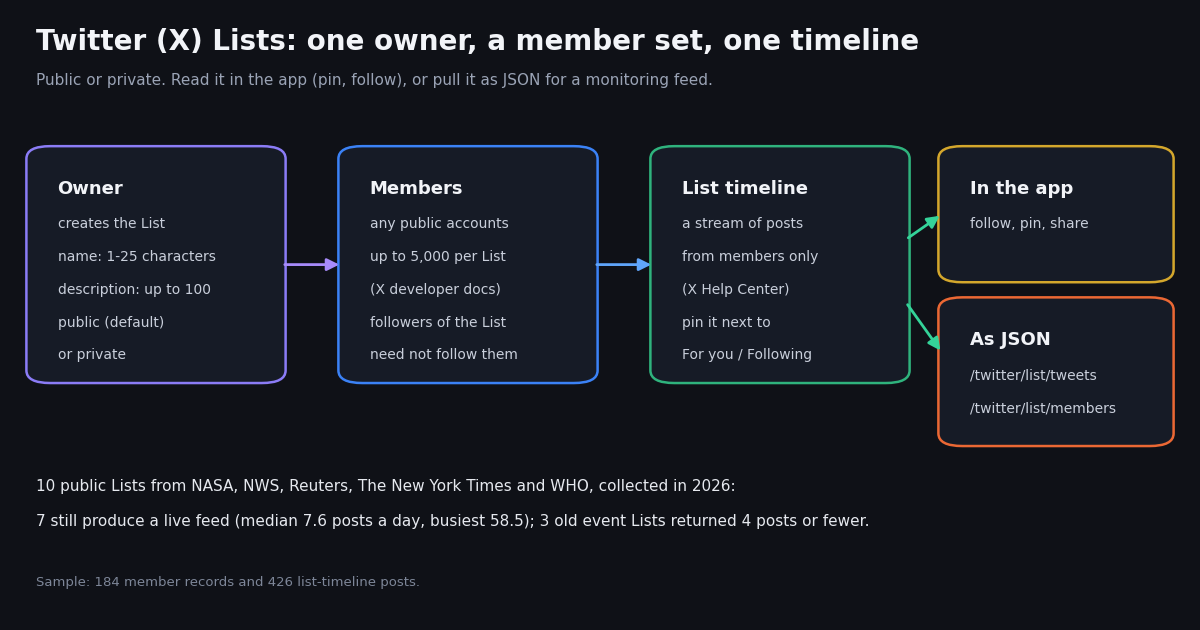
This page is the plain-language guide to Twitter (X) Lists for people using the app: what a List is, public versus private, how to create, edit, pin and follow one, and what to do when a List stops working. If you want to read Lists from code (pagination, parameters, every endpoint, member management), our developer guide Twitter (X) Lists API: Programmatic Guide covers that in depth; this page only adds a short script at the end that turns a List into a feed.
Every step below comes from X's own help center article on Lists and from X's developer documentation, both read this session. The help center blocks automated fetches, so we read an archived copy of help.x.com/en/using-x/x-lists; where a step depends on the app version, we say so.
To see what real Lists look like in use, we pulled the members and the most recent posts of 10 public Lists curated by NASA, the National Weather Service (NWS), Reuters, The New York Times and the World Health Organization. The numbers in this guide come from that sample.
What is a Twitter (X) List?
A List is a named group of X accounts, picked by one owner, that produces its own timeline. X's help center describes it this way: Lists let you "customize, organize and prioritize the posts you see in your timeline", and "viewing a List timeline will show you a stream of posts from only the accounts on that List." X's glossary adds that you create Lists "by topic or interest (e.g., a list of friends, coworkers, celebrities, athletes)".
What it is not. A List is not a group chat, not a Community and not a following list. Adding an account to a List does not follow that account, and following a List does not follow the members. Your Home timeline is unchanged; the List lives in its own tab.
Why people use them. Lists give you a feed limited to accounts you chose: a beat reporter's List of sources, a List of local weather offices during a storm, a List of competitors' brand accounts, a List of friends whose posts you do not want to miss. Newsrooms and agencies publish Lists for events: in our sample, NWS shared one List of the offices covering Hurricane Helene and Reuters shared Lists of its reporters for elections and climate summits.
Owned, followed, and on. Every account sees three kinds of Lists: Lists you created, other people's public Lists you follow, and Lists you are on (other people added you). X's app shows all three under the Lists entry in your profile menu.
Public vs private Twitter Lists
When you create a List, X makes it public unless you switch it to private. The help center wording: "The default setting for your List is public (anyone can follow the List). To make the List only accessible to you, drag the slider next to Private to on." You can change the setting later from the List's Edit screen.
When to make a List private. Use private for a watch List you would rather not advertise: competitors, people you are researching, or a personal reading List. A private List is also a way to read accounts without following them; our guide to hiding who you follow covers that trick and its limits.
When to make it public. Public Lists are useful when you want others to subscribe: a curated List of experts, a List of your company's team accounts, or an event List you share in a post. Public Lists can be shared by link, by Direct Message or in a post from the List's share menu.
How to make a List on Twitter (X), and the limits
The steps below follow X's help center. Menu labels can shift between app versions, but the path has been stable: profile menu, Lists, new List.
Step 1. Open Lists. Tap your profile icon in the top menu, then tap Lists. X's help article has iOS, Android and desktop variants of these steps; the mobile path is quoted here.
Step 2. Create the List. Tap the new List icon. Type a name and, if you like, a short description. X's help center: "List names cannot exceed 25 characters, nor can they begin with a number."
Step 3. Choose public or private. Leave it public, or turn on Private to keep it to yourself. Tap Done.
Step 4. Add members. Search for accounts and add them, or tap the more icon on an account's profile and tick the Lists you want to add it to (untick to remove).
The two count limits come from X's developer reference: "you can create up to 1000 lists per account" and "lists can't have more than 5,000 members, and you are limited to adding up to 100 members to a list at a time." The help center article does not restate the counts, so treat them as X's documented limits. If you hit an error near either number, that is the reason.
Edit, pin, follow, share, and leave a List
Edit or delete a List. Go to your profile, open the Lists tab, pick a List you created and tap Edit to change its name, description or privacy. To change who is on it, tap Edit List, then Manage members: add with the search box, remove with the button next to each account. Delete List sits on the same screen.
Pin a List to your Home timeline. Open Lists from your profile icon menu and tap the pushpin icon next to a List. X's help center says it then "will appear to the right of your For You and Following timelines." Tap the pin again to unpin; unpinning does not delete the List.
Reorder pinned Lists. In Lists, tap Edit, press and hold the reorder handle on the right of a List and drag it. Tap Done; the tab order on Home follows.
Follow someone else's List. Open the account's profile, tap the more icon, tap View Lists, pick a List and tap Follow. X's help center: "You can follow Lists without following the individual accounts in that List." On mobile X may also suggest Lists to follow in a Discover new Lists prompt.
Share a List. Open the List and tap the share icon at the top right: Copy link to List, Send via Direct Message, or post it. The link has the form x.com/i/lists/<number>; that number is the List ID.
See the Lists you are on. Profile icon, Lists, then the more icon and Lists you're on.
Remove yourself from a List. There is no leave button. X's help center: "To remove yourself from a List you will need to block the creator of that List." Open the List from Lists you're on, tap the more icon next to share, and choose Block next to the owner's handle. X's glossary confirms that a blocked account is "unable to follow you or add you to their X lists." To report an abusive List, use the report option on the List.
Twitter Lists not working: what to check
Most List problems fall into a handful of causes. Work down this table before assuming the feature is broken.
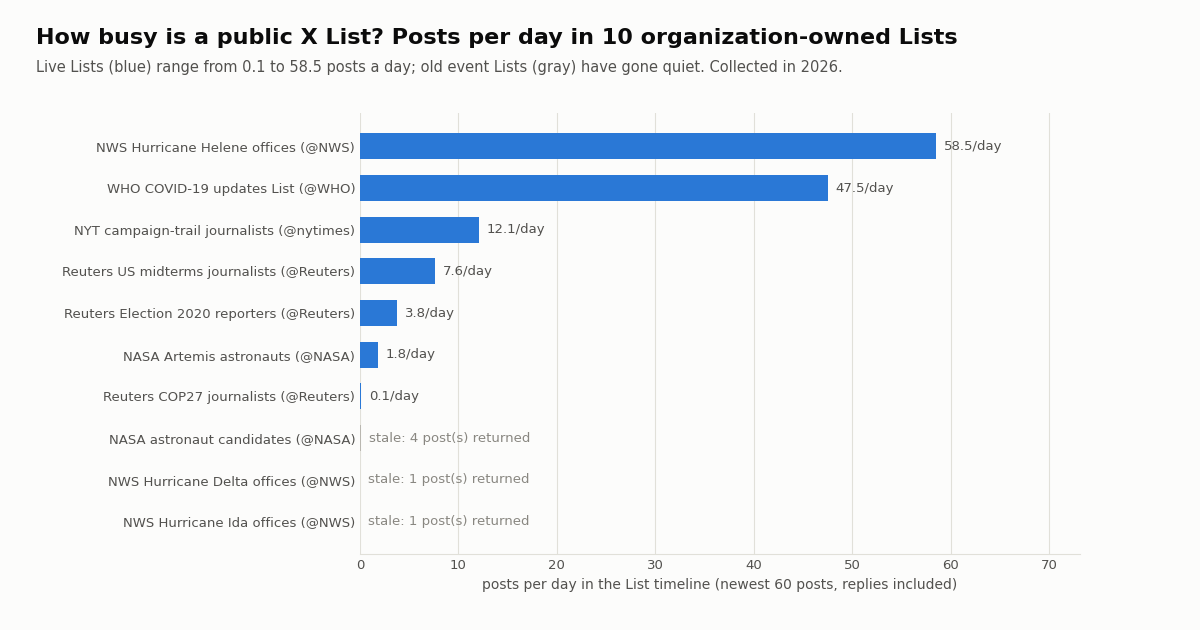
Stale Lists are common. Event Lists outlive their event. Of the 10 public Lists in our sample, 3 returned 4 posts or fewer: the NWS Lists for Hurricanes Ida and Delta returned a single post each, and NASA's astronaut-candidate List had not had a new post in roughly 336 days at collection time. If a List you follow looks dead, open its Members tab: the accounts may have gone quiet, been suspended, or been removed.
A few members can drown the rest. In the live Lists we sampled, the single most active account supplied a median of 45% of the most recent posts. If one account dominates, remove it or move it to a separate List so the quieter members surface.
General app checks. If the List itself loads on the web but not in the app, update the app, then sign out and back in. If Lists fail everywhere at once, check X's status page before changing anything; that points to a service problem rather than your List.
What real public Lists look like: 10 organization Lists measured
We took 10 public Lists that NASA, NWS, Reuters, The New York Times and WHO had shared in their own posts, and pulled each List's members and its most recent posts (up to 60, replies included). Posts per day is the number of posts divided by the time between the newest and oldest post in that sample.
The spread is wide. The seven Lists that still produced at least 20 posts ran from 0.1 to 58.5 posts a day, with a median of 7.6. The NWS Helene List, made of forecast offices, was the busiest at 58.5 a day; WHO's COVID-19 updates List followed at 47.5. Journalist Lists from past news events were far quieter: Reuters' COP27 List averaged 0.1 posts a day.
Few members carry the feed. Across the live Lists, a median of only 34.5% of the members returned appeared among the latest posts. A List of 30 people is, day to day, a feed of about ten.
Members returned is not always the full List. NASA's Artemis astronaut List returned an empty member page in our pull while its timeline still produced posts from 5 accounts, so it is left out of the member columns. Count members across all pages until an empty page rather than multiplying pages by 20.
Who sits on an organization's List
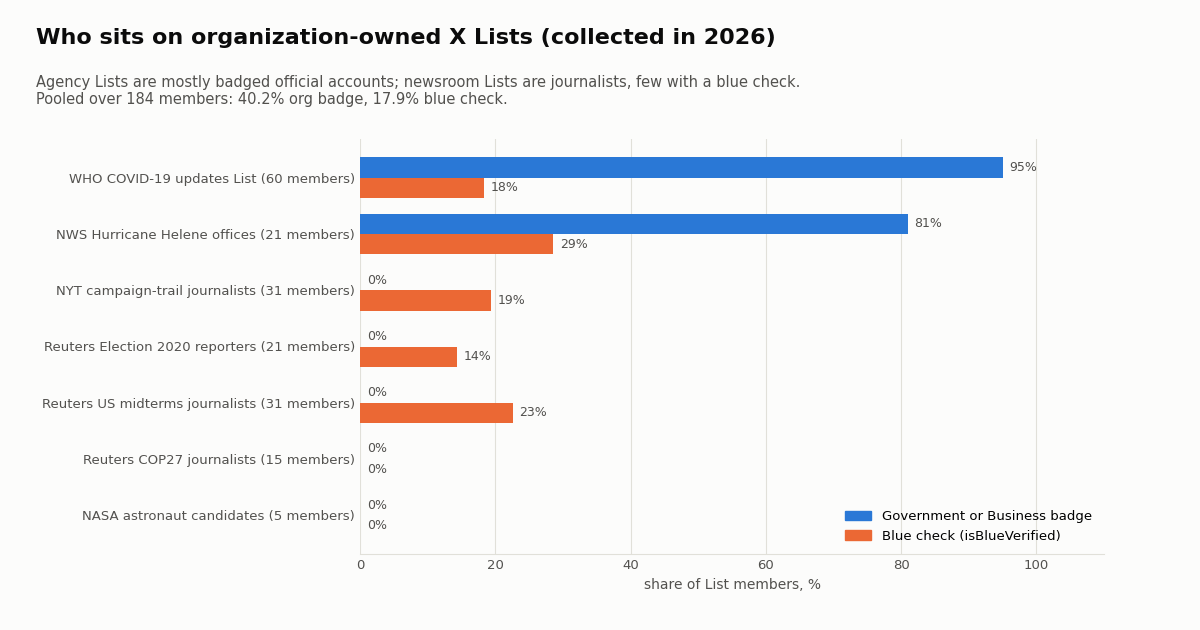
Agency Lists and newsroom Lists are built from very different accounts. On WHO's List, 95.0% of members carry X's Government or Business badge; on the NWS Helene List, 81.0%. None of the journalists on the Reuters and New York Times Lists carry an organization badge, and between 14.3% and 22.6% have a blue check. Pooled over all 184 member records, 40.2% carry an organization badge and 17.9% a blue check.
What this means for your own Lists. A badge-heavy List is a good proxy for an official-sources feed: during a storm or an outbreak, a List of verified agencies filters out commentary. A List of reporters gives you first-hand updates from the ground but no badge to sort by, so curate it by name.
Lists from one owner overlap less than you would expect. Reuters' US midterms List and its Election 2020 List share 10 members (a Jaccard overlap of 0.238); Reuters' COP27 List shares none with either, and none of the Reuters Lists shares a member with the New York Times campaign List. Owners build a fresh List per event rather than reusing one, which is another reason old event Lists go quiet.
Use a List as a monitoring feed
A List is already a filter: it narrows X to the accounts you chose. That makes it a lightweight monitoring feed you can read outside the app, for example to post new List tweets to Slack, save them to a spreadsheet, or alert on a keyword only from trusted sources.
What you need. The List ID (the number in x.com/i/lists/<number>), a public List, and an API key. Reading a public List through twitterapi.io needs no X account. Two endpoints do the work: /twitter/list/members (parameter list_id, 20 accounts per page) and /twitter/list/tweets (parameter listId, 20 tweets per page, optional sinceTime in Unix seconds). Note the casing difference between the two parameter names.
The script below lists the members once, then fetches only posts newer than the last run and prints them as JSON lines. Run it from cron every few minutes. It stops on an empty page as well as on has_next_page, because the List tweet endpoint can report another page when none is left.
What it costs. twitterapi.io bills per item returned: 15 credits per tweet, which is $0.15 per 1,000 tweets, and a call that returns nothing costs the 15-credit minimum, $0.00015. The official X API pay-per-usage rate card on docs.x.com/x-api/getting-started/pricing lists Posts: Read at $0.005 per resource, so 1,000 posts cost $5.00 there, about 33 times more. Check /pricing for current plans.
Reading the table. At 58.5 posts a day, 30 days is 1,755 posts: 1,755 x $0.00015 = $0.26 with twitterapi.io, 1,755 x $0.005 = $8.78 on X's rate card. Polling every 5 minutes is 8,640 checks a month; each empty check costs the $0.00015 minimum, so the polling floor is $1.30. Your real cost is roughly the floor plus the tweets, so a busy List polled every 5 minutes stays under $1.60 a month.
Changing a List from code. twitterapi.io covers Lists for reading only: members, followers and the List timeline. Adding or removing members is a write on your own account and goes through X's official API: POST /2/lists/{id}/members and DELETE /2/lists/{id}/members/{user_id} with a user token that has the list.write scope, priced on X's rate card at docs.x.com/x-api/getting-started/pricing. Keep membership changes at the pace you would make them by hand; X's automation rules (help.x.com/en/rules-and-policies/x-automation) apply.
import json
import time
import requests

API_KEY = "YOUR_API_KEY"          # from twitterapi.io/dashboard
BASE = "https://api.twitterapi.io"
HEADERS = {"X-API-Key": API_KEY}
LIST_ID = "1838618485569519812"   # the number after x.com/i/lists/
STATE = "list_feed_state.json"


def list_members(list_id):
    """All members of a public List (20 per page)."""
    members, cursor = [], ""
    while True:
        r = requests.get(f"{BASE}/twitter/list/members",
                         params={"list_id": list_id, "cursor": cursor},
                         headers=HEADERS, timeout=30)
        body = r.json()
        if body.get("status") == "error":
            raise SystemExit(body.get("msg"))
        page = body.get("members") or []
        members += page
        cursor = body.get("next_cursor")
        if not page or not body.get("has_next_page") or not cursor:
            return members


def new_list_tweets(list_id, since_unix):
    """Tweets posted to the List timeline since a Unix time, newest first."""
    tweets, cursor = [], ""
    while True:
        r = requests.get(f"{BASE}/twitter/list/tweets",
                         params={"listId": list_id, "sinceTime": since_unix,
                                 "includeReplies": "false", "cursor": cursor},
                         headers=HEADERS, timeout=30)
        body = r.json()
        if body.get("status") == "error":
            raise SystemExit(body.get("msg"))
        page = body.get("tweets") or []
        tweets += page
        cursor = body.get("next_cursor")
        # has_next_page can be true on the last page: stop on an empty page too
        if not page or not body.get("has_next_page") or not cursor:
            return tweets


def load_state():
    try:
        return json.load(open(STATE))
    except FileNotFoundError:
        return {"since": int(time.time()) - 3600, "seen": []}


if __name__ == "__main__":
    members = list_members(LIST_ID)
    print(f"{len(members)} members, "
          f"{sum(1 for m in members if m.get('isBlueVerified'))} with a blue check")

    state = load_state()
    started = int(time.time())
    seen = set(state["seen"])
    fresh = [t for t in new_list_tweets(LIST_ID, state["since"]) if t["id"] not in seen]
    for t in reversed(fresh):                       # oldest first
        a = t["author"]
        print(json.dumps({"id": t["id"], "at": t["createdAt"],
                          "from": a["userName"], "text": t["text"],
                          "url": t["url"], "likes": t["likeCount"],
                          "views": t.get("viewCount")}))
    state = {"since": started - 60,                  # small overlap, ids dedupe it
             "seen": (list(seen) + [t["id"] for t in fresh])[-2000:]}
    json.dump(state, open(STATE, "w"))
How we collected this
Question. What do public X Lists curated by organizations look like as feeds: how many members, how many posts a day, who the members are, and how much Lists from the same owner overlap?
Lists. 10 public Lists, found as x.com/i/lists/ links inside posts by @NASA, @NWS, @Reuters, @nytimes and @WHO (no guessed IDs): NASA astronaut candidates and Artemis astronauts; NWS offices for Hurricanes Helene, Ida and Delta; Reuters journalists for COP27, the US midterms and Election 2020; New York Times campaign-trail journalists; WHO's COVID-19 updates List.
Method and window. For each List we called /twitter/list/members (up to 5 pages of 20) and /twitter/list/tweets with replies included (up to 3 pages of 20, newest first). The window per List runs from the oldest to the newest post returned, so quiet Lists span months and busy ones span hours. Collected in 2026.
Sample size. 184 member records and 426 List posts, in 58 API requests including discovery searches, for well under $0.15 in credits.
What the sample cannot show. Ten Lists picked from organizations' own posts are not a random sample of X Lists, and private Lists cannot be read at all. Posts per day comes from the latest 60 posts only, so it reflects current activity, not the List's busiest period. One List returned no members, and member counts are what the API returned, not a figure X displays.
Privacy. Aggregates only. Members include journalists and astronauts, so no member is named or profiled here, raw member and post pages were not kept in the repository, and the published sample holds per-List aggregates only.
import json
import time
import requests

API_KEY = "YOUR_API_KEY"          # from twitterapi.io/dashboard
BASE = "https://api.twitterapi.io"
HEADERS = {"X-API-Key": API_KEY}
LIST_ID = "1838618485569519812"   # the number after x.com/i/lists/
STATE = "list_feed_state.json"


def list_members(list_id):
    """All members of a public List (20 per page)."""
    members, cursor = [], ""
    while True:
        r = requests.get(f"{BASE}/twitter/list/members",
                         params={"list_id": list_id, "cursor": cursor},
                         headers=HEADERS, timeout=30)
        body = r.json()
        if body.get("status") == "error":
            raise SystemExit(body.get("msg"))
        page = body.get("members") or []
        members += page
        cursor = body.get("next_cursor")
        if not page or not body.get("has_next_page") or not cursor:
            return members


def new_list_tweets(list_id, since_unix):
    """Tweets posted to the List timeline since a Unix time, newest first."""
    tweets, cursor = [], ""
    while True:
        r = requests.get(f"{BASE}/twitter/list/tweets",
                         params={"listId": list_id, "sinceTime": since_unix,
                                 "includeReplies": "false", "cursor": cursor},
                         headers=HEADERS, timeout=30)
        body = r.json()
        if body.get("status") == "error":
            raise SystemExit(body.get("msg"))
        page = body.get("tweets") or []
        tweets += page
        cursor = body.get("next_cursor")
        # has_next_page can be true on the last page: stop on an empty page too
        if not page or not body.get("has_next_page") or not cursor:
            return tweets


def load_state():
    try:
        return json.load(open(STATE))
    except FileNotFoundError:
        return {"since": int(time.time()) - 3600, "seen": []}


if __name__ == "__main__":
    members = list_members(LIST_ID)
    print(f"{len(members)} members, "
          f"{sum(1 for m in members if m.get('isBlueVerified'))} with a blue check")

    state = load_state()
    started = int(time.time())
    seen = set(state["seen"])
    fresh = [t for t in new_list_tweets(LIST_ID, state["since"]) if t["id"] not in seen]
    for t in reversed(fresh):                       # oldest first
        a = t["author"]
        print(json.dumps({"id": t["id"], "at": t["createdAt"],
                          "from": a["userName"], "text": t["text"],
                          "url": t["url"], "likes": t["likeCount"],
                          "views": t.get("viewCount")}))
    state = {"since": started - 60,                  # small overlap, ids dedupe it
             "seen": (list(seen) + [t["id"] for t in fresh])[-2000:]}
    json.dump(state, open(STATE, "w"))
Questions readers ask
What is a Twitter list?
A Twitter (X) List is a group of accounts chosen by one owner whose posts appear in their own timeline, separate from your Home feed. You can create your own Lists, follow other people's public Lists, and pin a List next to the For you and Following tabs.
How do I make a list on Twitter?
Open your profile menu, tap Lists, tap the new List icon, enter a name of up to 25 characters that does not start with a number, add an optional description, choose public or private and tap Done. Then add members from the List's Manage members screen or from any profile's more menu.
Can people see my private Twitter lists?
No. X's help center says turning on Private makes the List only accessible to you. Others cannot open or follow it. A public List, the default, can be opened and followed by anyone.
Do people know when I add them to a list?
A public List shows its members to anyone who opens it, and members can find it under Lists you're on in their own Lists menu. A private List is only accessible to the owner, so it does not appear to the people on it.
How many lists can you have on X, and how many members?
X's developer documentation states up to 1,000 Lists per account and no more than 5,000 members per List. Names are limited to 25 characters and descriptions to 100 characters.
How do I remove myself from someone's Twitter list?
X has no leave button. Its help center says you have to block the List's creator: open Lists you're on, open the List, tap the more icon next to share and block the owner. A blocked account cannot add you to its Lists.
Why is my Twitter list not working or empty?
Common causes: the List is not pinned, it is private so others cannot open it, the members stopped posting, or the name breaks the 25-character rule. In our sample of 10 organization Lists, 3 old event Lists returned 4 posts or fewer. Check the Members tab, then the app version and X's status page.
Can I get a Twitter list's tweets as a feed?
Yes. With the List ID (the number at the end of the List link), the twitterapi.io endpoint /twitter/list/tweets returns the List's posts as JSON at $0.15 per 1,000 tweets, with no X account needed. Our developer guide to the Lists API covers every parameter.
Continue
- X Help Center: How to use X Lists
- X Help Center: Glossary (List, block)
- X API: Pinned Lists
- X API: Manage Lists (create, update, delete, public or private)
- X API v2: Create List (name 1-25 characters, description up to 100)
- X API pay-per-usage pricing
- X API overview: reading X data without an X developer account
- Twitter (X) Lists API: programmatic guide for developers
- Can you hide who you follow on Twitter? (private Lists as a workaround)
- Twitter monitoring tools compared
- Tweet notifications for specific accounts
- Turn Twitter accounts into an RSS feed
- What a Twitter (X) handle is and how it differs from a display name
- twitterapi.io pricing per tweet and per profile
- 01How do you earn TwitterAPI.io credits by writing about the API?
- 02Tweepcred: How Twitter (X) Scores Account Reputation, Read From the Code
- 03Tweet Failed to Send on Twitter (X)? What Each Error Means and How to Fix It
- 04How to Embed a Video on Twitter (X): In a Post or on Your Website
- 05Twitter (X) Direct Message Limit: the Daily DM Cap, Who Can Message You, and Why DMs Fail to Send
- 06Twitter (X) Lists API — Programmatic Guide
- 07Twitter Tools — 47 Worth Knowing, Organized by Job-to-Be-Done
- 08OSINT on Twitter (X): What Public Data You Can Pull, and How
Stop reading. Start building.
Starter credits cover real testing on real data. Google sign-in, no card, no application queue.
Get an API keyAlready building with TwitterAPI.io? Publish an honest tutorial or build log about it and earn up to $200 a month in API credits.