Tweet Failed to Send on Twitter (X)? What Each Error Means and How to Fix It
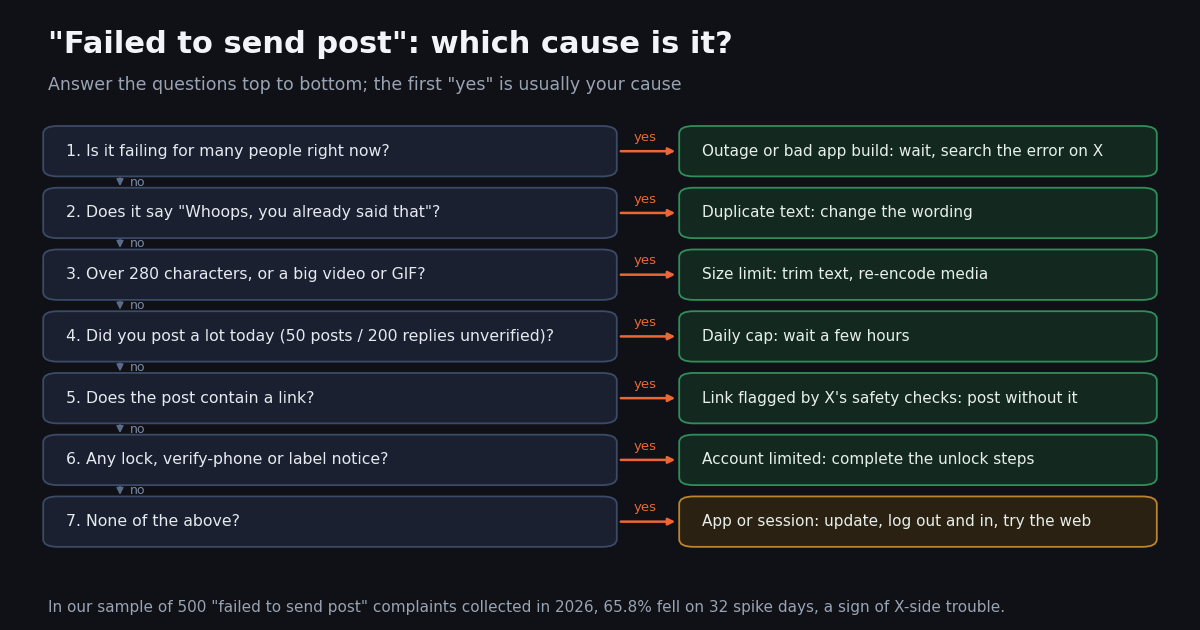
This page is about the generic send failure: "Failed to send post", "Post not sent" and "we weren't able to send your post". It is not about error 226, "This request looks like it might be automated", which is a specific verdict X gives about your activity and has its own recovery path on our error 226 page. If you see the 226 wording, go there; if you see any of the wordings above, the causes are broader and, most of the time, not about your account at all.
We built the checklist from two sources. The first is X's own help center: the posting help page, the limits page, the locked-account page and the video page, each read for this guide. The second is a study of what people actually report: 1,334 unique public posts that quote the error wording, collected in 2026 through X's advanced search. That data answers the question every help page skips: when your post fails, how likely is it that X is broken for everyone?
The guide is written for people using the X app or x.com first. The last sections are for developers and social teams who post through an API, and show what the same failure looks like in a response body and how to tell an X-side problem from your own.
The error messages, what they mean and the first fix
X uses several different wordings for a post that did not go through. Each wording below appears verbatim in public posts in our sample, or on X's help pages; match yours, then jump to the cause.
The wording changed with the rename. In our sample of the "weren't able to send your" dialog, posts from 2023 quote the "Tweet" version 57 times and the "post" version 2 times; in 2026 it is 16 "post" and 0 "Tweet". If your app still says "Tweet not sent", the app itself is old, which is one of the causes in its own right.
The limit message is specific. X's limits page says that when you reach a limit, "we'll let you know with an error message telling you which limit you've hit". So a generic "Failed to send post" with no mention of a limit is weak evidence that you hit the cap.
Cause 1: X is failing for everyone (check this first)
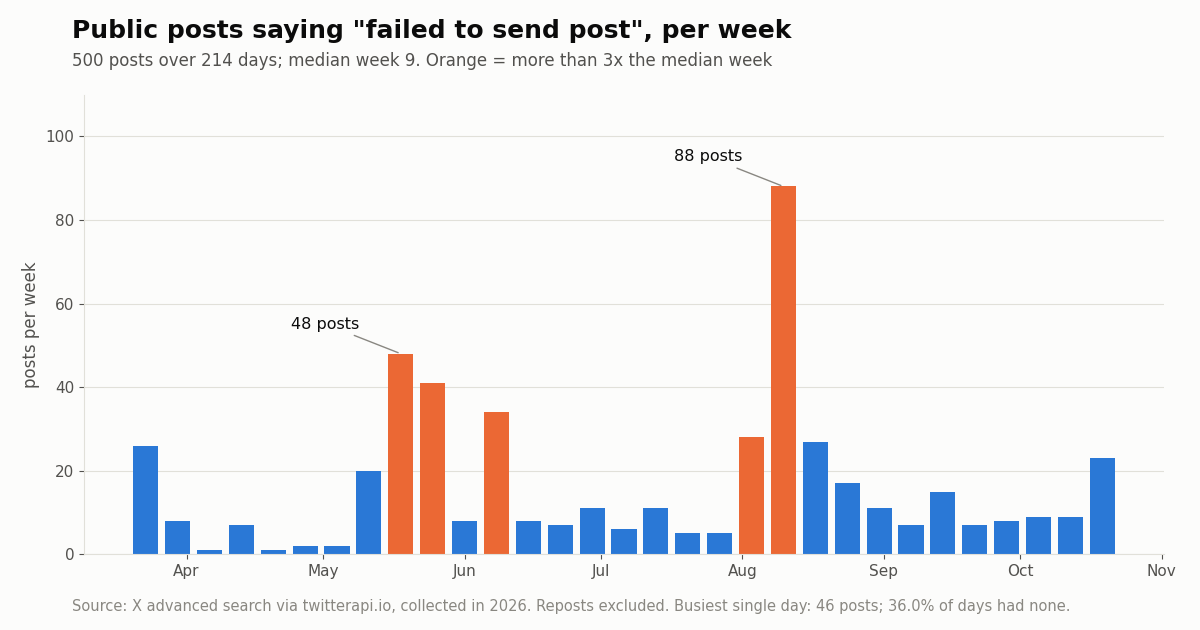
The single most useful fact about "failed to send post" is that it comes in waves. Across 214 days, the phrase appeared in a median of 1 public post a day, and 36.0% of days had none. Then, on 32 spike days (more than three times the median day), it exploded, and those days hold 65.8% of all the complaints.
The busiest day in the sample had 46 posts. Two waves dominate: mid to late May 2026 (112 posts that month) and August 9 to 11, 2026 (163 posts that month, with the single busiest week at 88). In the August wave many people describe replies failing while new posts still go through; in May they describe both, and some blame a new app version.
How to check in a minute. Open X search, type "failed to send post" and switch to the Latest tab. Several posts in the last hour from unrelated accounts means the problem is X-side. On spike days 13.4% of complaints use words like bug, glitch, down or "anyone else", against 7.6% on ordinary days, so you will usually see other people asking the same question.
What to do. Save the post to drafts (the "Post not sent" dialog offers this), stop retrying, and come back in a few hours. Reinstalling the app, clearing data or changing your password does not fix an X-side failure, and repeated identical retries can trip the duplicate check once X recovers. X runs no consumer status page; our is X down guide covers the developer status pages and what they can and cannot show.
Causes 2 and 3: duplicate text, or a post that is too long or too heavy
Cause 2: duplicate text ("Whoops, you already said that"). X's posting help page is explicit: the "Whoops, you already said that" error appears when you post exactly the same text as a recent post, and it should only appear for an exact match. The fix is to change the wording.
Where this catches people. A failed post that actually went through. People in our sample describe getting "Failed to send post", pressing Retry, and then being told they already said that, because the first attempt had posted after all. Before retrying, refresh your profile and check whether the post is already there.
How common it is. Only 1.9% of complaints in our sample mention duplicate text. It is a quick check, not the usual cause.
For schedulers and scripts. Templates that post the same sentence every day ("Good morning!") hit this constantly. Add something that changes, such as the date, a counter or the headline you are sharing.
Cause 3: too long, or the media is too big. X's help center sets the size limits. A standard post holds up to 280 characters; longer posts are a feature of X Premium and The X Subscription plans. A post can carry photos, a GIF or a video, up to 4 media items in total.
What to do. If the post carries a long or large video, trim it, export it again as an MP4, or post the text first and the media in a reply. If you are near 280 characters, our tweet character count guide shows how X counts them.
How common it is. 4.4% of complaints in our sample mention a video, image or GIF. Media failures are real but a minority.
Cause 4: the daily post limit and half-hour limits
X's limits page (help.x.com, rules and policies, X limits) now lists the post cap as 50 original posts and 200 replies per day for unverified accounts, and says the daily limit is further broken down into smaller limits for semi-hourly intervals. The same page still carries an older line about a limit of 2,400 updates per day, so the page itself is inconsistent; the 50 and 200 figures are the newer wording, reported by the press in May 2026.
What counts. The page says the limits include actions from all devices, including web, mobile, phone and API, so posts made by a scheduler or a connected app count against the same cap as posts you type. It also says the limits may be temporarily reduced during heavy site usage.
What to do. If the error names a limit, wait. The page says that for time-based limits you can try again once the period has passed, and suggests trying again in a few hours. Spreading posts through the day avoids the half-hour sub-limits that bite during live-tweeting.
How common it is. Only 2.2% of complaints mention a limit at all, and the share is lower on spike days (1.5%) than on ordinary days (4.1%). The big waves of "failed to send post" were not people hitting the cap. For read limits ("rate limit exceeded" while scrolling), see our rate limit guide.
Causes 5 and 6: a blocked link, or a locked or limited account
Cause 5: a link X will not let you post. X's posting help page says it has "automations in place that could impact your ability to post certain links", and points to its page on phishing, spam and malware links. X does not publish the list of links it blocks.
Test it. Post the same text without the link. If that works, the link is the problem; try the full destination URL instead of a shortener, or share it in a reply.
How common it is. 0.7% of complaints in our sample mention a link, the rarest cause we measured.
Cause 6: a locked or limited account. X's locked-account page says an account can be locked or limited if it may be compromised or in violation of the X Rules, and that the first step is to verify you are the owner. You may see "Please verify your account" or "Your account has been locked", and the check is by phone, email or captcha. If X thinks the account showed automated behavior, it may ask you to pass a captcha.
What it looks like. Posting fails on every surface (app and web), while browsing still works, and a banner or email explains the lock. If you never see a notice and the failure is on replies only, it is much more likely cause 1.
How common it is. 2.2% of complaints mention a lock, ban, restriction or label. Some of those are guesses ("am I shadowbanned?") rather than confirmed locks. Our shadowban checker shows whether your posts appear in search; error 226 is the automation-specific version of this cause.
Cause 7: the app, the browser or the session
X's posting help page puts this last and simply: trouble sending posts "can often be attributed to a need to upgrade your browser or app". Use the latest browser on the web and install any available app updates.
The checklist, in order. Update the app. Force-close and reopen it. Try the same post on x.com in a browser (or the other way round): if one surface works, the problem is local. Log out and back in to refresh the session. On Android, clearing the app's cache is the last step before reinstalling; copy the text of any draft you care about first.
What the sample shows. Only 4.0% of complaints name a surface at all: Android 2.2%, web or browser 2.2%, iPhone or iOS 0.5%. Android is mentioned more often on spike days (4.6%) than on other days (2.3%), consistent with reports that some waves came from a single app build. 3.4% mention updating, reinstalling, clearing the cache or logging out.
What 1,334 public complaints say, in one chart
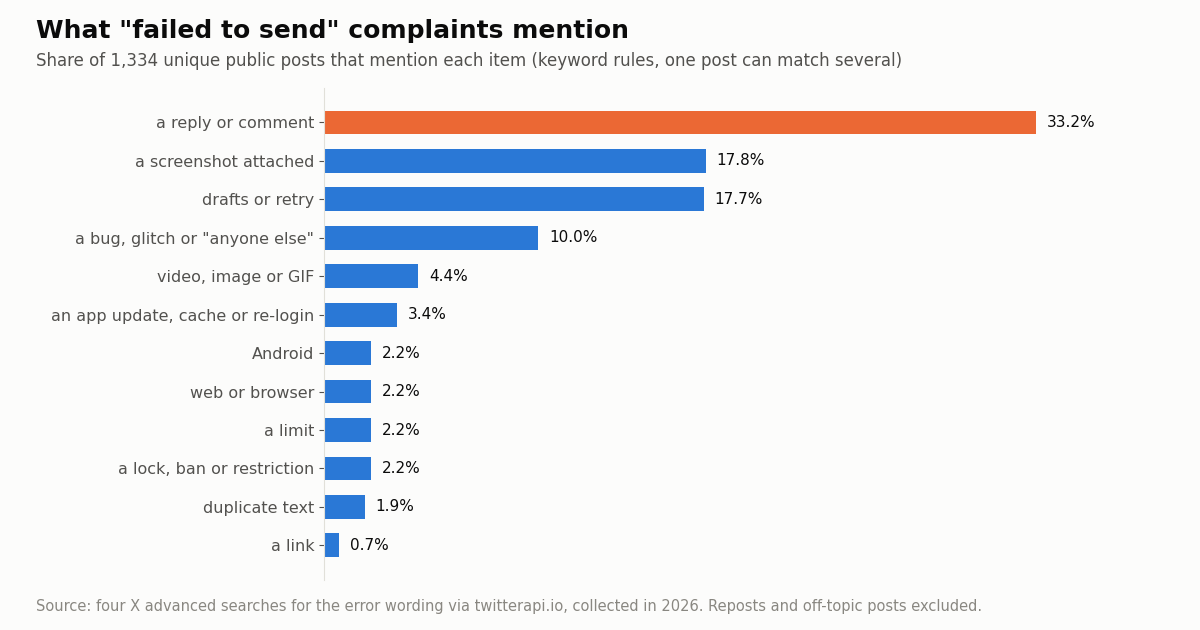
Across all four error wordings, the most frequent detail is that the failure hit a reply or a comment (33.2%). People also attach a screenshot of the error (17.8%), mention drafts or retrying (17.7%), and call it a bug or ask whether anyone else has it (10.0%). Every specific cause the help pages list, from limits to locks to links, sits at about 2% or less.
The dialog wording is quoted far less often than the short toast, because people paraphrase the long message. Its search reaches back years, so the per-day figure is tiny, which is also why it is the best record of the Tweet-to-post wording change.
For developers and social teams: the same failure in an API response
If you post through an API, the same refusals arrive as a response body instead of a toast, and reading that body is the whole job: it tells you whether to retry, change the post, or stop.
On X's official API. POST /2/tweets is billed at $0.015 per post created, or $0.20 when the post contains a URL (pay-per-usage card at docs.x.com/x-api/getting-started/pricing). X's response-codes page lists 403 Forbidden as "Valid auth but no permission for this resource or action" and 429 Too Many Requests as "Rate limit or usage cap exceeded"; it lists no duplicate-specific code, so log the body verbatim and decide from X's message.
On twitterapi.io. Posting runs through an authenticated session: one /twitter/user_login_v2 login ($0.10, with a residential proxy you supply) returns login_cookies, then /twitter/create_tweet_v2 takes login_cookies, tweet_text and proxy (plus optional reply_to_tweet_id, media_ids and others) at 60 credits ($0.0006) per call. When X refuses the post, the call still returns HTTP 200 with status: "error", and message carries the reason X gave, plus x_status (X's HTTP status) and code (X's error code) when available.
The caveats that matter. The call acts as that X account, so X can rate-limit, lock or suspend it exactly as it would if you posted by hand, and the daily cap above applies. Keep a human pace. The session can need a re-login; the docs ask you to enable 2FA before logging in, because without it the returned cookies may be faulty and posting can fail. Billing is per HTTP 200 call, including calls where X refused the post, so a retry loop on status: error costs money and looks like spam. Reads such as advanced search need only an API key, no X account.
For social teams: detect an X-wide failure before your users do. A brand account or a scheduling product sees "failed to send" as a support ticket. The question support needs answered is the one in cause 1: is X failing for everyone right now? You can answer it the same way we built this study, by counting fresh public complaints.
The check. Every few minutes, run /twitter/tweet/advanced_search with "failed to send post" -filter:retweets since_time:<one hour ago> and queryType=Latest, and alert when the count jumps. The full script is at the end of this page.
What it costs. Tweet endpoints bill 15 credits per tweet returned, $0.15 per 1,000 tweets, with a 15-credit minimum per request, so a check that finds nothing costs $0.00015. Checking every 5 minutes for a month is about $1.30 in empty checks, plus $0.00015 per complaint actually returned. On ordinary days the median is 1 complaint a day, so most checks are empty. Reading the same posts on X's own API costs $0.005 per post read on the pay-per-usage card, about 33x the $0.15 per 1,000 on twitterapi.io.
What our whole study cost. 70 search requests returned 1,379 posts, about $0.2069 at 15 credits per tweet.
resp = requests.post(
    "https://api.twitterapi.io/twitter/create_tweet_v2",
    headers={"X-API-Key": API_KEY},
    json={"login_cookies": COOKIES, "tweet_text": text, "proxy": PROXY},
    timeout=60,
).json()
if resp.get("status") != "success":
    # X's own reason, not a generic 'failed to send'
print(resp.get("message"), resp.get("code"))How we collected this
Question. When people say a post failed to send on X, what do they describe, and do the complaints cluster into X-wide waves?
Queries. Four X advanced searches, Latest tab: "failed to send post"; "failed to send" with tweet, post, reply, X or Twitter (excluding the first phrase); "weren't able to send your"; and "post not sent" or "post was not sent" or "post wasn't sent". Reposts were excluded, and off-topic matches (for example money transfers that "failed to send") were dropped with a keyword rule.
Window and size. The most recent matching posts at collection time, collected in 2026: 70 requests, 1,334 unique posts after de-duplication. The main phrase covers 214 days; the dialog wording reaches back to 2015.
Method. Case-insensitive keyword rules written before collection flag each post (reply, media, limit, lock, link, duplicate, surface, bug). A spike day has more than three times the median daily count of the main phrase. 93.0% of posts are in English.
What the sample cannot show. It counts people who complained in public, not everyone who saw the error. Keyword rules miss paraphrases and misread jokes. Search results are what X returns for these phrases, not a complete archive, and nothing here proves the cause of any single failure.
Privacy. Aggregates only. The posts are by private individuals: no handles, IDs or text are published, raw pages were not kept with the study, and the de-identified sample holds only day, language and the keyword flags.
"""failed_to_send.py - two jobs around "failed to send post" on X (Twitter).

1. is_it_x(): count public posts complaining "failed to send post" in the last hour.
   A burst means the failure is X-side, so retrying or reinstalling will not help.
2. post_with_diagnosis(): post through /twitter/create_tweet_v2 and, when X refuses,
   print X's own reason instead of a generic "failed to send".

    pip install requests
    export TWITTERAPI_IO_API_KEY=...       # reads need only this key, no X account
    export X_LOGIN_COOKIES=...             # from /twitter/user_login_v2 (writes only)
    export X_PROXY=http://user:pass@host:port
"""
import os
import time

import requests

BASE = "https://api.twitterapi.io"
HEADERS = {"X-API-Key": os.environ["TWITTERAPI_IO_API_KEY"]}


def is_it_x(window_minutes=60, max_pages=5):
    """Return how many public posts said "failed to send post" in the window."""
    since = int(time.time()) - window_minutes * 60
    query = f'"failed to send post" -filter:retweets since_time:{since}'
    cursor, total = "", 0
    for _ in range(max_pages):
        r = requests.get(
            f"{BASE}/twitter/tweet/advanced_search",
            headers=HEADERS,
            params={"query": query, "queryType": "Latest", "cursor": cursor},
            timeout=30,
        )
        if r.status_code in (429, 500, 502, 503):
            time.sleep(2)
            continue
        r.raise_for_status()
        body = r.json()
        tweets = body.get("tweets", [])
        total += len(tweets)
        if not body.get("has_next_page") or not tweets:
            break
        cursor = body.get("next_cursor", "")
    return total


def post_with_diagnosis(text, reply_to=None):
    """Post once. On a refusal, show X's reason. Never loop on status=error:
    every HTTP 200 call is billed, and repeating a refused post looks like spam."""
    payload = {
        "login_cookies": os.environ["X_LOGIN_COOKIES"],
        "tweet_text": text,
        "proxy": os.environ["X_PROXY"],
    }
    if reply_to:
        payload["reply_to_tweet_id"] = reply_to
    r = requests.post(f"{BASE}/twitter/create_tweet_v2", headers=HEADERS, json=payload, timeout=60)
    if r.status_code == 400:
        # missing or invalid parameter: not charged, fix the request
        print("bad request:", r.text)
        return None
    if r.status_code in (429, 500, 502, 503):
        print(f"HTTP {r.status_code}: transient, retry later with backoff")
        return None
    r.raise_for_status()
    body = r.json()
    if body.get("status") == "success":
        print("posted:", body.get("tweet_id"))
        return body.get("tweet_id")
    # X refused the post: message carries X's reason (and X's error code when available)
    print("X refused the post:", body.get("message"), "| X error code:", body.get("code"))
    return None


if __name__ == "__main__":
    n = is_it_x()
    print(f"{n} public 'failed to send post' complaints in the last hour")
    if n >= 10:
        print("Looks X-side right now: wait instead of retrying.")
    # post_with_diagnosis("Testing a single post at a human pace.")
Questions readers ask
Why does my tweet keep saying "failed to send"?
Most often because X is having a problem: in our sample of 500 complaints collected in 2026, 65.8% fell on 32 spike days when many accounts failed at once. If others are not reporting it, check in order: duplicate text, length or media size, the daily post limit, a link, a locked account, and finally the app or session (update, log out and in, try x.com).
Why can I post on X but not reply?
Reply-only failures are the most common pattern in public complaints: 33.2% mention a reply or comment, rising to 34.7% on spike days such as the August 2026 wave. That pattern points to an X-side problem rather than your account. Unverified accounts also have a separate cap of 200 replies a day on X's limits page.
How many posts can you make per day on X?
X's limits page lists 50 original posts and 200 replies per day for unverified accounts, broken into smaller half-hour limits, counted across web, app and API. The same page still carries an older 2,400-per-day line, and X says limits can be temporarily reduced during heavy usage. When you hit a limit, X says the error message names it.
What does "We're sorry, we weren't able to send your post" mean?
It is X's generic send-failure dialog: "Post not sent. We're sorry, we weren't able to send your post. Would you like to retry or save this post in drafts?" Older app versions said "Tweet". Save the post to drafts, check whether X is failing for others, then retry once on a stable connection or on x.com.
My post said it failed but it was posted anyway. Why?
People report this regularly, and it appears in our sample: the error shows, yet the post is live. Refresh your profile before retrying; retrying the same text then triggers "Whoops, you already said that", which X's help page says appears only for an exact repeat of a recent post.
Is "failed to send post" the same as error 226 or a shadowban?
No. Error 226, "This request looks like it might be automated", is a specific automation block with its own recovery steps. A shadowban is about visibility, not sending. "Failed to send post" is a generic failure, usually X-side; only about 2% of complaints in our sample mention a lock, ban or restriction.
Does X Premium stop posts from failing?
It changes some limits: X's limits page states the 50-post and 200-reply caps for unverified accounts, and Premium allows longer posts and videos up to 16 GB and under 4 hours. It does not protect you from X-side outages, which cause most failures in our sample.
How do I see why a post failed when I post through an API?
Read the response body. On twitterapi.io, /twitter/create_tweet_v2 returns HTTP 200 with status "error" and X's reason in message (plus x_status and code when available); each call is 60 credits ($0.0006) and is billed even when X refuses the post, so do not retry in a loop. On X's official API, POST /2/tweets is $0.015 per post created ($0.20 with a URL), and X's response-codes page lists 403 Forbidden and 429 Too Many Requests among its errors; log the body to see X's explanation.
Continue
- X Help Center: Help with posting (duplicate text, links, app and browser updates)
- X Help Center: About X limits (50 original posts and 200 replies a day for unverified accounts)
- X Help Center: Help with a locked or limited account
- X Help Center: video length and file size limits
- X API docs: response codes and errors (403, 429)
- twitterapi.io docs: Post & Action V2 (status, message, x_status, code; 60 credits per call)
- X (Twitter) API hub: endpoints, pricing and guides
- Error 226 "looks like it might be automated" explained
- Is X down? How to check X status yourself
- Twitter (X) posts not loading: fixes in order
- Twitter (X) rate limit exceeded (error 429)
- How X counts characters in a post
- Free Twitter (X) shadowban checker
- Auto post to Twitter (X) from code or a scheduler
- twitterapi.io pricing: pay per tweet returned
- 01How do you earn TwitterAPI.io credits by writing about the API?
- 02Twitter (X) Lists: What They Are, How to Make One, and How to Use Them
- 03Tweepcred: How Twitter (X) Scores Account Reputation, Read From the Code
- 04How to Embed a Video on Twitter (X): In a Post or on Your Website
- 05Twitter (X) Direct Message Limit: the Daily DM Cap, Who Can Message You, and Why DMs Fail to Send
- 06Tweet Character Count — Limits and How Counting Really Works
- 07Most-Liked Tweets — Build Your Own Leaderboard via API
- 08Can You Edit a Tweet? How Editing Works on X
Stop reading. Start building.
Starter credits cover real testing on real data. Google sign-in, no card, no application queue.
Get an API keyAlready building with TwitterAPI.io? Publish an honest tutorial or build log about it and earn up to $200 a month in API credits.