X Premium in 2026: The X Subscription Tiers, What They Unlock, and How to Cancel
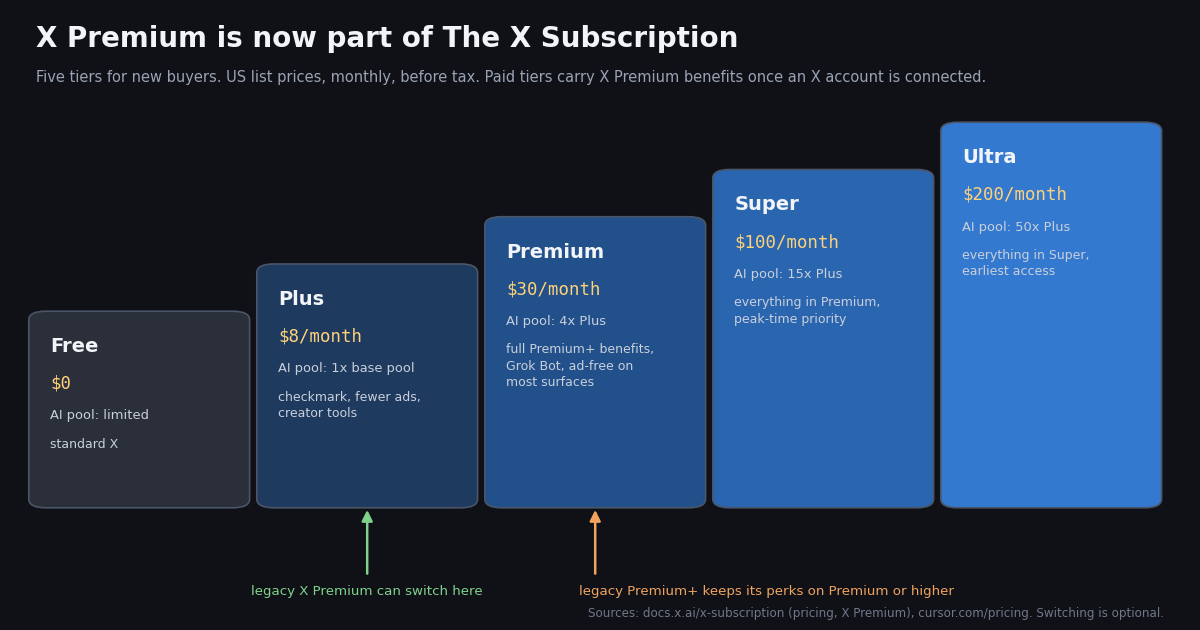
- X Premium is now part of The X Subscription for new buyers (launched October 12, 2026): Free, Plus, Premium, Super and Ultra, one bill for X Premium benefits, Grok and Cursor.
- US list prices, monthly, before tax: Plus $8, Premium $30, Super $100, Ultra $200 (yearly: $80, $300, $1,000, $2,000). Prices in other countries and inside the app stores can differ: check the amount on your own checkout screen.
- Old Premium+ maps to Premium or higher. Plus carries the checkmark, creator tools and fewer ads; Premium, Super and Ultra include full Premium+ benefits and Grok Bot.
- Switching is optional and permanent. Legacy X Premium plans keep their price and features; once you switch, support cannot undo it, and the old plan is refunded pro rata.
- Cancel where you paid: grok.com/dashboard (Current plan card, then cancel), iPhone Settings > your name > Subscriptions, or Google Play > Subscriptions. Deleting the app cancels nothing.
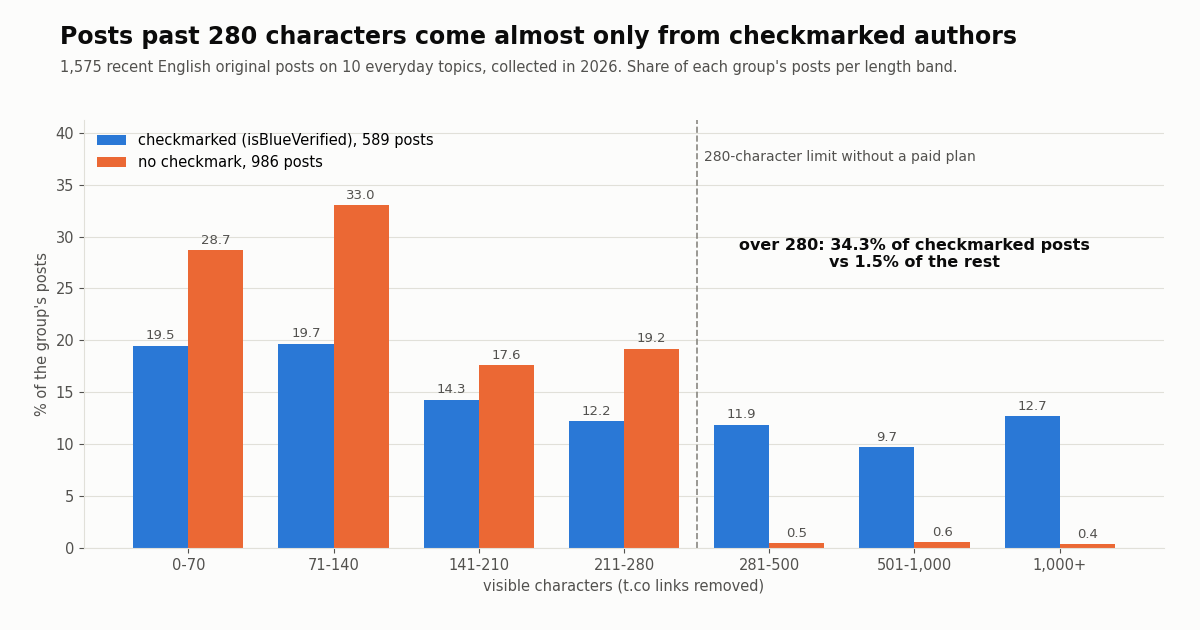
- What it looks like in data: in 1,575 recent posts we collected, 36.8% of authors had
isBlueVerified: true; 34.3% of their posts ran past 280 characters versus 1.5% for everyone else.
Most pages that answer "how much is X Premium" still show the old three-tier table (Basic, Premium, Premium+). That table stopped describing what new buyers see on October 12, 2026, when X, xAI's Grok and Cursor were folded into one product called The X Subscription. The official accounts said it plainly that day: "Creators, X Premium is now part of The X Subscription. Get your creator tools plus Grok and Cursor, starting at $8/month" (@XCreators), and Grok's account added that the plan comes "with five tiers to choose from" (@grok). This guide rebuilds the picture from the primary sources we could read this year: xAI's subscription documentation at docs.x.ai/x-subscription/..., the joint price list on cursor.com/pricing, X's own App Store description, and Apple's and Google's cancellation pages.
This page is the consumer view: what each tier costs, what it unlocks, how legacy subscribers are treated, and how to cancel or get money back on each platform. If you came for the developer key to the Grok models, our Grok API key guide covers the console and billing side; if you want to sell subscriptions to your own followers, see the creator subscriptions guide. We close with something no price table shows: what the paid checkmark actually changes in data, measured on 1,575 recent public posts we collected in 2026.
34.3% vs 1.5%
X Premium price: what The X Subscription is and what each tier costs
Until October 2026, X Premium was a stand-alone subscription sold in tiers, and Grok (xAI's assistant) and Cursor (the code editor) had their own separate plans. xAI's documentation now describes The X Subscription as a bundle of all three: Grok and Cursor draw from "one shared weekly included usage pool", and connecting a personal X account "adds X benefits based on your plan" (docs.x.ai/x-subscription/overview). The unify guide lists the tiers new customers see at x.ai/pricing: Free, Plus, Premium, Super and Ultra.
What did not change. The X Premium benefits themselves still exist; they are now attached to a tier of The X Subscription instead of being sold alone. The @XCreators announcement also states that switching "won't affect your Creator Subscriptions or Original Content Rewards enrollment", so the creator side of Premium carries over.
What changed for existing subscribers. Nothing, unless you act. xAI's article on whether you have to switch says "Switching is optional": your current plan, price and features continue until you change or cancel. If you do switch, the same article warns that a completed switch "cannot be undone by Support".
Where the name is confusing. "Premium" now means two things. Legacy X Premium is the old middle tier of X's own subscription. Premium (capital P, $30/month) is the second paid tier of The X Subscription, which includes the full benefits of the old Premium+. When you read a help article or a reply about "Premium", check which one it means.
These are the list prices on xAI's pricing documentation (docs.x.ai/x-subscription/pricing) and the joint price page at cursor.com/pricing, both read this year. They are US dollar list prices for individual plans and exclude sales tax, which may be added at checkout.
Prices in your country and in the app stores. The pricing documentation covers US list prices only and points to x.ai/pricing for current options; it does not publish regional prices. X's App Store listing that we read did not show the subscription tiers among its in-app purchases, so we cannot quote an iPhone price. The safe rule: the amount on your own checkout screen, in your currency, is the price. Taxes are added on top where they apply.
Team plans. Premium, Super and Ultra are also sold as team seats at $30, $100 and $200 per seat; Plus is not available for teams. Each seat holder gets X benefits by connecting their own X account (docs.x.ai/x-subscription/pricing).
Premium Business. Organizations on X's Premium Business plan, and their affiliates, can claim The X Subscription on the Premium tier at no extra charge through Premium Hub, according to xAI's page for X Premium customers (docs.x.ai/x-subscription/x-premium).
Free trial and discounts. None of the pricing pages we read mention a free trial for paid tiers or a student discount. Yearly billing is the only published discount: $80 instead of $96 on Plus, $300 instead of $360 on Premium.
What each tier unlocks: checkmark, ads, long posts, reply boost and Grok
X's own App Store description sums up what Premium has always been for: "X Premium unlocks a blue checkmark, boosted visibility, prioritized replies, fewer ads, longer videos, and post editing", and it adds creator revenue sharing and exclusive content for subscribers. Under The X Subscription those benefits are split between Plus and the higher tiers like this (docs.x.ai/x-subscription/x-premium, cursor.com/pricing):
Plus ($8/month): the checkmark tier. "Plus includes a checkmark, creator tools, and fewer ads on X." The joint price page also lists advanced analytics, the shared AI usage pool, Grok Chat, Voice, Imagine and Build, and Grok API access, limited to Grok models.
Premium ($30/month): the old Premium+. "Premium, Super, and Ultra include full X Premium+ benefits." The X-side extras listed for this tier are "Ad-free scrolling on most surfaces", a preferred @handle and a higher reply boost. On the AI side it adds four times the Plus usage, the latest Grok models, Grok Bot, cloud agents and AI image and video creation.
Super ($100/month) and Ultra ($200 monthly): more AI, same X perks. Neither adds X features beyond Premium; they raise the shared AI pool to 15x and 50x the Plus allowance and add priority access at peak times (Super) and earliest access to new products and models (Ultra). If you only care about X itself, these tiers buy you nothing extra on X.
Longer posts and editing. These are long-standing Premium features (the App Store text names post editing; our sample below shows checkmarked authors posting thousands of characters). The tier pages we could read do not repeat the exact per-tier character limit or the edit rules, so for those details see our guides to how X counts characters and how editing works, both linked at the end.
Creator revenue. The @XCreators announcement ties The X Subscription to the same Creator Subscriptions and Original Content Rewards programs, so a checkmark tier is still the entry ticket for creators; the eligibility thresholds sit in X's creator terms, not on the price page.
X Premium vs Premium+: where legacy subscribers land
If you subscribed before October 12, 2026, you are on a legacy plan, and the mapping matters when you decide whether to switch. xAI's page for X Premium customers spells it out: Free maps to Standard X; Plus includes the checkmark, creator tools and fewer ads; Premium, Super and Ultra include full X Premium+ benefits; and "Current X Premium+ subscribers should choose Premium or higher to keep those benefits."
Same price or less, according to X. The @X account's announcement invited legacy subscribers to "switch your X Premium plan to The X Subscription and get Grok and Cursor benefits included for the same price or less". Compare the price you pay today, on the platform you pay on, with the tier above before you decide.
What happens to your old subscription. When you switch, a paid X Premium or Premium+ on the connected account is cancelled automatically and you receive a refund for the unused time, sent separately from the new charge; the new plan is charged at full price and a new billing cycle starts that day (docs.x.ai/x-subscription/pricing and /overview). Gifted X Premium and Apple Family Sharing subscriptions are not cancelled or refunded.
Which plan includes Grok: limits, Grok Bot and API access
Grok sits on every tier, but the amount you get is set by one weekly pool shared across Grok and Cursor. xAI does not publish a number of messages per tier; it publishes multipliers. Plus is the base allowance, Premium is 4x, Super 15x and Ultra 50x, and allowances refresh weekly (cursor.com/pricing). The Free tier has limited usage with capped agent and Chat requests.
Grok Bot needs Premium or higher. The pricing documentation states Grok Bot is included on Premium, Super and Ultra and not on Plus, and that Bot usage draws from the same weekly pool. Cursor's own announcement says the same: "Premium, Super, and Ultra also include Grok Bot."
Running out. Top-ups buy Additional Usage credits for usage beyond the included pool, and third-party models used inside Cursor (Claude or GPT, for example) are never in the pool: they are billed at API list price from the first use, out of prepaid credit (docs.x.ai/x-subscription/overview).
Grok API access. The joint price page lists Grok API access on Plus. That is a developer feature with its own keys and console; our Grok API key guide walks through creating a key and how usage is billed, so we do not repeat it here.
How to cancel X Premium on the web, iPhone and Android
Cancel where you bought it. A subscription bought in an app store can only be cancelled in that store, and deleting the X app does not stop billing on either platform.
The X Subscription on the web. xAI's management article says the plan is managed at grok.com/dashboard, with billing at grok.com/dashboard/billing. Open the options on the Current plan card, choose to cancel, and follow the prompts. The same card shows your plan and renewal date. The joint price page advises cancelling at least 24 hours before renewal to avoid the next charge.
Legacy X Premium bought on x.com. Older subscriptions are managed from the Premium section of your X account settings; X's help center documents the steps at help.x.com/en/using-x/x-premium (it refused automated requests when we checked, so open it in your browser for the current wording).
iPhone or iPad (App Store). Apple's steps (support.apple.com/en-us/118428): open Settings, tap your name, tap Subscriptions, tap the subscription, then tap Cancel Subscription (you may need to scroll). If there is no Cancel button, or an expiration message appears in red, it is already cancelled.
Android (Google Play). Google's steps (support.google.com/googleplay/answer/7018481): open your subscriptions page in Google Play, choose the subscription, tap Cancel subscription and complete the prompts. Google states that uninstalling the app does not cancel the subscription.
After a switch, check the stores. If you moved a Google Play subscription to The X Subscription, xAI asks you to check Google Play afterwards and cancel anything still set to renew. Cursor plans bought through the App Store are not cancelled by the switch and must be cancelled in iPhone Settings.
X Premium refunds: what the official pages promise
Switching plans. This is the one refund the documentation guarantees: when you move an eligible monthly or yearly plan to The X Subscription, the old plan is cancelled and the unused time is refunded pro rata to the original payment method. Refunds "can take a few days to appear" (docs.x.ai/x-subscription/pricing).
App Store purchases. For Grok, Grok Bot or X Premium bought through Apple, xAI cancels the plan and asks Apple to refund the unused time, but "Apple decides" the amount. If Apple declines, the subscription simply does not renew and you keep access until the paid period ends (docs.x.ai/x-subscription/unify-accounts).
Cancelling without switching. The pages we could read do not promise a refund for a plain cancellation: they describe cancelling so the plan does not renew. For a disputed charge, xAI's management article points to its Invoices and Refunds page for web purchases; App Store and Google Play purchases follow the store's own refund process.
What we could not verify. X's help center page on Premium refunds blocked automated requests during our research, so this page does not quote X's own refund wording for legacy x.com purchases.
What the paid checkmark changes in data: a 1,575-post study
Price tables tell you what Premium promises. Public data shows what it looks like. We pulled the most recent English-language original posts (no replies, no reposts) for ten everyday topic words (weather, coffee, football, music, movie, dinner, phone, traffic, book, garden) and compared authors with the paid checkmark against everyone else. The checkmark is visible in the API as the isBlueVerified field on every post's author object.
How common is the checkmark? 36.8% of the 1,508 distinct authors in the sample carried it, and they wrote 37.4% of the 1,575 posts. The share swung by topic, from 24.1% of posts about movies to 54.1% of posts about traffic, so treat the overall figure as one snapshot, not a census.
Long posts are the clearest signal. 93.1% of all posts over 280 characters came from checkmarked authors. The few unmarked long posts are consistent with accounts whose subscription lapsed after posting, but the API does not say why, so we do not count them as anything else. Length here means visible characters after decoding HTML entities and removing t.co links (X counts each link as 23 characters, and media links are not part of the visible text).
Does X Premium get more views? What the numbers can and cannot say
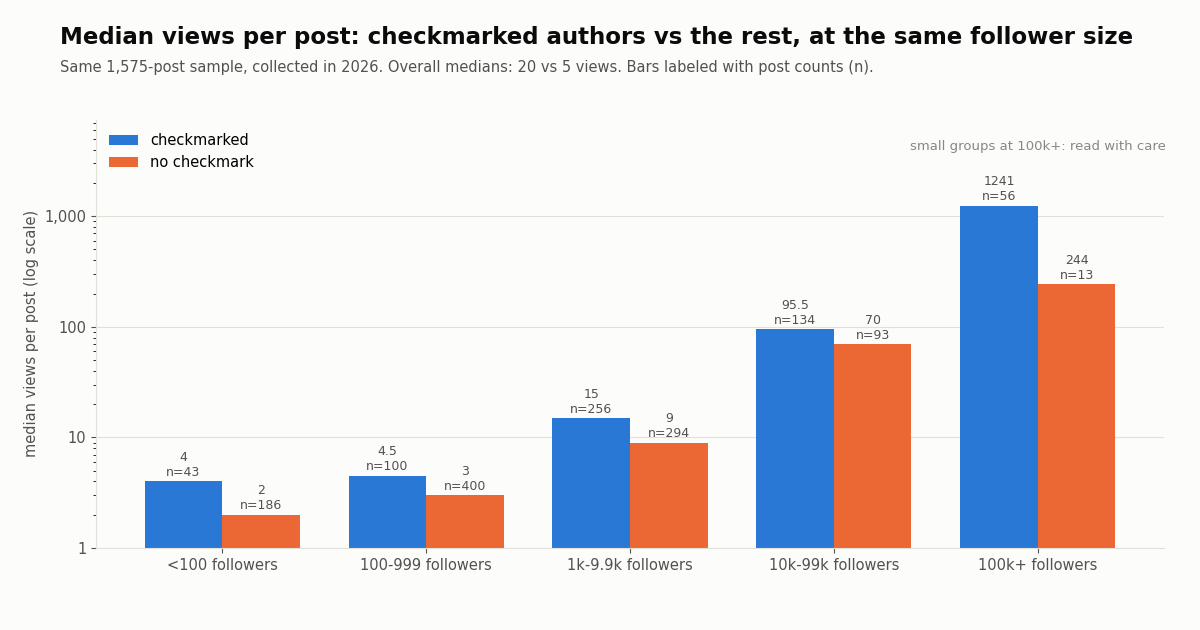
Overall, checkmarked authors' posts had a median of 20 views against 5 for the rest. That gap is not proof that paying buys reach: checkmarked authors in the sample were much larger accounts (median 4,151 followers against 644), and larger accounts get more views with or without a badge.
To take account size out of the comparison, we split authors into follower bands. Checkmarked posts still had higher median views in every band, but the gaps are far smaller at the low end: 4 vs 2 views under 100 followers, 4.5 vs 3 at 100 to 999, 15 vs 9 at 1,000 to 9,999, and 95.5 vs 70 at 10,000 to 99,999. The 100,000-plus band (1,241 vs 244) rests on only 56 and 13 posts, so read it with care.
What this sample cannot show. It cannot separate the effect of X's reply boost and ranking from the fact that people who pay tend to post more seriously; it covers a few hours of English posts on ten topics; and it measures views, which X reports per post, not reach to non-followers. It does say something useful for anyone deciding whether to pay: on small accounts, the checkmark alone moved the median by a few views, not hundreds.
For developers: reading Premium signals through an API, and what it costs
If you build tools that analyze X accounts, the paid checkmark is a field, not a guess. On TwitterAPI.io, /twitter/user/info?userName=<handle> returns isBlueVerified (true for paid checkmarks), and every tweet object carries the same flag on its author. In our sample, isVerified was false and verifiedType was empty for every one of the 1,508 authors, so isBlueVerified is the field that carries the signal. Long posts come back in full in the text field (the longest in our sample was 23,748 characters), so you can measure length directly.
What the study cost. The 80 search pages behind the numbers above returned 1,575 tweets. TwitterAPI.io bills 15 credits per tweet returned, which is $0.15 per 1,000 tweets, so the whole study cost $0.24; profile lookups are 18 credits per user ($0.18 per 1,000 profiles). Reads need no X account, and new accounts that pass the automatic bot check get up to $1 of free credits (at most 100,000 credits, no card, one per person or network, expiring after 31 days).
The official alternative. X's own API is billed per call on its pay-per-usage rate card at docs.x.com/x-api/getting-started/pricing: $0.005 per post read and $0.010 per user read. At 1,000 posts that is $5 on X's rate card against $0.15 on ours, about 33 times more, and X's pay-per-usage reads are capped at 3 million posts a month before Enterprise.
The script below reads a handful of public accounts, records whether each carries the paid checkmark, and measures how often their recent posts exceed 280 characters: the same method as the study, applied to accounts you choose.
import os, html, re, requests

BASE = "https://api.twitterapi.io"
HEAD = {"X-API-Key": os.environ["TWITTERAPI_IO_KEY"]}
TCO = re.compile(r"https://t\.co/\S+")

def visible_len(text):
    return len(TCO.sub("", html.unescape(text or "")).strip())

for handle in ["NASA", "github", "XCreators"]:
    r = requests.get(f"{BASE}/twitter/user/info", headers=HEAD, params={"userName": handle}, timeout=30).json()
    user = r.get("data") or {}
print(handle, "isBlueVerified:", user.get("isBlueVerified"), "followers:", user.get("followers"))"""Check the paid checkmark and long-post share for a list of public accounts.
Requires: pip install requests; export TWITTERAPI_IO_KEY=...
Cost: 18 credits per profile + 15 credits per tweet returned ($0.15 per 1,000 tweets).
"""
import html
import os
import re
import requests
BASE = "https://api.twitterapi.io"
HEAD = {"X-API-Key": os.environ["TWITTERAPI_IO_KEY"]}
TCO = re.compile(r"https://t\.co/\S+")
def visible_len(text):
"""Visible characters: HTML entities decoded, t.co links removed."""
return len(TCO.sub("", html.unescape(text or "")).strip())
def profile(handle):
r = requests.get(f"{BASE}/twitter/user/info", headers=HEAD,
params={"userName": handle}, timeout=30)
body = r.json()
if body.get("status") == "error":
raise ValueError(f"{handle}: {body.get('msg')}")
return body["data"]
def recent_posts(handle, pages=3):
posts, cursor = [], ""
for _ in range(pages):
params = {"userName": handle}
if cursor:
params["cursor"] = cursor
r = requests.get(f"{BASE}/twitter/user/last_tweets", headers=HEAD,
params=params, timeout=30)
body = r.json()
data = body.get("data") or {}
posts += data.get("tweets") or []
if not body.get("has_next_page"):
break
cursor = body.get("next_cursor") or ""
return posts
for handle in ["NASA", "github", "XCreators"]:
user = profile(handle)
posts = [t for t in recent_posts(handle) if not t.get("retweeted_tweet")]
long_posts = sum(1 for t in posts if visible_len(t.get("text")) > 280)
share = 100 * long_posts / len(posts) if posts else 0
print(f"{handle:12} checkmark={user.get('isBlueVerified')!s:5} "
f"followers={user.get('followers') or 0:>11,} posts={len(posts):3} "
f"over_280={share:.1f}%")
Researching this?Free starter credits cover end-to-end testing — Google sign-in, no card. Get a key.
Questions readers ask
How much is X Premium now?
For new buyers, X Premium benefits come with a paid tier of The X Subscription. xAI's pricing documentation lists US list prices before tax of $8/month for Plus, $30/month for Premium, $100/month for Super and $200 monthly for Ultra, with yearly billing at $80, $300, $1,000 and $2,000. Regional and in-app prices can differ, so the price on your own checkout screen is the one that applies.
What is the difference between X Premium and Premium+ now?
In The X Subscription, Plus carries the old Premium package (checkmark, creator tools, fewer ads), and Premium, Super and Ultra carry the full benefits of the old Premium+, such as ad-free scrolling on most surfaces and a higher reply boost. xAI's documentation tells current Premium+ subscribers to choose Premium or higher to keep those benefits.
Do I have to switch from X Premium to The X Subscription?
No. xAI's article says switching is optional: your current plan, price and features continue unless you change or cancel. If you do switch, it is permanent and support cannot undo it; your old plan is cancelled and the unused time is refunded.
Which X plan includes Grok?
All tiers include some Grok usage from one weekly pool shared with Cursor. Free is limited, Plus is the base allowance, and Premium, Super and Ultra get 4x, 15x and 50x the Plus allowance. Grok Bot is included only on Premium, Super and Ultra.
How do I cancel X Premium on my iPhone?
If you paid through the App Store, cancel in iPhone Settings: tap your name, tap Subscriptions, tap the X or Grok subscription, then tap Cancel Subscription (Apple's steps at support.apple.com/en-us/118428). Deleting the app does not cancel it.
How do I cancel X Premium on Android?
Open your subscriptions page in Google Play, choose the subscription, tap Cancel subscription and follow the prompts (Google's steps at support.google.com/googleplay/answer/7018481). Google states that uninstalling the app does not cancel the subscription.
Can I get a refund for X Premium?
The documented refund is the pro-rata refund of unused time when you switch an eligible plan to The X Subscription. For App Store purchases, xAI asks Apple to refund the unused time and Apple decides the amount. The pages we could read do not promise a refund for a plain cancellation, which instead stops the next renewal.
Is there an X Premium free trial or student discount?
None of the official pricing pages we read this year mention a free trial for paid tiers or a student discount. The published saving is yearly billing, for example $300 a year for Premium instead of $360 billed monthly. The Free tier itself is permanent, with limited AI usage.
Continue
- xAI docs: The X Subscription pricing (tiers, monthly and yearly prices, usage multipliers, refunds on switching)
- xAI docs: X Premium customers moving to The X Subscription (tier mapping, Premium+ guidance, refunds)
- xAI docs: Managing The X Subscription (grok.com/dashboard, cancel from the Current plan card)
- Apple Support: cancel a subscription from Apple
- Google Play Help: cancel, pause or change a subscription
- X developer docs: pay-per-usage API pricing
- X API hub: endpoints, pricing and guides for reading X data
- Grok API key: creating a key in the xAI console and how usage is billed
- Creator Subscriptions on X: how paid follower subscriptions work
- How to edit a post on X: the edit window, limits and who can edit
- How X counts characters in a post, including links and emoji
- X firehose and data access pricing compared for developers
- TwitterAPI.io pricing: $0.15 per 1,000 tweets returned
- 01Most Mentioned Stocks and Crypto on Twitter (X): 81.3 Million Cashtag Mentions, 2024-2026
- 02Twitter (X) Images Not Loading: A Five-Hop Fix Checklist
- 03Twitter (X) Ads Library: What the X Ads Repository Shows, and What It Misses
- 04TweetScout explained: the crypto Twitter (X) score, its API, and a smart-follower score you can build yourself
- 05Twitter (X) Spaces API: Official Endpoints, Space Details and Real Listener Data
- 06Twitter (X) Analytics Tools — A Developer's Honest Roundup
- 07Twitter (X) Posts Not Loading? How to Fix It
- 08Cloudflare Pay per Crawl: How the HTTP 402 Handshake Works, and What It Means for Twitter (X) Data
Writing about something you built with TwitterAPI.io? Our community rewards program pays API credits for honest tutorials, build logs and videos.
Stop reading. Start building.
Starter credits cover real testing on real data. Google sign-in, no card, no application queue.
Get an API keyAlready building with TwitterAPI.io? Publish an honest tutorial or build log about it and earn up to $200 a month in API credits.