Twitter (X) Images Not Loading: A Five-Hop Fix Checklist
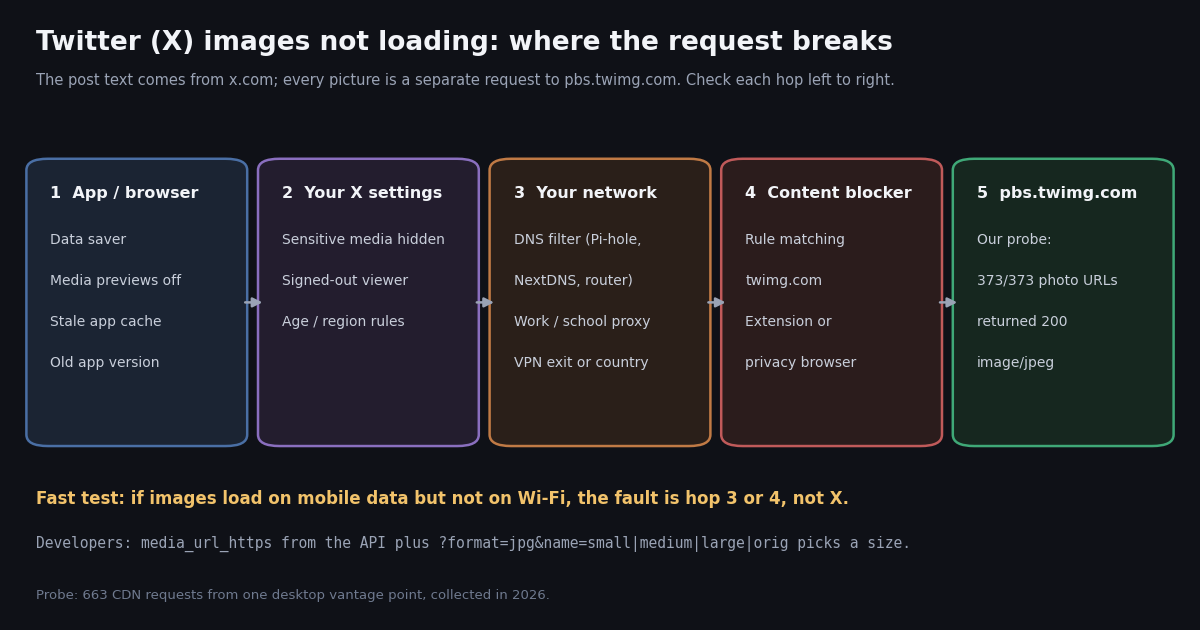
- Text loads, images do not means the post request worked and the separate request to
pbs.twimg.comfailed. - Check five hops in order: app or browser settings, your X settings, your network, content blockers, then X.
- Fastest test: switch Wi-Fi to mobile data. Images appear on mobile data means a network or DNS filter is blocking
twimg.com. - Our probe: 373 of 373 photo URLs from 10 organization accounts returned HTTP 200
image/jpeg; only broken URLs returned 404. - Settings that hide images on purpose: Data Saver, media previews off, and the sensitive-media display setting.
- Developers:
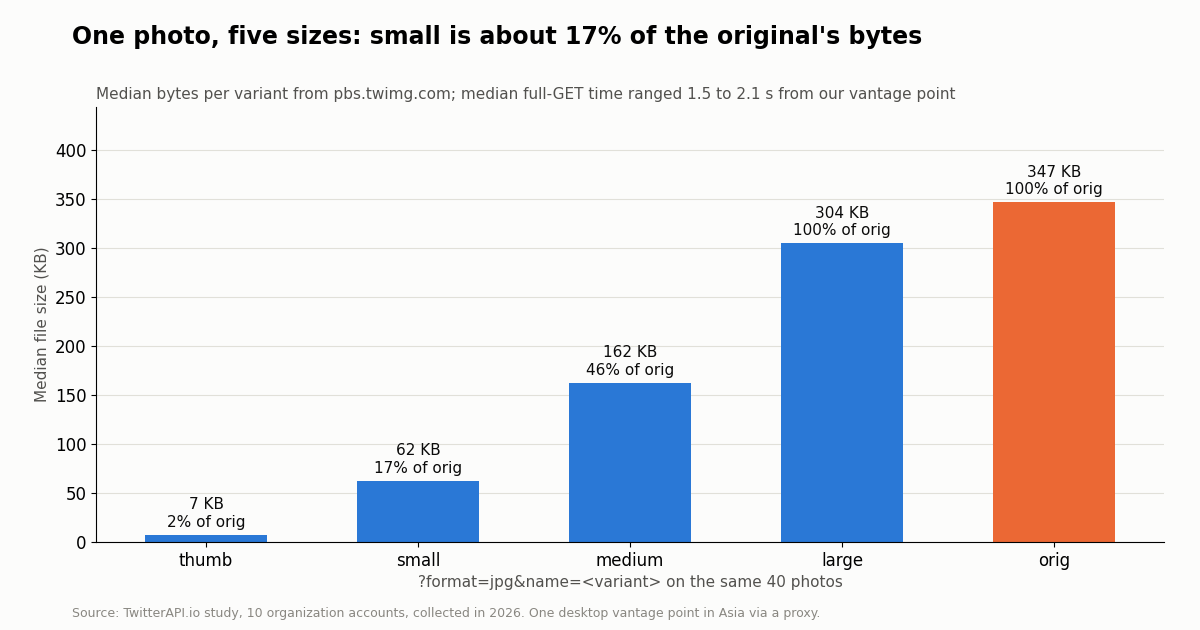
media_url_httpsplus?format=jpg&name=smallis about 17% of the original's bytes in our sample.
Few things on X are as quietly broken-looking as a timeline full of text with grey rectangles where the pictures should be. The page loaded, your account works, replies show up, and yet every image is a blank tile, a spinner, or a broken-image icon. This page is a focused checklist for that exact symptom on the X app (iPhone and Android) and on x.com in a browser. If posts themselves will not load, or you see messages such as "Something went wrong", start with our general guide to X not loading instead; it has a short media section, and this page goes deeper on images only.
We also did something the usual "11 fixes" lists do not: we measured the media host. From one desktop machine, collected in 2026, we pulled the recent posts of 10 well-known organization accounts through the API, took every photo URL, and requested each one from pbs.twimg.com at a polite rate. The results tell you which side of the connection to suspect, and the developer sections at the end show how image URLs and size variants work if you build on X data.
373 of 373
Why the text loads but the images do not
A post on X is assembled from several requests. The text, author name and counts come from X's own servers behind x.com. Each photo is a separate file served from pbs.twimg.com, and videos stream from video.twimg.com. Your app or browser fetches the post first and then asks the media host for each picture. When the first request works and the second fails, you get exactly the symptom people search for: posts that read fine with grey or blank boxes where the images belong.
That split is useful, because it rules out a lot. Your account is signed in, X's main service is answering, and your connection works in general. What is left is anything that treats twimg.com differently from x.com: a setting that holds images back on purpose, a filter that blocks the media domain, a corrupted image cache, or, less often, a real problem at X's media host.
The media host is built to be cached hard. When we requested a photo, the response carried cache-control: public, max-age=604800, meaning browsers and proxies may keep the file for 7 days, and a timing-allow-origin header listing x.com, mobile.x.com and lite.x.com. That caching is also why a broken tile can stick around: if your device cached a failed or truncated response, it may keep showing it until the cache is cleared.
Blank grey box. Usually the request never completed: blocked, filtered or still waiting on a slow network.
Broken-image icon in a browser. The request finished with an error (often a 404 or a block page from a filter), or the bytes were not a valid image.
"This media may contain sensitive material" cover. Not a failure: X is declining to show the media under your current settings.
Endless spinner on one image only. Often that one file is large and the connection is slow; the original size of a photo can be over a megabyte (see the size table below).
Step 1: check whether X is having a real outage
Before changing anything, take ten seconds to rule out a problem at X. There is no official public status page for the consumer x.com site or its media host that we could verify: status.x.com did not answer a connection when we checked, and the long-running third-party page at twitterstat.us returns "Your page is inactive" from its status API. X does run a status page for its developer platform at developer.x.com/status, with an incident history at docs.x.com/incidents; that covers the API, not the app, but a site-wide event usually shows there too. The incident log lists past events such as an "X site-wide outage: API endpoint degradation".
The practical test is better than any status page. Open a post with a picture from a large news or brand account. If its image loads and the one you wanted does not, the problem is that one post (removed media, sensitive-media cover) or your settings, not X. If no image loads anywhere, on any account, try a second device on a different network. If that works too, the problem is your device or network. Only when every device on every network fails at once is it likely to be X, and then waiting is the only fix.
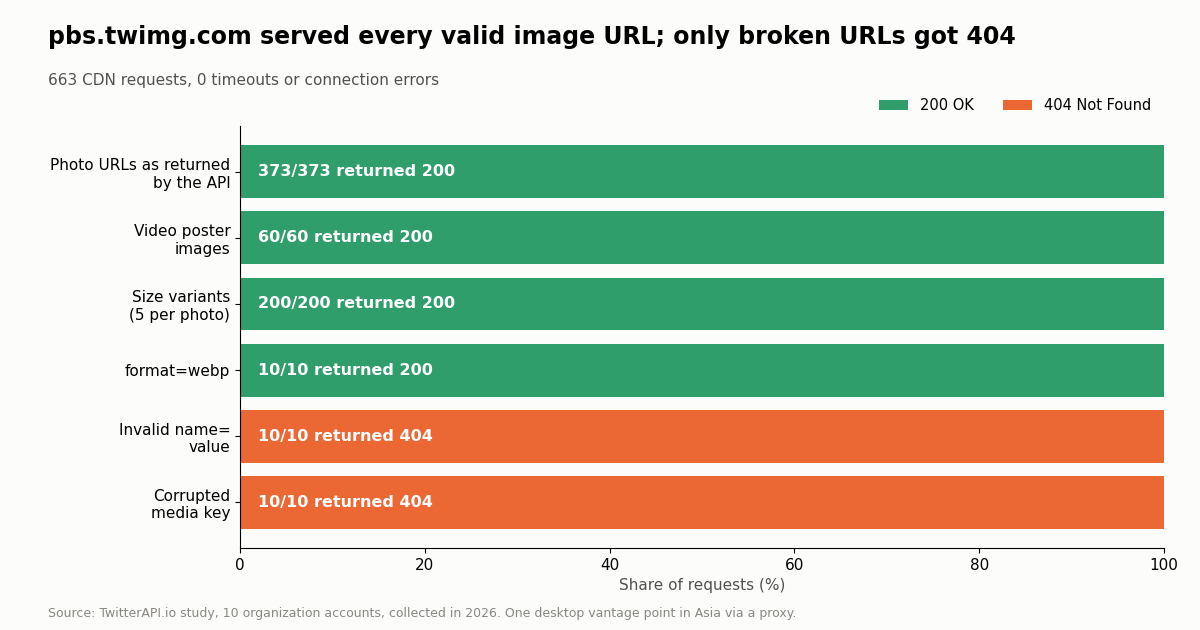
Our own check fits this pattern. We requested 663 image URLs from pbs.twimg.com in one session collected in 2026: 373 of 373 photo URLs as the API returned them, 60 of 60 video poster images, and 200 of 200 size variants came back with HTTP 200, with zero timeouts or connection errors. The media host is not a frequent point of failure; the hops in front of it are. Our is-X-down guide covers outage checks in more detail.
Step 2: settings in the X app and on x.com that hide images on purpose
X has several settings whose whole job is to not load images, and they are the most common cause after an app update or on a new phone. Menu names below follow X's Help Center pages on media settings and on the app (help.x.com/en/rules-and-policies/media-settings, help.x.com/en/using-x/mobile-x-not-working); X moves menu items between releases, so if a name differs on your version, search the settings screen for the keyword.
Data Saver. In Settings and privacy, under Accessibility, display, and languages, then Data usage. With Data Saver on, X loads lower-quality images or holds them until you tap. Turn it off, or set high-quality images to load on Wi-Fi and mobile data.
Media previews. Under Display and sound (web: Settings, Accessibility, display, and languages, Display). When previews are off, posts show a link or a placeholder instead of the image, which looks exactly like a loading failure.
Sensitive media. Under Privacy and safety, then Content you see, "Display media that may contain sensitive content". With it off, every image the author or X marked as sensitive stays behind a cover. The option only applies to signed-in accounts, and X's rules on age and region decide who can turn it on.
Autoplay. Under Data usage. This only affects video, but a poster frame that never turns into a video is often reported as "images not loading". Our probe fetched 60 video poster images: all returned 200, so a stuck poster is a playback setting or network issue rather than a missing file.
After changing any of these, pull to refresh the timeline (app) or reload the page (web): settings apply to newly loaded posts, not ones already on screen.
Step 3: clear the image cache, update, then reinstall
Because the media host tells devices they may keep images for up to 7 days, a cache that saved a broken or partial response can keep showing a blank tile long after the cause is gone. Clearing it forces fresh requests.
iPhone or iPad (X app). Settings and privacy, then Accessibility, display, and languages, then Data usage, then Storage: clear Media storage and Web storage. If that option is missing on your version, offload or delete and reinstall the app from the App Store.
Android (X app). Android Settings, Apps, X, Storage, then Clear cache. Clear storage (data) also works but signs you out.
Browser (x.com). Do a hard reload first (Ctrl+Shift+R on Windows and Linux, Cmd+Shift+R on Mac). If images are still blank, clear cached images and files for x.com and twimg.com in your browser's privacy settings, then reload. Opening x.com in a private window is a quick test: a private window starts with an empty cache and usually no extensions.
Update. App updates ship fixes for display bugs; update from the App Store or Google Play before trying anything drastic.
If clearing the cache and updating do not help, the cause is very unlikely to be on the device's storage; move on to the network.
Step 4: network, DNS and VPN checks
This is the most common real cause when images fail on one network but not another. Network filters work on domain names, and many blocklists treat twimg.com as a tracking or ad domain, or block it as part of a social-media policy, while allowing x.com. The result is the classic symptom on every device on that Wi-Fi.
Wi-Fi versus mobile data. Turn Wi-Fi off and reload. Images loading on mobile data and not on Wi-Fi points straight at the Wi-Fi network: router filtering, a DNS service with blocklists, or a work, school, hotel or public network policy.
DNS filters. Pi-hole, NextDNS, AdGuard DNS and many router parental-control features answer blocked domains with 0.0.0.0 or a block page. Check the filter's query log for pbs.twimg.com and add it to the allowlist. On Android, a Private DNS setting pointing at a filtering resolver has the same effect; set it to Automatic as a test.
VPNs and proxies. A VPN or proxy adds its own route and its own filtering between you and the media host. Turn the VPN off as a test, or switch to another exit location. Any route that can reach x.com but not twimg.com gives exactly this symptom.
Slow links. On a slow connection the text arrives in milliseconds while a large photo takes seconds. Our probe, from one desktop machine in Asia routed through a proxy, measured a median full download of 1.85 seconds per image (p90 2.18 s, p99 2.56 s). On a congested network, many images per screen multiply that wait.
Developers and power users can test the hop directly from a terminal on the affected network. A healthy result is 200 image/jpeg; a resolver answering 0.0.0.0 or a TLS error means the network is in the way.
# 1. Can this network reach the media host at all?
curl -sS -o /dev/null -w "%{http_code} %{content_type} %{time_total}s\n" \
  "https://pbs.twimg.com/media/HXBNsEVWgAAsCUY?format=jpg&name=small"

# Expected on a healthy network: 200 image/jpeg and a time in seconds.
# A DNS error, "Could not resolve host", a TLS reset or a block page
# from a filter means the network (hop 3) is the problem, not X.

# 2. What does your DNS resolver return for the host?
nslookup pbs.twimg.com
# 0.0.0.0 or 127.0.0.1 is the classic sign of a DNS-level blocklist.Step 5: content blockers and browser extensions
On x.com in a browser, ad blockers, privacy extensions and privacy-focused browsers are a frequent cause. A single filter rule that matches twimg.com blocks every picture on X while leaving the site otherwise usable. Lists are updated often, so a rule can appear overnight with no change on your side.
Quick test. Open x.com in a private window with extensions disabled, or pause the blocker for the site. Images appearing confirms the blocker.
Fix without turning the blocker off. Open the blocker's logger while loading x.com, look for blocked requests to pbs.twimg.com, and add an exception for that host. In uBlock Origin or AdGuard syntax, an allowlist rule looks like the snippet below.
Browser shields and tracking protection. Some browsers ship built-in tracker blocking. Lower the protection level for x.com only and reload.
Script and image blockers. Extensions that block images to save data, or block third-party requests by default, treat twimg.com as a third party because it is a different domain from x.com. Allow it for x.com.
! Content blockers: look for a rule like one of these and remove it,
! or add an exception for the media host.
||twimg.com^
||pbs.twimg.com^

! Exception (allowlist) rule in uBlock Origin / AdGuard syntax:
@@||pbs.twimg.com^What we measured: the media host answered every valid URL
To see whether the media host is a likely cause, we took the 1,000 most recent posts of 10 organization accounts (NASA, nvidia, PlayStation, Xbox, NatGeo, SpaceX, Google, Nike, Starbucks and espn), kept the 741 posts the accounts wrote themselves (259 were reposts), and extracted every photo. 265 of the 741 own posts (35.8%) carried at least one photo, 373 photos in total, alongside 337 videos and 2 GIFs. The API marked all 712 media items as Available in ext_media_availability.
Then we requested each image from pbs.twimg.com, one at a time at no more than 2 requests per second, and recorded what came back.
Every valid URL worked; every broken URL failed with a clean 404 rather than a timeout. That is the useful takeaway for troubleshooting: a broken-image icon whose request returned 404 means the URL is wrong or the media was removed, while a blank tile with no response at all means something between you and the host stopped the request. Your browser's developer tools (Network tab, filter by twimg) show which one you have.
About 70% of the original photo responses carried a cache HIT header, so most images were already sitting in the media host's cache. Latency in our setup was dominated by the route from our vantage point, not the host: the median full download of a photo was 1.85 seconds through our proxy, which is far slower than a typical direct home connection would see.
For developers: image URLs and the name= size variants
If you build on X data and your app shows blank images, the cause is usually the URL you built, not the host. In TwitterAPI.io responses the image URL sits at extendedEntities.media[].media_url_https on each tweet, next to type (photo, video or animated_gif), media_key, original_info and ext_alt_text. X's own API v2 data dictionary (docs.x.com/x-api/fundamentals/data-dictionary) exposes the same file as the media object's url for photos and preview_image_url for videos.
That base URL ends in .jpg. To pick a size, drop the extension and add ?format=jpg&name=<size>. These size names are not listed in the v2 data dictionary; the table below is what the host returned in our probe for the same 40 photos.
Use small or medium for feeds. A grid of orig images is several megabytes; at the 90th percentile an original was about 1.7 MB in our sample. small keeps a typical thumbnail grid light.
large often equals orig. For most photos in our sample, large was byte-identical in size to the original (median 100%), because the upload was already within the large size limit.
A wrong size name is a 404, not a fallback. name=giant returned 404 for 10 of 10 photos, as did a media key with three characters changed. If your app shows broken images, log the exact URL and status code before suspecting the host.
WebP is available. format=webp&name=small returned image/webp for 10 of 10 photos at a median 42.8 KB, smaller than the 62.2 KB JPEG at the same size.
Alt text. Only 115 of the 373 photos (30.8%) carried ext_alt_text. Render it as the image alt attribute when present; it is what screen readers and broken-image placeholders show.
How we collected this
Question. When images fail to load, is the media host the likely cause? What status codes, content types, sizes per name= variant and latencies does pbs.twimg.com return for images attached to real recent posts?
Accounts. NASA, nvidia, PlayStation, Xbox, NatGeo, SpaceX, Google, Nike, Starbucks and espn: public organization accounts only.
Method and window. 50 requests to /twitter/user/last_tweets (5 pages of up to 20 posts per account, newest first) returned 1,000 posts, the most recent posts of each account at collection time. Reposts were excluded from the media analysis. Each unique photo URL was then requested once from pbs.twimg.com with a plain GET, no cookies and no sign-in, at no more than 2 requests per second: 663 media requests in total. Image bytes were counted, never stored. Collected in 2026.
Cost. The 1,000 posts cost $0.15 at $0.15 per 1,000 tweets returned. The same 1,000 post reads on X's official pay-per-usage rate card (docs.x.com/x-api/getting-started/pricing, $0.005 per post read) would cost $5, about 33x more. The image downloads themselves are free requests to the public media host.
What the sample cannot show. One vantage point (a desktop machine in Asia, routed through a proxy), one session, 10 large accounts. It cannot show regional blocks, short outages outside our session, how the app behaves, or how often private accounts' images fail. Latency numbers describe our route, not yours.
Privacy. Aggregates only. Organization accounts only; reposted and quoted authors were not analyzed, and the de-identified sample stores per-post counts without IDs, URLs or text.
import requests

API_KEY = "YOUR_API_KEY"  # from the TwitterAPI.io dashboard
BASE = "https://api.twitterapi.io"
HEADERS = {"X-API-Key": API_KEY}


def photo_urls(user_name, pages=2):
    """Yield (tweet_url, media_url_https) for photos in an account's recent posts."""
    cursor = ""
    for _ in range(pages):
        r = requests.get(
            f"{BASE}/twitter/user/last_tweets",
            headers=HEADERS,
            params={"userName": user_name, "cursor": cursor},
            timeout=30,
        )
        r.raise_for_status()
        body = r.json()
        data = body.get("data") or {}
        for t in data.get("tweets", []):
            if t.get("retweeted_tweet"):
                continue  # skip reposts, keep the account's own posts
            for m in (t.get("extendedEntities") or {}).get("media", []):
                if m.get("type") == "photo":
                    yield t["url"], m["media_url_https"]
        if not body.get("has_next_page"):
            break
        cursor = body.get("next_cursor", "")


def check(url, size="small"):
    """Ask pbs.twimg.com for one size variant and report what came back."""
    stem = url.rsplit(".", 1)[0]
    variant = f"{stem}?format=jpg&name={size}"
    r = requests.get(variant, timeout=20)
    return r.status_code, r.headers.get("content-type"), len(r.content), variant


if __name__ == "__main__":
    for tweet_url, media_url in photo_urls("NASA"):
        status, ctype, size, variant = check(media_url)
        print(status, ctype, size, variant, "<-", tweet_url)
Researching this?Free starter credits cover end-to-end testing — Google sign-in, no card. Get a key.
Questions readers ask
Why are pictures on Twitter (X) not loading but text is?
The text and the pictures come from different servers. Posts come from x.com; every image is a separate request to pbs.twimg.com. When that second request is blocked by a setting (Data Saver, media previews, sensitive media), a network or DNS filter, a content blocker, or a stale cache, you see the post with a blank box. In our probe collected in 2026, the media host returned HTTP 200 for 373 of 373 valid photo URLs, so the cause is usually on your side.
Why do Twitter images load on mobile data but not on Wi-Fi?
Something on the Wi-Fi network is blocking the media domain twimg.com: a router filter, a DNS service with blocklists such as Pi-hole or NextDNS, or a work, school or public network policy. Check the filter's log for pbs.twimg.com and allowlist it, or ask the network administrator.
Is X down, or is it just me?
Open a post with an image from a large news or brand account and try a second device on a different network. If images load anywhere else, it is your device or network. X publishes a status page for its developer platform at developer.x.com/status with an incident history at docs.x.com/incidents; we could not verify an official status page for the consumer site.
Why are Twitter images blurry or low quality?
Data Saver is the usual cause: it loads lower-quality images on mobile data. Turn it off in Settings and privacy, Accessibility, display, and languages, Data usage, or set high-quality images to load on both Wi-Fi and mobile data.
Why does one image say it may contain sensitive content?
The author or X marked the media as sensitive. It stays covered unless you are signed in and have turned on "Display media that may contain sensitive content" under Privacy and safety, Content you see. X's age and region rules decide whether the option is available to your account.
How do I clear the X app's image cache?
On iPhone, go to Settings and privacy, Accessibility, display, and languages, Data usage, Storage, and clear Media storage. On Android, open the phone's Settings, Apps, X, Storage, Clear cache. In a browser, do a hard reload, then clear cached images for x.com and twimg.com.
What is pbs.twimg.com?
It is X's media host for images: profile pictures, banners, photos in posts and video poster frames. Videos stream from video.twimg.com. If a blocker or DNS filter blocks twimg.com, X loads but its images do not.
How do I get the full-size version of a Twitter image URL?
Take the media URL, remove the .jpg extension and add ?format=jpg&name=orig. Other sizes are thumb, small, medium and large. In our sample, small was about 17% of the original's bytes and an invalid size name returned 404.
Continue
- X Developer Platform incident history
- X API v2 data dictionary: the media object (url, preview_image_url, variants)
- X Help Center: media settings and sensitive media
- X Help Center: help with the X app
- X API pay-per-usage pricing
- TwitterAPI.io docs: Get User Last Tweets
- Twitter (X) API overview: the hub for reading X data
- Fix X posts that are not loading at all
- Is X down? How to check an outage
- Extract Twitter image URLs with the API
- Download pictures from Twitter in full size
- Twitter video and media downloader tool
- TwitterAPI.io API documentation
- 01Most Mentioned Stocks and Crypto on Twitter (X): 81.3 Million Cashtag Mentions, 2024-2026
- 02X Premium in 2026: The X Subscription Tiers, What They Unlock, and How to Cancel
- 03Twitter (X) Ads Library: What the X Ads Repository Shows, and What It Misses
- 04TweetScout explained: the crypto Twitter (X) score, its API, and a smart-follower score you can build yourself
- 05Twitter (X) Spaces API: Official Endpoints, Space Details and Real Listener Data
- 06Twitter (X) Posts Not Loading? How to Fix It
- 07How to Search Twitter (X) for Images: Operators, What They Return, and the API Route
- 08Twitter (X) Search Not Working? The October 2026 Search Outage, Other Causes and Fixes
Writing about something you built with TwitterAPI.io? Our community rewards program pays API credits for honest tutorials, build logs and videos.
Stop reading. Start building.
Starter credits cover real testing on real data. Google sign-in, no card, no application queue.
Get an API keyAlready building with TwitterAPI.io? Publish an honest tutorial or build log about it and earn up to $200 a month in API credits.