How to Build an AI Twitter (X) Bot with an LLM in 2026
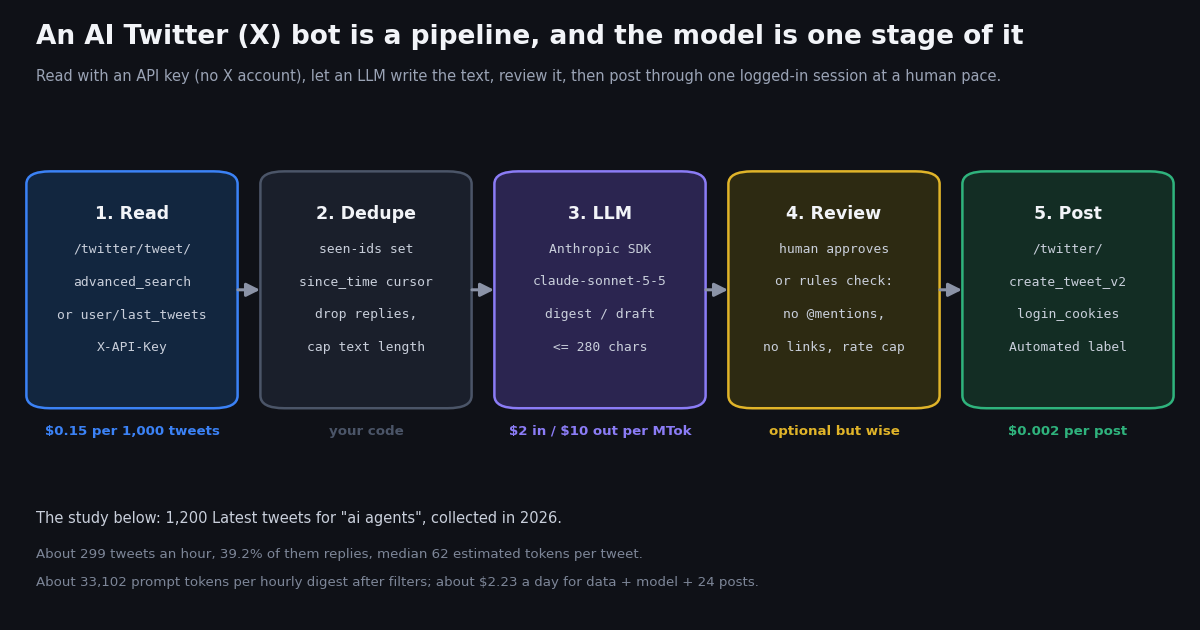
This guide builds an AI Twitter bot where a language model writes the words: an hourly digest bot that reads what developers posted about a topic and summarizes it in one post, and a persona bot that drafts replies to a few accounts' new posts for a human to approve. It is written for Python developers who want to own the pipeline rather than rent a hosted tweet generator, and every stage runs against real endpoints with the prices printed next to them.
It is deliberately not about mention responders. If what you want is "when someone @mentions us, reply", the rules (one reply per interaction, the Automated label, how fast mentions actually arrive) are in our sibling guide, Twitter (X) auto reply: rules and setup; the general taxonomy of bots is in the Twitter (X) bots hub. This page starts where those stop: the model is doing the writing, so the questions become how much it has to read, what that costs in tokens, and how you keep a generated post from embarrassing the account.
To answer the first two with data instead of guesses, we pulled 1,200 Latest tweets for the neutral developer topic "ai agents" in 2026 and measured tweets per hour, the share that are replies and quotes, text length and estimated tokens per tweet, links and media, the language mix, and from those the prompt size of an hourly digest and the bot's cost per day in data, model and posting. The code's defaults (the query filters, the 600-character cap, the page limit, the daily post cap) each come from one of those numbers.
What an AI Twitter bot is: three sides, three bills, one set of rules
Strip the marketing off "AI Twitter bot" and three independent pieces remain. A read side that gets tweets into your program. A generate side where a model turns those tweets (or a prompt alone) into text. A post side that publishes the text as an X account. Each is billed separately, each fails separately, and only the third one touches X's rules.
Read side. On twitterapi.io, reading is a GET with an X-API-Key header; there is no X app, OAuth dance or developer tier, and no X account is involved. For a topic bot the call is /twitter/tweet/advanced_search with queryType=Latest and a query such as "ai agents" lang:en -filter:replies since_time:<unix>; it returns tweets[], has_next_page and next_cursor, 20 tweets per page. For an account-based bot it is /twitter/user/last_tweets with userName, which returns data.tweets[]. Tweet endpoints bill 15 credits per tweet returned ($0.15 per 1,000 tweets), with a 15-credit minimum per request, so a full page costs $0.003 and a search that finds nothing costs $0.00015.
Generate side. Any LLM with an HTTP API. The examples use the Anthropic Python SDK (pip install anthropic) and the model claude-sonnet-5-5, priced on Anthropic's pricing page at $2 per million input tokens and $10 per million output tokens (cache reads $0.10, batch requests at half price). One paragraph in Step 2 shows the same call through an OpenAI-compatible client, which is also how you point the bot at a self-hosted model. The model never sees X directly; it sees a prompt you built, which is why the dedupe-and-shrink stage matters so much for the bill.
Post side. Writes on twitterapi.io run through an authenticated session for the bot's own X account: one POST /twitter/user_login_v2 with user_name, email, password, an optional but strongly recommended totp_secret and a required residential proxy returns login_cookies and costs 10,000 credits ($0.10). Each POST /twitter/create_tweet_v2 with login_cookies, tweet_text and the proxy (plus reply_to_tweet_id for a reply, attachment_url for a quote, media_ids from /twitter/upload_media_v2) is 200 credits, $0.002, billed per HTTP 200 call. The call acts as that account: X can rate-limit, lock or suspend it, the session can expire and need a new login, and the pace has to be a human one.
The rules. X's automation rules (help.x.com/en/rules-and-policies/x-automation) are the constraint on the post side. In short: automated accounts must be labeled as automated, you may not send unsolicited mentions or replies in bulk, you may not automate likes, follows or trending-topic posting to amplify, and you may not post duplicate or substantially similar content across accounts. A digest bot that posts once an hour under its own account with the Automated label, no @mentions and no engagement automation sits comfortably inside that. A "reply to everyone who tweets the keyword" bot does not, and no amount of model quality changes that.
Two shapes: the digest bot and the persona (reply-drafting) bot
The digest bot reads a topic or a list of accounts on a schedule, keeps only what it has not seen, asks the model for one post that summarizes the hour, checks it against a few hard rules, and posts it as the bot's own account. Nobody is addressed, nothing is replied to, so the only people who see the output chose to follow the account. It is the shape with the fewest ways to go wrong, and it is the one the full script at the end of the page implements.
The persona bot reads a short list of accounts (organizations, partners, your own product's community), drafts a reply in a defined voice to each new post, and shows the draft to a human who approves, edits or skips it; the approved text goes out through /twitter/create_tweet_v2 with reply_to_tweet_id. The model saves the typing, the human keeps the judgment, and the account's output remains one reply per post, written for that post. The variant code below is the delta from the digest bot: a last_tweets reader, a persona system prompt, and the reply_to field.
What this page does not build is a bot that scans a keyword and replies to strangers. That is the shape X's rules describe as unsolicited bulk replies, and it is also the shape that tends to make the account disposable. If you need a responder for people who message you, the auto reply guide measured how often mentions actually arrive and shows the one-reply-per-interaction pattern; this page does not re-measure that.
# Variant: a persona bot that DRAFTS replies to a few accounts' new posts; a human approves each one.
WATCH = ["vercel", "github"]          # organization accounts; never target individuals without consent
PERSONA = ("You are the voice of a small developer-tools company. Draft a reply to the post below: "
           "one useful, specific sentence, under 240 characters, no links, no hashtags, no @mentions, "
           "no praise, no sales pitch. If there is nothing worth adding, answer exactly: SKIP")


def new_posts(handle, seen):
    r = requests.get(f"{API}/twitter/user/last_tweets", headers=H,
                     params={"userName": handle}, timeout=30)       # 20 newest, $0.003 per page
    r.raise_for_status()
    return [t for t in (r.json().get("data") or {}).get("tweets") or [] if t["id"] not in seen]


def draft_reply(client, post_text):
    resp = client.messages.create(model="claude-sonnet-5-5", max_tokens=200, system=PERSONA,
                                  output_config={"effort": "low"},
                                  messages=[{"role": "user", "content": post_text}])
    if resp.stop_reason == "refusal":
        return "SKIP"
    return "".join(b.text for b in resp.content if b.type == "text").strip()


# for each new post: draft = draft_reply(client, t["text"]); show it; if the reviewer types y,
# create_post(login_cookies, draft, reply_to=t["id"]). One reply per post, never a second one.
Step 1: read the topic with an API key, dedupe by id, and shrink the text
The read stage has one job besides fetching: make the prompt as small as it can be without losing what the model needs. Three choices in the code come straight from the sample. First, the query carries lang:en -filter:replies: in our 1,200-tweet sample 39.2% of the matches were replies, which are conversation fragments a digest cannot use, and 4.2% were not English (the largest non-English slices were zxx, X's code for text with no linguistic content, at 1.3% and Spanish at 0.8%). The two filters together kept 58.2% of the tweets and 174 an hour instead of 299.
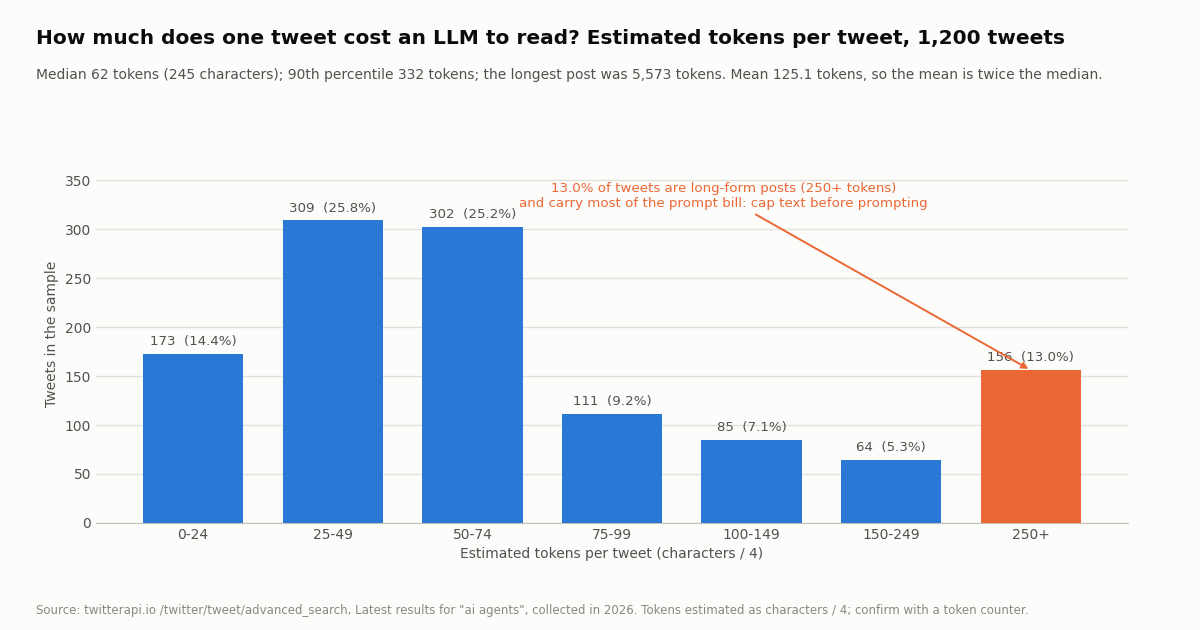
Second, a since_time: operator plus a 120-second overlap and a persisted seen set. The search only returns tweets created after the timestamp, so an hourly run reads roughly one hour of tweets, not a fixed page count; the overlap covers indexing delay and the seen set drops what the overlap re-reads. Third, CAP_CHARS = 600: 13.0% of tweets in the sample were long-form posts of 250 or more estimated tokens, and they carried most of the prompt. Capping each tweet at 600 characters touched 29.4% of the filtered tweets and removed 49.1% of the tokens; a 280-character cap would have removed 65.9% but cuts into 57.4% of posts, which is too much of the substance. The first 600 characters of a long post almost always contain its claim.
Reposts need no filter: a Latest search returned none in our sample (retweeted_tweet was present on 0 of 1,200 tweets), which matches what we saw on other studies with from: searches. Quotes (9.2%) are kept, because a quote is a comment and the comment is the point; the quoted text is in quoted_tweet if you want to append it, at a token cost.
The likeCount and author.followers prefix on each line is cheap context that lets the model weigh a post with 400 likes over a post with none without you ranking anything. If you would rather rank yourself, sort the lines by likeCount and keep the top 40; that is a fixed prompt size and a fixed bill.
# Step 1: read the topic with an API key (no X account), then dedupe and shrink.
import os
import requests

API = "https://api.twitterapi.io"
H = {"X-API-Key": os.environ["TWITTERAPI_IO_API_KEY"]}
QUERY = '"ai agents" lang:en -filter:replies'   # the filters alone cut the sample to 58% of the tweets
CAP_CHARS = 600                                 # long-form posts are 13% of tweets but most of the tokens


def fetch_topic(since_time, max_pages=15):
    tweets, cursor = [], None
    for _ in range(max_pages):
        params = {"query": f"{QUERY} since_time:{since_time}", "queryType": "Latest"}
        if cursor:
            params["cursor"] = cursor
        r = requests.get(f"{API}/twitter/tweet/advanced_search", headers=H, params=params, timeout=30)
        r.raise_for_status()
        body = r.json()                      # top-level: tweets[], has_next_page, next_cursor
        page = body.get("tweets") or []
        tweets.extend(page)
        if not page or not body.get("has_next_page") or not body.get("next_cursor"):
            break
        cursor = body["next_cursor"]
    return tweets


def prepare(tweets, seen):
    """seen is a set of tweet ids persisted between runs."""
    lines = []
    for t in tweets:
        if t["id"] in seen or t.get("isReply") or t.get("retweeted_tweet"):
            continue
        seen.add(t["id"])
        text = " ".join((t.get("text") or "").split())[:CAP_CHARS]
        a = t.get("author") or {}
        lines.append(f"- [{t.get('likeCount', 0)} likes, {a.get('followers', 0)} followers] {text}")
    return lines
Step 2: build the prompt and call the model (Anthropic SDK, with an OpenAI-compatible variant)
The prompt is the system instruction plus the prepared lines. The system text does the real work: it fixes the format (one post, under 270 characters, which leaves room for the length check to pass), bans the things the rules check will reject anyway (@mentions, links, hashtags), forbids quoting individuals, and gives the model an explicit escape hatch, NOTHING_NEW, so it never has to invent a digest for a quiet hour. Models follow an instruction to say nothing far better than an instruction to be interesting.
client.messages.create(model="claude-sonnet-5-5", max_tokens=300, system=SYSTEM, output_config={"effort": "low"}, messages=[...]) is the whole call. max_tokens=300 is a hard ceiling that is plenty for one post; effort: low tells the model not to spend reasoning tokens on a summarization task. The response's content is a list of blocks, so the code joins the text blocks and strips. Always check stop_reason: a value of refusal means a safety classifier declined and there is no text to post. resp.usage.input_tokens and output_tokens are your bill, and logging them is how you will know whether the cap and filters are working.
OpenAI-compatible variant. The same prompt runs through the openai package with client = OpenAI() (or OpenAI(base_url=..., api_key=...) for any host that speaks that protocol, including local model servers) and client.chat.completions.create(model=..., max_tokens=300, messages=[{"role": "system", "content": SYSTEM}, {"role": "user", "content": prompt}]); the text is resp.choices[0].message.content. Nothing else in the pipeline changes, which is the point of keeping the model behind one function.
Prompt caching is not worth it here. The system prompt is about 90 tokens and the tweet lines change every hour, so there is no stable prefix long enough to cache (Anthropic's minimum cacheable prefix is in the thousands of tokens for current models). What is worth it: the hourly prompt in our sample was a median of 33,102 tokens with the filters and no cap, and about 16,301 with the 600-character cap. At $2 per million input tokens that is the difference between about $1.59 and $0.78 a day. The cap is the cost control; the model choice is second.
# Step 2: build the prompt and call the model. Anthropic Python SDK (pip install anthropic).
import anthropic

SYSTEM = (
    "You write a single X post that digests what developers said about a topic in the last hour. "
    "Plain English, no hashtags, no @mentions, no links, no emoji, no quoting individual users, "
    "under 270 characters. Name concrete things (tools, releases, arguments), not vibes. "
    "If the tweets contain nothing new or notable, answer exactly: NOTHING_NEW"
)


def digest(lines, topic):
    client = anthropic.Anthropic()                       # reads ANTHROPIC_API_KEY
    prompt = f"Tweets from the last hour about {topic}:\n\n" + "\n".join(lines)
    resp = client.messages.create(
        model="claude-sonnet-5-5",
        max_tokens=300,
        system=SYSTEM,
        output_config={"effort": "low"},
        messages=[{"role": "user", "content": prompt}],
    )
    if resp.stop_reason == "refusal":                    # declined by safety classifiers: post nothing
        return None, resp.usage
    text = "".join(b.text for b in resp.content if b.type == "text").strip()
    return text, resp.usage                              # usage.input_tokens / output_tokens -> your bill


# Same prompt through an OpenAI-compatible client instead (pip install openai):
#   from openai import OpenAI
#   client = OpenAI()                                     # or OpenAI(base_url=..., api_key=...) for a compatible host
#   resp = client.chat.completions.create(model=MODEL_NAME, max_tokens=300,
#       messages=[{"role": "system", "content": SYSTEM}, {"role": "user", "content": prompt}])
#   text = resp.choices[0].message.content.strip()
Step 3: review before posting: rules check, human review mode, and the other guardrails
A generated post is a liability until something has looked at it. The script has two layers. rules_check is mechanical and always on: it rejects NOTHING_NEW, anything over 280 characters, anything containing @, # or http, and anything whose first 60 characters match a recent post (models repeat themselves on slow news days). --review is the human layer: the post is printed and nothing goes out until someone types y. Run in --review mode for the first week, read what the model produces, tighten the system prompt, and only then let it post unattended, if at all.
Rate caps. MAX_POSTS_PER_DAY = 24 is enforced from the persisted state, not from memory, so a crash loop cannot post twenty times in a minute. One post an hour is a human cadence; if you want more topics, run more accounts with one bot each rather than one account that posts every five minutes, and label each one as automated.
No DMs, no likes, no follows. The write endpoints can like, retweet, follow and message, and none of them belong in a content bot. Automated likes and follows are what X's automation rules describe as amplification, and automated messages to people who did not ask are what makes a bot reportable. The scripts on this page call exactly one write endpoint, create_tweet_v2.
Opt-outs. For the persona variant, keep a list of handles that asked not to be replied to and check it before drafting; honor it forever. Also skip any post that is itself a reply, and never reply twice to the same post or in the same thread: one reply per post is the line the auto-reply guide draws, and it applies here too.
The Automated label and the bio. Label the account as automated in its settings and say in the bio what it posts and who runs it. The label is a requirement of the automation rules, and in practice it is also what makes readers tolerate a bot: nobody is fooled, so nobody is annoyed.
Secrets. login_cookies act as the account. Treat them like the password: environment variable or secret store, never a repository, never a log line. The script stores them in the state file next to the seen-ids; put that file somewhere only the bot can read.
Step 4: post as the account through a user_login_v2 session
Posting is two endpoints. POST /twitter/user_login_v2 takes user_name, email, password, the optional totp_secret (the base32 seed of the account's 2FA, not a six-digit code; the documentation says enabling 2FA is highly recommended because cookies obtained without it may be faulty) and a required proxy in the form http://user:pass@host:port, which should be a residential proxy you supply. It returns login_cookies, status and message, and costs $0.10. The cookies from user_login_v2 only work with the _v2 write endpoints, such as create_tweet_v2.
POST /twitter/create_tweet_v2 takes login_cookies, tweet_text and the same proxy; reply_to_tweet_id makes it a reply, attachment_url (the URL of another post) makes it a quote, community_id posts into a community, media_ids attaches media uploaded through /twitter/upload_media_v2, and is_note_tweet: true allows more than 280 characters on a Premium account. The response is tweet_id, status and message. It costs $0.002 per HTTP 200 call, whether or not X ultimately shows the post, so the length and content checks run before the call, not after.
The post() function in the full script re-logs-in once if a post comes back with a non-success status, because sessions expire, and then stops rather than retrying in a loop. A failing post is a signal about the account, not a transient error, and the right response is a human looking at it. Keep the proxy constant between the login and the posts: the session was created from that network identity.
Expect the posts to carry X's Automated label when you set it on the account, and expect X's own rate limits on the account to apply as they would to a person typing. The hourly cadence here is far below any of them; the cap exists so a bug cannot test them.
# Step 4: post as the bot's own account. One login ($0.10) returns login_cookies; each post is $0.002.
import os
import requests

API = "https://api.twitterapi.io"
H = {"X-API-Key": os.environ["TWITTERAPI_IO_API_KEY"]}
PROXY = os.environ["X_PROXY"]        # required on both calls: a residential proxy you supply


def login():
    r = requests.post(f"{API}/twitter/user_login_v2", headers=H, json={
        "user_name": os.environ["X_USER"],
        "email": os.environ["X_EMAIL"],
        "password": os.environ["X_PASSWORD"],
        "totp_secret": os.environ.get("X_TOTP_SECRET", ""),   # base32 seed; the docs strongly recommend 2FA
        "proxy": PROXY}, timeout=120)
    r.raise_for_status()
    body = r.json()                   # {"login_cookies": "...", "status": "success" | "error", "message": "..."}
    if body.get("status") != "success":
        raise RuntimeError(body.get("message"))
    return body["login_cookies"]


def create_post(login_cookies, text, reply_to=None):
    payload = {"login_cookies": login_cookies, "tweet_text": text, "proxy": PROXY}
    if reply_to:
        payload["reply_to_tweet_id"] = reply_to          # the reply-drafting variant uses this
    r = requests.post(f"{API}/twitter/create_tweet_v2", headers=H, json=payload, timeout=60)
    r.raise_for_status()
    body = r.json()                   # {"tweet_id": "...", "status": "...", "message": "..."}
    if body.get("status") != "success":
        raise RuntimeError(body.get("message"))          # expired cookies -> login() again, once
    return body["tweet_id"]
What an LLM digest bot would actually have to read: 1,200 tweets measured
We asked /twitter/tweet/advanced_search for the Latest tweets matching the bare phrase "ai agents", with no language or reply filter so that both could be measured, and followed next_cursor for 60 pages: 1,200 tweets, 0 duplicates across page boundaries, 1,200 unique tweets spanning 4.0 hours, 60 requests, $0.18 in reads.
Volume. About 299 tweets an hour on average; the 3 full clock hours inside the window held 243, 289 and 325 tweets. For a bot that is the difference between a fixed page count and a time cursor: a bot that reads "the latest 100" every hour would miss two thirds of the topic, while one that reads since its last run gets all of it and pays for all of it, about $1.08 a day at 15 credits per tweet.
Kind. 39.2% of the matches were replies, 9.2% quotes, 52.2% original posts and 0% reposts (a Latest search does not return them). A digest wants the originals and the quotes; -filter:replies removes the replies at the query, which also removes their data cost. 48.0% of tweets mentioned someone and 16.5% used a hashtag.
Length and tokens. Median 245 characters, mean 499, 90th percentile 1,326, maximum 22,290; 39.2% of tweets were over 280 characters, because long-form posts return their full text in text. Estimated as characters / 4, that is a median of 62 tokens, a mean of 125, a 90th percentile of 332 and a maximum of 5,573. The mean is twice the median: a small share of long posts carries a large share of the prompt.
Links, media, language. 31.7% of tweets carried at least one URL and 30.0% had media (279 photos, 76 videos, 8 GIFs across the sample). A text-only digest ignores both, so the model never sees what a third of the posts were about; if that matters for your topic, append the URL's domain to the line. 95.8% of tweets were tagged en, so for this topic a lang:en filter removes little; for a product name that is also a word in another language it removes a lot more.
Prompt tokens per digest are the tweets in each full clock hour plus a fixed 400-token instruction. All token figures use the characters / 4 heuristic, which over-counts URLs and under-counts non-Latin scripts; the provider's token counting endpoint gives exact numbers for your own prompts.
What it costs per day: data, model and posting, next to the official X API
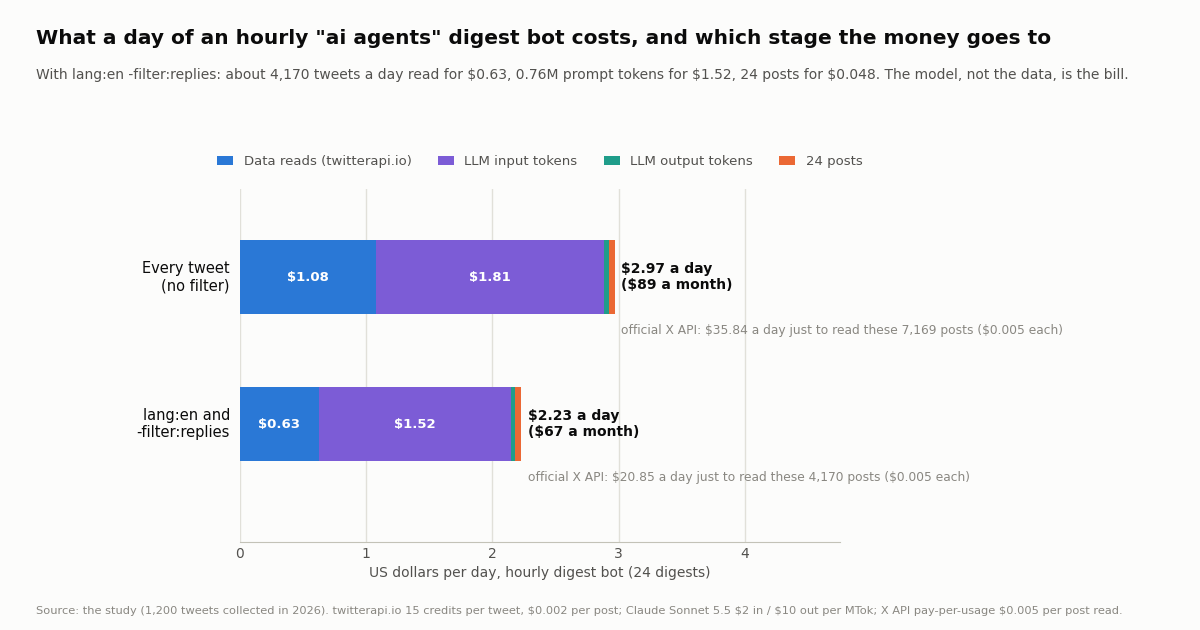
Multiply the sample out to a day of an hourly digest bot and the bill has four lines. Data: tweets per hour x 24 at 15 credits each ($0.15 per 1,000), with the 15-credit minimum per request as the floor for a quiet hour. Model input: the hourly prompt x 24 at $2 per million tokens. Model output: 150 tokens per digest (one post plus slack) x 24 at $10 per million. Posting: 24 x $0.002. The one-time $0.10 login is not in the daily figure.
Two things stand out. The model, not the data, is the bill: with the filters, $1.52 of the $2.23 is prompt tokens and $0.63 is reads, so the 600-character cap (which would take the input line to about $0.78) is worth more than any data-side optimization. And the comparison with the official route is lopsided on the read side: X's pay-per-usage rate card (docs.x.com/x-api/getting-started/pricing) prices a post read at $0.005, against $0.15 per 1,000 here, so $5 versus $0.15 per 1,000 tweets, about 33x, and reading this one filtered feed would cost $20.85 a day on the official rate before any model is involved. On the write side the gap is smaller: $0.015 per post created there ($0.20 if the post contains a URL) against $0.002 here, 7.5x, which for 24 posts a day is $0.36 against $0.048. The official route also needs a paid developer account and pay-per-usage is capped at 3 million post reads a month; new accounts get $1 in free credits on twitterapi.io if they pass the automatic bot check (one per person or network, expiring after 31 days), and purchased credits never expire. Plans with bonus credits are on /pricing.
A smaller model changes the middle line and nothing else: at Anthropic's listed $1 per million input tokens for claude-haiku-4-5, the filtered input line halves to about $0.76; at claude-opus-5-5's $4 it doubles. Batch requests at half price are not useful here because a digest is latency-bound to its hour. Run --dry-run for a day with usage logging before choosing; the quality difference on a 270-character summary is something you should read, not assume.
How we collected this
Question: how much would an LLM digest bot for a developer topic actually have to read each hour, what kind of tweets are they, how long are they in characters and estimated tokens, what share carry links or media, what is the language mix, and what does an hourly digest therefore cost per day in data, model tokens and posting.
Query and window: /twitter/tweet/advanced_search with query="ai agents" and queryType=Latest, no language or reply filter so that both could be measured, followed through next_cursor for 60 pages: 1,200 tweets returned, 1,200 unique, spanning 4.0 hours, collected in 2026 through a rate-limited, read-only client. 60 requests, $0.18 in reads.
Method: per tweet we recorded text length, estimated tokens as characters / 4 (a stated heuristic), whether isReply, retweeted_tweet or quoted_tweet were set, whether entities.urls or extendedEntities.media were present, the lang field and the UTC hour. Per-hour figures use the 3 full clock hours inside the window. Prompt tokens per digest are the hour's tweet tokens plus a fixed 400-token instruction. Costs use twitterapi.io's published prices (15 credits per tweet, 15-credit minimum per request, $0.002 per create_tweet_v2 call), Anthropic's listed price for claude-sonnet-5-5 ($2 per million input, $10 per million output tokens) and X's published pay-per-usage rate card ($0.005 per post read, $0.015 per post created).
What the sample cannot show: 4.0 hours of one topic is a snapshot, not a day: volume for "ai agents" by hour of day, by weekday, or during a product launch will differ, and other topics have very different reply and language shares. Token counts are estimates; real tokenizers vary by model and by script. The output-token figure (150 per digest) is an assumption, not a measurement, and so is the fixed instruction size. We did not post anything; the write-side prices and request shapes come from the endpoint documentation, and the account-side effects (labels, rate limits) from X's published rules.
Aggregates only. The authors of topic-search tweets are mostly private individuals, so no tweet text, id, URL or author is kept with the study; the raw pages lived in a temporary folder and only derived per-tweet rows (length, estimated tokens, flags, language, hour) and the aggregates are stored with the analysis script and results.
"""ai_twitter_bot.py - an LLM-powered X (Twitter) digest bot: read a topic through twitterapi.io,
let Claude write a post of at most 280 characters, review it, post it as your account once an hour.

    pip install requests anthropic
    export TWITTERAPI_IO_API_KEY=...        # twitterapi.io dashboard; reads need no X account
    export ANTHROPIC_API_KEY=...            # Anthropic console
    export X_USER=... X_EMAIL=... X_PASSWORD=... X_TOTP_SECRET=...   # the bot's own X account
    export X_PROXY=http://user:pass@host:port                        # residential proxy you supply
    python ai_twitter_bot.py --dry-run      # read + generate, print, post nothing
    python ai_twitter_bot.py --review       # ask before each post (human review mode)
    python ai_twitter_bot.py                # one digest per run; schedule hourly with cron

Costs per run: 15 credits per tweet read ($0.15 per 1,000; a full page of 20 is $0.003), Claude
Sonnet 5.5 at $2 per million input tokens and $10 per million output tokens, one
/twitter/create_tweet_v2 call at $0.002 (billed per HTTP 200 call). The login is $0.10, once;
the cookies are reused until X invalidates them. The posts carry X's Automated label.
"""
import argparse
import json
import os
import sys
import time
from datetime import datetime, timezone

import anthropic
import requests

API = "https://api.twitterapi.io"
H = {"X-API-Key": os.environ["TWITTERAPI_IO_API_KEY"]}
QUERY = os.environ.get("X_QUERY", '"ai agents" lang:en -filter:replies')
MODEL = "claude-sonnet-5-5"
STATE_FILE = "ai-bot-state.json"
MAX_PAGES = 15          # 15 x 20 = 300 tweets per run at most ($0.045); our sample saw ~174/h after filters
CAP_CHARS = 600         # long-form posts dominate the token bill; a 600-character cap saved 49% in our sample
MAX_POSTS_PER_DAY = 24  # one digest an hour: a human pace, which is what X's automation rules ask for

SYSTEM = (
    "You write a single X post that digests what developers said about a topic in the last hour. "
    "Plain English, no hashtags, no @mentions, no links, no emoji, no quoting individual users, "
    "under 270 characters. Name concrete things (tools, releases, arguments), not vibes. "
    "If the tweets contain nothing new or notable, answer exactly: NOTHING_NEW"
)


def load_state():
    if os.path.exists(STATE_FILE):
        with open(STATE_FILE) as f:
            return json.load(f)
    return {"since_time": int(time.time()) - 3600, "seen": [], "posted": [], "login_cookies": None}


def save_state(s):
    s["seen"] = s["seen"][-5000:]
    s["posted"] = s["posted"][-200:]
    with open(STATE_FILE, "w") as f:
        json.dump(s, f)


# ------------------------------------------------ 1. read: API key only, no X account involved
def fetch_topic(since_time):
    """Latest tweets matching QUERY created after since_time; follows next_cursor."""
    tweets, cursor = [], None
    for _ in range(MAX_PAGES):
        params = {"query": f"{QUERY} since_time:{since_time}", "queryType": "Latest"}
        if cursor:
            params["cursor"] = cursor
        r = requests.get(f"{API}/twitter/tweet/advanced_search", headers=H, params=params, timeout=30)
        r.raise_for_status()
        body = r.json()
        page = body.get("tweets") or []
        tweets.extend(page)
        if not page or not body.get("has_next_page") or not body.get("next_cursor"):
            break
        cursor = body["next_cursor"]
    return tweets


# ------------------------------------------------ 2. dedupe and shrink before the model sees anything
def prepare(tweets, seen):
    lines = []
    for t in tweets:
        if t["id"] in seen or t.get("isReply") or t.get("retweeted_tweet"):
            continue
        seen.add(t["id"])
        text = " ".join((t.get("text") or "").split())[:CAP_CHARS]   # collapse whitespace, cap length
        a = t.get("author") or {}
        lines.append(f"- [{t.get('likeCount', 0)} likes, {a.get('followers', 0)} followers] {text}")
    return lines


# ------------------------------------------------ 3. generate
def digest(lines):
    client = anthropic.Anthropic()                      # reads ANTHROPIC_API_KEY
    topic = QUERY.split(" lang:")[0]
    prompt = f"Tweets from the last hour about {topic}:\n\n" + "\n".join(lines)
    resp = client.messages.create(
        model=MODEL,
        max_tokens=300,                                 # the output is one short post
        system=SYSTEM,
        output_config={"effort": "low"},                # a digest does not need deep reasoning
        messages=[{"role": "user", "content": prompt}],
    )
    if resp.stop_reason == "refusal":                   # safety classifiers can decline; post nothing
        return None, resp.usage
    text = "".join(b.text for b in resp.content if b.type == "text").strip()
    return text, resp.usage


# ------------------------------------------------ 4. review: rules first, a human if you want one
def rules_check(text, posted):
    if not text or text == "NOTHING_NEW":
        return "nothing new"
    if len(text) > 280:
        return "over 280 characters"
    if "@" in text or "http" in text.lower() or "#" in text:
        return "contains a mention, link or hashtag"
    if any(text[:60] == p[:60] for p in posted):
        return "near-duplicate of a recent post"
    return None


# ------------------------------------------------ 5. post as the account
def login():
    """One call, $0.10. The cookies act as this account: keep them as secret as the password."""
    r = requests.post(f"{API}/twitter/user_login_v2", headers=H, json={
        "user_name": os.environ["X_USER"], "email": os.environ["X_EMAIL"],
        "password": os.environ["X_PASSWORD"], "totp_secret": os.environ.get("X_TOTP_SECRET", ""),
        "proxy": os.environ["X_PROXY"]}, timeout=120)
    r.raise_for_status()
    body = r.json()
    if body.get("status") != "success":
        raise RuntimeError(body.get("message"))
    return body["login_cookies"]


def post(text, state):
    """$0.002 per HTTP 200 call; the post appears as the logged-in account, with the Automated label."""
    if not state.get("login_cookies"):
        state["login_cookies"] = login()
    body = {}
    for _ in range(2):
        r = requests.post(f"{API}/twitter/create_tweet_v2", headers=H, json={
            "login_cookies": state["login_cookies"], "tweet_text": text,
            "proxy": os.environ["X_PROXY"]}, timeout=60)
        r.raise_for_status()
        body = r.json()
        if body.get("status") == "success":
            return body.get("tweet_id")
        state["login_cookies"] = login()                 # the session can expire: re-login once, then stop
    raise RuntimeError(body.get("message"))


def main():
    ap = argparse.ArgumentParser()
    ap.add_argument("--dry-run", action="store_true", help="generate and print, never post")
    ap.add_argument("--review", action="store_true", help="ask before posting")
    args = ap.parse_args()
    state = load_state()
    today = datetime.now(timezone.utc).strftime("%Y-%m-%d")
    if sum(1 for p in state["posted"] if p.startswith(today)) >= MAX_POSTS_PER_DAY:
        sys.exit("daily post cap reached")
    started = int(time.time())
    seen = set(state["seen"])
    lines = prepare(fetch_topic(state["since_time"] - 120), seen)   # 120 s overlap; seen-ids remove duplicates
    state["seen"], state["since_time"] = list(seen), started
    print(f"{len(lines)} tweets after filters", file=sys.stderr)
    if len(lines) < 5:
        save_state(state)
        sys.exit("too few tweets for a digest")
    text, usage = digest(lines)
    print(f"tokens in={usage.input_tokens} out={usage.output_tokens}", file=sys.stderr)
    why = rules_check(text, [p.split(" ", 1)[1] for p in state["posted"]])
    if why:
        save_state(state)
        sys.exit(f"not posting: {why}")
    print(text)
    if args.dry_run:
        save_state(state)
        return
    if args.review and input("post this? [y/N] ").strip().lower() != "y":
        save_state(state)
        sys.exit("skipped by reviewer")
    tweet_id = post(text, state)
    state["posted"].append(f"{today} {text}")
    save_state(state)
    print(f"posted {tweet_id}", file=sys.stderr)


if __name__ == "__main__":
    main()
Questions readers ask
Do I need an X developer account to build an AI Twitter bot?
Not for the reading side: twitterapi.io reads need only an API key in the X-API-Key header, no X app, OAuth or developer tier, and no X account. For posting you need an X account for the bot itself (its username, email, password and ideally its 2FA seed), which /twitter/user_login_v2 turns into login_cookies for $0.10; each post is then $0.002 through /twitter/create_tweet_v2. The official X API alternative requires a paid developer account and charges $0.005 per post read and $0.015 per post created.
Is an AI Twitter bot allowed under X's rules?
Automation is allowed with conditions, set out in X's automation rules at help.x.com/en/rules-and-policies/x-automation: label the account as automated, do not send unsolicited mentions or replies in bulk, do not automate likes or follows, and do not post duplicate content across accounts. A digest bot posting once an hour under its own labeled account with no @mentions fits; a bot that replies to strangers who use a keyword does not. The calls act as your account, so X can rate-limit, lock or suspend it if the pace or content looks wrong.
How many tokens does a tweet cost an LLM to read?
In our sample of 1,200 tweets about "ai agents", the median tweet was 245 characters, about 62 tokens at the characters / 4 heuristic, but the mean was 125 tokens because 13.0% were long-form posts of 250 tokens or more (the longest about 5,573). An hour of the filtered feed was about 33,102 prompt tokens; capping each tweet at 600 characters cut that by about 49.1%.
What does an AI Twitter bot cost to run per day?
For an hourly digest of a topic the size of "ai agents" with lang:en -filter:replies, about $2.23 a day: $0.63 for about 4,170 tweets read at 15 credits each, $1.52 for about 0.76M prompt tokens on Claude Sonnet 5.5 at $2 per million, $0.036 for output, and $0.048 for 24 posts at $0.002, plus a one-time $0.10 login. A quieter topic or a smaller model costs proportionally less; the model input is the largest line.
Can I use ChatGPT or an open model instead of Claude?
Yes. The model sits behind one function. Replace the Anthropic call with the openai package's client.chat.completions.create (pointing base_url at any OpenAI-compatible host, including local model servers) and read choices[0].message.content; the read, review and post stages do not change. Keep the same system prompt, the same NOTHING_NEW escape hatch and the same rules check.
Why does the bot use advanced_search instead of the user timeline endpoint?
Because a topic bot wants everything said about a topic since its last run, and advanced_search with a since_time: operator returns exactly that, billed per tweet returned (an hour that produces nothing costs the $0.00015 minimum). /twitter/user/last_tweets is the right call for the persona variant, which watches a few named accounts and reads their 20 newest posts per page at $0.003.
Should the bot post automatically or should a human approve each post?
Start with human approval (the script's --review flag) and read a week of output before letting anything post unattended. Keep the mechanical rules check on in both modes: under 280 characters, no @mentions, links or hashtags, no near-duplicates, a daily cap. For reply-drafting bots keep a human in the loop permanently; for a digest under the bot's own account, unattended posting is reasonable once the prompt is tuned.
What happens when the login session expires?
A create_tweet_v2 call returns a non-success status instead of a tweet_id. The script calls /twitter/user_login_v2 once more ($0.10), retries the post once, and stops if that fails too, because repeated failures are a signal about the account rather than a transient error. Use the same proxy for the login and the posts, enable 2FA on the bot account and pass its totp_secret, and store login_cookies as carefully as the password.
Continue
- twitterapi.io API reference: create tweet v2 (login_cookies, tweet_text, proxy, reply_to_tweet_id, attachment_url, media_ids; 200 credits per call)
- twitterapi.io API reference: user login v2 (user_name, email, password, totp_secret, proxy; returns login_cookies; 10,000 credits)
- twitterapi.io API reference: advanced search (query, queryType, cursor; tweets[], has_next_page, next_cursor)
- Anthropic pricing: Claude Sonnet 5.5 $2 per M input / $10 per M output tokens, Haiku 4.5 $1 / $5, Opus 5.5 $4 / $20
- Anthropic Python SDK (pip install anthropic): client.messages.create, content blocks, stop_reason, usage
- X automation rules: Automated label, no unsolicited bulk mentions or replies, no automated likes or follows
- X API pay-per-usage pricing ($0.005 per post read, $0.015 per post created, $0.20 with a URL), the official and pricier route
- What Twitter (X) bots are and how they work
- Twitter (X) auto reply: what the rules allow and how to build a mention responder
- Twitter (X) chatbot: conversational bots on X
- How to use Claude with the Twitter (X) API
- Connect ChatGPT to Twitter (X) via API
- Twitter (X) automation: the complete guide
- Twitter (X) to Discord bot: polling and push patterns
- Pay-per-call pricing
- 01X Communities API: How Do You Read Community Posts and Post to a Community?
- 02Twitter (X) Search Not Working? The October 2026 list: Search Outage, Other Causes and Fixes
- 03How Will You Use the Twitter (X) API or Twitter Data? Answering the Developer Sign-Up Question
- 04Twitter (X) Welcome Message: Is the API Still Alive, and How to Send One in 2026
- 05xurl: the X API CLI for Twitter (X) — Install, Auth, Commands and What Each Read Costs
- 06How to Build a Twitter (X) to Discord Bot in 2026
- 07How to Use the Vercel AI SDK with the Twitter (X) API
- 08Count Tweets — Twitter (X) API Programmatic Guide
Stop reading. Start building.
Starter credits cover real testing on real data. Google sign-in, no card, no application queue.
Get an API key