How to Build a Twitter (X) to Discord Bot in 2026
This guide is about one job: new posts from X accounts (or a keyword search) you choose, appearing in a Discord channel a minute or so after they go live, from code you run and can change. It is not about what X bots are or how to automate an X account; that is our guide to Twitter bots. And it is not about the hosted Discord bots (MEE6's X feed sits behind its premium tier, TweetShift and QTweet are others) or the IFTTT and Zapier recipes you will find in most search results. Those are fine if you want zero code and accept their cadence, formatting and pricing. If you want to own all three, read on.
You will create a Discord webhook and test it with curl, then build the X side two ways: a polling script (Python, with a short Node variant) that asks the twitterapi.io search endpoint for posts newer than its last run and remembers what it already relayed, and a push setup where a filter rule sends matches to a small Flask receiver that forwards them to Discord. No X developer account is needed for either.
Then the part no other guide does: we pulled the 200 most recent posts from each of 10 organization accounts that typically end up in Discord feeds (@vercel, @github, @Docker, @CloudflareDev, @OpenAIDevs, @nvidia, @PlayStation, @Xbox, @discord, @NASA) in 2026 and measured how often such a feed would actually fire, how long the gaps are, what share of 60-second and 5-minute polls would be empty, when in the day posts land, and how many would not fit in a Discord message. Every design decision in the code, from the polling interval to the truncation rule, comes from one of those numbers.
What the bot does, and which path to pick
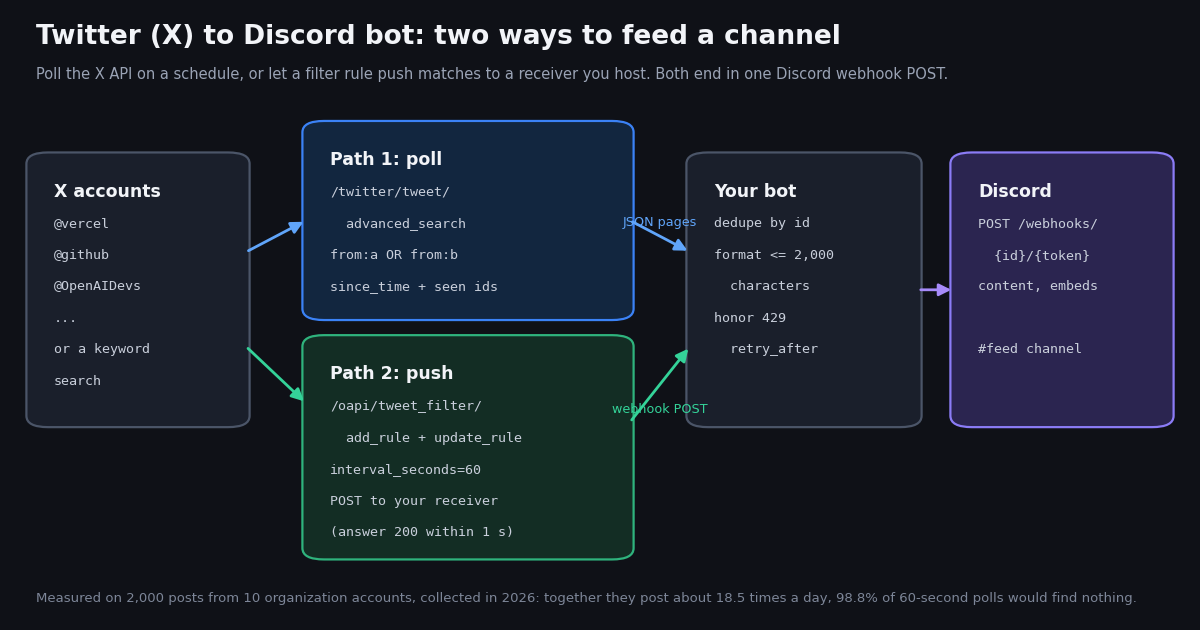
The bot has four parts: a source of new tweets, a memory of which tweets it already posted, a formatter that turns a tweet into a Discord message, and a single HTTP POST to a Discord webhook URL. The memory and the formatter are a few lines each. The POST is one call. The only real decision is the source, and there are two reasonable ones.
Path 1, polling. A script runs every minute or every five minutes, asks the X API for posts newer than its last run, and relays what is new. On twitterapi.io the right call is /twitter/tweet/advanced_search with a query such as (from:vercel OR from:github) since_time:1760000000 and queryType=Latest, because it returns only the posts you have not seen (an idle pass returns an empty list and costs the $0.00015 minimum). A seen set of tweet IDs catches the overlap you deliberately re-read at the boundary.
Path 2, push. You register a filter rule once (/oapi/tweet_filter/add_rule, the same from: syntax, checked every interval_seconds), point your account's webhook URL at an HTTPS endpoint you host, and the API POSTs matching tweets to it as they are found. Your receiver answers 200 within a second and forwards each tweet to Discord. Nothing to schedule, but something to host.
Rule of thumb from the data below: these accounts post 0.3 to 5 times a day each, so a 60-second poll is already far more often than anything happens. Start with Path 1 at 60 seconds (or 5 minutes if a few minutes of delay is fine, which cuts the bill by about 80%), and move to Path 2 when you want sub-minute delivery for many rules without running a scheduler. If what you watch is a fixed list of accounts and seconds matter, the Twitter Stream product pushes their posts to a webhook on a flat monthly plan instead of per call.
Step 1: create the Discord webhook and send a test message
In Discord, open the target channel's settings, go to Integrations, create a webhook and copy its URL. The URL has the form https://discord.com/api/webhooks/<id>/<token>, and per Discord's webhook documentation, executing a webhook is POST /webhooks/{webhook.id}/{webhook.token} with no bot token and no OAuth: the token in the URL is the credential. Treat it like a password (environment variable, never a repository).
What you can send. The JSON body needs at least one of content, embeds, components, file or poll. content is plain text up to 2,000 characters. embeds is an array of up to 10 embed objects; an embed's description can hold 4,096 characters, its title 256, with a combined cap of 6,000 characters across all embeds in one message (Discord's message documentation). username and avatar_url override the webhook's display name and avatar per message, which is a neat way to show the X account's name on each post. allowed_mentions controls what the message is allowed to ping; {"parse": []} suppresses every mention, which you want for a feed that relays other people's text. flags is a bitfield; SUPPRESS_EMBEDS is 1 << 2 and SUPPRESS_NOTIFICATIONS is 1 << 12.
Two query parameters matter. wait=true makes Discord wait for the message to be created and return it as JSON (useful while debugging); without it a success is 204 No Content. thread_id posts into a thread of the webhook's channel instead of the channel itself.
Run the smoke test below before writing any X code. If the first curl prints 204, the Discord half is done.
# 1. Channel settings > Integrations > Webhooks > New Webhook > Copy Webhook URL
export DISCORD_WEBHOOK_URL="https://discord.com/api/webhooks/<id>/<token>"

# 2. Smoke test: 204 means the message is in the channel
curl -s -o /dev/null -w "%{http_code}\n" -H "Content-Type: application/json" \
  -d '{"content": "feed test", "allowed_mentions": {"parse": []}}' "$DISCORD_WEBHOOK_URL"

# 3. ?wait=true returns the created message as JSON (id, channel_id, content, ...)
curl -s -H "Content-Type: application/json" -d '{"content": "feed test 2"}' "$DISCORD_WEBHOOK_URL?wait=true"

# 4. An embed instead of plain content: description up to 4,096 characters, 10 embeds per message
curl -s -o /dev/null -w "%{http_code}\n" -H "Content-Type: application/json" \
  -d '{"username": "X feed", "embeds": [{"title": "@vercel posted", "description": "post text here", "url": "https://x.com/vercel"}]}' \
"$DISCORD_WEBHOOK_URL"Step 2 (Path 1): poll the X API with a since_time cursor and a seen-ids set
The full Python bot is at the end of this page; this section explains its three decisions, and gives the same bot in Node.
Decision 1: search, not the timeline endpoint. The obvious call for "new posts from @vercel" is /twitter/user/last_tweets, but it returns a full page of the account's latest 20 posts on every call, and tweet endpoints bill per tweet returned: 15 credits each, so a page is $0.003 whether or not anything is new. Polled every 60 seconds that is 1,440 pages, $4.32 a day, per account. /twitter/tweet/advanced_search with a since_time: operator returns only posts created after that Unix timestamp. In our sample 98.8% of 60-second windows held nothing new for the whole 10-account feed, so almost every pass returns an empty list and costs the $0.00015 minimum: $0.216 a day for the floor, plus $0.00015 per new post actually returned. Use last_tweets once, for the initial backfill, if you want the channel to start with history.
Decision 2: one query for all accounts. from: operators can be joined with OR, so ten accounts are one request: (from:vercel OR from:github OR from:Docker ...) since_time:1760000000. Keep the whole query under 512 characters, which is roughly 25 handles; beyond that, split into several queries per pass. A keyword feed is the same call with a different query, for example "vercel" lang:en -filter:replies min_faves:20, which is what the X_QUERY variable in the script switches to.
Decision 3: overlap plus a seen set, not a precise cursor. Clock skew and indexing delay mean a post created at 12:00:59 can show up in the search a little later. The script therefore re-reads the last 120 seconds before its previous run (OVERLAP) and drops anything whose ID is already in state["seen"], which it keeps at 2,000 IDs in a small JSON file. The overlap costs nothing when idle (the same minimum charge) and makes missed posts a non-issue. New posts are sorted oldest first before posting so the channel reads in order.
Scheduling. python twitter_to_discord.py does one pass and exits, so a crontab line * * * * * cd /srv/feed && python twitter_to_discord.py is the 60-second version and */5 * * * * the 5-minute one; --loop 60 keeps it running in a container instead. GitHub Actions also works for the 5-minute version (its schedule granularity is 5 minutes), with the state file committed or cached between runs.
Reposts. When we compared a from: search with the timeline endpoint for the same accounts and week on another study, the search returned every post except reposts. Reposts were 4.6% of this sample, so most feeds will not miss them; if yours must include them, poll /twitter/user/last_tweets for that one account and pay the $0.003 page, or run the Path 2 rule and see what it delivers.
The Node version below is the same algorithm in about 50 lines with Node 18's built-in fetch, one pass per run; schedule it the same way.
// twitter-to-discord.mjs - Path 1 in Node 18+ (built-in fetch, no dependencies). One pass per run.
//   TWITTERAPI_IO_API_KEY=... DISCORD_WEBHOOK_URL=https://discord.com/api/webhooks/<id>/<token> node twitter-to-discord.mjs
import fs from "node:fs";

const API = "https://api.twitterapi.io";
const WATCH = ["vercel", "github", "OpenAIDevs"];
const STATE = "discord-feed-state.json";
const sleep = (ms) => new Promise((r) => setTimeout(r, ms));

const state = fs.existsSync(STATE)
  ? JSON.parse(fs.readFileSync(STATE, "utf8"))
  : { since_time: Math.floor(Date.now() / 1000) - 3600, seen: [] };
const started = Math.floor(Date.now() / 1000);

// only posts newer than since_time come back; re-read 120 s of overlap and dedupe by id
const query = `(${WATCH.map((h) => `from:${h}`).join(" OR ")}) since_time:${state.since_time - 120}`;
const res = await fetch(`${API}/twitter/tweet/advanced_search?` + new URLSearchParams({ query, queryType: "Latest" }), {
  headers: { "X-API-Key": process.env.TWITTERAPI_IO_API_KEY },
});
if (!res.ok) throw new Error(`twitterapi.io HTTP ${res.status}`);
const body = await res.json();

const seen = new Set(state.seen);
const fresh = (body.tweets ?? []).filter((t) => !seen.has(t.id)).reverse(); // API is newest first

function format(t) {
  const header = `**${t.author?.name ?? ""}** (@${t.author?.userName ?? ""})`;
  const text = t.retweeted_tweet?.text ?? t.text ?? "";
  const url = t.url ?? t.twitterUrl ?? "";
  const room = 2000 - header.length - url.length - 6; // Discord content limit; cut the text, keep the link
  const cut = text.length > room ? text.slice(0, room) + " ..." : text;
  return `${header}\n${cut}\n${url}`;
}

for (const t of fresh) {
  for (let attempt = 0; attempt < 5; attempt++) {
    const r = await fetch(process.env.DISCORD_WEBHOOK_URL, {
      method: "POST",
      headers: { "Content-Type": "application/json" },
      body: JSON.stringify({ content: format(t), allowed_mentions: { parse: [] } }),
    });
    if (r.status === 429) { const { retry_after } = await r.json(); await sleep(retry_after * 1000 + 100); continue; }
    if (r.status === 404) throw new Error("webhook deleted (404): stop using this URL");
    if (!r.ok) throw new Error(`Discord HTTP ${r.status}`);
    break; // 204 No Content
  }
  state.seen.push(t.id);
  await sleep(2000);
}
state.since_time = started;
state.seen = state.seen.slice(-2000);
fs.writeFileSync(STATE, JSON.stringify(state));
console.error(`${fresh.length} new post(s) relayed`);Step 3 (Path 2): a filter rule that pushes matches to a receiver you host
Path 2 moves the polling to twitterapi.io's side. You create a rule, the API evaluates it every interval_seconds, and each batch of matching tweets is POSTed to the webhook URL configured on your account. Three facts from the endpoint documentation shape the code.
The rule. POST /oapi/tweet_filter/add_rule takes tag (your label, up to 255 characters), value (the filter, same from: and keyword syntax as the search, up to 255 characters, so about 10 to 12 handles per rule) and interval_seconds (how often it is checked: minimum 0.05, maximum 86,400, default 60). It returns rule_id, status and msg. A new rule is not active. You must call POST /oapi/tweet_filter/update_rule with every field again (rule_id, tag, value, interval_seconds) and is_effect: 1. GET /oapi/tweet_filter/get_rules lists what you have; the dashboard can edit rules too.
The push. Each delivery is a JSON POST with event_type ("tweet"; the dashboard's test button sends "test_webhook_url"), rule_id, rule_tag, rule_value, timestamp in milliseconds and a tweets array of the same tweet objects advanced_search returns (id, text, url, createdAt, author.userName, likeCount and so on). The request carries your own API key in an x-api-key header, and there is no HMAC signature, so compare that header with your key in constant time and answer 401 otherwise. The push times out after one second and is not retried: answer 200 first and do the Discord call on a worker thread or queue.
The bill. Every evaluation of the rule costs at least $0.00015 (15 credits), found something or not, and each matched tweet delivered costs $0.00015. A rule checked every 60 seconds therefore has the same $0.216-a-day floor as Path 1 at 60 seconds; at interval_seconds: 5 it is 17,280 checks, $2.59 a day ($77.76 a month), which is what sub-minute delivery costs.
The receiver below is complete: run it once with CREATE_RULE=1 to create and activate the rule, deploy it anywhere with a public HTTPS URL (a small VM, Railway, Render, or a serverless function kept warm so cold starts stay under the one-second budget), and paste that URL into the twitterapi.io dashboard's webhook settings. It imports format_message from the polling script so both paths post identical messages.
"""receiver.py - Path 2: a filter rule pushes matching posts here; we forward them to Discord.

    pip install flask requests
    export TWITTERAPI_IO_API_KEY=...  DISCORD_WEBHOOK_URL=...
    CREATE_RULE=1 python receiver.py     # once: create + activate the rule, then serve
    python receiver.py                   # afterwards: just serve
Set this server's public HTTPS URL as the webhook URL in the twitterapi.io dashboard.
"""
import hmac
import os
import queue
import threading
import time

import requests
from flask import Flask, request

from twitter_to_discord import format_message, post_to_discord   # the polling script on this page

API = "https://api.twitterapi.io"
X_KEY = os.environ["TWITTERAPI_IO_API_KEY"]
H = {"X-API-Key": X_KEY}


def create_rule(tag, value, interval_seconds=60):
    """value: same syntax as advanced search, max 255 characters (about 10-12 from: handles)."""
    r = requests.post(f"{API}/oapi/tweet_filter/add_rule", headers=H,
                      json={"tag": tag, "value": value, "interval_seconds": interval_seconds}, timeout=30)
    r.raise_for_status()
    body = r.json()
    if body.get("status") == "error":
        raise RuntimeError(body.get("msg"))
    rule_id = body["rule_id"]
    # New rules are inactive: update_rule with every field again and is_effect=1
    r = requests.post(f"{API}/oapi/tweet_filter/update_rule", headers=H,
                      json={"rule_id": rule_id, "tag": tag, "value": value,
                            "interval_seconds": interval_seconds, "is_effect": 1}, timeout=30)
    r.raise_for_status()
    return rule_id


app = Flask(__name__)
jobs = queue.Queue()
seen = set()   # overlapping rules can deliver one post twice; use Redis or a table in production


@app.post("/x-to-discord")
def receive():
    # The push carries your own API key in x-api-key (no HMAC signature)
    if not hmac.compare_digest(request.headers.get("x-api-key", ""), X_KEY):
        return "", 401
    jobs.put(request.get_json(silent=True) or {})
    return "", 200     # answer within 1 s; the push is not retried


def worker():
    while True:
        body = jobs.get()
        if body.get("event_type") != "tweet":    # the dashboard's test button sends "test_webhook_url"
            continue
        for t in body.get("tweets") or []:
            if t["id"] in seen:
                continue
            seen.add(t["id"])
            post_to_discord(format_message(t))
            time.sleep(2)


threading.Thread(target=worker, daemon=True).start()

if __name__ == "__main__":
    if os.environ.get("CREATE_RULE"):
        print("rule", create_rule("discord-feed", "from:vercel OR from:github OR from:OpenAIDevs", 60))
app.run(host="0.0.0.0", port=8000)Formatting a tweet for Discord: the 2,000-character limit, mentions and rate limits
Both scripts build the same message: a bold header with the account's display name and handle, the post text, and the post URL on its own line (Discord unfurls a link in content into a preview card, which is why we keep the link whole). The lengths that result come from the study.
Most posts fit easily, a few never will. Across 2,000 posts the median formatted message was 285 characters and the 95th percentile 453. But 466 posts (23.3%) were longer than 280 characters, because long-form posts return their full text in text, and the longest raw text was 5,263 characters. Two posts out of 2,000 (one each from @OpenAIDevs and @discord) produced a formatted message above Discord's 2,000-character limit, 5,335 characters at most. Discord rejects those with a 400, so the formatter cuts the text to the room left after the header and the URL and appends an ellipsis. Never cut the URL: the preview card and the click-through are the feed's value.
If you want more room, use an embed. An embed description holds 4,096 characters, which would have fit every post in this sample but the two longest, and title or author can carry the handle. The trade-off is that embeds do not auto-unfurl the linked post, so you render the text yourself. The curl example in Step 1 shows the shape.
Never let a relayed post ping your server. Tweet text can contain @everyone or @here, and Discord would honor it. allowed_mentions: {"parse": []} tells Discord to parse no mention types at all; both scripts send it on every message. If you do not want push notifications for the feed either, add flags: 4096 (SUPPRESS_NOTIFICATIONS, 1 << 12).
Rate limits. Discord's rate-limit documentation describes per-route limits reported in X-RateLimit-Limit, X-RateLimit-Remaining, X-RateLimit-Reset, X-RateLimit-Reset-After and X-RateLimit-Bucket headers, a 429 body with message, retry_after (seconds) and global, and a global limit of 50 requests per second for bots. It does not publish the per-webhook number; developers commonly report about 30 requests per 60 seconds per webhook, and the headers on your own responses are the authority. Both scripts sleep on retry_after after a 429 and pause two seconds between posts. For a feed like the one measured here that margin is enormous: the busiest clock hour across all 10 accounts held 8 posts, and the busiest minute 3. The one hard rule from the docs: if the webhook returns 404 it has been deleted, stop calling it, because repeated attempts lead to temporary restrictions.
What the feed would relay: 2,000 posts from 10 organization accounts
To size the bot we pulled the 200 most recent posts (10 pages of /twitter/user/last_tweets, replies excluded by default) from each of 10 organization accounts people put in Discord feeds: developer platforms (@vercel, @github, @Docker, @CloudflareDev, @OpenAIDevs), hardware and gaming (@nvidia, @PlayStation, @Xbox), plus @discord and @NASA. 100 requests, 2,000 posts, $0.30 in API reads.
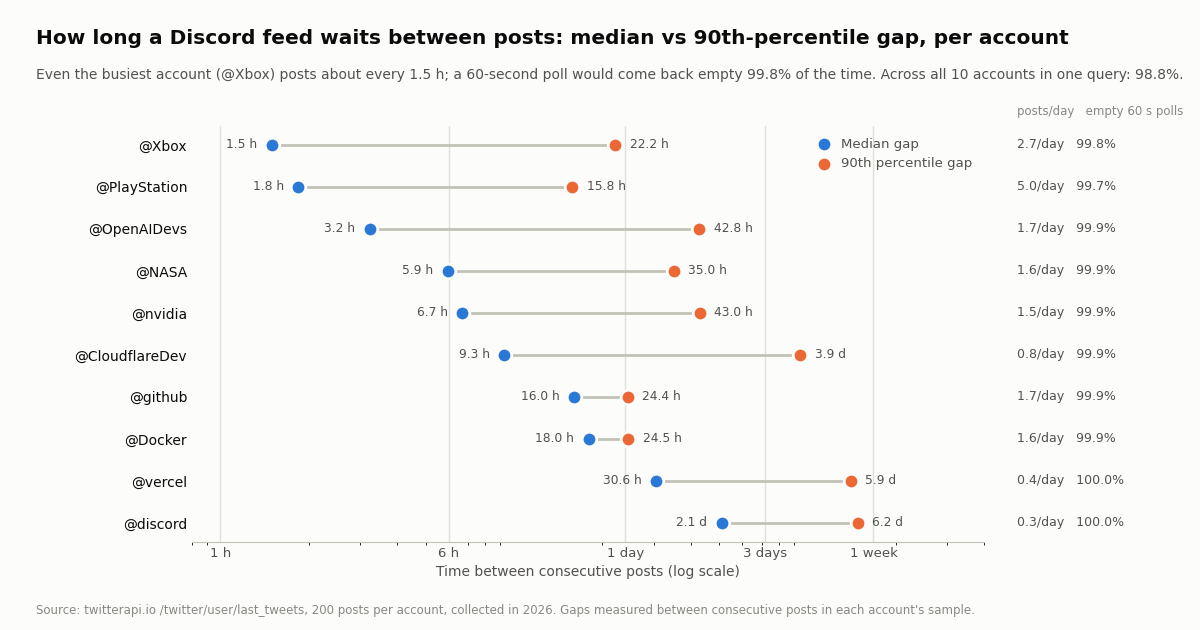
Nobody posts much. The accounts post between 0.3 and 5.0 times a day; @PlayStation is the only one above 3. The 200 posts spanned 40 days for @PlayStation and 713 days for @discord. Combined, in the 38-day window all ten accounts cover, the feed would have relayed 707 posts, 18.5 a day, with a peak of 8 in a single clock hour and never more than 3 in one minute.
Gaps are hours, not minutes. The median gap between consecutive posts ranged from 1.5 hours (@Xbox) to 2.1 days (@discord), and the 90th-percentile gap from 16 hours to over 6 days. The longest silence in the sample was 40 days (@discord). A bot that assumes a steady trickle will spend nearly all of its passes finding nothing; a bot that sleeps for an hour after each post will still rarely miss anything, but will deliver late. The 60-second poll with a since_time: cursor is the compromise: cheap when idle, prompt when something lands.
What kind of posts. 84.1% were original posts, 11.3% quotes and 4.6% reposts; replies were 0% because the default timeline call excludes them. @CloudflareDev (27.5% quotes), @discord (22.5%), @nvidia (22.0%) and @OpenAIDevs (21.5%) quote the most; @OpenAIDevs also reposts the most (15.5%). If your channel should not relay quotes, check quoted_tweet and skip; a from: search already omits reposts.
"Empty polls" is the share of 60-second or 5-minute windows across each account's sample span that contained no new post, which is the share of passes that would return an empty list and cost the $0.00015 minimum. The combined row uses the 38-day window in which all ten accounts have data.
Hour of day, empty polls, and what each option costs per day
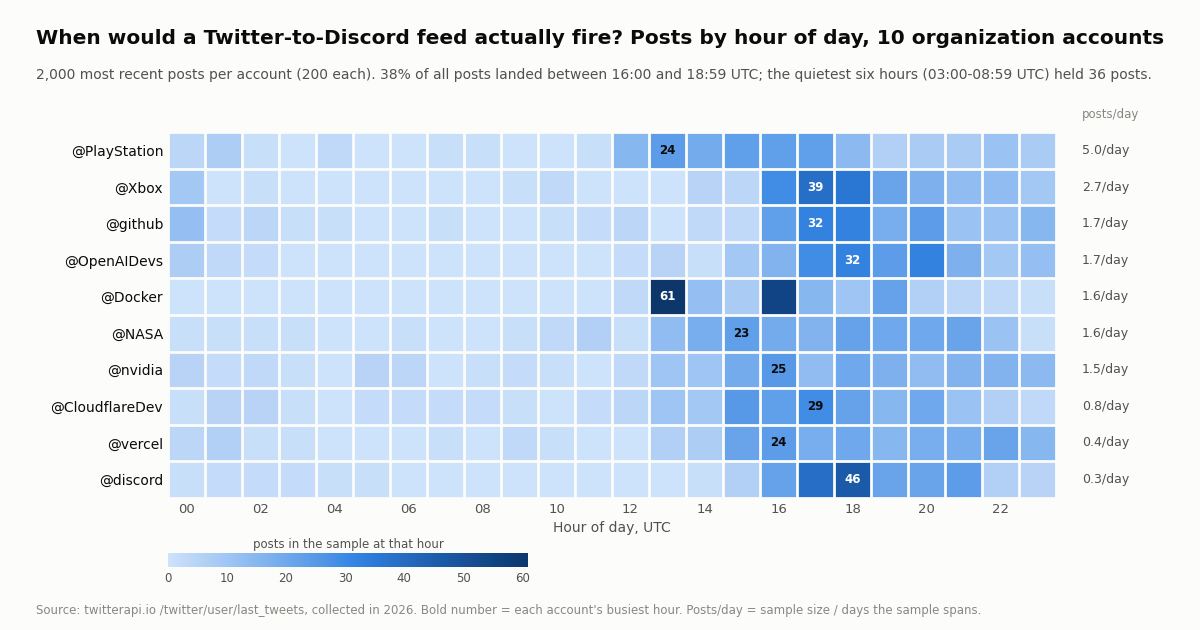
Posts cluster in the US working day. 92.2% of the 2,000 posts were created between 12:00 and 23:59 UTC, and 38.3% in just three hours, 16:00 to 18:59 UTC (766 posts). The six quietest hours, 03:00 to 08:59 UTC, held 36 posts in total, 1.8%. Every account's busiest hour sits between 13:00 and 21:00 UTC. For a bot this means two things: a 60-second poll overnight is almost pure floor cost (you can drop to 5 minutes between 00:00 and 12:00 UTC and lose little), and Discord's rate limit is irrelevant even at the afternoon peak.
Cost per day for this 10-account feed (about 19 posts a day), using twitterapi.io's published prices: 15 credits per tweet returned ($0.15 per 1,000), a 15-credit minimum per request ($0.00015), $1 = 100,000 credits; and the official X API pay-per-use rate card at $0.005 per post read (docs.x.com), which is about 33x more per 1,000 posts ($5 vs $0.15).
The two official-API rows bracket the real answer: the official rate card prices each post read, so a tight since_id keeps it to new posts only, but a timeline-style call that returns recent posts every minute is billed for every one of them, and you need the paid developer account before the first call. On twitterapi.io the cost of asking is the $0.00015 minimum, and because 98.8% of passes return nothing, the floor is the bill. Plans with bonus credits are on the pricing page.
Troubleshooting a Twitter to Discord bot
Discord returns 400. The body violated a limit: content over 2,000 characters, more than 10 embeds, or an embed field over its cap. Log the length of what you sent; the formatter on this page cuts text to fit.
Discord returns 401 or 404. The webhook URL is wrong or the webhook was deleted in the channel settings. On 404, stop posting to that URL, create a new webhook, and update the environment variable.
Discord returns 429. Read retry_after from the JSON body (seconds) and sleep that long before retrying; check X-RateLimit-Remaining on earlier responses to see how close you were. Spacing posts two seconds apart keeps a burst of relayed posts under the limit.
The message pinged @everyone. You sent a message without allowed_mentions. Add {"parse": []} to every POST.
Posts arrive twice. Two overlapping sources (two rules, or a rule plus a poll) delivered the same tweet, or the state file was not written. De-duplicate on id, and make sure the process can write discord-feed-state.json where it runs.
Posts arrive out of order or late. Sort new posts by createdAt (format %a %b %d %H:%M:%S %z %Y, not ISO 8601) before posting. Late arrivals within a couple of minutes are normal; that is what the 120-second overlap is for.
The poll finds nothing for an account that clearly posted. Reposts are not returned by a from: search. Check the handle with /twitter/user/info (handles change), and confirm the post is not a reply if your query has -filter:replies.
HTTP 429 from twitterapi.io. Accounts that have never paid are limited to 0.2 requests a second (20 once paid). A single poll per minute is far below that; if you poll several queries per pass, space them out.
The filter rule never fires. New rules are inactive until update_rule is called with is_effect: 1 and every other field. Also check that the dashboard webhook URL is HTTPS and answers 200 in under a second; use the dashboard's test button and look for the test_webhook_url event in your logs.
The receiver gets the push but Discord never shows it. The worker thread is doing the Discord call; if the process is a serverless function it may be frozen right after returning 200. Keep a minimum instance warm, or hand the batch to a queue the function does not own.
How we collected this
Question: how many posts per hour and per day would a Twitter-to-Discord feed of typical organization accounts actually relay, how long are the gaps, what share of 60-second and 5-minute polls would find nothing, when in the day do posts land, and how many posts would exceed Discord's 2,000-character limit once formatted.
Accounts: 10 public organization accounts: @vercel, @github, @Docker, @CloudflareDev, @OpenAIDevs, @nvidia, @PlayStation, @Xbox, @discord and @NASA.
Method: /twitter/user/last_tweets with the default includeReplies (replies excluded), 10 pages of 20 per account, newest first: 100 requests, 2,000 posts, collected in 2026 through a rate-limited, read-only client. For each account we measured the span from oldest to newest post, posts per day, posts per UTC clock hour, gaps between consecutive posts, the share of 60-second and 300-second windows across the span with no post, and the length of each post formatted as the Discord message the scripts on this page send (header line, text, URL). The combined feed uses the window in which all 10 accounts have data (38 days).
What the sample cannot show: 200 posts per account is a snapshot, and for the quieter accounts it reaches back more than a year, so posts per day is a long-run average that hides launch weeks. Ten organization accounts are not individuals or news accounts, which post far more often; a feed of such accounts would see shorter gaps, more multi-post windows, and a higher share of non-empty polls, though the polling floor arithmetic is the same. Replies were excluded by the default call, so the reply share is unmeasured here. The Discord webhook limits were read from Discord's documentation, and the per-webhook rate limit is not published there, so we did not test it.
Aggregates only. The accounts named are organizations; no individual's posts were analyzed. The analysis script, results and the gzip-compressed raw pages for these organization accounts are kept with the study.
"""twitter_to_discord.py - relay new posts from chosen X (Twitter) accounts, or a keyword
search, into a Discord channel through a Discord webhook. This is Path 1 (polling).

    pip install requests
    export TWITTERAPI_IO_API_KEY=...     # twitterapi.io dashboard
    export DISCORD_WEBHOOK_URL=https://discord.com/api/webhooks/<id>/<token>
    python twitter_to_discord.py             # one pass: run it from cron every 1-5 minutes
    python twitter_to_discord.py --loop 300  # or keep it running and poll every 300 s

Cost: one advanced_search call per pass. A pass that finds nothing costs the $0.00015
minimum (15 credits); each new post returned costs $0.00015. Every 60 s is about $0.22
a day before the posts themselves; every 5 minutes about $0.05.
"""
import argparse
import json
import os
import sys
import time
from datetime import datetime

import requests

API = "https://api.twitterapi.io"
X_KEY = os.environ["TWITTERAPI_IO_API_KEY"]
DISCORD = os.environ["DISCORD_WEBHOOK_URL"]
WATCH = ["vercel", "github", "OpenAIDevs"]   # accounts to relay (keep the query under 512 characters)
QUERY = os.environ.get("X_QUERY")             # or a keyword search, e.g. '"vercel" lang:en -filter:replies min_faves:20'
STATE_FILE = "discord-feed-state.json"
OVERLAP = 120        # seconds re-read on every pass; the seen-ids set removes the duplicates
LIMIT = 2000         # Discord's limit for the content field
MAX_PAGES = 5        # safety cap per pass (one page = up to 20 posts = $0.003)


def load_state():
    if os.path.exists(STATE_FILE):
        with open(STATE_FILE) as f:
            return json.load(f)
    return {"since_time": int(time.time()) - 3600, "seen": []}   # first run: the last hour


def save_state(state):
    state["seen"] = state["seen"][-2000:]      # enough to cover the overlap many times over
    with open(STATE_FILE, "w") as f:
        json.dump(state, f)


def build_query(since_time):
    base = QUERY or "(" + " OR ".join(f"from:{h}" for h in WATCH) + ")"
    return f"{base} since_time:{since_time}"


def fetch_new(since_time):
    """Only posts newer than since_time come back, so an idle pass returns an empty list."""
    tweets, cursor = [], None
    for _ in range(MAX_PAGES):
        params = {"query": build_query(since_time), "queryType": "Latest"}
        if cursor:
            params["cursor"] = cursor
        r = requests.get(f"{API}/twitter/tweet/advanced_search",
                         headers={"X-API-Key": X_KEY}, params=params, timeout=30)
        r.raise_for_status()
        body = r.json()
        page = body.get("tweets") or []
        tweets.extend(page)
        if not page or not body.get("has_next_page") or not body.get("next_cursor"):
            break
        cursor = body["next_cursor"]
    return tweets


def parse_time(s):
    # createdAt looks like "Wed Oct 01 17:03:12 +0000 2026", not ISO 8601
    return datetime.strptime(s, "%a %b %d %H:%M:%S %z %Y")


def format_message(t):
    """Header line, the post text, the link. 2 of 2,000 posts in our sample were over 2,000 characters."""
    a = t.get("author") or {}
    rt = t.get("retweeted_tweet") or None
    text = (rt or t).get("text") or ""          # a repost's own text is cut short; use the original's
    header = f"**{a.get('name', '')}** (@{a.get('userName', '')})"
    if rt:
        header += f" reposted @{(rt.get('author') or {}).get('userName', '')}"
    url = t.get("url") or t.get("twitterUrl") or ""
    body = f"{header}\n{text}\n{url}"
    if len(body) > LIMIT:
        room = LIMIT - len(header) - len(url) - 6
        body = f"{header}\n{text[:room]} ...\n{url}"   # cut the text, never the link
    return body


def post_to_discord(content):
    payload = {"content": content, "allowed_mentions": {"parse": []}}   # never ping @everyone from a feed
    for _ in range(5):
        r = requests.post(DISCORD, json=payload, timeout=15)
        if r.status_code == 429:                       # body: {"message", "retry_after" (seconds), "global"}
            time.sleep(float(r.json().get("retry_after", 1)) + 0.1)
            continue
        if r.status_code == 404:
            sys.exit("Discord returned 404: the webhook was deleted, stop using this URL")
        r.raise_for_status()                           # 204 No Content on success
        return
    raise RuntimeError("Discord kept returning 429")


def run_once(state):
    started = int(time.time())
    seen = set(state["seen"])
    new = [t for t in fetch_new(state["since_time"] - OVERLAP) if t["id"] not in seen]
    new.sort(key=lambda t: parse_time(t["createdAt"]))   # oldest first, so the channel reads in order
    for t in new:
        post_to_discord(format_message(t))
        state["seen"].append(t["id"])
        time.sleep(2)            # spaces a burst out; Discord's rate-limit headers are the final word
    state["since_time"] = started
    save_state(state)
    print(f"{len(new)} new post(s) relayed", file=sys.stderr)


if __name__ == "__main__":
    ap = argparse.ArgumentParser()
    ap.add_argument("--loop", type=int, help="poll every N seconds instead of exiting after one pass")
    args = ap.parse_args()
    state = load_state()
    while True:
        run_once(state)
        if not args.loop:
            break
        time.sleep(args.loop)
Questions readers ask
Do I need a Discord bot token to post tweets to a Discord channel?
No. A channel webhook is enough: create it in the channel's Integrations settings and POST JSON to its URL (POST /webhooks/{webhook.id}/{webhook.token}). Discord's docs state that executing a webhook needs no authentication beyond the token in the URL, so keep that URL secret. You only need a bot application if you want slash commands or to read Discord messages.
How often should a Twitter to Discord bot poll?
Every 60 seconds if a minute of delay is fine, every 5 minutes if a few minutes are. In our sample of 10 organization accounts, 98.8% of 60-second windows and 94.2% of 5-minute windows held no new post, so polling more often than once a minute mostly buys empty passes. At $0.00015 per empty pass, 60 seconds is about $0.22 a day and 5 minutes about $0.05.
Why poll advanced_search instead of the user timeline endpoint?
Because /twitter/user/last_tweets returns the latest 20 posts on every call, and tweet endpoints bill per tweet returned: $0.003 per page, $4.32 a day per account at a 60-second interval. /twitter/tweet/advanced_search with a since_time: operator returns only posts newer than your last run, so an idle pass is an empty list at the $0.00015 minimum. Use last_tweets once for an initial backfill.
Does the feed include retweets and replies?
A from: search returned every post except reposts when we compared it with the timeline endpoint on another study, and replies are included unless you add -filter:replies to the query. Reposts were 4.6% of the 2,000 posts measured here. If you need them, poll /twitter/user/last_tweets for that account and accept the full-page price.
What happens when a tweet is longer than Discord's 2,000-character limit?
Discord rejects the message with a 400. Long-form posts return their full text in the text field (23.3% of our 2,000 posts were over 280 characters and 2 were over 2,000, the longest 5,263 characters), so cut the text to the room left after the header and the URL and append an ellipsis, or send the text as an embed description, which holds 4,096 characters.
What does a Twitter to Discord bot cost to run?
On twitterapi.io, a 10-account feed polled every 60 seconds costs about $0.22 a day (1,440 passes at the $0.00015 minimum plus $0.00015 per new post), about $6.57 a month; every 5 minutes about $1.38 a month. A filter rule checked every 60 seconds has the same floor. The official X API rate card is $0.005 per post read, about 33x more per 1,000 posts, plus a paid developer account. Up to $1 in free credits for new accounts that pass the bot check; expires after 31 days; see /pricing.
Can one bot feed several Discord channels or servers?
Yes. Each channel has its own webhook URL, so keep a list of URLs and POST the same message to each, or map accounts to channels. To post into a thread, add thread_id to the webhook URL's query string. Rate limits are tracked per webhook, so spreading a feed over several channels does not concentrate the load.
Do I need an X (Twitter) developer account for this?
No. Reads on twitterapi.io need only an API key sent in the X-API-Key header; there is no X app, OAuth or developer tier. The official X API alternative requires a paid developer account and charges $0.005 per post read.
Continue
- Discord developer docs: Webhook resource (Execute Webhook, content and embeds params, wait and thread_id)
- Discord developer docs: Rate limits (X-RateLimit headers, 429 body, 404 webhook rule)
- Discord developer docs: Message resource (embed limits, allowed mentions, message flags)
- twitterapi.io API reference: add a webhook/websocket tweet filter rule (tag, value, interval_seconds; new rules inactive)
- twitterapi.io API reference: update a tweet filter rule (is_effect activates it)
- twitterapi.io API reference: advanced_search, last_tweets and response fields
- X API pay-per-usage pricing ($0.005 per post read), the official and pricier route
- What Twitter (X) bots are and how they work
- n8n workflow: post new tweets to Slack (or Discord) without code
- Twitter (X) webhooks: filter rules and the push payload
- Tweet notifications: polling, webhook rule or stream
- Twitter to RSS: build your own feed
- Twitter (X) alerts for keywords: a developer guide
- Twitter Stream: fixed account lists pushed in seconds
- Pay-per-call pricing
- 01A Brandwatch Alternative for Teams That Only Need X (Twitter) Data
- 02Data365 Alternative: Pay-Per-Data X (Twitter) API Instead of a EUR 300 Subscription
- 03How to Get Twitter (X) Data into Google Sheets with Apps Script in 2026
- 04Twitter (X) Auto Reply: What the Rules Allow and How to Build One
- 05snscrape for Twitter (X): why it returns blocked (404) and how to migrate
- 06Searching for a Tweet — Operators, Filters, and API
- 07Download Twitter (X) Media — Bulk API Workflow (Photos + Videos)
- 08Nitter Is Archived: Which Nitter Alternatives Still Work in 2026?
Stop reading. Start building.
Starter credits cover real testing on real data. Google sign-in, no card, no application queue.
Get an API key