What Is a Twitter (X) Chatbot, and How Do You Build One in 2026?
Search for "twitter chatbot" and the results split into three camps: pages selling no-code bot builders, old tutorials written for an X API that has since changed its pricing and rules, and explainers that say a chatbot can "reply to tweets, handle mentions and send DMs 24/7" without mentioning that two of those three are restricted. None of them show a working bot or what it costs to run. This page does both, and it starts by separating the four things people mean by the term, because the rules and the engineering are different for each.
The structure is: what each kind of chatbot is and which rules apply to it; the automation rules themselves, as X publishes them in 2026; then a build of the kind that is both useful and clearly allowed, a mention bot that answers people who tag it. The build has three steps (read mentions, draft the answer, post the reply) and ends with a cost table for a bot that answers 1,000 mentions a month. A short section covers the DM variant for businesses that want to answer people who message first.
Two boundaries. The language-model side is kept to a placeholder function, because the companion guides on using Claude with the Twitter (X) API and connecting ChatGPT to the Twitter (X) API already cover it. And nothing here helps with bulk outreach: the DM endpoint appears only for answering people who wrote to you first, which is the one way X's rules allow automated messages.
The four kinds of Twitter (X) chatbot in 2026, and the rules each must follow
The word covers four products that share almost nothing except a text box. Before building, decide which one you mean, because the first needs no code, the second and fourth are allowed under clear conditions, and the third is the one that gets accounts suspended.
Grok inside X. Grok is xAI's assistant built into the X app. Anyone can tag @grok in a reply to a post and get an answer under it; xAI has since added a separate Grok Bot that is assigned tasks by tagging @bot (xAI docs, 2026). If "a chatbot on Twitter" means a general assistant that answers questions about posts, this already exists and there is nothing to build; the rest of this page is about chatbots that speak for your own account.
A DM responder. A business account that answers people who send it a direct message: order status, opening hours, a hand-off to a human. X's automation rules explicitly allow building solutions that automatically respond to users in Direct Messages, with the condition that the user consented, which messaging you first satisfies, and that opt-outs are honoured.
A public reply bot. A bot that finds posts by keyword and replies under them, uninvited. This is the "reply guy" pattern, and under the rules it is an unsolicited message: you may not reply to or mention users without consent, and keyword-triggered replies are the behaviour the platform-manipulation policy is written against. We show no code for it.
An opt-in mention bot. A bot that answers only people who tag it: a support bot, a transcript bot, a "summarise this thread" bot. The person tagging the account is the invitation. This is the kind built on this page.
For the broader taxonomy of bots that never talk at all (alert feeds, data collectors, schedulers), the companion page on how Twitter (X) bots work in 2026 covers them; this page stays on the conversational kind.
The automation rules a Twitter chatbot has to follow
X keeps its automation rules on the help centre, and the Developer Agreement adds the API-side obligations. The sentences that matter for a chatbot, as published in 2026, are short. You can run campaigns that auto-reply to users who engage with your content, and you can build solutions that automatically respond to users in Direct Messages. You must always get a user's explicit consent before sending them automated replies or messages, and you must immediately respect user requests to opt out of being contacted. You may not spam or bother users or send them unsolicited messages, and you must not reply to, mention or DM users with potentially sensitive content, including profanity, without appropriate consent. Automated activity should honour users' expectations, and if you are not sure, ask permission before acting.
The second document is the Automated label. X's help page on automated account labels says the label exists so readers can tell a bot from a person, and that automated accounts are expected to display it and stay connected to a human-run account; it is enabled from the account's settings under account information and automation, where you pick the human account that manages the bot. There is no approval step. Turn it on before the first automated reply.
What those rules mean in code, for the mention bot below:
Reply only to the invitation. Answer the post that tagged you, with reply_to_tweet_id set to that post. Do not reply to the people replying to that post, and do not follow the conversation up the thread.
Keep a stop list. If someone's mention says stop, unsubscribe or similar, record their handle and never answer them again. The rules say opt-outs are honoured immediately, so the check runs before the model is called, not after.
Filter what goes out. The model's draft is checked for length and for anything that could count as sensitive content before it is posted. If the check fails, the bot stays silent; silence is never a rule violation.
Pace it like a person. A fixed gap between replies and one poll a minute. Rapid-fire posting is what X's rate limiting and locking respond to, and the account that gets locked is the bot's own; the companion page on the "this request looks like it might be automated" error describes what that looks like from the API side.
One bot, one account. Never run the same answers from several accounts, and never use the bot account for anything else.
How a mention chatbot is put together: read side and write side
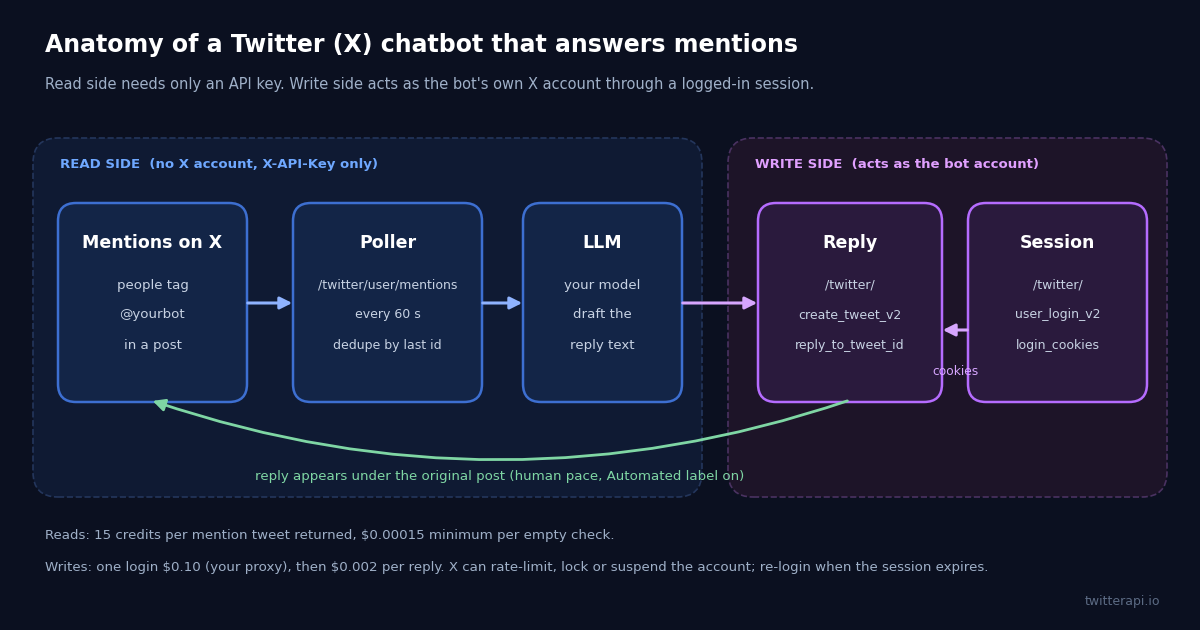
The diagram at the top of the page shows the shape. It has a read side and a write side, and they are authenticated differently, which is the single most useful thing to understand before writing any code.
The read side needs no X account. /twitter/user/mentions takes the bot's screen name and an X-API-Key header and returns the posts that mention it. Nothing logs in to X, nothing acts as the bot, and if you only wanted to read mentions (for a dashboard, say) you could stop here with an API key from the twitterapi.io dashboard.
The write side acts as the bot's own account. Posting a reply requires a session for that account: one call to /twitter/user_login_v2 with the account's credentials and a proxy you supply returns login_cookies, and every later /twitter/create_tweet_v2 call carries those cookies. From X's point of view the reply is the account posting, so the automation rules, the Automated label and X's enforcement (rate limits, locks, suspensions) all apply to that account.
The model sits between the two. It receives the mention text and returns a draft, and it has no access to X at all. That is deliberate: the bot decides what to fetch and what to post; the model only writes prose. If you want the model to pull more context (the thread the mention sits in, the user's recent posts) before answering, the MCP route in the Claude guide gives it read tools for exactly that, still with no write access.
State is one small file. The ID of the newest mention handled, the Unix time of the last poll, the current login_cookies, and the stop list. Tweet IDs are time-ordered, so "larger than the last seen ID" is a complete dedupe rule and a crash or restart never answers the same mention twice.
Step 1: read new mentions with /twitter/user/mentions
The endpoint is GET https://api.twitterapi.io/twitter/user/mentions with userName (the bot's handle, no @), optional sinceTime and untilTime as Unix timestamps in seconds, and cursor for paging. Each page returns up to 20 mentions, newest first, as a top-level tweets array with has_next_page and next_cursor beside it. Each tweet carries id, text, createdAt, author.userName, inReplyToId and the usual counts (likeCount, replyCount, viewCount). Error text, when there is any, comes back in msg.
Pricing is the tweet rate: 15 credits per tweet returned ($0.15 per 1,000), with a 15-credit minimum per request. That minimum is why sinceTime matters. Without it, every poll returns a full page of 20 old mentions and costs $0.003 a minute, about $130 a month for a bot that does nothing. With sinceTime set to the last poll time, a quiet minute returns zero tweets and costs the $0.00015 minimum, which is the $6.48-a-month floor used in the cost table below.
Dedupe on the ID, not the time. sinceTime is inclusive at the boundary and clocks drift, so the function below keeps only tweets with an ID larger than the last one handled, and skips the bot's own posts (a reply by the bot that quotes its own handle would otherwise look like a mention). On the very first run it records the newest ID and answers nothing, so switching the bot on does not reply to a backlog of old mentions.
A note for readers of the tweet notifications guide: the polling loop there watches other accounts' posts with advanced search; this one watches mentions of your own account, but the state handling (last ID, since-time, minimum charge on empty polls) is the same pattern.
import os
import time

import requests

HEADERS = {"X-API-Key": os.environ["TWITTERAPI_IO_KEY"]}  # twitterapi.io/dashboard
BOT = os.environ["BOT_USERNAME"]  # the bot's handle, without @


def fetch_new_mentions(last_seen_id, since_time):
    """One page of mentions newer than last_seen_id.

    15 credits per tweet returned, 15-credit minimum: with since_time set, a quiet
    minute returns nothing and costs $0.00015.
    """
    r = requests.get(
        "https://api.twitterapi.io/twitter/user/mentions",
        params={"userName": BOT, "sinceTime": since_time},
        headers=HEADERS,
        timeout=30,
    )
    r.raise_for_status()
    body = r.json()
    if body.get("status") == "error":
        raise RuntimeError(body.get("msg"))
    fresh = []
    for t in body.get("tweets") or []:
        author = ((t.get("author") or {}).get("userName") or "").lower()
        if int(t["id"]) > last_seen_id and author != BOT.lower():
            fresh.append(t)
    return sorted(fresh, key=lambda t: int(t["id"]))  # oldest first


if __name__ == "__main__":
    for m in fetch_new_mentions(0, int(time.time()) - 3600):
        print(m["id"], "@" + m["author"]["userName"], m["createdAt"], m["text"][:80])
Step 2: draft the answer with a language model
The model call is the part of a chatbot that every tutorial spends most of its words on, and the part that matters least for staying within the rules. In the script it is one function, draft_reply(mention), that takes the mention and returns a string or None. Swap the placeholder body for a call to whichever model you use; the two companion guides show the exact setup for Claude and for ChatGPT and the OpenAI API, including how to give the model read access to X through MCP so it can look at the thread before answering.
What the function must do regardless of the model:
Return None when unsure. A chatbot that stays silent on a question it cannot answer is fine; one that answers everything is how sensitive content gets posted under your account's name. Tell the model it may decline, and treat a decline as silence.
Keep it under 280 characters. Standard accounts are limited to 280 characters per post; create_tweet_v2 has an is_note_tweet flag for longer posts on Premium accounts, but a reply bot should not need it. Truncate in code as a last resort, after asking the model for a short answer.
Never put the user's handle in the text. reply_to_tweet_id already threads the reply under the right post; adding @handles in the text is how one reply turns into a mention of several people who did not ask.
Log the draft before posting it. Keep the mention ID, the draft and the posted tweet ID in a log. When someone complains, you want to know exactly what the bot said and why.
For a support-style bot, the system prompt usually carries a short knowledge base (hours, policies, links) and the instruction to decline anything outside it. For a utility bot (summarise, translate, convert), the mention's inReplyToId tells you which post the person wants processed; fetch that post with /twitter/tweets and pass its text to the model.
Step 3: post the reply through the write path
Two endpoints. /twitter/user_login_v2 logs the bot account in: user_name, email, password, a proxy you supply (http://user:pass@host:port, a residential proxy is what the docs ask for) and an optional totp_secret (the 2FA seed, which the docs strongly recommend so the session is reliable). It costs $0.10 and returns login_cookies, plus a status and message. Store the cookies; the docs describe them as long-lived for accounts in good standing, so one login normally lasts weeks.
/twitter/create_tweet_v2 posts the reply: login_cookies, tweet_text, reply_to_tweet_id (the mention's id) and the same proxy. It costs $0.002 per call, billed on every HTTP 200 response, and returns tweet_id and status. If status is not success, read message: a session problem means re-login; a refusal from X means the account is being rate-limited or locked and the right response is to stop, not retry. Field names for both endpoints are listed on docs.twitterapi.io/api-reference/endpoint/user_login_v2 and .../create_tweet_v2; check there if a call rejects a parameter.
The caveats, which apply to every write call on this page: the call acts as that account, and X can rate-limit, lock or suspend it, so keep a human pace (the script sleeps a fixed 45 seconds between replies and polls once a minute); the session may need re-login after a password change, a security prompt, or a period of inactivity; and each call is billed per HTTP 200, whether or not X later removes the post. The account should be one you are prepared to lose, with the Automated label on and a real human account behind it.
If you have not posted through the API before, the login and post guide walks the two calls in isolation with a curl example for each; the function below is the same thing inside the bot's state handling.
import os

import requests

HEADERS = {"X-API-Key": os.environ["TWITTERAPI_IO_KEY"]}
PROXY = os.environ["BOT_PROXY"]  # http://user:pass@host:port, supplied by you


def login():
    """One login ($0.10) returns login_cookies; store them, they normally last weeks."""
    r = requests.post(
        "https://api.twitterapi.io/twitter/user_login_v2",
        headers=HEADERS,
        json={
            "user_name": os.environ["BOT_USERNAME"],
            "email": os.environ["BOT_EMAIL"],
            "password": os.environ["BOT_PASSWORD"],
            "totp_secret": os.environ.get("BOT_TOTP_SECRET", ""),  # 2FA seed, recommended
            "proxy": PROXY,
        },
        timeout=90,
    )
    r.raise_for_status()
    body = r.json()
    if body.get("status") != "success":
        raise RuntimeError(f"login failed: {body.get('message')}")
    return body["login_cookies"]


def post_reply(login_cookies, reply_to_tweet_id, text):
    """$0.002 per call, billed per HTTP 200. Acts as the bot's own account."""
    r = requests.post(
        "https://api.twitterapi.io/twitter/create_tweet_v2",
        headers=HEADERS,
        json={
            "login_cookies": login_cookies,
            "tweet_text": text,
            "reply_to_tweet_id": reply_to_tweet_id,
            "proxy": PROXY,
        },
        timeout=60,
    )
    r.raise_for_status()
    return r.json()  # {"status": "success", "tweet_id": "..."} or an error message
The DM variant: answer people who message your account first
A DM chatbot is allowed under the same consent rule, and the consent is built in: the person wrote to you. What is not allowed is the reverse, a bot that opens conversations. /twitter/send_dm_to_user exists for the first case only, and nothing on this page helps with the second.
The read side is /twitter/get_dm_history_by_user_id with login_cookies and the other person's user_id, which returns the conversation with that user; the write side is /twitter/send_dm_to_user with login_cookies, user_id, text and proxy, at $0.002 per call, with optional reply_to_message_id. Both require the session from /twitter/user_login_v2, because DMs are private to the account. The docs note that DMs can only be sent to people who have DMs enabled for you, and that a send can fail and need a retry; check docs.twitterapi.io for the current inbox endpoints, since the manifest we validate against exposes history per user rather than a full inbox listing.
The loop is the mention bot with the endpoints swapped: for each user who has messaged you, fetch the history, find messages newer than the last one handled, draft an answer, send it, sleep. The extra rules are stricter in practice than for public replies: the sending account is the one X will lock if the pace looks automated, so one DM at a time with a fixed gap, a stop word that ends the conversation permanently, and a hand-off path to a human for anything the model declines. The same write caveats apply: the call acts as the account, X can rate-limit, lock or suspend it, the session may need re-login, and every HTTP 200 is billed.
If a DM bot's purpose is "reach people who have not contacted us", it is outreach, X's rules call it unsolicited, and no endpoint on twitterapi.io is offered for it.
What a Twitter chatbot costs to run: 1,000 mentions a month
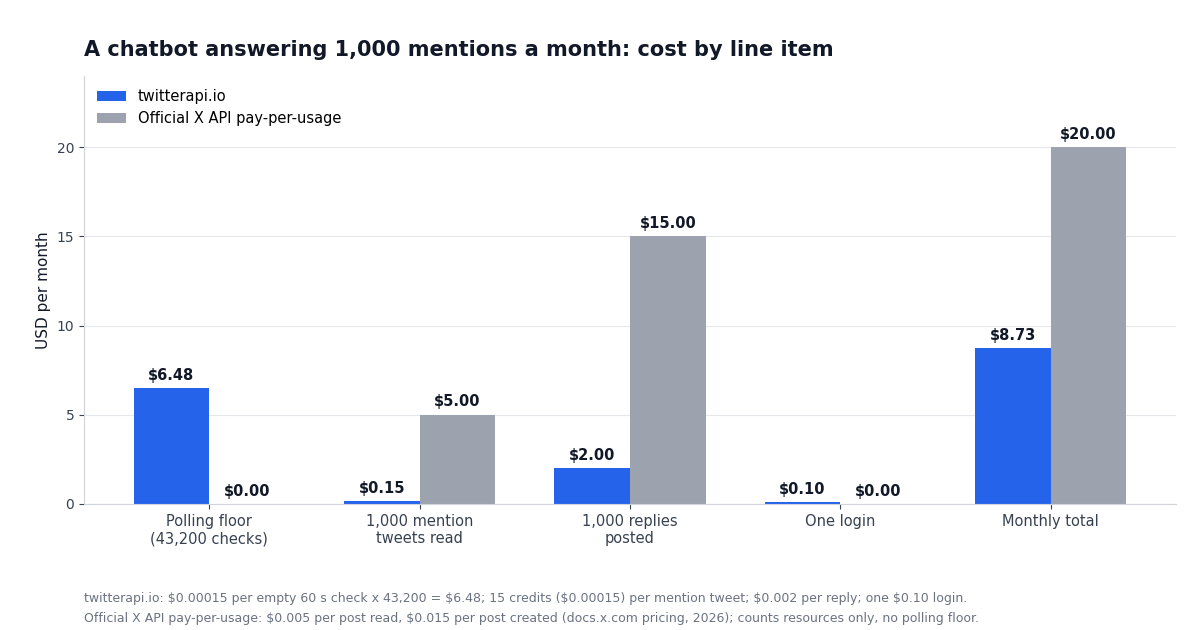
Take a mention bot that polls once a minute and answers 1,000 mentions a month. On twitterapi.io the read side is the polling floor plus the mentions actually returned, and the write side is one login plus one reply per mention. On the official X API, the pay-per-usage rate card prices reads and writes per resource, and that path also needs an X developer account with a saved card and an app with write scope. Prices below are from the twitterapi.io pricing page and docs.x.com pricing, both checked in 2026.
The ratio for this bot is $20.00 / $8.73, about 2.3 times, and it is driven by the write side: $0.015 per post created on the official rate card against $0.002 per reply here, 7.5 times per reply. The read side is where the official API's per-resource billing looks better than it is for a bot: the $6.48 floor on twitterapi.io buys a check every minute, while the official $5.00 assumes you only ever read the 1,000 mentions and nothing else. Poll every five minutes instead and the floor drops to $1.30 (8,640 checks), for a total of $3.55.
The chart below plots the same line items. Two things it does not show: reads on twitterapi.io need no X account at all, so a read-only mention monitor runs on an API key alone, and the write side on either provider is subject to X's rules and enforcement on the bot's account, which no price changes. Plans with included credits are on the pricing page.
"""Twitter (X) mention chatbot: poll mentions, dedupe, draft with a model, reply at a human pace.

Reads need only TWITTERAPI_IO_KEY (no X account). Replies act as the bot's own X account
through a logged-in session: X can rate-limit, lock or suspend it, so keep the pace human,
turn on the Automated label first, and expect to re-login now and then.
Env: TWITTERAPI_IO_KEY, BOT_USERNAME, BOT_EMAIL, BOT_PASSWORD, BOT_PROXY, BOT_TOTP_SECRET (optional)
"""
import json
import os
import time

import requests

HEADERS = {"X-API-Key": os.environ["TWITTERAPI_IO_KEY"]}  # twitterapi.io/dashboard
BOT = os.environ["BOT_USERNAME"]          # the bot's handle, without @
PROXY = os.environ["BOT_PROXY"]           # http://user:pass@host:port, supplied by you
STATE_FILE = "chatbot-state.json"
POLL_SECONDS = 60                         # one check a minute: $0.00015 when nothing is new
REPLY_GAP_SECONDS = 45                    # fixed human pace between replies
STOP_WORDS = ("stop", "unsubscribe", "leave me alone")


def load_state():
    if os.path.exists(STATE_FILE):
        with open(STATE_FILE) as f:
            return json.load(f)
    return {"last_seen_id": 0, "since_time": int(time.time()), "login_cookies": None, "muted": []}


def save_state(state):
    with open(STATE_FILE, "w") as f:
        json.dump(state, f)


def fetch_new_mentions(state):
    """15 credits per tweet returned, 15-credit minimum. sinceTime keeps quiet polls empty."""
    r = requests.get(
        "https://api.twitterapi.io/twitter/user/mentions",
        params={"userName": BOT, "sinceTime": state["since_time"]},
        headers=HEADERS,
        timeout=30,
    )
    r.raise_for_status()
    body = r.json()
    if body.get("status") == "error":
        raise RuntimeError(body.get("msg"))
    fresh = []
    for t in body.get("tweets") or []:
        author = ((t.get("author") or {}).get("userName") or "").lower()
        if int(t["id"]) > state["last_seen_id"] and author != BOT.lower():
            fresh.append(t)
    return sorted(fresh, key=lambda t: int(t["id"]))  # oldest first


def draft_reply(mention):
    """Placeholder for your model call. Return None to stay silent.

    Replace the body with a call to Claude, ChatGPT or any model. Give it the mention text
    (and, if useful, the post it replies to via inReplyToId), ask for under 280 characters,
    let it decline, and never put @handles in the answer: reply_to_tweet_id does the threading.
    """
    question = (mention.get("text") or "").replace("@" + BOT, "").strip()
    if not question:
        return None
    answer = "Thanks for asking. Short answer: ..."  # <- model output goes here
    return answer[:280]


def login(state):
    """One login ($0.10, your proxy) returns login_cookies."""
    r = requests.post(
        "https://api.twitterapi.io/twitter/user_login_v2",
        headers=HEADERS,
        json={
            "user_name": BOT,
            "email": os.environ["BOT_EMAIL"],
            "password": os.environ["BOT_PASSWORD"],
            "totp_secret": os.environ.get("BOT_TOTP_SECRET", ""),
            "proxy": PROXY,
        },
        timeout=90,
    )
    r.raise_for_status()
    body = r.json()
    if body.get("status") != "success":
        raise RuntimeError(f"login failed: {body.get('message')}")
    state["login_cookies"] = body["login_cookies"]
    save_state(state)


def post_reply(state, mention, text):
    """$0.002 per call, billed per HTTP 200. Acts as the bot's own account."""
    r = requests.post(
        "https://api.twitterapi.io/twitter/create_tweet_v2",
        headers=HEADERS,
        json={
            "login_cookies": state["login_cookies"],
            "tweet_text": text,
            "reply_to_tweet_id": mention["id"],
            "proxy": PROXY,
        },
        timeout=60,
    )
    r.raise_for_status()
    return r.json()


def run_once(state):
    poll_started = int(time.time())
    mentions = fetch_new_mentions(state)
    if state["last_seen_id"] == 0 and mentions:
        # first run: remember the newest mention and answer nothing, so no backlog gets replies
        state["last_seen_id"] = int(mentions[-1]["id"])
        mentions = []
    for m in mentions:
        state["last_seen_id"] = max(state["last_seen_id"], int(m["id"]))
        user = ((m.get("author") or {}).get("userName") or "").lower()
        text = (m.get("text") or "").lower()
        if any(w in text for w in STOP_WORDS):
            state["muted"].append(user)          # opt-out is honoured before anything else
            save_state(state)
            continue
        if user in state["muted"]:
            save_state(state)
            continue
        answer = draft_reply(m)
        if not answer:
            save_state(state)
            continue
        if not state["login_cookies"]:
            login(state)
        result = post_reply(state, m, answer)
        if result.get("status") == "success":
            print(f"replied to @{user}: tweet {result.get('tweet_id')}")
        else:
            # expired session or X refused the write: drop the cookies, re-login on the next
            # reply, and do not retry this one. Repeated refusals mean stop the bot.
            print("reply failed:", result.get("message"))
            state["login_cookies"] = None
        save_state(state)
        time.sleep(REPLY_GAP_SECONDS)
    state["since_time"] = poll_started - 120   # small overlap; the ID check removes duplicates
    save_state(state)


if __name__ == "__main__":
    state = load_state()
    while True:
        try:
            run_once(state)
        except (requests.RequestException, RuntimeError) as e:
            print("error:", e)
        time.sleep(POLL_SECONDS)
Questions readers ask
What is a Twitter (X) chatbot?
Software that converses on X on behalf of an account: it reads mentions, replies or direct messages sent to that account and posts an answer without a person typing it. In 2026 the term covers Grok (X's own assistant, answered by tagging @grok), DM responders for business accounts, public reply bots, and opt-in mention bots that answer only people who tag them.
Are chatbots allowed on Twitter (X)?
Yes, under X's automation rules: you can auto-reply to users who engage with your content and build solutions that respond automatically in Direct Messages, provided you have the user's explicit consent, honour opt-outs immediately, send nothing unsolicited or sensitive, and put the Automated label on a fully automated account. A bot that replies to strangers' posts by keyword is the case the rules prohibit.
Can a Twitter chatbot send direct messages?
Only to people who messaged the account first, which is the consent the rules require. On twitterapi.io that is /twitter/get_dm_history_by_user_id to read a conversation and /twitter/send_dm_to_user ($0.002 per call) to answer, both with the login_cookies from /twitter/user_login_v2. Opening conversations with people who never wrote to you is unsolicited messaging and is not something the API is offered for.
Do I need an X account to build a chatbot?
To read, no: /twitter/user/mentions returns a handle's mentions with an API key alone. To reply, yes: the reply is posted as the bot's own account through a session from /twitter/user_login_v2, so you need the account's credentials, a proxy you supply, and ideally its 2FA seed. X applies its rules and enforcement to that account.
How much does it cost to run a Twitter chatbot?
For a bot polling once a minute and answering 1,000 mentions a month: $6.48 polling floor (43,200 checks at the $0.00015 minimum) + $0.15 for the 1,000 mention tweets + $2.00 for 1,000 replies at $0.002 + one $0.10 login = $8.73 on twitterapi.io. The official X API pay-per-usage rate card prices the same month at $5.00 in post reads plus $15.00 in posts created, $20.00, and needs a developer account with a card.
Can I use ChatGPT or Claude as the chatbot's brain?
Yes. The script on this page isolates the model in one function, draft_reply, that receives the mention text and returns a draft or nothing. Call any model there. The companion guides show how to connect Claude and ChatGPT to Twitter (X) data through MCP or function calling, so the model can read the thread before it answers; the posting stays in the bot's own code.
What is the Automated label and does my chatbot need it?
A line under the account name reading Automated, with the handle of the human or company account that runs the bot. X's help page says automated accounts are expected to display it and stay linked to a human-run account; it is enabled in the account's settings under account information and automation, with no approval step. Turn it on before the bot posts its first reply.
Why does my chatbot's reply call fail after working for weeks?
Usually the session: login_cookies from /twitter/user_login_v2 last a long time for accounts in good standing but are invalidated by a password change, a security prompt on the account, or a proxy change. Re-login once ($0.10). If calls keep failing after a fresh login, X is rate-limiting or locking the account, and the fix is to stop the bot and check the account in the app, not to retry.
Continue
- X Help Center: automation rules (consent for automated replies and messages, opt-outs, unsolicited messages)
- X Help Center: automated account labels (who displays the Automated label and where it is enabled)
- X API pay-per-usage pricing (docs.x.com): $0.005 per post read, $0.015 per post created, the official and more expensive route
- twitterapi.io docs: user_login_v2 (fields, proxy format, 2FA recommendation, login_cookies)
- twitterapi.io docs: create_tweet_v2 (login_cookies, tweet_text, reply_to_tweet_id, proxy)
- xAI docs: working with Grok Bot by tagging it on X
- Twitter (X) bots: the types, the 2026 rules and how they are built
- Using Claude with the Twitter (X) API: MCP setup for the model side
- Connecting ChatGPT to the Twitter (X) API: MCP, Custom GPT and function calling
- Tweet notifications: the polling and webhook patterns this bot reuses
- Login and post through the API: the write path in isolation
- Error 226: what X's automation enforcement looks like from the API
- twitterapi.io pay-per-call pricing and plans
- Get an API key from the dashboard
- 01How to Use Google Gemini with the Twitter (X) API
- 02OSINT on Twitter (X): What Public Data You Can Pull, and How
- 03n8n Twitter (X) API Workflow: Post New Tweets to Slack in 2026
- 04How to Use Cursor with the Twitter (X) API
- 05How Do You Turn On Twitter (X) Dark Mode, and What Are Its Exact Colors?
- 06Who Blocked Me on Twitter — The Methods That Actually Work
- 07Rate Limit Exceeded on Twitter (X) API — Causes & Fixes
- 08What Percentage of Twitter (X) Is Bots? Every Published Estimate and Its Method
Stop reading. Start building.
Starter credits cover real testing on real data. Google sign-in, no card, no application queue.
Get an API key