Google Antigravity Pricing: Free Tier, Pro and Ultra Quotas, and What X Users Report
Searching "antigravity pricing" usually means one of three questions: is Google Antigravity free, what do Google AI Pro and Ultra actually add inside it, and what happens when the quota runs out. This page answers all three from Google's own pages, read this session: the Antigravity pricing page (antigravity.google/pricing), the Plans and Models docs (antigravity.google/docs/plans, antigravity.google/docs/models) and the Google AI plans page (one.google.com/about/google-ai-plans).
How this page differs from our comparison. Our Antigravity vs Cursor page puts the two tools side by side and walks through the MCP setup step by step. This page is the full pricing answer for Antigravity alone: every plan, the model matrix per plan, how the weekly and five-hour quotas work, credits and overages, the Business route, and an X study of what users say about Antigravity quotas. For the MCP config walkthrough we link to that page instead of repeating it.
Our angle. We read 460 recent X posts about Antigravity quotas, limits, credits and plans (collected in 2026) and measured what people bring up. We also price the X data bill when an Antigravity agent reads X through our MCP server, against the official X API rate card.
Antigravity pricing at a glance: every plan in one table
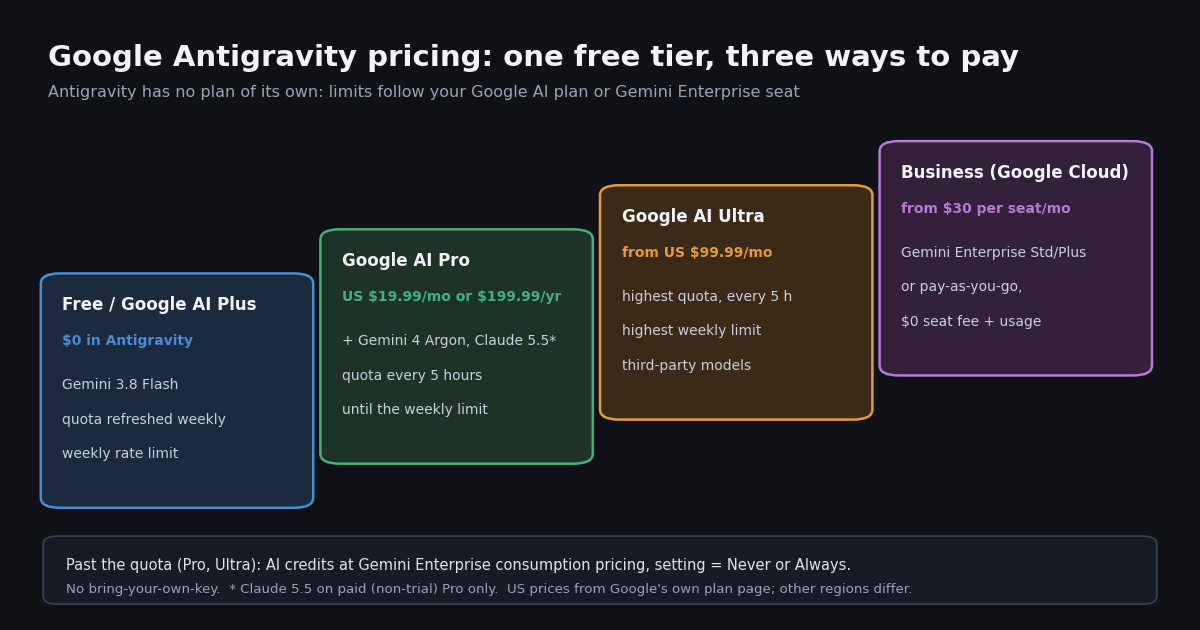
Antigravity's pricing page lists four columns: For Individuals at $0/month, Google AI Pro, Google AI Ultra, and a Business plan via Google Cloud. The page prints the $0 and the $30 Business seat price but not the Pro and Ultra prices, because those are Google AI subscriptions sold through Google One and priced per country. The US figures below come from the savings calculator on Google's own plan page, which shows Pro at $19.99 a month or $199.99 a year and Ultra at $99.99 a month with the note "Ultra plans are billed monthly only".
Two Ultra tiers. Google's comparison table has two Ultra columns, labeled Ultra 5x and Ultra 20x (5x and 20x the Gemini usage of the Pro plan), and its Antigravity row rates agent requests as Limited for Plus, Expanded for Pro, Higher for Ultra 5x and Highest for Ultra 20x. The card says Ultra costs "From" a monthly price; the higher tier's price did not render in the page text we fetched, so check it in your own account before you buy.
Pro and Ultra include Google Cloud credits too. The same comparison lists Google Developer Program premium credits of $10, $40 and $100 a month on the Pro, Ultra 5x and Ultra 20x columns. Those are Google Cloud credits, a separate balance from Antigravity's AI credits.
Is Google Antigravity free? What the $0 plan really includes
Yes. The Antigravity docs state that all plans, including the free one, get Gemini models as the core agent model (including Gemini 3.8 Flash), unlimited Tab completions, and "access to all product features, such as scheduled tasks and the CLI". The pricing page adds unlimited Command requests and calls the free limits "basic weekly rate limits".
The quota is weekly, not daily. Accounts that are not on Google AI Pro or Ultra get "a meaningful quota, refreshed weekly" and a weekly rate limit. Google does not publish a request or token number for any plan. The docs explain why: the limits "correlate with the amount of work done by the agent", so you get more prompts when tasks are simple and fewer when the agent works through long, complex jobs. They also say the limits are "primarily determined by available capacity" and "subject to modification".
Who can sign in for free. Personal Google Accounts such as @gmail.com addresses can use Antigravity on any plan, including the free tier, according to the Antigravity FAQ. You must be 18 or older and in a supported country or territory. Google Workspace accounts need their administrator to provision Antigravity first.
Google AI Plus does not upgrade Antigravity. The Models page groups "Free & Google AI Plus" in a single column, with the same model list. If you pay for Plus to get more Gemini in the Gemini app, you do not get a larger Antigravity quota from it.
Claude on the free tier is ending. The free column currently lists Claude Sonnet 4.6, Claude Opus 4.6 and GPT-OSS-120b, each marked "Will be removed on November 18, 2026". After that date, the free and Plus model list is Gemini 3.8 Flash only. At least one X post in our sample gave an earlier date for this change; the docs date is the one to trust.
Google AI Pro vs Ultra inside Antigravity: quotas and models
Both paid plans switch the quota from a weekly refresh to a five-hour refresh. Pro gets "a high, generous quota, refreshed every five hours until the weekly limit is reached" plus a higher weekly rate limit. Ultra gets "the highest, most generous quota, refreshed every five hours", the highest weekly rate limits, and access to third-party models. The quota panel in the model selector shows two meters per model family (Gemini models, and Claude and GPT models): Weekly Limit Remaining and Five Hour Limit Remaining.
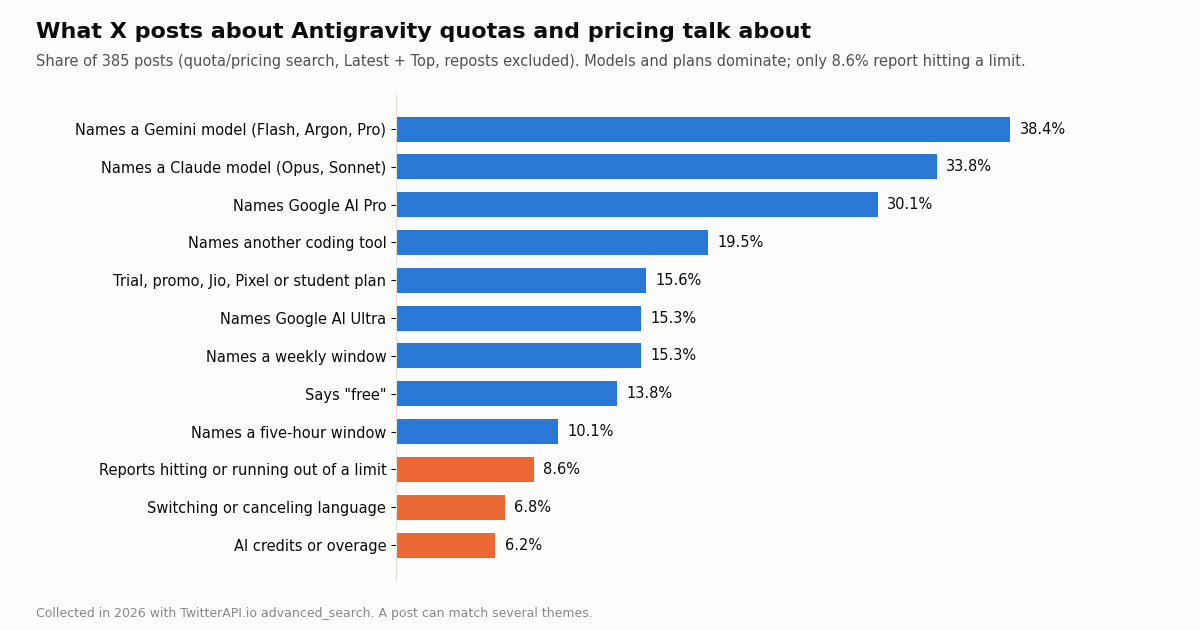
Trial Pro is not paid Pro. The Models page carries two footnotes that matter for anyone who got Google AI Pro free with a phone, a carrier bundle or a student offer: Claude 5.5 models are "available on Google AI Pro for non-trial subscriptions only", and Gemini 4 Argon is available with paid Pro plans "or on trial with eligible premium devices". The docs link a request form to switch a trial to a paid plan. In our X sample, 15.6% of the quota and pricing posts mention a trial, promo, carrier, Pixel or student plan, which tells you how many people meet this footnote in practice.
Thinking levels. The model selector offers Low, Medium and High thinking for most models. Higher effort means the agent does more work per prompt, and since the quota tracks agent work, it also means fewer prompts per window. If you hit the five-hour meter often, dropping routine edits to a Flash model or a lower thinking level is the simplest way to stretch the quota.
When the quota runs out: AI credits and overages
Free users have one option when the weekly quota is gone: wait for the refresh. Pro and Ultra users can spend AI credits. The Plans page says they "can use purchased AI credits (or any one-time promotional credits) for additional overage usage above the baseline quota", and that "AI credits are consumed at standard Gemini Enterprise consumption pricing".
The setting that controls it. Once you exhaust the baseline quota for a model, the AI Credit Overages setting decides what happens. Never means Antigravity never spends credits and you wait for the refresh. Always means it spends credits whenever the quota is exhausted and switches back to the quota once it refreshes. You can see quota use per model on the Settings page.
In the CLI. The Antigravity CLI shows the remaining credit count on the right of its status line, highlights it when credits drop below a warning threshold, and has a /credits command (balance, usage this billing cycle, links to buy more) and a /usage command, alias /quota, that refreshes and shows the per-model quota. The useG1Credits key in the CLI settings.json, or the Use AI Credits toggle under /config, turns credit fallback on or off.
What a credit costs. Google's AI credits page (one.google.com/ai/credits) requires sign-in, so we could not read a current credit price this session. When Google introduced AI credits for Antigravity in March 2026, The Register reported extra credits at $25 for 2,500 and noted that Google's documentation did not say how much Antigravity work a credit buys. Treat that as a historical data point, and read the price inside your own account before you set overages to Always.
What is not available. The Plans page lists two things that are currently not supported: bring-your-own-key or bring-your-own-endpoint for extra rate limits, and organizational tiers through a custom contract. If you were hoping to plug a Gemini API key from AI Studio into Antigravity for more headroom, that is not an option; our Google AI Studio free tier page covers what that key gets you on its own.
Antigravity for teams: Gemini Enterprise and pay-as-you-go
Teams do not buy Google AI Pro seats. The pricing page routes organizations to a Business plan via Google Cloud, which covers the Antigravity app, the CLI and the IDE extensions. Three options are listed: API access with consumption-based pricing; Standard and Plus plans "starting at $30 USD per seat per month" for eligible Gemini Enterprise customers; and a pay-as-you-go plan with a $0 seat fee and consumption-based pricing. All three run under the Google Cloud Terms of Service, with spend caps across API and subscription plans and centralized admin controls.
Two ways to connect. The Enterprise docs describe a Google Cloud project with an invoiced Cloud Billing account and the roles/discoveryengine.agentspaceUser IAM role for consumption billing, or a Gemini Enterprise Standard or Plus seat license with "included first-party quotas, managed overages, and centralized administrative controls". No separate per-user Antigravity license is required.
One product gap. Enterprise sign-in works in the Antigravity app, the CLI (agy) and the IDE extensions for VS Code, Visual Studio, JetBrains, Zed, Xcode and Eclipse, but not in the standalone Antigravity IDE. Data residency applies to first-party Gemini models; third-party model inference runs in the global, us and eu locations.
How Antigravity's price compares with Claude Code, Codex and Cursor
The fair comparison is entry price plus what happens at the limit. Antigravity's distinguishing features are a free tier that runs the real agent and a single Google AI subscription that also covers the Gemini app, storage and other Google products. Its weak spot is opacity: no published request or token numbers, and credit pricing behind a sign-in.
Where the numbers come from. The Claude Code and Codex rows point to our pricing pages for those tools, which carry the full plan tables and limits verified from Anthropic's and OpenAI's own pages; the Cursor row matches our Antigravity vs Cursor comparison, which read cursor.com/docs/models-and-pricing. We do not restate those plans here so the numbers live in one place.
What users weigh. In our X sample, 19.5% of the Antigravity quota and pricing posts name another coding tool (Claude Code, Codex, Cursor, Copilot, Kiro, Windsurf or OpenCode), and 6.8% use switching or canceling language. A few posts praised one design choice in particular: Google keeps the Gemini app and Antigravity on separate limits, so heavy chat use does not eat into coding quota.
What X users report about Antigravity quotas and pricing
We searched X for recent posts that pair "antigravity" with quota, limit, pricing, price, credits, subscription, AI Pro or AI Ultra (Latest and Top, reposts excluded) and kept the 385 posts that name Antigravity and contain text. They came from 320 distinct authors; the Latest sample covers about 4.3 days, roughly 83.5 posts a day. For scale, in a broader sample of 229 recent Antigravity posts, 22.7% used any quota or pricing term at all.
Models, not dollars, drive the conversation. 33.8% of posts name a Claude model, almost as many as name a Gemini model (38.4%). Much of that is about eligibility: which plan gets Claude 5.5, whether a trial or carrier Pro counts, and the coming removal of the 4.6 models from the free column. Only 7.8% of posts contain an actual currency amount.
Limits are discussed more than they are hit. 15.3% of posts name a weekly window and 10.1% a five-hour window, and 6.5% name both, usually while comparing the two meters. Only 8.6% describe actually hitting or running out of a limit. Among posts that name a plan, the share reporting a hit limit is 11.3% for posts that say "free", 6.0% for Pro and 8.5% for Ultra; the counts behind those shares are small (53, 116 and 59 posts), so read them as direction, not as a ranking.
Credits barely register. Just 6.2% of posts mention AI credits or overages, which fits Google's design: free users cannot buy them and many paid users leave the setting at Never. Tone is mixed rather than angry: 3.4% carry a clear negative word (nerf, scam, downgrade, worse) and 5.7% a clear positive one (generous, worth it, underrated). 14.8% tag @antigravity directly, including reports of quota meters that look wrong. 3.6% are resale ads for multi-month Google AI Pro or Ultra bundles; those are not Google offers, and a resold or promotional plan may not count as paid Pro for Claude 5.5.
Add X data to Antigravity, and what the X data bill looks like
Antigravity agents can call MCP servers, so you can give them live X data without writing an integration. TwitterAPI.io hosts one at https://mcp.twitterapi.io/mcp. Its initialize response, which we requested this session, describes 12 tools (tweet search, user lookup, followers, replies, trends and more) and says to paste your TwitterAPI.io API key as the Bearer token. The block below goes in ~/.gemini/config/mcp_config.json; our Antigravity vs Cursor page has the full step-by-step setup, the project-level file location and the permission pattern for auto-approving the tools.
What the agent's reads cost. MCP tool calls bill like the REST API: tweet endpoints cost 15 credits per tweet returned, which is $0.15 per 1,000 tweets, with a minimum of 15 credits per request, so a search that finds nothing costs $0.00015 and a full 20-tweet page costs $0.003. Profiles cost $0.18 per 1,000. On the official X API pay-per-use rate card at docs.x.com/x-api/getting-started/pricing, a post read costs $0.005 and a user read $0.010, so 1,000 tweets cost $5 there against $0.15 here, roughly 33x. The X rate card also caps pay-per-use at 3 million post reads a month, with Enterprise above that.
A polling agent. If you schedule an Antigravity task to check a search every 60 seconds, a check that finds nothing still costs the $0.00015 minimum, which adds up to 43,200 checks and $6.48 a month; every 5 minutes it is $1.30. Before the first payment the API allows 0.2 requests per second, and 20 once paid, which is plenty for an agent.
Getting a key. You sign in with Google; no X developer account is needed for reads. New accounts that pass the automatic bot check get up to $1 of free credits (at most 100,000 credits, no card, one per person or network, expiring after 31 days), and purchased credits never expire. Write actions such as posting or liking are a separate REST product: a /twitter/user_login_v2 login ($0.10, with a proxy you supply) returns login_cookies, then each call like /twitter/create_tweet_v2 costs 60 credits ($0.0006). Those calls act as that account, so X can rate-limit, lock or suspend it; keep a human pace, expect to log in again sometimes, and note that every HTTP 200 call is billed.
{
  "mcpServers": {
    "twitterapi-io": {
      "serverUrl": "https://mcp.twitterapi.io/mcp",
      "headers": {
        "Authorization": "Bearer YOUR_TWITTERAPI_IO_KEY"
      }
    }
  }
}How we collected this, and which Antigravity plan to pick
Question. What do people on X report about Antigravity's quotas, limits, credits and plans? Query. /twitter/tweet/advanced_search with antigravity (quota OR limit OR limits OR "rate limit" OR pricing OR price OR credits OR "ai pro" OR "ai ultra" OR subscription) -filter:retweets, Latest (400 posts) and Top (60 posts), deduplicated to 427, of which 385 name Antigravity and contain text. Baseline: a Latest search for Antigravity with coding terms (240 posts, 229 analyzed). Window. The most recent matching posts at collection time, in 2026. Method. Case-insensitive keyword matching; a post can match several themes. Languages: 73.5% English, 9.6% Chinese, 7.5% Japanese.
What the sample cannot show. Keyword matching misses sarcasm and posts that describe a limit without the words we searched for, the window is a few days, and people who post about quotas are not a random sample of Antigravity users. Nothing here measures actual quota sizes, which Google does not publish. Privacy. All three samples are topic searches by private individuals, so we kept only de-identified counts, with no handles, ids or text. Cost. 39 requests returned 700 tweets, about $0.105 on TwitterAPI.io against $3.50 at the official X API's $0.005 per post read.
Which plan to pick. Stay on the free plan if Gemini 3.8 Flash covers your work and a weekly refresh is acceptable; it is the same Antigravity access as Google AI Plus. Pay for Google AI Pro if you want Gemini 4 Argon or Claude 5.5 and five-hour refreshes, and make sure it is a paid, non-trial Pro if Claude matters to you. Move to Ultra only if you hit Pro's weekly limit regularly or need third-party models beyond Pro's list. For a team, compare Gemini Enterprise seats with the $0-seat pay-as-you-go plan against your expected usage. Whatever you choose, X data for your agent is a separate, small line item: our pricing page lists credit packs and subscriptions.
import time
import requests

API_KEY = "YOUR_TWITTERAPI_IO_KEY"  # dashboard key; no X developer account needed
BASE = "https://api.twitterapi.io"
HEADERS = {"X-API-Key": API_KEY}
QUERY = 'antigravity (quota OR limit OR "ai pro" OR "ai ultra" OR credits) -filter:retweets'

THEMES = {
    "weekly window": ("week",),
    "five-hour window": ("5h", "5 hour", "five-hour", "five hour"),
    "credits": ("credit", "overage"),
    "claude models": ("claude", "opus", "sonnet"),
    "ultra": ("ultra",),
}


def search_latest(query, max_pages=10):
    """Yield posts from advanced_search, following next_cursor until has_next_page is false."""
    cursor = ""
    for _ in range(max_pages):
        params = {"query": query, "queryType": "Latest", "cursor": cursor}
        r = requests.get(f"{BASE}/twitter/tweet/advanced_search", headers=HEADERS, params=params, timeout=30)
        r.raise_for_status()
        body = r.json()
        for tweet in body.get("tweets", []):
            yield tweet
        if not body.get("has_next_page") or not body.get("next_cursor"):
            break
        cursor = body["next_cursor"]
        time.sleep(5)  # 0.2 requests/s before the first payment; drop this once you have paid


posts = list(search_latest(QUERY))
counts = {name: 0 for name in THEMES}
for tweet in posts:
    text = (tweet.get("text") or "").lower()
    for name, words in THEMES.items():
        if any(w in text for w in words):
            counts[name] += 1

print(f"{len(posts)} posts")
for name, c in sorted(counts.items(), key=lambda kv: -kv[1]):
    share = 100 * c / len(posts) if posts else 0
    print(f"{name:18} {c:4}  {share:5.1f}%")

# Tweet reads bill 15 credits per tweet returned ($0.15 per 1,000); 100,000 credits = $1
print(f"approximate data cost: ${len(posts) * 15 / 100000:.4f}")
Questions readers ask
Is Google Antigravity free?
Yes. The Individual plan costs $0 a month and includes Gemini 3.8 Flash as the agent model, unlimited Tab completions, unlimited Command requests and every product feature, with a quota and rate limit that refresh weekly. You sign in with a personal Google Account; you must be 18 or older and in a supported country.
How much does Antigravity cost per month?
Antigravity itself has no paid plan. Higher limits come from a Google AI subscription. Google's US plan page shows Google AI Pro at $19.99 a month or $199.99 a year and Google AI Ultra from $99.99 a month, billed monthly. Prices differ by country, so check one.google.com for yours. Teams pay through Gemini Enterprise, from $30 per seat per month, or a pay-as-you-go plan with a $0 seat fee.
Does Google AI Plus give more Antigravity quota?
No. Antigravity's Models page groups Free and Google AI Plus in the same column, with the same models (Gemini 3.8 Flash once the 4.6 Claude models and GPT-OSS-120b are removed on November 18, 2026). Pro is the first plan that changes Antigravity limits.
How often does the Antigravity quota reset?
Free and Plus accounts get a quota refreshed weekly. Google AI Pro refreshes every five hours until a weekly limit is reached, and Ultra gets the highest quota, also refreshed every five hours, with the highest weekly limits. The model selector shows both a weekly and a five-hour meter per model family.
Can I use Claude in Antigravity?
Claude Sonnet 5.5 and Opus 5.5 are available on Google AI Pro (paid, non-trial subscriptions only), Ultra and Enterprise. The free and Plus columns list Claude Sonnet 4.6 and Opus 4.6 until their removal on November 18, 2026.
What happens when I run out of Antigravity quota?
On the free plan you wait for the weekly refresh. On Pro or Ultra you can spend purchased or promotional AI credits, billed at Gemini Enterprise consumption pricing, if the AI Credit Overages setting is set to Always; with Never, you wait for the refresh. The CLI shows the balance with /credits and the quota with /usage.
Can I bring my own Gemini API key to Antigravity?
No. The Plans page says bring-your-own-key and bring-your-own-endpoint for additional rate limits are currently not supported, and neither are custom-contract organizational tiers.
How do I give an Antigravity agent access to X (Twitter) data?
Add the TwitterAPI.io MCP server (https://mcp.twitterapi.io/mcp) to ~/.gemini/config/mcp_config.json with your API key as a Bearer token in the Authorization header. Tweet reads cost $0.15 per 1,000 tweets returned, against $5 per 1,000 post reads on the official X API pay-per-use rate card.
Continue
- Google Antigravity: Pricing (Individual, Google AI Pro, Ultra, Business)
- Google Antigravity docs: Plans (baseline quota, overages, unsupported options)
- Google Antigravity docs: Choose a model (model availability per plan)
- Google One: Google AI plans (Plus, Pro, Ultra benefits and US prices)
- Google Antigravity docs: Antigravity in Gemini Enterprise
- X API pricing (official pay-per-use rate card)
- Twitter (X) API hub: endpoints, pricing and guides
- Antigravity vs Cursor: plans, models and the MCP setup step by step
- Google AI Studio free tier limits for Gemini API keys
- Claude Code pricing: Pro, Max and Ultra limits
- Codex pricing: ChatGPT plans, limits and credits
- TwitterAPI.io hosted Twitter MCP server
- TwitterAPI.io pricing: credits and subscriptions
- 01What Is Qoder? Plans, Credits, MCP Setup and Twitter (X) Data in Qoder
- 02Cursor vs GitHub Copilot: Plans, Agent Mode, MCP and a Twitter (X) Data Setup in Both
- 03Claude Code hooks: every event, the settings.json shape, and tested recipes (plus an X data budget guard)
- 04OpenRouter Alternatives in 2026: LiteLLM, Vercel AI Gateway, Requesty, Portkey and Direct APIs Compared, With What Developers on Twitter (X) Say
- 05Lovable pricing in 2026: plans, credits, and what an app that pulls Twitter (X) data really costs
- 06n8n Pricing in 2026: Plans, Executions and the Twitter (X) Data Cost
- 07Twitter (X) Firehose Pricing — Enterprise vs API Comparison
- 08Claude API Pricing in 2026: Per-Token Rates and What 1,000 Tweets Really Cost
Stop reading. Start building.
Starter credits cover real testing on real data. Google sign-in, no card, no application queue.
Get an API keyAlready building with TwitterAPI.io? Publish an honest tutorial or build log about it and earn up to $200 a month in API credits.