Claude Code hooks: every event, the settings.json shape, and tested recipes (plus an X data budget guard)
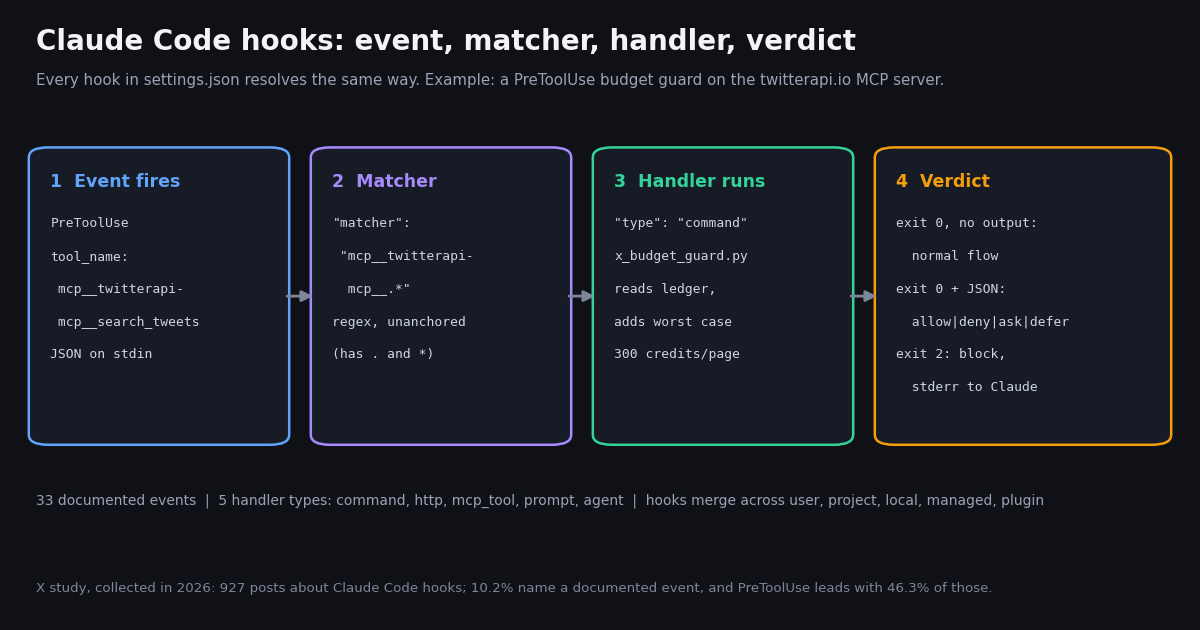
Hooks are the deterministic layer of Claude Code. A CLAUDE.md rule asks the model to remember to run Prettier or to never touch .env; a hook makes it happen every time, because Claude Code itself runs the handler at the lifecycle point you pick, whatever the model decides. That is why the hooks reference reads more like an API reference than a tips page: an event list, a JSON input schema per event, an exit-code contract and a JSON output schema.
This page is that reference in one place, checked against Anthropic's own hooks reference and hooks guide at code.claude.com/docs/en/hooks and code.claude.com/docs/en/hooks-guide this session, plus recipes we ran with sample stdin before writing them up. Version-gated fields carry the Claude Code version the docs name. We also searched X for how developers talk about hooks, which shows which events people actually reach for, and we close with a hook pair that logs and caps the X data an agent pulls through the twitterapi.io MCP server.
If you are still choosing a coding agent, the pricing and plan limits are on our Claude Code pricing page; this page assumes Claude Code is installed and you can edit its settings files.
All 33 Claude Code hook events, and which ones can block
The hooks reference lists 33 events. They fall into three cadences: per session (SessionStart, SessionEnd), per turn (UserPromptSubmit, Stop, StopFailure), and per tool call inside the agentic loop (PreToolUse, PostToolUse and their relatives). The rest are standalone events such as FileChanged, CwdChanged and the model-switch pair. The third column is what exit code 2 does on that event, which is the quickest way to know whether a hook there can stop anything.
Matchers differ by event. Tool events match tool_name; SessionStart matches how the session started; Notification matches the notification type (permission_prompt, idle_prompt, auth_success, elicitation_dialog, agent_needs_input, and more); PreCompact and PostCompact match manual or auto; StopFailure matches the error type (rate_limit, overloaded, billing_error, ...). UserPromptSubmit, Stop, PostToolBatch, TeammateIdle, TaskCreated, TaskCompleted, the worktree pair, MessageDisplay and CwdChanged have no matcher support: a matcher there is silently ignored and the hook fires every time.
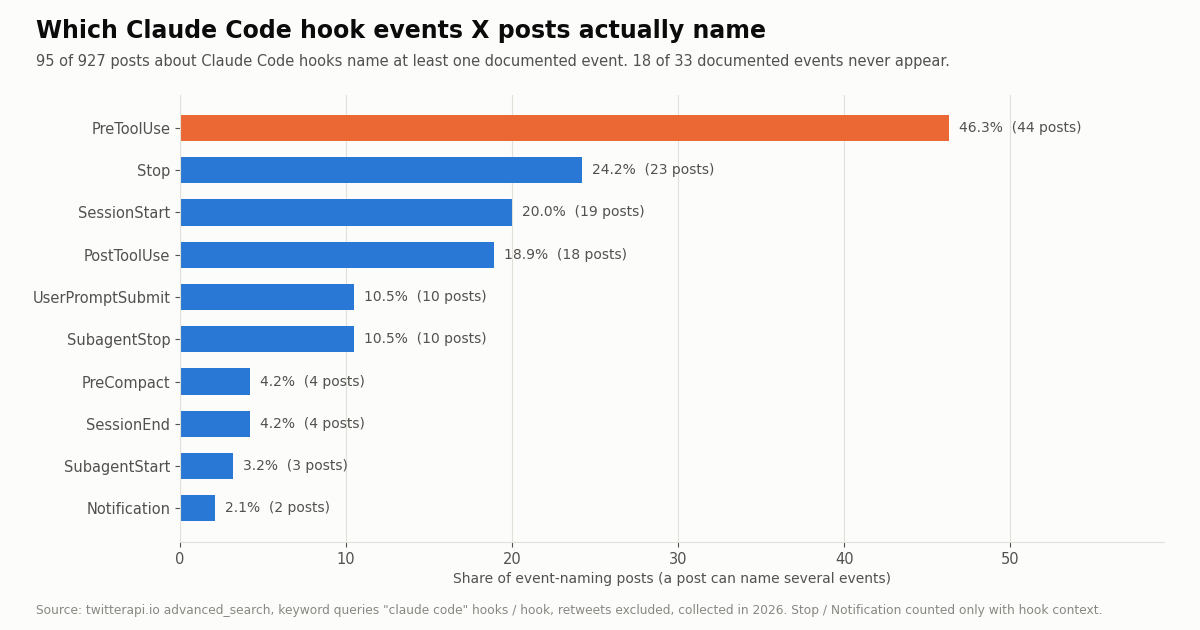
What people actually use. In our X sample, posts that name an event mostly name four: PreToolUse (46.3%), Stop (24.2%), SessionStart (20.0%) and PostToolUse (18.9%). 18 of the 33 events, including PostToolBatch, FileChanged, ConfigChange and the model-switch pair, did not appear once. The newer events are documented and working; they are simply not yet part of the shared recipes people copy.
The settings.json shape: event, matcher group, handler
Hooks live under a top-level hooks key in a settings file, nested three levels deep: the event name maps to an array of matcher groups, and each matcher group holds a matcher string plus a hooks array of handlers. Where the file sits sets the scope.
Entries merge across levels instead of replacing each other, and the same handler defined in two settings files runs once. Matching hooks for one event run in parallel. Edits to settings files are normally picked up by a file watcher; the /hooks command opens a read-only browser that shows every configured hook and the file it came from.
Handler types. command runs a shell command or an executable; http POSTs the event JSON to a URL and reads the same JSON output from the response body; mcp_tool calls a tool on an MCP server you already configured; prompt asks a Claude model for a one-shot decision; agent spawns a subagent that can read files before deciding (the docs mark agent hooks experimental).
Common fields. type (required), if (one permission rule such as Bash(git *) or Edit(*.ts), evaluated only on tool events), timeout in seconds (defaults: 600 for command, http and mcp_tool, lowered to 30 on UserPromptSubmit and the model-switch events; 30 for prompt; 60 for agent), and statusMessage for the spinner text. Command hooks add command, args, async, asyncRewake, shell and onFailure (Claude Code v2.1.295 or later).
Exec form vs shell form. With args present, command is resolved as an executable and spawned with no shell, so a path placeholder such as ${CLAUDE_PROJECT_DIR} needs no quoting. Without args, the string goes to sh -c (Git Bash or PowerShell on Windows), which gives you pipes and && but means every placeholder must sit in double quotes.
Environment variables. Every command hook gets CLAUDE_PROJECT_DIR (the root where the session started; it does not follow Claude into a worktree, read cwd from the input for that), and plugin hooks also get CLAUDE_PLUGIN_ROOT and CLAUDE_PLUGIN_DATA. CLAUDE_ENV_FILE exists only for SessionStart, Setup, CwdChanged and FileChanged: append export lines to it to set variables for every later Bash command. CLAUDE_CODE_REMOTE is true in cloud sessions, CLAUDE_EFFORT carries the effort level, and there is no CLAUDE_MODEL variable.
This project file registers the three everyday hooks on this page: a formatter after edits, a guard before Bash and file writes, and a desktop ping on notifications.
{
  "hooks": {
    "PostToolUse": [
      {
        "matcher": "Edit|Write",
        "hooks": [
          {
            "type": "command",
            "command": "${CLAUDE_PROJECT_DIR}/.claude/hooks/format-on-edit.sh",
            "args": [],
            "timeout": 30
          }
        ]
      }
    ],
    "PreToolUse": [
      {
        "matcher": "Bash|Edit|Write",
        "hooks": [
          {
            "type": "command",
            "command": "python3",
            "args": ["${CLAUDE_PROJECT_DIR}/.claude/hooks/guard.py"],
            "onFailure": "block"
          }
        ]
      }
    ],
    "Notification": [
      {
        "matcher": "permission_prompt|idle_prompt",
        "hooks": [
          { "type": "command", "command": "${CLAUDE_PROJECT_DIR}/.claude/hooks/notify.sh", "args": [] }
        ]
      }
    ]
  }
}Matcher syntax, MCP tool names and the if field
How Claude Code reads a matcher depends on the characters in it, and this is where most broken hooks come from.
Pipe lists. Edit|Write is the same exact-name list as Edit, Write. Unanchored means substring. Edit.* matches both Edit and NotebookEdit. Write ^Edit$ when you mean exactly one tool. Matchers are case-sensitive, so bash matches nothing.
MCP tools. MCP server tools appear in tool events as mcp__<server>__<tool>. To catch every tool from one server you need the .* suffix: mcp__memory has only exact-match characters, so it is compared as an exact string and matches no tool at all. mcp__brave-search__.* works for hyphenated server names, mcp__.*__write.* catches write tools on any server, and a plugin-bundled server uses a scoped segment such as mcp__plugin_my-plugin_db__.*. Since Claude Code v2.1.274 the input also carries an mcp_server object with the server name and a source; the docs recommend basing trust decisions on source rather than on the tool-name prefix.
The if field narrows further. A handler-level if holds exactly one permission rule and is only evaluated on tool events (on any other event a hook with if never runs). For Bash, leading VAR=value assignments are stripped and each subcommand is checked, so Bash(git *) fires on npm test && git push, and commands inside $() and backticks are checked too. When Claude Code cannot tell which commands a Bash string runs, it runs the hook anyway. The docs are explicit that this filter is best-effort: use permission rules, not an if pattern, for a hard allow or deny.
Which file tools. For Write, Edit and Read, tool_input.file_path always arrives absolute (Claude Code expands ~ and relative paths first), with backslashes on Windows. A path check written with forward slashes never matches on Windows and lets the call through.
Exit codes and JSON output: how a hook decides
A command hook gets the event JSON on stdin: common fields (session_id, transcript_path, cwd, permission_mode, hook_event_name, and prompt_id once there is user input) plus event fields such as tool_name, tool_input and tool_use_id for tool events, tool_response and duration_ms for PostToolUse, and stop_hook_active plus last_assistant_message for Stop. It answers with an exit code and, optionally, one JSON object on stdout.
Exit 1 does not block. It is the usual Unix failure code, but in Claude Code it is a non-blocking error. A policy hook must exit 2, return a deny decision, or set "onFailure": "block", which also turns a missing script, a crash or a timeout into a block. A timed-out PreToolUse hook without that flag lets the call continue through the normal permission flow.
JSON output. Print only one JSON object; a line your shell profile echoes first is enough to make Claude Code read the output as plain text. Universal fields: continue (false stops Claude entirely), stopReason, systemMessage (a warning shown to the user) and terminalSequence (a desktop notification, title or bell, because hooks have no /dev/tty). Event-specific control comes in two styles: a top-level decision: "block" plus reason for UserPromptSubmit, PostToolUse, PostToolBatch, Stop, SubagentStop, ConfigChange and PreCompact, and a hookSpecificOutput object with hookEventName for PreToolUse, PermissionRequest and others.
PreToolUse decisions. permissionDecision is allow, deny, ask or defer (defer needs -p mode), with permissionDecisionReason; updatedInput replaces the whole tool input before it runs; additionalContext adds a note next to the tool result. When several hooks disagree, deny beats defer, which beats ask, which beats allow. A hook's allow never overrides a deny rule in settings, while a hook's deny holds in every permission mode, including the mode that --dangerously-skip-permissions turns on. The old top-level approve / block values for this event are deprecated.
PostToolUse and Stop. PostToolUse cannot undo anything (the tool already ran); decision: "block" puts your reason next to the result, and updatedToolOutput replaces what Claude sees. A Stop hook that blocks makes Claude keep working; check stop_hook_active to avoid loops, because Claude Code overrides the block after eight consecutive continuations (raise it with CLAUDE_CODE_STOP_HOOK_BLOCK_CAP). additionalContext, systemMessage and plain stdout are each capped at 10,000 characters; longer text is saved to a file and Claude gets a preview.
Context injection. On SessionStart, UserPromptSubmit, UserPromptExpansion and PostModelSwitch, plain-text stdout is added to Claude's context as-is; elsewhere stdout only goes to the debug log (claude --debug, then ~/.claude/debug/<session-id>.txt). The docs advise writing injected text as facts ("This repo uses bun test") rather than as commands.
// PreToolUse: deny with a reason Claude sees
{
  "hookSpecificOutput": {
    "hookEventName": "PreToolUse",
    "permissionDecision": "deny",
    "permissionDecisionReason": "Database writes are not allowed"
  }
}

// PostToolUse / Stop / UserPromptSubmit: top-level decision
{ "decision": "block", "reason": "Test suite must pass before proceeding" }

// Any event: stop Claude entirely
{ "continue": false, "stopReason": "Build failed, fix errors before continuing" }Recipe 1 and 2: a PostToolUse formatter and a PreToolUse guard
The formatter. A PostToolUse hook on Edit|Write reads tool_input.file_path and formats that one file by extension. It always exits 0: the edit already happened, and a formatter that blocks only confuses Claude. We tested it by piping a sample Write payload for a file containing const a = {b:1}; Prettier rewrote it to const a = { b: 1 }; and the hook printed nothing, which is the expected success path. The docs' one-liner version is jq -r '.tool_input.file_path' | xargs npx prettier --write.
The guard. A PreToolUse hook on Bash|Edit|Write denies a recursive force delete, a force push to main, piping a download into a shell, and writes to .env, key files or .git/. It returns a JSON deny instead of exiting 2 so the reason reaches Claude cleanly, and stays silent otherwise so the normal permission flow decides. Register it with "onFailure": "block" so a crashed guard fails closed. Treat it as a seatbelt, not a sandbox: pattern matching on shell strings misses creative spellings, which is why Anthropic's docs point hard allow / deny rules at the permission system.
The notifier. The notify.sh registered in the settings above returns a terminalSequence (OSC 777) that Claude Code writes for you; Notification hooks cannot block and their systemMessage is discarded, but the sequence still fires in an interactive session.
Test before you register. Pipe sample JSON into each script and check stdout and the exit code, exactly as the troubleshooting section of the guide suggests. These are the runs we did for this page:
#!/bin/bash
# PostToolUse hook (matcher "Edit|Write"): format the file Claude just wrote.
# Reads the hook JSON on stdin; tool_input.file_path is always absolute.
file=$(jq -r '.tool_input.file_path // empty')
[ -z "$file" ] || [ ! -f "$file" ] && exit 0

case "$file" in
  *.py)                  ruff format --quiet "$file" 2>/dev/null ;;
  *.ts|*.tsx|*.js|*.jsx|*.json|*.css|*.md)
                         npx --no-install prettier --write --log-level silent "$file" 2>/dev/null ;;
  *.go)                  gofmt -w "$file" 2>/dev/null ;;
esac
exit 0   # never block: the edit already happened

# ---- guard.py ----
#!/usr/bin/env python3
"""PreToolUse hook (matcher "Bash|Edit|Write"): deny a few dangerous actions.

Exit 0 + JSON permissionDecision "deny" blocks the call and shows the reason to Claude.
Exit 0 with no output leaves the normal permission flow in charge.
"""
import json, re, sys

data = json.load(sys.stdin)
tool = data.get("tool_name", "")
inp = data.get("tool_input", {}) or {}

BASH_RULES = [
    (r"\brm\s+-[a-z]*r[a-z]*f|\brm\s+-[a-z]*f[a-z]*r", "recursive force delete"),
    (r"\bgit\s+push\b.*(--force|-f\b).*\b(main|master)\b", "force push to main"),
    (r"\bcurl\b[^|]*\|\s*(sh|bash)\b", "piping a download into a shell"),
]
PROTECTED = (".env", ".env.local", "id_rsa", ".pem", "/.git/")

reason = None
if tool == "Bash":
    cmd = inp.get("command", "")
    for pattern, label in BASH_RULES:
        if re.search(pattern, cmd):
            reason = f"Blocked by guard.py: {label}. Ask the user to run it by hand."
            break
elif tool in ("Edit", "Write"):
    path = inp.get("file_path", "")
    if any(path.endswith(p) or p in path for p in PROTECTED):
        reason = f"Blocked by guard.py: {path} is a protected file."

if reason:
    print(json.dumps({"hookSpecificOutput": {
        "hookEventName": "PreToolUse",
        "permissionDecision": "deny",
        "permissionDecisionReason": reason}}))
sys.exit(0)

# ---- notify.sh ----
#!/bin/bash
# Notification hook: desktop ping through Claude Code's own terminal write path.
# Hooks have no /dev/tty, so return the escape sequence in "terminalSequence".
input=$(cat)
body=$(jq -r '.message // "Needs your attention"' <<<"$input")
seq=$(printf '\033]777;notify;%s;%s\007' "Claude Code" "$body")
jq -nc --arg seq "$seq" '{terminalSequence: $seq}'

# ---- tests ----
# Test every hook before you register it: pipe sample stdin JSON, check stdout and exit code
$ echo '{"tool_name":"Bash","tool_input":{"command":"cd build && rm -rf /"}}' | ./guard.py; echo " exit=$?"
{"hookSpecificOutput": {"hookEventName": "PreToolUse", "permissionDecision": "deny", "permissionDecisionReason": "Blocked by guard.py: recursive force delete. Ask the user to run it by hand."}}
 exit=0

$ echo '{"tool_name":"Bash","tool_input":{"command":"npm test"}}' | ./guard.py; echo "[empty] exit=$?"
[empty] exit=0

$ echo '{"tool_name":"mcp__twitterapi-mcp__search_tweets","tool_input":{"query":"x"}}' \
    | X_DAILY_BUDGET_CREDITS=500 ./x_budget_guard.py
{"hookSpecificOutput": {"hookEventName": "PreToolUse", "permissionDecision": "deny", "permissionDecisionReason": "X data budget reached: 318 of 500 credits used today ($0.0032). This search_tweets call could add 300."}}

$ X_LEDGER=/tmp/l.jsonl ./x_call_log.py < post_search.json && tail -1 /tmp/l.jsonl
{"day": "...", "tool": "search_tweets", "args": {"query": "claude code hooks", "queryType": "Latest"}, "tweets": 20, "users": 0, "credits": 300, "usd": 0.003, "duration_ms": 812, ...}Recipe 3: log and cap X API calls made through an MCP server
Give an agent a Twitter (X) data tool and it will happily run a search forty times while it iterates. Because MCP tools are ordinary tools in PreToolUse and PostToolUse, two small hooks turn that into a metered, capped resource. We sent the hosted twitterapi.io MCP server an initialize and a tools/list request this session: it answers as twitterapi-mcp and lists 12 tools (search_tweets, get_user_info, get_user_about, get_user_followers, get_user_followings, get_user_last_tweets, get_user_mentions, get_tweets_by_ids, get_tweet_replies, get_tweet_quotes, get_tweet_retweeters, get_trends), and its instructions say to pass your API key as the Bearer token. Added under the name twitterapi-mcp, the tools show up as mcp__twitterapi-mcp__search_tweets and so on, so one matcher, mcp__twitterapi-mcp__.*, covers all of them.
x_call_log.py (PostToolUse) walks the tool result, counts the tweets or users it returned, prices the call (15 credits per tweet with a 15-credit minimum, 18 per profile) and appends one JSON line to ~/.claude/x-ledger.jsonl. Fed a real 20-tweet search page wrapped as MCP text content, it logged 20 tweets, 300 credits, $0.003.
x_budget_guard.py (PreToolUse) sums today's ledger, adds the worst case for the call about to run (a full 20-tweet page is 300 credits), returns ask above 80% of the budget and deny above 100%, with the numbers in the reason so Claude can tell you why. With onFailure: "block", a missing or broken guard stops X calls instead of letting them through unmetered. In our test with a 500-credit budget and 318 credits already logged, it denied the next search with the message shown above.
The X data bill. twitterapi.io charges 15 credits per tweet returned ($0.15 per 1,000 tweets; a full 20-tweet page is $0.003, an empty search costs the $0.00015 minimum) and 18 credits per profile ($0.18 per 1,000). The official X API pay-per-usage rate card at docs.x.com/x-api/getting-started/pricing lists $0.005 per post read and $0.010 per user read, so the same 1,000 tweets cost $5 there against $0.15 here, roughly 33x. Our study for this page pulled 1,335 tweets in 74 requests for $0.20; at X's post-read rate that is $6.67.
The MCP server's tools all read data. For writes, use the REST write endpoints instead (Recipe 4). New accounts that pass the automatic bot check get up to $1 of free credits (at most 100,000 credits, no card, one per person or network, expiring after 31 days), which is enough to run this guard with the default budget for three days; purchased credits never expire. Plans and rate limits are on the pricing page.
# 1. Add the hosted twitterapi.io MCP server (Streamable HTTP, key as a Bearer token)
claude mcp add --transport http --scope user twitterapi-mcp https://mcp.twitterapi.io/mcp \
  --header "Authorization: Bearer YOUR_API_KEY"

# 2. Its tools now appear as mcp__twitterapi-mcp__<tool>, for example
#    mcp__twitterapi-mcp__search_tweets, mcp__twitterapi-mcp__get_user_info

# 3. Drop the two hook scripts into the project and register them (settings below)
mkdir -p .claude/hooks && cp x_budget_guard.py x_call_log.py .claude/hooks/

# 4. Optional: set the daily budget in credits ($1 = 100,000 credits)
export X_DAILY_BUDGET_CREDITS=30000     # $0.30 a day, 100 full search pages

# ---- settings.json ----
{
  "hooks": {
    "PreToolUse": [
      {
        "matcher": "mcp__twitterapi-mcp__.*",
        "hooks": [
          {
            "type": "command",
            "command": "python3",
            "args": ["${CLAUDE_PROJECT_DIR}/.claude/hooks/x_budget_guard.py"],
            "onFailure": "block",
            "statusMessage": "Checking X data budget"
          }
        ]
      }
    ],
    "PostToolUse": [
      {
        "matcher": "mcp__twitterapi-mcp__.*",
        "hooks": [
          {
            "type": "command",
            "command": "python3",
            "args": ["${CLAUDE_PROJECT_DIR}/.claude/hooks/x_call_log.py"]
          }
        ]
      }
    ]
  }
}

# ---- .claude/hooks/x_budget_guard.py ----
#!/usr/bin/env python3
"""PreToolUse hook (matcher "mcp__twitterapi-mcp__.*"): a daily X data budget.

Reads today's spend from the ledger that x_call_log.py writes, adds a worst-case
estimate for the call Claude is about to make, and asks or denies when the total
would cross the budget. Prices: twitterapi.io pay-as-you-go, 15 credits per tweet
returned (minimum 15 per request), 18 credits per profile; $1 = 100,000 credits.
"""
import datetime, json, os, sys

BUDGET = int(os.environ.get("X_DAILY_BUDGET_CREDITS", "30000"))   # 30,000 credits = $0.30
LEDGER = os.path.expanduser(os.environ.get("X_LEDGER", "~/.claude/x-ledger.jsonl"))

# Worst-case credits per call: a full page of 20 tweets x 15 credits = 300.
TWEET_PAGE = 20 * 15
ESTIMATE = {
    "search_tweets": TWEET_PAGE, "get_user_last_tweets": TWEET_PAGE,
    "get_user_mentions": TWEET_PAGE, "get_tweet_replies": TWEET_PAGE,
    "get_tweet_quotes": TWEET_PAGE,
    "get_user_info": 18, "get_user_about": 18,
}
DEFAULT = TWEET_PAGE  # conservative placeholder for tools not listed above

data = json.load(sys.stdin)
tool = data["tool_name"].split("__")[-1]          # mcp__twitterapi-mcp__search_tweets -> search_tweets
args = data.get("tool_input", {}) or {}
if tool == "get_tweets_by_ids":
    estimate = 15 * max(1, len(str(args.get("tweet_ids", "")).split(",")))
else:
    estimate = ESTIMATE.get(tool, DEFAULT)

today = datetime.date.today().isoformat()
spent = 0
if os.path.exists(LEDGER):
    with open(LEDGER) as f:
        for line in f:
            try:
                row = json.loads(line)
            except ValueError:
                continue
            if row.get("day") == today:
                spent += int(row.get("credits", 0))

after = spent + estimate
decision = None
if after > BUDGET:
    decision = ("deny", f"X data budget reached: {spent:,} of {BUDGET:,} credits used today "
                        f"(${spent/100000:.4f}). This {tool} call could add {estimate:,}.")
elif after > 0.8 * BUDGET:
    decision = ("ask", f"{tool} would bring today's X data spend to about {after:,} of "
                       f"{BUDGET:,} credits. Allow?")

if decision:
    print(json.dumps({"hookSpecificOutput": {
        "hookEventName": "PreToolUse",
        "permissionDecision": decision[0],
        "permissionDecisionReason": decision[1]}}))
sys.exit(0)

# ---- .claude/hooks/x_call_log.py ----
#!/usr/bin/env python3
"""PostToolUse hook (matcher "mcp__twitterapi-mcp__.*"): log every X call and its bill.

Counts the tweets / users the tool returned and appends one JSON line per call to
the ledger that x_budget_guard.py reads. Billing model: 15 credits per tweet
returned (minimum 15 per request), 18 credits per profile.
"""
import datetime, json, os, sys

LEDGER = os.path.expanduser(os.environ.get("X_LEDGER", "~/.claude/x-ledger.jsonl"))


def find_lists(node, out):
    """Walk the MCP result (content blocks may hold JSON text) and collect list lengths."""
    if isinstance(node, str):
        s = node.strip()
        if s.startswith("{") or s.startswith("["):
            try:
                find_lists(json.loads(s), out)
            except ValueError:
                pass
    elif isinstance(node, dict):
        for key, val in node.items():
            if key in ("tweets", "followers", "followings", "users") and isinstance(val, list):
                out[key] = out.get(key, 0) + len(val)
            else:
                find_lists(val, out)
    elif isinstance(node, list):
        for item in node:
            find_lists(item, out)


data = json.load(sys.stdin)
tool = data["tool_name"].split("__")[-1]
counts = {}
find_lists(data.get("tool_response"), counts)
tweets = counts.get("tweets", 0)
users = counts.get("users", 0) + counts.get("followers", 0) + counts.get("followings", 0)

if tool in ("get_user_info", "get_user_about"):
    credits = 18
elif users and not tweets:
    credits = users * 3                     # follower pages bill 1-3 credits per user; log the upper end
else:
    credits = max(15, tweets * 15)          # tweet endpoints: 15 per tweet, 15 minimum

row = {"day": datetime.date.today().isoformat(), "tool": tool,
       "args": data.get("tool_input"), "tweets": tweets, "users": users,
       "credits": credits, "usd": round(credits / 100000, 5),
       "duration_ms": data.get("duration_ms"), "session": data.get("session_id")}
os.makedirs(os.path.dirname(LEDGER), exist_ok=True)
with open(LEDGER, "a") as f:
    f.write(json.dumps(row) + "\n")
sys.exit(0)Recipe 4: SessionStart X context and a Stop hook that posts a ship note
Pull fresh X context at startup. A SessionStart hook with matcher startup can run one search for your project's name or handle and print the top posts; plain-text stdout from SessionStart lands in Claude's context before your first prompt. Two pages cost at most $0.006. mcp_tool hooks do not run on SessionStart at launch (MCP servers are not connected yet), so this one is a command hook calling the REST endpoint /twitter/tweet/advanced_search directly; the full script is the code example at the end of this page. Keep it fast and fail silent: a hook that errors here only shows a notice, but a slow one delays every session.
Post a ship note on Stop, carefully. Stop fires at the end of every turn, not only when a task is done, so a hook that posts on every Stop would post constantly. The script below acts only when Claude's last_assistant_message contains a line starting with #shipped (ask for that line in CLAUDE.md), skips when stop_hook_active is true, and defaults to a dry run that just shows a systemMessage. Run it with "async": true so it never holds up the session; note that in -p mode Claude Code cancels async hooks still running at teardown.
What the write call means. Posting runs through an authenticated session: one /twitter/user_login_v2 login ($0.10, with a proxy you supply) returns login_cookies, and each /twitter/create_tweet_v2 call is then 60 credits ($0.0006), billed per HTTP 200 call. The call acts as that X account, so X can rate-limit, lock or suspend it; keep a human pace (one note per real release, not per turn) and expect the session to need a fresh login from time to time. Reads, by contrast, need no X account at all.
Dry-run test. Piping a Stop payload whose last message ends with #shipped: v0.4 adds CSV export to the mentions CLI printed {"systemMessage": "[dry run] would post to X: v0.4 adds CSV export to the mentions CLI"}; a payload without the tag, or with stop_hook_active: true, printed nothing and exited 0.
#!/usr/bin/env python3
"""Stop hook: post a one-line ship note to X when a turn ends with a #shipped line.

Stop fires at the end of EVERY turn, so this hook only acts when Claude's last
message contains a line starting with "#shipped" (ask for it in CLAUDE.md).
Default is a dry run; set X_POST_ON_STOP=1 to really post.

Writes act as the logged-in X account: X can rate-limit, lock or suspend it, so
keep a human pace. One /twitter/create_tweet_v2 call is 60 credits ($0.0006),
billed per HTTP 200 call. login_cookies come from one /twitter/user_login_v2
login ($0.10, with a proxy you supply) and can need a fresh login later.
"""
import json, os, sys

data = json.load(sys.stdin)
if data.get("stop_hook_active"):
    sys.exit(0)                                   # never loop

msg = data.get("last_assistant_message") or ""
ship = [l.strip() for l in msg.splitlines() if l.strip().lower().startswith("#shipped")]
if not ship:
    sys.exit(0)
text = ship[0][len("#shipped"):].strip(" :-")[:270]
if not text:
    sys.exit(0)

if os.environ.get("X_POST_ON_STOP") != "1":
    print(json.dumps({"systemMessage": f"[dry run] would post to X: {text}"}))
    sys.exit(0)

import requests
r = requests.post(
    "https://api.twitterapi.io/twitter/create_tweet_v2",
    headers={"X-API-Key": os.environ["TWITTERAPI_IO_API_KEY"]},
    json={"login_cookies": os.environ["X_LOGIN_COOKIES"],
          "tweet_text": text,
          "proxy": os.environ["X_PROXY"]},
    timeout=20,
)
body = r.json() if r.headers.get("content-type", "").startswith("application/json") else {}
note = f"X post {body.get('status', r.status_code)}: tweet_id {body.get('tweet_id', '-')}"
print(json.dumps({"systemMessage": note}))
sys.exit(0)

# Register (async so it never blocks the turn):
# {"hooks": {"Stop": [{"hooks": [{"type": "command", "command": "python3",
# "args": ["${CLAUDE_PROJECT_DIR}/.claude/hooks/stop_post_summary.py"], "async": true}]}]}}What X posts say about Claude Code hooks (how we collected this)
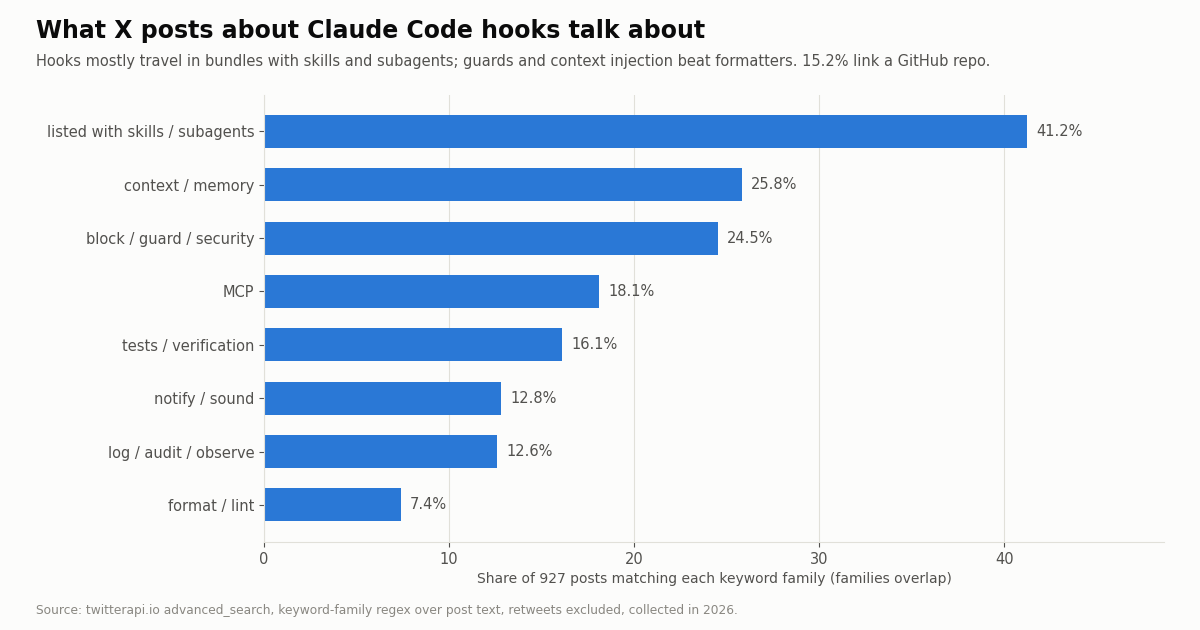
Question. When developers post about Claude Code hooks on X, which events do they name and what do they use hooks for? Query. Three keyword searches through twitterapi.io /twitter/tweet/advanced_search with retweets excluded: "claude code" hooks (Latest, two windows) and "claude code" hook (Top), plus a separate search seeded with four event names. Sample. 1,335 tweets returned in 74 requests, 1,153 unique; the keyword set used for the event shares is 927 posts, collected in 2026. Method. Event names from the official list matched case-sensitively as whole words; Stop, Notification, Setup and Elicitation counted only with hook context ("Stop hook", quoted or in backticks) because they are ordinary English words. Use-case families are keyword regexes over the text and overlap.
What it shows. Hooks are mostly mentioned as part of a kit: 41.2% of posts list them next to skills, subagents or plugins, and only 10.2% get specific enough to name an event. When people do get specific, it is about control rather than convenience: PreToolUse dominates, guard and security vocabulary (24.5%) far outruns formatting (7.4%), even though formatting is the first recipe in most tutorials. In the search seeded with event names (300 posts), PreToolUse again appears in 46.7% of posts. Engagement is very skewed: the median post gets 2 likes while the top tenth gets 124 or more.
What the sample cannot show. Search returns what X indexes for these words, so posts that describe a hook without the word "hook" are missed, and the Top query reaches further back than the Latest windows. Keyword families are crude ("context" also matches posts about context windows). Mentions are not usage: nothing here says how many people run a given hook. Privacy. Keyword searches return posts by private individuals, so raw pages stayed on our machine and were not published; the study files hold aggregates and de-identified rows only, and no person is named or profiled. Cost. 1,335 tweets at 15 credits each is 20,025 credits, $0.20.
Troubleshooting: hook not firing, JSON ignored, Stop loops
The hook never runs. Open /hooks and confirm it is listed under the right event. Check the matcher's case and form (an MCP matcher without .* matches nothing; bash is not Bash). In an interactive session, hooks from every settings file wait until you accept the workspace trust dialog for that folder. If the menu says only managed hooks run, an administrator set allowManagedHooksOnly.
A hook error notice appears. Failed with non-blocking status code means the exit code was neither 0 nor 2. A No such file or directory in the notice means the script never started: fix the path, use ${CLAUDE_PROJECT_DIR} in exec form, and chmod +x the script. jq: command not found means jq is missing from the hook's PATH; write the hook in Python or Node instead.
JSON has no effect. Something else reached stdout first, often an echo in ~/.zshrc or ~/.bashrc; guard it with an interactive-shell check. Or a field sits at the wrong level: permissionDecision belongs inside hookSpecificOutput with hookEventName, while decision and reason for Stop or PostToolUse are top-level. Build output with jq -n or json.dumps, never string concatenation.
Claude will not stop. A Stop hook that blocks on a condition Claude cannot meet loops until the eight-continuation cap ends the turn with a warning. Exit 0 early when stop_hook_active is true.
Turning hooks off. Set "disableAllHooks": true in a settings file, or pass --settings '{"disableAllHooks": true}' for one run; there is no switch for a single hook short of deleting its entry, and user-level settings cannot disable managed hooks. Before scripting claude -p over a repository you did not write, read its .claude/ settings: in -p and SDK sessions there is no trust dialog, so committed project hooks run.
Security. Command hooks run with your full user permissions. The docs' own checklist: validate inputs, quote every shell variable, reject .. in paths, use absolute paths, and skip .env, .git/ and key files. If a hook needs secrets (like the X API key above), read them from the environment, never from the repo.
"""x_context_hook.py - a SessionStart hook that gives Claude the latest X posts
about your project, and doubles as a standalone script you can run by hand.

    pip install requests
    export TWITTERAPI_IO_API_KEY=...            # twitterapi.io dashboard
    export X_PROJECT_QUERY='"my-cli" OR @mycli -filter:retweets'

Register in .claude/settings.json:
    {"hooks": {"SessionStart": [{"matcher": "startup", "hooks": [
        {"type": "command", "command": "python3",
         "args": ["${CLAUDE_PROJECT_DIR}/.claude/hooks/x_context_hook.py"], "timeout": 20}]}]}}

Plain-text stdout from a SessionStart hook is added to Claude's context.
Bill: 15 credits per tweet returned, so a full 20-tweet page is $0.003 and two pages $0.006.
"""
import json
import os
import sys

import requests

BASE = "https://api.twitterapi.io"
KEY = os.environ.get("TWITTERAPI_IO_API_KEY")
QUERY = os.environ.get("X_PROJECT_QUERY")
MAX_PAGES = int(os.environ.get("X_CONTEXT_PAGES", "2"))


def read_stdin_event():
    """Claude Code sends the hook input on stdin; by hand there is none."""
    if sys.stdin.isatty():
        return {"hook_event_name": "manual", "source": "startup"}
    try:
        return json.load(sys.stdin)
    except ValueError:
        return {}


def search(query, max_pages):
    tweets, cursor = [], ""
    for _ in range(max_pages):
        r = requests.get(
            f"{BASE}/twitter/tweet/advanced_search",
            headers={"X-API-Key": KEY},
            params={"query": query, "queryType": "Latest", "cursor": cursor},
            timeout=8,
        )
        r.raise_for_status()
        body = r.json()
        tweets.extend(body.get("tweets", []))
        if not body.get("has_next_page") or not body.get("next_cursor"):
            break
        cursor = body["next_cursor"]
    return tweets


def main():
    event = read_stdin_event()
    if event.get("source") not in (None, "startup", "resume"):
        return 0                       # skip /clear and compaction re-runs
    if not KEY or not QUERY:
        return 0                       # not configured: say nothing
    try:
        tweets = search(QUERY, MAX_PAGES)
    except requests.RequestException as exc:
        print(f"x_context_hook skipped: {exc}", file=sys.stderr)
        return 0                       # never break session start
    if not tweets:
        return 0
    tweets.sort(key=lambda t: t.get("likeCount") or 0, reverse=True)
    credits = max(15, 15 * len(tweets))
    lines = [f"X posts matching {QUERY}: {len(tweets)} returned "
             f"(about {credits} credits, ${credits / 100000:.4f}). Most liked first:"]
    for t in tweets[:10]:
        text = " ".join((t.get("text") or "").split())[:220]
        author = (t.get("author") or {}).get("userName", "?")
        lines.append(f"- @{author}, {t.get('likeCount', 0)} likes, "
                     f"{t.get('replyCount', 0)} replies, {t.get('createdAt')}: {text}")
    print("\n".join(lines))
    return 0


if __name__ == "__main__":
sys.exit(main())Questions readers ask
What are Claude Code hooks?
Handlers that Claude Code runs automatically at fixed lifecycle points, such as before a tool call (PreToolUse), after it (PostToolUse), at the end of a turn (Stop) or when a session starts (SessionStart). They are configured in settings files and can be shell commands, HTTP endpoints, MCP tool calls, LLM prompts or subagents. Unlike a CLAUDE.md instruction, a hook runs every time, whatever the model decides.
Where do I put Claude Code hooks?
Under a hooks key in ~/.claude/settings.json (all projects), .claude/settings.json (one project, committed), or .claude/settings.local.json (one project, not committed). Plugins use hooks/hooks.json, and skills and subagents can declare hooks in frontmatter. Entries from all levels merge; /hooks shows what is active and where it came from.
How many hook events does Claude Code have?
The hooks reference lists 33, including SessionStart, UserPromptSubmit, PreToolUse, PermissionRequest, PostToolUse, PostToolUseFailure, PostToolBatch, Notification, SubagentStart, SubagentStop, Stop, StopFailure, PreCompact, PostCompact, FileChanged, PreModelSwitch and SessionEnd. Older tutorials list far fewer, so check the reference before relying on one.
How do I block a tool call with a hook?
Register a PreToolUse hook on the tool and either exit 2 with the reason on stderr, or exit 0 and print {"hookSpecificOutput": {"hookEventName": "PreToolUse", "permissionDecision": "deny", "permissionDecisionReason": "..."}}. Exit 1 does not block. Add "onFailure": "block" so a crashed or missing script also blocks. A hook deny holds even with --dangerously-skip-permissions.
How do I match MCP tools in a hook?
MCP tools are named mcp__<server>__<tool>. Use mcp__<server>__.* to match every tool on one server; the .* matters, because mcp__<server> alone contains only exact-match characters and matches no tool. For example, mcp__twitterapi-mcp__.* covers all 12 tools of the twitterapi.io MCP server when you add it under that name.
Why does my Stop hook keep Claude running forever?
A Stop hook that exits 2 or returns decision: "block" tells Claude to keep working. If the condition never clears, it loops until Claude Code's cap of eight consecutive continuations ends the turn. Read stop_hook_active from stdin and exit 0 when it is true. Stop also fires on every turn, not only when a task is finished.
Can a hook send Claude Code notifications to my desktop or phone?
Yes. A Notification hook (matchers such as permission_prompt or idle_prompt) can return a terminalSequence like OSC 777 or OSC 9 for a desktop notification, since hooks cannot write to /dev/tty, or call any external service such as a chat webhook. Notification hooks cannot block or change the notification itself.
Can hooks control what an agent spends on X (Twitter) data?
Yes. Because MCP tools go through PreToolUse and PostToolUse, a PostToolUse hook can log each X call and its credits, and a PreToolUse hook can ask or deny once a daily budget is reached. On twitterapi.io a full 20-tweet page is $0.003 ($0.15 per 1,000 tweets), against $0.005 per post read on X's pay-per-usage rate card.
Continue
- Claude Code docs: Hooks reference (events, configuration schema, matchers, exit codes, JSON output)
- Claude Code docs: Automate actions with hooks (guide, recipes, troubleshooting)
- Claude Code docs: MCP (claude mcp add, Bearer header, mcp__<server>__<tool> names)
- anthropics/claude-code on GitHub: Bash command validator hook example (linked from the hooks reference)
- twitterapi.io docs: hosted MCP server at mcp.twitterapi.io/mcp, 12 tools, Bearer auth
- X developer docs: pay-per-usage pricing ($0.005 per post read, 3M monthly cap)
- X (Twitter) API guide: endpoints, pricing and access
- Claude Code channels: push X events into a running session
- What --dangerously-skip-permissions does in Claude Code
- Claude Code pricing, plans and usage limits
- Connecting the twitterapi.io MCP server to Claude Code, Cursor and Codex
- Using Claude with the Twitter (X) API
- twitterapi.io pricing: pay per tweet and profile returned
- 01What Is Qoder? Plans, Credits, MCP Setup and Twitter (X) Data in Qoder
- 02Cursor vs GitHub Copilot: Plans, Agent Mode, MCP and a Twitter (X) Data Setup in Both
- 03Google Antigravity Pricing: Free Tier, Pro and Ultra Quotas, and What X Users Report
- 04OpenRouter Alternatives in 2026: LiteLLM, Vercel AI Gateway, Requesty, Portkey and Direct APIs Compared, With What Developers on Twitter (X) Say
- 05Lovable pricing in 2026: plans, credits, and what an app that pulls Twitter (X) data really costs
- 06OpenCode vs Claude Code: config, plugins, models and one Twitter (X) MCP server in both
- 07Claude Code Pricing in 2026: Plans, Usage Limits and the Real Cost of an Always-On Agent
- 08Cursor vs Claude Code: Plans, MCP Setup and Headless Runs Compared for Twitter (X) Data Work
Stop reading. Start building.
Starter credits cover real testing on real data. Google sign-in, no card, no application queue.
Get an API keyAlready building with TwitterAPI.io? Publish an honest tutorial or build log about it and earn up to $200 a month in API credits.