Cursor vs GitHub Copilot: Plans, Agent Mode, MCP and a Twitter (X) Data Setup in Both
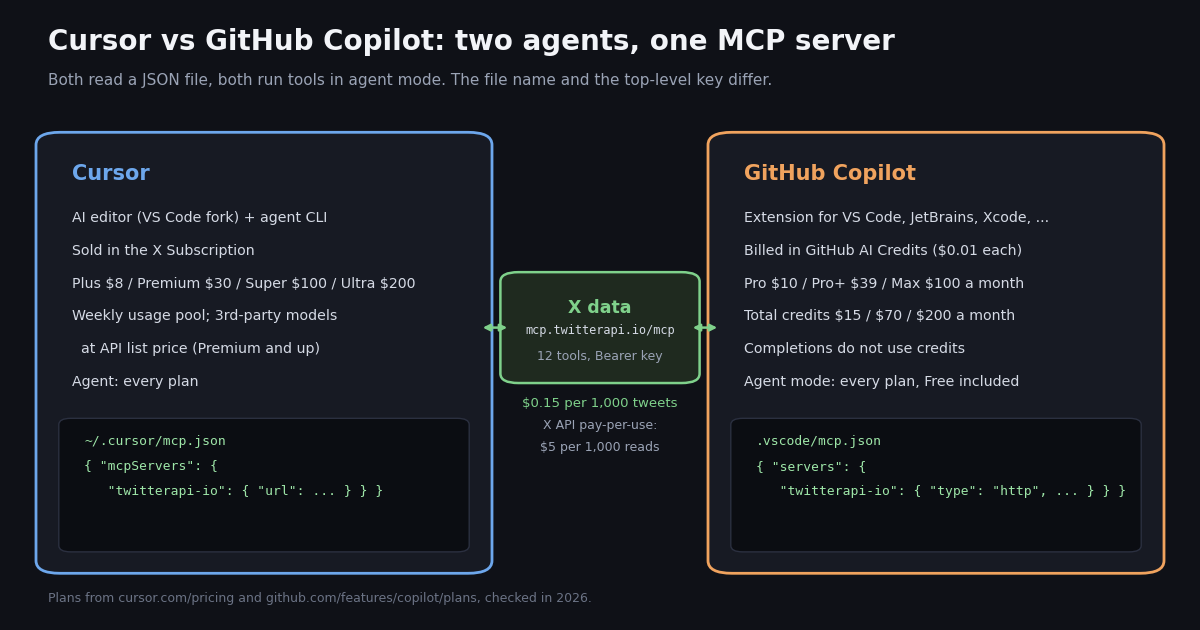
The searches for Cursor vs Copilot used to be about autocomplete. In 2026 both products changed how they charge and what they sell. Cursor, acquired by SpaceX in August 2026, is now sold through the X Subscription with a weekly usage pool shared with Grok. GitHub Copilot moved every monthly plan from premium requests to token-based GitHub AI Credits on June 1, 2026, and its plans page now tops out at a $100 Max tier. This page compares the two on what a builder actually pays for and uses today: plans, included usage, models, agent mode and MCP, with each fact checked against the vendor's own pricing page and docs.
This is the Cursor vs Copilot page; the sibling pages cover other pairs. If you are weighing Cursor against Anthropic's terminal agent, read the Cursor vs Claude Code comparison (rules files, headless runs); for Google's agent IDE, read Antigravity vs Cursor. Here the second tool is GitHub Copilot, so the focus is AI Credits, the VS Code .vscode/mcp.json format and the organization policy that can switch MCP off.
The last part is what makes the page ours. We collected X posts that name both tools and the two official timelines to see how developers really compare them, and we show the exact MCP entry that gives either agent live Twitter (X) data, with the bill for that data next to the official X API price.
Cursor vs GitHub Copilot at a glance
The short version: Cursor is the editor, Copilot lives in your editor. Both now meter AI usage against a dollar-denominated allowance, both run an agent that edits files and calls tools, and both read a JSON MCP config. The differences are in what the base price buys and which models it covers.
Sources for every row: cursor.com/pricing, github.com/features/copilot/plans, the GitHub changelog post announcing usage-based billing, cursor.com/docs/context/mcp and the VS Code MCP configuration reference, all checked in 2026. The Business and Enterprise prices come from the GitHub changelog; the plans page lists the individual tiers.
Pricing in 2026: Cursor's usage pool vs Copilot's AI Credits
Cursor. The pricing page lists Free ($0, limited agent and Chat requests), Plus at $8 a month ("Our introductory plan", a shared AI usage pool, and the note "Only Grok models are available on this plan"), Premium at $30 (4x the usage of Plus, cloud agents and automations, code hosting, AI code reviews and third-party models at API list price), Super at $100 (15x Plus, priority model access at peak times) and Ultra at $200 (50x Plus, earliest access to new products and models). Teams starts at $30 per user per month and Enterprise is custom. Prices exclude taxes.
How Cursor's limit works. "Every tier includes a pool of AI usage shared across Cursor and Grok", the allowance "refreshes weekly", and when it runs out you buy top-offs or wait. Third-party model usage in Cursor "is not included in the monthly prices shown and must be purchased separately", and you can set spending caps. The same bundle carries X features (the checkmark, fewer ads), which is why the page reads like a social subscription: subscriptions are sold through X Subscription Corp.
GitHub Copilot. The plans page lists Free ($0, 2,000 completions a month, limited chat and agent usage, Copilot CLI), Pro at $10 per user per month, Pro+ at $39 and Max at $100. Each paid plan shows base credits equal to its price plus a flex allotment: Pro $10 + $5 = $15 of total monthly credits, Pro+ $39 + $31 = $70, Max $100 + $100 = $200. GitHub notes that "Flex allotments may change over time." Extra usage is bought as more GitHub AI Credits on paid plans, not on Free.
What an AI Credit is. GitHub's changelog post on the switch says that starting June 1, 2026, usage "will consume GitHub AI Credits", consumed "based on token usage, including input, output, and cached tokens" at "the published API rates for each model". One credit is $0.01. "Code completions and Next Edit suggestions remain included in all plans and do not consume AI Credits", while agent mode, code review, Copilot in the cloud, Copilot CLI and the Copilot app do. Copilot code review also consumes GitHub Actions minutes.
Premium requests are legacy. The old model (300 premium requests a month on Pro, 1,500 on Pro+, extra requests at $0.04 each, model multipliers) now applies only to subscribers on an existing annual Pro or Pro+ plan, who stay on it until the plan expires. If a tutorial still quotes "300 premium requests", it describes the legacy plan. This is the "github copilot pricing changes" question in one sentence: from requests to tokens, priced per model.
The two allowances do not convert into each other. Cursor states usage as multiples of Plus and adds third-party models at API list price on top; Copilot states a dollar amount of credits that every model, Claude Opus included, draws down at its API rate. For heavy Claude or GPT use, that makes Copilot's credits the closer comparison to Cursor's separately billed third-party usage. The Cursor vs Claude Code page breaks down Cursor's tiers further, and the Claude Code pricing page covers Anthropic's own plans.
Models: Grok first in Cursor, a multi-vendor list in Copilot
Cursor's FAQ is explicit: "Plus includes Grok models only. Premium and above include generous usage of Grok models but do not include an allowance for third-party models. Third-party models remain available in Cursor at API list price." So Claude, GPT or Gemini in Cursor means Premium or higher plus a separate usage bill.
Copilot's comparison table lists one model menu for the paid plans that includes Anthropic Claude (Haiku, Sonnet and Opus generations up to Opus 5.5, plus Fable), OpenAI GPT-5.x and GPT-6.x models including Codex variants, Google Gemini 3.7 Flash, 3.8 Flash and Gemini 4 Argon, xAI Grok 4.5 to 4.7, Kimi K3 and Microsoft MAI-Code-1.1-Flash. Free gets a smaller set (the plans page names Haiku 4.5 and GPT-5 mini), and Pro+ is the tier marketed with "Access to premium models, including Opus". Every call is billed from credits at that model's API rate, so a cheaper model stretches the same $15 further.
Pro also lists "Access to 3rd party agents (Claude Code and Codex)": you can delegate a task to Anthropic's or OpenAI's agent from inside Copilot. That partly explains the X data below, where the two products are almost always mentioned next to Claude Code and Codex.
Agent mode in each: what runs, where, and what it costs
Cursor Agent. The pricing table marks Agent as available on every plan, Free included; cloud agents and automations start at Premium. The agent edits across files, runs terminal commands and calls MCP tools, and the agent CLI runs the same agent from a shell (see the Cursor vs Claude Code page for agent -p headless runs). Usage draws on the weekly pool, or on separately billed third-party usage when you pick a non-Grok model.
Copilot agent mode. GitHub's plans page says "Free plan supports CLI and agent mode" and lists agent mode in VS Code, Visual Studio, JetBrains, Eclipse and Xcode. In VS Code you open Copilot Chat and select Agent from the mode dropdown; MCP tools then appear under the tools icon. Copilot cloud agent (assign an issue, get a pull request) starts at Pro. Each agent turn consumes credits by tokens, including the tokens spent reading MCP tool output.
The token angle matters for MCP. In Copilot every tool result that lands in the context window is input tokens, billed at the model's rate. A 20-tweet result with full tweet objects can run to thousands of tokens, so ask the agent for the fields you need (text, likes, URL) instead of dumping whole tweet objects, and prefer a smaller model for bulk summarization. In Cursor the same tokens draw down the weekly pool.
MCP side by side: the same X data server in Cursor and in Copilot
Both tools support remote MCP servers over HTTP, so one hosted server works in both. The entries differ in three places: the file name, the top-level key (mcpServers vs servers) and how secrets are referenced (${env:NAME} in Cursor, ${input:id} prompts or ${env:NAME} in VS Code).
Copilot has one more layer: in an organization or enterprise on Copilot Business or Enterprise, the "MCP servers in Copilot" policy "is disabled by default" and must be enabled before MCP works. Free, Pro, Pro+ and Max are not governed by that policy. VS Code 1.99 or later is required. VS Code also reads a portable Copilot format (.mcp.json at the workspace root, or ~/.copilot/mcp-config.json) that uses mcpServers; Copilot harness sessions read that file directly and do not forward servers that need ${input:...} prompts.
Our server's own initialize response says to "paste your twitterapi.io API key as the Bearer token", and the TwitterAPI.io Cursor guide on docs.twitterapi.io uses exactly the Cursor entry below. The server exposes 12 tools for reading X: tweet search, user profiles, last tweets, mentions, replies, quotes, retweeters, followers and trends.
// Cursor: ~/.cursor/mcp.json or .cursor/mcp.json
{
  "mcpServers": {
    "twitterapi-io": {
      "url": "https://mcp.twitterapi.io/mcp",
      "headers": {
        "Authorization": "Bearer ${env:TWITTERAPI_IO_API_KEY}"
      }
    }
  }
}

// GitHub Copilot in VS Code: .vscode/mcp.json
{
  "inputs": [
    {
      "type": "promptString",
      "id": "twitterapi-io-key",
      "description": "TwitterAPI.io API key",
      "password": true
    }
  ],
  "servers": {
    "twitterapi-io": {
      "type": "http",
      "url": "https://mcp.twitterapi.io/mcp",
      "headers": {
        "Authorization": "Bearer ${input:twitterapi-io-key}"
      }
    }
  }
}

// .mcp.json at the workspace root (portable Copilot format: Copilot CLI and harness sessions)
{
  "mcpServers": {
    "twitterapi-io": {
      "type": "http",
      "url": "https://mcp.twitterapi.io/mcp",
      "headers": {
        "Authorization": "Bearer ${TWITTERAPI_IO_API_KEY}"
      }
    }
  }
}Step by step: add Twitter (X) data to Copilot agent mode and to Cursor
1. Get a key. Sign in at the TwitterAPI.io dashboard with Google; new accounts that pass the automatic bot check get up to $1 of free credits (at most 100,000 credits, no card, one per person or network, expiring after 31 days). Reads need no X account and no X developer app. Purchased credits never expire.
2. Copilot in VS Code. Create .vscode/mcp.json with the servers entry above. Click the Start button that VS Code shows above the server list, paste the key into the password prompt (VS Code says the value is then securely stored for later use, outside the file), then run MCP: List Servers from the command palette to confirm. Open Copilot Chat, switch to Agent, and check that the twitterapi-io tools are ticked in the tools menu.
3. Cursor. Export TWITTERAPI_IO_API_KEY in the environment Cursor starts from, add the mcpServers entry to ~/.cursor/mcp.json, and restart Cursor. The TwitterAPI.io docs also describe an OAuth path: leave the variable unset and Cursor shows a sign-in prompt for twitterapi.io the first time the agent calls a tool. Cursor asks for approval before each tool call by default.
4. Run the same prompt in both. For example: "Use the twitterapi-io tools to get the 20 latest posts from @cursor_ai and @github, list the five with the most likes, and give the URL of each." Each tool call returns one page per account, so the task costs two pages of 20 tweets.
5. Keep secrets out of git. Commit .vscode/mcp.json with the ${input:...} placeholder, never a pasted key; in Cursor keep the key in the environment and the file with ${env:...}. The VS Code reference says plainly: do not commit tokens, passwords, or populated authentication headers.
The Cursor-only walkthrough with more prompts and error fixes is on the how-to-use-Cursor-with-the-Twitter-API page; the generic MCP explainer covers how the protocol itself works.
What developers comparing Cursor and Copilot talk about on X
We searched X for posts containing both words (cursor copilot -filter:retweets lang:en), Latest and Top, and tagged each post's text with keyword rules. The Latest set holds 649 unique posts over 9.5 days, about 68.6 a day; the Top set holds 164 posts.
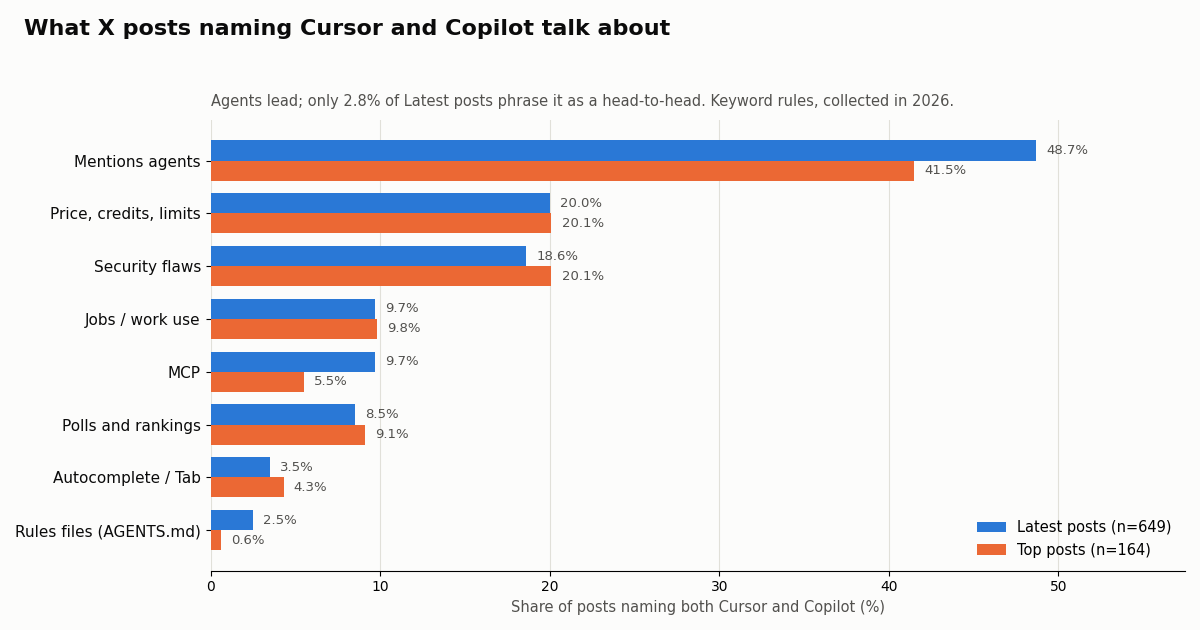
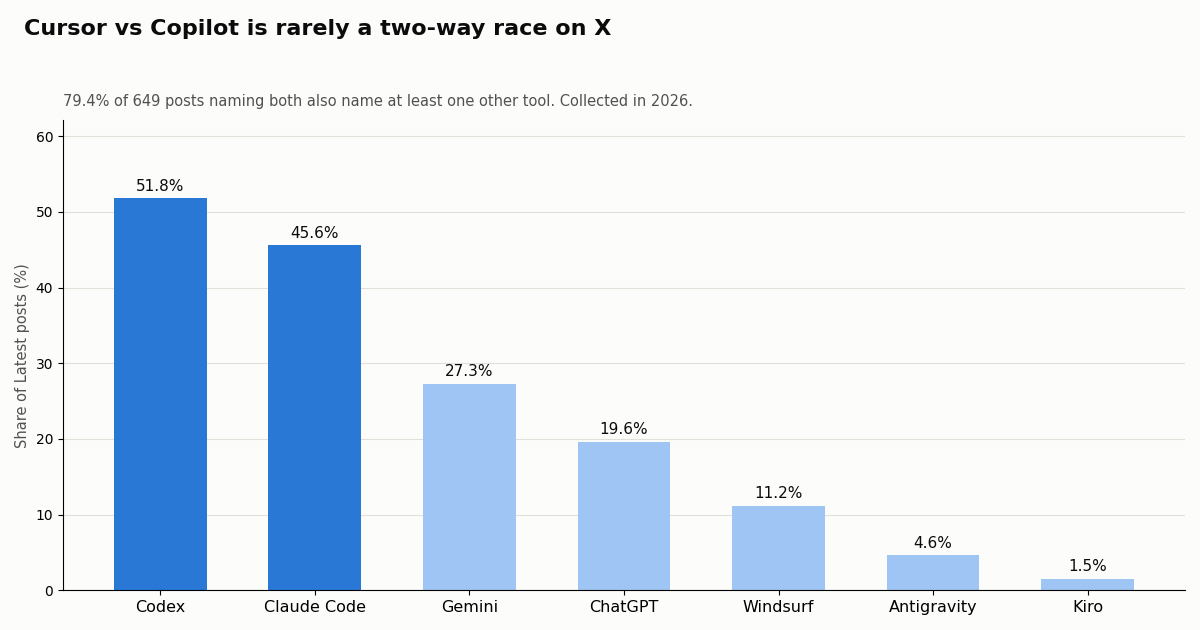
It is a crowd, not a duel. Only 2.8% of Latest posts (18 posts) phrase the pair head to head ("Cursor vs Copilot", "Cursor or Copilot"), and 79.4% also name at least one other tool. Codex appears in 51.8% and Claude Code in 45.6% of them. The typical post is a list or a poll ("keep only one AI coding tool") that puts Cursor and Copilot in a field of four or five.
Agents, not autocomplete. 48.7% of Latest posts mention agents, while only 3.5% mention autocomplete, Tab or completions. That matches the queue note behind this page: the 2024 autocomplete duel is over and the comparison people make now is between agents.
Money and safety come next. 20.0% mention a price, credits, tokens or limits, and 18.6% are about security, a share driven in this window by posts about published research into the embedded browsers of several AI coding tools, Cursor and Copilot among them. MCP comes up in 9.7%, and 9.7% are about jobs or tools used at work.
Which Copilot? 41.3% of Latest posts say GitHub Copilot (or Copilot CLI, Copilot in VS Code) explicitly and 6.0% name Microsoft Copilot; the rest say just "Copilot". Claude models are named in 492 posts (most of them via Claude Code), Gemini in 177 and Grok in 64.
Reach. The median Latest post got 2 likes and 129 views; the Top set's median is 9 likes and 624 views. Our phrase rules found no clear "switched from Cursor to Copilot" (or the reverse) statements in either set, so the sample does not show a migration in one direction.
How the official accounts differ: @cursor_ai vs @github (and a silent @GitHubCopilot)
The obvious handle for Copilot is nearly empty: @GitHubCopilot has 1 post since it was created in 2021 and 17,448 followers. Copilot announcements go out from @github instead, which has 2,733,822 followers. Anyone monitoring Copilot news on X should follow @github and filter for the word Copilot.
@cursor_ai posts rarely (3.2 a week) but each post travels: a median of 416,466 views and 3,881 likes, to 497,123 followers. None of its 40 sampled posts mention Copilot, and 17.5% touch pricing, credits or limits, a sign of how much its plan changes needed explaining. @github posts 18.4 times a week; 30.0% of its posts name Copilot and none name Cursor.
The X data bill in either tool, how we collected this, and which to pick
MCP calls in Cursor or Copilot hit the same REST endpoints and cost the same as the endpoint they wrap. Tweet endpoints are 15 credits per tweet returned, $0.15 per 1,000 tweets, with a minimum of 15 credits per request (an empty search costs $0.00015) and no per-request cap. A full 20-tweet page is $0.003. Profiles are $0.18 per 1,000. On the official X API pay-per-use rate card (docs.x.com/x-api/getting-started/pricing) a post read is $0.005 and a user read is $0.010, so 1,000 tweets cost $5 there against $0.15 here, about 33x; X caps pay-per-use at 3M post reads a month and sends larger use to Enterprise.
Rate limits are 0.2 requests per second before the first payment, 20 once paid, 50 on Scale and 500 on Business, up to 1,000 on request. That is plenty for an agent, which makes a few calls per prompt. Subscriptions are optional; the pricing page lists them.
How we collected this. Question: what do X posts that mention both Cursor and Copilot talk about, and what do the official accounts post? Query: cursor copilot -filter:retweets lang:en on /twitter/tweet/advanced_search, Latest and Top, deduplicated by tweet ID (698 unique posts), plus /twitter/user/last_tweets for @cursor_ai, @github and @GitHubCopilot and /twitter/user/info for the three profiles. Window: the most recent posts at collection time, 9.5 days for the Latest set; collected in 2026. Requests: 65; data cost $0.17.
What the sample cannot show. Topics come from keyword rules, which miss sarcasm and miscount the everyday word "cursor"; "Copilot" alone can mean Microsoft's assistant; X search returns what its index exposes, not every post; and a share of posts is not a share of users or of market. Privacy: aggregates only. Search authors are private individuals and are never named; only the organization accounts are named.
Which to pick: GitHub Copilot if you want to keep VS Code, JetBrains, Visual Studio or Xcode, you want Claude, GPT, Gemini and Grok models from one allowance billed per token, your company already buys GitHub (Business $19, Enterprise $39 per user), or you want a $10 entry plan whose completions do not count against credits. Check the MCP policy first if your seat comes from an organization.
Cursor if you want an editor built around the agent, the Grok models included in the pool, cloud agents and automations from Premium, and you are fine paying API list price for third-party models on top. The weekly refresh suits bursty work better than a monthly bucket.
For X data, it does not matter. The same MCP entry works in both, and the bill is per tweet returned either way. Start in whichever editor you already use, add the server, and ask the agent for something concrete. If you outgrow chat-driven calls, the Python below runs the same search on a schedule.
import os
import re
import time
from collections import Counter

import requests

BASE = "https://api.twitterapi.io"
HEADERS = {"X-API-Key": os.environ["TWITTERAPI_IO_API_KEY"]}

TOOLS = {
    "Claude Code": r"claude code",
    "Codex": r"\bcodex\b",
    "Windsurf": r"windsurf",
    "Gemini": r"gemini",
    "ChatGPT": r"chatgpt",
}


def search_posts(query, max_pages=10):
    """Latest posts for a query. 15 credits per tweet returned ($0.003 for a full 20-tweet page)."""
    posts, cursor = [], ""
    for _ in range(max_pages):
        params = {"query": query, "queryType": "Latest"}
        if cursor:
            params["cursor"] = cursor
        r = requests.get(f"{BASE}/twitter/tweet/advanced_search", headers=HEADERS, params=params, timeout=30)
        r.raise_for_status()
        body = r.json()
        posts.extend(body.get("tweets", []))
        if not body.get("has_next_page"):
            break
        cursor = body.get("next_cursor", "")
        time.sleep(0.2)
    return posts


def latest_from(user_name, pages=2):
    """Newest posts of one account via last_tweets (data.tweets[], 20 per page)."""
    out, cursor = [], ""
    for _ in range(pages):
        params = {"userName": user_name}
        if cursor:
            params["cursor"] = cursor
        r = requests.get(f"{BASE}/twitter/user/last_tweets", headers=HEADERS, params=params, timeout=30)
        r.raise_for_status()
        body = r.json()
        data = body.get("data") or {}
        out.extend(data.get("tweets", []))
        if not body.get("has_next_page"):
            break
        cursor = body.get("next_cursor", "")
    return out


if __name__ == "__main__":
    posts = search_posts("cursor copilot -filter:retweets lang:en")
    named = Counter()
    for t in posts:
        text = (t.get("text") or "").lower()
        named.update(k for k, rx in TOOLS.items() if re.search(rx, text))
    print(f"{len(posts)} posts, data cost about ${len(posts) * 0.00015:.4f}")
    for tool, n in named.most_common():
        print(f"  also names {tool:<12} {n / max(len(posts), 1):6.1%}")

    for t in latest_from("cursor_ai", pages=1)[:5]:
        print(t["createdAt"], t.get("likeCount", 0), "likes", t["url"])
Questions readers ask
Is Cursor better than GitHub Copilot?
Neither wins outright. Cursor is an agent-first editor (a VS Code fork) whose plans bundle a weekly usage pool shared with Grok; Copilot is an assistant inside the IDE you already use, billed in token-based AI Credits across Claude, GPT, Gemini and Grok models. Choose by editor and by which models you want included.
Is GitHub Copilot cheaper than Cursor?
At the entry level the prices are close: Copilot Pro is $10 per user per month with $15 of total monthly credits, Cursor Plus is $8 a month but covers Grok models only. For Claude or GPT, Cursor needs Premium ($30) plus separate usage at API list price, while Copilot draws those models from the plan's credits. Compare against your own token use.
What changed in GitHub Copilot pricing in 2026?
On June 1, 2026 every monthly Copilot plan moved from premium requests to GitHub AI Credits, consumed by input, output and cached tokens at each model's published API rate ($0.01 per credit). Code completions and next edit suggestions do not use credits. Annual Pro and Pro+ subscribers stay on premium requests until their plan expires.
Does GitHub Copilot have agent mode like Cursor?
Yes. GitHub's plans page says the Free plan supports CLI and agent mode, and agent mode runs in VS Code, Visual Studio, JetBrains, Eclipse and Xcode. Cursor's Agent is on every plan too; Cursor adds cloud agents and automations from Premium, Copilot adds its cloud agent from Pro.
Can I use Claude models in Cursor and in Copilot?
In Copilot, Claude models (including Opus on Pro+ and Max) are on the model menu and bill from AI Credits. In Cursor, Plus is Grok-only; Premium and higher can use Claude and other third-party models, billed separately at API list price on top of the plan.
Where does each tool keep its MCP config?
Cursor reads ~/.cursor/mcp.json or .cursor/mcp.json with a mcpServers map and url plus headers for remote servers. Copilot in VS Code reads .vscode/mcp.json or the user profile with a servers map and "type": "http"; VS Code also reads the portable .mcp.json format. In Business and Enterprise organizations the MCP policy must be enabled first.
How do I give Cursor or Copilot live Twitter (X) data?
Add one MCP entry pointing at https://mcp.twitterapi.io/mcp with your TwitterAPI.io key as a Bearer token. The agent then gets 12 tools for searching tweets and reading profiles, timelines, replies, followers and trends. Reads cost $0.15 per 1,000 tweets and need no X developer account.
Why is @GitHubCopilot so quiet on X?
In our collection the @GitHubCopilot account had 1 post in total. GitHub announces Copilot changes from its main @github account, where 30.0% of recent posts mention Copilot, so that is the account to monitor.
Continue
- GitHub Copilot plans: Free, Pro, Pro+, Max, AI Credits, models
- GitHub changelog: Copilot moves to usage-based billing (AI Credits)
- GitHub Docs: extending Copilot Chat with MCP servers
- VS Code docs: MCP configuration reference
- TwitterAPI.io docs: Cursor MCP integration
- X API pricing (pay-per-usage rate card)
- X API hub: endpoints, pricing and guides
- Cursor vs Claude Code: plans, rules files and headless runs
- Antigravity vs Cursor: plans, models and MCP setup
- How to use Cursor with the Twitter (X) API over MCP
- Twitter (X) MCP server explained
- Claude Code pricing and plan limits
- TwitterAPI.io pricing: $0.15 per 1,000 tweets
- 01What Is Qoder? Plans, Credits, MCP Setup and Twitter (X) Data in Qoder
- 02Claude Code hooks: every event, the settings.json shape, and tested recipes (plus an X data budget guard)
- 03Google Antigravity Pricing: Free Tier, Pro and Ultra Quotas, and What X Users Report
- 04OpenRouter Alternatives in 2026: LiteLLM, Vercel AI Gateway, Requesty, Portkey and Direct APIs Compared, With What Developers on Twitter (X) Say
- 05Lovable pricing in 2026: plans, credits, and what an app that pulls Twitter (X) data really costs
- 06Cursor vs Claude Code: Plans, MCP Setup and Headless Runs Compared for Twitter (X) Data Work
- 07How to Use Cursor with the Twitter (X) API
- 08Antigravity vs Cursor: Plans, Models and a Twitter (X) MCP Setup in Both
Stop reading. Start building.
Starter credits cover real testing on real data. Google sign-in, no card, no application queue.
Get an API keyAlready building with TwitterAPI.io? Publish an honest tutorial or build log about it and earn up to $200 a month in API credits.