The Best Twitter (X) Accounts to Follow, by Topic
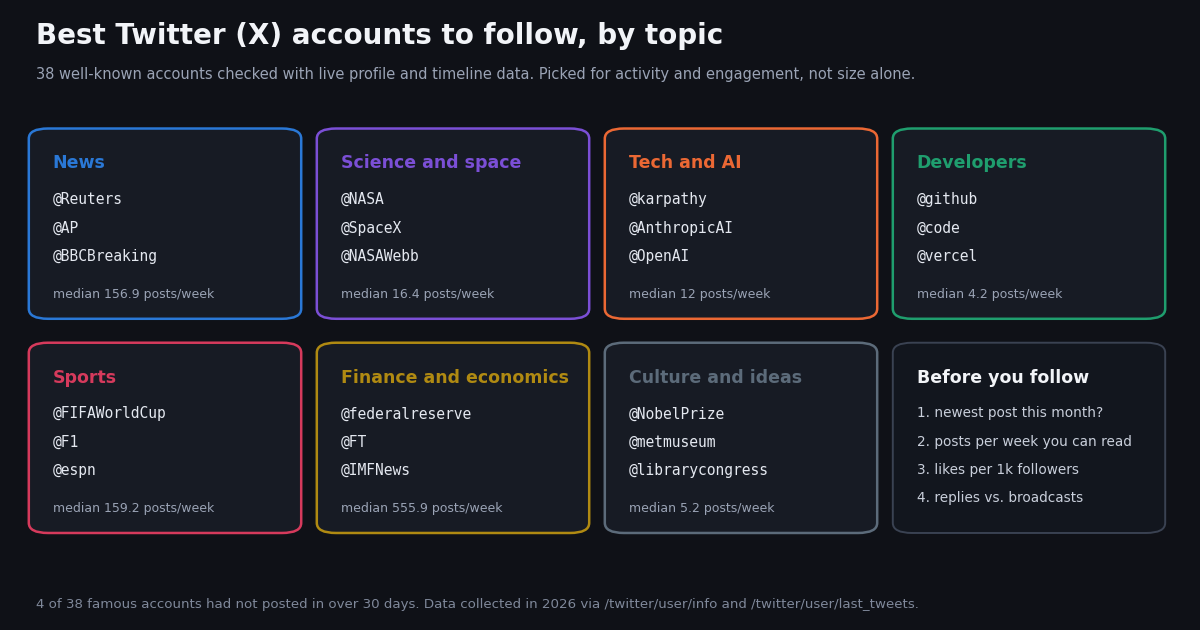
This page is a curated reading list: the best X (Twitter) accounts to follow, grouped by topic, with a reason for each pick and live numbers showing that the account is active and that people engage with what it posts. It is not a follower-count ranking. If you want to know which accounts have the most followers, that is a different question with a different answer, and our leaderboard of the most-followed Twitter accounts covers it. Here, size is one column among five.
Most best-accounts lists you will find are a name, a profile picture and a sentence, often written years ago. Handles change, organizations leave the platform and once-busy feeds go silent, and the lists rarely say so. So instead of trusting memory, we looked every candidate up through the X data that is public right now: its profile, and its 40 most recent posts including replies. That gave us five things per account: followers, posts per week, median likes and views per original post, the share of posts that are replies, and how long ago it last posted.
The picks cover organizations and public figures only, chosen for readers who want a feed that teaches them something: news, science and space, tech and AI, software development, sports, finance and economics, and culture. No gossip accounts, no personal accounts of private people. At the end there is a short section on building your own best-accounts list for any niche with two API calls per account.
What makes a Twitter account worth following
A good account for your feed is one you will actually read and learn from. That turns into four checks you can run on any profile in under a minute, by hand or with the API.
1. It still posts. Open the profile and look at the newest post that is not pinned. In our check, four well-known accounts had not posted in more than 30 days, one of them for over three years. Following them adds nothing to your feed.
2. Its pace fits your feed. A wire service can post hundreds of times a day; a research lab may post a few times a week. Neither is wrong, but a firehose will drown everything else on your timeline. We measured pace as posts per week across each account's 40 most recent posts.
3. People engage with it for its size. Raw likes favor huge accounts. Likes per 1,000 followers (median likes on original posts divided by followers, times 1,000) shows whether an account's audience is still paying attention. Across our set the median was 0.045, with a range from under 0.001 to almost 10.
4. It talks or it broadcasts. The share of posts that are replies tells you the style. Headline feeds sit near 0%. Researchers and product teams often reply in threads and answer questions, which makes their feed more useful and also noisier.
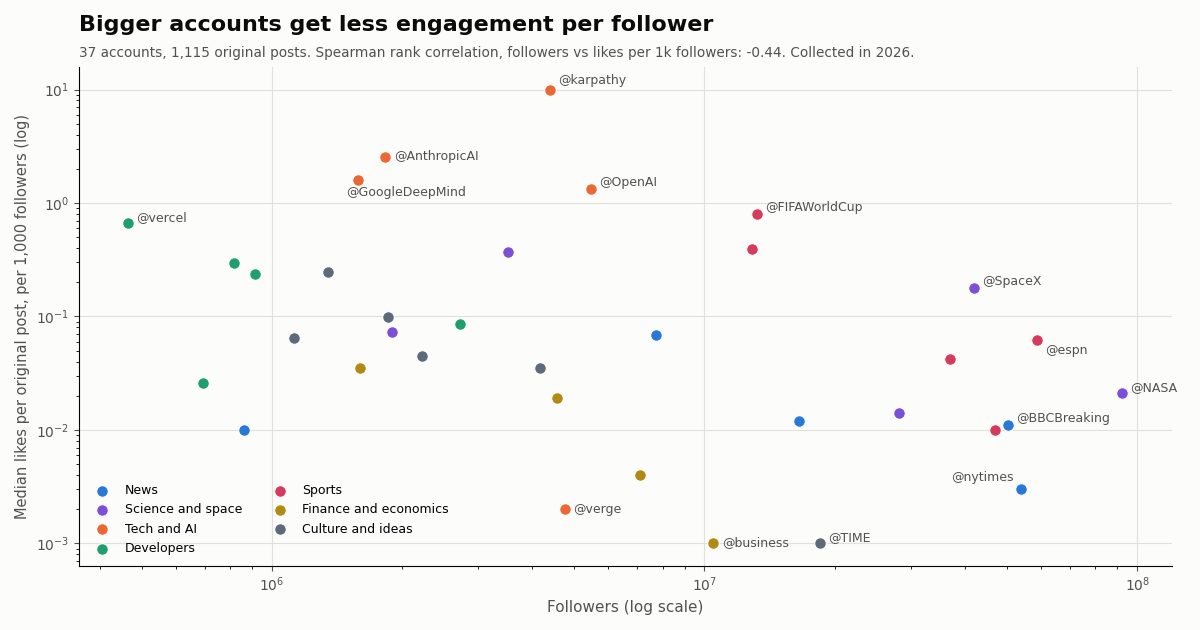
The chart below plots the first and third checks against each other for the 37 accounts we analyzed. The pattern is clear: the larger the account, the fewer likes it earns per follower (Spearman rank correlation -0.44). That does not make big accounts bad picks. @SpaceX and @FIFAWorldCup combine huge audiences with strong engagement. It means follower count alone should not decide what you follow.
Best news accounts on X
News accounts are the classic reason to use X: posts appear as events happen. Most of them broadcast headlines with a link and almost never reply, so judge them by speed and pace rather than engagement. Every one of the active accounts below posted within the last few hours of our collection.
@Reuters. The Reuters wire's main account (its bio points business news to @ReutersBiz). It was the fastest news feed we measured, at about 1,646 posts a week extrapolated from a short burst, so put it in an X List rather than your main timeline. Low likes per post simply reflect volume.
@AP. The Associated Press. A steadier pace than Reuters, 169.3 posts a week, and a median of 203 likes per original post. A good single follow for verified breaking news.
@BBCBreaking. BBC breaking-news alerts only; its bio sends international coverage to @BBCWorld and UK news to @BBCNews. At 30.8 posts a week it is the calmest major news feed here, and its posts drew a median of 1,550,622 views, the highest of any news account in our set.
@nytimes and @axios. The New York Times is the most-followed news account we checked (53.9M), and 22.5% of its recent posts were reposts, mostly of its own reporters and The Athletic. Axios posts short items at a high pace, about 261.6 a week.
Skip for now: @NPR. The account still shows 7.7M followers, but its newest post was 1,289 days old when we collected. NPR announced on April 12, 2023 that it would stop posting to its official Twitter accounts after the platform labeled it state-affiliated, then government-funded, media (NPR's own report is at npr.org/2023/04/12/1169269161/npr-leaves-twitter-government-funded-media-label). Our data shows it has not come back.
Best science and space accounts
Science and space accounts are where large audiences and real engagement overlap. The median post in this group drew 1,309 likes, and the accounts post a manageable 16.4 times a week at the median.
@NASA. The most-followed account in our whole set (92.3M). About 35% of its recent posts were reposts, mostly of NASA mission and center accounts, so following it is a good way to discover those.
@SpaceX. Launch updates and webcasts. It had the strongest engagement of the large science accounts, a median of 7,471 likes and 1,250,530 views per original post, and almost no reposts.
@NASAWebb. The James Webb Space Telescope's official account. It posts only about 3.5 times a week, but 60% of its posts are replies in threads that explain each image, and it earned 0.373 likes per 1,000 followers, the best ratio in this group.
@esa and @NatGeo. The European Space Agency is the counterpart to NASA for European missions and reposts heavily (37.5% of recent posts). National Geographic posts about 16.4 times a week and threads many of its stories as replies.
Best tech, AI and developer accounts
This is the group where small accounts beat big ones. The AI labs and researchers below have a fraction of NASA's audience, yet their median likes per 1,000 followers (1.61) is more than 20 times the science group's. They also reply far more: a median 37.5% of recent posts were replies.
@karpathy. Andrej Karpathy, a founding member of OpenAI and former Director of AI at Tesla, according to his own site (karpathy.ai). He posts only a few times a week, but his median original post drew 43,614 likes and 6,225,802 views, the highest engagement per follower of any account we checked (9.941 likes per 1,000 followers).
@AnthropicAI, @OpenAI and @GoogleDeepMind. The official accounts of three leading AI labs. Model launches, research papers and product changes show up here first, usually as a thread. All three ranked in the top four for engagement per follower.
@verge. The Verge covers consumer tech at a newsroom pace, about 661.6 posts a week, nearly all headline links. Useful in a tech List; heavy in a main feed.
For software developers, the official accounts of the tools you use are the fastest source of release notes, outages and deprecations.
@github and @code. GitHub and Visual Studio Code both post a few times a day. @code replies a lot (42.5% of recent posts), often answering editor questions.
@vercel, @nodejs and @ThePSF. Vercel had the best engagement per follower of the developer group (0.661). Node.js and the Python Software Foundation post less often, so following them costs your feed little. One to drop: @rustlang, whose own bio now says the account is no longer active; its newest post was 568 days old.
Best sports accounts
League and broadcaster accounts post highlights and scores at a high pace, a median of 159.2 posts a week in this group, and almost never reply. Pick the competitions you care about rather than following every league.
@FIFAWorldCup. The official FIFA World Cup account. Its median original post drew 10,554 likes, the most of any account in our set except @karpathy, at a modest 16.3 posts a week.
@F1. Formula 1's official account, with 0.39 likes per 1,000 followers, the second best ratio among sports accounts.
@espn, @NFL and @NBA. The big US broadcasters and leagues. They are among the most-followed accounts anywhere, and during a season they post hundreds of times a week; @NBA was at about 849. Follow the one league you watch, or put them in a sports List.
Best finance, economics, culture and ideas accounts
Finance publishers are the busiest accounts on X and the least engaged per follower: a median of 555.9 posts a week and 31.5 likes per post in this group. The primary-source institutions are the better follows.
@federalreserve. The official channel of the Federal Reserve Board of Governors, per its bio: rate decisions, speeches and data releases, about 13.7 posts a week. Few accounts are a more direct primary source for markets.
@IMFNews. The International Monetary Fund. Half of its recent posts were reposts, most of them from its managing director Kristalina Georgieva (@KGeorgieva), so one follow covers the institution and its leadership.
@FT, @business and @TheEconomist. The Financial Times, Bloomberg and The Economist post article links at several hundred to a few thousand posts a week. Their engagement per follower was among the lowest we measured (under 0.001 to 0.004 likes per 1,000 followers), which says more about volume than quality. Read them in a List.
Culture and ideas accounts are slower and quieter, which makes them pleasant in a main feed, but this is also where we found the most dormant accounts.
@NobelPrize. The official Nobel Prize feed: laureate announcements, lectures and the science behind each prize, about 29.4 posts a week with the best engagement per follower in this group (0.246).
@metmuseum and @librarycongress. The Metropolitan Museum of Art and the Library of Congress post objects and documents from their collections a few times a week. @librarycongress replies in threads (22.5% of posts) that add context to each item.
@TIME. A newsroom-pace feed, about 120.4 posts a week. Skip for now: @smithsonian and @britishmuseum, whose newest posts were 76 and 338 days old when we collected.
Famous accounts that went quiet
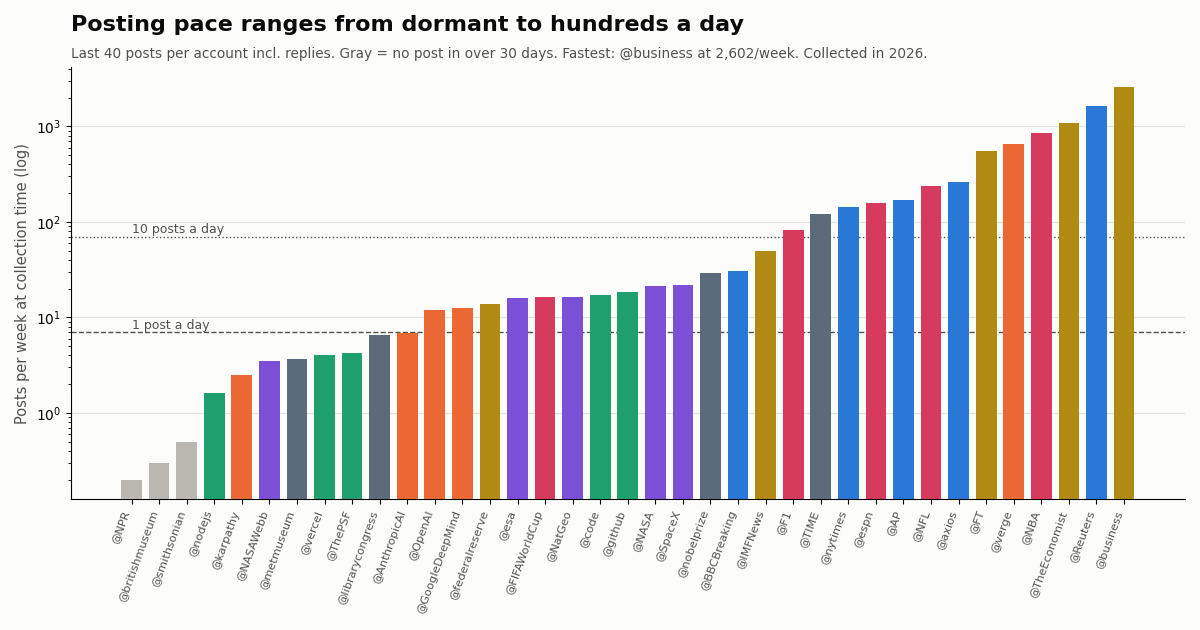
Four of the 38 accounts we checked had not posted in more than 30 days. Together they still show more than 12 million followers, because followers stay when an account stops posting. A follower count tells you how many people once followed an account, not whether it is alive.
The chart below shows the posting pace of every account we measured, with the dormant ones in gray. The spread is enormous: from a few posts a year to a few thousand a week. The two dashed lines mark one and ten posts a day, a useful band for accounts you want in your main feed. Anything above the top line is better read in an X List; X allows up to 5,000 accounts per list and 1,000 lists per account (help.x.com/en/using-x/x-lists-not-working, confirmed by heise online's guide to X Lists).
Build your own best-accounts list with the API
Every number on this page came from two read calls per account, and you can run the same check on any niche: your industry's companies, a conference's speakers, the maintainers of the libraries you use. No X account is needed for reads.
Step 1, verify the handle. GET /twitter/user/info?userName=<handle> returns the profile with followers, following, statusesCount and createdAt. An unknown handle comes back as HTTP 200 with status: "error" and msg: "user not found"; a suspended account comes back with data.unavailable: true. Drop both.
Step 2, read recent posts. GET /twitter/user/last_tweets?userName=<handle>&includeReplies=true returns 20 posts per page, newest first, with likeCount, viewCount, isReply, retweeted_tweet and createdAt on each. Follow next_cursor while has_next_page is true; two pages were enough for our pace and engagement numbers.
Step 3, score. Skip accounts whose newest post is older than 30 days, compute posts per week and median likes on original posts (not reposts or replies), divide by followers, and sort. The code below does all three.
What it costs. Profiles are $0.18 per 1,000 and timeline posts $0.15 per 1,000 ($0.003 for a full 20-post page), so one account check (a profile plus 40 posts) is about $0.006. Our 38-account check made 117 requests and cost about $0.23. On the official X API pay-per-usage rate card (docs.x.com/x-api/getting-started/pricing), the same reads cost $0.010 per user and $0.005 per post, about $0.21 per account; per 1,000 posts that is $5 against $0.15, roughly 33x. New accounts that pass the automatic bot check get up to $1 of free credits (at most 100,000 credits, no card, one per person or network, expiring after 31 days); before the first payment the rate limit is 0.2 requests per second, so the script waits 5 seconds between calls. Plans and per-endpoint rates are on the pricing page.
Limits to keep in mind. The API returns only public accounts; protected accounts' posts are not available. Forty posts is a snapshot, so rerun the check monthly rather than treating one week as permanent.
import os, time, statistics, requests
from datetime import datetime, timezone

BASE = "https://api.twitterapi.io"
HEADERS = {"X-API-Key": os.environ["TWITTERAPI_IO_KEY"]}
PAUSE = 5  # 0.2 requests/s before your first payment; 0.05 is fine once paid

def profile(handle):
    r = requests.get(f"{BASE}/twitter/user/info", headers=HEADERS,
                     params={"userName": handle}, timeout=30).json()
    if r.get("status") != "success" or not r.get("data"):
        return None                      # "user not found" comes back as status error
    if r["data"].get("unavailable"):
        return None                      # suspended or unavailable account
    return r["data"]

def recent_posts(handle, pages=2):
    posts, cursor = [], ""
    for _ in range(pages):
        time.sleep(PAUSE)
        r = requests.get(f"{BASE}/twitter/user/last_tweets", headers=HEADERS,
                         params={"userName": handle, "includeReplies": "true",
                                 "cursor": cursor}, timeout=30).json()
        posts += (r.get("data") or {}).get("tweets") or []
        if not r.get("has_next_page"):
            break
        cursor = r.get("next_cursor", "")
    return posts

def ts(s):
    return datetime.strptime(s, "%a %b %d %H:%M:%S %z %Y")

def score(handle):
    info = profile(handle)
    if info is None:
        return {"handle": handle, "status": "not found or unavailable"}
    posts = recent_posts(handle)
    if not posts:
        return {"handle": handle, "status": "no recent posts returned"}
    now = datetime.now(timezone.utc)
    oldest = min(ts(p["createdAt"]) for p in posts)
    newest = max(ts(p["createdAt"]) for p in posts)
    days = max((now - oldest).total_seconds() / 86400, 1 / 24)
    originals = [p for p in posts if not p.get("retweeted_tweet") and not p.get("isReply")]
    likes = statistics.median([p["likeCount"] for p in originals]) if originals else 0
    return {
        "handle": handle,
        "followers": info["followers"],
        "days_since_last_post": round((now - newest).total_seconds() / 86400, 1),
        "posts_per_week": round(len(posts) / days * 7, 1),
        "reply_share": round(sum(1 for p in posts if p.get("isReply")) / len(posts), 2),
        "median_likes": likes,
        "likes_per_1k_followers": round(likes / max(info["followers"], 1) * 1000, 3),
    }

candidates = ["NASA", "SpaceX", "NASAWebb", "esa", "NatGeo"]
rows = []
for h in candidates:
    time.sleep(PAUSE)
    rows.append(score(h))
active = [r for r in rows if r.get("days_since_last_post", 999) <= 30]
for r in sorted(active, key=lambda r: r["likes_per_1k_followers"], reverse=True):
    print(r)
for r in rows:
    if r not in active:
        print("skip:", r["handle"], r.get("status") or f"{r['days_since_last_post']} days since last post")
How we collected this
Question. Among well-known organization and public-figure accounts that readers commonly follow by topic, which are active, at what pace do they post, and how much engagement do their posts get relative to their size?
Accounts. 38 accounts in seven topics: news, science and space, tech and AI, developers, sports, finance and economics, and culture and ideas. The list was chosen editorially from organizations and public figures widely recommended in each field; @nytimes and @librarycongress were added after the first pass showed @NPR and @britishmuseum dormant, and @nodejs replaced @rustlang in the developer table. Every handle resolved through /twitter/user/info; none returned user not found.
Window and sample. Each account's 40 most recent posts including replies at collection time, via /twitter/user/last_tweets with includeReplies=true (for @britishmuseum that request returned an empty page, so its 40 posts exclude replies and its reply share is shown as n/a; for @rustlang only one page was read). 1,480 posts in the analyzed set, 1,115 of them original posts (not reposts, not replies). Collected in 2026; 117 requests, about $0.23.
Metrics. Posts per week = posts in the sample divided by the days from the oldest sampled post to collection time, times 7. Median likes and views use original posts only. Likes per 1,000 followers = median likes divided by followers, times 1,000. Reply share counts posts where isReply is true, including an account's replies inside its own threads.
What the sample cannot show. Forty posts is a snapshot: a launch week, a match day or a breaking story moves every number, and for the fastest accounts the pace is extrapolated from a span of hours. View counts are X's own counter. Engagement per follower does not measure accuracy or quality, and our picks are an editorial selection, not a census of every good account in each field.
Privacy. Aggregates only. Organization and public-figure accounts only; we did not analyze the accounts they reposted, quoted or replied to. Raw responses are kept compressed for audit; per-post rows in the published sample carry no ids, text or handles.
import os, time, statistics, requests
from datetime import datetime, timezone

BASE = "https://api.twitterapi.io"
HEADERS = {"X-API-Key": os.environ["TWITTERAPI_IO_KEY"]}
PAUSE = 5  # 0.2 requests/s before your first payment; 0.05 is fine once paid

def profile(handle):
    r = requests.get(f"{BASE}/twitter/user/info", headers=HEADERS,
                     params={"userName": handle}, timeout=30).json()
    if r.get("status") != "success" or not r.get("data"):
        return None                      # "user not found" comes back as status error
    if r["data"].get("unavailable"):
        return None                      # suspended or unavailable account
    return r["data"]

def recent_posts(handle, pages=2):
    posts, cursor = [], ""
    for _ in range(pages):
        time.sleep(PAUSE)
        r = requests.get(f"{BASE}/twitter/user/last_tweets", headers=HEADERS,
                         params={"userName": handle, "includeReplies": "true",
                                 "cursor": cursor}, timeout=30).json()
        posts += (r.get("data") or {}).get("tweets") or []
        if not r.get("has_next_page"):
            break
        cursor = r.get("next_cursor", "")
    return posts

def ts(s):
    return datetime.strptime(s, "%a %b %d %H:%M:%S %z %Y")

def score(handle):
    info = profile(handle)
    if info is None:
        return {"handle": handle, "status": "not found or unavailable"}
    posts = recent_posts(handle)
    if not posts:
        return {"handle": handle, "status": "no recent posts returned"}
    now = datetime.now(timezone.utc)
    oldest = min(ts(p["createdAt"]) for p in posts)
    newest = max(ts(p["createdAt"]) for p in posts)
    days = max((now - oldest).total_seconds() / 86400, 1 / 24)
    originals = [p for p in posts if not p.get("retweeted_tweet") and not p.get("isReply")]
    likes = statistics.median([p["likeCount"] for p in originals]) if originals else 0
    return {
        "handle": handle,
        "followers": info["followers"],
        "days_since_last_post": round((now - newest).total_seconds() / 86400, 1),
        "posts_per_week": round(len(posts) / days * 7, 1),
        "reply_share": round(sum(1 for p in posts if p.get("isReply")) / len(posts), 2),
        "median_likes": likes,
        "likes_per_1k_followers": round(likes / max(info["followers"], 1) * 1000, 3),
    }

candidates = ["NASA", "SpaceX", "NASAWebb", "esa", "NatGeo"]
rows = []
for h in candidates:
    time.sleep(PAUSE)
    rows.append(score(h))
active = [r for r in rows if r.get("days_since_last_post", 999) <= 30]
for r in sorted(active, key=lambda r: r["likes_per_1k_followers"], reverse=True):
    print(r)
for r in rows:
    if r not in active:
        print("skip:", r["handle"], r.get("status") or f"{r['days_since_last_post']} days since last post")
Questions readers ask
What are the best Twitter accounts to follow?
It depends on the topic. From our check of 38 accounts: @Reuters, @AP and @BBCBreaking for news; @NASA, @SpaceX and @NASAWebb for science and space; @karpathy, @AnthropicAI, @OpenAI and @GoogleDeepMind for AI; @github, @code and @vercel for developers; @FIFAWorldCup, @F1 and @espn for sports; @federalreserve and @IMFNews for economics; @NobelPrize, @metmuseum and @librarycongress for culture. All were posting at collection time.
Are the accounts with the most followers the best ones to follow?
Not necessarily. Across 37 accounts the rank correlation between followers and likes per 1,000 followers was -0.44: larger accounts earned less engagement per follower, and none of the 10 most-followed made the top 10 for engagement. For a raw follower ranking see our most-followed leaderboard instead.
How can I tell if an X account is still active?
Open the profile and check the date of the newest post that is not pinned. With the API, /twitter/user/last_tweets returns the latest posts newest first, so the first post's createdAt tells you. Four famous accounts in our set, including @NPR and @rustlang, had not posted in more than 30 days.
How many accounts should I follow on X?
There is no fixed right number, but pace matters more than count. Accounts in our set ranged from under one post a week to about 2,602 a week. A handful of wire or newspaper accounts can fill a timeline by themselves, so put high-volume accounts in an X List and keep your main feed for slower, higher-signal accounts.
What is an X List and how many accounts can it hold?
A List is a custom timeline that shows posts only from the accounts you add, without following them. X allows up to 5,000 accounts per list and up to 1,000 lists per account (help.x.com/en/using-x/x-lists-not-working). Lists are the best place for fast news, sports and finance feeds.
Which AI accounts are worth following on Twitter?
The official accounts of AI labs, @OpenAI, @AnthropicAI and @GoogleDeepMind, plus researchers such as @karpathy. In our data the tech and AI group had the highest engagement per follower (1.61 likes per 1,000 followers at the median) and replied the most (37.5% of recent posts).
Can I find the best accounts in my own niche automatically?
Yes. Start with candidate handles, call /twitter/user/info to verify each one and /twitter/user/last_tweets to read its recent posts, then rank by recency, posts per week and likes per 1,000 followers. A profile plus 40 posts costs about $0.006 per account.
Continue
- TwitterAPI.io docs: Get User Info (/twitter/user/info fields, user not found and unavailable responses)
- TwitterAPI.io docs: Get User Last Tweets (includeReplies, 20 per page, cursor)
- X developer docs: X API pricing (pay-per-usage rates per post and user read)
- NPR: NPR quits Twitter after being labeled state-affiliated media (April 2023)
- Andrej Karpathy's site: OpenAI founding member, former Director of AI at Tesla
- X Help Center: Help with Lists (list limits)
- Twitter (X) API overview: endpoints, pricing and limits
- Who has the most Twitter followers: the live leaderboard
- The most liked tweets of all time
- Twitter Lists API: build and read lists in code
- Free Twitter engagement rate calculator
- Get any account's follower count with the API
- TwitterAPI.io pricing: pay only for the data returned
- 01GetXBot: What the Twitter (X) Video Bot Is, Whether It Is Safe, and Alternatives
- 02What Is xcancel (X Cancel)? The Twitter (X) Nitter Front End, Explained
- 03Twitter (X) Media Viewer: How to Browse an Account's Photos and Videos
- 04AllMyTweets: What It Did, Its Limits, and How to See Every Tweet on Twitter (X)
- 05Twitter (X) Private Profile Viewer: Can You See Protected Tweets?
- 06The Best Third-Party Twitter (X) API in 2026
- 07How to Find Deleted Twitter (X) Accounts: What Still Exists and Where to Look
- 08Twitter (X) API Error Handling — Production Best Practices
Stop reading. Start building.
Starter credits cover real testing on real data. Google sign-in, no card, no application queue.
Get an API key