AllMyTweets: What It Did, Its Limits, and How to See Every Tweet on Twitter (X)
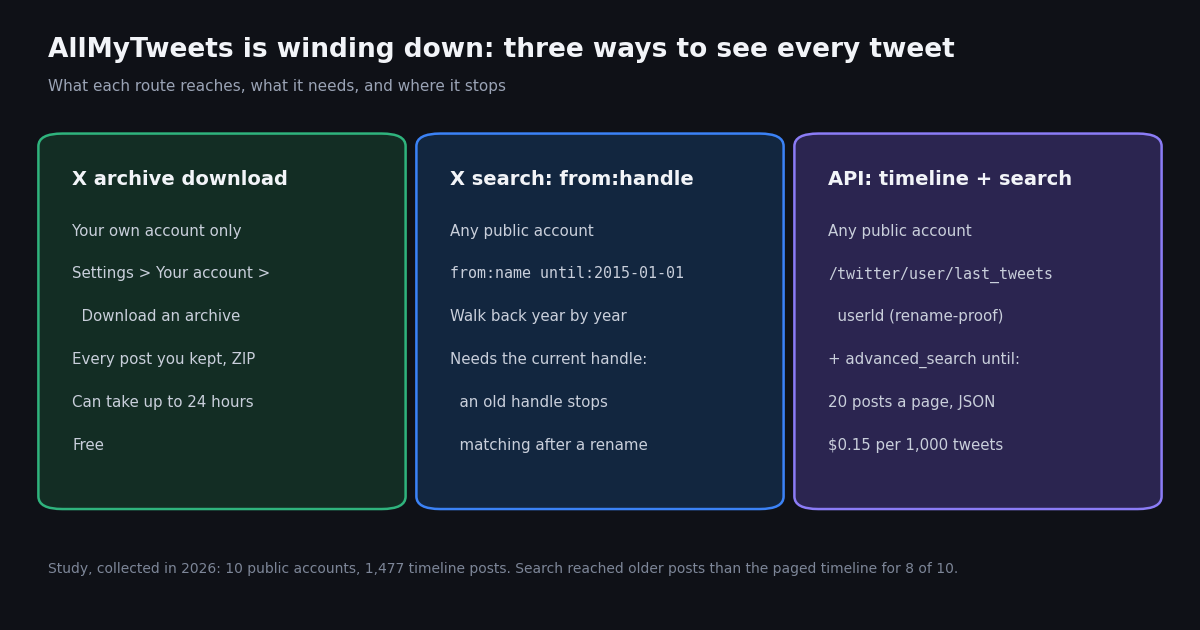
This page is about one tool and one job: what AllMyTweets did, whether it still works, and how to see every tweet from a single account on one page or in one file. Our older guide on finding tweets in the X archive (the twitter archive tweet finder guide) covers research workflows that search across many accounts and topics over time; this page stays with a single account's own history, the 3,200-post window that AllMyTweets inherited, and the routes around it.
Search interest in "allmytweets" climbed sharply in recent months, and the reason is visible on the site itself: in 2026 its pages say it has become part of Twilert and will soon stop functioning. People who relied on it want to know whether it is broken, what replaced it, and how to get the same "all my tweets on one page" view. We fetched the site this year and describe only what we saw, then walk through the official X archive, the X search operators that page back through time, and an API script that pulls every surviving post of a public account.
We also measured how far back an account's timeline actually goes. For 10 organization and public-figure accounts we paged the timeline, compared the result with each account's post counter, and tested whether a single dated search reached older posts. Every number below comes from that study, collected in 2026 with 103 requests.
What AllMyTweets is, and what we found on the site in 2026
AllMyTweets lives at allmytweets.net. It is a third-party site, not part of X, and we do not link to it. Its home page title is "All My Tweets - View all your tweets on one page" and its description reads "View all tweets from any Twitter user on one page. Fast, Free and Easy."
Status banner. Both the home page and the About page we fetched in 2026 (HTTP 200 with and without a proxy) open with the line "AllMyTweets is now part of the Twilert! AllMyTweets will soon stop functioning." We name Twilert only to explain the banner.
What it says it does. The page promises a view of "all your X posts/tweets, likes, followers or timeline on one page", filters to find old tweets and likes by keyword, ID or date range, bulk deletion of posts and likes, and export to .txt or .csv from an Export button on the results page.
Sign-in. The FAQ says to "log in with your Twitter account" and then enter any public handle. The feature list repeats it: "Log in using your X account (formerly Twitter)." In other words it never worked logged-out; it read tweets through the access your X login granted it.
Stated limit. The FAQ answers its own question about the maximum directly: "Due to Twitter's API limitations, AllMyTweets can show up to your latest 3,200 tweets." The About page says the same: "up to 3,200 of your most recent tweets on a single, scrollable page."
What we could not do. In the HTML we fetched, the "Sign up for free" buttons point to a placeholder link and to a contact form, and the /login/ path redirects to a WordPress admin login rather than to an X sign-in. We found no working route that loaded tweets, so we could not test any account through it. If it still loads for you, the 3,200 limit above still applies.
Why AllMyTweets stops at 3,200 tweets
The 3,200 figure is not AllMyTweets' own choice. X's developer documentation for the user posts timeline (docs.x.com/x-api/posts/timelines/introduction) states that GET /2/users/:id/tweets returns "Up to 3,200 most recent Posts" and that the mentions timeline returns up to 800. Any viewer built on that endpoint inherits the same window.
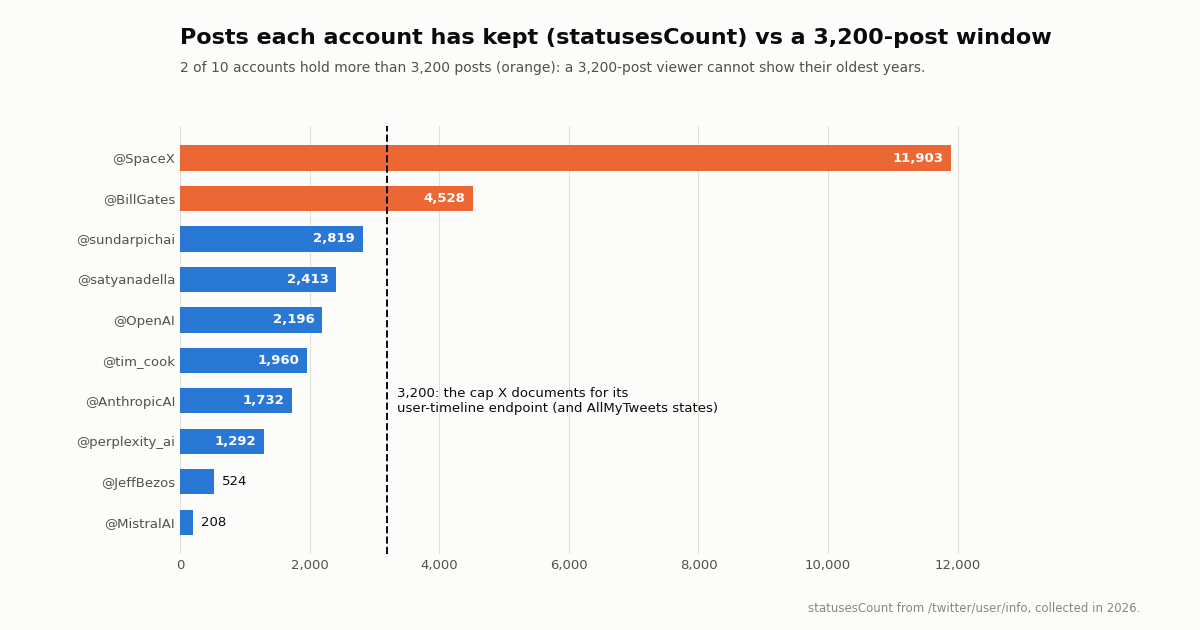
What that means in practice depends on how much an account posts. An account that has kept fewer than 3,200 posts shows everything. An account above it loses its oldest years first. Of the ten accounts in our study, two had post counters above 3,200: @SpaceX with 11,903 and @BillGates with 4,528. For those two, a 3,200-post viewer could never reach the early posts.
Pace matters as much as the counter. At the rate an account posted in the weeks we sampled, a 3,200-post window spans a very different stretch of time. The table below is arithmetic, not a measurement: 3,200 divided by the recent posts per day we observed.
So for a busy brand account a 3,200-post viewer shows roughly the last two years; for a slower executive account it can still reach back a decade. The counter itself is visible in any profile lookup (statusesCount in the API).
See all of your own tweets: the X archive download
For your own account the most complete answer is free and official: request your X data archive. X's help article is at help.x.com/en/managing-your-account/how-to-download-your-x-archive (X's help center blocks automated fetching, so we cite the address). A step-by-step guide at hongkiat.com/blog/backup-x-data/, which we read this session, lists the same path.
Step 1. Log in on the web or in the app. On desktop, open More in the left navigation; on mobile, tap your profile picture.
Step 2. Open Settings and privacy, then Your account, then Download an archive of your data.
Step 3. Confirm your password and enter the verification code X sends by email or phone.
Step 4. Select Request archive. X prepares the files in the background; the guide notes it "can take up to 24 hours" and that you are told by email or push notification when the ZIP is ready to download.
The archive is the only route that covers your own posts without the 3,200 window, because it is built from your account data rather than from the public timeline. It only works for an account you can log in to; you cannot request someone else's archive.
Browse any public account by year: X search with from: and until:
X's search box accepts the same operators as its Advanced Search form (help.x.com/en/using-x/x-advanced-search). X's developer operator reference (docs.x.com/x-api/posts/search/integrate/operators) defines from: as "Matches Posts from a specific user". Combine it with a date and you can step back through an account's history without any third-party site.
Newest posts before a date. Type from:SpaceX until:2011-01-01 and choose the Latest tab. Results start just before that date and run backward.
A single year. from:SpaceX since:2010-01-01 until:2011-01-01 limits results to one calendar year. Move both dates back a year at a time to walk the whole history.
After a rename. The search matches the handle the account uses now. If you or the account changed handles, search the current name; a query on an old name may no longer match the account's posts, which is a recurring complaint in threads asking why from: search misses old tweets.
Search is good for reading, not for collecting: you scroll a page at a time and there is no export. That is where the API route below comes in.
How far back an account's timeline really goes: our 2026 study
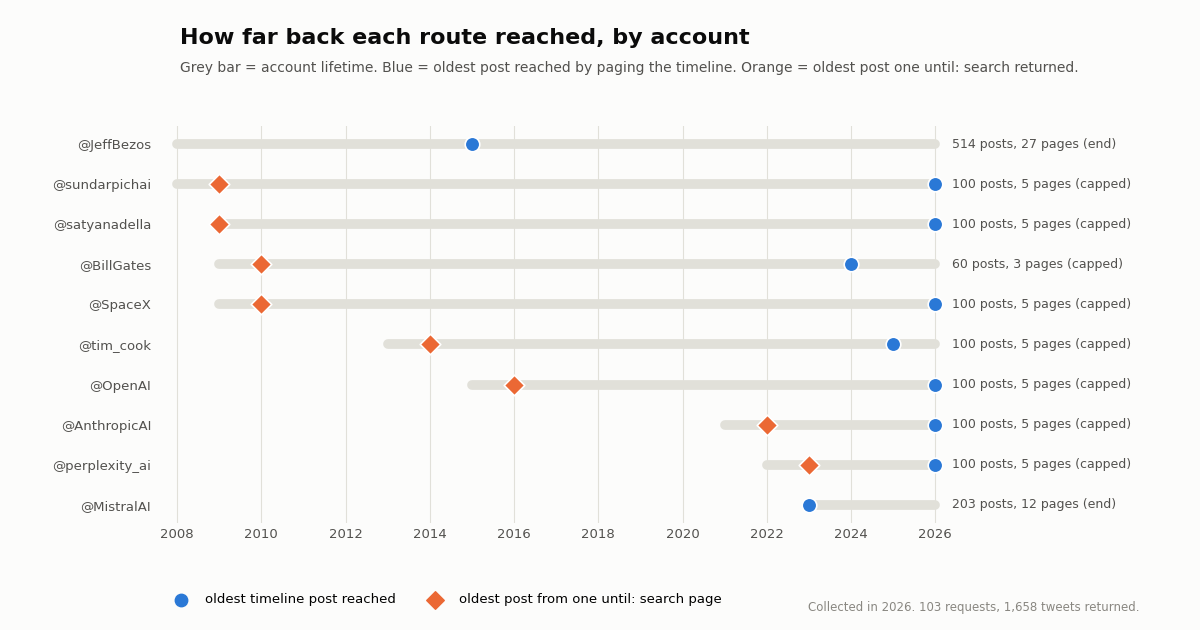
We picked ten organization and public-figure accounts, looked up each one's post counter with /twitter/user/info, and paged /twitter/user/last_tweets by numeric userId with replies included. Two accounts with small counters we paged to the very end; for the other eight we stopped at five pages (three for @BillGates, explained below) to stay inside our request budget. Then, for every account, we ran one /twitter/tweet/advanced_search page with from:<handle> until:<date> set before the oldest timeline post we had reached.
Paged to the end, the timeline returned nearly everything. @MistralAI ended naturally after 12 pages with 203 of 208 posts (97.6%). @JeffBezos ended after 27 pages with 514 of 524 (98.1%), oldest post in 2015. A search for his posts before 2015 returned nothing, so the timeline had reached the start of what the account still holds even though it was created in 2008.
Search reached older posts for every capped account. For all 8 capped accounts, a single until: search page returned posts older than the oldest timeline post we had paged to, back to 2009 for @sundarpichai and @satyanadella and 2010 for @SpaceX. For a full export, combine both: the timeline for recent years, year-by-year search for the rest.
One glitch worth coding for. On our first @BillGates run (by userId, replies included) the timeline returned 20 posts and then an empty page with has_next_page false, although the account has 4,528 posts. A retry by userName without replies continued normally, which is the run in the table. The script below therefore compares what the timeline returned with the post counter and falls back to search when it stops short.
Total cost. 103 requests returned 1,658 tweets, about $0.25 at 15 credits per tweet.
The API way: pull every tweet of an account into a CSV
If you want what AllMyTweets offered, every post of an account in one list you can search and export, the API does it without logging in to anyone's X account (reads need no X account) and without a 3,200 window on the export, because older years come from search.
Use the numeric user ID, not the handle. Handles change; the numeric ID belongs to the account. The /twitter/user/last_tweets reference at docs.twitterapi.io notes that userId "is recommended, could be more stable and faster than userName", and that the two are mutually exclusive (if both are sent, userId wins). Look an ID up once with our Twitter ID finder and keep it.
Page until the end. Each call returns up to 20 posts in data.tweets[], newest first, plus has_next_page and next_cursor. Pass next_cursor as cursor until has_next_page is false. Set includeReplies=true if you want replies too (the default is false).
Fill older years with search. /twitter/tweet/advanced_search takes a query such as from:SpaceX since_time:1262304000 until_time:1293840000 (Unix seconds, the format the docs show) with queryType=Latest, and returns top-level tweets[] with the same cursor fields. Because from: needs the current handle, resolve it from the ID first with /twitter/user/batch_info_by_ids.
Private accounts. Protected accounts' posts are not returned by our API, by search or by the timeline. For your own protected account, use the X archive.
The script below does all of it: resolves the current handle from a stable ID, pages the timeline, compares the total with statusesCount, walks search back year by year to the account's creation year when the timeline stops short, de-duplicates by tweet ID and writes a CSV sorted oldest first.
"""Pull every surviving post of one public X (Twitter) account to a CSV.

1. Resolve the account's current handle from its numeric user ID (IDs survive renames).
2. Page /twitter/user/last_tweets by userId until has_next_page is false.
3. If the timeline stops short of the account's post counter, walk advanced_search
   backward one year at a time (from:<handle> since_time/until_time) to reach older posts.
Protected accounts are not returned. Cost: 15 credits per tweet returned ($0.15 per 1,000).
"""
import csv
import time
from datetime import datetime, timezone

import requests

API_KEY = "YOUR_API_KEY"          # from https://twitterapi.io/dashboard
BASE = "https://api.twitterapi.io"
HEADERS = {"X-API-Key": API_KEY}
USER_ID = "15506669"              # numeric ID; find one with the Twitter ID finder tool
FMT = "%a %b %d %H:%M:%S %z %Y"   # createdAt, e.g. "Thu Oct 16 12:34:56 +0000 2025"


def get(url, params):
    for attempt in range(5):
        r = requests.get(url, headers=HEADERS, params=params, timeout=40)
        if r.status_code == 429:              # back off, then retry
            time.sleep(5 * 2 ** attempt)
            continue
        r.raise_for_status()
        body = r.json()
        if body.get("status") == "error":
            raise RuntimeError(body.get("msg"))
        return body
    raise RuntimeError("still rate limited after 5 tries")


def resolve(user_id):
    users = get(f"{BASE}/twitter/user/batch_info_by_ids", {"userIds": user_id})["users"]
    handle = users[0]["userName"]           # the CURRENT handle, even after a rename
    info = get(f"{BASE}/twitter/user/info", {"userName": handle})["data"]
    return handle, info["statusesCount"], info["createdAt"]


def timeline(user_id, posts):
    cursor = ""
    while True:
        body = get(f"{BASE}/twitter/user/last_tweets",
                   {"userId": user_id, "includeReplies": "true", "cursor": cursor})
        for t in (body.get("data") or {}).get("tweets", []):
            posts[t["id"]] = t
        if not body.get("has_next_page") or not body.get("next_cursor"):
            return
        cursor = body["next_cursor"]


def search_back(handle, created_year, posts):
    oldest = min((datetime.strptime(t["createdAt"], FMT) for t in posts.values()),
                 default=datetime.now(timezone.utc))
    for year in range(oldest.year, created_year - 1, -1):
        since = int(datetime(year, 1, 1, tzinfo=timezone.utc).timestamp())
        until = int(min(oldest, datetime(year + 1, 1, 1, tzinfo=timezone.utc)).timestamp())
        cursor = ""
        while True:
            body = get(f"{BASE}/twitter/tweet/advanced_search", {
                "query": f"from:{handle} since_time:{since} until_time:{until}",
                "queryType": "Latest", "cursor": cursor})
            for t in body.get("tweets", []):
                posts.setdefault(t["id"], t)
            if not body.get("has_next_page") or not body.get("next_cursor"):
                break
            cursor = body["next_cursor"]


def main():
    handle, counter, created = resolve(USER_ID)
    posts = {}
    timeline(USER_ID, posts)
    print(f"@{handle}: timeline returned {len(posts)} of {counter} posts")
    if len(posts) < counter * 0.95:            # stopped short (cap or glitch): use search
        search_back(handle, int(created[:4]) if created[:4].isdigit() else int(created[-4:]), posts)
        print(f"after year-by-year search: {len(posts)} posts")
    rows = sorted(posts.values(), key=lambda t: datetime.strptime(t["createdAt"], FMT))
    with open(f"{handle}_all_tweets.csv", "w", newline="", encoding="utf-8") as f:
        w = csv.writer(f)
        w.writerow(["id", "createdAt", "isReply", "likeCount", "retweetCount", "replyCount", "viewCount", "url", "text"])
        for t in rows:
            w.writerow([t["id"], t["createdAt"], t.get("isReply"), t.get("likeCount"), t.get("retweetCount"),
                        t.get("replyCount"), t.get("viewCount"), t.get("url"), t.get("text")])
    print(f"wrote {len(rows)} posts to {handle}_all_tweets.csv")


if __name__ == "__main__":
    main()
What it costs, next to the official X API
Our tweet endpoints, including the timeline and advanced search, cost 15 credits per tweet returned, which is $0.15 per 1,000 tweets; a full 20-post page is $0.003. Every request has a 15-credit minimum, so a page that returns nothing costs $0.00015. You pay only for the data returned, and a profile lookup is 18 credits ($0.18 per 1,000 profiles).
On X's own pay-per-usage rate card (docs.x.com/x-api/getting-started/pricing) a post read is $0.005, or $5 per 1,000, about 33 times more per 1,000 tweets, and pay-per-usage reads are capped at 3 million posts a month before Enterprise. X's user timeline endpoint also stops at the 3,200 most recent posts.
New accounts that pass the automatic bot check get up to $1 of free credits (at most 100,000 credits, no card, one per person or network, expiring after 31 days), enough for roughly 6,600 tweets. Purchased credits never expire. Before the first payment the rate limit is 0.2 requests per second, so a large export runs slowly until you top up; see the pricing page for plans.
Comparing the ways to see all tweets from one account
Pick the archive when the account is yours and you want everything, including posts no one else can see. Pick search for a quick look at one year of a public account. Pick the API when you need every surviving post of a public account in a file, need to repeat it for many accounts, or want it to keep working after a rename.
Deleted tweets are a separate problem: none of these routes returns a post after it has been deleted. Our guide on deleted tweet search covers caches and archives that sometimes still hold them.
How we collected this
Question. How far back can an account's public timeline be paged before it ends, how does that compare with the account's post counter and the 3,200-post window, and does a dated search reach older posts?
Accounts. Ten organization and public-figure accounts: @MistralAI, @JeffBezos, @tim_cook, @satyanadella, @sundarpichai, @BillGates, @AnthropicAI, @perplexity_ai, @OpenAI, @SpaceX. Four other candidates were looked up and dropped (two showed zero posts, two were too large to page within budget).
Window and method. Each account's timeline as served at collection time, newest first, via /twitter/user/last_tweets by userId with includeReplies=true (the @BillGates run used userName without replies after the glitch described above), plus one /twitter/tweet/advanced_search page per account with from:<handle> until:<date>. Collected in 2026.
Sample size. 103 requests; 1,477 unique timeline posts and 1,658 tweets returned in total.
What the sample cannot show. We paged only two timelines to the end, so we did not measure where a long timeline stops for accounts above 3,200 posts. One search page per account shows that older posts are reachable, not that every older post is. Posts-per-day figures come from a short recent window and the 3,200-post spans are arithmetic estimates. Post counters include replies and reposts the account kept.
Privacy. Aggregates only, organization and public-figure accounts only, no analysis of the accounts they replied to, quoted or reposted. The raw pages, analysis script and chart script are kept with the study files.
"""Pull every surviving post of one public X (Twitter) account to a CSV.

1. Resolve the account's current handle from its numeric user ID (IDs survive renames).
2. Page /twitter/user/last_tweets by userId until has_next_page is false.
3. If the timeline stops short of the account's post counter, walk advanced_search
   backward one year at a time (from:<handle> since_time/until_time) to reach older posts.
Protected accounts are not returned. Cost: 15 credits per tweet returned ($0.15 per 1,000).
"""
import csv
import time
from datetime import datetime, timezone

import requests

API_KEY = "YOUR_API_KEY"          # from https://twitterapi.io/dashboard
BASE = "https://api.twitterapi.io"
HEADERS = {"X-API-Key": API_KEY}
USER_ID = "15506669"              # numeric ID; find one with the Twitter ID finder tool
FMT = "%a %b %d %H:%M:%S %z %Y"   # createdAt, e.g. "Thu Oct 16 12:34:56 +0000 2025"


def get(url, params):
    for attempt in range(5):
        r = requests.get(url, headers=HEADERS, params=params, timeout=40)
        if r.status_code == 429:              # back off, then retry
            time.sleep(5 * 2 ** attempt)
            continue
        r.raise_for_status()
        body = r.json()
        if body.get("status") == "error":
            raise RuntimeError(body.get("msg"))
        return body
    raise RuntimeError("still rate limited after 5 tries")


def resolve(user_id):
    users = get(f"{BASE}/twitter/user/batch_info_by_ids", {"userIds": user_id})["users"]
    handle = users[0]["userName"]           # the CURRENT handle, even after a rename
    info = get(f"{BASE}/twitter/user/info", {"userName": handle})["data"]
    return handle, info["statusesCount"], info["createdAt"]


def timeline(user_id, posts):
    cursor = ""
    while True:
        body = get(f"{BASE}/twitter/user/last_tweets",
                   {"userId": user_id, "includeReplies": "true", "cursor": cursor})
        for t in (body.get("data") or {}).get("tweets", []):
            posts[t["id"]] = t
        if not body.get("has_next_page") or not body.get("next_cursor"):
            return
        cursor = body["next_cursor"]


def search_back(handle, created_year, posts):
    oldest = min((datetime.strptime(t["createdAt"], FMT) for t in posts.values()),
                 default=datetime.now(timezone.utc))
    for year in range(oldest.year, created_year - 1, -1):
        since = int(datetime(year, 1, 1, tzinfo=timezone.utc).timestamp())
        until = int(min(oldest, datetime(year + 1, 1, 1, tzinfo=timezone.utc)).timestamp())
        cursor = ""
        while True:
            body = get(f"{BASE}/twitter/tweet/advanced_search", {
                "query": f"from:{handle} since_time:{since} until_time:{until}",
                "queryType": "Latest", "cursor": cursor})
            for t in body.get("tweets", []):
                posts.setdefault(t["id"], t)
            if not body.get("has_next_page") or not body.get("next_cursor"):
                break
            cursor = body["next_cursor"]


def main():
    handle, counter, created = resolve(USER_ID)
    posts = {}
    timeline(USER_ID, posts)
    print(f"@{handle}: timeline returned {len(posts)} of {counter} posts")
    if len(posts) < counter * 0.95:            # stopped short (cap or glitch): use search
        search_back(handle, int(created[:4]) if created[:4].isdigit() else int(created[-4:]), posts)
        print(f"after year-by-year search: {len(posts)} posts")
    rows = sorted(posts.values(), key=lambda t: datetime.strptime(t["createdAt"], FMT))
    with open(f"{handle}_all_tweets.csv", "w", newline="", encoding="utf-8") as f:
        w = csv.writer(f)
        w.writerow(["id", "createdAt", "isReply", "likeCount", "retweetCount", "replyCount", "viewCount", "url", "text"])
        for t in rows:
            w.writerow([t["id"], t["createdAt"], t.get("isReply"), t.get("likeCount"), t.get("retweetCount"),
                        t.get("replyCount"), t.get("viewCount"), t.get("url"), t.get("text")])
    print(f"wrote {len(rows)} posts to {handle}_all_tweets.csv")


if __name__ == "__main__":
    main()
Questions readers ask
Is AllMyTweets still working?
When we fetched allmytweets.net in 2026 it loaded, but every page said "AllMyTweets is now part of the Twilert! AllMyTweets will soon stop functioning." Its sign-up buttons pointed to a placeholder link and a contact form, and we found no working way to load tweets. Use the X archive for your own posts, or X search or the API for a public account.
Why does AllMyTweets only show 3,200 tweets?
Its FAQ says so "due to Twitter's API limitations". X documents that its user posts timeline endpoint returns up to the 3,200 most recent posts, so any viewer built on it inherits that window. Older posts need the X archive (your own account) or a dated search.
Did AllMyTweets need me to log in with Twitter?
Yes. Its FAQ says to visit the site and "log in with your Twitter account", then enter any public handle. It never offered a logged-out view.
How do I see all my tweets from the beginning?
Request your X archive: Settings and privacy, Your account, Download an archive of your data, confirm your password and code, then Request archive. X emails you when the ZIP is ready, usually within 24 hours. It contains every post you have kept, with no 3,200 cap.
How do I see all tweets from someone else's account?
For a public account, search from:handle until:YYYY-MM-DD on X and move the date back a year at a time, or use the API to page the account's timeline by user ID and fill older years with search. Protected accounts cannot be read by either route unless you follow them on X.
Why does from: search not find my old tweets?
The from: operator matches the handle an account uses now. If the handle changed, search the current one. The API avoids the problem by using the numeric user ID, which stays the same through renames.
Can I export all tweets of an account to CSV?
Yes. The script on this page pages /twitter/user/last_tweets by user ID, falls back to year-by-year advanced_search, de-duplicates and writes a CSV. At 15 credits per tweet, a 3,200-post account costs about $0.48.
Can I see deleted tweets this way?
No. Neither the archive, X search nor the API returns a post after it is deleted. Our deleted tweet search guide covers caches and web archives that sometimes still hold a copy.
Continue
- X developer docs: Timelines introduction (user posts timeline up to 3,200 most recent posts; mentions up to 800)
- X Help Center: How to download your X archive
- X developer docs: search operators reference (from:)
- X developer docs: pay-per-usage pricing
- TwitterAPI.io docs: Get user last tweets (userId vs userName, 20 per page, cursor)
- TwitterAPI.io docs: Advanced search (query syntax, since_time / until_time, cursor)
- Twitter (X) API overview: endpoints, pricing and limits
- Find tweets in the Twitter (X) archive via API
- Export an account's full Twitter (X) history
- How to search for deleted tweets
- Twitter viewer options without an account
- Twitter ID finder: look up a stable user ID
- TwitterAPI.io pricing and plans
- 01GetXBot: What the Twitter (X) Video Bot Is, Whether It Is Safe, and Alternatives
- 02The Best Twitter (X) Accounts to Follow, by Topic
- 03What Is xcancel (X Cancel)? The Twitter (X) Nitter Front End, Explained
- 04Twitter (X) Media Viewer: How to Browse an Account's Photos and Videos
- 05Twitter (X) Private Profile Viewer: Can You See Protected Tweets?
- 06Twitter (X) Analytics Free — What's Actually $0 in 2026?
- 07Twitter (X) Monitoring Tools — Developer-Focused Comparison
- 08TweetGrok Twitter (X) Viewer: What It Is, Whether It Works, and Safer Options
Stop reading. Start building.
Starter credits cover real testing on real data. Google sign-in, no card, no application queue.
Get an API key