GetXBot: What the Twitter (X) Video Bot Is, Whether It Is Safe, and Alternatives
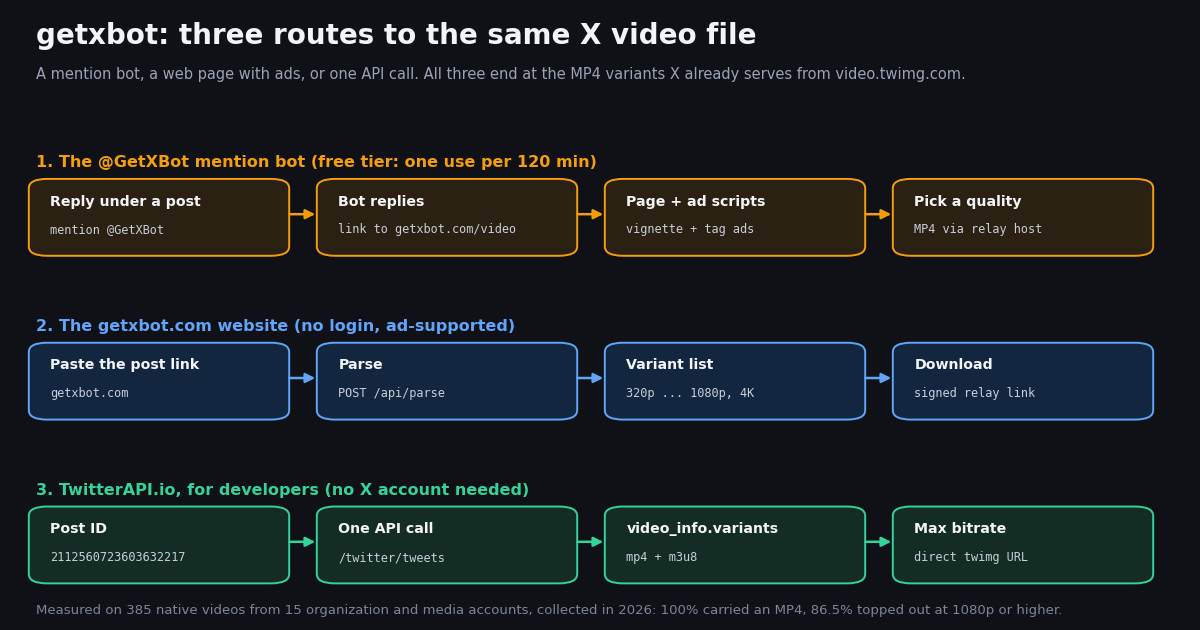
This page answers a brand question: what GetXBot (the @GetXBot account and getxbot.com) is, whether it is safe, and why it sometimes fails. If you just want to save one video, our free Twitter video downloader tool does that directly; if you need to pull media from hundreds of posts with code, the bulk media download API guide covers that workflow. Here we stay with GetXBot itself, checked first-hand, and only bridge to those two at the end.
Everything below comes from what we saw this session: the site's own pages and scripts, one test download through its parser, the bot account's public profile and a page of its recent replies, plus a study of 385 videos from 15 organization and media accounts that shows what any downloader can actually get from X. We describe the site by its domain as plain text and do not link to it.
What is GetXBot? A reply bot and a downloader website
GetXBot is two connected things, and most confusion comes from seeing only one of them.
The @GetXBot account on X. It is a mention bot. Its profile, written in Chinese, says (our translation): mention @GetXBot in a post and it will reply within seconds with a video download link; follow it for notifications; VIP members can also send it posts by direct message. When we looked it up through the API, the account had 758,435 followers, followed 2 accounts, had published 818,099 posts, carried a paid blue check, and was created in 2013. X's isAutomated flag (the "automated account" label) was not set.
The bot is busy. One page of its most recent posts held 20 replies spread over about 27 minutes, and all 20 linked to getxbot.com/video. Each reply is a short Chinese template ("your video is ready, click the link") with the requester tagged. We looked only at the bot's own text and links, not at the people it replied to.
The getxbot.com website. In English, with Japanese, Korean and Chinese versions, it presents itself as a "Twitter Video Downloader": paste a post link, press Parse Now, pick a resolution, download an MP4. It states it is not affiliated with Twitter, needs no sign-up, and "does not host" videos because they come from X's content delivery network.
Not one of X's own bots. The name reads like "get X bot", but nothing on the profile or the site connects it to X Corp. or to the official automated accounts such as @grok. It is an independent service that uses X's public video files.
What we saw on getxbot.com when we tested it
We fetched the site directly and through a second network path. Both returned the same thing: getxbot.com redirects (HTTP 301) to www.getxbot.com, which answers HTTP 200 from behind Cloudflare. The page is a Nuxt (Vue) app. Here is what each part does.
The test download. We sent one public NASA video post from our sample through the parser. It answered in about 1.2 seconds with 4 MP4 entries, 320x568, 480x852, 720x1280 and 1080x1920, each pointing at video.twimg.com. X's own data for that post, read through our API, lists exactly the same 4 MP4 renditions plus one HLS playlist (.m3u8) that the site leaves out. So the site does not upscale or re-encode anything; it hands you X's files.
The guide's "Copy MP4 Link" button gives you the raw X address. The ordinary Download button goes through the relay instead, which is how the site forces a file download in the browser and also means the relay sees which files you fetch.
What we did not do. We read the HTML and the JavaScript the pages load and called the two endpoints the page itself calls; we did not click through ads in a live browser, so we cannot tell you what each ad shows on a given day.
How the @GetXBot reply bot works, and its limits
The bot flow is what most people searching "get x bot" have seen in a reply thread. It goes like this.
Step 1. Under a post with a video, reply and mention @GetXBot.
Step 2. Within a couple of minutes the bot replies to you with a short link to getxbot.com/video?status=<post id>.
Step 3. That page lists the available resolutions; tap one to save the MP4.
The bot's landing page carries a Chinese FAQ that spells out the rules. In our translation, the main points are these.
Free users: one use per 120 minutes. "Many people use the bot, so ordinary users are limited to once every 120 minutes; if no reply arrives within about 2 minutes, it usually will not come." Members are served first and, when lines are busy, some free requests are dropped.
VIP membership. Subscribing to any plan in the store makes you a member, and you must link your own X handle there. Members can send posts by DM and are not limited by reply counts. The FAQ says subscriptions are not refunded and advises buying a small plan first.
When the bot cannot answer. The post's author has blocked the bot; your own account is protected; X judged your mention as spam; the post shows a picture with a fake play button instead of a real video; or your mention asks it to "find the full video", which it ignores.
Reposts and quotes. Mention it under the original post. If you reply under a repost or a quote, the page may say no video exists.
Is GetXBot safe? A practical checklist
Safe enough for saving a public clip, as long as you treat the ads with care. Here is the honest breakdown based on what we observed.
What is reassuring. It never asks for your X password or any login on the website. It does not ask you to install an app, an extension, or to allow notifications. The MP4 files it lists are X's own files from video.twimg.com, the same ones X plays in its app, so the video itself is not modified.
What to watch. The site is ad-funded. Its privacy policy says it uses Google AdSense and Google Analytics cookies, and keeps standard server logs (IP address, browser, pages, clicks). The bot's landing page goes further: it injects two scripts from third-party ad-network domains (one of them a file named vignette, the usual name for a full-page ad) and shows an image ad, labeled as an ad, that opens an outside site over plain HTTP. Do not install anything such an ad offers, and close any extra tab you did not open.
The relay. The Download button fetches the file through a second GetXBot server rather than straight from X. That is common for downloaders, but it means the operator can log which videos you save, despite the home page's "we never save the links you submit" line. If that matters, use the raw MP4 link (the site's Copy MP4 Link button, or our tool, which never proxies media).
Paying for VIP. The store is a Chinese-only email and password login on another domain, and the FAQ states there are no refunds. Use a unique password if you sign up.
Using the bot from your account. Mentioning @GetXBot is a normal public reply from your account. Your mention is visible to the post's author and everyone in the thread, and the bot's own FAQ says X sometimes filters these mentions as spam.
Copyright. Saving a video does not give you rights to reuse it. GetXBot's terms limit use to personal, non-commercial purposes and require users to be 18 or older; X's copyright policy is at help.x.com/en/rules-and-policies/copyright-policy.
GetXBot not working? Causes, fixes and file sizes
Most failures are not GetXBot's fault, and the same causes break every downloader, including ours. Work down this list.
Protected accounts are a hard stop. If the poster's account is protected, only approved followers can see their posts (see help.x.com/en/safety-and-security/public-and-protected-posts). GetXBot's own FAQ says it cannot download from private accounts, and neither can our API or tool: they return public posts only.
Is the site itself down? Check by opening getxbot.com in a private window. When we tested, it was up and the parser worked. If the page loads but every link fails, the service's own connection to X may be failing; try again later or use an alternative.
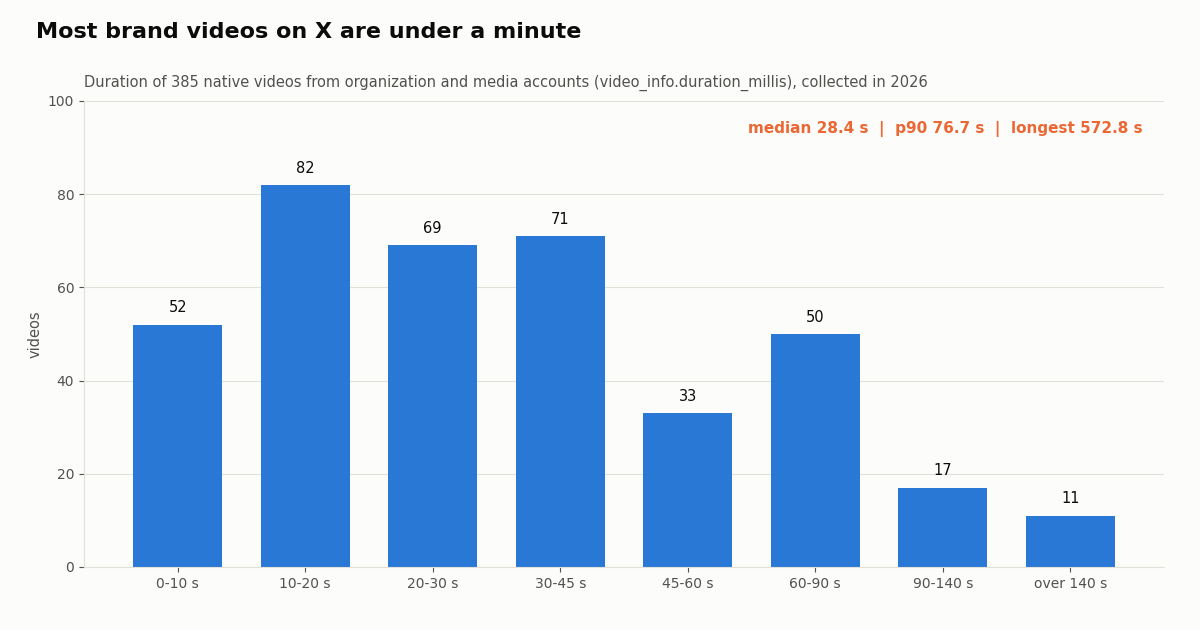
Video plays on X but not after download? Check its size. Brand videos on X are short: in the 385 videos of our study (method below), the median was 28.4 seconds, 90% were 76.7 seconds or shorter, and only 2.9% ran past 140 seconds; the longest in the sample was 572.8 seconds.
That has a practical consequence for downloader complaints: at a 1080p rung of about 10 Mbps, a 30-second clip is roughly 39 MB, small enough for any phone. Large files are rare and usually 4K uploads, which is where mobile browsers and in-app browsers struggle. GetXBot's own blog mentions iPhone Safari failing on files above 500 MB; picking the 1080p or 720p entry avoids that.
Aspect ratios were mixed: 16:9 landscape was most common, followed by 9:16 vertical and 4:5. Downloaders keep the original shape; nothing is cropped.
What any X video downloader can actually get: our data
Every downloader, GetXBot included, can only hand you what X already stores. To see what that is, we read the recent timelines of 15 public organization and media accounts and inspected every native video's video_info.variants list. Of 1,002 original posts (reposts excluded), 381 carried native video (38.0%), giving 385 videos.
Every video had an MP4. 100% of the 385 videos had at least one video/mp4 variant, and 100% also had an HLS (.m3u8) playlist. The typical list held 5 entries: one HLS playlist and 4 MP4 renditions (319 videos, 82.9%).
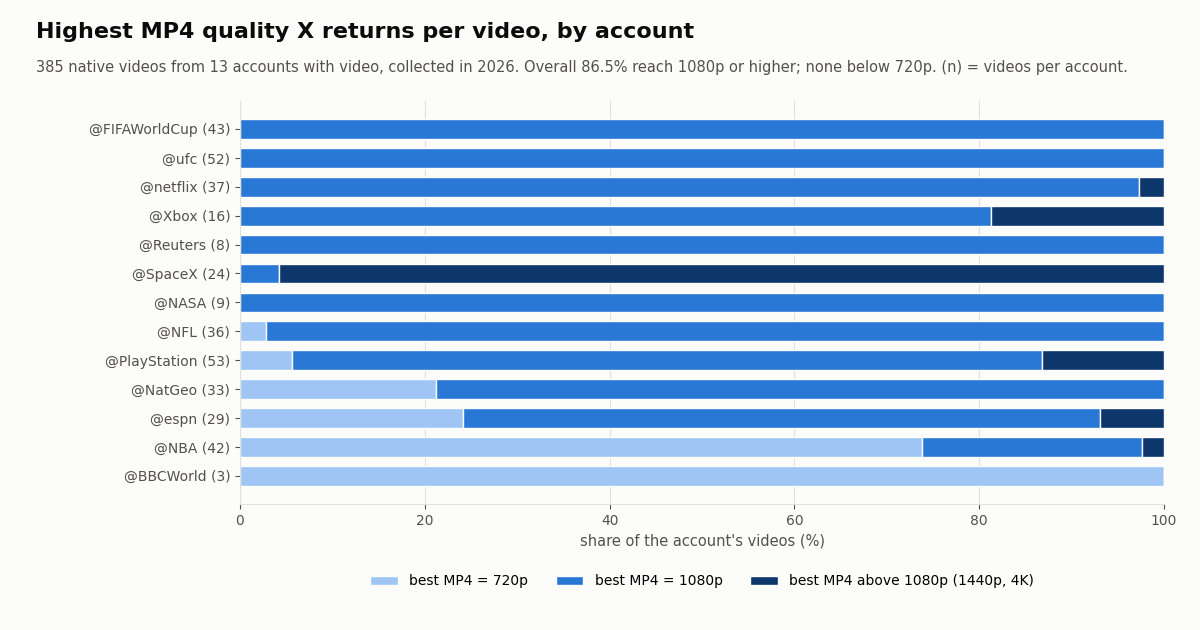
Quality ceiling. For 86.5% of videos the best MP4 was 1080p or higher, 13.5% topped out at 720p, and none were capped below 720p. 28 videos (7.3%) offered a 4K file. The median top bitrate was 10,368 kbps; the highest was 25,128 kbps.
The spread matters. @SpaceX videos almost all come in 4K-class files, while 73.8% of @NBA clips top out at 720p. @CNN and @nytimes had no native video at all in the posts we sampled. So "HD" on a downloader is only as good as the upload: when a site promises 1080p or 4K, it can only deliver it if X stored it.
GetXBot alternatives
If GetXBot's ads or relay bother you, or the bot ran out of free uses, these routes give you the same X files.
Our free tool. The Twitter video downloader at /tools/twitter-video-downloader takes a post link or ID and lists every MP4 rendition, GIFs (which X stores as MP4) and original-size images. It returns X's own CDN links and never proxies, stores or re-hosts media. Limits: 20 posts a day without an account, 100 a day when you sign in with Google. It works for public posts only.
Other downloader sites. Many sites do the same job; twmate.com, savetwt.com and tweeload.com were all up and offering X video downloads when we checked. They all read the same public variant list, so quality is identical; they differ in ads, redirects and whether they relay files. Apply the safety checklist above to any of them.
For a lot of videos, use code. Pasting links one by one stops scaling after a handful. The next section shows the API route.
For developers: the API route to the highest-bitrate MP4
Every downloader does the same thing under the hood: read the post, walk extendedEntities.media[], keep entries whose type is video or animated_gif, and pick the video_info.variants entry with the highest bitrate among content_type video/mp4. The HLS entry (application/x-mpegURL) has no bitrate and is for streaming players.
With TwitterAPI.io that is one request: GET /twitter/tweets with tweet_ids (up to 50 comma-separated IDs per call) and your key in the X-API-Key header. For an account's recent videos, page through GET /twitter/user/last_tweets with userName, following has_next_page and next_cursor. Reads need no X account. The MP4 URLs point at video.twimg.com and download without any key. The full script below handles batching, reposts and pagination.
Cost compared. Tweet reads cost 15 credits per tweet returned, which is $0.15 per 1,000 posts. The official X API pay-per-usage rate card lists $0.005 per post read, $5 per 1,000 posts, about 33 times more, and caps pay-per-usage at 3 million post reads a month (docs.x.com/x-api/getting-started/pricing). Each request is billed at a minimum of 15 credits. New accounts that pass the automatic bot check get up to $1 of free credits (at most 100,000 credits, no card, one per person or network, expiring after 31 days); purchased credits never expire. Before the first payment the rate limit is 0.2 requests per second, 20 once paid.
Our study cost. The 15 timelines plus the bot checks took 62 requests and returned 1,220 posts, about $0.18 of credits. The same limits apply as for any downloader: protected accounts' posts are not returned, and deleted posts are gone.
Need more than videos? The bulk media download API guide covers photos, GIFs, naming and resuming large jobs.
import requests

r = requests.get(
    "https://api.twitterapi.io/twitter/tweets",
    headers={"X-API-Key": "YOUR_KEY"},
    params={"tweet_ids": "2112560723603632217"},
)
tweet = r.json()["tweets"][0]
for m in tweet["extendedEntities"]["media"]:
    mp4 = [v for v in m["video_info"]["variants"] if v["content_type"] == "video/mp4"]
    best = max(mp4, key=lambda v: v["bitrate"])
print(best["bitrate"], best["url"])How we collected this
Question. When a downloader such as GetXBot asks X for a video post, what can it get: how many variants, how many MP4s, what top resolution and bitrate, and how long the videos are.
Accounts. 15 public organization and media accounts: @NASA, @SpaceX, @NBA, @NFL, @espn, @BBCWorld, @CNN, @Reuters, @nytimes, @PlayStation, @Xbox, @netflix, @NatGeo, @ufc and @FIFAWorldCup.
Window and sample. The most recent posts of each account at collection time, up to 4 pages (80 posts) per account through /twitter/user/last_tweets, collected in 2026. 1,200 posts returned, 198 reposts excluded, 1,002 original posts analyzed, 385 native videos. Resolution is read from the /vid/.../WxH/ segment of the best MP4 URL; duration from video_info.duration_millis.
GetXBot checks. One profile lookup and one page of the bot's recent replies (only its own text and link domains were counted), the site's HTML and scripts fetched directly, and one test of the site's parser with a public NASA video post.
What the sample cannot show. Brand accounts upload polished video; personal accounts may post more 720p and longer clips. The sample held no animated GIFs, so GIF variant counts are not measured here. Recent posts only, so older uploads may carry fewer renditions.
Privacy. Aggregates only. Only organization and media accounts and the public @GetXBot service account are named; no private individuals were analyzed.
"""Save the best MP4 from public X (Twitter) video posts with TwitterAPI.io.

Usage:
  python save_x_videos.py 2112560723603632217 https://x.com/NASA/status/2112560723603632217
  python save_x_videos.py --user NASA --pages 2      # recent videos from one public account
Needs: pip install requests ; export TWITTERAPI_IO_KEY=...
"""
import os
import re
import sys

import requests

BASE = "https://api.twitterapi.io"
HEADERS = {"X-API-Key": os.environ["TWITTERAPI_IO_KEY"]}
ID_RE = re.compile(r"(?:status(?:es)?/)?(\d{5,25})")


def post_id(text):
    m = ID_RE.search(text)
    return m.group(1) if m else None


def tweets_by_id(ids):
    """GET /twitter/tweets accepts up to 50 comma-separated IDs per call."""
    out = []
    for i in range(0, len(ids), 50):
        r = requests.get(f"{BASE}/twitter/tweets", headers=HEADERS,
                         params={"tweet_ids": ",".join(ids[i:i + 50])}, timeout=30)
        r.raise_for_status()
        out.extend(r.json().get("tweets") or [])
    return out


def recent_tweets(user, pages):
    """GET /twitter/user/last_tweets, 20 posts per page, follows next_cursor."""
    out, cursor = [], ""
    for _ in range(pages):
        r = requests.get(f"{BASE}/twitter/user/last_tweets", headers=HEADERS,
                         params={"userName": user, "cursor": cursor}, timeout=30)
        r.raise_for_status()
        body = r.json()
        if body.get("status") != "success":
            sys.exit(f"API error: {body.get('msg')}")
        data = body.get("data") or {}
        out.extend(data.get("tweets") or [])
        if not body.get("has_next_page"):
            break
        cursor = body.get("next_cursor") or ""
    return out


def best_mp4(media):
    """Highest-bitrate MP4 variant; the m3u8 (HLS) entry has no bitrate and is skipped."""
    variants = (media.get("video_info") or {}).get("variants") or []
    mp4 = [v for v in variants if v.get("content_type") == "video/mp4"]
    return max(mp4, key=lambda v: v.get("bitrate") or 0) if mp4 else None


def save(tweet):
    if tweet.get("retweeted_tweet"):
        tweet = tweet["retweeted_tweet"]  # a repost carries the original post
    for n, media in enumerate((tweet.get("extendedEntities") or {}).get("media") or [], 1):
        if media.get("type") not in ("video", "animated_gif"):
            continue
        v = best_mp4(media)
        if not v:
            continue
        size = re.search(r"/(\d+x\d+)/", v["url"])
        name = f"{tweet['id']}_{n}_{size.group(1) if size else 'best'}.mp4"
        with requests.get(v["url"], stream=True, timeout=120) as r:  # X's own CDN, no key needed
            r.raise_for_status()
            with open(name, "wb") as f:
                for chunk in r.iter_content(1 << 20):
                    f.write(chunk)
        secs = (media.get("video_info") or {}).get("duration_millis", 0) / 1000
        print(f"saved {name}  {v.get('bitrate', 0) // 1000} kbps  {secs:.1f} s")


if __name__ == "__main__":
    args = sys.argv[1:]
    if args[:1] == ["--user"]:
        pages = int(args[args.index("--pages") + 1]) if "--pages" in args else 1
        posts = recent_tweets(args[1], pages)
    else:
        ids = [i for i in (post_id(a) for a in args) if i]
        posts = tweets_by_id(ids)
    if not posts:
        sys.exit("No posts returned: deleted, protected, or a bad ID.")
    for t in posts:
        save(t)
Questions readers ask
What is GetXBot?
GetXBot is an independent Twitter (X) video downloader. It has a mention bot, @GetXBot, that replies with a download link when you tag it under a video post, and a website, getxbot.com, where you paste a post link and pick an MP4 resolution. It is not affiliated with X.
Is GetXBot safe to use?
It asks for no login or password and installs nothing, and the files are X's own MP4s. The risks are the ads: AdSense on the site, plus two extra third-party ad scripts and an outbound image ad on the bot's landing page. The Download button also routes files through GetXBot's relay server. Avoid installing anything an ad offers.
Why is GetXBot not replying to my mention?
Free users get one reply every 120 minutes, according to the bot's own FAQ. It also cannot reply if the post's author blocked it, if your account is protected, or if X filtered your mention as spam. Paste the post link into a website downloader instead.
Can GetXBot download videos from private accounts?
No. Its own FAQ says videos from private (protected) accounts cannot be saved. The same is true of every legitimate downloader, our free tool and our API: they only read public posts.
Is GetXBot free?
The website is free with ads and no sign-up. The bot is free with a limit of one use per 120 minutes; a paid VIP membership, bought in a Chinese-language store that requires an email login, removes the reply limit and allows sending posts by DM. The bot's FAQ states VIP plans are not refunded.
What quality does GetXBot download?
Whatever X stored for that post. In our test it returned all four MP4 renditions of a NASA video, up to 1080x1920. Across 385 brand videos we sampled, 86.5% had a 1080p or higher MP4 and 7.3% had 4K.
What is a good GetXBot alternative?
Our free Twitter video downloader at /tools/twitter-video-downloader returns direct X CDN links with no ads (20 posts a day without an account, 100 when signed in). Developers can fetch posts by ID with the TwitterAPI.io API and pick the highest-bitrate MP4 from video_info.variants.
Is @GetXBot an official X bot?
No. Despite the name, nothing on its profile or website links it to X Corp. It is a third-party account with a paid blue check and a Chinese-language bio that points to its own subscription store.
Continue
- twitterapi.io API reference: GET /twitter/tweets (tweet_ids, up to 50 per call)
- twitterapi.io API reference: GET /twitter/user/last_tweets (cursor pagination)
- X developer docs: data dictionary, media object variants (bit_rate, content_type, url) and duration
- X API pay-per-usage pricing ($0.005 per post read, 3M monthly cap)
- twitterapi.io documentation: authentication with the X-API-Key header
- Twitter (X) API overview: endpoints, pricing and limits
- Free Twitter video downloader: direct MP4 links, no ads
- Bulk media download API guide for photos and videos
- How to save a GIF from Twitter (X)
- Twitter (X) video not playing: fixes
- What Twitter (X) bots are and how they work
- Pay-per-call pricing for tweet reads
- 01The Best Twitter (X) Accounts to Follow, by Topic
- 02What Is xcancel (X Cancel)? The Twitter (X) Nitter Front End, Explained
- 03Twitter (X) Media Viewer: How to Browse an Account's Photos and Videos
- 04AllMyTweets: What It Did, Its Limits, and How to See Every Tweet on Twitter (X)
- 05Twitter (X) Private Profile Viewer: Can You See Protected Tweets?
- 06twitter-api-v2 (npm) Quick Start: the Twitter (X) API from Node.js and TypeScript in 2026
- 07Twitter "This Request Looks Like It Might Be Automated" — Error 226, and How to Fix It
- 08Twitter (X) Templates — Bulk Post via API
Stop reading. Start building.
Starter credits cover real testing on real data. Google sign-in, no card, no application queue.
Get an API key