Twitter (X) Private Profile Viewer: Can You See Protected Tweets?
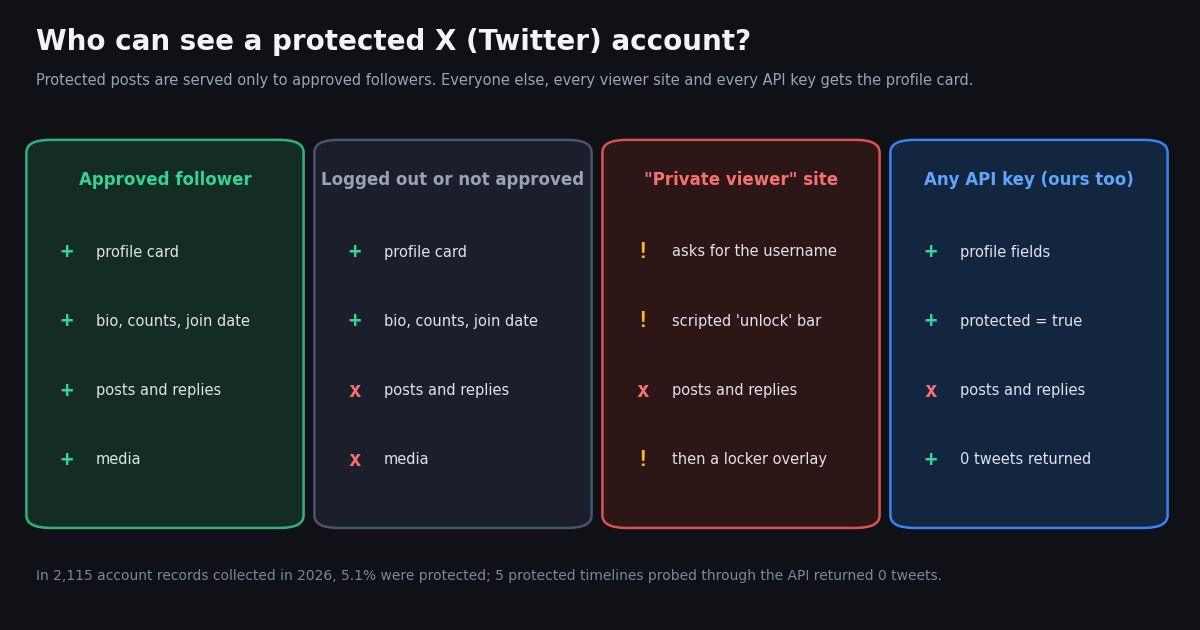
This page answers one question: can any tool show you the posts of a private (protected) X account you do not follow? Our Twitter web viewer guide covers the different case of reading public accounts without logging in; a protected account is the one thing no web viewer, mirror or API can open, and this page explains why, what the sites that promise it actually do, and what you can see instead.
We did not stop at the help-center wording. We opened the "private viewer" sites that rank for this search and read what their pages and scripts do, and we pulled 2,115 account records through the twitterapi.io API to measure how common protected accounts are and exactly which fields stay visible when an account is protected. Everything below is aggregated; no private individual is named.
If you landed here because a profile says its posts are protected (the old banner read "This account's Tweets are protected"), the short version is: the only door is the follow request, and anyone selling another door is selling something else.
Why no viewer can show protected tweets
Protection is enforced by X's servers, not by the X app. X's help article on public and protected posts (help.x.com/en/safety-and-security/public-and-protected-posts) describes the two states: public posts, the default, are visible to anyone, whether or not they have an X account; protected posts are only visible to the account's X followers. When an account turns protection on, new people must send a follow request that the owner approves or denies.
The posts never leave X for non-followers. A web page, an app or a script that is not logged in as an approved follower asks X for the timeline and gets nothing back. There is no cached public copy inside X to read, and the same help article says protected posts will not appear in third-party search engines such as Google. A viewer site sits even further away than you do: it is not your follower list, so it receives less than your own logged-in browser does.
Followers cannot spread them with a repost. The help article also notes that followers cannot use the repost icon on protected posts, so the usual way posts leak to a public timeline is closed too. Followers can still take screenshots, which X says plainly.
Two exceptions exist, and neither helps a stranger. Accounts that followed before the owner switched protection on keep their access unless the owner blocks them, and a third-party app the owner has authorized on their own account may be able to see the protected posts. Both depend on permission the owner already gave.
X's developer data dictionary (docs.x.com/x-api/fundamentals/data-dictionary) describes the user field protected as indicating whether the user has chosen to protect their posts, "in other words, if this user's Tweets are private". That flag is public; the posts behind it are not.
What the "private viewer" sites actually do
We checked the sites that surface for this search during this session, loading each one both directly and through a second network path. None of them is linked from this page, and we recommend you do not visit the first one.
tweetgoon.com (loads, HTTP 200). The home page is titled "View any private Twitter account!" and claims "120K Accounts Unlocked", "350+ Satisfied Clients" and a live "Users currently active" counter, and suggests the tool for "a parent to check their child's posts, or your spouse". Its viewer page is titled "Private Profile Unlocker" and is built on a template whose markup is labeled for Instagram. We read its script instead of running it. After you type a username, it asks the site's own server for basic profile details; if that lookup fails it shows hard-coded numbers (11 posts, 1,073 followers, 988 following). The "preview" grid is one stock image hosted on another domain, repeated in every tile. A progress bar then fills in 100 steps, one every 169 milliseconds (about 17 seconds), printing canned lines such as "Decrypting story container...", "Lock status: OVERRIDE GRANTED" and "Unlock process: COMPLETE". At 100% the page says "Redirecting to unlock page..." and injects a full-screen frame that loads a content-locker script from a separate host, revealacc.online, which answered with an HTTP 520 error when we checked. At no step does the script request a single post from X.
How this site gets traffic. We found it promoted through user-made pages on scribehow.com titled "Twitter Private Account Viewer (No logins required)", which call it a way to view private profiles anonymously while also warning readers to avoid "survey unlock" traps. Other results for the same searches were keyword-stuffed posts placed on unrelated platforms: a discussion topic in an unrelated book's forum on goodreads.com, and a "Methods To View Private Tweets" page on merlot.org that first says there is absolutely no way to see a protected tweet without permission and then says third-party tools will do it. Its outbound link went to insuiter.com, which today shows only Telegram how-to articles. A PDF on a university upload folder that ranked for the same phrase now returns 404.
twitterviewer.net (loads, HTTP 200). This is a public-only viewer and it says so: its FAQ answers the private-account question with "No. Only public tweets are accessible." and adds that private content is not shown by any legitimate viewer. It needs no login and shows ads with a hide toggle. tweetgrok.ai (HTTP 200) lists a "Twitter Viewer" among many tools and makes no claim about private accounts. twitterwebviewer.com returned HTTP 403 to us.
The pattern to recognize. A real viewer can only show what X shows a logged-out visitor. A page that promises protected posts and then shows a progress bar, a "human verification" step, a survey, an app install or a payment page is collecting something from you (your time, an offer completion, a download, card details or your X password) and will not deliver the posts. Never type your X password into any viewer.
How common protected accounts are
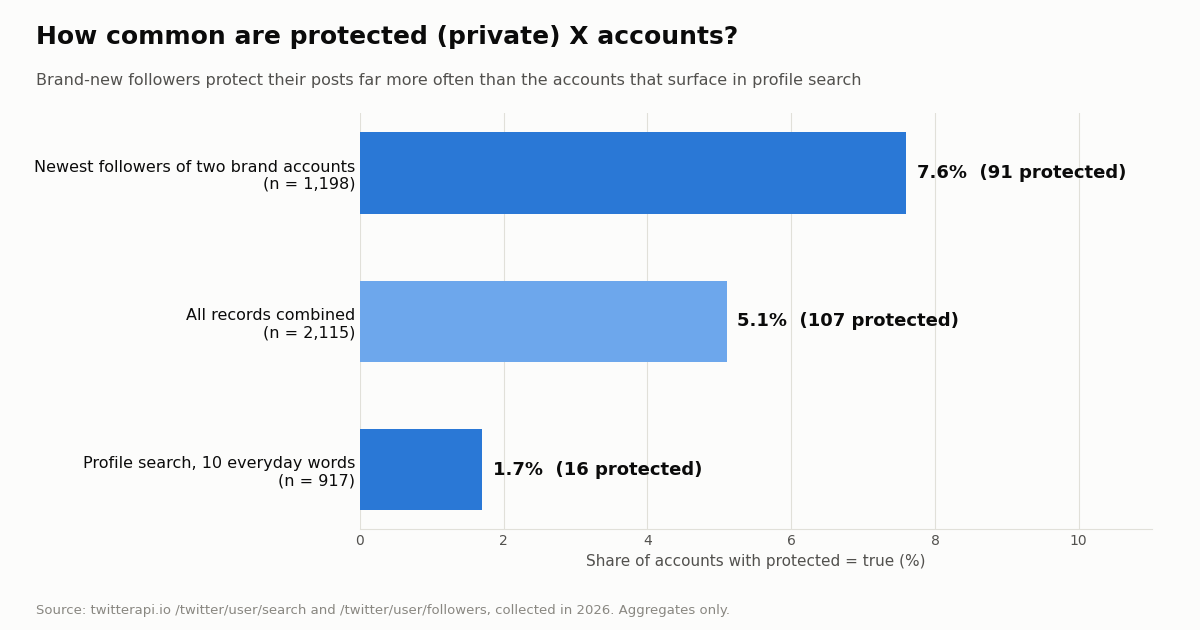
To see how often people actually run into a locked profile, we collected two kinds of account samples in 2026. Profile search for ten everyday words (coffee, music, football, travel, photography, student, gaming, nurse, teacher, fitness) returned 917 unique accounts, and 16 of them (1.7%) were protected. The newest followers of two large brand accounts, NASA and Spotify, gave 1,198 unique accounts, and 91 of them (7.6%) were protected. Combined: 107 of 2,115, or 5.1%.
The gap is the useful part. Profile search favors established, findable accounts (the protected ones it found had a median 55,411 followers and were 14.5 years old), and they rarely lock their posts. A follower list sorted newest first is mostly brand-new accounts: 73.6% of the protected ones were created this year, with a median of 0 followers and 1 post. In other words, the protected profile you are curious about is most often an ordinary person or a new account, which is exactly who the protection setting is for.
What you can still see about a protected account
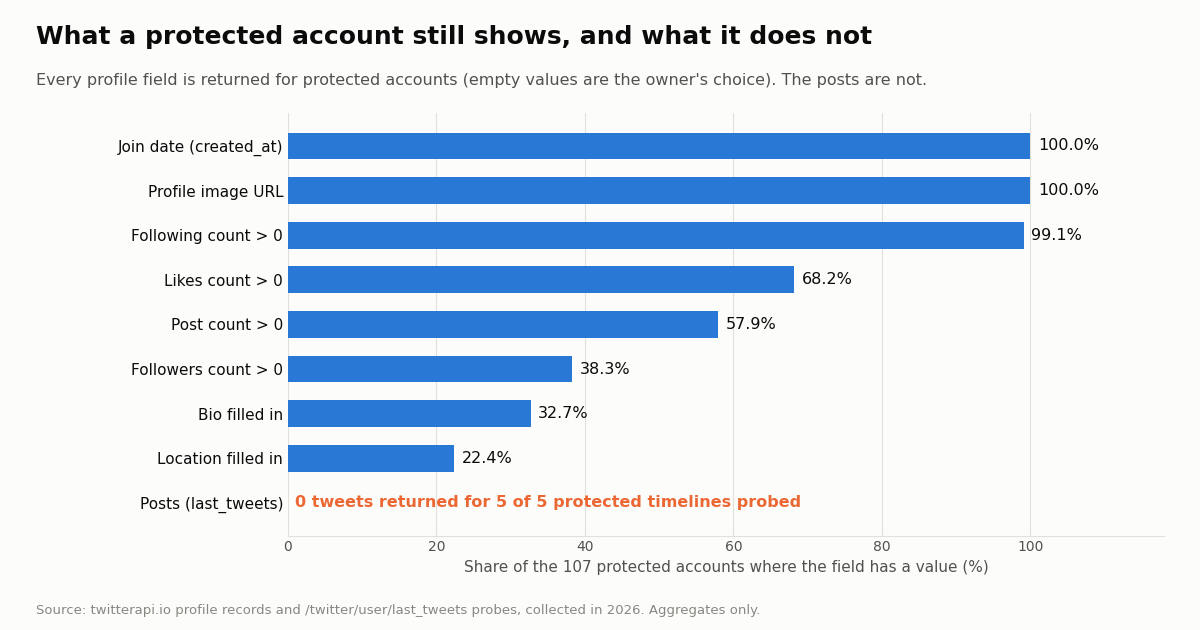
Protection hides posts, not the profile. Anyone, logged in or not, sees the profile card: name, handle, avatar, banner, bio, location, website link, join date and the follower and following counts. Our data shows the same thing from the API side: for every protected account in the sample, each profile field was present in the response; whether it had a value depended only on what the owner filled in.
We also asked the timeline endpoint for the recent posts of 5 protected accounts that each had more than 20 posts on their profile counter. Every request succeeded and every one came back with an empty list and no next page: 0 posts in total. The counter tells you posts exist; nothing outside the follower list can read them.
So what is legitimately visible? Whether the account exists, when it was created, roughly how active it is (post and like counts), how many people follow it and how many it follows, and whatever the owner chose to put in the bio. That is useful for deciding whether a follow request is worth sending, or for checking that a profile is not a fresh impersonation (our account age checker reads the same join date).
Legitimate ways to see what a protected account posts
Send a follow request. Open the profile while logged in and select Follow. The owner gets a request and approves or denies it. This is the only route X offers, and if the account belongs to someone you know, a short message through another channel explaining who you are helps more than any tool.
Read what other people posted publicly. A protected account's own posts are hidden, but replies and mentions written by public accounts are public. If a public account replied to or mentioned the person, that post appears in X search and on the replier's timeline. You see one side of the conversation, never the protected side, and you should treat it that way.
Look for copies made while the account was public. If the account was public before, some of its posts may have been captured by web archives such as the Internet Archive's Wayback Machine (web.archive.org) or quoted in news articles. X's help article notes it cannot remove content from sites other than X.com. Archives only hold what was captured before protection was switched on, and many personal accounts were never captured at all.
Check the person's other public channels. Many people keep a public profile elsewhere, a personal site or a public second account; the bio and website link on the protected profile are the honest place to start.
What not to do. Do not create a second account that poses as someone the owner would approve, do not buy "unlock" services, and do not hand a stranger's site your X password. X's authenticity policy (help.x.com/en/rules-and-policies/authenticity) says you may not impersonate individuals, groups or organizations to deceive others, and its impersonation reporting page says such accounts may be permanently suspended.
If your own account is protected: what others can see
Turning protection on is a real privacy control, with known edges. Strangers still see your profile card: name, handle, avatar, bio, location, website, join date and counts. Pick those with that in mind.
Old followers keep access. Anyone who followed you before you protected your posts can still see and interact with them unless you remove or block them. Review your follower list after switching.
Authorized apps can still read. X's help article says a third-party application you have authorized on your account may be able to see your protected posts. Review connected apps in your X settings and revoke anything you do not recognize, including any "viewer" or "analytics" app you once logged into.
Screenshots and earlier copies. Approved followers can capture images of your posts, and anything that was public before (archives, quotes, search engine caches) is outside X's control.
A viewer site cannot expose you. Based on everything we saw this session, the sites that promise to open private profiles do not reach your protected posts. The real exposure paths are the four above.
What an API returns for a protected account (ours included)
Developers ask the same question in API form, and the answer is the same: a data API reads X the way a logged-out visitor does, so it gets profile fields and no protected posts. TwitterAPI.io does not return posts from protected accounts, and we do not offer a way around that. In our probes, /twitter/user/info returned the profile with protected: true, and /twitter/user/last_tweets returned status: success with an empty tweets list and has_next_page: false.
Check the flag before you build anything. Any tool that shows people's posts (an archive tool, a monitor, a research dashboard) should read protected from /twitter/user/info first, tell the user plainly that the account is private, and skip the timeline call. The example below does exactly that for a list of handles.
What it costs. Profiles cost 18 credits each, $0.18 per 1,000 profiles; tweets cost $0.15 per 1,000 returned, with a 15-credit ($0.00015) minimum per request, so an empty timeline check of a protected account costs that minimum. For comparison, the official X API rate card (docs.x.com/x-api/getting-started/pricing) lists $0.010 per user read and $0.005 per post read, which is $10 and $5 per 1,000. Reads need no X account. New accounts that pass the automatic bot check get up to $1 of free credits (at most 100,000 credits, no card, one per person or network, expiring after 31 days).
Use this for public accounts and organizations, and for checking whether an account is protected. It will not, and is not meant to, read protected posts.
import requests

API_KEY = "YOUR_API_KEY"
BASE = "https://api.twitterapi.io"
HEADERS = {"X-API-Key": API_KEY}


def profile(user_name):
    r = requests.get(f"{BASE}/twitter/user/info", headers=HEADERS,
                     params={"userName": user_name}, timeout=30)
    body = r.json()
    if body.get("status") != "success" or not body.get("data"):
        return None  # unknown handle: HTTP 200, status "error", msg "user not found"
    return body["data"]


for handle in ["NASA", "Spotify"]:
    p = profile(handle)
    if p is None:
        print(handle, "-> not found")
    elif p["protected"]:
        print(handle, "-> protected: only approved followers can see the posts")
    else:
print(handle, "-> public,", p["followers"], "followers,", p["statusesCount"], "posts")How we collected this
Question. How common are protected X accounts, and what does a public API still return about a protected account versus what it does not?
Accounts and queries. /twitter/user/search for ten everyday words, five pages each (917 unique accounts), and /twitter/user/followers for the newest followers of NASA and Spotify, three pages each (1,198 unique accounts). Then /twitter/user/info and /twitter/user/last_tweets once each for 5 protected accounts from the follower sample that had more than 20 posts.
Window and size. One snapshot, collected in 2026: 2,115 account records, 67 API requests, about $0.18 to $0.20 in credits.
What the sample cannot show. Neither sample is a random draw of all X accounts. Profile search ranks established, popular accounts, so it understates protection; newest-follower lists skew to brand-new accounts and possibly automated ones, so they may overstate it. The true platform-wide share is unknown to us, and X does not publish it. Five timeline probes show the behavior, not a rate. The viewer-site findings describe what those sites served when we checked; such sites change domains and scripts often.
Privacy. Aggregates only. Raw responses stayed on our machine and are not published; the committed sample holds de-identified rows (no ids, handles, names or bio text). No private individual is named on this page, and the probes stored only status, message and post count.
import requests

API_KEY = "YOUR_API_KEY"
BASE = "https://api.twitterapi.io"
HEADERS = {"X-API-Key": API_KEY}


def get_profile(user_name):
    r = requests.get(f"{BASE}/twitter/user/info", headers=HEADERS,
                     params={"userName": user_name}, timeout=30)
    body = r.json()
    if body.get("status") != "success" or not body.get("data"):
        return None  # unknown user: status "error", msg "user not found"
    return body["data"]


def recent_posts(user_name, max_pages=2):
    """Recent posts of a PUBLIC account. Protected accounts return none."""
    posts, cursor = [], ""
    for _ in range(max_pages):
        r = requests.get(f"{BASE}/twitter/user/last_tweets", headers=HEADERS,
                         params={"userName": user_name, "cursor": cursor}, timeout=30)
        body = r.json()
        data = body.get("data") or {}
        posts.extend(data.get("tweets") or [])
        if not body.get("has_next_page"):
            break
        cursor = body.get("next_cursor", "")
    return posts


handle = "NASA"
profile = get_profile(handle)
if profile is None:
    print("No such account")
elif profile["protected"]:
    # Protected: only approved followers can see posts. Do not try to fetch them.
    print(f"@{handle} is protected. Visible: bio, join date {profile['createdAt']}, "
          f"{profile['followers']} followers, {profile['statusesCount']} posts.")
else:
    for t in recent_posts(handle):
print(t["createdAt"], t["likeCount"], t["text"][:80].replace("\n", " "))Questions readers ask
Is there a Twitter private profile viewer that actually works?
No. X serves protected posts only to followers the owner approved, so no website, app or API can retrieve them for a stranger. Sites that claim otherwise show public profile data plus fake progress screens, then try to send you to a survey, an offer, a download or a payment.
How can I see protected tweets without following?
You cannot see the protected posts themselves. You can see the profile card (bio, counts, join date), public replies and mentions that other people wrote, and copies of posts captured in web archives while the account was still public. To see the posts, send a follow request.
Are private Twitter viewer sites safe?
The one we tested this session played a scripted unlock animation over a stock image and then loaded a third-party content-locker overlay; it never requested any posts from X. Treat any site that asks for surveys, app installs, payment or your X password as unsafe, and never enter your login.
What does "This account's Tweets are protected" mean?
It is the older Twitter wording of the notice on a protected profile: the owner has turned on protection, so only approved followers can see their posts. You can still see the profile card and send a follow request.
Can someone see my protected tweets if they followed me before I went private?
Yes. X's help article says accounts that followed you before you protected your posts can still view and interact with them unless you block them. Third-party apps you authorized may also be able to see them.
Can I make a second account to get my follow request approved?
You can create more than one account, but posing as someone the owner trusts is deception. X's authenticity policy says you may not impersonate individuals, groups or organizations to deceive others, and impersonating accounts may be permanently suspended. Send the request as yourself.
Can a Twitter API read protected tweets?
Not for accounts the caller is not approved to follow. TwitterAPI.io does not return protected posts: the profile endpoint reports protected as true and the timeline endpoint returns an empty list. Use the flag to tell your users an account is private.
Do protected tweets show up on Google?
No. X's help article says protected posts do not appear in third-party search engines such as Google, and they are searchable on X only by the account and its followers. Posts made while the account was public may still exist in archives or quotes elsewhere.
Continue
- X Help Center: About public and protected posts (who can see protected posts, follow requests, search engines, authorized apps)
- X developer docs: Data dictionary (user object protected field)
- X developer docs: X API pricing (per user read and per post read)
- TwitterAPI.io docs: Get user info (protected flag and profile fields)
- TwitterAPI.io docs: Get user last tweets
- X Help Center: Authenticity policy (impersonation)
- X (Twitter) API overview: endpoints, pricing and limits
- Twitter web viewer: read public accounts without logging in
- XCancel alternatives for reading public tweets
- Nitter alternatives that still work
- TwitterViewer reviewed: what the public viewer shows
- Twitter account age checker (join date of any profile)
- Twitter follow checker: does one account follow another
- TwitterAPI.io pricing: pay only for the data returned
- 01GetXBot: What the Twitter (X) Video Bot Is, Whether It Is Safe, and Alternatives
- 02The Best Twitter (X) Accounts to Follow, by Topic
- 03What Is xcancel (X Cancel)? The Twitter (X) Nitter Front End, Explained
- 04Twitter (X) Media Viewer: How to Browse an Account's Photos and Videos
- 05AllMyTweets: What It Did, Its Limits, and How to See Every Tweet on Twitter (X)
- 06Twitter (X) Viewer API — A Developer's Read-Only Guide
- 07Twitter (X) Profile Analytics — How to Pull User Metrics via API
- 08Does X / Twitter Show Who Viewed Your Profile?
Stop reading. Start building.
Starter credits cover real testing on real data. Google sign-in, no card, no application queue.
Get an API key