Data365 Alternative: Pay-Per-Data X (Twitter) API Instead of a EUR 300 Subscription
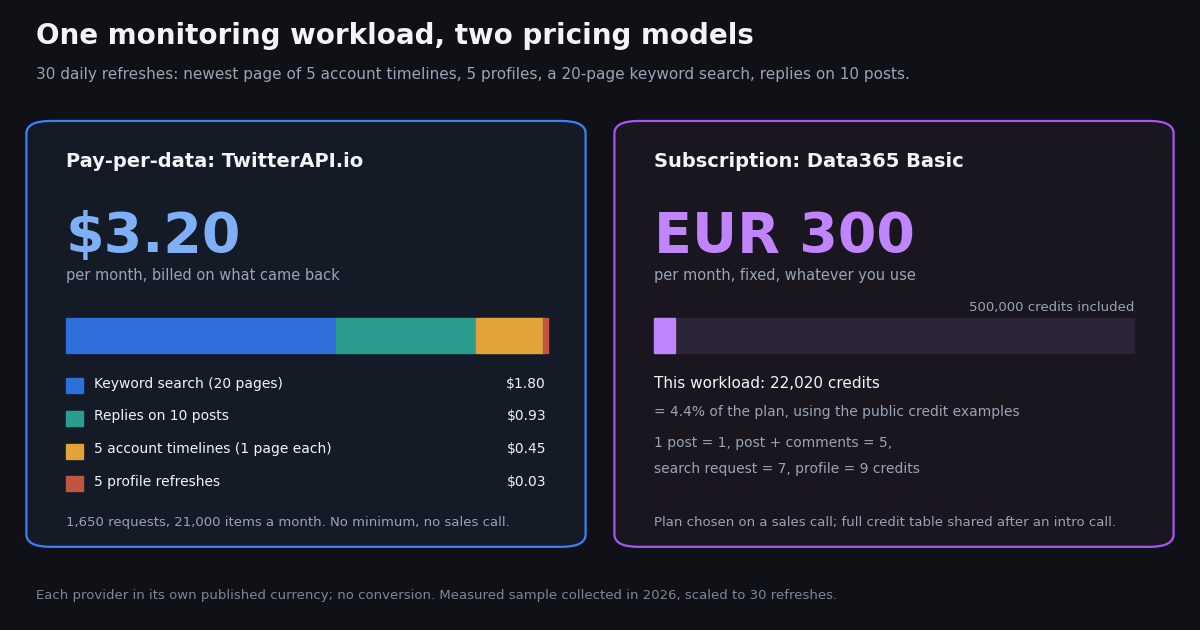
Data365 (data365.co) is a social media data API that covers seven networks and sells access as a monthly subscription measured in credits. If you found it while shopping for X (Twitter) data, the question is not whether it works, it is whether a EUR 300 a month plan chosen on a sales call is the right shape for your workload, or whether paying per returned record with an API key you create yourself gets the same data for less commitment.
This page lays the two pricing models side by side using only what each vendor publishes, then does the thing neither pricing page does: it measures a realistic monitoring workload against the live X API, counts the records that came back, and prices that month under both models. It also maps Data365's concepts (profile with info, profile feed, search, post + comments) to TwitterAPI.io endpoints with runnable Python, and names the cases where Data365 is the better choice.
Everything about Data365 here comes from its public pricing page and its Twitter API page, read this year; their detailed credit documentation is only shared after an introductory call, so where we had to apply their four public credit examples literally, we say so. Everything about TwitterAPI.io comes from our pricing and from requests we actually made.
Data365 vs TwitterAPI.io at a glance
The two products answer the same request, 'give me public X posts and profiles as JSON', with different commercial shapes. Data365 is a subscription with a credit quota and a sales process; TwitterAPI.io bills each record returned, with optional subscriptions that only add bonus credits and higher rate limits. The official X API is the expensive baseline both are measured against.
Read the table as a shape comparison, not a conversion. Data365 publishes euros and credit examples; TwitterAPI.io publishes dollars and credits; we keep both as published and never apply an exchange rate. The honest one-line summary: if your workload is X only and smaller than a few hundred thousand records a month, pay-per-data costs a fraction of a fixed EUR 300 plan. If you need several networks from one vendor with one schema, Data365's bundle is the thing you are paying for, and this page will not pretend otherwise.
Two pricing models: credit quota in a subscription vs pay for what came back
How Data365 prices X data. The pricing page lists three plans: Basic at EUR 300 a month for 1 social network and 500,000 credits a month, Standard at EUR 850 a month for 3 social networks and 1,000,000 credits a month, and Custom at custom pricing for up to 7 social networks and up to 100,000,000 credits a month. Four credit values are given as examples: 1 post = 1 credit, 1 post + comments = 5 credits, 1 search request = 7 credits, 1 profile with info = 9 credits. The FAQ says a detailed description of all credit values is in the API documentation, which 'will be available after you have an introductory call with our team'. Getting started means completing a form so the sales team can contact you, choose a plan and provide a free 14-day trial without a credit card (the trial 'has some limitations for security reasons'). Plans are billed monthly by wire transfer or card.
Two things follow from that structure. First, the price of one post depends on how much of the quota you use: EUR 300 divided by 500,000 credits is EUR 0.0006 per credit, and that is the per-post price only in the month you consume every credit. The page describes credits as a monthly allowance and we found no mention of rollover, so a month in which you pull 50,000 posts costs EUR 300 just the same, or EUR 0.006 per post. Second, you cannot price a project before the call, because the four public values do not cover every data type (followers, for example, are not listed) and the full table is behind the intro call.
How TwitterAPI.io prices the same data. Every tweet-returning endpoint (search, timelines, mentions, replies, quotes, retweeters, tweets by ID) costs 15 credits per tweet returned, which is $0.15 per 1,000 tweets at $1 = 100,000 credits. A request has a minimum of 15 credits, so a search that finds nothing costs $0.00015 and a full 20-tweet page costs $0.003; there is no per-request cap. Profiles are 18 credits per user, $0.18 per 1,000. Followers and followings are 1 to 3 credits per user returned depending on page size. There is no monthly minimum: you top up credits and purchased credits never expire. New accounts that pass the automatic bot check get $1 in free credits (100,000 credits, no card, one per person or network, expiring after 31 days), which is enough to run every example on this page. Subscriptions exist (Starter $29, Builder $99, Pro $199, Scale $499, Business $1,499 a month) but they are optional and buy bonus credits and higher rate limits, not access; the per-record prices are the same either way, and the plan details live at /pricing.
The baseline. The official X API's pay-per-use pricing (docs.x.com/x-api/getting-started/pricing) is $0.005 per post read and $0.010 per user read, capped at 3 million post reads per monthly billing cycle, with an Enterprise plan above that. Per 1,000 posts that is $5 against TwitterAPI.io's $0.15, about 33x. It is the number to keep in mind when either third-party price looks high: both are a small fraction of the official rate card, and the difference between them is mostly about commitment, not unit cost.
Where the models cross. A fixed quota is a good deal when you consume most of it every month and a poor one when you do not. Our measured workload below used 4.4% of a Basic quota. The reverse question, how much X work $300 of pay-per-data buys, has a measurable answer: about 93 copies of that monitoring workload a month ($300 / $3.20). We state that in dollars only; whether EUR 300 is more or less than $300 is for your finance team, not this page.
The credit math, side by side
The table below puts each public Data365 credit value next to the TwitterAPI.io price for the same record. The Data365 euro column uses EUR 300 / 500,000 = EUR 0.0006 per credit, which assumes a Basic plan whose quota is fully used; in any month you use less, the effective figure is higher. The TwitterAPI.io column is the published price, charged only on what is returned.
Data365's pricing page also has a calculator with four examples of what 1,000,000 credits (a Standard plan, EUR 850 a month) 'could look like'. We priced each example on pay-per-data. The search and profile examples come to a little over 1,000,000 credits by the literal values (10,000 x 7 + 1,000,000 = 1,070,000; 10,000 x 9 + 1,000,000 = 1,090,000), so their calculator rounds; we show their figure as published.
The last row is the one to read carefully, because it is the one case where the two credit systems are built differently. Data365 charges a flat 5 credits per post with comments, however many comments come back; TwitterAPI.io charges per reply returned. For posts with a handful of replies the pay-per-data figure is far lower than the row shows; for posts with hundreds of replies it is higher. The measured 19.6 replies per post below is from recent posts by five organization accounts and will not match a viral-content workload. The other three rows are not sensitive to anything: $150 against EUR 850 for a million posts is the structural gap between the two models.
What one month of a monitoring workload really costs: measured, not estimated
Pricing pages give unit prices; bills come from workloads. So we defined a monitoring job a small team might actually run, collected it once against the live X API through TwitterAPI.io, counted every record that came back, and scaled that single refresh to 30 daily refreshes. One refresh is: the newest page of five organization accounts' timelines (@github, @vercel, @stripe, @Shopify, @NotionHQ), one profile refresh for each, a 20-page Latest search for a two-word topic phrase in quotes with lang:en, and the replies on the 10 most recent original posts across those accounts, paged until the API said there were no more.
What came back. Timeline pages held 20 posts every time (50 of 50 pages full, 1,000 posts); the newest page per account covers between a few days and a few weeks, since the five accounts posted between 0.86 and 4.29 times a day over their most recent week, so one page a day is more than enough for daily monitoring. Search pages averaged 19.95 posts (399 over 20 pages; one page had 19, because the API filters ads and non-posts). Replies came to 196 for the 10 posts in 25 requests; the next section is about why that is 25 and not 15.
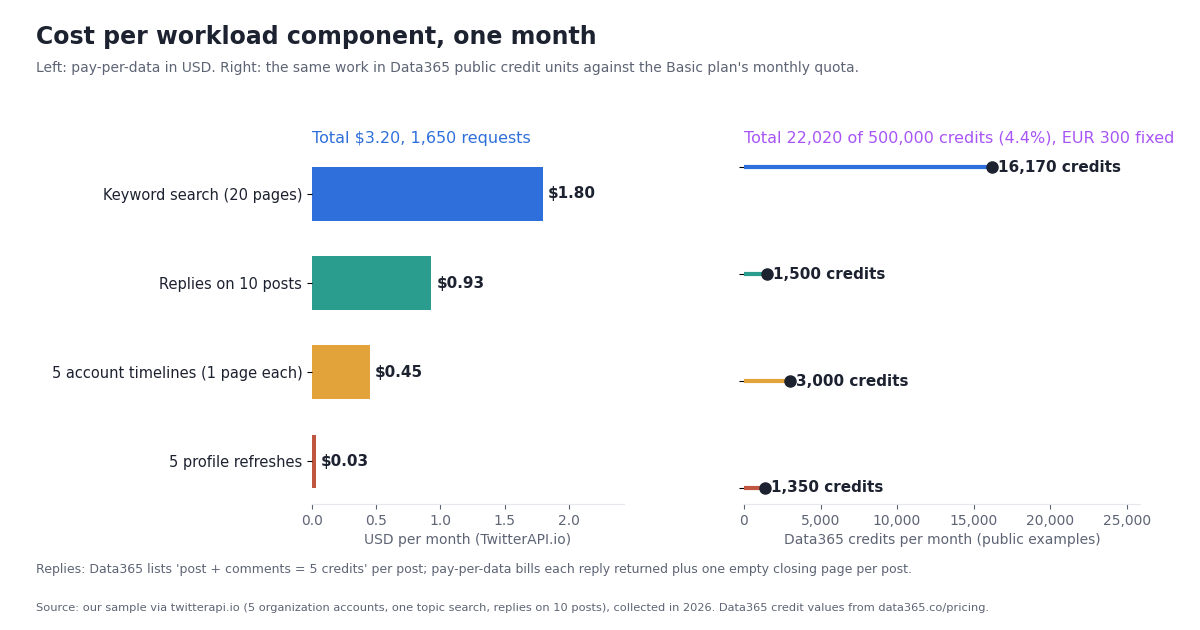
The credit math per refresh. TwitterAPI.io: timelines 100 posts x 15 = 1,500 credits; profiles 5 x 18 = 90; search 399 x 15 = 5,985; replies 196 x 15 = 2,940 plus 10 empty closing pages x 15 = 3,090. Total 10,665 credits = $0.1066 per refresh, 55 requests. Data365, applying the four public values literally: timelines 100 posts x 1 = 100; profiles 5 x 9 = 45; search 20 requests x 7 + 399 posts x 1 = 539; replies 10 posts x 5 = 50. Total 734 credits per refresh.
Reading the result. On pay-per-data the month is $3.20, and about 56% of it is the keyword search, which is the component you would tune first (fewer pages, a since: operator, or a sharper query). On Data365 the same month consumes 22,020 of the 500,000 credits in a Basic plan, so 95.6% of what EUR 300 buys goes unused; by their own public values the plan would hold about 22 copies of this workload before you needed Standard. The two columns are in different units and we draw no exchange-rate conclusion from them. The structural point stands without one: this is a workload sized for a team that monitors a handful of accounts and one topic, and that is exactly the size at which a fixed quota is mostly empty.
What would change the picture. Multiply the workload by 20 (100 accounts, 20 topics) and pay-per-data is about $64 a month while Data365 would use about 88% of a Basic plan; that is the region where the quota starts to earn its price, and where our rate limits (20 requests per second once paid) and plan bonus credits matter more than unit price. Add a second social network and the comparison stops being about X at all, which is the neutral note at the end of this page.
Replies: where the two credit systems diverge
'Post + comments = 5 credits' is Data365's most interesting public value, because it is flat: one post with 3 comments and one post with 300 cost the same 5 credits. TwitterAPI.io's /twitter/tweet/replies is the opposite: 15 credits per reply returned, 20 replies per page, paged with next_cursor. Which is cheaper per post depends entirely on how many replies there are, so we measured it on recent posts rather than guess.
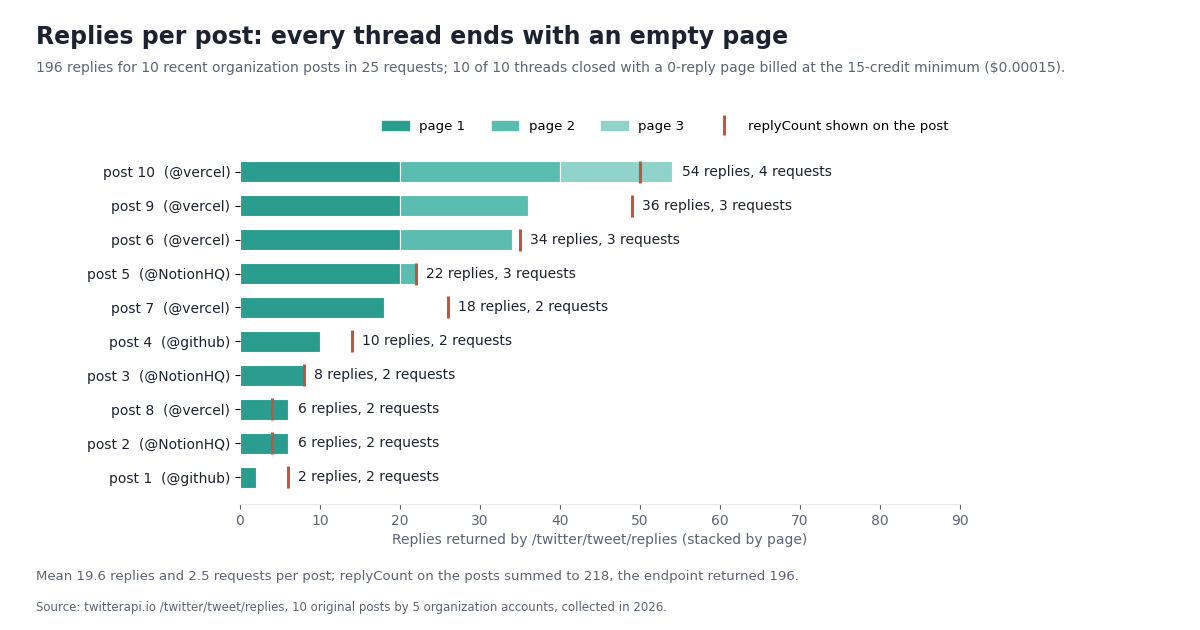
196 replies, 25 requests, 10 empty pages. The 10 most recent original posts by the five accounts carried between 2 and 54 replies through the endpoint (mean 19.6). The replyCount field on the posts themselves summed to 218 while the endpoint returned 196; the gap is replies the API filters out (ads, deleted or restricted replies, accounts that cannot be shown), and it means replyCount is an estimate of what you will pay for, not the bill. The pattern that matters for cost: every single thread, including the two-reply one, needed one more request than it had pages of replies, because the API only reports has_next_page: false on a page that comes back empty. That closing page is billed at the 15-credit minimum ($0.00015). On a post with 2 replies that is 30 + 15 = 45 credits; on a post with 54 replies, 810 + 15 = 825.
Per post, in both systems. At the measured average of 19.6 replies and 2.5 requests, one post's replies cost 294 TwitterAPI.io credits ($0.00294) against Data365's flat 5 credits (EUR 0.0030 at full Basic use). Below roughly 20 replies per post pay-per-data is lower in its own currency than the full-use Data365 figure; above it, higher. For a team watching its own announcements (single digits to a few dozen replies each) the measured mean is a fair guide. For a team watching viral threads, budget per reply, and consider pulling replies only for posts whose replyCount crosses a threshold, which is a one-line check in the script at the end of this page.
Pagination rule for your code. Stop when has_next_page is false or next_cursor is empty, and expect that final empty page: a loop that stops on len(tweets) < 20 would have ended early on the 18-reply post (one page of 18, then nothing) but it would also have stopped before page 2 of the 22-reply post (20, then 2). Follow the cursor, not the count.
Setup and request model: sales call and async tasks vs an API key and one GET
The pricing difference is visible before the first request. Data365's own getting-started FAQ is a sales process: complete the form, the sales team contacts you, helps you choose a plan and provides free API access for 14 days; their Twitter API page says the team 'will provide you with setup guidance and an API key' after a brief introductory call. TwitterAPI.io's path is sign in with Google, copy the key from the dashboard, send it in an X-API-Key header. No X developer account, no app review, no call.
The request model differs too. Data365 describes an asynchronous flow for X: a POST request 'initiates data collection for the specified profile or query', a GET 'checks if the data collection is complete', and a second GET 'returns the structured result', with the data characterized as 'asynchronous, real-time data with 1-5 minutes latency'. Their guide shows task URLs ending in profile/<username>/update?access_token=... and the same path without /update for the result. That design suits scheduled bulk collection; it means your code needs a task queue and a status poller even for a single profile. TwitterAPI.io endpoints are synchronous GETs: /twitter/user/info?userName=vercel returns the profile in the response body, and /twitter/user/last_tweets?userName=vercel returns the newest 20 posts with a cursor for the next page. There is nothing to poll.
Rate limits are published on both sides. Data365's Twitter page says 'Rate limits apply, up to 100 requests per second' without stating which plan gets what. TwitterAPI.io's are tiered by payment status: 0.2 requests per second before your first payment (enough to try everything on this page, slowly), 20 once you have paid, 50 on the Scale plan, 500 on Business, and up to 1,000 on request. Our monitoring workload is 55 requests per refresh, which is under three seconds at the paid tier.
The code below is the smallest useful TwitterAPI.io request: one profile and its newest page, with the cost printed from the response. It is the whole 'setup'.
import os, requests

BASE = "https://api.twitterapi.io"
H = {"X-API-Key": os.environ["TWITTERAPI_IO_API_KEY"]}  # key from the dashboard, no sales call

# one profile: 18 credits ($0.00018). The user object is in `data`, camelCase fields.
u = requests.get(f"{BASE}/twitter/user/info", headers=H, params={"userName": "vercel"}, timeout=30).json()["data"]
print(u["userName"], u["followers"], "followers,", u["statusesCount"], "posts")

# newest timeline page: 15 credits per tweet returned. last_tweets nests the list under data.tweets.
r = requests.get(f"{BASE}/twitter/user/last_tweets", headers=H, params={"userName": "vercel"}, timeout=30).json()
tweets = r["data"]["tweets"]
print(len(tweets), "posts; this page cost", max(1, len(tweets)) * 15, "credits; next page:", r["has_next_page"])
for t in tweets[:3]:
print("-", t["createdAt"], t["likeCount"], "likes:", t["text"][:80].replace("\n", " "))Migrating from Data365 concepts to TwitterAPI.io endpoints
Data365 groups X data into profiles, profile feeds, searches and posts with comments. Each has a direct TwitterAPI.io endpoint, and the response shapes are simple enough that most migrations are a swap of the call layer plus field renames. The one structural change is removing the task-and-poll loop: there is no update step and no status check.
Field names on tweets are likeCount, retweetCount, replyCount, quoteCount, viewCount, createdAt (formatted like Thu Oct 16 14:02:11 +0000 2026, not ISO 8601) and author.userName. Errors come back as status: "error" with the reason in msg; /twitter/user/info never returns HTTP 404 for an unknown handle, it returns status: "error" and msg: "user not found", so check the body, not the status code. The full script at the end of this page runs the whole monitoring workload from the study (profiles, newest timeline pages, a search, replies on recent posts) and prints the credit total, so you can price your own account list and query before you commit to anything.
Mapping Data365's search semantics. Their search is 'by keywords or hashtags'. On advanced_search, the same job is the query string, and you get X's operators for free: "api pricing" lang:en -filter:replies since:2026-10-01 narrows a topic to original English posts after a date. queryType=Latest returns newest first and is the one to use for monitoring; Top ranks by engagement and skips posts. If you want new posts only, carry the newest id you have seen and stop paging when you reach it, which is cheaper than any time filter because you never pay for pages you already had.
# Data365 'profile feed' + 'search' + 'post with comments' on TwitterAPI.io, one GET each, no task polling.
import os, requests

BASE = "https://api.twitterapi.io"
H = {"X-API-Key": os.environ["TWITTERAPI_IO_API_KEY"]}

def pages(url, params, list_of):
    """Follow next_cursor until has_next_page is false. The last page may be empty (15-credit minimum)."""
    cursor = ""
    while True:
        body = requests.get(url, headers=H, params={**params, "cursor": cursor}, timeout=30).json()
        if body.get("status") == "error":
            raise RuntimeError(body.get("msg"))
        yield list_of(body)
        if not body.get("has_next_page") or not body.get("next_cursor"):
            return
        cursor = body["next_cursor"]

# profile feed -> last_tweets (nested under data.tweets)
feed = next(pages(f"{BASE}/twitter/user/last_tweets", {"userName": "github"}, lambda b: b["data"]["tweets"]))

# search -> advanced_search (top-level tweets), newest first
hits = next(pages(f"{BASE}/twitter/tweet/advanced_search", {"query": '"api pricing" lang:en', "queryType": "Latest"}, lambda b: b["tweets"]))

# post + comments -> replies, all pages
replies = [r for page in pages(f"{BASE}/twitter/tweet/replies", {"tweetId": feed[0]["id"]}, lambda b: b["tweets"]) for r in page]
print(len(feed), "feed posts,", len(hits), "search hits,", len(replies), "replies on the newest post")How we collected this
Question: what does one month of a typical monitoring workload cost on pay-per-data, measured from real responses, and what would the same workload consume in Data365's public credit units?
Accounts and query: five public organization accounts, @github, @vercel, @stripe, @Shopify and @NotionHQ, chosen as the kind of developer-tool and commerce brands a small team might track. One brand-neutral topic search, a two-word phrase in quotes with lang:en, queryType=Latest. Replies on the 10 most recent original posts (not reposts or replies) across the five accounts.
Method: all requests went through a rate-limited, read-only client at under 5 requests per second. /twitter/user/last_tweets, 10 pages per account (1,000 posts); /twitter/user/info once per account; /twitter/tweet/advanced_search, 20 pages (399 posts); /twitter/tweet/replies, followed until has_next_page was false for each of the 10 posts (25 requests, 196 replies). 100 requests in total, collected in 2026. One refresh of the workload uses the first timeline page per account, all 5 profiles, all 20 search pages and all reply pages; the month is 30 such refreshes. TwitterAPI.io credits are counted from the records returned (15 per tweet, 18 per profile, 15 minimum per request); Data365 credits apply the four public example values literally (1 per post, 7 per search request plus 1 per post returned, 9 per profile, 5 per post with comments), because the full table is not public.
Where the Data365 numbers come from. The plan prices, quotas, credit examples, calculator examples, trial and onboarding wording are from data365.co/pricing; the request flow, latency wording, rate-limit wording and network list are from data365.co/twitter. Both were read this year. Nothing on this page about Data365 comes from a trial account or from their private documentation.
What the sample cannot show: five organization accounts and one topic are one workload, not all workloads. Reply counts on recent organization posts (2 to 54) are far below what a viral thread produces, so the replies comparison will tilt further toward a flat per-post price as reply volume grows. Search page fill (19.95 per page) depends on the query; sparse queries return short pages and pay the 15-credit minimum more often. We did not measure Data365 response times, page sizes or filtering, so the 1-5 minutes latency and 100 requests per second figures are their statements, not our measurements, and their credit charges for records outside the four public examples (followers, for instance) are unknown to us. Prices on both sides can change; the pricing pages are the source of truth.
Aggregates only. The posts and accounts named on this page are the five organization accounts above. Search results and replies were analyzed in aggregate and de-identified; no private individual's post, handle or ID is stored with the study. The analysis script, the per-page sample and the gzip-compressed raw timeline pages for the organization accounts are kept with the study.
"""monitor.py - price your own monitoring workload on TwitterAPI.io before you commit to anything.

    pip install requests
    export TWITTERAPI_IO_API_KEY=...      # from the twitterapi.io dashboard
    python monitor.py

One refresh = profile + newest timeline page per account, one keyword search (N pages),
replies on the most recent original posts. Prints records returned and the credit total.
Prices: 15 credits per tweet returned (minimum 15 per request), 18 per profile, $1 = 100,000 credits.
"""
import os
import sys
import time

import requests

BASE = "https://api.twitterapi.io"
KEY = os.environ.get("TWITTERAPI_IO_API_KEY")
ACCOUNTS = ["github", "vercel", "stripe", "Shopify", "NotionHQ"]
QUERY = '"api pricing" lang:en'
SEARCH_PAGES = 20
REPLY_POSTS = 10              # replies on this many recent original posts
MIN_REPLIES_TO_FETCH = 1      # skip posts whose replyCount is below this
MAX_REQUESTS = 120            # hard cap per run

_requests = 0
_credits = 0


def get(url, **params):
    """One GET with the request cap, 429 backoff and the API's own error format (status/msg)."""
    global _requests
    if not KEY:
        sys.exit("Set TWITTERAPI_IO_API_KEY first.")
    for attempt in range(4):
        if _requests >= MAX_REQUESTS:
            raise RuntimeError(f"request cap {MAX_REQUESTS} reached")
        _requests += 1
        r = requests.get(url, headers={"X-API-Key": KEY}, params=params, timeout=30)
        if r.status_code == 429:  # 0.2 requests/s before the first payment, 20 after
            time.sleep(5 * (attempt + 1))
            continue
        r.raise_for_status()
        body = r.json()
        if body.get("status") == "error":
            raise RuntimeError(body.get("msg") or "twitterapi.io error")
        return body
    raise RuntimeError("still rate-limited after 4 attempts")


def bill_tweets(n):
    """15 credits per tweet returned, minimum 15 per request (an empty page still costs 15)."""
    global _credits
    _credits += max(1, n) * 15


def profile(handle):
    global _credits
    u = get(f"{BASE}/twitter/user/info", userName=handle)["data"]
    _credits += 18
    return u


def newest_page(handle):
    body = get(f"{BASE}/twitter/user/last_tweets", userName=handle)
    tweets = (body.get("data") or {}).get("tweets") or []
    bill_tweets(len(tweets))
    return tweets


def search(query, pages):
    out, cursor = [], ""
    for _ in range(pages):
        body = get(f"{BASE}/twitter/tweet/advanced_search", query=query, queryType="Latest", cursor=cursor)
        tweets = body.get("tweets") or []
        bill_tweets(len(tweets))
        out.extend(tweets)
        if not body.get("has_next_page") or not body.get("next_cursor"):
            break
        cursor = body["next_cursor"]
    return out


def replies(tweet_id):
    """All replies. Expect the final page to be empty: has_next_page only turns false on a 0-reply page."""
    out, cursor = [], ""
    while True:
        body = get(f"{BASE}/twitter/tweet/replies", tweetId=tweet_id, cursor=cursor)
        tweets = body.get("tweets") or []
        bill_tweets(len(tweets))
        out.extend(tweets)
        if not body.get("has_next_page") or not body.get("next_cursor"):
            return out
        cursor = body["next_cursor"]


def main():
    posts = []
    for h in ACCOUNTS:
        u = profile(h)
        page = newest_page(h)
        posts.extend(t for t in page if not t.get("retweeted_tweet") and not t.get("isReply"))
        print(f"@{u['userName']}: {u['followers']:,} followers, {len(page)} posts on the newest page")

    hits = search(QUERY, SEARCH_PAGES)
    print(f"search {QUERY!r}: {len(hits)} posts over up to {SEARCH_PAGES} pages")

    # newest original posts first; createdAt is 'Www Mmm DD HH:MM:SS +0000 YYYY', so sort by id instead
    posts.sort(key=lambda t: int(t["id"]), reverse=True)
    n_replies = 0
    for t in posts[:REPLY_POSTS]:
        if (t.get("replyCount") or 0) < MIN_REPLIES_TO_FETCH:
            continue
        rs = replies(t["id"])
        n_replies += len(rs)
        print(f"  replies on {t['author']['userName']} post: replyCount={t.get('replyCount')}, returned={len(rs)}")

    usd = _credits / 100_000
    print(f"\none refresh: {_requests} requests, {_credits:,} credits = ${usd:.4f}")
    print(f"30 daily refreshes: {_credits * 30:,} credits = ${usd * 30:.2f} a month")


if __name__ == "__main__":
    main()
Questions readers ask
What is Data365 and how does its pricing work?
Data365 (data365.co) is a social media data API covering Twitter/X, Instagram, TikTok, Facebook, Reddit, Threads and Pinterest. Its pricing page lists monthly subscriptions measured in credits: Basic at EUR 300 a month for 500,000 credits on one network, Standard at EUR 850 for 1,000,000 credits on three networks, and Custom plans up to seven networks. Public credit examples are 1 post = 1 credit, 1 post + comments = 5, 1 search request = 7, 1 profile with info = 9; the full credit table is shared after an introductory call.
How much does Data365 charge per tweet?
Their pricing page lists 1 post = 1 credit. On the Basic plan that is EUR 300 / 500,000 = EUR 0.0006 per post, but only in a month where you use every credit; use half the quota and the effective figure doubles. TwitterAPI.io charges $0.00015 per tweet returned ($0.15 per 1,000) with no quota to fill. We show both currencies as published and do not convert.
Is there a Data365 alternative with no monthly minimum?
Yes. TwitterAPI.io has no monthly minimum: you top up credits and pay 15 credits per tweet returned and 18 per profile, with $1 = 100,000 credits. Purchased credits never expire. New accounts that pass the automatic bot check get $1 in free credits (no card, one per person or network, expiring after 31 days). Optional plans from $29 a month add bonus credits and higher rate limits but are not required for access.
Do I need a sales call to get an API key?
On Data365, yes: the pricing FAQ says to complete a form, the sales team contacts you to choose a plan and provide a 14-day trial, and the API key and detailed credit documentation follow an introductory call. On TwitterAPI.io you sign in with Google and copy the key from the dashboard; the first request can be made in minutes.
What did a real month of monitoring cost on TwitterAPI.io?
In our measurement, one refresh of five organization timelines (newest page each), five profiles, a 20-page keyword search and the replies on ten recent posts returned 700 records in 55 requests and cost 10,665 credits, about $0.11. Thirty daily refreshes come to 319,950 credits, $3.20 a month. The same work in Data365's public credit units is 22,020 credits, 4.4% of a Basic plan's 500,000.
How do I migrate Data365 profile feed, search and comments calls?
Profile with info maps to /twitter/user/info (user object in data, camelCase fields such as followers and statusesCount). Profile feed maps to /twitter/user/last_tweets (list nested at data.tweets, 20 per page). Search maps to /twitter/tweet/advanced_search with query and queryType=Latest (tweets, has_next_page, next_cursor at the top level). Post + comments maps to /twitter/tweet/replies with tweetId, paged until has_next_page is false. There is no update task or status check; each endpoint is one synchronous GET with the key in an X-API-Key header.
Why did replies cost more requests than pages of replies?
Because /twitter/tweet/replies only reports has_next_page: false on a page that comes back empty. In our sample all 10 threads ended with a 0-reply page, which is billed at the 15-credit minimum ($0.00015). A post with 54 replies took 4 requests (20, 20, 14, 0). Follow next_cursor until has_next_page is false rather than stopping when a page has fewer than 20 replies.
When is Data365 the better choice?
When you need several social networks from one vendor with one schema and one integration, or when your X volume is large enough to use most of a 500,000 or 1,000,000 credit quota every month. TwitterAPI.io covers X only. For an X-only workload, especially one under a few hundred thousand records a month, pay-per-data avoids paying for quota you do not use.
Continue
- Data365 pricing: Basic EUR 300 / 500,000 credits, Standard EUR 850 / 1,000,000 credits, credit value examples, calculator, trial and onboarding FAQ (data365.co/pricing)
- Data365 Twitter API page: POST update / GET status / GET result flow, '1-5 minutes latency', 'up to 100 requests per second', seven networks (data365.co/twitter)
- X API pay-per-use pricing: $0.005 per post read, $0.010 per user read, 3 million post reads a month cap (the official, pricier route)
- TwitterAPI.io pricing: 15 credits per tweet returned, 18 per profile, $1 = 100,000 credits, plans and rate limits
- TwitterAPI.io docs: advanced_search query, queryType, cursor pagination
- TwitterAPI.io API reference: user info, last_tweets, replies and response fields
- Twitter (X) API: endpoint hub and pricing overview
- Apify Twitter (X) scraper alternatives compared
- X API alternatives for social listening
- TwitterAPI.io vs the official X API
- Twitter (X) monitoring tools for developers, compared
- Nitter alternative: read X timelines via API
- TwitterAPI.io pay-per-data pricing and plans
- 01A Brandwatch Alternative for Teams That Only Need X (Twitter) Data
- 02How to Get Twitter (X) Data into Google Sheets with Apps Script in 2026
- 03Twitter (X) Auto Reply: What the Rules Allow and How to Build One
- 04snscrape for Twitter (X): why it returns blocked (404) and how to migrate
- 05How to Build a Twitter (X) to Discord Bot in 2026
- 06Nitter Is Archived: Which Nitter Alternatives Still Work in 2026?
- 07Tweet Tunnel Alternative: How to See Old Tweets Now That TweetTunnel Is Gone
- 08xcancel Not Working? The xcancel Alternatives That Still Work
Stop reading. Start building.
Starter credits cover real testing on real data. Google sign-in, no card, no application queue.
Get an API key