How to Get Twitter (X) Data into Google Sheets with Apps Script in 2026
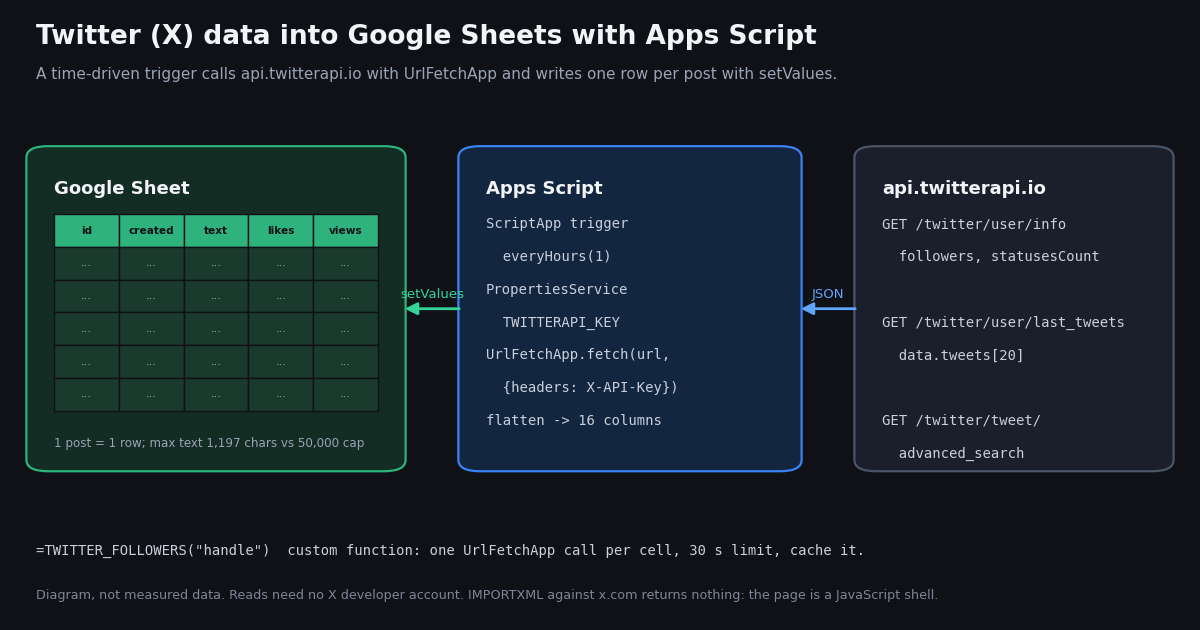
Most "Google Sheets Twitter" searches end at a dead formula. =IMPORTXML("https://x.com/NASA", "//span[contains(@class,'followers')]") worked in some tutorials years ago and returns nothing today, and forum threads about it rarely say why. The reason is simple once you look at what x.com actually sends to a non-browser fetch, and the fix is a short Apps Script that calls a JSON API instead of scraping a page.
This guide builds that script end to end: a fetch helper with the X-API-Key header, a flattener that turns a nested post into a 16-column row, a refreshTweets() function on an hourly trigger, a refreshProfiles() function that logs follower counts once a day, a cached =TWITTER_FOLLOWERS("handle") custom function, and a keyword-search variant that paginates advanced_search into its own tab. Every Apps Script limit it runs into (URL Fetch quota, the 30-second custom-function limit, trigger runtime, property store sizes) is quoted from Google's documentation.
It also answers the question the other tutorials skip: what does a tweet look like as a row? We pulled the latest 1,600 posts from 8 organization accounts (@GoogleWorkspace, @googledevs, @github, @vercel, @Docker, @NASA, @Shopify, @Stripe) plus their profiles in 2026 and measured how many columns a post flattens to, which ones are ever filled, how long the text gets against the 50,000-character cell cap, how many rows a day each account produces, and what a daily refresh costs in credits and in URL Fetch quota. The trigger interval and the column layout below come from those numbers.
Why IMPORTXML and IMPORTDATA return nothing from x.com
Google's own documentation describes IMPORTXML as importing "data from any of various structured data types including XML, HTML, CSV, TSV, and RSS and ATOM XML feeds", addressed with an XPath query, and IMPORTDATA as importing "data at a given url in .csv (comma-separated value) or .tsv (tab-separated value) format". Both fetch a URL from Google's servers, parse what comes back as a static document, and never execute JavaScript. That is the whole problem.
We fetched https://x.com/NASA without a browser while writing this guide. The response was a 200 with about 198 KB of HTML, and the only human-readable sentence in its body was "JavaScript is not available." The follower count does exist inside the response, but only as a value inside a script string (followers:92328024 in an inline JavaScript blob), not as text in an element. An XPath such as //span[contains(@class,'followers')] has no element to match, so IMPORTXML returns an empty result or #N/A. Profile pages are also login-walled for timelines, so even a browser that runs the JavaScript shows a logged-out shell for most of the page.
No cleverer XPath fixes this, and the x.com/intent/user workarounds in older tutorials depend on pages that change without notice and never give you posts with likes, views and dates. The dependable way is to call an API that returns JSON and write the rows yourself, which is what Google Apps Script is for.
There are two APIs to choose from. The official X API needs a developer app, OAuth 2.0 client credentials, an OAuth library inside your script and a payment method, and it bills $0.005 per post read and $0.010 per user read on its pay-per-usage plan (docs.x.com/x-api/getting-started/pricing), capped at 3 million post reads a month. twitterapi.io reads the same public data with a single API key sent as a header, at 15 credits per tweet returned ($0.15 per 1,000 tweets) and 18 credits per profile ($0.18 per 1,000). The rest of this page uses the second route; the table compares all three.
If you only need follower counts, the dedicated guide Twitter follower count via API covers that single field in depth; this page assumes you want posts as rows too.
Step 1: what you need, and the fetch helper with the key in PropertiesService
A Google Sheet on any Google account. The script creates a Tweets tab and a Followers tab the first time it runs. Google's Sheets limits page puts a spreadsheet at up to 20 million cells or 100 MB and a single cell at 50,000 characters; a 16-column tweet sheet reaches 20 million cells at 1.25 million posts, which is not a limit you will meet with a few accounts.
A twitterapi.io API key. Sign in with Google at twitterapi.io and copy the key from the dashboard. Reads need no X developer account and no OAuth. Up to $1 in free credits for new accounts that pass the bot check; expires after 31 days; see /pricing. As the cost section shows, that covers about a month of daily refreshes for 8 accounts.
Where the key lives. Never paste it into a cell or a formula. The script stores it with PropertiesService, Google's key-value store for scripts, which "stores all data as strings in key-value pairs" and has three scopes: script properties shared by every user of the script, user properties per user, and document properties per document. The quotas page allows 9 KB per value, 500 KB per store and 50,000 property reads and writes a day on consumer accounts (500,000 on Google Workspace). The script writes the key to both the script store and the user store, for a reason that matters in Step 3: Google's custom-function documentation allows custom functions to use Properties "(getUserProperties only)", so =TWITTER_FOLLOWERS() cannot read a script property.
The two quotas that shape the design. Google's Apps Script quotas page allows 20,000 URL Fetch calls a day on consumer accounts and 100,000 on Google Workspace accounts, with a 50 MB response size per call, 6 minutes per script execution, 30 seconds per custom-function execution, 90 minutes of total trigger runtime a day on consumer accounts (6 hours on Workspace), 30 simultaneous executions per user and 20 triggers per user per script. Every design choice below, from one page per account per run to the cached custom function, exists to stay inside those numbers with room to spare.
Posting from Sheets is out of scope here. twitterapi.io does have write endpoints: one /twitter/user_login_v2 login ($0.10, with a proxy you supply) returns login_cookies, and each post through /twitter/create_tweet_v2 is then $0.002, billed per HTTP 200 call; the call acts as that X account, which X can rate-limit, lock or suspend, so keep a human pace and expect to log in again when the session expires. The read side needs none of that. For the write side, start with Twitter (X) bots: how they work.
Open your sheet, choose Extensions > Apps Script, delete the placeholder myFunction, and paste the code from this page into Code.gs. Edit HANDLES to the accounts you want, put your key in setKey(), run setKey() once from the editor's Run menu (Google will ask you to authorize the script for external requests and spreadsheet access), then delete the key from the file. From then on apiKey_() reads it from the property store.
twApi_() is the only place the network is touched. UrlFetchApp.fetch(url, params) takes a headers map, a method (default get) and muteHttpExceptions, which Google documents as: "If true the fetch doesn't throw an exception if the response code indicates failure, and instead returns the HTTPResponse." With it on, the helper can read getResponseCode() and turn a 429 into a readable message instead of a generic exception. The response body comes from getContentText(); twitterapi.io reports its own errors inside a 200 body as {"status": "error", "msg": "..."}, so the helper checks that too (a misspelled handle on /twitter/user/info returns msg: "user not found", not an HTTP 404).
Two small helpers sit next to it. safeText_() prefixes a post whose text starts with = or + with an apostrophe, because Sheets treats a cell value that begins with = as a formula; none of the 1,600 posts in our sample started that way, but a post that reads "=== launch day ===" would otherwise become a broken formula or, worse, a working one. tweetDate_() exists because a post's createdAt looks like Fri Oct 16 18:03:27 +0000 2026, and new Date() on the V8 runtime returns Invalid Date for that token order (our replay test caught exactly this), so the helper builds the date from its parts with Date.UTC. A real Date cell sorts, filters and charts correctly; a string does not.
var API = 'https://api.twitterapi.io';
var HANDLES = ['GoogleWorkspace', 'googledevs', 'github', 'vercel', 'Docker', 'NASA', 'Shopify', 'Stripe'];
var TWEET_HEADER = ['tweet_id', 'url', 'created_at', 'kind', 'text', 'lang', 'likes', 'reposts', 'replies',
  'quotes', 'views', 'bookmarks', 'in_reply_to', 'quoted_tweet_id', 'links', 'media_count'];
var PROFILE_HEADER = ['snapshot_at', 'handle', 'followers', 'following', 'posts', 'media', 'account_created'];

/** Run once by hand, then delete the key from this file. Script properties serve the triggers;
 *  user properties are the only store a custom function such as TWITTER_FOLLOWERS may read. */
function setKey() {
  var key = 'paste-your-twitterapi-io-key';
  PropertiesService.getScriptProperties().setProperty('TWITTERAPI_KEY', key);
  PropertiesService.getUserProperties().setProperty('TWITTERAPI_KEY', key);
}

function apiKey_() {
  var key = PropertiesService.getScriptProperties().getProperty('TWITTERAPI_KEY') ||
    PropertiesService.getUserProperties().getProperty('TWITTERAPI_KEY');
  if (!key) throw new Error('Run setKey() first.');
  return key;
}

/** One GET against twitterapi.io. Throws on HTTP errors and on the API's own {status:"error", msg} body. */
function twApi_(path, params) {
  var qs = Object.keys(params).map(function (k) {
    return encodeURIComponent(k) + '=' + encodeURIComponent(params[k]);
  }).join('&');
  var res = UrlFetchApp.fetch(API + path + '?' + qs, {
    method: 'get',
    headers: { 'X-API-Key': apiKey_() },
    muteHttpExceptions: true
  });
  var code = res.getResponseCode();
  if (code === 429) throw new Error('Rate limited (0.2 req/s before the first payment, 20 after). Retry later.');
  if (code !== 200) throw new Error('HTTP ' + code + ' from ' + path);
  var body = JSON.parse(res.getContentText());
  if (body.status === 'error') throw new Error(body.msg || 'twitterapi.io error');
  return body;
}

/** Cells that start with = are formulas to Sheets. Prefix them so post text stays text. */
function safeText_(s) {
  s = s || '';
  return (s.charAt(0) === '=' || s.charAt(0) === '+') ? "'" + s : s;
}

/** createdAt is "Www Mmm DD HH:MM:SS +0000 YYYY". new Date() returns Invalid Date for that order, so build it by hand. */
function tweetDate_(s) {
  var p = s.split(' '); // ["Fri", "Oct", "16", "18:03:27", "+0000", "2026"]
  var m = 'JanFebMarAprMayJunJulAugSepOctNovDec'.indexOf(p[1]) / 3;
  var hms = p[3].split(':');
  return new Date(Date.UTC(+p[5], m, +p[2], +hms[0], +hms[1], +hms[2]));
}

/** /twitter/user/info dates are ISO 8601 with microseconds ("2008-02-11T04:41:50.000000Z"); trim to milliseconds. */
function isoDate_(s) {
  return new Date(String(s).replace(/\.(\d{3})\d*Z$/, '.$1Z'));
}Step 2: tweets to rows: the 16-column layout and one setValues call
A post from /twitter/user/last_tweets is a nested object with 30 top-level keys, an embedded author profile, optional quoted_tweet and retweeted_tweet objects that are full posts themselves, and entities and extendedEntities holding links and media. Flattened naively with dot paths (author.followers, quoted_tweet.author.name, ...) the 1,600 posts in our sample produced 398 distinct leaf columns, a median of 66 per post and up to 230 when a quoted or reposted post is nested inside. 37 of those columns are the author object, identical on every row of one account's timeline, and 316 come from the nested quoted or reposted post. Only 30 paths were populated on every post and 41 on at least half. A sheet with 398 columns, most of them blank, is not a sheet anyone reads.
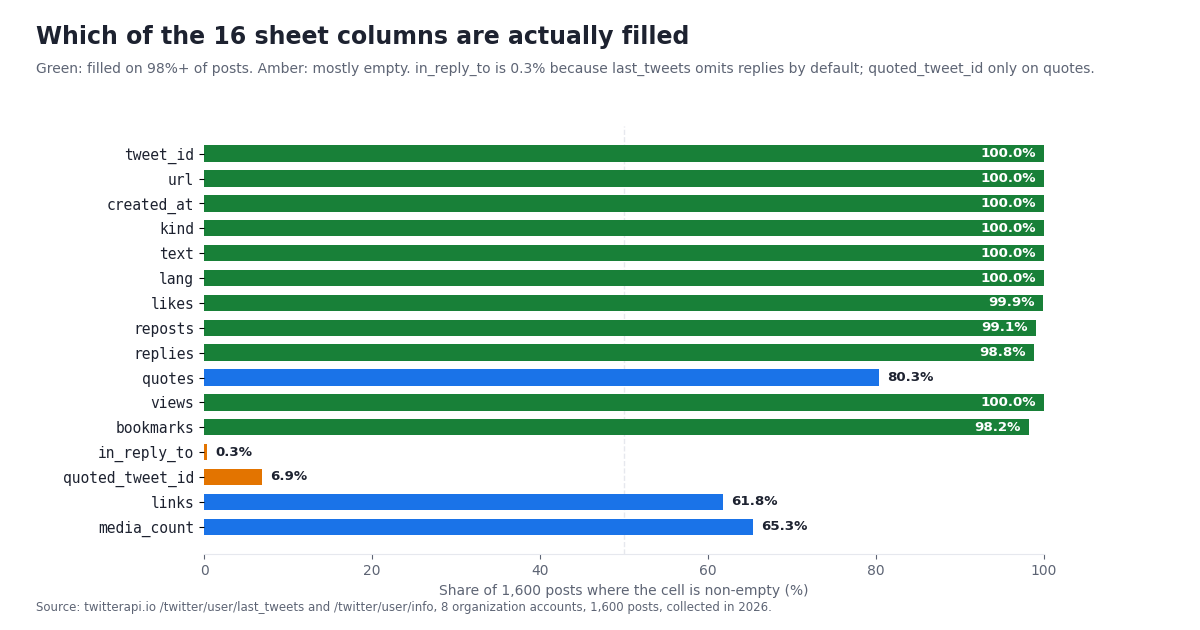
tweetRow_() therefore picks 16 columns and derives a few. kind is computed from retweeted_tweet, quoted_tweet and isReply. text comes from retweeted_tweet.text on reposts, because a repost's own text is "RT @handle: ..." cut short. links joins every entities.urls[].expanded_url into one cell, media_count is the length of extendedEntities.media, and quoted_tweet_id keeps the pointer to the quoted post without copying its 100-odd fields. Numeric counts default to 0 where the API omits them. The table shows how often each cell was filled across the sample.
Read the table as a layout review. Eleven of the first twelve columns are reliable; quotes is 0 on about one post in five, which is a real zero, not a missing value. in_reply_to is 0.3% only because last_tweets omits replies unless you pass includeReplies=true; if you add that parameter, expect the column to fill and the row count per day to rise. links and media_count are filled on roughly two posts in three, which for organization accounts is the normal shape of a timeline.
Text length never threatens the cell cap. The median post was 228 characters, the 95th percentile 415, the longest 1,197; 31.2% were longer than the classic 280 characters and 0.1% longer than 1,000. The longest is 2.39% of Google's 50,000-character per-cell limit, so there is no truncation to handle in the sheet, although a database column sized at 280 would truncate a third of these posts. 73.9% of posts contain line breaks; setValues keeps them as multi-line cells, and if you export to CSV they are quoted correctly by any standard CSV writer.
Write once, not per cell. refreshTweets() reads the existing tweet_id column once into a lookup object, builds every new row in memory, sorts them oldest first, and appends them with a single getRange(lastRow + 1, 1, rows.length, 16).setValues(rows). Google's best-practices page is blunt about the alternative: "Alternating read and write commands is slow", and its own example shows a per-cell loop taking about 70 seconds against about 1 second batched. One batched write per run also keeps a run well inside the 6-minute execution limit. Store tweet_id as a string: Sheets stores numbers as doubles and would round a 19-digit snowflake ID. The dedupe lives in the script because last_tweets always returns the newest page; every run re-reads up to 20 posts per account, which the cost section prices.
/** Flatten one raw tweet object into the 16-column row. Every nested object can be null. */
function tweetRow_(t) {
  var rt = t.retweeted_tweet || null;
  var qt = t.quoted_tweet || null;
  var kind = rt ? 'repost' : qt ? 'quote' : t.isReply ? 'reply' : 'original';
  var urls = (t.entities && t.entities.urls) || [];
  var media = (t.extendedEntities && t.extendedEntities.media) || [];
  return [
    t.id,
    t.url,
    tweetDate_(t.createdAt),
    kind,
    safeText_(rt ? rt.text : t.text), // a repost's own text is "RT @x: ..." cut short
    t.lang || '',
    t.likeCount || 0,
    t.retweetCount || 0,
    t.replyCount || 0,
    t.quoteCount || 0,
    t.viewCount || 0,
    t.bookmarkCount || 0,
    t.inReplyToUsername || '',
    qt ? qt.id : '',
    urls.map(function (u) { return u.expanded_url || u.url; }).join(' '),
    media.length
  ];
}

function sheet_(name, header) {
  var ss = SpreadsheetApp.getActiveSpreadsheet();
  var sh = ss.getSheetByName(name) || ss.insertSheet(name);
  if (sh.getLastRow() === 0) {
    sh.getRange(1, 1, 1, header.length).setValues([header]).setFontWeight('bold');
    sh.setFrozenRows(1);
  }
  return sh;
}

/** Trigger target: newest page of each account, append only unseen posts. 8 handles = 8 URL Fetch calls. */
function refreshTweets() {
  var sh = sheet_('Tweets', TWEET_HEADER);
  var seen = {};
  if (sh.getLastRow() > 1) {
    sh.getRange(2, 1, sh.getLastRow() - 1, 1).getValues().forEach(function (r) { seen[String(r[0])] = true; });
  }
  var rows = [];
  HANDLES.forEach(function (h) {
    // /twitter/user/last_tweets nests the list under data.tweets, newest first, 20 per page
    var body = twApi_('/twitter/user/last_tweets', { userName: h });
    (body.data.tweets || []).forEach(function (t) {
      if (!seen[t.id]) { seen[t.id] = true; rows.push(tweetRow_(t)); }
    });
  });
  if (rows.length) {
    rows.sort(function (a, b) { return a[2] - b[2]; }); // oldest first
    sh.getRange(sh.getLastRow() + 1, 1, rows.length, TWEET_HEADER.length).setValues(rows);
    sh.getRange(2, 3, sh.getLastRow() - 1, 1).setNumberFormat('yyyy-mm-dd hh:mm');
  }
  Logger.log('Tweets: appended ' + rows.length + ' rows');
  return rows.length;
}
Step 3: follower counts: a daily snapshot tab and a cached =TWITTER_FOLLOWERS() function
/twitter/user/info returns one profile per call with the user in data, camelCase: followers, following, statusesCount, mediaCount, favouritesCount, isBlueVerified, createdAt and about 25 fields in all. In our 8 profiles every one of followers, following, statusesCount, mediaCount and createdAt was populated. One formatting trap: the profile createdAt is ISO 8601 with microseconds (2008-02-11T04:41:50.000000Z), while a post's createdAt is Www Mmm DD HH:MM:SS +0000 YYYY; isoDate_() trims the fraction to milliseconds before new Date() so both end up as proper Date cells.
refreshProfiles() appends one row per handle per run to the Followers tab: timestamp, handle, followers, following, posts, media, account created. Run daily, that tab becomes a follower history you can chart with a pivot table, which is the thing the X profile page never gives you. The sample's follower counts ranged from 293,754 (@Stripe) to 92,328,056 (@NASA), and =TWITTER_FOLLOWERS and the snapshot differ by a few dozen on a big account within the same minute, because counts are live.
TWITTER_FOLLOWERS(handle) is the custom function most people search for, and Google's custom-function rules decide how to write it. A custom function "must return within 30 seconds" or the cell shows #ERROR! with "Exceeded maximum execution time". It may call URL Fetch, Cache and Properties, but Properties only through getUserProperties(), which is why setKey() writes the user store too. "Each time a custom function is used in a spreadsheet, Sheets makes a separate call to the Apps Script server", so 200 cells of =TWITTER_FOLLOWERS are 200 fetches per recalculation and 200 profile reads (3,600 credits, $0.036) on your bill. And custom functions recalculate only when their arguments change: a cell with a literal "github" will keep its value until you edit it or reload with an edited argument. Wrapping it in NOW() to force refreshes is a documented failure mode: arguments that depend on volatile functions leave the cell on "Loading..." indefinitely.
The code uses CacheService.getScriptCache(), whose put(key, value, expirationInSeconds) defaults to 600 seconds and allows a maximum of 21,600 seconds (6 hours), 100 KB per key and 250-character keys; get() returns null on a miss, and Google notes cached values are not guaranteed to survive until expiry. The function caches each handle's count for 6 hours, so a sheet with the same handle in many cells costs one fetch per handle per 6 hours, not one per cell. For history, rely on the Followers tab written by the trigger; use the custom function for the live number next to a handle.
/** Trigger target: one /twitter/user/info call per handle, one snapshot row each. */
function refreshProfiles() {
  var sh = sheet_('Followers', PROFILE_HEADER);
  var now = new Date();
  var rows = HANDLES.map(function (h) {
    var u = twApi_('/twitter/user/info', { userName: h }).data; // camelCase: followers, statusesCount, createdAt
    return [now, u.userName, u.followers, u.following, u.statusesCount, u.mediaCount, isoDate_(u.createdAt)];
  });
  sh.getRange(sh.getLastRow() + 1, 1, rows.length, PROFILE_HEADER.length).setValues(rows);
  return rows.length;
}

/**
 * =TWITTER_FOLLOWERS("github")  Custom function: live follower count in a cell.
 * One URL Fetch per cell per recalculation and a 30-second limit, so the result is cached for 6 hours
 * (the CacheService maximum). Custom functions may read user properties only, hence setKey() above.
 * @param {string} handle X username without the @.
 * @return {number} follower count
 * @customfunction
 */
function TWITTER_FOLLOWERS(handle) {
  var cache = CacheService.getScriptCache();
  var hit = cache.get('followers:' + handle);
  if (hit !== null) return Number(hit);
  var u = twApi_('/twitter/user/info', { userName: handle }).data;
  cache.put('followers:' + handle, String(u.followers), 21600);
  return u.followers;
}Step 4: the time-driven trigger, sized from real posting rates
Time-driven triggers are created in code with ScriptApp.newTrigger('refreshTweets').timeBased() followed by a schedule, or by hand from the Triggers page of the editor. The everyMinutes(n) builder accepts only 1, 5, 10, 15 or 30; everyHours(n) and everyDays(n) take any count; atHour(h) picks the hour for a daily trigger and Google notes the run lands somewhere within that hour (nearMinute(m) narrows it to plus or minus 15 minutes). installTriggers() below clears the project's triggers and installs two: refreshTweets every hour and refreshProfiles once a day at 6 in the script's time zone.
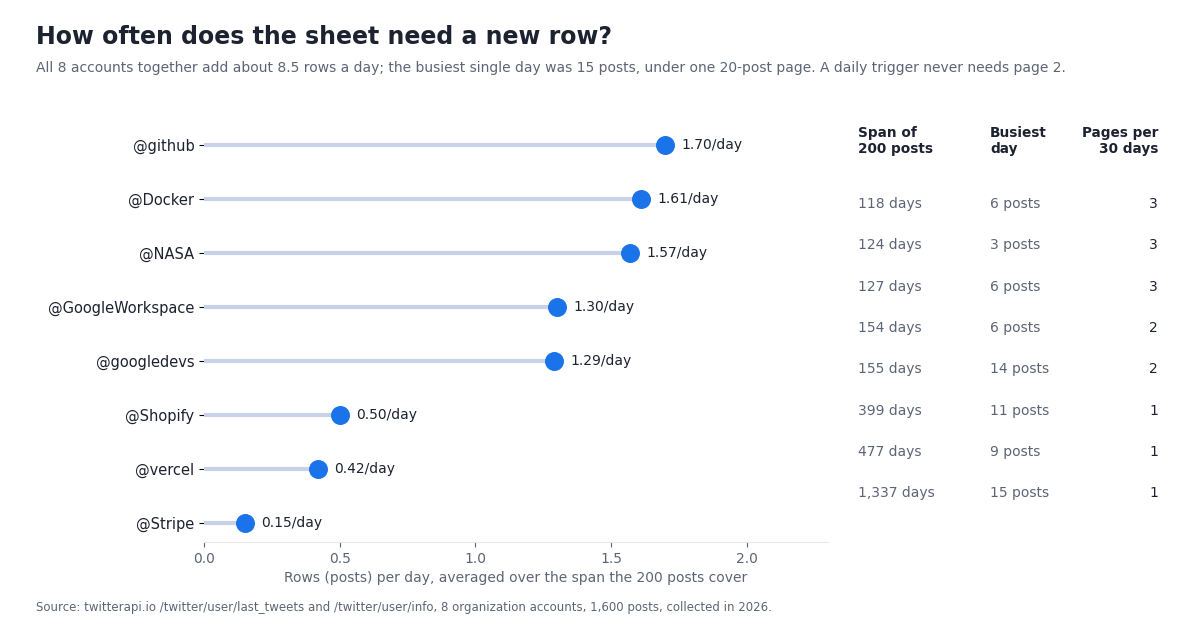
How often the tweet trigger should fire depends on how fast the accounts post, so we measured it. Over the span their latest 200 posts covered, the 8 accounts averaged 0.15 (@Stripe) to 1.7 (@github) rows a day, median 1.29, 8.5 rows a day for all eight together. The busiest single day for any account was 15 posts, which is still inside one 20-post page. A daily run therefore never needs page 2 for accounts like these, and an hourly run almost always finds nothing new, which is fine: the point of hourly is latency, not volume.
"Pages for 30 days" is how many 20-post pages you would have to fetch to backfill a month for that account: between 1 and 3 here. If you want history beyond the newest 200 posts, add a cursor loop like the one in searchToSheet() below and follow next_cursor while has_next_page is true. For accounts that post 30 or more times a day, an hourly trigger with one page can miss posts; either fetch two pages or switch the fetch to advanced_search with from:handle since_time:<unix seconds of the last run>, which returns only new posts and costs the 15-credit minimum ($0.00015) when there is nothing new.
Trigger runs count against "Triggers total runtime" (90 minutes a day on consumer accounts, 6 hours on Workspace); a run for 8 accounts takes a few seconds, so 24 a day is a couple of minutes of the 90. The limit that bites first is the URL Fetch quota in the next section.
/** Run once. Hourly tweets (16 calls an hour = 384 a day, 1.9% of the consumer URL Fetch quota) and a daily follower snapshot. */
function installTriggers() {
  ScriptApp.getProjectTriggers().forEach(function (t) { ScriptApp.deleteTrigger(t); });
  ScriptApp.newTrigger('refreshTweets').timeBased().everyHours(1).create();
  ScriptApp.newTrigger('refreshProfiles').timeBased().everyDays(1).atHour(6).create();
}
Quota and cost: 8 accounts on every trigger schedule
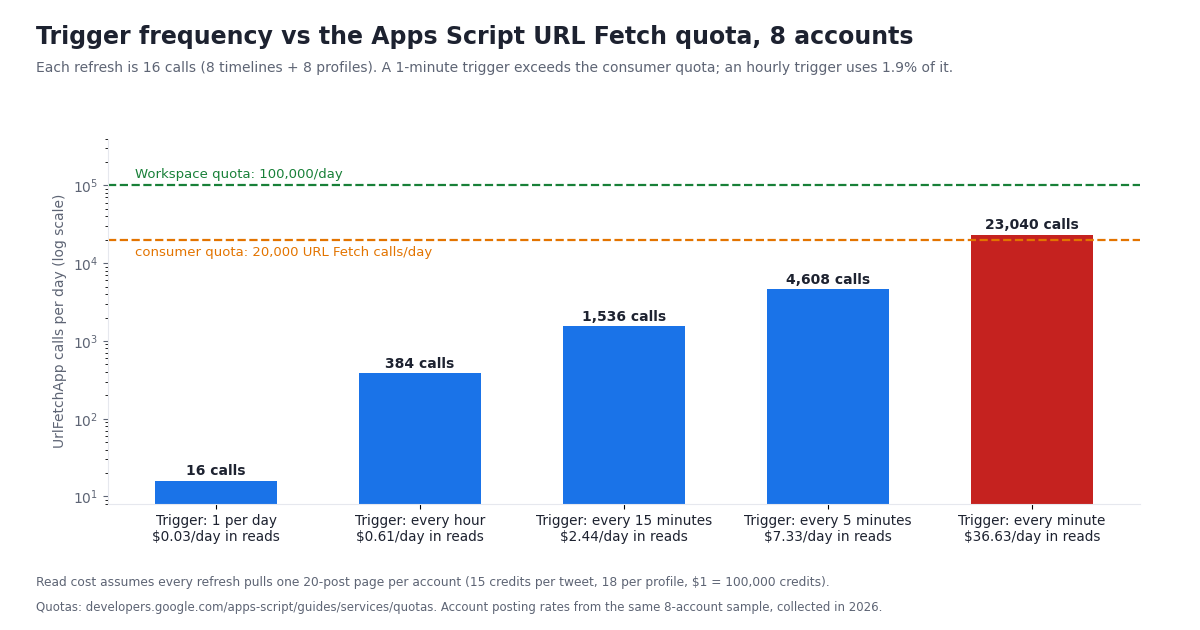
One refresh of the full script is 16 URL Fetch calls: 8 timelines and 8 profiles. Against Google's 20,000-calls-a-day consumer quota, that is 0.1% once a day, 1.9% hourly and 23% every 5 minutes. Every minute is 23,040 calls, over the consumer quota and 23% of the Workspace quota; with a 1-minute trigger a consumer account can cover at most 6 accounts (two calls each) before the quota runs out, and the script throws "Service invoked too many times for one day". The table and chart below put the numbers side by side; the dollar column assumes every refresh pulls one 20-post page per account at 15 credits per tweet and one profile at 18 credits, with $1 = 100,000 credits.
The read cost grows faster than the quota share because last_tweets bills the 20 posts it returns whether or not they are new. Hourly, that is $0.61 a day for 8 accounts; daily, 3 cents. If you need minute-level freshness, the advanced_search variant with since_time is the right tool: a check that finds nothing costs the 15-credit minimum ($0.00015), so every 5 minutes for a month is about $1.30 per query, and one query can cover several accounts with from:a OR from:b. The n8n Twitter workflow page walks through that pattern with the same endpoints.
Compared with the official X API's pay-per-usage rate card, the daily refresh looks like this:
$0.88 a day against about $0.025 is roughly 35x for this mix, slightly above the 33x per-1,000-tweets ratio because profile reads are priced higher on the official side ($0.010 each against 18 credits). The $1 in free credits that new twitterapi.io accounts receive after passing the bot check covers 39 days of this daily refresh, more than the 31 days before they expire. Larger plans and the Starter, Builder, Pro, Scale and Business subscriptions are on the pricing page; rate limits are 0.2 requests a second before the first payment and 20 once paid, so a first unpaid run of 16 calls takes about 80 seconds and still finishes well inside the 6-minute execution limit.
Keyword search into a tab with advanced_search, and flattening nested JSON
Timelines are one way in; the other is a search. /twitter/tweet/advanced_search takes query (X's search operators: from:, to:, since:, until:, min_faves:, lang:, -filter:replies, url: and so on) and queryType (Latest or Top), and returns up to 20 posts per page. Unlike last_tweets, the list is top-level (tweets, with has_next_page and next_cursor beside it), so the same tweetRow_() works but the loop reads body.tweets instead of body.data.tweets. Pages sometimes hold fewer than 20 posts while has_next_page is still true, and the final page is often empty; stop on has_next_page false, a missing cursor or an empty page, never on length < 20.
searchToSheet(query, maxPages) writes the results to a tab named after the query and caps the pages, because an unbounded cursor loop on a broad query is the one way this script can run up a bill (a full page is $0.003; 100 pages is $0.30) or hit the 6-minute execution limit. Call it from a small wrapper such as function nightlySearch() { searchToSheet('"google sheets" (twitter OR x.com) -filter:replies since:2026-01-01', 5); } and give that wrapper its own daily trigger.
The nested-JSON question comes up most with searches, where every author is different and quotes are common. The rules that kept our 16 columns clean apply generally: pick a fixed column list and map each column to one path or one derived value; turn arrays into a single cell (links joined with spaces, media_count as a number) or into a child tab keyed by tweet_id if you need one row per link; keep pointers (quoted_tweet_id) instead of copying a nested object's fields; and use (obj && obj.field) || default on every nested read, because quoted_tweet, retweeted_tweet, card, article and inReplyToUsername are null on most posts and entities and extendedEntities can be empty objects. If you do want everything, a generic flattener (recurse into objects with dot-path names, stringify arrays) gives you the 398-column shape we measured, and 251 of those columns were filled on fewer than 1% of posts.
/**
 * Keyword search into a sheet named after the query. Uses /twitter/tweet/advanced_search, whose list is
 * top-level `tweets` (not data.tweets). maxPages caps the bill: a full 20-post page is $0.003.
 */
function searchToSheet(query, maxPages) {
  maxPages = maxPages || 5;
  var sh = sheet_('Search ' + query.slice(0, 60), TWEET_HEADER);
  var rows = [], cursor = '', page = 0;
  while (page < maxPages) {
    var params = { query: query, queryType: 'Latest' };
    if (cursor) params.cursor = cursor;
    var body = twApi_('/twitter/tweet/advanced_search', params);
    (body.tweets || []).forEach(function (t) { rows.push(tweetRow_(t)); });
    page++;
    if (!body.has_next_page || !body.next_cursor || !(body.tweets || []).length) break;
    cursor = body.next_cursor;
  }
  if (rows.length) sh.getRange(sh.getLastRow() + 1, 1, rows.length, TWEET_HEADER.length).setValues(rows);
  return rows.length;
}Troubleshooting Apps Script + the X API
Run setKey() first. apiKey_() found no key in either property store. Run setKey() from the editor once (with your key pasted in), then remove the key from the file. If the error appears only in =TWITTER_FOLLOWERS, the user store is empty: custom functions can read user properties only, and they run as the user who edits the sheet.
HTTP 401 or API key is invalid. The key has a stray space or was copied from the wrong account. Copy it again from the dashboard.
Rate limited. Accounts that have never paid are limited to 0.2 requests a second; the helper reports the 429 instead of retrying inside a trigger run. Space the calls with Utilities.sleep(5000) on an unpaid account, or make the first payment, which lifts the limit to 20 requests a second.
Exceeded maximum execution time. A custom-function cell exceeded 30 seconds, or a trigger run exceeded 6 minutes. For the custom function, check that the cache is working (one fetch per handle per 6 hours) and that you are not forcing recalculation. For triggers, cut maxPages in searchToSheet() or split accounts across two functions.
Service invoked too many times for one day: urlfetch. You passed 20,000 URL Fetch calls (consumer) or 100,000 (Workspace) in a day. Reduce the trigger interval; the quota section has the arithmetic. Service using too much computer time for one day is the trigger-runtime quota (90 minutes consumer, 6 hours Workspace).
Cells show Loading... and never resolve. A =TWITTER_FOLLOWERS argument depends on NOW(), RAND() or another volatile function. Google documents this as an indefinite Loading...; pass a literal handle or a cell that holds one.
created_at shows Invalid Date or #NUM!. The post date was passed to new Date() raw. Use tweetDate_() for posts (Www Mmm DD HH:MM:SS +0000 YYYY) and isoDate_() for profiles (ISO 8601 with microseconds).
tweet_id values end in 000. The column is numeric and Sheets rounded the 19-digit ID. Format the column as plain text before the first run, or prefix IDs with an apostrophe.
The trigger never fires. A trigger created by installTriggers() needs the script to be authorized; run any function manually once and accept the prompts. Also check the project's time zone in Project Settings if the daily snapshot lands at an unexpected hour.
How we collected this
Question: what does a tweet look like as a row in Google Sheets, and how should the Apps Script around it be sized? Specifically: how many columns a post flattens to and which are ever filled, how long post text gets against the 50,000-character cell cap, how many rows a day an organization account produces, what a daily refresh of 8 accounts costs in credits and in URL Fetch quota, and which profile fields /twitter/user/info fills.
Accounts: 8 organization accounts: @GoogleWorkspace, @googledevs, @github, @vercel, @Docker, @NASA, @Shopify and @Stripe. Organizations only; no private individuals were queried or profiled.
Method: /twitter/user/last_tweets with default parameters (replies omitted), 10 pages of 20 posts per account, 1,600 posts in total, plus one /twitter/user/info call per account: 88 requests through a rate-limited, read-only client. The flattener recurses into objects with dot-path names and stringifies arrays; a cell counts as filled when it is not null, empty, zero or false. Rows per day is the post count divided by the span between an account's newest and oldest post in the sample. Credits use twitterapi.io's published rates (15 per tweet returned, 18 per profile); the official X API comparison uses the pay-per-usage rate card at docs.x.com. Apps Script quotas are quoted from Google's documentation as read in 2026. Collected in 2026.
The code on this page was run end to end against the recorded responses: Code.gs in a Node.js VM with stubbed UrlFetchApp, SpreadsheetApp, PropertiesService, CacheService and ScriptApp (160 rows appended, a second run appending 0, 8 profile rows, the custom function served from cache on its second call, a 2-page search returning 40 rows), and sheets_rows.py with the HTTP layer replaced by the same recordings. We did not run the script inside a live Google account for this guide, so authorization prompts and trigger timing are described from Google's documentation.
What the sample cannot show: 8 organization accounts are not all of X. They post links and media more often than individuals, rarely reply from the main account, and their posting rates (0.15 to 1.70 a day) are far below a news desk or a prolific individual, so trigger sizing for high-volume accounts needs your own measurement. Replies were excluded by the default last_tweets parameters, which is why in_reply_to is nearly empty. Posting rates are averages over spans of 118 to 1,337 days and hide bursts (the busiest day in the sample was 15 posts). Column coverage for searches will differ because authors vary and quotes are more common.
Aggregates only. Accounts named on this page are the organizations listed above. The analysis script, the chart script, the replay tests and the gzip-compressed raw pages for these organization accounts are kept with the study.
"""sheets_rows.py - X (Twitter) posts and follower counts as Sheets-ready CSV, via twitterapi.io.

    pip install requests
    export TWITTERAPI_IO_API_KEY=...                       # twitterapi.io dashboard
    python sheets_rows.py tweets github vercel NASA > tweets.csv       # 1 page (20 posts) per account
    python sheets_rows.py tweets github --pages 3 > tweets.csv         # older pages too
    python sheets_rows.py profiles github vercel NASA > followers.csv  # one snapshot row per account
    python sheets_rows.py search "from:github OR from:vercel" > search.csv

Import the CSV with File > Import in Google Sheets, or paste it. Same 16 columns as the Apps Script
on this page, so a sheet filled by either stays consistent. Reads need no X developer account.
"""
import argparse
import csv
import os
import sys
import time
from datetime import datetime

import requests

API = "https://api.twitterapi.io"
KEY = os.environ.get("TWITTERAPI_IO_API_KEY")
HEADER = ["tweet_id", "url", "created_at", "kind", "text", "lang", "likes", "reposts", "replies",
          "quotes", "views", "bookmarks", "in_reply_to", "quoted_tweet_id", "links", "media_count"]
PROFILE_HEADER = ["snapshot_at", "handle", "followers", "following", "posts", "media", "account_created"]


def call(path, params):
    """One GET with the API's error format. 15 credits per tweet returned, 18 per profile."""
    if not KEY:
        sys.exit("Set TWITTERAPI_IO_API_KEY first.")
    for attempt in range(4):
        r = requests.get(API + path, headers={"X-API-Key": KEY}, params=params, timeout=30)
        if r.status_code == 429:  # 0.2 requests/s before the first payment, 20 after
            time.sleep(5 * (attempt + 1))
            continue
        r.raise_for_status()
        body = r.json()
        if body.get("status") == "error":
            raise RuntimeError(body.get("msg") or "twitterapi.io error")
        return body
    raise RuntimeError("still rate-limited after 4 attempts")


def parse_time(s):
    # tweets: "Www Mmm DD HH:MM:SS +0000 YYYY"; /twitter/user/info returns ISO 8601 instead
    return datetime.strptime(s, "%a %b %d %H:%M:%S %z %Y")


def safe_text(s):
    """A cell that starts with = or + is a formula to Sheets; prefix it so post text stays text."""
    s = s or ""
    return "'" + s if s[:1] in ("=", "+") else s


def row(t):
    """Raw tweet -> the 16-column sheet row. Every nested object can be null or empty."""
    rt = t.get("retweeted_tweet") or None
    qt = t.get("quoted_tweet") or None
    kind = "repost" if rt else "quote" if qt else "reply" if t.get("isReply") else "original"
    urls = (t.get("entities") or {}).get("urls") or []
    media = (t.get("extendedEntities") or {}).get("media") or []
    return [
        t["id"],
        t.get("url"),
        parse_time(t["createdAt"]).strftime("%Y-%m-%d %H:%M:%S"),
        kind,
        safe_text((rt or t).get("text")),  # a repost's own text is "RT @x: ..." cut short
        t.get("lang") or "",
        t.get("likeCount", 0),
        t.get("retweetCount", 0),
        t.get("replyCount", 0),
        t.get("quoteCount", 0),
        t.get("viewCount") or 0,
        t.get("bookmarkCount", 0),
        t.get("inReplyToUsername") or "",
        qt.get("id") if qt else "",
        " ".join(u.get("expanded_url") or u.get("url") for u in urls),
        len(media),
    ]


def tweets(handles, pages):
    """Newest pages of each account. The list is nested under data.tweets, 20 per page."""
    for h in handles:
        params = {"userName": h}
        for _ in range(pages):
            body = call("/twitter/user/last_tweets", params)
            for t in (body.get("data") or {}).get("tweets") or []:
                yield row(t)
            if not body.get("has_next_page") or not body.get("next_cursor"):
                break
            params = dict(params, cursor=body["next_cursor"])


def search(query, pages):
    """advanced_search puts the list top-level as tweets; a page that returns nothing costs the $0.00015 minimum."""
    params = {"query": query, "queryType": "Latest"}
    for _ in range(pages):
        body = call("/twitter/tweet/advanced_search", params)
        page = body.get("tweets") or []
        for t in page:
            yield row(t)
        if not page or not body.get("has_next_page") or not body.get("next_cursor"):
            break
        params = dict(params, cursor=body["next_cursor"])


def profiles(handles):
    """One snapshot row per account from /twitter/user/info (camelCase: followers, statusesCount, createdAt)."""
    now = datetime.now().strftime("%Y-%m-%d %H:%M:%S")
    for h in handles:
        u = call("/twitter/user/info", {"userName": h})["data"]
        yield [now, u["userName"], u["followers"], u["following"], u["statusesCount"], u.get("mediaCount", 0),
               u["createdAt"][:10]]


def main():
    ap = argparse.ArgumentParser()
    ap.add_argument("task", choices=["tweets", "profiles", "search"])
    ap.add_argument("targets", nargs="+", help="handles without @, or one search query")
    ap.add_argument("--pages", type=int, default=1, help="pages per account or per search (20 posts each)")
    a = ap.parse_args()
    w = csv.writer(sys.stdout, lineterminator="\n")
    if a.task == "tweets":
        w.writerow(HEADER)
        n = sum(1 for r in tweets(a.targets, a.pages) if w.writerow(r) is None)
    elif a.task == "search":
        w.writerow(HEADER)
        n = sum(1 for r in search(" ".join(a.targets), a.pages) if w.writerow(r) is None)
    else:
        w.writerow(PROFILE_HEADER)
        n = sum(1 for r in profiles(a.targets) if w.writerow(r) is None)
    print(f"# {n} rows", file=sys.stderr)


if __name__ == "__main__":
    main()
Questions readers ask
Can I import tweets into Google Sheets with IMPORTXML or IMPORTDATA?
No. Both functions fetch a URL as a static document and never run JavaScript. x.com returns a page whose only visible text is "JavaScript is not available" to non-browser fetches, with the data inside script strings rather than HTML elements, so an XPath has nothing to match. Use Apps Script with UrlFetchApp against a JSON API instead.
Do I need a Twitter (X) developer account to pull tweets into Google Sheets?
Not with twitterapi.io: reads use one API key sent as an X-API-Key header, and no X account is involved. The official X API route needs a developer app, OAuth 2.0 client credentials, an OAuth library in the script and a payment method, and bills $0.005 per post read and $0.010 per user read.
How do I get a Twitter follower count in a Google Sheets cell?
Add the TWITTER_FOLLOWERS custom function from this page and type =TWITTER_FOLLOWERS("github"). It calls /twitter/user/info (18 credits) and caches the result for 6 hours. Keep in mind the 30-second limit per call, that custom functions can read user properties only, that each cell is a separate call, and that the cell recalculates only when its argument changes. For history, use the daily Followers tab written by the trigger.
How often should the trigger run?
Hourly is a good default. In our sample the 8 organization accounts added 0.15 to 1.7 posts a day each and never more than 15 on one day, so a daily run with one 20-post page catches everything, and an hourly run costs 384 URL Fetch calls a day, 1.9% of a consumer account's 20,000. A 1-minute trigger for 8 accounts (23,040 calls) exceeds that quota.
How much does it cost to keep 8 accounts in a sheet?
A daily refresh is 2,544 credits (2,400 for 160 posts at 15 each plus 144 for 8 profiles at 18 each), about $0.025 a day or $0.76 a month. Hourly refreshes are about $0.61 a day because last_tweets bills the 20 posts it returns each time. Up to $1 in free credits for new accounts that pass the bot check; expires after 31 days; see /pricing.
Will a long tweet break a Sheets cell?
No. Google's limit is 50,000 characters per cell; the longest post among 1,600 we measured was 1,197 characters (2.39% of the cap). 31.2% of posts were longer than 280 characters, so avoid a fixed 280-character column if you later move the data to a database.
Why does new Date(tweet.createdAt) give Invalid Date in Apps Script?
A post's createdAt is formatted as "Fri Oct 16 18:03:27 +0000 2026", and the V8 runtime does not parse that token order. Split the string and build the date with Date.UTC, as tweetDate_() on this page does. Profile dates from /twitter/user/info are ISO 8601 with six fractional digits; trim them to three before parsing.
Can the same script post tweets from the sheet?
Not the code on this page, which is read-only. twitterapi.io has write endpoints: a /twitter/user_login_v2 login ($0.10, with a proxy you supply) returns login_cookies, and each /twitter/create_tweet_v2 call is then $0.002, billed per HTTP 200 call. The call acts as that X account, which X can rate-limit, lock or suspend, so keep a human pace and expect re-logins. See the Twitter bots guide for the posting side.
Continue
- Google Apps Script quotas: URL Fetch calls per day, trigger runtime, custom function and script runtime, property store limits
- Google Apps Script: custom functions in Google Sheets (30-second limit, allowed services, recalculation, Loading...)
- Google Apps Script reference: UrlFetchApp.fetch parameters (headers, method, muteHttpExceptions)
- Google Apps Script: installable time-driven triggers
- Google Apps Script reference: Cache.put expiration (600 s default, 21,600 s maximum) and size limits
- Google Apps Script best practices: batch reads and writes with getValues and setValues
- Google Sheets help: IMPORTXML (structured data types and XPath)
- Google Drive help: Google Sheets size limits (cells, 50,000 characters per cell)
- X API pay-per-usage pricing ($0.005 per post read, $0.010 per user read), the official and pricier route
- twitterapi.io API reference: last_tweets, user/info, advanced_search and response fields
- X (Twitter) API: endpoints, pricing and limits
- n8n Twitter workflow: poll an account and post new tweets to Slack or Sheets
- Twitter (X) analytics with the API: metrics and a pipeline
- Twitter (X) follower count via API
- Twitter (X) bots: how they work, including the posting side
- Pay-per-call pricing: $0.15 per 1,000 tweets
- Get your API key from the dashboard
- 01A Brandwatch Alternative for Teams That Only Need X (Twitter) Data
- 02Data365 Alternative: Pay-Per-Data X (Twitter) API Instead of a EUR 300 Subscription
- 03Twitter (X) Auto Reply: What the Rules Allow and How to Build One
- 04snscrape for Twitter (X): why it returns blocked (404) and how to migrate
- 05How to Build a Twitter (X) to Discord Bot in 2026
- 06Getting Real Political Data From Twitter (X)
- 07Twitter (X) Reply API — A Programmatic Tutorial
- 08The Best Third-Party Twitter (X) API in 2026
Stop reading. Start building.
Starter credits cover real testing on real data. Google sign-in, no card, no application queue.
Get an API key