snscrape for Twitter (X): why it returns blocked (404) and how to migrate
snscrape was the scraper people reached for after twint died. One pip3 install snscrape, one snscrape --jsonl --max-results 500 twitter-search "query since:2022-01-01" > out.jsonl, and a thesis, a sentiment model or a newsroom dataset had its data, with no developer account and no bill. The notebooks that did this are still on GitHub and Kaggle, their first cell still installs the package, and the first run still fails with four blocked (404) lines. That failure is what most searches for snscrape are about.
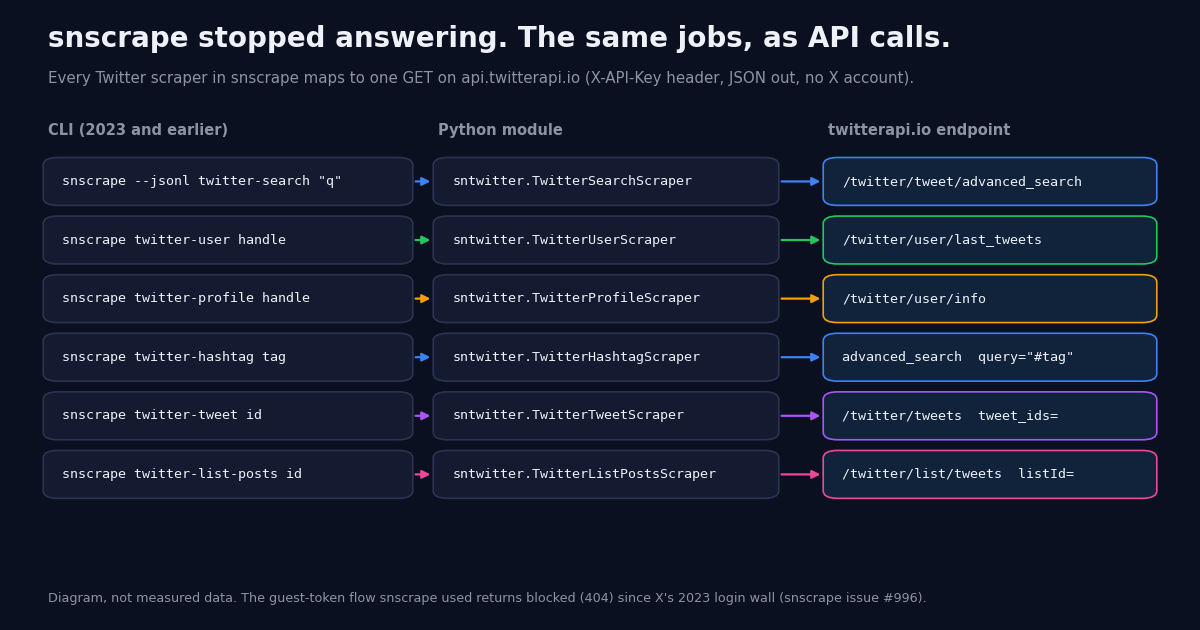
This page is the migration those notebooks need. It is specific to snscrape's Twitter module: what it did, what broke and why (with the issue threads), what you lose by moving to a paid API, and how each scraper class and each Tweet dataclass field maps onto a GET request against https://api.twitterapi.io with an X-API-Key header. The wrapper at the end prints snscrape-shaped JSON Lines so your pd.read_json(lines=True) and column names keep working. For the wider landscape of options, the Twitter scraper API hub and the guide to scraping Twitter without the official API are the parent pages.
Everything quoted about snscrape comes from the GitHub repository, its issue tracker, the twitter.py module source and the PyPI page as read this year. The field-coverage, page-size and pace numbers come from a study we ran ourselves in 2026: 40 pages of a twitter-search replacement for a neutral developer topic and 10 pages of a twitter-user replacement for three organization accounts, 1,400 tweets in total. Where the honest answer is "snscrape did this and the API does not", the page says so.
What snscrape was, and why people still install it
snscrape describes itself in its README as "a scraper for social networking services (SNS). It scrapes things like user profiles, hashtags, or searches and returns the discovered items, e.g. the relevant posts." It is a Python 3.8+ package by JustAnotherArchivist, GPL-3.0, with 5.5k stars, 785 forks and 466 commits on GitHub, and it covered eight services: Facebook, Instagram, Mastodon, Reddit, Telegram, Twitter, VKontakte and Weibo. The Twitter module was the one most people used, and it was broad: "users, user profiles, hashtags, searches (live tweets, top tweets, and users), tweets (single or surrounding thread), list posts, communities, and trends."
The interface had two halves. The CLI: snscrape twitter-user textfiles to get a user's posts, snscrape --max-results 100 twitter-hashtag archiveteam for a hashtag, and snscrape --jsonl [SCRAPER-NAME] [ARGUMENTS] to get every extracted field as one JSON object per line (those three are the README's own examples). And the module, which the README says "is currently undocumented" but which every tutorial used anyway: import snscrape.modules.twitter as sntwitter, then for tweet in sntwitter.TwitterSearchScraper("query since:2022-01-01 until:2022-02-01").get_items(): with a counter to stop at N, appending tweet.date, tweet.id, tweet.rawContent, tweet.user.username, tweet.likeCount and friends to a list that became a DataFrame. The twitter.py source defines ten scraper classes with CLI names: twitter-search, twitter-user, twitter-profile, twitter-hashtag, twitter-cashtag, twitter-tweet, twitter-list-posts, twitter-community, twitter-trends and twitter-users.
What made it popular is also what killed it. snscrape needed no API key and no account because it asked X's own web front end for the same JSON the browser loaded for a logged-out visitor. That was free, fast, had no documented rate limit and returned more fields than the official v1.1 API did. It also meant the data source was X's to remove, and in mid-2023 X removed it. The install still happens because the tutorials still rank; the error on the first run is the next section.
Why snscrape stopped working on X: the guest token, blocked (404), and issue #996
snscrape's Twitter module never authenticated. Before the first real request it called _ensure_guest_token(), which fetched a guest token from https://api.twitter.com/1.1/guest/activate.json (the same call the x.com front end made for anonymous visitors) and then sent that token with each request to the logged-out search, timeline and profile endpoints. The error strings in the module are the two ways that flow can fail: Unable to retrieve guest token when the activation call is refused, and blocked (404) when a data endpoint answers with a 404 for a request that used to work.
June 30, 2023 is the date. That day X required a login to view any post or search, and every snscrape Twitter scraper started returning blocked (404) four times (the module retries four times, then gives up) followed by a ScraperException. The maintainer opened issue #996, "All Twitter scrapes are failing: blocked (404)", the same day and pinned it, with the diagnosis: "This is likely connected to Twitter as a whole getting locked behind a login wall since earlier today. There is no known workaround at this time, and it's not known whether this will be fixable." X lifted the login requirement for viewing a single post a few days later, but the logged-out search and timeline JSON that snscrape read never came back. The thread now has over 160 comments, is still open, and comments posted in 2026 report the identical error.
Logged-in scraping was ruled out two years earlier. Issue #270, "Support for authentication", was opened by the maintainer in August 2021 and closed as wontfix with the reasoning that "snscrape has always been about making it easier to programmatically access _public_ social network service content", that accounts used for scraping would be banned, that testing with accounts was unreliable for the same reason, and that handling credentials safely would need substantial changes. So the one route that could have kept the module alive was out of scope by design, and the project did not change its mind after #996.
The duplicates tell you how often people still hit this: #997 "Yesterday i can, but today 404" (July 2023), #1003 "i am getting 404 block", #1013 "Does the Scrapper even work after Elon's API updates?", #1018 "ScraperException Error", #1048 "CRITICAL:snscrape.base:Errors: blocked (404), blocked (404)..." (July 2024), #1052 (December 2024) and #1056 "New 443 SSL Error" (February 2025), each closed as a duplicate of #996. A second open bug from the same day, #991, is the KeyError: 'timeline' crash on the twitter-profile scraper, which is the same login wall seen from a different endpoint.
So the diagnosis for a snscrape not working search does not depend on your setup: it is not your Python version, not a proxy, not the development branch (pip install git+https://github.com/JustAnotherArchivist/snscrape.git has the same module), and not a --retries or -vv flag. The PyPI release is 0.7.0.20230622 from June 22, 2023, eight days before the wall; the code asks X for data X no longer serves without a session. The rest of this page is what to do about it.
What snscrape did that an API does not, and the three routes forward
Be clear about the trade before writing code. snscrape was free, keyless and offline-installable, and it covered eight networks with one interface. A hosted Twitter (X) API gives up all three of those: you need a key, every tweet returned is billed, and the API covers X only. If your snscrape pipeline also pulled Reddit, Telegram or Mastodon, those modules are a separate question (the Reddit module uses Pushshift, which has its own history); this page only replaces the Twitter half.
The cookie libraries are the closest in spirit to snscrape: they act as logged-in accounts, so the account risk snscrape deliberately avoided is now yours, and the parser-chasing-the-front-end maintenance that killed the Twitter module is still there, in a library that is currently kept up. For a one-off academic pull that can be fine; for anything scheduled, the cost section's arithmetic usually says to pay for the reads instead.
The rest of this guide assumes the hosted-API route, because it is the one that maps onto snscrape's scrapers and fields without you operating accounts. The official X API is the other no-maintenance option and is in every cost table so you can see what it charges for the same reads. Python users coming from Tweepy rather than snscrape have their own Tweepy migration guide.
The migration table: every snscrape scraper, mapped to an endpoint
Each row is one scraper from snscrape/modules/twitter.py with its CLI name, and the request that replaces it. Endpoint paths are relative to https://api.twitterapi.io, all are GET with the X-API-Key header, and the response shapes are the ones in docs.twitterapi.io: advanced_search returns a top-level tweets array with has_next_page and next_cursor; last_tweets nests the list at data.tweets with the same two pagination fields at the top level and wraps errors as status: "error" with the reason in msg; user/info returns the profile in data.
Three details to carry into the code. First, advanced_search pages are "up to 20" tweets because ads and non-tweet cards are filtered out, so count rows, not pages, toward --max-results (in our study every page did hold exactly 20). Second, X search operators work inside query only on advanced_search; last_tweets takes no operators, which is why a dated pull on one account becomes from:handle since: until: on search. Third, a from: search does not return the account's retweets while last_tweets does; our search sample had 0 retweets in 800 tweets and the timelines had a few, so pick the endpoint by whether reposts matter to you. The search operators reference and the search-by-date guide cover the operator grammar in full.
# Before: the notebook cell that stopped working in 2023
import snscrape.modules.twitter as sntwitter

rows = []
for i, t in enumerate(sntwitter.TwitterSearchScraper("python pandas since:2023-01-01").get_items()):
    if i >= 500:
        break
    rows.append([t.date, t.id, t.rawContent, t.user.username,
                 t.likeCount, t.retweetCount, t.replyCount, t.quoteCount, t.conversationId])

# After: same loop, same column order, over twitterapi.io (snscrape_compat.py is at the end of this page)
from snscrape_compat import TwitterSearchScraper

rows = []
for t in TwitterSearchScraper("python pandas since:2026-01-01").get_items(max_results=500):
    rows.append([t["date"], t["id"], t["rawContent"], t["user"]["username"],
                 t["likeCount"], t["retweetCount"], t["replyCount"], t["quoteCount"], t["conversationId"]])
# 500 tweets = 25 pages = 7,500 credits = $0.075
Field mapping: the snscrape Tweet dataclass against the twitterapi.io tweet object
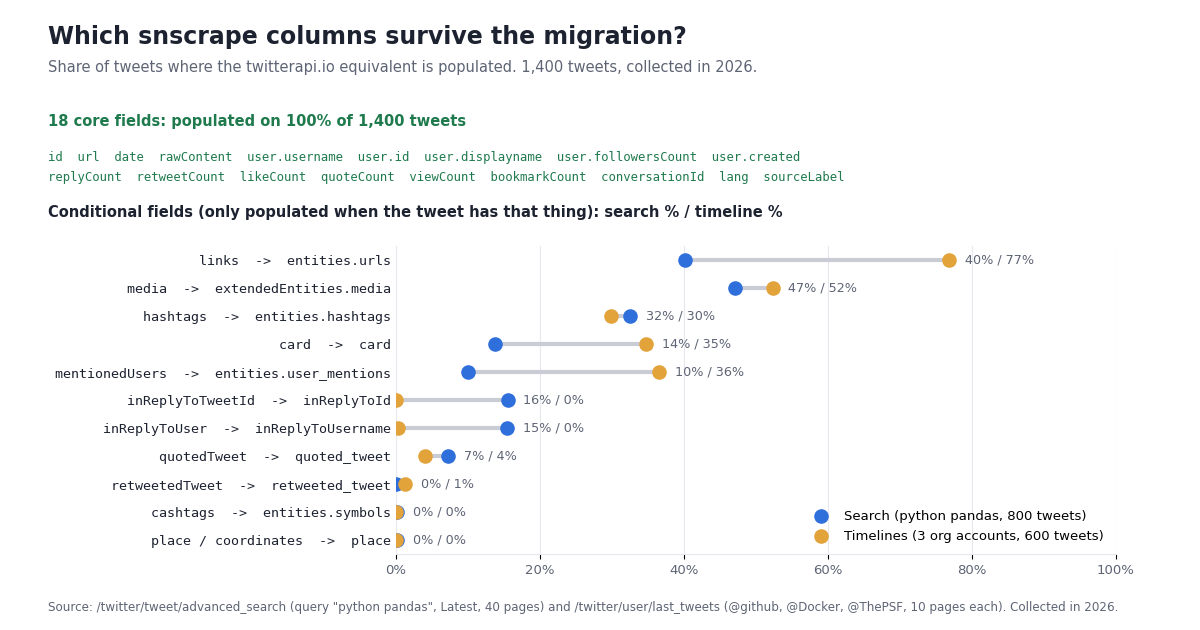
This is the table that decides whether your downstream code changes. The left column is the Tweet and User dataclass in snscrape/modules/twitter.py (field names verbatim); the middle is the path in the tweet object that advanced_search and last_tweets return; the right is the share of tweets in our 2026 sample where that path was populated (search / timelines), so you know which columns will be full and which are only filled when the tweet has that thing.
Two readings of this table. The 18 core columns a typical snscrape DataFrame used (date, id, rawContent, user.username, the four counts, conversationId, lang) were populated on 100% of all 1,400 tweets in both collections, so a --jsonl-consuming pipeline needs renames, not null handling, for those. The conditional columns are where the two collections differ: links were on 40% of search tweets but 77% of organization timeline posts, mentions 10% versus 36%, and reply fields 16% versus 0% (the default includeReplies=false). Those are properties of what you query, not of the API.
What a migrated snscrape search returns today: pages, post mix, text length, pace
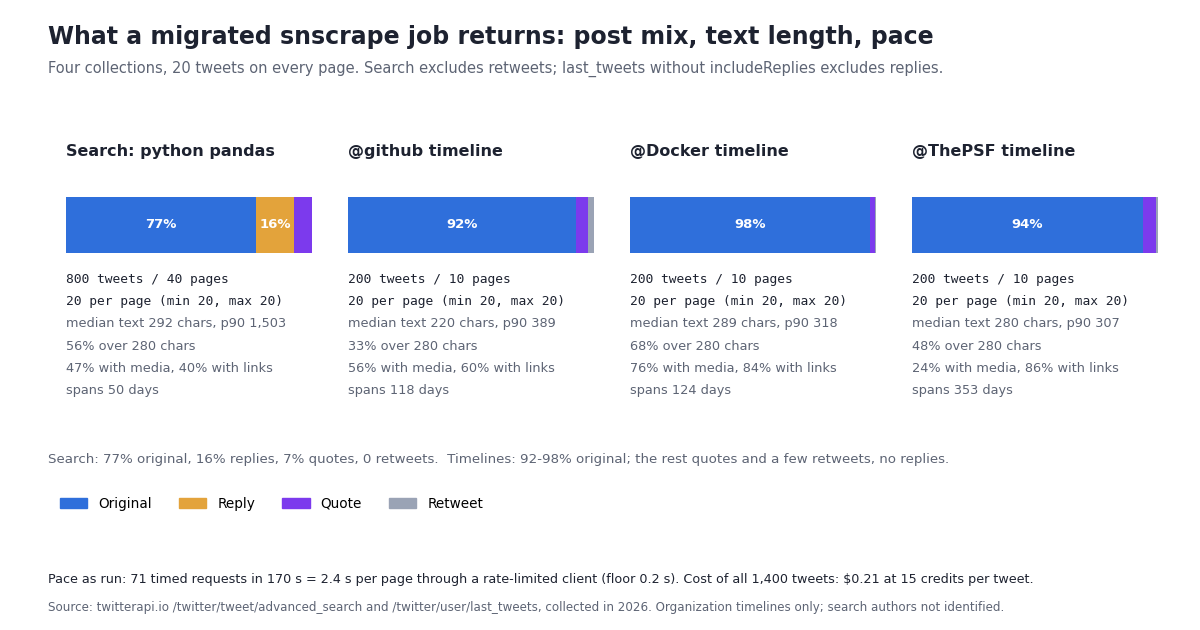
We ran the two most common snscrape jobs through their replacements and measured what came back. The twitter-search stand-in was advanced_search with query=python pandas and queryType=Latest, followed for 40 pages; the twitter-user stand-in was last_tweets for @github, @Docker and @ThePSF, 10 pages each with the default includeReplies=false. All 70 data requests went through a client capped at 5 requests per second.
Pages are full. Every one of the 40 search pages and all 30 timeline pages held exactly 20 tweets, so --max-results 500 is 25 requests and the cost math is simply tweets x 15 credits. The docs say "up to 20" because ads and non-tweet cards are filtered out; on these queries nothing was filtered. The last search page still reported has_next_page: true, so a --max-results-less snscrape loop would have kept going; the wrapper stops on your limit, an empty page, or has_next_page false.
Search is not a timeline. The search sample was 77% original posts, 16% replies and 7% quotes, with 0 retweets in 800 tweets, from 413 distinct authors over 50 days. The three organization timelines were 95% originals, 4% quotes and 1% retweets, with no replies because includeReplies was off. snscrape's twitter-user included replies, so pass includeReplies=true if you want its behavior; snscrape's twitter-search excluded retweets too, so that half matches.
Text is long now. snscrape-era code often assumed 280 characters. In the search sample the median text was 292 characters, the 90th percentile 1,503 and the longest 22,480 (an article-length post); 56% of search tweets and 50% of timeline posts exceeded 280. A VARCHAR(280) column or a fixed-width CSV reader will truncate; text holds the whole post, there is no second field to stitch.
Pace. The 71 requests we timed took 170 seconds, 2.4 s per page, through a client that spaces requests at least 0.2 s apart and was shared with other jobs on the same machine at the time; treat it as what a careful script sees, not as an API benchmark. New accounts are limited to 0.2 requests per second until the first payment (20 per second after), so on a free account the same 50 pages take about four minutes.
One account came back empty, and the profile call explained why. Our third planned timeline, @python_org, returned status: "success" with an empty data.tweets and has_next_page: false. GET /twitter/user/info?userName=python_org returned HTTP 200 with data.unavailable: true and unavailableReason: "Suspended" rather than an error status, so check data.unavailable yourself (the wrapper's twitter_profile() does). We replaced the account with @ThePSF (692,722 followers, 6,954 posts per user/info).
Cost: snscrape was free, so what does the same job cost, and what would the official X API charge?
snscrape cost nothing in money and, after June 2023, returned nothing. The replacement is metered, so here is the meter. Prices are from the twitterapi.io pricing page and the official X API pay-per-usage page; the ratios are arithmetic, not a benchmark. The study on this page is the first row: 1,400 tweets plus 2 profile lookups and 1 empty page cost $0.21; the same reads at the official rates would be $7.02.
The worked example most snscrape users care about is a scheduled job: 10,000 tweets a day is 10,000 x 15 = 150,000 credits = $1.50 a day at $1 per 100,000 credits, or $45 over 30 days; the official route for the same reads is 10,000 x $0.005 = $50 a day, $1,500 a month. New accounts that pass the automatic bot check get $1 of free credits (100,000 credits, no card; one per person or network; the credits expire after 31 days), which is about 6,600 tweets, enough to rerun your old snscrape query through the wrapper and diff the two JSON Lines files before paying anything. Subscriptions start at Starter $29 a month; the pricing page has the tiers and bonus credits.
One billing rule changes how you write the loop: you pay per tweet returned, so a narrow query is cheap and an over-broad one is not. A since:-bounded daily pull on a quiet topic costs the 15-credit minimum ($0.00015) on days it finds nothing and $0.003 per full page otherwise. snscrape users who used to pull everything and filter in pandas should move the filter into the query (lang:en, min_faves:, -filter:replies) where it reduces the bill.
Running the compatibility wrapper, and how we collected this
The main code block at the end of this page is snscrape_compat.py. It re-implements the four snscrape entry points most pipelines used, with the same CLI shape (--jsonl, --max-results, scraper name, argument) and classes with the same names and a get_items() generator, so both the shell one-liners and the module loops in old notebooks change by one import. Each item is a dict with snscrape's field names, built by to_snscrape() from the mapping table above; date is ISO 8601 in UTC as snscrape's --jsonl printed it, user is a nested object, and quotedTweet / retweetedTweet recurse. The pandas block shows that pd.read_json(lines=True) on the output reads the same way as before.
The wrapper does not emulate renderedContent, vibe, editState or conversationControlPolicy (nothing to map them to; code that read those columns gets a KeyError rather than a silently empty column), nor twitter-trends, twitter-community or twitter-list-posts, which are one-line additions following the table above.
How we collected this. Question: what does a migrated snscrape job return today, column by column, page by page? Query: python pandas, queryType=Latest, 40 pages of /twitter/tweet/advanced_search; accounts: @github, @Docker and @ThePSF, 10 pages each of /twitter/user/last_tweets with the default includeReplies=false; @python_org was planned, returned an empty timeline, and was replaced after /twitter/user/info reported it unavailable. Window: the most recent posts at collection time (the search sample spanned 50 days, the timelines 118 to 353 days). Sample: 1,400 tweets, 73 requests in total. Collected in 2026 through a read-only client capped at 5 requests per second. A field counts as populated when it is present and not null, not an empty string, list or object; counts of 0 are populated.
What the sample cannot show. One developer-topic query and three organization accounts are not all of X. Reply, media and link shares depend heavily on the query and the account type; organization accounts post more links and fewer replies than individuals, and a consumer topic would have a different language mix than the 77% English we saw. The pace figure reflects a shared rate limiter, not the API's ceiling. We did not test twitter-list-posts, twitter-community or twitter-trends; their rows in the table come from the endpoint reference, not from this run.
Aggregates only. Posts and accounts named on this page are the organization accounts listed above; search authors are not identified, and the raw search pages were not kept beyond the aggregates. The analysis script, results and the gzip-compressed raw timeline pages for the organization accounts are kept with the study.
# snscrape --jsonl ... > out.jsonl  ->  the same file from snscrape_compat.py, read the same way
import pandas as pd

df = pd.read_json("out.jsonl", lines=True)
df["date"] = pd.to_datetime(df["date"], utc=True)          # ISO 8601 strings, like snscrape's date
df["username"] = df["user"].apply(lambda u: u["username"])
df["is_reply"] = df["inReplyToTweetId"].notna()
df["is_quote"] = df["quotedTweet"].notna()
df["n_links"] = df["links"].apply(len)
print(df[["date", "username", "likeCount", "retweetCount", "replyCount", "quoteCount"]].describe())
# Columns snscrape had that will be empty here: renderedContent, vibe, editState, conversationControlPolicy.
# Rebuild renderedContent by replacing each t.co URL in rawContent with links[i]["url"].
"""snscrape_compat.py - snscrape's Twitter scrapers, re-implemented over twitterapi.io (reads only).

    pip install requests
    export TWITTERAPI_IO_KEY=...                      # key from twitterapi.io/dashboard

    # snscrape --jsonl --max-results 100 twitter-search "python pandas"
    python snscrape_compat.py --jsonl --max-results 100 twitter-search "python pandas"
    # snscrape --jsonl --max-results 200 twitter-user github
    python snscrape_compat.py --jsonl --max-results 200 twitter-user github
    # snscrape --jsonl twitter-profile ThePSF
    python snscrape_compat.py --jsonl twitter-profile ThePSF
    # snscrape --jsonl --max-results 100 twitter-hashtag python
    python snscrape_compat.py --jsonl --max-results 100 twitter-hashtag python

Each line is one JSON object with snscrape's field names (url, date, rawContent, id, user{...},
replyCount, retweetCount, likeCount, quoteCount, conversationId, lang, sourceLabel, links, media,
hashtags, mentionedUsers, inReplyToTweetId, quotedTweet, retweetedTweet), so a downstream
pd.read_json(..., lines=True) keeps working. No X account, no OAuth app.
Cost: 15 credits per tweet returned ($0.15 per 1,000); a full 20-tweet page is $0.003 and a page
that returns nothing is billed the 15-credit minimum ($0.00015). Profiles: 18 credits each.
"""
import argparse
import json
import os
import sys
import time
from datetime import datetime

import requests

HEADERS = {"X-API-Key": os.environ["TWITTERAPI_IO_KEY"]}
CREATED_AT = "%a %b %d %H:%M:%S %z %Y"   # tweet createdAt: "Fri Oct 16 18:13:45 +0000 2026"


def _get(url, params):
    for attempt in range(5):
        r = requests.get(url, params=params, headers=HEADERS, timeout=30)
        if r.status_code == 429:               # 0.2 requests/s before the first payment, 20 after
            time.sleep(2 ** attempt)
            continue
        r.raise_for_status()
        body = r.json()
        if body.get("status") == "error":      # last_tweets and user/info wrap errors; msg has the reason
            raise RuntimeError(body.get("msg") or "twitterapi.io error")
        return body
    raise RuntimeError("rate limited after 5 attempts")


def _iso(s):
    """Classic createdAt -> ISO 8601 like snscrape's `date`. user/info already returns ISO; pass it through."""
    if not s:
        return None
    try:
        return datetime.strptime(s, CREATED_AT).isoformat()
    except ValueError:
        return s


def _user(a):
    """twitterapi.io author object -> the snscrape User fields that have an equivalent."""
    a = a or {}
    return {
        "username": a.get("userName"), "id": a.get("id"), "displayname": a.get("name"),
        "rawDescription": a.get("description"), "verified": a.get("isVerified"),
        "blue": a.get("isBlueVerified"), "created": _iso(a.get("createdAt")),
        "followersCount": a.get("followers"), "friendsCount": a.get("following"),
        "statusesCount": a.get("statusesCount"), "favouritesCount": a.get("favouritesCount"),
        "mediaCount": a.get("mediaCount"), "location": a.get("location"),
        "protected": a.get("protected"), "profileImageUrl": a.get("profilePicture"),
    }


def to_snscrape(t):
    """One twitterapi.io tweet object -> one snscrape Tweet-shaped dict."""
    ent = t.get("entities") or {}
    media = (t.get("extendedEntities") or {}).get("media") or []
    rt, qt = t.get("retweeted_tweet") or None, t.get("quoted_tweet") or None
    return {
        "url": t.get("url"),
        "date": _iso(t.get("createdAt")),
        "rawContent": t.get("text", ""),
        "id": t.get("id"),
        "user": _user(t.get("author")),
        "replyCount": t.get("replyCount", 0),
        "retweetCount": t.get("retweetCount", 0),
        "likeCount": t.get("likeCount", 0),
        "quoteCount": t.get("quoteCount", 0),
        "viewCount": t.get("viewCount"),
        "bookmarkCount": t.get("bookmarkCount"),
        "conversationId": t.get("conversationId"),
        "lang": t.get("lang"),
        "sourceLabel": t.get("source"),
        "links": [{"text": u.get("display_url"), "url": u.get("expanded_url") or u.get("url")}
                  for u in ent.get("urls") or []],
        "media": [{"type": m.get("type"), "url": m.get("media_url_https")} for m in media],
        "hashtags": [h.get("text") for h in ent.get("hashtags") or []],
        "cashtags": [s.get("text") for s in ent.get("symbols") or []],
        "mentionedUsers": [{"username": m.get("screen_name"), "id": m.get("id_str"), "displayname": m.get("name")}
                           for m in ent.get("user_mentions") or []],
        "inReplyToTweetId": t.get("inReplyToId"),
        "inReplyToUser": ({"username": t.get("inReplyToUsername"), "id": t.get("inReplyToUserId")}
                          if t.get("isReply") else None),
        "quotedTweet": to_snscrape(qt) if qt else None,
        "retweetedTweet": to_snscrape(rt) if rt else None,
    }


def _paginate(url, params, tweets_of, max_results):
    """Follow next_cursor like snscrape's get_items(); stop at --max-results or when has_next_page is false."""
    n, cursor = 0, ""
    while max_results is None or n < max_results:
        body = _get(url, {**params, "cursor": cursor})
        tweets = tweets_of(body)
        if not tweets:
            return
        for t in tweets:
            yield to_snscrape(t)
            n += 1
            if max_results is not None and n >= max_results:
                return
        if not body.get("has_next_page") or not body.get("next_cursor"):
            return
        cursor = body["next_cursor"]


class TwitterSearchScraper:
    """sntwitter.TwitterSearchScraper(query) -> /twitter/tweet/advanced_search.
    Operators (since:, until:, from:, lang:, min_faves:, -filter:replies) go inside the query string."""

    def __init__(self, query, top=False):
        self.query, self.top = query, top

    def get_items(self, max_results=None):
        return _paginate("https://api.twitterapi.io/twitter/tweet/advanced_search",
                         {"query": self.query, "queryType": "Top" if self.top else "Latest"},
                         lambda b: b.get("tweets") or [], max_results)


class TwitterUserScraper:
    """sntwitter.TwitterUserScraper(handle) -> /twitter/user/last_tweets (tweets nested in data.tweets).
    includeReplies=true restores the replies snscrape's twitter-user returned."""

    def __init__(self, username, include_replies=True):
        self.username, self.include_replies = username, include_replies

    def get_items(self, max_results=None):
        return _paginate("https://api.twitterapi.io/twitter/user/last_tweets",
                         {"userName": self.username, "includeReplies": str(self.include_replies).lower()},
                         lambda b: (b.get("data") or {}).get("tweets") or [], max_results)


class TwitterHashtagScraper(TwitterSearchScraper):
    """sntwitter.TwitterHashtagScraper(tag) -> the same search with the query "#tag"."""

    def __init__(self, hashtag):
        super().__init__("#" + hashtag.lstrip("#"))


def twitter_profile(username):
    """snscrape twitter-profile handle -> /twitter/user/info. Suspended or missing accounts come back
    with data.unavailable = true (HTTP 200), not an error status."""
    body = _get("https://api.twitterapi.io/twitter/user/info", {"userName": username})
    d = body.get("data") or {}
    if not d or d.get("unavailable"):
        raise RuntimeError(f"{username}: {d.get('message') or body.get('msg')} ({d.get('unavailableReason')})")
    return _user(d)


def main():
    ap = argparse.ArgumentParser(description="snscrape-compatible CLI over twitterapi.io")
    ap.add_argument("--jsonl", action="store_true", help="one JSON object per line (same as snscrape)")
    ap.add_argument("--max-results", type=int, default=None)
    ap.add_argument("--top", action="store_true", help="twitter-search: Top instead of Latest")
    ap.add_argument("scraper", choices=["twitter-search", "twitter-user", "twitter-hashtag", "twitter-profile"])
    ap.add_argument("argument", help="query, handle or hashtag")
    a = ap.parse_args()
    if a.scraper == "twitter-profile":
        print(json.dumps(twitter_profile(a.argument), ensure_ascii=False))
        return
    scraper = {"twitter-search": lambda: TwitterSearchScraper(a.argument, top=a.top),
               "twitter-user": lambda: TwitterUserScraper(a.argument),
               "twitter-hashtag": lambda: TwitterHashtagScraper(a.argument)}[a.scraper]()
    n = 0
    for item in scraper.get_items(a.max_results):
        n += 1
        print(json.dumps(item, ensure_ascii=False) if a.jsonl else item["url"])
    print(f"# {n} tweets, about ${n * 15 / 100_000:.4f} in API reads", file=sys.stderr)


if __name__ == "__main__":
    main()
Questions readers ask
Is snscrape still working for Twitter in 2026?
No. Every Twitter scraper in snscrape ends in CRITICAL:snscrape.base:Errors: blocked (404), blocked (404), blocked (404), blocked (404) and a ScraperException. The maintainer's pinned issue #996 (opened mid-2023) says there is no known workaround and it is not known whether it is fixable; comments in 2026 report the same error. The last PyPI release is 0.7.0.20230622. The non-Twitter modules are a separate matter.
Why does snscrape say blocked (404)?
snscrape fetched a guest token from api.twitter.com/1.1/guest/activate.json and then called X's logged-out search and timeline endpoints with it. Since X's mid-2023 login wall those endpoints answer 404 to any client without a session; snscrape retries four times and gives up, which is the four blocked (404) lines. No proxy, retry flag or Python version changes that.
Is there a fix or a fork of snscrape that works?
Not one that keeps snscrape's no-account model. The maintainer closed "Support for authentication" (issue #270) as wontfix in 2021, so logged-in scraping is out of scope by design. Forks that patch the token step hit the same wall. Libraries such as twscrape or Twikit work by using X accounts you supply, with the account risk that implies; a hosted read API such as the one mapped on this page needs no X account.
What replaces sntwitter.TwitterSearchScraper?
GET https://api.twitterapi.io/twitter/tweet/advanced_search?query=<q>&queryType=Latest with an X-API-Key header. The query string takes the same operators snscrape passed through (since:, until:, from:, lang:, min_faves:, -filter:replies). The response is a top-level tweets array with has_next_page and next_cursor, up to 20 tweets per page; the snscrape_compat.py wrapper on this page exposes it as TwitterSearchScraper(query).get_items(max_results=N).
How do the snscrape field names map to the API?
rawContent is text, date is createdAt (classic format, parse with %a %b %d %H:%M:%S %z %Y), user.username is author.userName, user.followersCount is author.followers, likeCount / retweetCount / replyCount / quoteCount / viewCount / conversationId / lang keep their names, sourceLabel is source, links is entities.urls, media is extendedEntities.media, quotedTweet is quoted_tweet and inReplyToTweetId is inReplyToId. In our 2026 sample all 18 core fields were populated on 100% of 1,400 tweets. renderedContent, vibe and editState have no equivalent.
How do I get a user's tweets like snscrape twitter-user?
GET /twitter/user/last_tweets?userName=<handle>&includeReplies=true, following next_cursor until has_next_page is false. The tweets are nested at data.tweets (unlike search, where they are top-level), 20 per page, newest first, retweets included. snscrape's twitter-user included replies, so set includeReplies=true for the same behavior; the default is false.
How much does it cost to replace a snscrape job?
15 credits per tweet returned, $0.15 per 1,000 tweets; a full 20-tweet page is $0.003 and an empty page is billed the 15-credit minimum ($0.00015). Profiles are 18 credits each. A --max-results 1000 search is $0.15; the same 1,000 reads at the official X API's $0.005 per post are $5.00. New accounts that pass the automatic bot check get $1 of free credits (no card, one per person or network, expiring after 31 days).
Does the replacement cover the other networks snscrape scraped?
No. twitterapi.io reads X (Twitter) only. snscrape's Facebook, Instagram, Mastodon, Reddit, Telegram, VKontakte and Weibo modules are not replaced by this page; each has its own status and its own alternatives.
Continue
- JustAnotherArchivist/snscrape on GitHub: README (services, Twitter capabilities, CLI examples, 'library use is undocumented'), 5.5k stars, GPL-3.0
- snscrape issue #996: All Twitter scrapes are failing: blocked (404) (pinned, open since June 30, 2023; the maintainer's 'no known workaround' statement)
- snscrape issue #270: Support for authentication (closed wontfix; why logged-in scraping is out of scope)
- snscrape on PyPI: version 0.7.0.20230622 (June 22, 2023), Python ~=3.8, GPLv3+
- X API pay-per-usage pricing (the official, pricier route): $0.005 per post read, $0.010 per user read, 3M post reads a month cap
- twitterapi.io advanced_search reference: query, queryType, cursor, up to 20 tweets per page, since_time/until_time note
- Twitter (X) scraper API: tweets, users and search results as JSON
- How to scrape Twitter (X) without the official API: the full landscape
- Twint not working: the flag-by-flag migration
- Twitter (X) profiler: rebuild the twitter_profiler report with the API
- Twitter (X) search operators: the complete API reference
- How to search tweets by date via API (since: and until:)
- Tweepy vs TwitterAPI.io: the Python migration guide
- twitterapi.io pay-per-call pricing
- Get an API key from the dashboard
- 01A Brandwatch Alternative for Teams That Only Need X (Twitter) Data
- 02Data365 Alternative: Pay-Per-Data X (Twitter) API Instead of a EUR 300 Subscription
- 03How to Get Twitter (X) Data into Google Sheets with Apps Script in 2026
- 04Twitter (X) Auto Reply: What the Rules Allow and How to Build One
- 05How to Build a Twitter (X) to Discord Bot in 2026
- 06Twitter (X) Dataset Export — A Researcher's Guide
- 07Twitter (X) History API — How to Export Tweet Timeline
- 08Twitter (X) Username Lookup — A Developer's API Reference
Stop reading. Start building.
Starter credits cover real testing on real data. Google sign-in, no card, no application queue.
Get an API key