Can People See Your Twitter (X) Bookmarks? What Others See, and the One Public Number
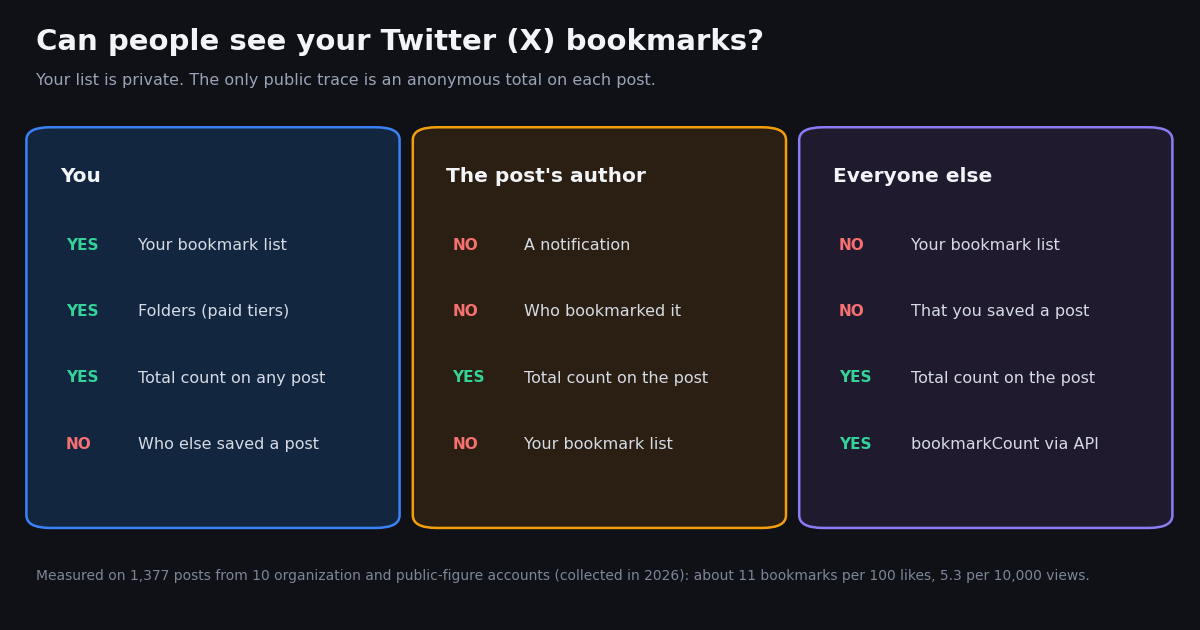
- Private list: only you can see which posts you bookmarked. Followers, the post's author and strangers cannot open your bookmarks.
- No notification: bookmarking a post does not alert its author, unlike a like (the author is notified of likes and can see who liked).
- One public number: each post shows an anonymous bookmark total. In our sample of 1,377 posts it averaged 10.8 bookmarks per 100 likes and 5.3 per 10,000 views.
- Rumors are not announcements: the "bookmarks are now public" posts traced back to a parody account in July 2024; X's docs still say bookmarks are private.
- Where they live:
x.com/i/bookmarkson the web, the ribbon icon in the sidebar; on iPhone the menu item was renamed History, which holds Bookmarks, Likes, Videos and Articles. - Exporting your own: X's official route is the
GET /2/users/:id/bookmarksendpoint with your own user token; there is no public endpoint that reads someone else's bookmarks.
You bookmarked a post and now you are wondering whether the person who wrote it knows, or whether your followers can scroll through everything you saved. The short version is reassuring, and it comes from X itself rather than from a guess: bookmarks are private. What trips people up is the bookmark counter that appears on every post, and the recurring screenshots claiming X is about to make bookmarks public.
This page answers the privacy question first, then covers where bookmarks are on each app, folders, why bookmarks seem to vanish, and how to export your own. It also measures the one public number, the bookmark total, on real posts. It is not a guide to running AI over your saved posts (that is our X bookmarks AI guide) and it is not about profile visits (see whether X shows who viewed your profile); both are linked below.
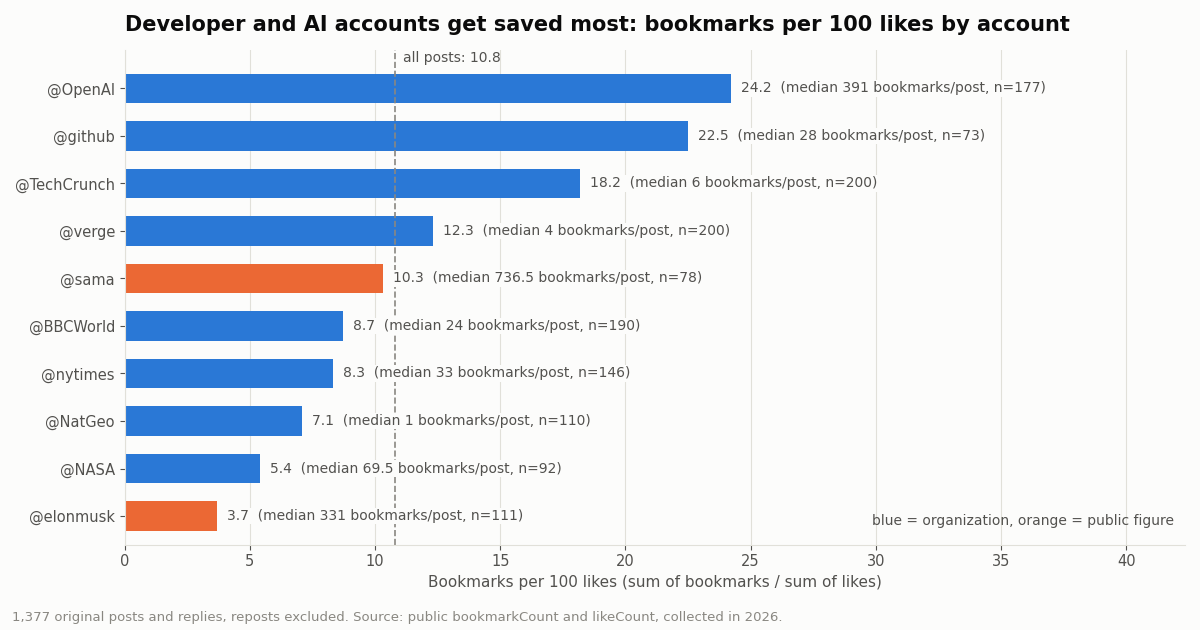
10.8 across 1,377 posts from 10 organization and public-figure accounts (collected in 2026), from 3.7 on @elonmusk to 24.2 on @OpenAI. Replies drew a median 1.9. Not one response listed who bookmarked a post.
Can people see your Twitter bookmarks? Who sees what, and who gets notified
X's developer documentation is the clearest primary statement: "Bookmarks are private and only visible to the user who created them" (docs.x.com/x-api/posts/bookmarks/introduction). The Help Center page on bookmark counts (help.x.com/en/using-x/bookmark-counts) says the same from the user side: a post shows how many times it was bookmarked, not which accounts bookmarked it. The Help Center blocks automated fetching, so we cite its address and confirmed its wording through a fact-check that quotes it: "Bookmarks are private and are only viewable to you within your X account."
The exceptions are about access, not visibility. Anyone who can sign in to your account, on a shared phone, a family laptop or a browser where you stayed logged in, can open your bookmarks tab. A third-party app you authorized with the bookmark.read permission can read the list too, because that is what the permission is for. If that worries you, review connected apps in Settings and privacy and sign out of devices you do not use.
X itself sees them. Bookmarks are stored on X's servers, which is why they sync between phone and web. X's privacy policy covers how it uses activity on the service; nothing in X's documentation suggests other users get access.
Does X notify the author? No. A bookmark sends no notification to the author, to you, or to anyone else. That is the main practical difference from a like. When you like a post, the author gets a notification and can see who liked it, even though, since likes became private in June 2024, people browsing your profile cannot see your likes list.
So if you want to save something without signaling anything to the author, a bookmark is the quiet option. The author can still watch the counter tick up by one, and on a post with very few bookmarks, a count that moves from 0 to 1 minutes after you opened it is a hint, not proof. On a post with dozens or hundreds of bookmarks your one addition is invisible in the total.
The one public number: bookmark counts on every post
Twitter began showing bookmark totals on March 16, 2023, starting on iOS in the post details view. The announcement came from the Twitter Support account and was widely reported at the time (betanews, Engadget and others): the count shows how many times a post was bookmarked, and the accounts behind it stay anonymous.
The same number is part of the public data attached to every post. When you read a post through an API, the bookmark total is just another field. On TwitterAPI.io it is bookmarkCount, next to likeCount, retweetCount, replyCount, quoteCount and viewCount. We read it on 1,660 posts for this page: the field was present on every one (0 missing), and no response contained a list of the accounts that bookmarked a post. The data simply does not exist in public form.
That is the honest answer to the variant query "how to see people's bookmarks on Twitter": you cannot see another person's bookmarks, and you cannot see who bookmarked a post, including your own. Any site that promises otherwise is either reading a public count, asking you to sign in with the other person's account, or making it up.
For creators the count is a signal. A bookmark is a save-for-later, so a high bookmarks-to-likes ratio usually means the post is a reference: a tutorial, a link people want to read later, a list. The next two sections measure how big the number really is.
What we measured: about 11 bookmarks per 100 likes
We collected the latest posts of 10 organization and public-figure accounts in 2026 and compared the public bookmark total with likes and views. After removing reposts (their counts belong to the original post), 1,377 posts remained. Across all of them, posts collected 10.8 bookmarks per 100 likes and 5.3 bookmarks per 10,000 views. The median post had 24 bookmarks against 273 likes.
Bookmarks move with likes: the rank correlation between the two was 0.943 and with views 0.913. Bookmarks almost never beat likes; that happened on 0.1% of posts (2 of 1,377). The single most-saved post in the sample, a media post from @OpenAI, had 99,711 bookmarks.
The spread between accounts is wider than the spread between post types. Developer and AI audiences save far more per like than news or celebrity audiences:
@OpenAI (24.2) and @github (22.5) posts get saved at more than twice the sample rate, while @elonmusk posts collect 3.7 bookmarks per 100 likes: lots of likes, comparatively few saves. @NatGeo's median post had 1 bookmark because 46.4% of its posts in the sample (many of them replies) had none.
Which posts people bookmark: links, media, threads, text, replies
We sorted every post into one type: a reply to another account, a thread post (the account replying to itself), a photo or video post, a link post (an external link or link card), or text only. The per-post median ratio is the fairest comparison, because a handful of viral posts dominate the totals.
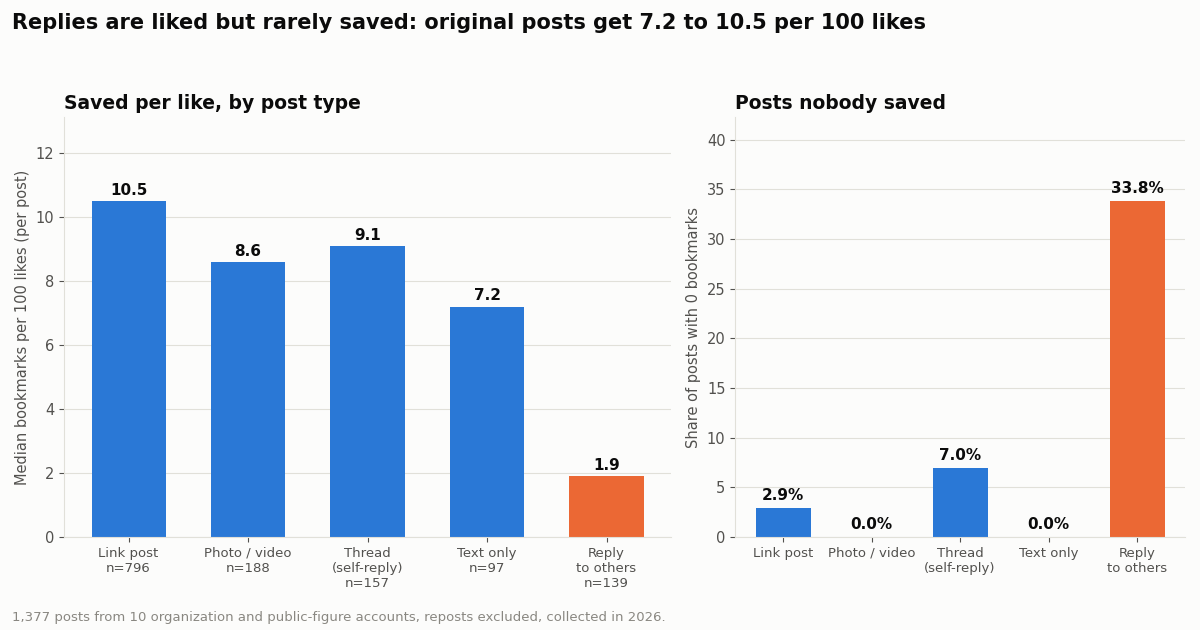
Replies are liked, not saved. A reply collected a median 1.9 bookmarks per 100 likes, roughly a fifth of an original post, and 33.8% of replies had no bookmarks at all. Original posts sat in a narrow band, from 7.2 (text only) to 10.5 (links).
The account matters more than the format. Within one account the pattern is clearer: @OpenAI's link posts drew 29.4 bookmarks per 100 likes, its media posts 25.4 and its thread posts 13.3; @github's link posts 22.4 against 13.3 for media. But among the top tenth of posts by bookmark-to-like ratio (every one at 25.3 or more per 100 likes), the type mix was close to the overall mix: 59.3% links against 62.8% overall, 18.6% media against 16.6%. In this sample, the account mattered more than the format.
Is X making bookmarks public? Where the rumors came from
Searches for "twitter bookmarks going public" spike every time a screenshot goes around. The best-documented wave started on 7 July 2024, when a parody account posted a mock-up of a "Bookmarked by" tab captioned as an X experiment. Soch Fact Check reviewed it and rated the claim false: the account's bio says it is a parody, the post carried a Community Note, X's Help Center still said bookmarks are private, and there were no verifiable reports of any announcement (sochfactcheck.com).
Two real changes feed the confusion. First, the public bookmark count from March 2023: people see a number on their post and assume a list must exist behind it. Second, X rebuilt the iPhone menu in 2026: TechCrunch reported that the Bookmarks item became History, a page with four tabs (Bookmarks, Likes, Videos and Articles), announced by X's head of product Nikita Bier, and that "the History section remains private to you". Neither change exposes your list.
How to check a future rumor yourself. Look for the claim on X's own channels: the Help Center bookmarks pages, the docs.x.com bookmarks documentation, and official X accounts. A screenshot of a tab you cannot find in your own app, posted by an account you do not recognize, is not an announcement. As of this page's fact check, X's developer docs still read "Bookmarks are private and only visible to the user who created them."
Where are your Twitter bookmarks, and why do they disappear?
Web (x.com). Click the ribbon-shaped Bookmarks icon in the left sidebar, or go straight to x.com/i/bookmarks.
iPhone and iPad. Tap your profile picture to open the side menu. On accounts that have the new layout, the item is called History; open it and choose the Bookmarks tab. On older layouts it is still called Bookmarks.
Android. Tap your profile picture and choose Bookmarks from the side menu. X has not published an Android History rollout that we could verify.
Saving and removing. Tap the bookmark ribbon under a post, or use the share icon and choose Bookmark if your layout has no ribbon. To remove one, tap the filled ribbon again or choose Remove post from Bookmarks. Third-party guides report that X's bookmarks help page (help.x.com/en/using-x/bookmarks) describes a clear-all option on the Bookmarks screen, though it may not appear on every layout.
Folders. Bookmark folders are a paid-subscription feature; X's Premium help page (help.x.com/en/using-x/x-premium) lists them among the features of its subscription tiers, starting with the entry tier. Folder names are private like the bookmarks in them. X's API exposes them read-only to the owner through GET /2/users/:id/bookmarks/folders.
Bookmarks are pointers to posts, not copies. That one fact explains most of the "my bookmarks are gone" reports.
The post was deleted, or the account was suspended or went protected. The bookmark points at a post you can no longer view, so it drops out of the list or shows as unavailable. Nothing you did removed it, and X offers no way to recover the text.
You are signed in to a different account. Bookmarks are per account. If you switch between accounts, check which one is active before assuming the list was wiped.
The menu item moved. On iPhone the entry point is now History on many accounts, with Bookmarks as a tab inside it. People looking for the old Bookmarks item conclude the feature disappeared.
The app is out of date or the list did not load. Update the app, pull to refresh, or open x.com/i/bookmarks in a browser. The web list is the quickest way to confirm the bookmarks still exist server-side.
You hit an older limit or a sync delay. X does not publish a maximum number of bookmarks in its Help Center; third-party guides report limits on how far back some views or exports reach. If very old saves are missing, export what you can while it is visible (next section).
How to export your own Twitter bookmarks
The official route is the X API, as yourself. GET /2/users/:id/bookmarks returns the bookmarks of the signed-in user only: the id must be your own numeric user ID, and the call needs a user token with the bookmark.read, tweet.read and users.read scopes, with up to 100 posts per page and a pagination_token for the next page (docs.x.com/x-api/users/get-bookmarks). X prices these as Owned Reads at $0.001 per resource when the developer app belongs to the same user, and post reads in general at $0.005 each on the pay-per-usage rate card (docs.x.com/x-api/getting-started/pricing).
Your X data archive. Settings, then Your account, then Download an archive of your data (help.x.com/en/managing-your-account/how-to-download-your-x-archive). Several third-party guides report that the archive does not include a bookmarks file; we could not confirm that from X's own help text, so open your archive and check before relying on it.
TwitterAPI.io bookmarks_v2 for an account you log in with. Our POST /twitter/bookmarks_v2 returns the bookmarks of the logged-in account in the same tweet format as the other endpoints, with has_next_page and next_cursor (docs.twitterapi.io/api-reference/endpoint/bookmarks_v2). It needs login_cookies from one /twitter/user_login_v2 login ($0.10, with a proxy you supply) and that proxy on every call. Only use it for your own account: the call acts as that account, so X can rate-limit, lock or suspend it; keep a human pace; the session can need a fresh login; and authenticated calls are billed per HTTP 200 response. It cannot read anyone else's bookmarks, because no one's bookmarks are reachable without their login.
If the goal is to search or summarize what you saved, our X bookmarks AI guide walks through the export script and the AI step end to end.
For builders: reading bookmark counts at scale
The public part, the bookmark total on any post, needs no X account. Two read endpoints cover most needs: /twitter/tweets with a comma-separated tweet_ids list for specific posts, and /twitter/user/last_tweets (20 posts per page, follow next_cursor) for an account's recent posts. Each returned post carries bookmarkCount, likeCount and viewCount. The script below prints both: counts for chosen IDs, and an account's bookmarks per 100 likes, the same ratio this page reports.
What it costs. TwitterAPI.io bills per tweet returned: $0.15 per 1,000 tweets, with a 15-credit minimum per request, so a full 20-post page costs $0.003. The study on this page read 1,660 posts in 87 requests for about $0.25. On X's official pay-per-usage rate card a post read is $0.005, or $5 per 1,000 posts, about 33 times more for the same 1,000 posts. New accounts that pass the automatic bot check get up to $1 of free credits (at most 100,000 credits, no card, one per person or network, expiring after 31 days); the full table is on the pricing page.
What it cannot do. No endpoint, ours or X's, returns the list of accounts that bookmarked a post. If a report needs "who saved this", the honest answer is that the data does not exist publicly; use the count.
# Minimal: read the public bookmark total of one post (no X account needed)
import os, requests
r = requests.get("https://api.twitterapi.io/twitter/tweets",
                 headers={"X-API-Key": os.environ["TWITTERAPI_IO_API_KEY"]},
                 params={"tweet_ids": "2121280846183137564"}, timeout=30)
for t in r.json().get("tweets", []):
    print(t["id"], t.get("bookmarkCount"), "bookmarks,", t.get("likeCount"), "likes")
How we collected this
Question. How large is the public bookmark total next to likes and views, and does the bookmark-to-like ratio differ by post type (link, media, text, thread, reply)?
Accounts. Ten organization and public-figure accounts chosen to span news, science, developer and AI audiences: @nytimes, @verge, @TechCrunch, @BBCWorld, @NASA, @NatGeo, @github, @OpenAI, @elonmusk and @sama.
Method and window. The most recent posts of each account, read with /twitter/user/last_tweets (includeReplies=true), up to 10 pages per account, collected in 2026. 1,660 posts were returned in 87 requests (about $0.25); 283 reposts were dropped, leaving 1,377. Ratios are sum of bookmarks over sum of likes unless marked as a per-post median. Post type: reply to another account, else thread (self-reply), else photo or video, else link (external URL or card), else text.
What the sample cannot show. It covers large public accounts, not ordinary users, whose posts mostly have single-digit counts. It is a snapshot of recent posts, and counts keep growing after collection. Ten accounts are not a census; the ratios describe these audiences, not X as a whole. The data cannot show who bookmarked anything, because that information is not public.
Privacy. Aggregates only, organization and public-figure accounts only, no analysis of reposted, quoted or replied-to accounts. The de-identified per-post rows (account, type, counts; no IDs, text or links) and the analysis script are published with this study.
"""bookmark_counts.py - read the public bookmarkCount next to likes and views.

Two calls, both read-only, no X account needed:
  1) /twitter/tweets for specific post IDs (one request, many IDs)
  2) /twitter/user/last_tweets to measure an account's bookmarks per 100 likes

    pip install requests
    export TWITTERAPI_IO_API_KEY=...   # from the twitterapi.io dashboard
"""
import os
import requests

BASE = "https://api.twitterapi.io"
HEADERS = {"X-API-Key": os.environ["TWITTERAPI_IO_API_KEY"]}


def counts_for_ids(ids):
    r = requests.get(f"{BASE}/twitter/tweets", headers=HEADERS,
                     params={"tweet_ids": ",".join(ids)}, timeout=30)
    r.raise_for_status()
    for t in r.json().get("tweets", []):
        print(t["id"], "bookmarks:", t.get("bookmarkCount"), "likes:", t.get("likeCount"),
              "views:", t.get("viewCount"))
        # There is no field listing WHO bookmarked a post. Only the total exists.


def account_ratio(user_name, max_pages=5):
    bookmarks = likes = views = posts = 0
    cursor = ""
    for _ in range(max_pages):
        params = {"userName": user_name, "includeReplies": "true"}
        if cursor:
            params["cursor"] = cursor
        r = requests.get(f"{BASE}/twitter/user/last_tweets", headers=HEADERS, params=params, timeout=30)
        r.raise_for_status()
        body = r.json()
        data = body.get("data") or {}
        for t in data.get("tweets", []):
            if t.get("retweeted_tweet"):
                continue  # a repost's counts belong to the original post
            posts += 1
            bookmarks += t.get("bookmarkCount") or 0
            likes += t.get("likeCount") or 0
            views += t.get("viewCount") or 0
        if not body.get("has_next_page") or not body.get("next_cursor"):
            break
        cursor = body["next_cursor"]
    print(f"@{user_name}: {posts} posts, {bookmarks:,} bookmarks, {likes:,} likes")
    if likes:
        print(f"  bookmarks per 100 likes: {100 * bookmarks / likes:.1f}")
    if views:
        print(f"  bookmarks per 10,000 views: {10000 * bookmarks / views:.1f}")


if __name__ == "__main__":
    counts_for_ids(["2121280846183137564"])  # a @NASA post; replace with the post IDs you care about
    account_ratio("NASA")
Researching this?Free starter credits cover end-to-end testing — Google sign-in, no card. Get a key.
Questions readers ask
Can people see what I bookmark on Twitter?
No. Your bookmark list is private to your account. Followers, the author of the post and anyone else cannot open it. X's developer docs state that bookmarks are private and only visible to the user who created them. The exception is anyone with access to your signed-in account or an app you authorized to read bookmarks.
Does Twitter notify someone when you bookmark their tweet?
No. Bookmarking sends no notification. The author only sees the post's bookmark total go up by one, with no name attached. Likes are different: the author is notified of a like and can see who liked the post.
Can the author see who bookmarked their post?
No. Authors see the total number of bookmarks on their post, not the accounts behind it. The count has been public on posts since March 2023, and no app view or API returns a list of who bookmarked.
Is X making bookmarks public?
Not according to anything X has published. The July 2024 'bookmarks are public' posts came from a parody account and were rated false by fact-checkers. X's 2026 History page on iPhone groups Bookmarks with Likes, Videos and Articles, and TechCrunch reported it remains private to you.
Where are my bookmarks on Twitter?
On the web, use the ribbon icon in the left sidebar or go to x.com/i/bookmarks. On iPhone, tap your profile picture and open History (or Bookmarks on older layouts). On Android, tap your profile picture and choose Bookmarks.
Why did my Twitter bookmarks disappear?
Usually because the saved post was deleted, its account was suspended or protected, you are signed in to a different account, or the menu item moved to History on iPhone. Bookmarks are pointers to posts, so when the post goes, the bookmark goes.
Are bookmark folders private too?
Yes. Folders and their names are visible only to you. Folders are a paid X subscription feature; X's Premium help page lists them among the subscription features.
Can I download or export my Twitter bookmarks?
Yes, your own. The official way is X's bookmarks endpoint called with your own user token. Third-party guides report the X data archive does not include bookmarks, so check your archive before relying on it. Nobody can export another person's bookmarks.
Continue
- X API docs: Bookmarks introduction (bookmarks are private and only visible to the user who created them; folder endpoints)
- X API docs: GET /2/users/{id}/bookmarks (own user ID only, bookmark.read scope, 100 per page)
- X API pricing: $0.005 per post read, Owned Reads $0.001 per resource
- X Help Center: About bookmark counts (total shown, not the accounts)
- X Help Center: How to use Bookmarks
- twitterapi.io API reference: bookmarks_v2 (logged-in account, login_cookies + proxy, cursor pagination)
- X (Twitter) API hub: endpoints, data fields and pricing
- X bookmarks AI: export your bookmarks and let a model sort them
- Does X show who viewed your profile?
- Why you can't see likes on Twitter (X) since likes went private
- Tweet metadata fields reference, including bookmarkCount
- Twitter (X) engagement rate calculator
- TwitterAPI.io pricing: pay only for the data returned
- 01ChatGPT vs Grok: plans, models, and the real difference on Twitter (X) data
- 02IFTTT Alternatives in 2026: Which Can Still Trigger on a New Twitter (X) Post
- 03Buffer Alternatives in 2026: Which Schedulers Still Post to Twitter (X), and the DIY Route
- 04Claude Token Counter: Count Tokens Exactly With the count_tokens API (and Budget Twitter (X) Data)
- 05GitHub Copilot vs Claude Code: Plans, Agent Modes, Models and MCP (with Live Twitter (X) Data)
- 06How to See Comments (Replies) on X, Including the Ones It Hides
- 07X (Twitter) Bookmarks + AI: Export Them, Then Let a Model Sort and Search Them
- 08Why Can't I See My Likes on Twitter (X) Anymore?
Writing about something you built with TwitterAPI.io? Our community rewards program pays API credits for honest tutorials, build logs and videos.
Stop reading. Start building.
Starter credits cover real testing on real data. Google sign-in, no card, no application queue.
Get an API keyAlready building with TwitterAPI.io? Publish an honest tutorial or build log about it and earn up to $200 a month in API credits.