X (Twitter) Bookmarks + AI: Export Them, Then Let a Model Sort and Search Them
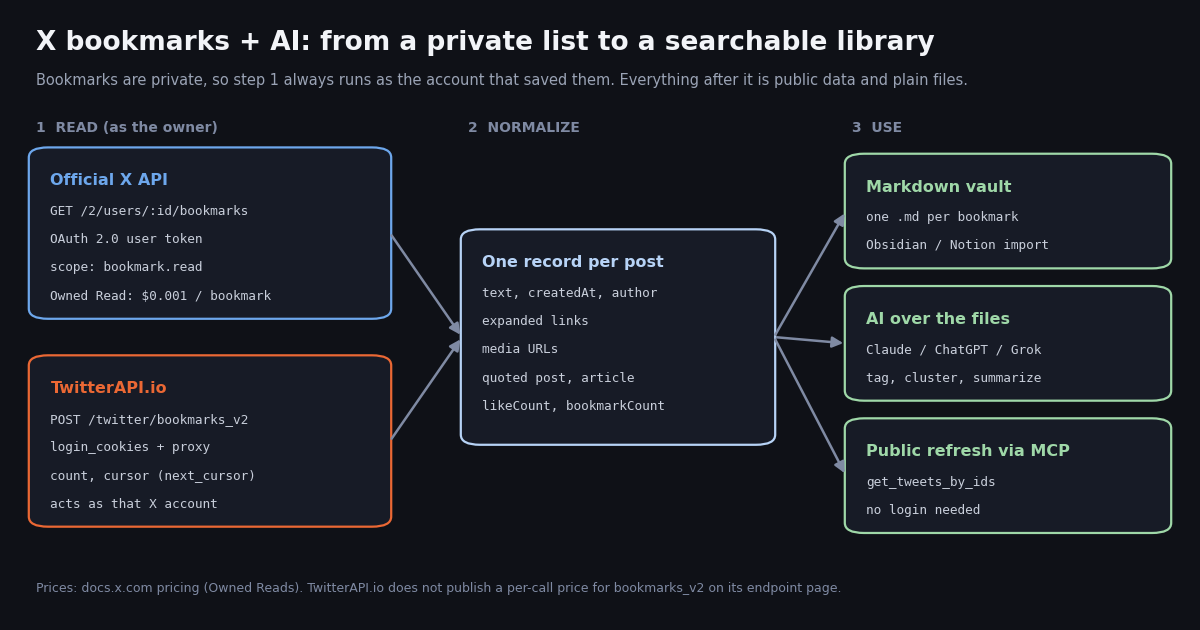
This page is about getting the posts you saved with X's Bookmark button into an AI-searchable library. It is not about browser bookmarklets: our twitter bookmarklet guide covers JavaScript snippets you save in your browser's bookmarks bar to act on x.com pages. Here, "bookmarks" means X's own private saved-posts list, and the question is how to read it as data, what that costs on the official X API, and how to hand it to Claude, ChatGPT, Grok, Obsidian or Notion.
The topic moved fast in 2026. xAI's August 29, 2026 announcement says Grok Bot can connect your X account and creates an X developer account for you if you don't have one, and its X plugin lists "manage lists and bookmarks" among its abilities. On X itself, the phrase "x bookmarks" / "twitter bookmarks" ran at about 101.7 English posts a day in our sample, and 23.4% of the bookmark posts we collected were someone building or launching a bookmark tool.
Below: the two documented ways to read bookmarks (and what each requires), a cost table built from docs.x.com's rate card, a runnable script that writes one Markdown file per bookmark, and a small study of which saved posts need more than their text captured.
Why bookmarks are the hard part: they are private
Most X data is public: a timeline, a search result, a reply thread. Bookmarks are not. docs.x.com puts it plainly on the Bookmarks overview: bookmarks are private and only visible to the user who created them. No public endpoint, scraper or MCP tool can list someone else's bookmarks, and nothing should.
That shapes every "x bookmarks ai" setup. Step 1 must run as the owner of the bookmarks. After that, everything is ordinary data: the bookmarked posts are usually public posts, so their text, links and counters can be refreshed later without the owner's credentials, and the AI step only needs files.
Route 1: the official X API bookmarks endpoint (and Owned Reads)
X documents five bookmark endpoints under docs.x.com/x-api/posts/bookmarks/introduction: GET /2/users/:id/bookmarks (list), POST /2/users/:id/bookmarks (add), DELETE /2/users/:id/bookmarks/:tweet_id (remove), and two folder endpoints, GET /2/users/:id/bookmarks/folders and GET /2/users/:id/bookmarks/folders/:folder_id. The prerequisites listed are a developer account, a Project and App in the Developer Console, and user access tokens via OAuth 2.0 PKCE or 3-legged OAuth.
The API reference for the list call shows max_results from 1 to 100 per page and a pagination_token, and the OAuth 2.0 scopes tweet.read, bookmark.read and users.read. An app-only Bearer token is not enough: the call is always made on behalf of the user.
Pricing. The pay-per-usage rate card at docs.x.com/x-api/getting-started/pricing has an Owned Reads section: requests made by your own developer app for your own data, including GET /2/users/{id}/bookmarks, are priced at $0.001 per resource (1,000 resources for $1). The condition is explicit: {id} must match the authenticated user and that user must own the developer app. The same page lists Posts: Read at $0.005 per resource, a write called Bookmark at $0.005 per request, a cap of 3 million Post reads per monthly billing cycle on pay-per-usage, and 24-hour UTC deduplication (reading the same post twice in a UTC day is charged once).
What that means for one person. If you create your own developer app and read your own bookmarks, a 1,000-bookmark export is $1 at the Owned Read rate. If the bookmarks are read by an app you do not own (a third-party bookmark manager, an agent platform's shared app), the Owned Read condition is not met and the posts are billed like other post reads; check the usage view in the Developer Console rather than assuming a rate. New X API accounts get $20 in credits on the first saved card and credit purchase, plus a match of the first auto-recharge up to $50, per the same page.
Route 2: TwitterAPI.io bookmarks_v2 for an account you log in with
TwitterAPI.io documents POST /twitter/bookmarks_v2 (docs.twitterapi.io, Get Bookmarks): it returns the bookmarks of a logged-in X account, in the same tweet format as the other tweet endpoints, with cursor pagination. The request body takes login_cookies and proxy (both required), plus optional count (default 20) and cursor. The response carries tweets[], has_next_page and next_cursor.
login_cookies comes from POST /twitter/user_login_v2 (body: user_name, email, password, proxy, optional totp_secret), which docs.twitterapi.io prices at 10,000 credits per login ($0.10). The endpoint page for bookmarks_v2 does not publish a per-call price, so we do not quote one here; check your balance in the dashboard after a test page.
What you are signing up for. This route is an authenticated session: the requests act as that X account, so X can rate-limit, lock or suspend it if the pattern looks automated. Keep a human pace (the script below sleeps between pages), use a proxy you control, expect that the session can need a fresh login, and remember billing is per HTTP 200 call. Use it only for an account that is yours.
Where it fits. It skips the developer-app and OAuth setup, and the posts come back with the same fields as every other TwitterAPI.io tweet endpoint (text, createdAt, author, entities.urls, extendedEntities.media, quoted_tweet, article, likeCount, bookmarkCount, viewCount), so one parser handles bookmarks, searches and timelines.
What it costs: 500, 1,000 and 5,000 bookmarks
The table uses only published rates. X API prices are from docs.x.com's pay-per-usage page; the refresh column is TwitterAPI.io's tweet rate (15 credits per tweet returned, $0.15 per 1,000 tweets) for GET /twitter/tweets, which looks up public posts by ID, 50 IDs per request.
How to read it. The first two columns are the cost of pulling the private list from X once. The Owned Read column applies only to your own app reading your own data. The third column is not a bookmark read: it is what a weekly refresh of posts you have already exported costs (updated counters, deleted posts dropping out), since a post ID is public and needs no login. Per 1,000 posts, that is $0.15 against X's $5 Posts: Read rate, about 33 times less on the post-read line of the two rate cards.
The cheap path for most people. Read the list once as the owner (Owned Read if you have your own app, or bookmarks_v2 with your own session), store the IDs, and do every later refresh and enrichment from public data. More rates: the pricing page and our X API cost breakdown.
The export script: one Markdown file per bookmark
The script below writes one .md file per post with YAML-style frontmatter (id, url, author, created, likes, bookmarks, views, hashtags, expanded links), the post text, the X Article title and preview if there is one, the quoted post as a blockquote, and media URLs as image embeds. Obsidian reads the folder as a vault as-is; Notion imports Markdown files as pages.
It has two documented inputs. MODE=bookmarks pages through POST /twitter/bookmarks_v2 with your login_cookies and proxy, following next_cursor until has_next_page is false, with a 3-second pause between pages. MODE=ids reads ids.txt (one post ID per line, for example IDs you saved from the official API) and refreshes them through GET /twitter/tweets in batches of 50, matching results by id because deleted, private or suspended posts are not returned.
Why frontmatter matters for AI. A model that sees author, links and bookmarks as fields can filter before it reads ("only posts with a GitHub link", "only posts saved by more than 1,000 people"), which keeps prompts small and answers grounded in the file it cites.
"""bookmarks_to_markdown.py - turn X (Twitter) bookmarks into one Markdown file per post,
ready for an Obsidian vault, a Notion import, or an AI assistant that reads a folder.
Two documented inputs:
MODE=bookmarks reads the logged-in account's bookmarks with POST /twitter/bookmarks_v2
(needs login_cookies from /twitter/user_login_v2 and a proxy you supply;
the call acts as that X account, so keep a human pace)
MODE=ids refreshes a list of post IDs you already have (ids.txt, one per line)
with GET /twitter/tweets, 50 IDs per request, public data only
pip install requests
export TWITTERAPI_IO_API_KEY=... # twitterapi.io dashboard
export MODE=ids # or: bookmarks
export LOGIN_COOKIES=... PROXY=http://user:pass@host:port # MODE=bookmarks only
python bookmarks_to_markdown.py
"""
import json
import os
import re
import time
from pathlib import Path
import requests
BASE = "https://api.twitterapi.io"
HEADERS = {"X-API-Key": os.environ["TWITTERAPI_IO_API_KEY"]}
OUT = Path(os.environ.get("OUT_DIR", "x-bookmarks"))
OUT.mkdir(exist_ok=True)
def fetch_bookmarks(max_pages=50):
"""Yield bookmarked posts, newest first, following next_cursor."""
body = {"login_cookies": os.environ["LOGIN_COOKIES"], "proxy": os.environ["PROXY"], "count": 20}
for _ in range(max_pages):
r = requests.post(f"{BASE}/twitter/bookmarks_v2", headers=HEADERS, json=body, timeout=60)
r.raise_for_status()
data = r.json()
if data.get("status") == "error":
raise SystemExit(f"bookmarks_v2 error: {data.get('msg') or data.get('message')}")
yield from data.get("tweets", [])
if not data.get("has_next_page") or not data.get("next_cursor"):
return
body["cursor"] = data["next_cursor"]
time.sleep(3) # human pace: this request runs as your X account
def fetch_by_ids(path="ids.txt"):
"""Yield public posts for IDs you already have, 50 per request."""
ids = [line.strip() for line in open(path) if line.strip().isdigit()]
for i in range(0, len(ids), 50):
chunk = ids[i:i + 50]
r = requests.get(f"{BASE}/twitter/tweets", headers=HEADERS,
params={"tweet_ids": ",".join(chunk)}, timeout=60)
r.raise_for_status()
found = {t.get("id"): t for t in r.json().get("tweets", []) if t.get("id")}
missing = [x for x in chunk if x not in found]
if missing:
print(f"not returned (deleted, private or suspended): {len(missing)}")
yield from found.values()
def slugify(text, n=60):
s = re.sub(r"[^a-zA-Z0-9]+", "-", text).strip("-").lower()
return s[:n] or "post"
def to_markdown(t):
a = t.get("author") or {}
links = [u.get("expanded_url") for u in (t.get("entities") or {}).get("urls", []) if u.get("expanded_url")]
media = [m.get("media_url_https") for m in (t.get("extendedEntities") or {}).get("media", [])]
tags = [h.get("text") for h in (t.get("entities") or {}).get("hashtags", []) if h.get("text")]
front = {
"id": t.get("id"), "url": t.get("url"), "author": a.get("userName"),
"created": t.get("createdAt"), "likes": t.get("likeCount"),
"bookmarks": t.get("bookmarkCount"), "views": t.get("viewCount"),
"tags": tags, "links": links,
}
lines = ["---"] + [f"{k}: {json.dumps(v, ensure_ascii=False)}" for k, v in front.items()] + ["---", ""]
lines += [t.get("text") or "", ""]
art = t.get("article")
if art:
lines += [f"## Article: {art.get('title', '')}", "", art.get("preview_text", ""), ""]
q = t.get("quoted_tweet")
if q:
qa = (q.get("author") or {}).get("userName")
lines += [f"> Quoting @{qa}: " + (q.get("text") or "").replace("\n", "\n> "), ""]
lines += [f"" for m in media if m]
return "\n".join(lines) + "\n"
def main():
mode = os.environ.get("MODE", "ids")
posts = fetch_bookmarks() if mode == "bookmarks" else fetch_by_ids()
n = 0
for t in posts:
name = f"{t.get('id')}-{slugify((t.get('text') or '')[:80])}.md"
(OUT / name).write_text(to_markdown(t), encoding="utf-8")
n += 1
print(f"wrote {n} Markdown files to {OUT}/")
if __name__ == "__main__":
main()
Adding the AI: Claude, ChatGPT, Grok and MCP
With a folder of Markdown files, the AI step is ordinary file work. Claude Code, Claude Desktop with a filesystem connector, ChatGPT with file uploads, or a local model can all read the folder. Prompts that work well on bookmark libraries are narrow: "group these into at most 12 topics and write a one-line summary per topic", "list every post that links to a GitHub repo, with the repo name", "which of these are tutorials I have not acted on". Write the model's tags back into the frontmatter so the next run starts from them.
Grok Bot. xAI's announcement (x.ai/news/grok-bot-and-x, August 29, 2026) says connecting your X account in Grok Bot creates an X developer account if you have none, that paid Grok Bot users get free X API credits to start, and that an X plugin can "search posts, read timelines, pull trends, and manage bookmarks". That is Route 1 run for you: it goes through the X API and your X API credits. xAI does not publish which rate line those bookmark reads land on, so watch your usage in the X Developer Console.
MCP. Our hosted MCP server at mcp.twitterapi.io/mcp describes itself in its initialize reply as read-only access to Twitter/X data via 12 tools, with your twitterapi.io API key pasted as the Bearer token. The tools are search_tweets, get_user_info, get_user_about, get_user_followers, get_user_followings, get_user_last_tweets, get_user_mentions, get_tweets_by_ids, get_tweet_replies, get_tweet_quotes, get_tweet_retweeters and get_trends. None of them reads bookmarks. What it does well in this setup: Claude can call get_tweets_by_ids on IDs from your export to refresh a post, get_tweet_replies to pull the discussion under a saved thread, or get_user_last_tweets to see what a bookmarked author posted since.
Which saved posts need more than their text
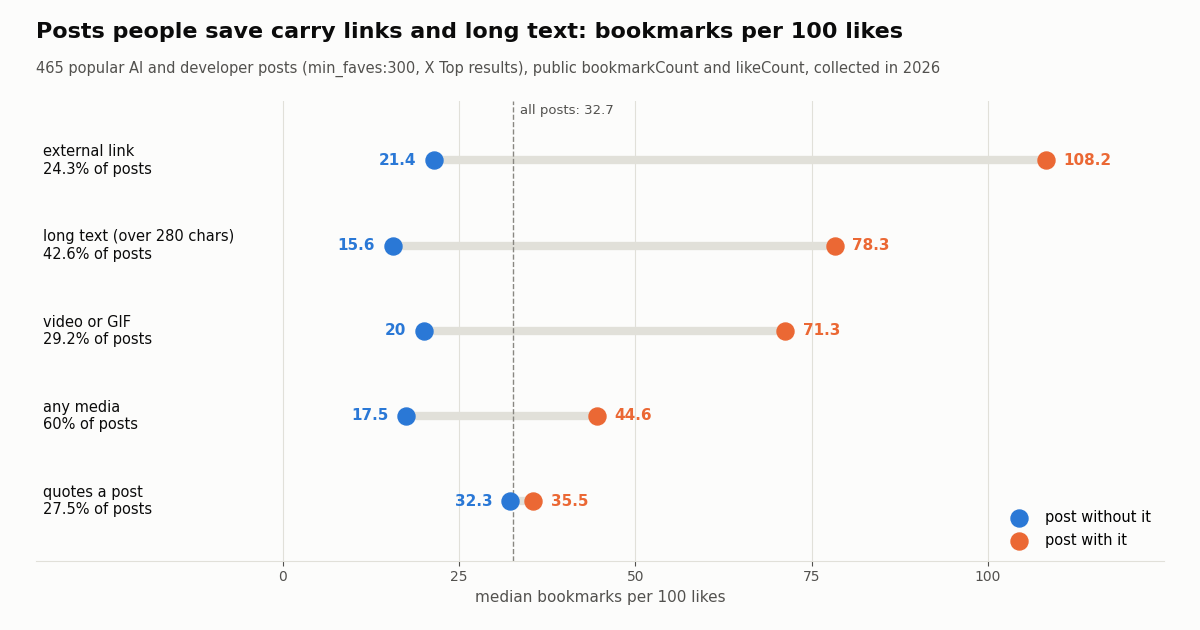
An export that keeps only text loses most of what made a post worth saving. We looked at 465 popular AI and developer posts (X Top results for two topic searches with min_faves:300, collected in 2026) and compared the public bookmarkCount to likeCount. Across all of them the median was 32.7 bookmarks per 100 likes, and 25.8% of posts had more bookmarks than likes.
The takeaway for an exporter. Links and long text are what people save: a post with an external link drew about five times the bookmarks per like of one without. In the top tenth of posts by bookmark-to-like ratio (46 posts, median 194 bookmarks per 100 likes), 43.5% carried an external link and 58.7% ran past 280 characters. Overall 84.9% of the posts had a link, media, a quoted post, an X Article or long text, which is why the script stores entities.urls[].expanded_url, extendedEntities.media[], quoted_tweet and article alongside the text.
X Articles were rare in this sample (7 posts) but saved heavily (median 132.2 per 100 likes); with so few posts, treat that as a hint, not a measurement.
What people actually ask for when they talk about X bookmarks
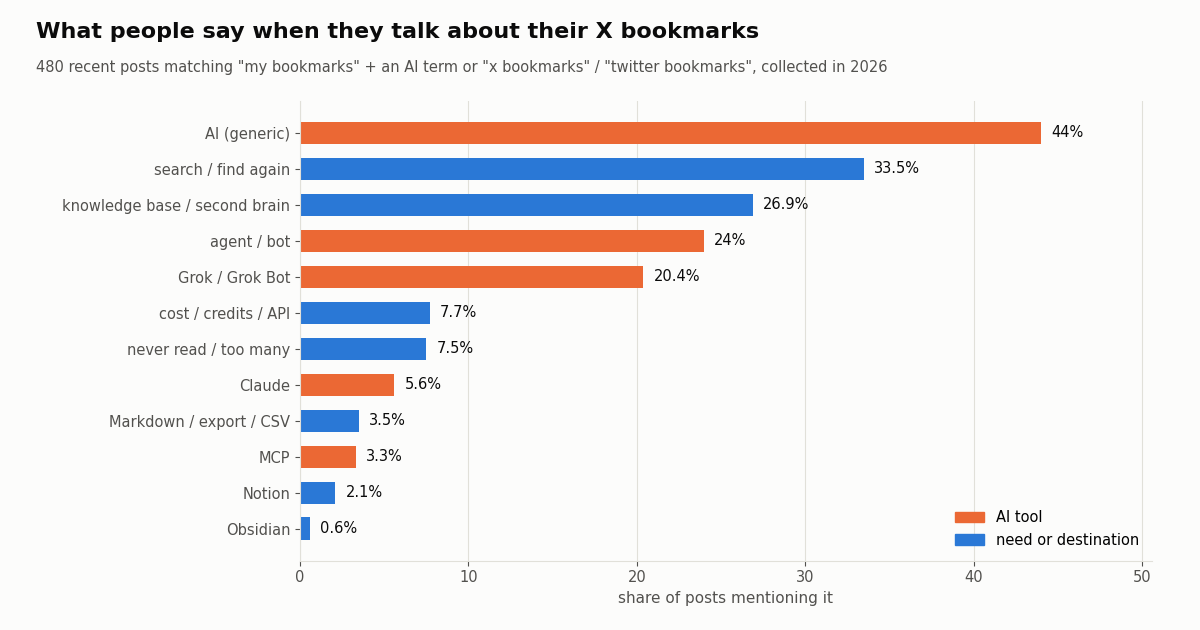
We also read recent public posts about bookmarks: 704 unique posts from three searches (bookmarks with Notion, Obsidian, Readwise or Markdown; "my bookmarks" with an AI term; and "x bookmarks" / "twitter bookmarks"). To avoid counting what a query already filters on, the shares below use only the two searches that do not name a destination (480 posts). One of those two searches requires an AI term, so the AI shares run high by construction.
Reading it. The need is retrieval: a third of the posts are about finding something again, and a quarter describe a knowledge base or second brain, while named destinations are rare (Notion 2.1%, Obsidian 0.6%). Grok shows up in 20.4% of posts, in line with the Grok Bot X plugin being new. Posts that state a bookmark count put the median at about 1,030 bookmarks (34 posts), which is exactly the size where scrolling stops working and search starts to matter. Across all 704 posts, 23.4% were someone building or launching a bookmark tool, so expect a crowded app market; a plain Markdown export keeps your data portable across all of them.
How we collected this
Question. What do people want when they put AI on their X bookmarks, and which saved posts carry more than text that an export has to keep?
Queries. Part A (talk): three advanced_search queries with queryType=Latest: bookmarks with Notion, Obsidian, Readwise or Markdown; "my bookmarks" with Grok, Claude, ChatGPT, GPT, AI, MCP or agent; "x bookmarks" or "twitter bookmarks"; English, no reposts. Part B (saved posts): two queryType=Top queries on AI and developer terms with min_faves:300, English, no reposts or replies.
Window and sample. The most recent matching posts at collection time for Part A (the narrower searches reached back several months, the broad one about two days) and X's Top ranking for Part B, collected in 2026. 1,200 posts returned in 60 requests to /twitter/tweet/advanced_search (about $0.18 at $0.15 per 1,000 tweets); 704 unique posts in Part A and 465 with at least one like in Part B.
Method. Keyword matching on post text for Part A (case-insensitive word patterns, listed in the study's analyze.py); public bookmarkCount, likeCount, entities.urls, extendedEntities.media, quoted_tweet and article fields for Part B. A link counts as external when it does not point to x.com or twitter.com.
What it cannot show. We read no one's bookmarks: no endpoint that needs login cookies was called. bookmarkCount is a public total, not who saved a post or why. Top results favor already-popular posts, keyword matching misses paraphrases, and "building or launching" includes some posts that are not about a bookmark product.
Privacy. Aggregates only. All queries are topic searches, so authors are private individuals: raw pages were kept out of the repository, the committed sample has no IDs, URLs, text or handles, and no person or product from the sample is named.
"""bookmarks_to_markdown.py - turn X (Twitter) bookmarks into one Markdown file per post,
ready for an Obsidian vault, a Notion import, or an AI assistant that reads a folder.
Two documented inputs:
MODE=bookmarks reads the logged-in account's bookmarks with POST /twitter/bookmarks_v2
(needs login_cookies from /twitter/user_login_v2 and a proxy you supply;
the call acts as that X account, so keep a human pace)
MODE=ids refreshes a list of post IDs you already have (ids.txt, one per line)
with GET /twitter/tweets, 50 IDs per request, public data only
pip install requests
export TWITTERAPI_IO_API_KEY=... # twitterapi.io dashboard
export MODE=ids # or: bookmarks
export LOGIN_COOKIES=... PROXY=http://user:pass@host:port # MODE=bookmarks only
python bookmarks_to_markdown.py
"""
import json
import os
import re
import time
from pathlib import Path
import requests
BASE = "https://api.twitterapi.io"
HEADERS = {"X-API-Key": os.environ["TWITTERAPI_IO_API_KEY"]}
OUT = Path(os.environ.get("OUT_DIR", "x-bookmarks"))
OUT.mkdir(exist_ok=True)
def fetch_bookmarks(max_pages=50):
"""Yield bookmarked posts, newest first, following next_cursor."""
body = {"login_cookies": os.environ["LOGIN_COOKIES"], "proxy": os.environ["PROXY"], "count": 20}
for _ in range(max_pages):
r = requests.post(f"{BASE}/twitter/bookmarks_v2", headers=HEADERS, json=body, timeout=60)
r.raise_for_status()
data = r.json()
if data.get("status") == "error":
raise SystemExit(f"bookmarks_v2 error: {data.get('msg') or data.get('message')}")
yield from data.get("tweets", [])
if not data.get("has_next_page") or not data.get("next_cursor"):
return
body["cursor"] = data["next_cursor"]
time.sleep(3) # human pace: this request runs as your X account
def fetch_by_ids(path="ids.txt"):
"""Yield public posts for IDs you already have, 50 per request."""
ids = [line.strip() for line in open(path) if line.strip().isdigit()]
for i in range(0, len(ids), 50):
chunk = ids[i:i + 50]
r = requests.get(f"{BASE}/twitter/tweets", headers=HEADERS,
params={"tweet_ids": ",".join(chunk)}, timeout=60)
r.raise_for_status()
found = {t.get("id"): t for t in r.json().get("tweets", []) if t.get("id")}
missing = [x for x in chunk if x not in found]
if missing:
print(f"not returned (deleted, private or suspended): {len(missing)}")
yield from found.values()
def slugify(text, n=60):
s = re.sub(r"[^a-zA-Z0-9]+", "-", text).strip("-").lower()
return s[:n] or "post"
def to_markdown(t):
a = t.get("author") or {}
links = [u.get("expanded_url") for u in (t.get("entities") or {}).get("urls", []) if u.get("expanded_url")]
media = [m.get("media_url_https") for m in (t.get("extendedEntities") or {}).get("media", [])]
tags = [h.get("text") for h in (t.get("entities") or {}).get("hashtags", []) if h.get("text")]
front = {
"id": t.get("id"), "url": t.get("url"), "author": a.get("userName"),
"created": t.get("createdAt"), "likes": t.get("likeCount"),
"bookmarks": t.get("bookmarkCount"), "views": t.get("viewCount"),
"tags": tags, "links": links,
}
lines = ["---"] + [f"{k}: {json.dumps(v, ensure_ascii=False)}" for k, v in front.items()] + ["---", ""]
lines += [t.get("text") or "", ""]
art = t.get("article")
if art:
lines += [f"## Article: {art.get('title', '')}", "", art.get("preview_text", ""), ""]
q = t.get("quoted_tweet")
if q:
qa = (q.get("author") or {}).get("userName")
lines += [f"> Quoting @{qa}: " + (q.get("text") or "").replace("\n", "\n> "), ""]
lines += [f"" for m in media if m]
return "\n".join(lines) + "\n"
def main():
mode = os.environ.get("MODE", "ids")
posts = fetch_bookmarks() if mode == "bookmarks" else fetch_by_ids()
n = 0
for t in posts:
name = f"{t.get('id')}-{slugify((t.get('text') or '')[:80])}.md"
(OUT / name).write_text(to_markdown(t), encoding="utf-8")
n += 1
print(f"wrote {n} Markdown files to {OUT}/")
if __name__ == "__main__":
main()
Questions readers ask
Can AI read my X bookmarks?
Only through something that is authorized as you, because X bookmarks are private to the account that saved them. Options are the official X API (GET /2/users/:id/bookmarks with an OAuth 2.0 user token and the bookmark.read scope), Grok Bot's X plugin, which runs through the X API and your X API credits, or TwitterAPI.io's POST /twitter/bookmarks_v2 with a session you log in with. Once exported, any model can read the files.
How much does it cost to read X bookmarks with the X API?
docs.x.com lists bookmarks under Owned Reads at $0.001 per bookmark (1,000 for $1) when the authenticated user owns the developer app making the call. Posts read outside that condition fall under the general Posts: Read line at $0.005 per post. Reads are deduplicated within a 24-hour UTC window.
Can I export Twitter bookmarks to Notion or Obsidian?
Yes. Export each bookmark to a Markdown file with frontmatter (the script on this page does that). An Obsidian vault is just a folder of Markdown files, so it opens as-is; Notion imports Markdown files as pages. Keep the post ID in the frontmatter so you can refresh the post later.
Does the TwitterAPI.io MCP server read bookmarks?
No. Its initialize reply describes read-only access via 12 tools, and none of them lists bookmarks. It is useful after the export: get_tweets_by_ids refreshes saved posts and get_tweet_replies pulls the discussion under them, with your twitterapi.io API key as the Bearer token.
Is bookmarks_v2 safe to use on my account?
It runs as your X account through a logged-in session and a proxy you supply, so X can rate-limit, lock or suspend the account if the activity looks automated. Use it only on your own account, keep a human pace between pages, expect to log in again occasionally, and note that every HTTP 200 call is billed.
Can Grok Bot organize my bookmarks?
xAI's August 29, 2026 announcement says Grok Bot can connect your X account and that its X plugin can manage bookmarks; the connection uses an X developer account and X API credits, and paid Grok Bot users get free credits to start. xAI does not publish how bookmark reads are billed in that setup, so check the usage view in the X Developer Console.
What is the difference between X bookmarks and a Twitter bookmarklet?
X bookmarks are posts you saved inside X with the Bookmark button. A bookmarklet is a JavaScript snippet saved in your browser's bookmarks bar that runs on the page you are viewing. This page covers the first; the bookmarklet guide covers the second.
Which fields should a bookmark export keep?
At least the post ID, URL, author, created time, text, expanded links, media URLs, the quoted post and any X Article title. In our sample of 465 popular posts collected in 2026, 84.9% carried a link, media, a quote, an Article or long text, and posts with links were saved about five times more per like.
Continue
- X API pay-per-usage pricing and Owned Reads (docs.x.com)
- X API Bookmarks endpoints overview (docs.x.com)
- X API reference: Get Users Bookmarks (docs.x.com)
- TwitterAPI.io Get Bookmarks, bookmarks_v2 (docs.twitterapi.io)
- TwitterAPI.io Log in, user_login_v2 (docs.twitterapi.io)
- Grok Bot now works with X (xAI)
- X API guide hub: endpoints, auth and pricing
- Twitter (X) bookmarklets: browser scripts for x.com
- Grok Bot and the X API: what it reads and what it costs
- How to use Claude with the Twitter (X) API
- TwitterAPI.io MCP server setup for Claude and other clients
- X API cost breakdown by endpoint
- Connecting ChatGPT to X data over MCP
- TwitterAPI.io pricing and credits
- 01X API 403 Forbidden: Every Cause on the Twitter (X) API and How to Fix Each One
- 02How to Use ZCode with the Twitter (X) API: MCP Server and Skills Setup
- 03Pi Coding Agent + Twitter (X): Add Live X Search to Pi
- 04DeepSeek Harness and Twitter (X): Add an X MCP Server, Skill or Plugin to dsh
- 05Custom GPT retirement: what migrates, and how to rebuild a Twitter (X) Action as an MCP connector
- 06How to Build an AI Twitter (X) Bot with an LLM in 2026
- 07Personal AI Agents Compared: Grok Bot, OpenAI Dots, Meta Muse and Claude Duet, and Which One Can Read Twitter (X)
- 08How to Use the Vercel AI SDK with the Twitter (X) API
Stop reading. Start building.
Starter credits cover real testing on real data. Google sign-in, no card, no application queue.
Get an API keyAlready building with TwitterAPI.io? Publish an honest tutorial or build log about it and earn up to $200 a month in API credits.