How to See Comments (Replies) on X, Including the Ones It Hides
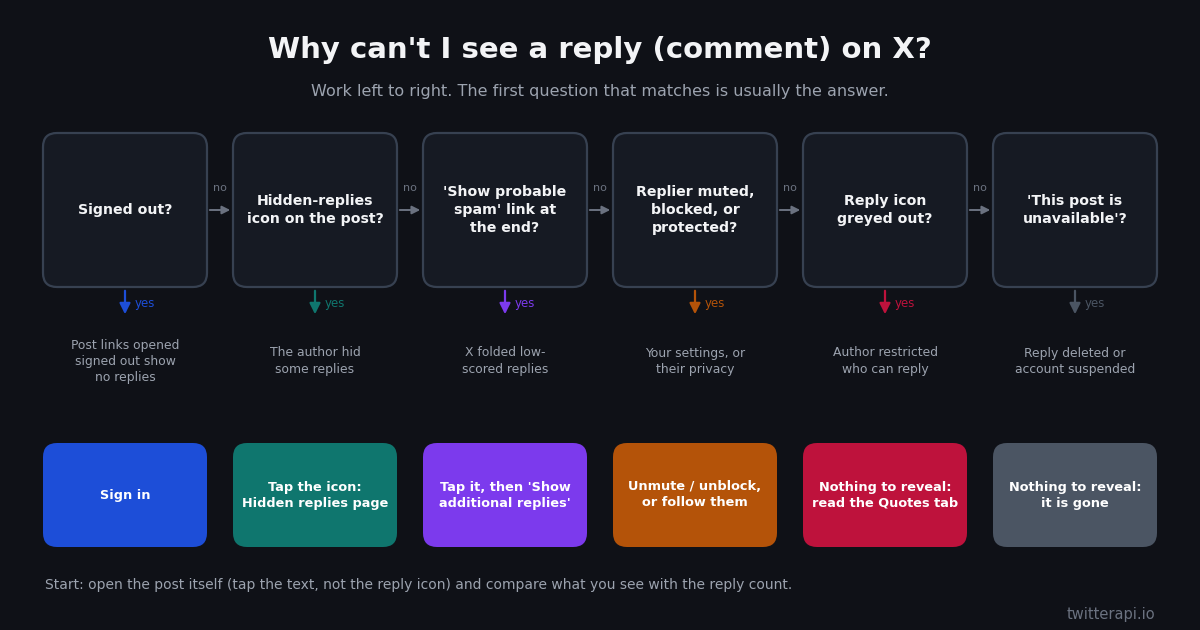
The word "comment" does not exist in X's interface, which is the first reason this question gets searched so often. X calls them replies, and the only place you can read all of them is the conversation view that opens when you tap a post. The second reason is more frustrating: you open the post, the counter says 83 replies, and you can count 20 on the screen. The replies are not gone. X stacks several filters between the raw count and what you see, and each one has its own way of being opened.
This page is written for a regular X user with that exact problem. It starts with where replies live in the app and on the web, then works through every reason a reply can be missing, in the order you are likely to hit them, with the tap or setting that fixes each. It ends with reply sorting, finding your own replies, and a short section for developers who need the complete reply list rather than the version X decides to show.
Scope note: this is about reading replies on X. If the whole site is stuck loading, start with the page on X not loading linked below, because no reply setting fixes a dead connection. And if you cannot see replies from one specific person anywhere, the page on who blocked you is the next stop.
Comments on X are replies: where they live in the app and on the web
X has no comment section. What every other platform calls comments, X calls replies, and they are only shown in full inside the conversation view of a single post, never in the timeline. In the timeline you may see one reply folded under a post, usually from someone you follow; the rest are behind a tap. Here is how to get there on each surface.
In the X app (iPhone and Android): tap the post text or the empty area of the post. Do not tap the speech-bubble icon in the row of icons under the post; that opens a box to write your own reply. The post expands to fill the screen and the replies load underneath it. Pull down to refresh if the list looks short.
On x.com in a browser: click anywhere on the post text, or open the post's own URL (the one ending in /status/<number>). The post opens in the centre column with the replies underneath. Replies to replies are indented and some are collapsed behind a Show replies link inside the thread.
From a notification: tap the notification that says someone replied to you. It opens the conversation at that reply, with the original post above it. To see the other replies, scroll up to the original post and tap it again.
Signed out? Opening a post link without being signed in shows the post itself but not its replies. X added that limit in 2023 and, as of our checks in 2026, it still applies, so a sign-in prompt where the replies should be is expected rather than a bug (reported at the time by Engadget and MobileSyrup; see sources).
Why you see fewer replies than the reply count
The number next to the reply icon is counted on X's side across every reply the post ever received that still exists. The list you see is that set with several filters applied, some chosen by the author, some by X, and some by you. That is why the count and the visible list almost never match on a busy post. X's own help page on replies not showing up adds one more cause: on posts with an overwhelming volume of replies, X says it is unable to show all of them at all, and the author may only find a given reply in their Notifications (help.x.com, verified 2026).
Here are the filters, roughly in the order they catch people. Each one is expanded in its own section below.
The author hid it. Post authors can hide individual replies. A hidden reply leaves the main conversation and moves to a separate page behind a hidden-replies icon on the original post (help.x.com, verified 2026).
X filtered it. Replies X scores as low quality or likely spam are collapsed behind a Show probable spam link at the end of the conversation, with a second Show additional replies, including those that may contain offensive content link for the lowest-scored ones. Third-party coverage in 2024 reported that this label replaced the older Show more replies wording and that legitimate replies land there often enough to be worth checking.
You muted or blocked the replier. In a conversation, replies from muted accounts you don't follow are hidden, while replies from muted accounts you do follow stay visible (help.x.com). Replies from an account you blocked are hidden behind a prompt that lets you choose to view them. Muted words go further than many people expect: X says muting removes matching posts from your Notifications tab, Home timeline, and from replies to posts (help.x.com), so a muted word can hide a reply inside the conversation too.
The replier has a protected account. Replies from an account with protected posts are visible only to that account's approved followers (help.x.com, verified 2026). To everyone else the reply does not appear, although it still counts.
The author restricted who can reply. A post set to Accounts you follow, Only accounts you mention, or Only verified accounts simply has no replies from anyone outside that set (help.x.com, verified 2026). The reply icon is greyed out for you when you are not allowed to reply.
The reply was deleted, or the replier is suspended. A deleted reply disappears but may still be referenced by replies to it, which then show This post is unavailable where the parent used to be.
Your sensitive-content setting. Replies carrying media that X labels as sensitive are covered until you tap through or switch on Display media that may contain sensitive content under Privacy and safety, Content you see (setting name as widely reported). This hides the media, not the reply text, but it makes threads look emptier than they are.
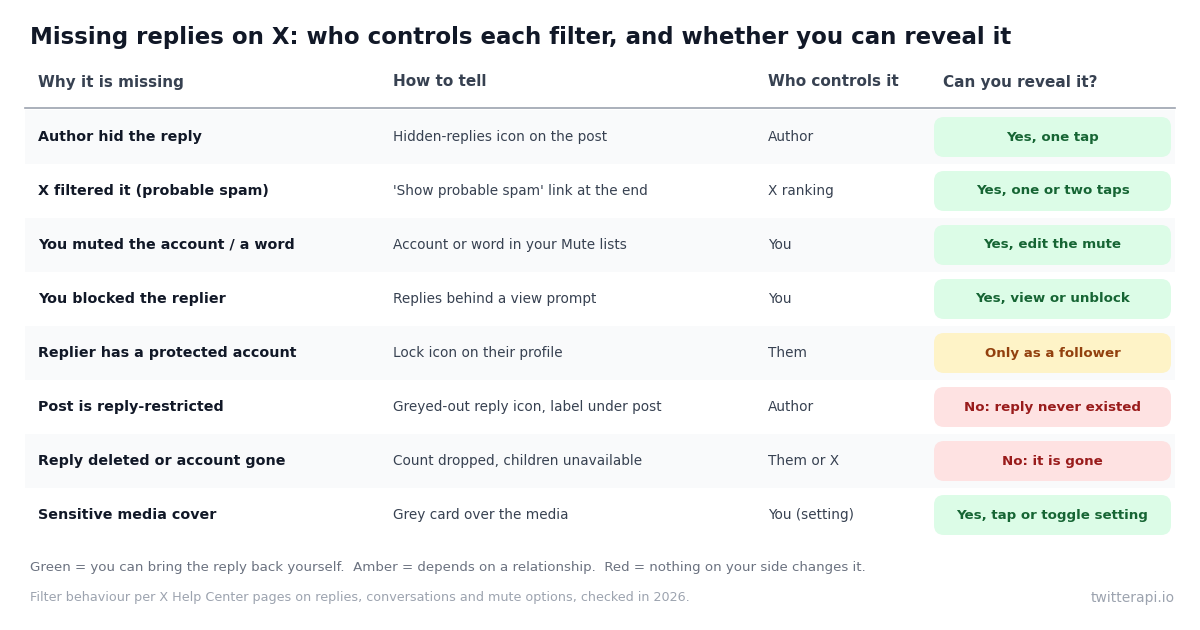
Reason, how to tell, fix: the full table
Use this table when a specific reply or a chunk of the conversation is missing. The middle column is the tell you can check in a few seconds; the last column is the only thing that will bring the reply back, if anything can.
Two of these deserve a second look because they are easy to misread. Blocks work differently in each direction since late 2024: if you blocked someone, their replies are hidden behind a prompt you can open; if a public account blocked you, you can still read its posts and replies but cannot engage with them, so a block on their side rarely explains a missing reply (help.x.com). And a very busy post can look reply-restricted when it is not: check for the restriction label under the post before assuming anything.
How to see hidden replies the author hid
X lets the author of a post hide any reply to it. The hidden reply is not deleted and the replier is not told; it simply moves out of the main conversation into a hidden-replies page that anyone can open (help.x.com, verified 2026). This is the feature people mean when they say a post "has hidden comments".
Step 1: open the original post. Hidden replies are only reachable from the post that received them, not from the timeline or from a reply to a reply.
Step 2: look for the hidden-replies icon. X's help page describes it as an icon in the bottom right of the original post. If the post has no hidden replies, the icon is not shown at all, so no icon means there is nothing to reveal.
Step 3: tap the icon. A page titled Hidden replies opens with every reply the author hid, in a list you can read and reply to like any other.
Step 4: on the web, check the More menu too. Older client versions put View hidden replies inside the three-dot menu at the top right of the post. If you see no icon but the menu has that entry, use it.
There are two limits worth knowing. Hidden replies from a protected account do not appear on the hidden-replies page for anyone but that account's followers, and if the author hid a reply and the replier then blocked or muted the author, the author can no longer view or unhide it (help.x.com, verified 2026). From the reader's side, that means a hidden-replies page can also be shorter than the number of replies the author hid.
If you are the author and want the opposite, hiding a reply takes two taps: open the More menu on the reply, choose Hide reply, and confirm. Unhiding is the same menu from the hidden-replies page.
Show probable spam, Show additional replies, and the sensitive-content setting
Separately from anything the author does, X runs its own ranking over every conversation and collapses the replies it scores lowest. On a long conversation you will find them in up to two layers at the very end of the reply list.
Layer 1: Show probable spam. Scroll to the bottom of the replies and look for a grey Show probable spam link. Tapping it loads the replies X scored as likely spam or low quality. Coverage of the change in 2024 reported that this wording replaced the earlier Show more replies label, and that long, on-topic replies from accounts the author disagrees with sometimes land here, so it is worth a tap whenever a conversation feels one-sided.
Layer 2: Show additional replies, including those that may contain offensive content. On some posts a second link appears under the first batch. It holds the replies scored lowest of all, typically graphic media or abuse, but again not exclusively. Tap it if you are looking for a specific reply you know was posted and it is not in layer 1.
There is no setting that turns these layers off. Guides sometimes point to a "quality filter" toggle, but that switch lives under Notifications settings and controls what reaches your notifications tab, not the conversation view. The only way to see the folded replies in a conversation is the two links above.
Sensitive-content covers are different. A reply whose media X labels as potentially sensitive stays in the list but shows a grey card over the media. To stop seeing the cards, sign in on x.com in a browser, open Settings and privacy, then Privacy and safety, then Content you see, and switch on Display media that may contain sensitive content. It is widely reported that X only offers the toggle to accounts whose birth date shows an adult, and age-verification rules vary by country. On iPhone the setting has historically been easier to change on the web than inside the app.
A practical order when a reply you know exists is missing: tap Show probable spam, tap Show additional replies if it appears, then check for the hidden-replies icon on the original post. Those three taps cover the two filters that are not caused by your own settings.
Muted words, muted accounts, blocks, and reply-restricted posts
The remaining filters are the ones you or the author set. They produce gaps that look random until you know where to check.
Muted accounts. Muting is silent; the muted account does not know and nothing on their replies says they are muted. Check your list under Settings and privacy, Privacy and safety, Muted, Muted accounts (help.x.com). In conversations, X hides replies from muted accounts you don't follow and keeps showing replies from muted accounts you do follow; opening the person's profile directly still shows their replies.
Muted words. The same Muted screen has Muted words, each with a duration of forever, 24 hours, 7 days or 30 days (help.x.com). X says muted words remove matching posts from your Notifications tab, your Home timeline, and replies to posts, so a muted word can hide a reply inside the conversation; temporarily removing the word is the quickest way to confirm.
Blocked accounts. If you blocked someone, their replies are hidden behind a prompt in conversations, and you can choose to view them or unblock. If a public account blocked you, X has let you see its posts and replies since late 2024; you just cannot like, reply or repost, and its profile shows that you are blocked (help.x.com). Only if that account is also protected will its replies stay out of view.
Reply-restricted posts. When writing a post, the author chooses who can reply: Everyone, Accounts you follow, Only accounts you mention, or Only verified accounts, and can change it afterwards through the post's More menu and Change who can reply (help.x.com, verified 2026). The post shows a small label under it describing the restriction, and the reply icon is greyed out for anyone outside the allowed group. There are no missing replies here, only replies that could never be written; quote posts are the usual workaround, and they are listed under the post's Quotes tab, not among the replies.
Protected repliers. An account with protected posts replies like anyone else, but X shows that reply only to the account's approved followers (help.x.com, verified 2026). If a friend with a protected account says they replied and you cannot see it, following them (and being approved) is the fix.
Sort replies newest first, and find your own replies
Two smaller questions come up constantly alongside the main one, so here they are.
Sort replies by newest or most liked. X added reply sorting in 2024, reported at the time by Engadget and others. On the web, the sort control is the Most relevant label shown above the first reply; click it to switch to Most recent or Most liked. In the app the labels have been reported as Most relevant replies, Newest and Most likes; exact wording varies by app version. The sort is per conversation and resets when you leave. Newest first is the fastest way to find a reply someone just told you about, because the default relevance ranking tends to put replies from verified and high-engagement accounts at the top regardless of time.
See your own replies. Open your profile and tap the Replies tab, which lists every reply you have written, newest first, with the post you replied to shown above each one. Tab labels can differ by app version, but a Replies tab is present on both the app and the web. If a reply you wrote is missing from someone else's conversation, remember the capacity note above: X states that on very busy posts not every reply is shown, and the author may still see yours in Notifications (help.x.com, verified 2026).
See replies to your own post. Your Notifications tab lists them as they arrive, including replies X later folds away in the conversation, which is why the author of a post often sees replies that readers cannot. For a complete, searchable list, the API route in the next section returns every reply to a post you specify, yours or anyone else's.
Reply from an embedded post. Embeds on other websites show the post without its replies. Clicking the post opens it on x.com, where the conversation view and all of the above apply.
Developer route: read every reply of a post, unfolded, with the API
If you are building something, or you simply want the complete list of replies to one post without tapping through layers, the conversation view is the wrong tool. On twitterapi.io, GET /twitter/tweet/replies takes a tweetId and returns the replies as a flat list, up to 20 per page, ordered newest first, with a cursor for the next page; the response carries replies, has_next_page and next_cursor (docs.twitterapi.io, verified 2026). Because it is a data endpoint rather than the conversation screen, it is the practical way to page through every reply the API returns; expect the total to differ from the counter on the post, which also includes deleted replies and replies you cannot see. Two things to know from the docs: tweetId must be an original post (the first post in a thread, not a reply), and has_next_page can occasionally be true when nothing is left, so stop on an empty page as well as on a false flag.
Each reply is a standard tweet object: id, text, createdAt, likeCount, replyCount, author.userName and inReplyToId, among others. Depending on the conversation, replies to replies can come back in the same list; filter on inReplyToId equal to the root post ID if you only want top-level replies.
The script below pages through all replies of a post, counts them, and prints the newest ten. Set TWITTERAPI_IO_KEY to a key from your dashboard.
Cost, for a sense of scale: a post with 500 replies is 25 pages, which is about $0.075 at $0.15 per 1,000 tweets, and the minimum charge per call is $0.00015 (twitterapi.io/pricing, verified 2026). The companion guide on the Twitter reply API linked below covers posting replies, which this page deliberately leaves out.
import os
import requests

BASE = "https://api.twitterapi.io"
HEADERS = {"X-API-Key": os.environ["TWITTERAPI_IO_KEY"]}  # from twitterapi.io/dashboard


def all_replies(tweet_id, max_pages=200):
    """Return every reply to a root post, newest first, following the cursor."""
    replies, cursor = [], ""
    for _ in range(max_pages):
        r = requests.get(
            f"{BASE}/twitter/tweet/replies",
            params={"tweetId": tweet_id, "cursor": cursor},
            headers=HEADERS,
            timeout=30,
        )
        r.raise_for_status()
        data = r.json()
        page = data.get("replies") or []
        if not page:
            break  # has_next_page can be true on an empty tail; stop here
        replies.extend(page)
        if not data.get("has_next_page"):
            break
        cursor = data.get("next_cursor") or ""
        if not cursor:
            break
    return replies


if __name__ == "__main__":
    root_id = "1234567890123456789"  # the post ID from the /status/ URL (must be the root post)
    replies = all_replies(root_id)
    top_level = [t for t in replies if t.get("inReplyToId") == root_id]
    print(f"{len(replies)} replies fetched, {len(top_level)} directly to the post")
    for t in replies[:10]:
        user = (t.get("author") or {}).get("userName", "?")
        print(f"@{user:16} {t.get('createdAt', '')[:19]}  {t.get('text', '')[:80]!r}")
"""Count and export every reply to one X post, including the ones the app folds away.

Usage: python replies.py <root tweet id>
Needs TWITTERAPI_IO_KEY in the environment. Writes replies.csv next to the script.
"""
import csv
import os
import sys
import requests

BASE = "https://api.twitterapi.io"
HEADERS = {"X-API-Key": os.environ["TWITTERAPI_IO_KEY"]}


def fetch_replies(tweet_id, max_pages=200):
    cursor = ""
    for _ in range(max_pages):
        r = requests.get(
            f"{BASE}/twitter/tweet/replies",
            params={"tweetId": tweet_id, "cursor": cursor},
            headers=HEADERS,
            timeout=30,
        )
        r.raise_for_status()
        data = r.json()
        page = data.get("replies") or []
        if not page:
            return
        yield from page
        if not data.get("has_next_page") or not data.get("next_cursor"):
            return
        cursor = data["next_cursor"]


def main():
    root_id = sys.argv[1] if len(sys.argv) > 1 else "1234567890123456789"
    rows, direct = [], 0
    for t in fetch_replies(root_id):
        if t.get("inReplyToId") == root_id:
            direct += 1
        rows.append({
            "id": t.get("id"),
            "author": (t.get("author") or {}).get("userName"),
            "createdAt": t.get("createdAt"),
            "inReplyToId": t.get("inReplyToId"),
            "likeCount": t.get("likeCount"),
            "text": (t.get("text") or "").replace("\n", " "),
        })
    with open("replies.csv", "w", newline="", encoding="utf-8") as f:
        w = csv.DictWriter(f, fieldnames=["id", "author", "createdAt", "inReplyToId", "likeCount", "text"])
        w.writeheader()
        w.writerows(rows)
    pages = (len(rows) + 19) // 20
    print(f"{len(rows)} replies ({direct} directly to the post) over {pages} pages, ~${pages * 20 * 0.00015:.4f}")


if __name__ == "__main__":
    main()
Questions readers ask
How do I see comments on X?
Comments on X are replies. Tap or click the post itself (the text, not the speech-bubble icon) and the replies load underneath it in the conversation view. This works in the iPhone and Android app and on x.com, but only while you are signed in.
Why can't I see comments on X even though the post shows a reply count?
The count includes replies you are not shown: ones the author hid, ones X folded behind Show probable spam, ones from accounts you muted or blocked, ones from protected accounts you do not follow, and ones since deleted. Tap Show probable spam at the end of the conversation and the hidden-replies icon on the post to reveal the two biggest groups.
How do I see hidden replies on X?
Open the original post and look for the hidden-replies icon at its bottom right; it only appears when the author has hidden at least one reply. Tap it to open the Hidden replies page. On older web clients the same list is under the post's three-dot menu as View hidden replies.
What does Show probable spam mean on X?
It is the link at the end of a conversation that holds replies X's ranking scored as likely spam or low quality. A second link, Show additional replies including those that may contain offensive content, holds the lowest-scored ones. Both are one tap, and legitimate replies do end up there, so check them when a conversation looks incomplete.
Why can't I see replies on X when I am not logged in?
Since 2023, opening a post link without an account shows the post but replaces the replies with a sign-in prompt. There is no workaround on x.com itself; sign in to read the conversation.
How do I see the newest replies first on X?
Above the first reply, tap the sort label (Most relevant on the web, Most relevant replies in the app) and choose Most recent or Newest. You can also pick Most liked. The choice applies to that conversation only.
How do I see my own replies on X?
Open your profile and tap the Replies tab; it lists every reply you have written with the post you replied to above it. Replies to your own posts arrive in your Notifications tab, including ones X later folds away in the public conversation.
Can I get every reply to a post as a list or spreadsheet?
Yes, through an API. On twitterapi.io, GET /twitter/tweet/replies with the root post's tweetId returns replies 20 per page with a cursor. The script on this page exports them to CSV; a page of 20 costs about $0.003 (twitterapi.io/pricing, verified 2026).
Continue
- X Help Center: about replies and mentions (hidden replies icon, hide/unhide, protected-account replies)
- X Help Center: about conversations on X (who can reply: Everyone, Accounts you follow, Only accounts you mention, Only verified accounts)
- X Help Center: help with hashtags and replies (replies not shown on posts with overwhelming reply volume)
- X Help Center: your media settings (marking sensitive media)
- Engadget: X adds reply sorting by most relevant, most recent and most liked (2024)
- twitterapi.io docs: Get Tweet Replies endpoint (tweetId, cursor, has_next_page, 20 replies per page)
- Twitter (X) API overview: the hub for reading X data
- Twitter reply API tutorial: posting and reading replies programmatically
- Unroll a Twitter (X) thread into one page
- Fix Twitter (X) not loading before you chase missing replies
- How to tell who blocked you on Twitter (X)
- Why you can't see likes on Twitter (X) anymore
- twitterapi.io pay-per-call pricing
Stop reading. Start building.
Starter credits cover real testing on real data. Google sign-in, no card, no application queue.
Get an API key