Why Can't I See My Likes on Twitter (X) Anymore?
Two questions bring people to this page, and they have different answers. "Why can't I see my likes?" is usually a surprise at the Likes tab vanishing from profiles, and sometimes a real glitch with your own Likes tab. "How do I see who liked a tweet?" is about other people's likes, and since 2024 the honest answer is mostly "you can't". This page separates the two, so you stop looking for a setting that does not exist and fix the thing that is actually fixable.
We also cover what still shows: like counts, the author's own view of likers, the engagement signals that stayed public (retweets, quotes, replies), and what a developer can read from a post through an API, because a lot of "who liked this" questions are really "who engaged with this", and that part still has an answer.
Scope note: this page is about likes on X. If what you are missing is bookmarks, that is a different feature; bookmarks were always private and live under the Bookmarks menu item, not on the profile.
What changed on June 12, 2024
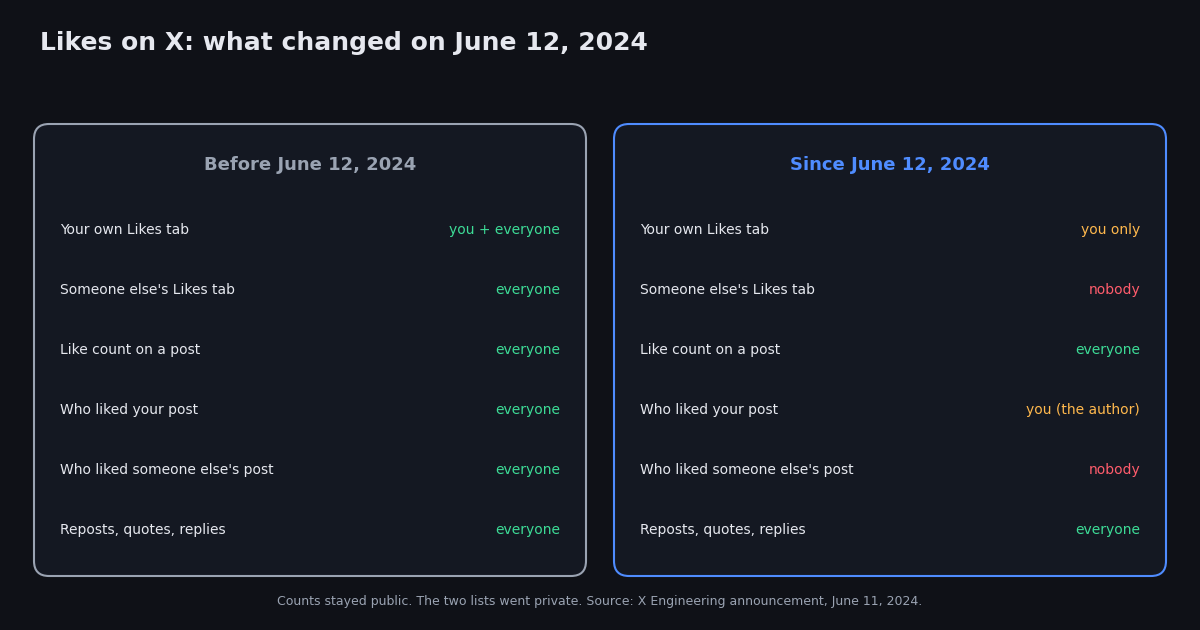
On June 11, 2024 the X Engineering account announced that likes would become private for everyone the next day, "to better protect your privacy". The post spelled out the new rules: you can still see the posts you have liked, but others cannot; like counts and other metrics for your own posts still show up under notifications; and you can no longer see who liked someone else's post. X engineer Haofei Wang gave the reasoning in a separate post: public likes were "incentivizing the wrong behavior", with people avoiding liking "edgy" content for fear of retaliation.
In practice, two things disappeared on June 12, 2024. The Likes tab on other people's profiles, which used to show every post they had liked in reverse order, and the list of likers on posts you did not write, which used to open when you tapped a post's like count. Nothing else moved: the like button, the count next to it, and your own Likes tab all work as before.
There was no transition period and there is no setting. Earlier in 2024, X had let Premium subscribers hide their Likes tab as an option; the June change made that the only state for everyone, free or paid. If you see a guide promising a toggle to make your likes public again, it predates June 2024.
Who can see what: the visibility matrix
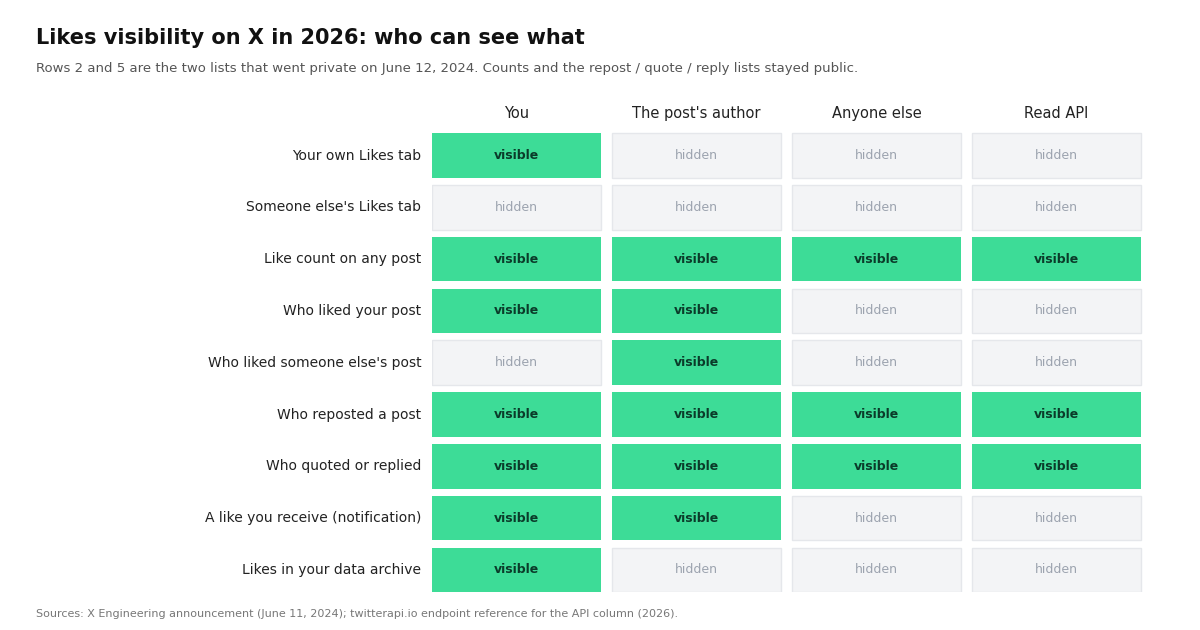
Here is the full picture as of 2026, based on the X Engineering announcement and on how the app and web client behave when we checked. "You" means the signed-in account; "author" means the account that wrote the post.
Two rows surprise people. First, the author still sees likers: if you like a post, its author can see that you did, so likes are private from the crowd, not from the person you liked. Second, reposts, quotes, and replies were never hidden, which is why they remain the public record of who engaged with a post, and why the developer section later on this page leans on them.
Where your own likes are now
Your likes did not move; the entrance did. The Likes tab is still on your profile, but it is the last tab on the row, after Posts, Replies, Highlights (Premium), Articles (Premium), and Media, so on a narrow phone screen it can be scrolled off the edge.
On the web: open x.com, click your avatar or Profile in the left menu, then the Likes tab at the right end of the tab row. The URL is your profile URL with /likes on the end, and it only works while you are signed in as that account.
In the app: tap your avatar, then Profile, then swipe the tab row to the left until Likes appears. Posts you liked show newest first.
In your data archive: Settings and privacy, Your account, Download an archive of your data. The archive includes a file of liked post IDs with the text of each post at the time, which is the only export X itself offers; expect to wait up to a day or two for the archive link.
My own Likes tab is empty or missing: the checklist
If the problem is your own likes, not someone else's, the 2024 change is not the cause. Work through these in order; each one explains a large share of the reports we see on X itself.
1. You are signed into a different account. Likes are per account. Tap your avatar and check the handle at the top before anything else.
2. The tab is scrolled off-screen. On a phone the Likes tab is last on the row and often hidden until you swipe the tab row.
3. The app is out of date or holding a stale profile. Update it, close it fully, reopen. On the web, hard-refresh the profile page or sign out and back in. Likes tabs loading as blank for a moment and then filling is normal; blank after a refresh is not.
4. The posts you liked are gone. A like on a post that was deleted, or whose author was suspended or went private, drops out of your Likes tab. People who liked a lot of posts from one account notice this all at once when that account disappears.
5. Sensitive-content filtering. If a liked post is flagged as sensitive and your settings hide such media, it can show as a placeholder or be filtered from the list. Check Settings and privacy, Privacy and safety, Content you see.
6. You are looking at the Likes tab on the web while signed out. Signed-out profiles show no Likes tab at all; sign in.
7. Reports of likes being removed in bulk. Users periodically report liked posts disappearing from the tab in batches. X has not documented a cause; practitioners commonly attribute it to spam clean-ups, mass deletions by authors, or client-side caching, and we have no first-hand evidence for any one explanation. If the posts still exist and still show your like when you open them directly, it is a display problem, and a sign-out and sign-in usually resolves it.
How to see who liked a tweet
If it is your post: open the post and tap the like count. The list of accounts that liked it opens as before. Each like also arrives as a notification, so your Notifications tab is a running log.
If it is someone else's post: you cannot, since June 12, 2024, and neither can any app, extension, or website. Any service that claims to show who liked another person's post is either showing you reposts and quotes under a misleading label, or asking you to sign in with your X account to a tool you should not trust. The only people who can see that list are the post's author.
What you can still see on anyone's post: the like count, the list of who reposted it, every quote post, and every reply. For most of the questions that used to be answered by the likers list (who is amplifying this, who is engaging with this account, what is this post's reach), those three lists are the better signal anyway, because a repost or a reply is a stronger action than a like.
For developers: what the API still exposes about likes
If you are building anything on top of X data, the June 2024 change drew a clear line. Counts stayed; lists went. A read-only API such as twitterapi.io returns every post with its likeCount, retweetCount, replyCount, quoteCount, viewCount and bookmarkCount (endpoint reference checked in 2026), so you can track how a post's likes grow over time, compare like-to-repost ratios across accounts, or rank an account's posts by likes. What no public read endpoint returns is the list of accounts behind a like count, and you should treat any vendor claiming otherwise with suspicion. The two lists that remain public, retweeters and replies, each have their own endpoint.
The script below snapshots a post's engagement counts and the accounts that reposted it. Run it on a schedule and you get a time series of likes for any post, which is the closest honest replacement for "who liked this" when the post is not yours.
Cost, for planning: reading a post costs about $0.00015 on twitterapi.io ($0.15 per 1,000 tweets, pricing page checked in 2026) against $0.005 per post read on the official X API's pay-per-use tier (docs.x.com, checked in 2026), roughly 33 times less for the same counts. Neither API returns likers on other people's posts.
import os
import requests

HEADERS = {"X-API-Key": os.environ["TWITTERAPI_IO_KEY"]}  # from twitterapi.io/dashboard


def engagement_snapshot(tweet_id):
    """Return the public engagement counts for one post."""
    r = requests.get(
        "https://api.twitterapi.io/twitter/tweets",
        params={"tweet_ids": tweet_id},
        headers=HEADERS,
        timeout=30,
    )
    r.raise_for_status()
    tweets = r.json().get("tweets") or []
    if not tweets:
        return None  # deleted, private, or suspended author
    t = tweets[0]
    return {
        "likes": t.get("likeCount"),
        "reposts": t.get("retweetCount"),
        "replies": t.get("replyCount"),
        "quotes": t.get("quoteCount"),
        "views": t.get("viewCount"),
        "bookmarks": t.get("bookmarkCount"),
    }


if __name__ == "__main__":
    snap = engagement_snapshot("1234567890123456789")  # the number at the end of the post URL
    if snap is None:
        print("post not available")
    else:
        for k, v in snap.items():
            print(f"{k:10} {v}")
        # Likers are not exposed by any public read API since June 2024.
        # Reposts, quotes and replies are: see /twitter/tweet/retweeters, /twitter/tweet/quotes, /twitter/tweet/replies
Why X hid likes, and whether it will come back
X's stated reason was privacy and behaviour: people were not liking things they agreed with because the like was public, and X said it wanted engagement to reflect what people actually think. A second, widely reported motivation was reducing the use of the likers list as a target list for harassment. Whatever the weighting, the change aligned with where the product was already going: Premium subscribers had been able to hide their Likes tab since earlier in 2024, and the June change made that universal.
As of 2026 there has been no announcement of a reversal or of an opt-in to make likes public again, and the Likes tab on other people's profiles has not returned in any client. Plan around private likes being permanent, and around counts, reposts, quotes, and replies being the public engagement record.
"""Track how a post's likes grow over time, since the list of likers is no longer public.

Run on a schedule (cron, GitHub Actions) and append one row per run to a CSV.
Needs TWITTERAPI_IO_KEY in the environment.
"""
import csv
import os
import sys
import time
import requests

HEADERS = {"X-API-Key": os.environ["TWITTERAPI_IO_KEY"]}
OUT = "likes-timeseries.csv"


def fetch_counts(tweet_ids):
    r = requests.get(
        "https://api.twitterapi.io/twitter/tweets",
        params={"tweet_ids": ",".join(tweet_ids)},
        headers=HEADERS,
        timeout=30,
    )
    r.raise_for_status()
    return r.json().get("tweets") or []


if __name__ == "__main__":
    ids = sys.argv[1:] or ["1234567890123456789"]
    new_file = not os.path.exists(OUT)
    with open(OUT, "a", newline="", encoding="utf-8") as f:
        w = csv.writer(f)
        if new_file:
            w.writerow(["unix_time", "tweet_id", "likes", "reposts", "replies", "quotes", "views", "bookmarks"])
        now = int(time.time())
        for t in fetch_counts(ids):
            w.writerow([
                now,
                t.get("id"),
                t.get("likeCount"),
                t.get("retweetCount"),
                t.get("replyCount"),
                t.get("quoteCount"),
                t.get("viewCount"),
                t.get("bookmarkCount"),
            ])
            print(t.get("id"), "likes", t.get("likeCount"))
Questions readers ask
Why can't I see my likes on Twitter (X)?
If you mean other people's likes: X made likes private for everyone on June 12, 2024, so the Likes tab is gone from every profile except your own. If you mean your own likes: they are still under Profile, then the Likes tab at the far right of the tab row, visible only while you are signed in as that account.
Can people see my likes on X in 2026?
The general public cannot. The one exception is the author of the post you liked, who can still open the list of likers on their own post and also receives a notification of your like. Reposts, quotes, and replies you make remain public.
How do I see who liked a tweet?
If it is your post, open it and tap the like count. If it is someone else's post, you cannot; nobody but the author has been able to since June 2024, and no third-party tool can either. You can still see who reposted, quoted, or replied to any post.
Is there a setting to make my likes public again?
No. Private likes apply to every account, free and Premium, and X has not offered an opt-in to make them public. Guides that describe such a toggle are from before June 2024.
Why is my own Likes tab empty?
Check that you are signed into the right account, swipe the tab row (Likes is the last tab), update and fully restart the app, and sign out and back in on the web. Likes on posts that were deleted or whose authors were suspended drop out of the tab, so a sudden gap usually means those posts are gone.
How can I export my likes from X?
Request your data archive under Settings and privacy, Your account, Download an archive of your data. It includes a file of the posts you liked. Public read APIs cannot export your likes, because that list is private.
Can an API see who liked a tweet?
Not for other people's posts. Read APIs such as twitterapi.io return a post's like count, repost count, reply count, quote count, view count, and bookmark count, plus the public lists of reposters, quotes, and replies, but no list of likers. Any service claiming to list likers on someone else's post should be treated with suspicion.
Continue
- CBS News: X makes likes private, quoting the X Engineering announcement of June 11, 2024
- X Help Center: liking posts, where your likes appear
- X Help Center: how to download your X data archive (includes liked posts)
- Social Media Today: report on the June 2024 change and Haofei Wang's explanation
- twitterapi.io docs: Get Tweets by IDs (likeCount, retweetCount, replyCount, quoteCount, viewCount, bookmarkCount)
- X API pay-per-usage pricing (docs.x.com), the official and more expensive route to the same counts
- Twitter (X) API overview: the hub for reading X data
- Does X show who viewed your profile?
- The most liked tweets of all time, via the API
- Tweet metadata fields reference (likeCount and friends)
- Engagement rate calculator built on the API
- Who blocked me on Twitter (X)?
- twitterapi.io pay-per-call pricing
Stop reading. Start building.
Starter credits cover real testing on real data. Google sign-in, no card, no application queue.
Get an API key