Buffer Alternatives in 2026: Which Schedulers Still Post to Twitter (X), and the DIY Route
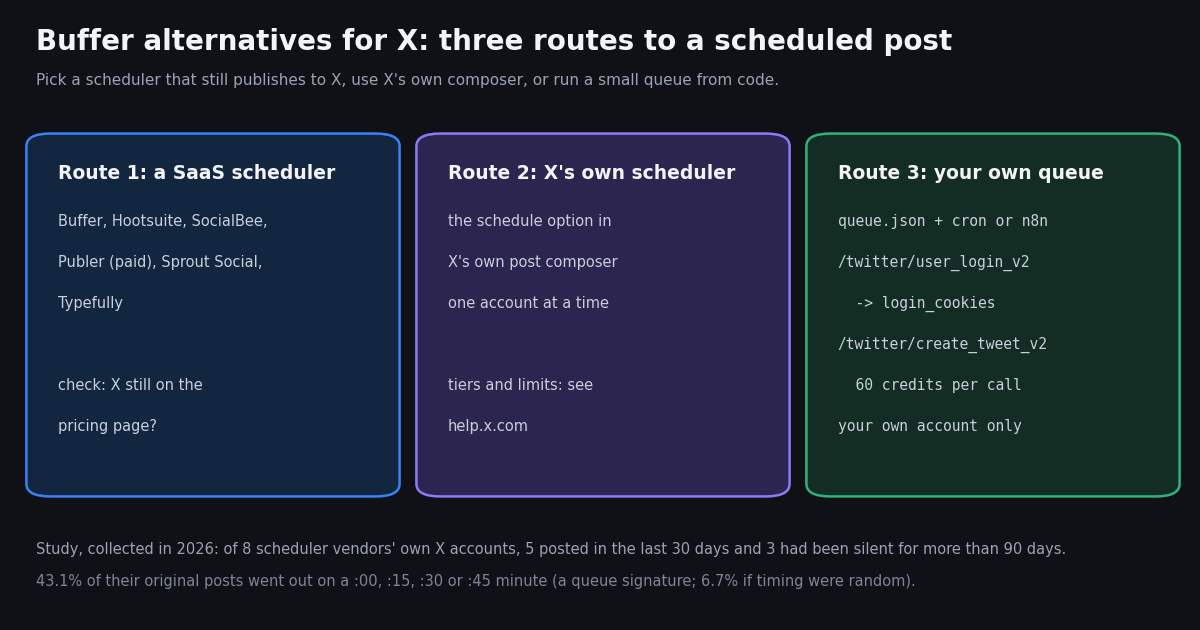
- Check X first. Buffer, Hootsuite, SocialBee and Sprout Social list X on their pricing pages; Publer supports X on paid plans only; Later and Hypefury no longer list X.
- Buffer's free plan still includes X: 3 channels, 10 scheduled posts per channel, 1 user. Essentials is $5/month per channel ($60 billed yearly).
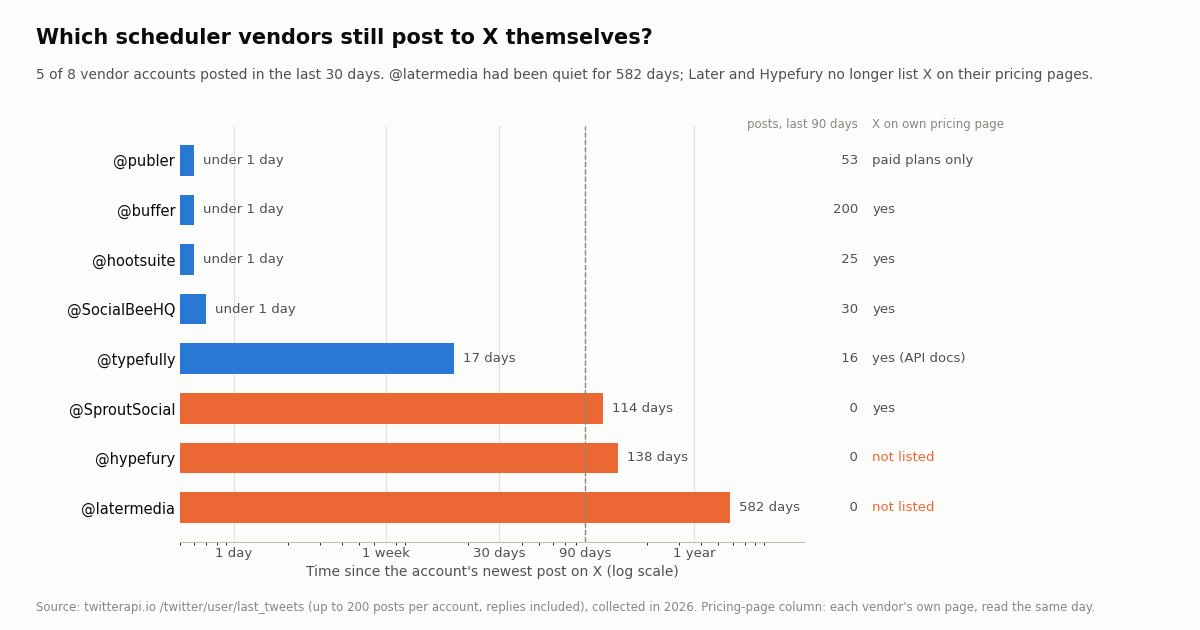
- Vendor accounts tell the story: of 8 scheduler vendors' own X accounts, 5 posted in the last 30 days; @latermedia had been silent for 582 days.
- Schedulers schedule: 43.1% of the vendors' original posts went out on :00, :15, :30 or :45, against 6.7% if timing were random.
- DIY for one account: a cron job or n8n flow plus
/twitter/create_tweet_v2costs $0.0006 per post after a $0.10 login, versus $0.015 per post created on X's pay-per-usage card ($0.200 with a URL). - The account carries the risk: API posts act as that account, so keep a human pace and follow X's Automation Rules whichever tool you use.
Most lists of Buffer alternatives were written when every scheduler supported Twitter. That is no longer true. Some tools have quietly dropped X from their supported platforms, one keeps X off its free plan because of the cost of X's API, and the vendors' own X accounts show which companies still treat the platform as a channel. If X is one of the channels you schedule for, the first filter is not price or features, it is whether the tool still publishes there.
This guide compares Buffer with the alternatives using only what each vendor shows on its own pricing page, then adds a real-data study of how 8 scheduler vendors post on X themselves, and a DIY route for people who only need to schedule posts for their own account. It is the X-first companion to our Hootsuite alternatives guide, which covers suites and brand listening; for the built-in and SaaS scheduler overview see the Twitter scheduler guide, and for posting from code in depth see the Twitter auto post guide. We link those rather than repeat them.
5 of 8
What Buffer does for X today, and why people look for alternatives
Buffer (buffer.com) is a publishing tool priced per channel rather than per user. Its pricing page, read this session, shows three plans:
X is still a first-class Buffer channel. The channel table lists automatic publishing for both free and Premium X profiles, threads to X on every plan (the free plan allows 1 threaded post, paid plans are unlimited), and analytics. The FAQ notes that "unlimited" scheduled posts sit under a fair use policy of 5,000 posts per channel.
Buffer also has an API now. The same page lists API access on every plan with shared limits: on Free, 1 API key, 150 requests per 15 minutes and 600 per 24 hours; on Team, 5 keys, 1,500 per 15 minutes and 6,000 per 24 hours, with a monthly allowance per channel. If you were going to leave Buffer only to script your posting, check whether that API already covers you.
Why people still look elsewhere. The reasons that come up in practice are concrete: per-channel pricing adds up past a handful of profiles, the free plan caps the queue at 10 posts per channel, X-specific features such as auto-reposting your own evergreen posts are outside Buffer's scope, and some teams want an inbox, approvals or listening that Buffer does not sell. Each of those points to a different alternative, which is why the next table is organized by what you are replacing.
Buffer alternatives for X compared: price, free option, and whether X is still supported
Every price below is the entry paid price exactly as the vendor's own pricing page showed it this session, with its billing period. Where the page is rendered by script and we could not read a price, the row says so instead of guessing.
Publer (publer.com) states the X rule plainly on its plans page: the free version allows 3 social accounts "except X", and "Due to the Twitter / X Enterprise API cost, we can only support Twitter / X accounts on a paid subscription basis." If your Buffer free plan is mostly X, Publer's free plan is not the swap.
SocialBee (socialbee.com) sells by number of profiles: Bootstrap 5 profiles at $29 per month ($24 per month billed annually), Accelerate 10 profiles at $49 ($40), Pro 25 profiles at $99 ($82), with agency tiers up to 150 profiles. X appears both for direct posting and for comments and mentions.
Typefully (typefully.com) is an X-first writing and scheduling tool that has expanded to other networks. Its pricing page did not render any plan text for our fetcher, so we print no price. Its public API docs list X, LinkedIn, Mastodon, Threads, Bluesky and Substack Notes as platforms, describe draft creation, scheduling and publishing, and return a 402 error "Account is paused or requires a paid plan before creating drafts", which tells you API scheduling needs a paid plan. The docs also tell users to follow X's automation rules.
Later (later.com) and Hypefury (hypefury.com). Later's pricing page says "Later supports Instagram, Facebook, TikTok, Threads, YouTube, Pinterest, LinkedIn and Snapchat", and Hypefury's pricing page counts "Instagram, Facebook, Threads, LinkedIn, TikTok and Bluesky" as its 6 platforms. Neither lists X. Both still appear in many alternatives roundups as X tools, so if X matters, read the vendor's platform list before you trust a list article, this one included.
Hootsuite and Sprout Social are suites, priced per user or seat, and they replace Buffer only if you also want an inbox, approvals and reporting. Our Hootsuite alternatives guide compares them in detail, so they get one row each here.
Which scheduler vendors still post to X themselves?
A vendor's own X account is a cheap signal of how seriously it treats the platform. We pulled up to 200 recent posts, replies included, from the official X accounts of Buffer and 7 alternatives, and measured how long ago each last posted and how many posts it published in the 90 days before collection.
The pattern lines up with the pricing pages. The two vendors whose pricing pages no longer list X were also among the quiet accounts: @latermedia's newest post was 582 days old and @hypefury's 138 days. @SproutSocial is the exception in the other direction, still listing X but silent for 114 days, so a quiet account is a prompt to check, not proof that the product dropped X.
Buffer uses X as a support and community channel. @buffer published all 200 sampled posts within 58 days, about 3.4 a day, and 64% of them were replies. Only 12.5% were stand-alone original posts. Publer (53 posts in 90 days) and SocialBee (30) were the other steady posters.
Free Buffer alternatives: what free actually covers on X
Searches for free Buffer alternatives usually mean one of two things: a free plan with no time limit, or a long enough trial to test. For X, the free options are narrower than the lists suggest.
Buffer's free plan is still the realistic free scheduler for X. None of the alternatives we checked offers a permanent free plan that includes X. If you outgrow 10 queued posts per channel, the question is whether to pay Buffer $5/month for that channel or move.
X's own scheduler lives in the post composer on the web and works for one account at a time, with no bulk queue or cross-posting. X documents it at help.x.com/en/using-x/how-to-schedule-a-post, a help-center page our tools cannot fetch, so check there which account tiers can use it today.
A script is the third free-ish option. New TwitterAPI.io accounts that pass the automatic bot check receive up to $1 of free credits (at most 100,000 credits, no card, one per person or network, expiring after 31 days); at 60 credits a post, that covers the login plus well over a thousand posts' worth of write calls, far more than any human-paced account should send in a month. Treat it as a trial: the next section shows what the route involves.
The DIY route: schedule your own X posts with an API, cron or n8n
If you schedule for one X account you own, you can replace the scheduler with a queue file and a timer. There are two APIs to post with, and they differ in how you authenticate, what each post costs and who carries the account risk.
The official X API. Posts are created with POST /2/tweets on api.x.com using an OAuth user token. On X's pay-per-usage rate card (docs.x.com/x-api/getting-started/pricing) a post created costs $0.015 per request and $0.200 per request when the post contains a URL; new paying users can earn $20 in credits after a first purchase, and a first auto-recharge may be matched up to $50. This is the sanctioned route for an app that other people log in to.
The TwitterAPI.io write flow. You log in once with POST /twitter/user_login_v2 (user_name, email, password, a proxy you supply, and the strongly recommended totp_secret), which returns login_cookies and costs 10,000 credits, $0.10. Each POST /twitter/create_tweet_v2 then takes login_cookies, tweet_text and proxy, plus optional media_ids from /twitter/upload_media_v2, reply_to_tweet_id, attachment_url for a quote and is_note_tweet for long posts on Premium; it returns tweet_id and costs 60 credits, $0.0006 per call.
What a month of posting costs on each card (posts only; the X column has no URL, the second X column is every post carrying a link):
What you accept with the write flow. The call acts as that X account, so what it posts is that account's speech, and X can rate-limit, lock or suspend the account if the pattern looks like spam. Keep a human pace (the script below caps at 8 posts a day, 30 minutes apart, with random jitter). The session can need a re-login when cookies expire or X asks for verification, so cache the cookies and log in again only after a failure. Every call that returns HTTP 200 is billed, including a 200 whose body says status: error, so read the body and stop instead of retrying in a loop. Use it for your own account only; scheduling posts for clients belongs in a tool built on X's OAuth flow.
Cron or n8n. With cron, one line runs the script every 15 minutes: */15 * * * * cd /path/to/queue && python3 x_queue.py. In n8n, a Schedule Trigger node on the same interval followed by an HTTP Request node does the same job: POST to https://api.twitterapi.io/twitter/create_tweet_v2 with the X-API-Key header and a JSON body of login_cookies, tweet_text and proxy. Our n8n workflow guide shows the node setup for reading; the write call is the same node with a POST body.
Follow X's rules either way. X's Developer Policy (docs.x.com/developer-terms/policy) says write actions must follow the Automation Rules: no bulk, aggressive or spammy actions, no identical content across multiple accounts, and consent before automated replies or DMs. A scheduler does not change that, and no API provider can shield an account from enforcement.
# crontab -e : run the queue every 15 minutes
*/15 * * * * cd $HOME/x-queue && /usr/bin/python3 x_queue.py >> run.log 2>&1

# the same write call with curl (one post; billed 60 credits on HTTP 200)
curl -s -X POST https://api.twitterapi.io/twitter/create_tweet_v2 \
  -H "X-API-Key: $TWITTERAPI_IO_API_KEY" -H "Content-Type: application/json" \
-d '{"login_cookies": "'"$LOGIN_COOKIES"'", "tweet_text": "Shipping notes are up.", "proxy": "'"$X_PROXY"'"}'Schedulers schedule: the queue signature in vendors' own X posts
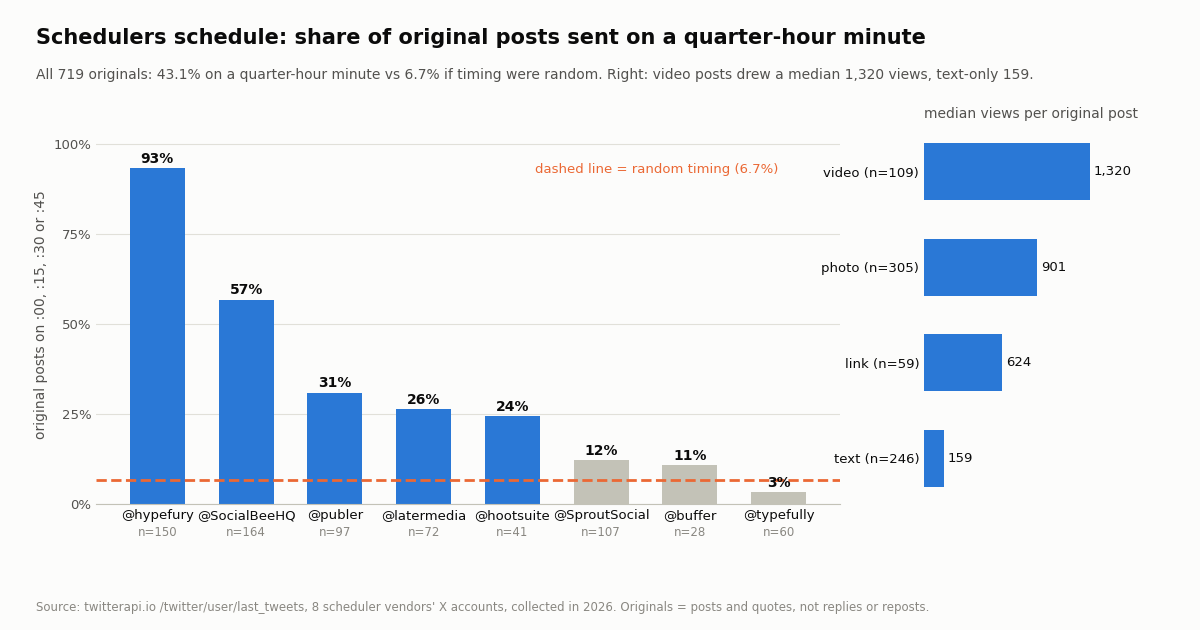
Scheduled posts leave a visible trace: they go out on round minutes. Across the 719 original posts and quotes in our sample, 43.1% were published on minute :00, :15, :30 or :45. If timing were random, 4 minutes in 60 would give 6.7%.
Hypefury's account was almost entirely queued. 93.3% of its 150 originals landed on a quarter-hour, and SocialBee's 56.7%. At the other end, @typefully (3.3%) and @buffer (10.7%) look hand-timed, which fits accounts that spend most of their time replying.
Format mattered more than timing for views. Video originals drew a median 1,320 views (n=109), photos 901 (n=305), link posts 624 (n=59) and text-only posts 159 (n=246). The text-only group is dominated by SocialBee's queued tips, so read it as a mix of format and account size, not a pure format effect.
Weekdays, business hours. Only 9.7% of the originals went out on a Saturday or Sunday, and the busiest UTC hours were 13:00 and 16:00 to 17:59, the European afternoon and US morning. If you are building your own queue, our best time to post on X guide covers timing for general accounts in more depth.
What a round minute does not mean. A post on :00 is not proof of automation, and hand-timed posts can come from a scheduler that adds jitter. The share is a signal across many posts, which is how we use it here, and the reason the DIY script above adds a random delay before each post.
Measuring what you post: reading results back without an X login
Whichever scheduler you pick, you will want to know what worked. Buffer and the suites include analytics for the channels they publish to; if you schedule from a script, or want the same numbers for accounts you do not manage (a competitor, a partner), you read them from a data API instead.
Reading public posts needs no X account. GET /twitter/user/last_tweets?userName=<account> returns the newest posts 20 per page with has_next_page and next_cursor, and each tweet carries viewCount, likeCount, retweetCount, replyCount, quoteCount and bookmarkCount. That is how this page's study was collected.
What it costs. Tweet reads are 15 credits per tweet returned, $0.15 per 1,000 tweets, with a minimum of 15 credits per request, so a full 20-tweet page is $0.003. On X's pay-per-usage card a post read is $0.005, $5 per 1,000, about 33 times more per 1,000 tweets. The whole study on this page, 1,550 posts over 78 requests, cost about $0.23.
A weekly report for one account is two pages of last_tweets, about $0.006, which is small next to any scheduler's monthly fee. The report() function at the end of the code example prints views, likes and reposts for your newest posts.
How to choose a Buffer alternative for X
You schedule a few channels, X included, and want to pay little. Stay on Buffer's free plan until 10 queued posts per channel is the limit, then compare Buffer Essentials at $5/month per channel with SocialBee's per-profile plans.
You want X writing and threads above everything. Typefully is built around X writing and lists X in its API docs; read its pricing page in a browser, since it did not render for us.
You run social for a team with approvals and an inbox. Hootsuite or Sprout Social, priced per user or seat; the Hootsuite alternatives guide compares the suites.
You want recycled evergreen content. SocialBee's category-based queue is built for that, and its own X account shows it: more than half of its originals went out on a quarter-hour minute.
You only post to your own account and can run a script. The DIY route costs cents a month, but you own the pacing, the account risk and the maintenance. If you are building a product that posts for other people, use X's OAuth API instead.
X is your main channel. Rule out Later and Hypefury unless their pricing pages list X again, and remember that Publer supports X only on paid plans.
How we collected this
Question. Which scheduler vendors still post on X, how much of their posting looks queued, and which formats draw views on their accounts.
Accounts. The official X accounts @buffer, @hootsuite, @latermedia, @typefully, @hypefury, @SproutSocial, @SocialBeeHQ and @publer, all organization accounts.
Method and window. GET /twitter/user/last_tweets with includeReplies=true, newest first, up to 10 pages per account; the window is each account's most recent posts at collection time, collected in 2026. Sample: 1,550 posts (719 originals and quotes), 78 requests, about $0.23 at 15 credits per tweet returned. Recency is measured against the newest post in the whole sample.
Definitions. Original = a post or quote that is not a reply or a repost; a reply to the account's own post counts as a thread continuation, not a reply. Quarter-hour minute = the post's createdAt minute is 0, 15, 30 or 45. Format = video (video or GIF), photo, link (an external URL or card) or text only. Pricing columns come from each vendor's own pricing page, read the same day.
What the sample cannot show. A vendor's X account is a marketing channel, not its product: a quiet account does not prove a product dropped X, and an active one does not prove the product's X integration works for you. 200 posts span weeks for busy accounts and years for quiet ones, so per-day rates are not comparable across accounts. Views are as reported at collection time.
Privacy. Aggregates only, organization accounts only; reposted, quoted and replied-to authors were not analyzed, and the de-identified rows in our study file carry no post IDs, URLs, text or other handles.
"""x_queue.py - publish due posts from a small queue to YOUR OWN X (Twitter) account,
then report how the last posts performed. One pass per run: schedule it with cron
(or an n8n Schedule Trigger + Execute Command node) every 10-15 minutes.

    pip install requests
    export TWITTERAPI_IO_API_KEY=...                    # twitterapi.io dashboard
    export X_USER=... X_EMAIL=... X_PASSWORD=... X_TOTP_SECRET=...   # your own account
    export X_PROXY=http://user:pass@host:port           # a residential proxy you supply

queue.json: [{"text": "...", "at": "YYYY-MM-DDTHH:MM:SS+00:00"}, ...]   ("at" = when it is due, UTC)

Costs: /twitter/user_login_v2 is $0.10 per call (cached in cookies.json and reused);
/twitter/create_tweet_v2 is 60 credits = $0.0006 per call, billed on every HTTP 200,
including a 200 whose body says status "error". Reading your timeline back is
$0.15 per 1,000 tweets returned. The post is published AS this account: X can
rate-limit, lock or suspend it, so this script posts at most one item per run.
"""
import json
import os
import random
import time
from datetime import datetime, timezone

import requests

BASE = "https://api.twitterapi.io"
H = {"X-API-Key": os.environ["TWITTERAPI_IO_API_KEY"]}
PROXY = os.environ["X_PROXY"]
QUEUE, COOKIES, LOG = "queue.json", "cookies.json", "posted.jsonl"
MIN_GAP_SECONDS = 30 * 60      # never two posts closer than 30 minutes
MAX_PER_DAY = 8


def login(force=False):
    if not force and os.path.exists(COOKIES):
        return json.load(open(COOKIES))["login_cookies"]
    body = {"user_name": os.environ["X_USER"], "email": os.environ["X_EMAIL"],
            "password": os.environ["X_PASSWORD"], "proxy": PROXY,
            "totp_secret": os.environ.get("X_TOTP_SECRET", "")}
    r = requests.post(f"{BASE}/twitter/user_login_v2", headers=H, json=body, timeout=90)
    data = r.json()
    if r.status_code != 200 or data.get("status") != "success":
        raise SystemExit(f"login failed (HTTP {r.status_code}): {data.get('message') or r.text[:200]}")
    json.dump({"login_cookies": data["login_cookies"]}, open(COOKIES, "w"))
    return data["login_cookies"]


def create_tweet(cookies, text):
    body = {"login_cookies": cookies, "tweet_text": text, "proxy": PROXY}
    r = requests.post(f"{BASE}/twitter/create_tweet_v2", headers=H, json=body, timeout=90)
    data = r.json()
    if r.status_code == 200 and data.get("status") == "success":
        return True, data.get("tweet_id")
    return False, f"HTTP {r.status_code}: {data.get('message') or r.text[:200]}"


def history():
    if not os.path.exists(LOG):
        return []
    return [json.loads(line) for line in open(LOG) if line.strip()]


def publish_one():
    now = datetime.now(timezone.utc)
    past = [p for p in history() if p["ok"]]
    if sum(1 for p in past if p["t"] > time.time() - 86400) >= MAX_PER_DAY:
        return print("daily cap reached")
    if past and time.time() - past[-1]["t"] < MIN_GAP_SECONDS:
        return print("too soon after the last post")
    queue = json.load(open(QUEUE))
    due = [q for q in queue if datetime.fromisoformat(q["at"]) <= now]
    if not due:
        return print("nothing due")
    item = due[0]
    time.sleep(random.uniform(0, 180))          # do not fire on the exact cron second
    cookies = login()
    ok, detail = create_tweet(cookies, item["text"])
    if not ok and "HTTP 200" in detail:         # an expired session is the usual cause
        ok, detail = create_tweet(login(force=True), item["text"])
    with open(LOG, "a") as f:
        f.write(json.dumps({"t": time.time(), "ok": ok, "detail": detail}) + "\n")
    if ok:
        queue.remove(item)
        json.dump(queue, open(QUEUE, "w"), indent=1)
    print("posted" if ok else "refused, not retrying:", detail)


def report(user_name, pages=2):
    """Read your own recent posts back (no X login needed) and print engagement."""
    cursor, rows = "", []
    for _ in range(pages):
        params = {"userName": user_name, "cursor": cursor}
        r = requests.get(f"{BASE}/twitter/user/last_tweets", headers=H, params=params, timeout=60)
        body = r.json()
        data = body.get("data") or {}
        for t in data.get("tweets") or []:
            if t.get("retweeted_tweet"):
                continue
            rows.append((t["createdAt"], t.get("viewCount") or 0, t.get("likeCount") or 0,
                         t.get("retweetCount") or 0, (t.get("text") or "")[:60]))
        if not body.get("has_next_page"):
            break
        cursor = body.get("next_cursor", "")
    for created, views, likes, reposts, text in rows[:20]:
        print(f"{created}  {views:>7} views  {likes:>4} likes  {reposts:>3} reposts  {text}")


if __name__ == "__main__":
    publish_one()
    report(os.environ["X_USER"])
Researching this?Free starter credits cover end-to-end testing — Google sign-in, no card. Get a key.
Questions readers ask
Is there a free alternative to Buffer for X (Twitter)?
For X specifically, none of the alternatives we checked has a permanent free plan that includes X: Publer's free plan excludes X, and SocialBee, Hootsuite, Hypefury and Later offer trials only (Later and Hypefury do not list X at all). Buffer's own free plan, 3 channels with 10 scheduled posts each, remains the free option, alongside the schedule option in X's own composer for a single account.
Does Buffer still support Twitter (X)?
Yes. Buffer's pricing page lists X (Twitter) with automatic publishing for free and Premium X profiles, threads to X on every plan (1 threaded post on the free plan), and analytics. Its own X account was also among the most active in our study, mostly replies.
Does Hypefury still work with X?
Hypefury's pricing page lists 6 platforms, Instagram, Facebook, Threads, LinkedIn, TikTok and Bluesky, and does not include X. Its official X account had not posted for 138 days when we collected our sample in 2026. If X is your main channel, confirm with Hypefury before you subscribe.
Does Later support X (Twitter) scheduling?
Later's pricing page says it supports Instagram, Facebook, TikTok, Threads, YouTube, Pinterest, LinkedIn and Snapchat, with no X. Its @latermedia account's newest post was 582 days old in our sample.
How much does Buffer cost compared with the alternatives?
Buffer Essentials is $5/month per channel ($60 billed yearly) and Team $10/month per channel. SocialBee starts at $29 per month for 5 profiles ($24 billed annually), Hootsuite at $99 USD per user/month on annual billing, Sprout Social at $79 per seat/month annual, and Later at $18.75USD/month billed yearly. Typefully and Publer's paid prices were not readable in the pages we fetched.
Can I schedule X posts with an API instead of a scheduler?
Yes, for your own account. The official X API creates posts at $0.015 per request ($0.200 with a URL) with an OAuth user token. The TwitterAPI.io write flow uses one /twitter/user_login_v2 login ($0.10) and /twitter/create_tweet_v2 at 60 credits ($0.0006) per call, run from cron or n8n. Either way the post acts as that account, so keep a human pace and follow X's Automation Rules.
Is scheduling posts against X's rules?
No. Scheduling your own original posts is normal, and X documents a schedule option in its own composer. X's Developer Policy says write actions must follow the Automation Rules: no bulk or spammy actions, no identical content across multiple accounts, and consent before automated replies or DMs.
Does Buffer have an API?
Yes. Buffer's pricing page lists API access on every plan, with limits shared across keys: 150 requests per 15 minutes and 600 per 24 hours on Free, 450 and 1,800 on Essentials, and 1,500 and 6,000 on Team, plus a monthly allowance per channel.
Continue
- X API pay-per-usage pricing: $0.015 per post created, $0.200 with a URL, $0.005 per post read, 3M post-read monthly cap
- X Developer Policy: write actions must follow the Automation Rules
- TwitterAPI.io reference: POST /twitter/create_tweet_v2 (login_cookies, tweet_text, proxy; 60 credits, $0.0006 per call)
- TwitterAPI.io reference: POST /twitter/user_login_v2 (login_cookies; 10,000 credits, $0.10 per call)
- TwitterAPI.io reference: GET /twitter/user/last_tweets (the study's data source)
- X Help Center: Automation rules (cited; the page blocks automated fetching)
- X (Twitter) API hub: endpoints, pricing and guides
- Hootsuite alternatives: suites, free options and brand listening
- Twitter scheduler: built-in, SaaS and DIY API routes
- Twitter (X) auto post: RSS, Sheets and posting from code
- n8n workflow with the Twitter (X) API
- Best time to post on X, measured
- Twitter (X) automation in 2026: what is allowed
- TwitterAPI.io pricing: pay only for the data returned
- TwitterAPI.io API docs: create_tweet_v2 and last_tweets reference
- 01Can People See Your Twitter (X) Bookmarks? What Others See, and the One Public Number
- 02ChatGPT vs Grok: plans, models, and the real difference on Twitter (X) data
- 03IFTTT Alternatives in 2026: Which Can Still Trigger on a New Twitter (X) Post
- 04Claude Token Counter: Count Tokens Exactly With the count_tokens API (and Budget Twitter (X) Data)
- 05GitHub Copilot vs Claude Code: Plans, Agent Modes, Models and MCP (with Live Twitter (X) Data)
- 06Base44 alternatives in 2026: Lovable, Bolt.new, Replit, v0, Emergent, open-source Dyad and coding agents compared
- 07Firecrawl Alternatives in 2026, and What Each Can Read From Twitter (X)
- 08Manus Alternatives in 2026: Hosted, Chat-Plan and Open-Source Agents, and What People on Twitter (X) Switch To
Writing about something you built with TwitterAPI.io? Our community rewards program pays API credits for honest tutorials, build logs and videos.
Stop reading. Start building.
Starter credits cover real testing on real data. Google sign-in, no card, no application queue.
Get an API keyAlready building with TwitterAPI.io? Publish an honest tutorial or build log about it and earn up to $200 a month in API credits.