Can You Hide Who You Follow on Twitter (X)?
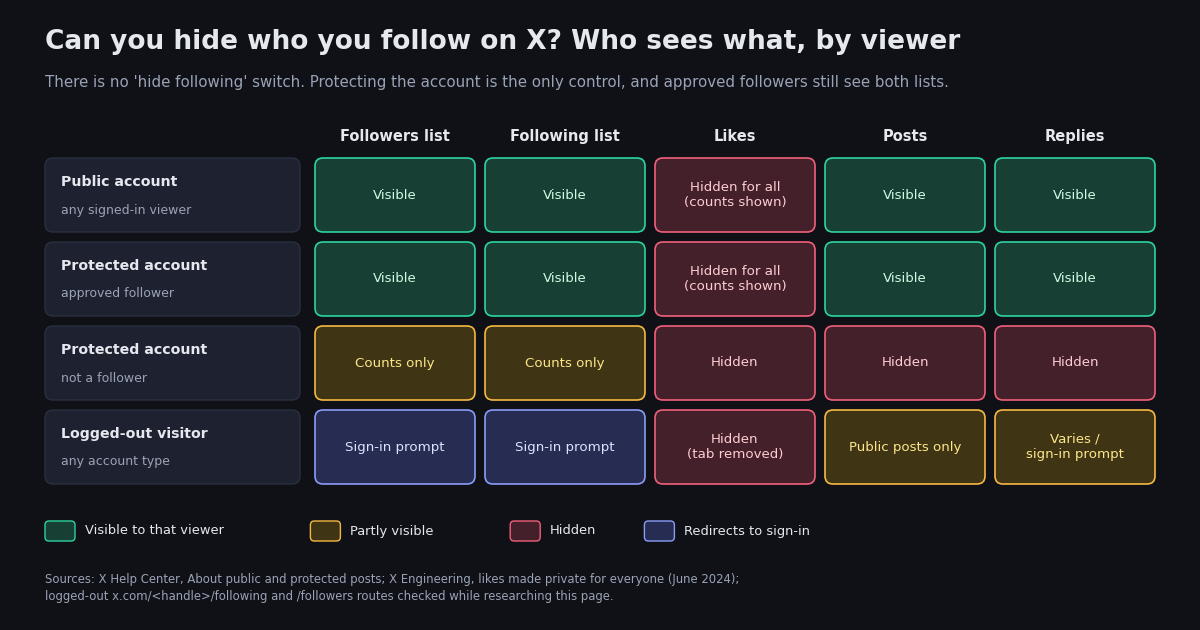
This page answers one question that people ask in several ways: can you hide who you follow on Twitter, now X, and if not, what can you do instead. The honest answer is uncomfortable for anyone who wants a public account with a private following list: X does not offer that combination. What it offers is a single switch, Protect your posts, that changes your whole account at once, and a handful of partial measures that reduce who notices your follows without hiding the list.
A neighbouring question, whether X shows who looked at your profile, is a different topic with a different answer; it is covered on the does X show who viewed your profile page and is not repeated here. This page is about what other people can see on your profile, not about what you can see of your visitors. The related question of why the Likes tab vanished from everyone's profile has its own page too, linked where the likes-versus-following difference comes up.
The structure is the matrix first, because it settles most of the follow-up questions in one look: four kinds of viewer against five kinds of content. Then what protecting the account changes and costs, what a logged-out visitor actually gets, why likes were made private but following was not, and the workarounds people try. The final section is the one for readers who want the opposite of hiding: reading a public following list in bulk, with a short script and its cost.
The short answer: X has no setting to hide your following list
Open Settings and privacy on X, then Privacy and safety, and read every section. There is a switch for protecting your posts, controls for who can tag you in photos, discoverability by email and phone number, direct-message permissions, muting and blocking, and the ad and data settings. There is nothing that says hide my following list, hide my followers, or make my lists private. The absence is the answer: as of 2026, on the web client and in the iOS and Android apps, X does not let a public account keep a private following list.
The only setting that affects the lists is the one X documents on its help page About public and protected posts (help.x.com/en/safety-and-security/public-and-protected-posts). The switch itself lives under Settings and privacy, then Privacy and safety, then Audience and tagging, where you drag the slider next to Protect your posts; on the web it is a checkbox labelled Protect my posts (X Help Center, How to make X private and public). The help site blocks automated fetches, so both pages were confirmed against their indexed text and a second how-to source.
That switch does not hide the lists on their own. It changes the account from public to protected, and a protected account's posts, replies, followers list, and following list are all visible only to followers you have approved. Everything below is about what that trade actually involves and what else people try when they do not want to make the trade.
Who sees what: followers, following, likes, posts, and replies by viewer
The matrix below is the part of the page to keep. Each row is a kind of viewer, each column a kind of content on your profile. Visible means the viewer can open the tab and scroll the list or read the content. Counts only means the number in the profile header is shown but the tab behind it is not. Sign-in prompt means X redirects the visitor to the login flow before showing anything. The protected-account rows follow X's help page on public and protected posts; the likes column follows X Engineering's June 2024 announcement; the logged-out row records what the x.com routes returned to a request with no session while this page was being researched.
Three things fall out of the table. First, the two list columns move together: X has no state in which followers are visible and following is hidden, or the reverse. Second, the only viewer who sees nothing of your following on a public account is a visitor with no X session, and that is a property of X's login wall, not a privacy setting you control. Third, likes are the one column that is hidden in every row, which is why so many people assume a similar setting must exist for following. It does not; the next sections explain why the two diverged.
What protecting your account changes, and what it costs you
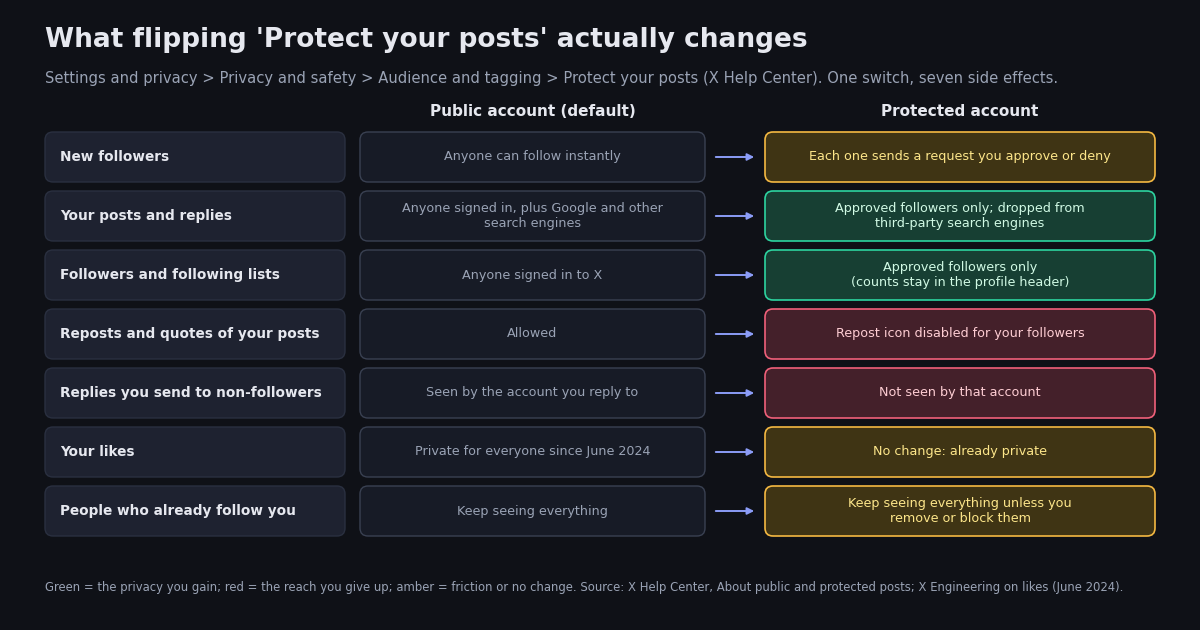
Protect your posts is the only switch that hides your following list from anyone, so it is worth being precise about what it does. X's help page lists the consequences, and they are all-or-nothing: you cannot take the list privacy without the rest.
New followers need your approval. Once protected, anyone who wants to follow you sends a request that you approve or deny. People who already followed you before you flipped the switch keep their access unless you remove or block them (X Help Center, About public and protected posts).
Your posts become followers-only, including their permanent links. A protected post's URL shows nothing to a non-follower, and protected posts do not appear in third-party search engines such as Google; on X itself they are searchable only by you and your followers (X Help Center).
Your followers lose the repost button. Followers cannot use the repost icon to repost or quote a protected post. The help page also notes that followers can still screenshot your posts and share them, so protection reduces reach rather than guaranteeing secrecy.
Replies to non-followers go unseen. A reply you send to an account that does not follow you is not seen by that account, which in practice means protected accounts cannot take part in public conversations.
Both lists become followers-only, but only from non-followers. This is the point that disappoints most people who protect their account for list privacy: every approved follower still sees your full followers and following lists. If the person you did not want to see a particular follow is already a follower, protecting the account changes nothing for them. The counts in the profile header remain visible to everyone, as rendered by the X web client.
Third-party apps may still see your protected posts. If you have authorized an app to access your account, X's help page says that app may be able to see protected posts; revoke access to anything you no longer use.
The reverse switch has its own fine print. When you unprotect, every previously protected post becomes public, and any follower requests still pending are not accepted automatically; those people will have to follow you again (X Help Center, How to make X private and public). If you protect the account temporarily to hide a burst of new follows and then unprotect, the following list is fully public again the moment you do.
What a logged-out visitor sees on your profile
A common hope is that the people you worry about are not on X at all, so what matters is the logged-out view. That view has changed several times, and the history explains why it is unreliable as a privacy measure. On 30 June 2023 Twitter began requiring a login to view any tweet or profile, which the owner described as a temporary measure against aggressive scraping (Bloomberg, 30 June 2023). The requirement was quietly lifted on 5 July 2023, though at the time a logged-out visitor opening a profile saw the banner and bio but none of the posts (MobileSyrup, 5 July 2023). By August 2023 profile posts were showing again to signed-out visitors, sorted by like count rather than date (TechCrunch, 16 August 2023).
While this page was being researched, plain requests to x.com with no session behaved like this: a public profile page returned normally; the same profile's /following and /followers routes returned a redirect to X's sign-in flow with the original page set as the destination after login; and the /likes route redirected back to the profile, consistent with the Likes tab having been removed. So, as of this writing on the web, a logged-out visitor can see that you follow a certain number of accounts but cannot open the list without signing in.
Two cautions. X has reversed itself on logged-out access more than once, so treat this as the current behaviour rather than a guarantee. And signing up for X is free and takes minutes, so the login wall deters casual curiosity, not a motivated person. If your concern is a specific individual, assume they can see your following list whenever your account is public.
Likes went private for everyone; following did not, and probably will not
If likes can be hidden, why not following? Because the two changes came from different places. Hiding the Likes tab started as a paid perk: X launched the ability to hide your likes tab for X Premium subscribers in 2023, pitching it as a way to keep spicy likes private (Engadget, 2024). Then, on 11 June 2024, the X Engineering account announced that likes were going private for everyone, and from 12 June 2024 the Likes tab disappeared from other people's profiles. You can still see your own likes, authors can still see who liked their own posts, and like counts still show on every post (Engadget; TIME, June 2024). The full account of that change, including where your own likes now live and how to get at them, is on the why you cannot see your likes on Twitter page.
Following never had a Premium hide option, and there has been no announcement about one. There is a structural reason it is unlikely. A like is a reaction to a single post; hiding it costs the network little. A follow is an edge in the social graph that X uses for recommendations, for the Following timeline, for the followed-by labels on profiles, and for the follower counts that creators and advertisers treat as currency. The followers list is the mirror image of the following list: every entry in your following list is an entry in someone else's followers list. Hiding one side without the other would leave the information visible from the other end, and hiding both for a public account would undo much of what makes the graph useful to the platform. None of that is from X; it is the practical reason that the question keeps being asked and the setting keeps not appearing.
Workarounds people try, and why each one falls short
Search for how to hide following on X and the results are a handful of partial measures dressed up as solutions. Each one is listed here with what it actually does, so you can pick the one that matches your real concern.
Private Lists. X Lists can be private, and X's help page says only you can view your private Lists; accounts you add are not notified (X Help Center, How to use X Lists). A private List is a good way to read accounts you do not want to follow publicly, and it is the one workaround that genuinely keeps a relationship off your profile. What it does not do is hide an existing follow: if you follow an account, adding it to a private List changes nothing on your following list. The workflow that works is unfollow, then add to a private List. The cost is that those accounts will not appear in your Following timeline, only in the List.
Remove a follower, or soft block. Since October 2021, X lets you remove a follower without blocking them, from the Followers list or the follower's profile on the web; the removed account is not told and can follow you again later (XDA Developers, 11 October 2021). Before that feature, people did the same thing by blocking and immediately unblocking, which is still called a soft block and still works in the apps. This cleans up who follows you, which matters if the account you are worried about is a follower of a protected account. It does nothing to your following list.
Unfollowing in bulk. If the concern is a long list of old follows that no longer reflect you, the direct fix is to shorten the list. For a few dozen accounts the app is fine; for hundreds, the follower remover and bulk unfollow guide covers doing it in a human-paced way without tripping X's limits.
A second account. Some people keep a public account with a curated following list and a second, protected account for the follows they would rather not show. X allows multiple accounts and the apps switch between them. This is legitimate as long as the accounts are not used to evade a suspension or manipulate the platform, and it is the most honest answer to I want a public profile and a private following list: have two accounts, one for each.
Blocking. Blocking stops a specific account from following you and, while signed in, from viewing your posts, but a blocked person can still see a public account's profile and lists from another account or in a logged-out browser once the login wall allows it. Blocking is for ending contact, not for hiding a list.
Third-party hide following apps and browser extensions. These cannot change what X serves to other people. At best they hide the tab in your own browser; at worst they ask for your login. Nothing that runs on your device can alter what a different person's device receives from X.
Following lists are public data: reading one in bulk with an API
Everything above has a mirror image. Because a public account's following list is visible to every signed-in user, it is also the kind of data that can be read programmatically, which is useful when you want the opposite of hiding: an audit of who a brand follows, a backup of your own list before a cleanup, or the overlap between two accounts' follows. This is why the export Twitter following list tool works at all: it reads what X already shows to any signed-in viewer, nothing more. Protected accounts' lists are not public data, and no read tool can reach them.
The same read is available as two endpoints on twitterapi.io. GET /twitter/user/info?userName= returns the profile with its followers and following counts, the same two numbers the profile header shows (docs.twitterapi.io, Get User Info, verified 2026). GET /twitter/user/followings?userName=&cursor= returns the list itself as a followings array of full profiles, up to 200 per page with pageSize, plus has_next_page and next_cursor for paging (docs.twitterapi.io, Get User Followings, verified 2026).
What it costs. Followings are priced per profile returned, 1 to 3 credits each depending on the page size you ask for, with 1 credit each at the 200-per-page maximum; a 1,000-account following list is therefore about 1,000 credits, or $0.01, and the one-off profile lookup is 18 credits (twitterapi.io/pricing and docs.twitterapi.io, verified 2026). The official X API prices the same reads at $0.010 per follower or following returned, so the same 1,000-account list costs $10 on its pay-per-use tier (docs.x.com/x-api/getting-started/pricing, verified 2026). The official API remains the route if you need to follow or unfollow on an account's behalf; this page only reads.
The short snippet below prints the counts; the full script at the end of the page pages through the list and prints the first handles. Set TWITTERAPI_IO_KEY in your environment (the key is on the dashboard after sign-up). New accounts that pass the automatic bot check get $1 of free credits, 100,000 credits with no card, one per person or network, expiring after 31 days (twitterapi.io/pricing, verified 2026), which covers a few hundred following-list reads.
import os

import requests

BASE = "https://api.twitterapi.io"
HEADERS = {"X-API-Key": os.environ["TWITTERAPI_IO_KEY"]}  # key from twitterapi.io/dashboard


def counts(user_name):
    """The two numbers the profile header shows: followers and following."""
    r = requests.get(
        f"{BASE}/twitter/user/info",
        params={"userName": user_name},
        headers=HEADERS,
        timeout=30,
    )
    r.raise_for_status()
    body = r.json()
    if body.get("status") != "success" or not body.get("data"):
        raise SystemExit(f"@{user_name}: {body.get('msg') or 'no profile returned'}")
    return body["data"]


if __name__ == "__main__":
    p = counts("X")
    print(f"@{p['userName']}: following={p.get('following'):,} followers={p.get('followers'):,}")
"""Can you hide who you follow on X? No: a public following list is public data.
This script reads one public account's following list through twitterapi.io,
prints the counts from the profile, then the first handles with follower counts.

Usage: python following_list.py <userName> [how_many]
Needs TWITTERAPI_IO_KEY in the environment (twitterapi.io/dashboard).
Cost: followings are priced per profile returned, 1 to 3 credits each by page size
(1 credit each at the 200-per-page maximum, so about $0.01 per 1,000 accounts);
the profile lookup is 18 credits. See twitterapi.io/pricing.
A protected account's list is not public, so expect an empty page for one.
"""
import os
import sys

import requests

BASE = "https://api.twitterapi.io"
HEADERS = {"X-API-Key": os.environ["TWITTERAPI_IO_KEY"]}


def get(url, params):
    r = requests.get(url, params=params, headers=HEADERS, timeout=30)
    r.raise_for_status()
    return r.json()


def profile(user_name):
    body = get(f"{BASE}/twitter/user/info", {"userName": user_name})
    if body.get("status") != "success" or not body.get("data"):
        raise SystemExit(f"@{user_name}: {body.get('msg') or 'no profile returned'}")
    return body["data"]


def followings(user_name, limit=200):
    """Yield the accounts @user_name follows, up to `limit`, 200 per page."""
    seen, cursor = 0, ""
    while seen < limit:
        body = get(
            f"{BASE}/twitter/user/followings",
            {"userName": user_name, "cursor": cursor, "pageSize": 200},
        )
        page = body.get("followings") or []
        if not page:  # empty tail, or a protected account
            break
        for u in page:
            yield u
            seen += 1
            if seen >= limit:
                return
        if not body.get("has_next_page") or not body.get("next_cursor"):
            break
        cursor = body["next_cursor"]


if __name__ == "__main__":
    user_name = sys.argv[1] if len(sys.argv) > 1 else "X"
    limit = int(sys.argv[2]) if len(sys.argv) > 2 else 20
    p = profile(user_name)
    print(f"@{p['userName']} follows {p.get('following') or 0:,} accounts "
          f"and has {p.get('followers') or 0:,} followers")
    print(f"\nfirst {limit} accounts @{user_name} follows (handle, followers):")
    for u in followings(user_name, limit=limit):
        print(f"  @{u.get('userName'):<20} {u.get('followers_count') or 0:>12,}")
Questions readers ask
Can you hide who you follow on Twitter (X) without going private?
No. X has no setting that hides the following list or the followers list on a public account. The only control that affects them is Protect your posts, which makes the whole account followers-only. If you want a public profile and a private following list, the practical options are a second protected account or unfollowing and tracking accounts in a private List.
If I protect my account, can my followers still see who I follow?
Yes. Protecting your posts hides your posts, replies, followers list, and following list from people who are not approved followers, but every approved follower sees both lists in full (X Help Center, About public and protected posts). The follower and following counts in your profile header stay visible to everyone.
Can someone see who I follow on X without logging in?
As of this writing, no. A logged-out request to x.com/<handle>/following or /followers redirects to X's sign-in flow, while the profile page itself and its follower and following counts load. X has changed logged-out access several times since 2023, so treat this as current behaviour rather than a guarantee, and remember that signing up takes minutes.
Why can X hide likes but not who you follow?
Hiding likes began as an X Premium perk in 2023 and became the default for everyone on 12 June 2024 after an X Engineering announcement; the Likes tab was removed from other people's profiles (Engadget, TIME). Following was never part of that change and has no hide option. The follow graph powers recommendations, the Following timeline, and follower counts, and each follow also appears in someone else's followers list, which is the likely reason X has not offered a switch.
Does a private List hide who I follow?
Only if you unfollow first. A private List is visible only to you and its members are not notified (X Help Center, How to use X Lists), so it is a good way to read accounts without following them publicly. But adding an account you already follow to a private List does not remove it from your following list.
Can I remove someone from my followers without blocking them?
Yes. On the web, open your Followers list or the follower's profile, choose the more menu, and select Remove this follower; the account is not notified and can follow you again later (XDA Developers, October 2021). In the apps, blocking and immediately unblocking, the soft block, has the same effect. This changes your followers list, not your following list.
Can an app or API read my following list?
If your account is public, yes: a following list is visible to every signed-in X user, so read tools and APIs can page through it. On twitterapi.io, GET /twitter/user/followings returns up to 200 profiles per page at 1 to 3 credits per profile, and the official X API charges $0.010 per following read. If your account is protected, the list is not public and read tools get nothing.
Continue
- X Help Center: About public and protected posts (what protecting hides, follower approval, no reposts, no third-party search)
- X Help Center: How to protect and unprotect your posts (Settings and privacy > Privacy and safety > Audience and tagging)
- X Help Center: How to use X Lists (private Lists are visible only to you)
- Engadget, June 2024: X makes likes private for everyone, after hiding the Likes tab had been an X Premium perk
- XDA Developers, 11 October 2021: Twitter's Remove this follower button makes the soft block official
- X API pay-per-usage pricing (docs.x.com): $0.010 per follower or following read
- Twitter (X) API overview: the hub for reading X data
- Does X (Twitter) show who viewed your profile? Profile-view visibility explained
- Why you cannot see likes on Twitter (X) anymore: the June 2024 change
- Export a Twitter (X) following list to CSV
- Twitter (X) follower remover and bulk unfollow: the API guide
- twitterapi.io pay-per-call pricing: profiles, followers, and followings
- 01How Do You Turn On Twitter (X) Dark Mode, and What Are Its Exact Colors?
- 02How Do You Create a Second Twitter (X) Account, and What Does X Allow?
- 03What Was Twitter (X) Circle, and What Can You Use Instead?
- 04What Percentage of Twitter (X) Is Bots? Every Published Estimate and Its Method
- 05Deactivating a Twitter (X) Account: What Happens, Step by Step
- 06Who Blocked Me on Twitter — The Methods That Actually Work
- 07Who Has the Most Twitter (X) Followers — Build a Live API Leaderboard
- 08Does X / Twitter Show Who Viewed Your Profile?
Stop reading. Start building.
Starter credits cover real testing on real data. Google sign-in, no card, no application queue.
Get an API key