How Do You Create a Second Twitter (X) Account, and What Does X Allow?
Most people who want a second X account want one of three things: a personal account that is separate from the one their colleagues follow, a brand or project account, or a scratch account for testing posts and settings before they touch the real one. X supports all three natively. The app can hold several accounts at once and switch between them with a tap, and X's own rules say how many you may run and on what terms. The trouble is that the pieces live on four different help pages and the steps differ between iPhone, Android, and the web.
This page puts them in one place: the menu path for creating a second account or adding one you already have, what the new account needs (and why an email that is already on your first account will be refused), how to switch, how to stop the two accounts bleeding into each other, and the rules that separate a legitimate second account from what X calls platform manipulation. If you are choosing a handle for the new account, the username ideas and rules guide covers the 15-character limit and what X rejects; if the second account is replacing one you want gone, read the deactivation guide first, because an email or phone stays attached to the old account until you remove it.
The last section is for the reader who ends up with three or four public accounts and wants their follower counts and latest posts on one screen without switching. It is a short read-only API script, priced so you can decide whether it is worth it. Everyone else can stop before it.
What X allows before you start: 10 accounts, one email each, one phone for up to 10
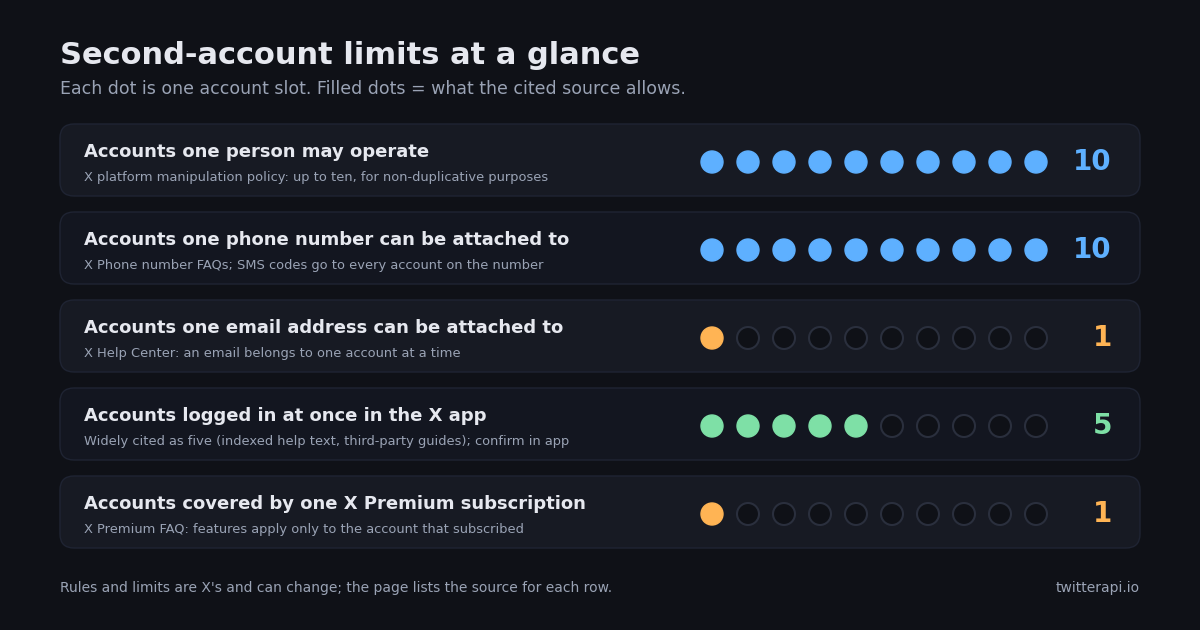
A second account is explicitly allowed. X's platform manipulation and spam policy says users may "create and/or operate up to ten (10) accounts for different, non-duplicative purposes", and gives examples of legitimate multi-account use such as separate accounts for different professional teams in the same league (X Help Center, Platform manipulation and spam policy). The qualifier matters: the accounts must do different things. A second account that exists to like, repost, and reply to your first account's posts is the pattern the policy is written against, and the rules section below quotes it.
Three technical limits shape how you set the second account up. Email: an email address can be attached to only one X account at a time, so a sign-up with the address on your first account is refused with an "already associated" message; you need a second address or you first move the old one (X Help Center, How to update your email address). Phone: X's Phone number FAQs say a phone number can be registered to up to 10 accounts, and that SMS codes for password resets and login verification are sent to each account the number is attached to, which is convenient and also the first way two accounts become visibly linked. Logged-in slots: X's multi-account help page says you can add and access several accounts from the iOS and Android apps, desktop, mobile.x.com, X Lite, and X for Windows; the number you can keep logged in at once in the app is widely cited as five (indexed help-page text and third-party guides, 2026). Treat the five as a working figure rather than a guarantee, because X does not publish it prominently and the app itself is the final word.
Two more things are per account rather than per person. X Premium features apply only to the account that subscribed; the X Premium FAQ says that if you own multiple accounts you do not have access to Premium features when logged in to the others, and that subscribers must confirm a phone number. And the protected-posts setting, which hides an account's posts from everyone but approved followers, is set on each account separately (X Help Center, About public and protected posts). The figure below collects the limits with their sources.
How to create a second Twitter (X) account from the app
X's help page on managing multiple accounts says that from the account menu you can create a new account or add an existing account. The steps below follow that page for the create path; the help site blocks automated fetches, so each step was confirmed against its indexed text and a second how-to source, and the exact labels can shift between app versions.
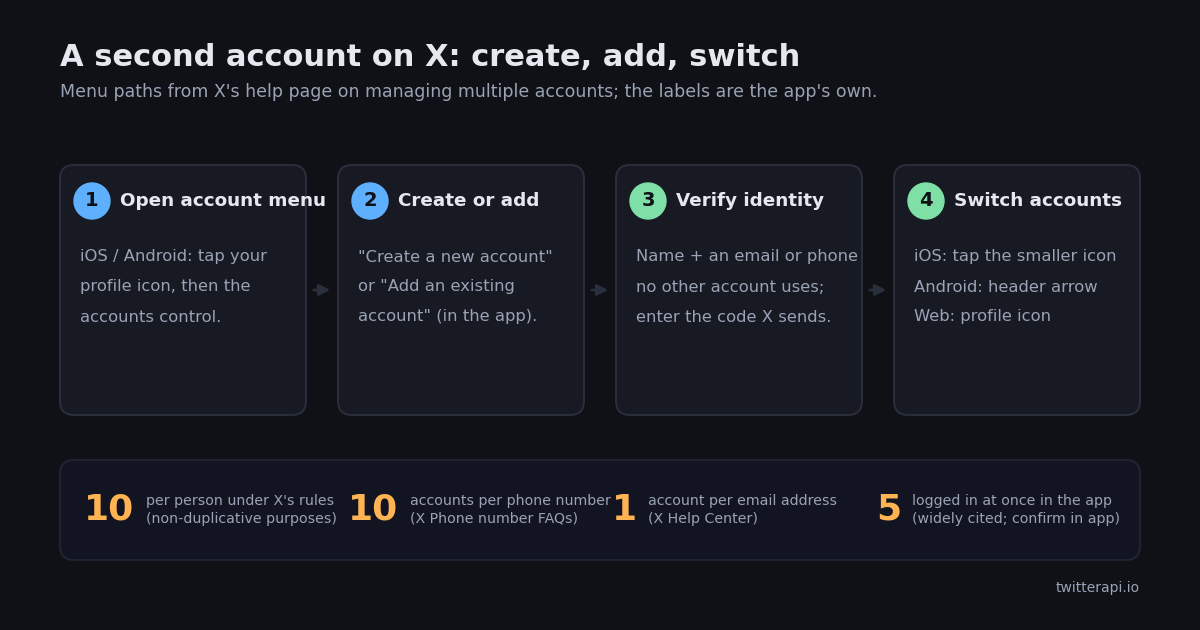
Step 1, open the account menu. In the X app on iPhone or Android, tap your profile icon (top left on most layouts; swiping right from the Home timeline opens the same panel). At the top of the panel, next to your name, is the account control: on iOS an additional-accounts icon, on Android a downward-facing arrow. Tap it.
Step 2, choose Create a new account. The menu offers two options: Create a new account and Add an existing account. Pick Create. The sign-up flow that opens is the same one a brand-new user sees (X Help Center, Signing up with X).
Step 3, give the account its own identity. X asks for a name and an email address or phone number, then sends a verification code to whichever you entered (X Help Center, Signing up with X). This is where the one-email rule bites: use an address that is not on your first account. A phone number already on your first account is accepted, up to the 10-account limit, but remember that resets and login codes for both accounts will then arrive on the same phone. The flow also asks for a date of birth, a password, and a username; third-party walkthroughs in 2026 describe the password minimum as eight characters, which X's own help page does not state, so treat that detail as hedged. The username guide has the length and character rules and a list of ideas if the obvious handle is taken.
Step 4, you are now signed in to both. After the code is accepted, the app switches to the new account and keeps the first one logged in. The next section covers switching back.
On the web. X's help text for desktop describes adding an existing account from the more icon or the plus icon and toggling between accounts via the profile icon; it does not describe creating a new account from inside a logged-in session. To create one on a computer, open x.com/signup in a private window or after signing out, complete the sign-up, then sign back in to the first account and add the new one with the Add an existing account option. That reading is from the help page's indexed text as of 2026; if your web client shows a Create option in the account menu, use it.
Common refusals. "Email already associated with an account" means the address is on another X account, possibly a deactivated one that has not yet been deleted; use a different address or free the old one first (the deactivation guide explains the holding period). A phone number that will not verify may already be on 10 accounts. And X's policy forbids automation to create accounts, so sign-up tools that promise bulk registration are the thing the mass-registration rule exists to catch (X Help Center, Platform manipulation and spam policy).
Adding an account you already have, and switching between accounts
If the second account already exists, you do not sign out. X's multi-account help page gives one path per surface, and the wording below is its own.
iOS. Open the account menu as above and choose Add an existing account, then sign in. Afterwards, tap the profile icon of the account you are using and then the smaller, additional profile icon next to it to switch (X Help Center, How to manage multiple accounts).
Android. Add the account from the same menu. To switch, tap the downward-facing arrow in the header and pick the account.
Desktop (x.com). Add an existing account from the more icon or the plus icon. Once added, click your profile icon and then the smaller, additional profile icon to switch.
mobile.x.com. Add an existing account from the more icon; switch by long-pressing your profile icon and tapping the smaller additional profile icon.
X Lite and X for Windows are listed on the same help page as supporting multiple accounts; the page does not spell out their menu paths, so expect the same profile-icon pattern but check in the client.
When the slots are full. If the app refuses to add another account, the widely cited limit of five logged-in accounts is the likely reason. Log one out (switch to it, then Settings and privacy, Your account, Log out) and add the new one. Logging out does not delete anything; the account can be added again later.
Notifications after adding. When Twitter for Android first shipped multiple accounts in July 2011, its announcement said each account had its own push-notification settings (Twitter blog, July 2011), and that is still the shape of it: the notification controls under Settings and privacy apply to whichever account is active when you open them, and X's mobile-notifications help page notes a cap of 25 push devices per account. So if the second account is a quiet test account, switch to it once and turn its pushes down, otherwise two accounts' worth of mentions and likes land in the same tray.
Second account checklist: personal, brand, or test account
The right setup depends on what the second account is for. This table is the part of the page to keep: it puts the three common cases side by side and says what each needs, how visible it should be, how it can end up linked to your main account, and what X's rules say about it. Each row cites the X help page or policy it draws on, and nothing in it is a count or a statistic.
Keeping two accounts separate: notifications, the compose box, Premium, and shared devices
Once two accounts live in the same app, the mistakes are predictable: a post goes out from the wrong one, a notification for the quiet account interrupts you, or a family member picks up the phone and sees a feed you did not mean to share. None of these need a tool; they need four habits.
Check the avatar before you post. The compose box shows the profile picture of the account that will post. After a switch it is easy to forget which one is active, and the only reliable guard is looking at that avatar before tapping Post. If you draft the same text for both a brand and a personal account, post it from one and let the other repost or quote it rather than publishing identical text twice, which also keeps you clear of the overlapping-personas rule discussed below.
Set notifications per account. Because the settings are per account, switch to the second account once, open Settings and privacy, then Notifications, and reduce or silence its push notifications if it is a test or low-traffic account. Do the same for email notifications; a second account with your main email's alias will otherwise double your inbox.
Premium is per account. If the second account needs Premium features, log in to that account and subscribe from there; the X Premium FAQ says you must be logged in to the account you want to subscribe and that Premium features are not available on your other accounts. Subscribers also have to confirm a phone number, which is one reason to decide early whether the second account will share your phone.
Protect the account that should be private. The protected-posts switch (Settings and privacy, Privacy and safety, Audience and tagging, Protect your posts) makes posts visible only to approved followers and keeps them out of third-party search engines (X Help Center, About public and protected posts). It is the right default for a sandbox account, and for a personal account whose whole point is privacy. The history-clearing guide covers what to tidy if an account has already been public for a while.
Shared devices. Every logged-in account is one tap away from anyone holding the phone. On a shared or family device, keep only the account you need logged in, and sign the others out (Settings and privacy, Your account, Log out). Logging out is reversible; the account and its posts are untouched.
The rules: what makes a second account legitimate, and what gets both suspended
This is the part most how-to guides skip, and it is why this page is not a guide to making alts. X publishes the rules, and they are short enough to quote.
Up to ten, for different purposes. X's platform manipulation and spam policy says: "X allows users to create and/or operate up to ten (10) accounts for different, non-duplicative purposes." It adds that users already operating more than ten will not be affected unless another rule is broken, and that users cannot mass-register X accounts or use automation to create them (X Help Center, Platform manipulation and spam policy; wording confirmed against the indexed text and a second source, 2026).
Overlapping personas. The same policy prohibits coordinated inauthentic activity that artificially influences conversations or disrupts X, including "operating multiple accounts that interact with the same or substantially similar content or in order to inflate or manipulate the prominence of content and/or accounts" (X Help Center, Platform manipulation and spam policy). In plain terms: a second account you use to like, repost, and reply to your first account's posts, or to make a hashtag look busier than it is, is the thing being described. A personal account and a brand account that post different things to different audiences are not.
Ban evasion. X's ban evasion policy says you "may not circumvent X enforcement actions, including by creating new accounts or imitating a suspended account to replace it", and that if an account is permanently suspended for severe violations, X reserves the right to also permanently suspend any other account it believes is operated by the same holder (X Help Center, Ban evasion). Two practical consequences for a second account: do not open one to carry on after a suspension, and note that accounts sharing a phone number, device, or payment method are exactly what "believed to be operated by the same account holder" looks like from X's side. A legitimate second account is not at risk from this on its own, but it is a reason to keep every account's behaviour inside the rules rather than treating one as disposable.
Impersonation and authenticity. X's authenticity rules cover manufactured identities used to deceive; a test or parody account should say what it is in the bio and must not pose as a real brand or person (X Help Center, Authenticity). The exact parody and fan-account labelling requirements change, so check the current page before naming an account after someone else.
The common thread is purpose. X's examples of acceptable multi-account use are accounts that each do a distinct job: different teams in the same league, different locations for a tracking account. If you can finish the sentence "this account exists to..." differently for each account, you are on the right side of the line.
Fixing the usual problems: email refused, phone limit, missing Create option, full slots
"This email is already associated with an account." The address is on another X account, which may be one you deactivated but which has not yet been deleted. Either use a different address, or sign in to the old account and change its email first (X Help Center, How to update your email address). Remember that an email cannot be on two accounts, so the fix is always to move or replace, never to share.
Phone number will not verify. A number can be attached to at most 10 accounts (X Help Center, Phone number FAQs). If you have been given accounts by a previous owner of the number, or run accounts for clients, the count may be higher than you think; remove the number from an account you no longer use.
No Create option on the web. As read from X's help text, desktop only describes adding an existing account. Create the account from the app or from x.com/signup in a signed-out session, then add it.
Cannot add a sixth account. Log one out and try again; five logged in at once is the widely cited limit for the app. The account you log out keeps its data.
Wrong account posted. Delete the post from the account that published it (the post's menu, Delete), then post again from the right one. Deleting is immediate on X but a repost or screenshot may already exist, so the avatar check above is the better fix.
You want the second account gone. Switch to it and deactivate it from Settings and privacy, Your account; the deactivation guide explains the holding period before the username and email are released, and what happens to the data.
Watching several of your own public accounts in one place with the API
Switching accounts is fine for two. By the time you run a personal account, a brand account, and a project account, the question becomes "what is each one at today, and what did it last post", and answering it means four switches and four profile visits. If the accounts are public, a read-only API answers it in one run, with nothing posted and no login shared. For deeper setups, the Twitter (X) monitoring guide covers keyword and competitor tracking; this section only does the small thing: a loop over your own handles.
Two read endpoints. GET /twitter/user/info?userName= returns one profile with followers, following, statusesCount, isBlueVerified, createdAt, and description inside data (docs.twitterapi.io, Get User Info, verified 2026). GET /twitter/user/last_tweets?userName= returns that account's most recent posts, up to 20 per page, each with id, text, createdAt, likeCount, retweetCount, and viewCount, plus has_next_page and next_cursor for paging and an includeReplies flag that defaults to false (docs.twitterapi.io, Get User Last Tweets, verified 2026). Neither needs the account's password; they read what any logged-out visitor can see, which also means a protected account returns nothing useful.
What it costs. Profiles are 18 credits per user returned, which is $0.18 per 1,000 profiles; tweet endpoints such as last tweets are 15 credits per post returned, $0.15 per 1,000 posts, with a 15-credit minimum per request so a full 20-post page is $0.003 (twitterapi.io/pricing, verified 2026). One pass over one account is therefore $0.00018 for the profile plus $0.003 for its latest page of posts; three accounts checked every hour for a month (2,160 passes) come to about $6.87. The official X API prices the same reads at $0.010 per user and $0.005 per post on its pay-per-use tier, so 1,000 profiles cost $10 there against $0.18 here, and 1,000 posts $5 against $0.15, about 33 times more per post (docs.x.com/x-api/getting-started/pricing, verified 2026). The official API remains the route if you want to post or act as the account; that is not what this script does.
The script below takes handles on the command line (or the list at the top), fetches each profile and its latest post, and prints one block per account. Set TWITTERAPI_IO_KEY in your environment (the key is on the dashboard after sign-up). New accounts that pass the automatic bot check get $1 of free credits (100,000 credits, no card, one per person or network, expiring after 31 days), which covers a few thousand runs (twitterapi.io/pricing, verified 2026). Prices and plans are on the pricing page.
import os

import requests

BASE = "https://api.twitterapi.io"
HEADERS = {"X-API-Key": os.environ["TWITTERAPI_IO_KEY"]}  # key from twitterapi.io/dashboard


def profile(handle):
    """Public profile for one handle: followers, following, statusesCount, ..."""
    r = requests.get(
        f"{BASE}/twitter/user/info",
        params={"userName": handle},
        headers=HEADERS,
        timeout=30,
    )
    r.raise_for_status()
    return r.json().get("data") or {}


if __name__ == "__main__":
    for h in ["XDevelopers", "X"]:  # replace with your own handles
        p = profile(h)
        print(f"@{p.get('userName')}: followers={p.get('followers')} posts={p.get('statusesCount')}")
"""Second Twitter (X) account check-in: for each of your own public handles, print
follower count, post count, and the latest post, without switching accounts.

Usage: python second_account_checkin.py handle1 handle2 ...
Needs TWITTERAPI_IO_KEY in the environment (twitterapi.io/dashboard).
Cost per handle per run: user info = 18 credits ($0.18 per 1,000 profiles);
last tweets = 15 credits per post returned ($0.15 per 1,000 posts, 15-credit
minimum per request, a full 20-post page = $0.003). See twitterapi.io/pricing.
"""
import os
import sys

import requests

BASE = "https://api.twitterapi.io"
HEADERS = {"X-API-Key": os.environ["TWITTERAPI_IO_KEY"]}
HANDLES = ["XDevelopers", "X"]  # replace with your own handles


def get(url, params):
    r = requests.get(url, params=params, headers=HEADERS, timeout=30)
    r.raise_for_status()
    return r.json()


def profile(handle):
    body = get(f"{BASE}/twitter/user/info", {"userName": handle})
    data = body.get("data") or {}
    if body.get("status") != "success" or not data.get("userName"):
        raise SystemExit(f"@{handle}: {body.get('msg') or data.get('message') or 'profile not found'}")
    return data


def latest_post(handle):
    """Newest post (replies excluded). Tweets may sit at the root or under data."""
    body = get(f"{BASE}/twitter/user/last_tweets", {"userName": handle, "includeReplies": "false"})
    tweets = body.get("tweets") or (body.get("data") or {}).get("tweets") or []
    return tweets[0] if tweets else None


if __name__ == "__main__":
    handles = sys.argv[1:] or HANDLES
    for h in handles:
        p = profile(h)
        print(f"@{p['userName']:<16} followers={p.get('followers') or 0:>10,}  "
              f"following={p.get('following') or 0:>7,}  posts={p.get('statusesCount') or 0:>8,}")
        t = latest_post(h)
        if t is None:
            print("    no public posts (protected account or empty timeline)")
            continue
        text = " ".join((t.get("text") or "").split())[:100]
        print(f"    latest {t.get('createdAt')}  likes={t.get('likeCount') or 0:,}  "
              f"views={t.get('viewCount') or 0:,}")
        print(f"    {text}")
Questions readers ask
How do I create a second Twitter (X) account?
In the X app on iPhone or Android, tap your profile icon to open the account menu, tap the accounts control next to your name (an additional-accounts icon on iOS, a downward arrow on Android), and choose Create a new account. Enter a name and an email address or phone number that is not already on another account, type the code X sends, then set a password and username. The first account stays logged in (X Help Center, How to manage multiple accounts).
Can I use the same email for two X accounts?
No. An email address can be attached to only one X account at a time, so the sign-up is refused with an "already associated" message. Use a different address, or change the email on the existing account first (X Help Center, How to update your email address). A phone number is different: X's Phone number FAQs say one number can be registered to up to 10 accounts.
How many Twitter (X) accounts can one person have?
X's platform manipulation and spam policy allows up to ten accounts per person for different, non-duplicative purposes. Separately, one phone number can be attached to up to 10 accounts, and the number of accounts the app keeps logged in at once is widely cited as five; log one out to add another.
How do I switch between accounts on X without logging out?
On iOS, tap your profile icon and then the smaller profile icon next to it. On Android, tap the downward-facing arrow in the header. On x.com, click your profile icon and choose the other account; on mobile.x.com, long-press the profile icon. All of these are from X's help page on managing multiple accounts.
Can I create a second account on the X website?
X's desktop help text describes adding an existing account from the more or plus icon, not creating a new one from inside a logged-in session. To create one on a computer, sign out or open a private window, go to x.com/signup, complete the sign-up, then sign back in to your first account and use Add an existing account. If your web client shows a Create option in the account menu, use that.
Does X Premium cover all my accounts?
No. The X Premium FAQ says that if you own multiple accounts you do not have access to Premium features when logged in to the others; you subscribe from inside the account you want it on, and each subscriber must confirm a phone number. A brand account and a personal account therefore need two subscriptions if both need the features.
Is having a second Twitter (X) account against the rules?
Not by itself. X allows up to ten accounts with different, non-duplicative purposes. What is prohibited is using several accounts to interact with the same content or inflate its prominence (overlapping personas), mass-registering accounts or creating them with automation, and opening a new account to get around a suspension, which X's ban evasion policy says can get every account believed to belong to the same person suspended.
How can I see follower counts for all my accounts without switching?
For public accounts, a read-only API does it: loop over your handles and call GET /twitter/user/info?userName= for the profile and GET /twitter/user/last_tweets?userName= for the latest post. On twitterapi.io that is $0.18 per 1,000 profiles and $0.15 per 1,000 posts (pricing page, verified 2026). The script on this page prints one block per account; protected accounts return nothing because the API reads only what a logged-out visitor can see.
Continue
- X Help Center: How to manage multiple accounts (create or add from the account menu; switching on iOS, Android, desktop, and mobile.x.com)
- X Help Center: Phone number FAQs (a phone number can be registered to up to 10 accounts; SMS codes go to each)
- X Help Center: Signing up with X (name plus email or phone, verification code)
- X Help Center: Platform manipulation and spam policy (up to ten accounts for non-duplicative purposes; overlapping personas; no mass registration)
- X Help Center: Ban evasion policy (no new accounts to circumvent enforcement; linked accounts may be suspended)
- X Help Center: X Premium FAQ and support (Premium features apply only to the subscribing account; phone confirmation required)
- Twitter (X) API overview: the hub for reading X data
- Usernames for Twitter (X): rules, limits, and ideas for a new handle
- Deactivating a Twitter (X) account: what happens to the email, username, and data
- How to clear Twitter (X) history before making an account private
- Twitter (X) monitoring: tracking accounts and keywords in one place
- Twitter (X) automation guide: what you can automate within the rules
- twitterapi.io pay-per-call pricing: profiles, posts, and followers
- 01How Do You Turn On Twitter (X) Dark Mode, and What Are Its Exact Colors?
- 02What Was Twitter (X) Circle, and What Can You Use Instead?
- 03What Percentage of Twitter (X) Is Bots? Every Published Estimate and Its Method
- 04Can You Hide Who You Follow on Twitter (X)?
- 05Deactivating a Twitter (X) Account: What Happens, Step by Step
- 06Tracking Twitter (X) Account Views via API — A Developer Guide
- 07How to Use Twitter (X) Without an Account — A Developer's API Guide
- 08Twitter (X) Analytics Tools — A Developer's Roundup
Stop reading. Start building.
Starter credits cover real testing on real data. Google sign-in, no card, no application queue.
Get an API key