What Was Twitter (X) Circle, and What Can You Use Instead?
If you are searching for Twitter Circle in 2026, you are probably in one of three situations: you remember the green "only people in your Circle can see this" label and want to know where the option went; you have a stack of old Circle posts and want to know who can see them now; or you want a way to post to a small group and are looking for whatever replaced it. All three questions have short answers, and the short answers are not what most of the older guides on this topic say, because the landscape moved twice: Circle went in October 2023, and Communities, the replacement those guides point to, went in May 2026.
This page keeps to what X has said on its own help pages and in announcements, plus the press record of the dates and the 2023 privacy incident. Where X has not said something, for example whether former Circle members can still open your old Circle posts, the page says so instead of guessing. If what you actually want to hide is your following list rather than your posts, that is a different switch; the can you hide who you follow on X page covers it.
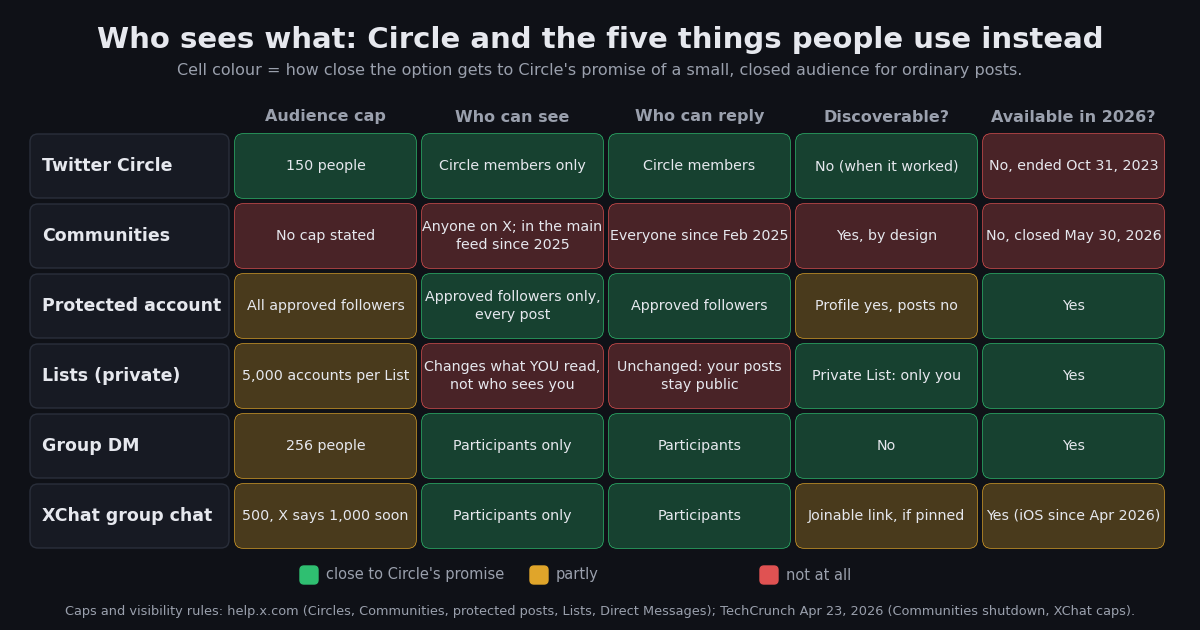
The comparison matrix in the middle of the page is the part to bookmark: Circle against a protected account, Lists, group DMs, XChat group chats, and the now-closed Communities, on how many people, who can see, who can reply, whether strangers can find it, and whether it still exists.
What Twitter Circle was and how it worked
Twitter Circle was Twitter's version of Instagram's Close Friends. You built one Circle per account by adding people from your followers or from any public account, up to 150 of them, and then, each time you wrote a post, you could choose between Everyone and your Twitter Circle as the audience (Android Central, August 30, 2022; MobileSyrup, May 4, 2022). A Circle post looked like any other post except for a green banner underneath saying that only people in the author's Circle could see it, and the repost button was greyed out so a member could not push it to a wider audience (TechCrunch, February 3, 2023).
Three details made it different from a protected account, and they are why people still search for it. It was per post, not per account. You stayed public and dropped into the small audience only when you wanted to. Membership was invisible. People were not told when you added or removed them, and they did not have to follow you to be added (Android Central, 2022). Replies stayed inside. Members could reply, and those replies were visible only to the Circle, so a thread could run among 150 people without the rest of X seeing it.
Circle shipped on iOS, Android, and the web at the same time (MobileSyrup, 2022), which is why so many accounts had Circle posts by the time it was switched off a little over a year later.
The timeline: test, rollout, bugs, security incident, shutdown
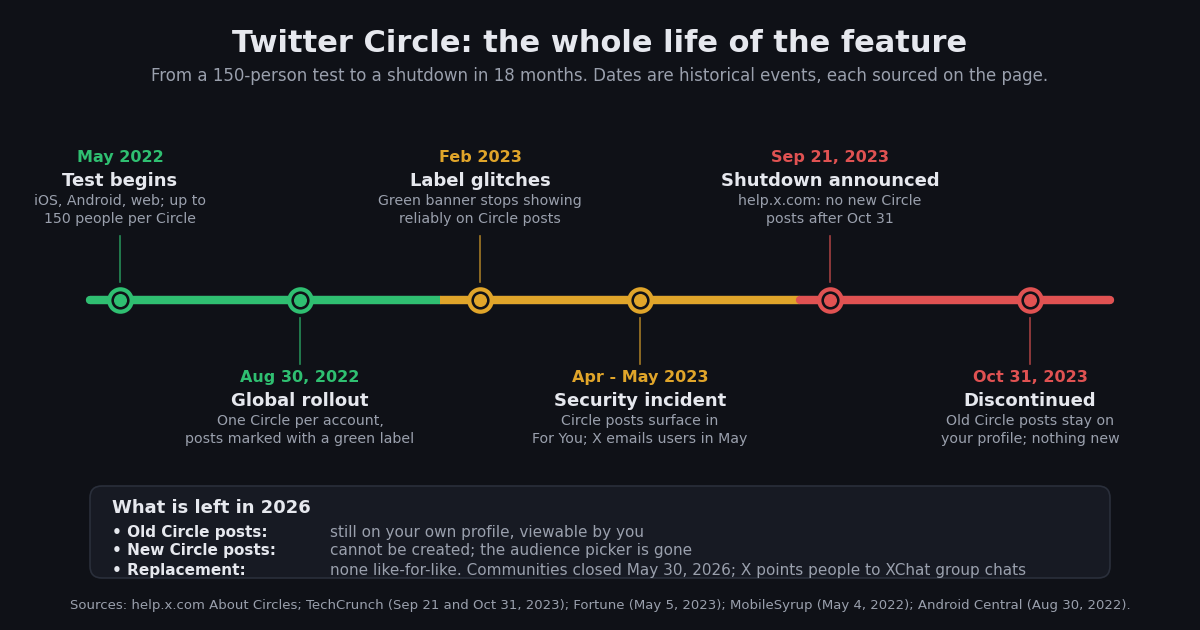
The hero image above compresses the feature's life into one strip; here are the same events with their sources.
May 2022, the test. Twitter began testing Circle with a limited set of users on iOS, Android, and the web, with the 150-person cap already in place (MobileSyrup, May 4, 2022).
August 30, 2022, global rollout. Twitter announced Circle for everyone. The pitch was choosing who can see and engage with a post on a tweet-by-tweet basis, and the launch coverage noted that you could edit the Circle afterwards and that removed accounts were not notified (Android Central; Hypebae, August 2022).
February 2023, the label glitch. About three months into the Musk ownership, users reported that the green banner marking Circle posts stopped appearing reliably, and that the repost notice on Circle posts read "(null) and their Twitter Circle can see these Tweets." Musk replied that the reports "helped identify some issues with the system" and that they should be addressed by the next week (TechCrunch, February 3, 2023).
April 2023, the security incident. Around April 7, users began reporting that Circle posts were surfacing in the For You timeline of followers who were not in the Circle, with likes and views from outside it (Security Affairs, citing The Guardian, 2023). On May 5, 2023, Twitter emailed affected accounts: "a security incident may have allowed users outside of your Twitter Circle to see tweets that should have otherwise been limited to the Circle," adding that the issue "was identified by our security team and immediately fixed" (Fortune, May 5, 2023). Twitter did not say what caused it, how long it lasted, or how many accounts it touched.
September 21, 2023, the shutdown notice. A note on X's help page announced that Circles would be deprecated as of October 31, 2023: "After this date, you will not be able to create new posts that are limited to your Circle, nor will you be able to add people to your Circle," though you could still remove people by unfollowing them (help.x.com, About Circles; TechCrunch, September 21, 2023).
October 31, 2023, the end. The audience picker disappeared. TechCrunch's same-day report noted that you could still see your own Circle posts on your profile and that there was no sign the old posts had been made public, and that X had not explained why it was retiring the feature (TechCrunch, October 31, 2023).
What happened to your old Circle posts
This is the question with the least documentation, so it is worth separating what X has said from what it has not.
What X said. The deprecation notice covered only the future: no new Circle posts, no new members. X's statement to the press added that users would still have access to their past Circle posts (AlternativeTo, September 2023; TechCrunch, 2023). On the day of the shutdown, your own Circle posts were still visible on your own profile (TechCrunch, October 31, 2023).
What X did not say. X has never documented whether the people who were in your Circle can still open those posts, whether the green label persists, or whether the posts are treated as fully private, visible to former members, or something in between. TechCrunch observed that the green banner "only appeared some of the time" after the shutdown, which is exactly why people were unsure of their posts' status (TechCrunch, October 31, 2023). Nothing published since settles it.
The practical reading. If a Circle post was something you would not want outside the original 150, the safe move is to delete it rather than rely on an audience setting whose code path no longer exists. There is no Circle filter on your profile, so you find them by scrolling your own posts and looking for the green label where it still shows, or by searching the archive you can download from your account settings. Once they are deleted, the content is not available on Twitter page explains the other reasons an old post can stop loading, which helps you tell a deleted Circle post from a broken one.
For anyone wondering about the API. Circle posts were never exposed through X's public API, which documented Community lookups but never a Circle endpoint or a Circle-audience field. An old Circle post is not sitting in a third-party dataset; it exists on your profile and X's servers and nowhere else. The API note at the end of the page covers what was readable.
Why X removed Circle
X never gave a reason. Its help-page notice stated the date and the consequences and nothing else, and TechCrunch's shutdown-day report said plainly that it was not clear why X was sunsetting the feature (TechCrunch, October 31, 2023).
Two explanations are widely cited, and both should be read as inference rather than fact. The first is the bug history: a feature whose entire promise is "only these people can see this" had a visible failure in February 2023 and a confirmed exposure in April 2023 that X's own email called a security incident (Fortune). The second is stability under the new ownership: the February 2023 coverage of the glitches came three months into the Musk era and quoted former trust-and-safety head Yoel Roth's warning that platform instability undermines privacy protections (TechCrunch, February 3, 2023). Neither has been confirmed by X.
What is not in doubt is the pattern. Circle was announced as a privacy control, had a documented privacy failure within eight months of launch, and was retired within fourteen. Anyone choosing a replacement should weigh the alternatives on the same test: has the feature's privacy promise held up, and does X still invest in it?
Circle vs Communities vs protected account vs Lists vs group chats: the matrix
Every row is one option and every column a question you would ask about Circle. Caps and visibility rules come from X's help pages; the two shutdown dates come from X's help page (Circle) and X's product head (Communities), both as reported by TechCrunch.
Read the table by the second and third columns. Only three live options actually narrow who sees what you write: a protected account, a group DM, and an XChat group chat. Lists narrow what you read. Communities, which most 2024-era guides recommended as the Circle replacement, had already stopped being private in February 2025 and then closed outright in May 2026.
Communities: the replacement that closed too
Communities gets its own section because it is the answer most pages about Twitter Circle alternatives still give, and it is wrong twice over.
Twitter launched Communities on September 9, 2021 as its answer to Facebook Groups and subreddits: moderated groups around a topic, where members could post to the group instead of to their followers (AdNews; Ubergizmo, September 2021). Even then it was never a privacy feature. X's help page spelled it out: posts in Communities can be seen by anyone on X, and only members can engage (help.x.com, Communities on X). It also required a public account; protected accounts could not join. So a Community was the opposite of Circle on the axis that mattered: it limited who could talk, not who could listen.
In February 2025, X went further and made Community posts and replies visible to your followers and other people on X, eligible for the main feed and recommendations, and let everyone on X reply, with member replies prioritised (Social Media Today, February 3, 2025). From that point a Community post was just a public post with a topic label.
Then on April 23, 2026, X's head of product Nikita Bier announced the shutdown. His reasoning was blunt: Communities "were used by less than 0.4% of users, yet contributed to 80% of spam reports, financial scams, and malware on X." The deprecation was first set for May 6, 2026 and, after pushback from moderators, pushed to May 30, 2026 so that admins could move their members to XChat group chats by pinning a joinable link (TechCrunch, April 23, 2026; PiunikaWeb; Roboin). X launched a Custom Timelines feature for Premium subscribers in the same week, which it framed as the new way to follow a niche, but that is a reading feature with no audience control at all.
What X has not said is what happens to the posts that lived inside Communities: the announcement covered migrating members, not content, and coverage through the May 30 deadline does not confirm whether Community pages stayed readable. If you posted in a Community, assume those are public posts on your profile unless you deleted them.
Protected account, Lists, group DMs, XChat: what each gives you, and which to pick
Protected account: the only real per-account privacy switch. When you protect your posts, anyone who wants to follow you has to send a request you approve, and only approved followers can see your posts. Followers cannot repost or quote them, the posts are searchable on X only by you and your followers, and they do not appear in third-party search engines (help.x.com, About public and protected Posts). Two consequences people miss: the switch is not retroactive, so accounts that followed you before you protected the account keep access unless you block them (help.x.com; How-To Geek), and it is all-or-nothing, so your public reach ends the moment you flip it. The practical pattern for a Circle refugee is a second, protected account for the small-audience writing.
Lists: for reading, not for hiding. A List is a curated timeline of accounts. You can keep up to 1,000 Lists with up to 5,000 accounts each (help.x.com, Help with Lists; the limits rose from 20 and 500 in 2013, per MarTech), and a private List is visible only to you. Nothing about a List changes who can see your posts. If what you missed about Circle was the small, quiet feed of 150 people rather than the privacy, a private List gives you that today; the Twitter Lists programmatic guide covers building and reading Lists at scale.
Group DMs: the closest live match for a private thread. A group message on X can include up to 256 people, any participant can add others, and nobody outside sees it (help.x.com, About Direct Messages). It is the right tool when the point of your Circle was the back-and-forth among a known set of people. The limits: no profile-style timeline, no quoting, and the group is only as private as its least careful member, who can add anyone.
XChat group chats: X's own answer in 2026. XChat is the standalone messaging app X shipped on iOS on April 24, 2026, with end-to-end encryption claimed by X, message editing and deletion, and group chats that started at 350 participants (Engadget, April 2026). When Communities closed, X raised the cap to 500, said 1,000 would follow within weeks, and added joinable links that admins could pin on the timeline (TechCrunch, April 23, 2026). It is the feature X is actively investing in. The caveats: the launch was iOS-only, with other platforms unconfirmed at the time of writing, and a joinable link makes a group as discoverable as wherever you post the link.
Which one to pick depends on what you used Circle for. Personal updates to friends while staying public otherwise: a second, protected account, the only option that keeps ordinary posts, replies, and a profile timeline inside an approved audience. A group chat with a timeline: a group DM if the group is under 256 and lives in the X app you already use; an XChat group chat if it is larger or you want encryption and editing. Testing drafts with a trusted few: either of the above; the replies stay inside. A calmer feed of your 150 closest people: a private List, which reproduces the attention part of Circle rather than the secrecy. An audience of thousands around a topic: that was Communities, and it is gone; X's suggestion is an XChat group chat with a pinned joinable link, and neither that nor the Premium-only Custom Timelines is private.
Twitter Circle generator (interaction circles): a different thing
A search for "Twitter Circle" also brings up circle generators. These tools draw a picture: your profile photo in the middle, surrounded by rings of the accounts you interact with most. They share a name with X's Circle feature and nothing else. A generator never controlled who could see a post, and it was not affected when X removed Circle, because it only reads public activity.
How a generator works. It reads an account's recent public posts, counts which accounts it replied to, mentioned, quoted and reposted, ranks them, and places the top ones in rings, closest first. Some tools also count likes. The result is a shareable image, not a privacy setting.
If you want to build one, the inputs are public data. On TwitterAPI.io, GET /twitter/user/last_tweets with includeReplies=true returns an account's recent posts and replies, 20 per page; each post carries inReplyToUsername, quoted_tweet, retweeted_tweet and the mentions in entities. GET /twitter/user/mentions returns the posts that mention the account, also 20 per page, which gives you the other direction. Count handles on both sides and rank them. Likes cannot be part of the score here: the API has no endpoint that lists the posts an account has liked.
So if you came here for the picture, you want a circle generator. If you came for the audience control X used to offer, the options are in the matrix above.
The API note: Circle was never readable, Communities and Lists were
A short bridge for readers who work with X data. The features on this page fall into two groups from an API point of view.
Never exposed to third parties: Circle posts, protected posts, group DMs, and XChat. If someone offers you a dataset of Circle posts, it did not come from the API.
Readable while they existed: Communities and Lists. The official X API documented Community lookups such as GET /2/communities/{id} (docs.x.com), and twitterapi.io exposes GET /twitter/community/info?community_id= for a Community's name, description, member count, join policy, and rules (20 credits per call, per the endpoint page) and GET /twitter/community/tweets?community_id= for its posts, newest first, 20 per page with a next_cursor. Since the May 30, 2026 shutdown these calls return whatever X still serves for a Community ID; test with a known ID before building on them. The same script shape works for a List timeline with GET /twitter/list/tweets?listId=, which is the longer-lived option.
Cost. Community and List posts are tweet endpoints: 15 credits per post returned, which is $0.15 per 1,000 posts, with a 15-credit minimum per request, so a full 20-post page costs $0.003 (twitterapi.io/pricing, verified 2026). The official X API prices pay-per-use reads at $0.005 per post, so the same 1,000 posts cost $5 (docs.x.com, X API pricing, verified 2026), about 33 times more. New twitterapi.io accounts that pass the automatic bot check get $1 of free credits (100,000 credits, no card, one per person or network, expiring after 31 days), which covers a few thousand pages. The script below pulls one Community's info and its latest posts; set TWITTERAPI_IO_KEY in your environment and change the ID.
import os
import sys

import requests

BASE = "https://api.twitterapi.io"
HEADERS = {"X-API-Key": os.environ["TWITTERAPI_IO_KEY"]}  # key from twitterapi.io/dashboard


def community_info(community_id):
    """Name, description, member count, join policy, rules. 20 credits per call."""
    r = requests.get(
        f"{BASE}/twitter/community/info",
        params={"community_id": community_id},
        headers=HEADERS,
        timeout=30,
    )
    r.raise_for_status()
    return r.json().get("community_info") or {}


if __name__ == "__main__":
    if len(sys.argv) < 2:
        raise SystemExit("usage: python community_info.py <community_id>")
    info = community_info(sys.argv[1])
    print(info.get("name"), "-", info.get("member_count"), "members, join policy:", info.get("join_policy"))
"""Twitter Circle is gone and Communities closed on May 30, 2026; this reads what X still serves
for a Community: its info, then its latest posts, newest first, 20 per page.

Usage: python community_readback.py <community_id> [pages]
Needs TWITTERAPI_IO_KEY in the environment (twitterapi.io/dashboard).
Cost: community info = 20 credits per call (endpoint page); community posts are a tweet endpoint,
15 credits per post returned = $0.15 per 1,000 posts, 15-credit minimum per request, so a full
20-post page is $0.003 (twitterapi.io/pricing). Swap the posts call for
GET /twitter/list/tweets?listId= to read a List timeline the same way.
"""
import os
import sys

import requests

BASE = "https://api.twitterapi.io"
HEADERS = {"X-API-Key": os.environ["TWITTERAPI_IO_KEY"]}


def get(url, params):
    r = requests.get(url, params=params, headers=HEADERS, timeout=30)
    r.raise_for_status()
    body = r.json()
    if body.get("status") == "error":
        raise SystemExit(f"API error: {body.get('msg')}")
    return body


def community_info(community_id):
    body = get(f"{BASE}/twitter/community/info", {"community_id": community_id})
    return body.get("community_info") or {}


def community_posts(community_id, pages=2):
    """Yield posts newest first, 20 per page; stop on an empty page as well as on has_next_page."""
    cursor = ""
    for _ in range(pages):
        body = get(f"{BASE}/twitter/community/tweets", {"community_id": community_id, "cursor": cursor})
        tweets = body.get("tweets") or []
        if not tweets:
            break
        yield from tweets
        if not body.get("has_next_page") or not body.get("next_cursor"):
            break
        cursor = body["next_cursor"]


if __name__ == "__main__":
    if len(sys.argv) < 2:
        raise SystemExit("usage: python community_readback.py <community_id> [pages]")
    community_id = sys.argv[1]
    pages = int(sys.argv[2]) if len(sys.argv) > 2 else 2

    info = community_info(community_id)
    if not info:
        raise SystemExit(f"no community info returned for {community_id}; X may no longer serve it")
    print(f"{info.get('name')}  members={info.get('member_count')}  join_policy={info.get('join_policy')}")
    print(f"  {info.get('description')}\n")

    n = 0
    for t in community_posts(community_id, pages=pages):
        n += 1
        author = (t.get("author") or {}).get("userName")
        text = (t.get("text") or "").replace("\n", " ")[:90]
        print(f"{t.get('createdAt')}  @{author:<18} likes={t.get('likeCount') or 0:>6}  {text}")
    print(f"\n{n} posts read; approximate cost ${n * 15 / 100000:.5f} plus $0.0002 for the info call")
Questions readers ask
What was Twitter Circle?
A feature that let you send an ordinary post to a chosen audience of up to 150 people instead of all your followers. You built one Circle per account, picked Circle as the audience when writing a post, and the post carried a green label saying only your Circle could see it. Twitter tested it in May 2022 and rolled it out to everyone on August 30, 2022.
Does Twitter Circle still exist in 2026?
No. X's help page says Circles were deprecated as of October 31, 2023. After that date you cannot create Circle posts or add people to a Circle. There is no X Circle under another name either; the audience picker in the compose box is gone.
Can I still see my old Twitter Circle posts?
Yes, on your own profile. X said users would keep access to their past Circle posts, and on the day of the shutdown they were still visible to their authors. There is no filter for them, so scroll your profile or search your downloaded archive, and delete the ones you would not want seen more widely.
Can other people see my old Circle tweets now?
X has not documented this. Press reports on the shutdown day found no sign the posts had been made public, but also noted the green Circle label only appeared some of the time. Because X has never stated who can open them, the safe assumption for a sensitive post is to delete it.
Why did X get rid of Twitter Circle?
X never said. The feature had a visible label glitch in February 2023 and a confirmed security incident in April 2023 in which Circle posts appeared in the For You timelines of people outside the Circle, which Twitter confirmed by email on May 5, 2023. Those problems are widely cited as the reason, but that is inference; X's notice gave only the date.
What replaced Twitter Circle?
Nothing with the same shape. For private posts, a protected account; for a private conversation, a group DM (up to 256 people) or an XChat group chat (500, with 1,000 promised); for a quieter feed, a private List. Communities, the usual recommendation in older guides, was never private and closed on May 30, 2026.
Is a protected account the same as Twitter Circle?
No. Circle was per post and you stayed public otherwise; protecting your account applies to every post, hides them from search engines, stops followers reposting them, and requires approving each new follower. It is also not retroactive: people who followed you before you protected the account keep access unless you block them (help.x.com). Most former Circle users run a second, protected account for the small-audience writing.
Were Circle posts available through the Twitter API?
No. X's public API never documented a Circle endpoint or a Circle-audience field, so third-party tools could not read them. Community posts were readable while Communities existed, and List timelines still are, which is why the API bridge on this page uses those endpoints rather than anything to do with Circle.
Continue
- X Help Center: About Circles (deprecation notice: no new Circle posts or members as of October 31, 2023)
- X Help Center: Communities on X (posts visible to anyone on X, public accounts only, join types)
- X Help Center: About public and protected Posts (approval, no reposts, not in search engines)
- TechCrunch, September 21, 2023: X is shutting down its Circle feature in October (150 cap, bug history, X's wording)
- Fortune, May 5, 2023: Twitter's email confirming the April 2023 Circle security incident
- TechCrunch, April 23, 2026: X is shutting down Communities (under 0.4% usage, 80% of spam reports, XChat migration, May 30 deadline)
- Twitter (X) API overview: the hub for reading X data
- Why a post says content is not available on Twitter (X)
- Twitter (X) Lists: building and reading them programmatically
- Can you hide who you follow on X? What a protected account changes
- twitterapi.io pay-per-call pricing: tweets, profiles, and Lists
- Get an API key on the twitterapi.io dashboard
- 01How Do You Turn On Twitter (X) Dark Mode, and What Are Its Exact Colors?
- 02How Do You Create a Second Twitter (X) Account, and What Does X Allow?
- 03What Percentage of Twitter (X) Is Bots? Every Published Estimate and Its Method
- 04Can You Hide Who You Follow on Twitter (X)?
- 05Deactivating a Twitter (X) Account: What Happens, Step by Step
- 06Twitter (X) Tweet Metadata — API Fields Reference
- 07Twitter Monitoring — A Practical Guide
- 08Monitoring Twitter (X) Tweets via API — A Developer's Guide
Stop reading. Start building.
Starter credits cover real testing on real data. Google sign-in, no card, no application queue.
Get an API key