Agent Reach and Twitter (X): What the Twitter Channel Does, What It Needs, and the API Route
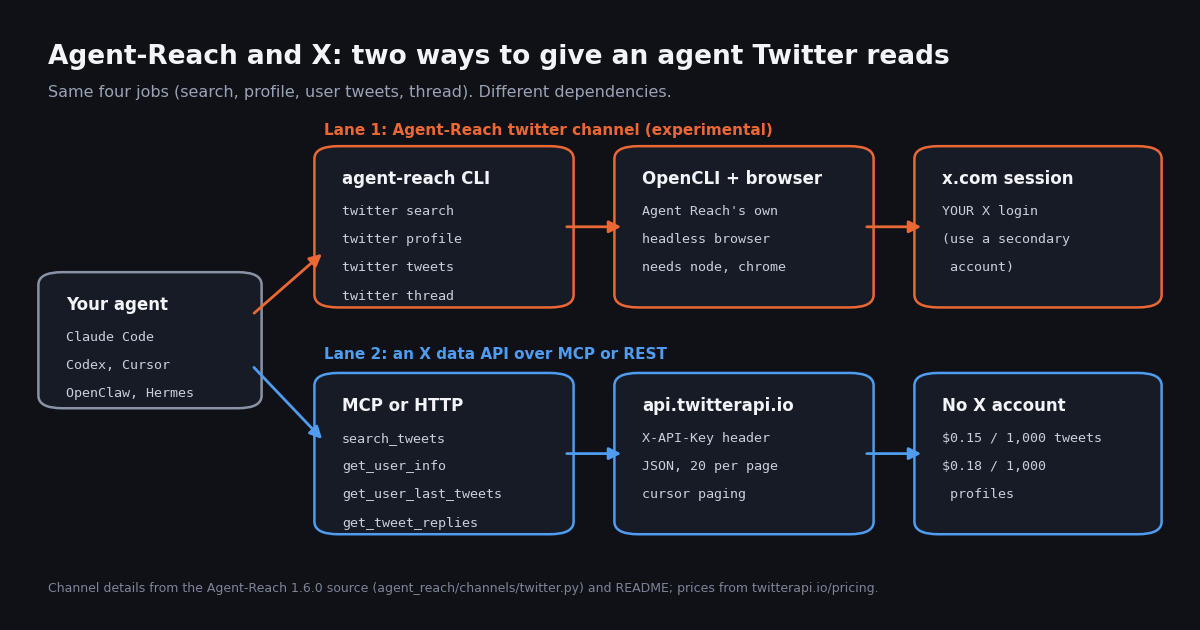
This page is about one specific tool, Agent-Reach, and its Twitter (X) channel. Our OpenClaw and Hermes Agent pages are about agents (the thing that thinks and plans); Agent-Reach is a tool layer those agents install, the way you would add a skill or an MCP server. Its README names Claude Code, Codex, Hermes Agent and OpenClaw among the agents it is built for. So if you already run one of those agents and keep seeing "Agent Reach" in repo round-ups, this is the page that tells you what it actually does with X, what it needs from you, and what to do when it is not enough.
Everything below was checked against the repository itself: the English README (docs/README_en.md), the install guide (docs/install.md), pyproject.toml, the 1.6.0 changelog, the twitter channel source (agent_reach/channels/twitter.py) and the release acceptance file. We then did two pieces of first-hand work: we measured how people talk about Agent-Reach on X (500 search results, 366 of them about the project), and we ran the same four jobs its twitter channel offers through the twitterapi.io API on 8 organization accounts, recording what each call returned and what it cost.
One note on scope. Agent-Reach covers many platforms, including several regional ones; this page only discusses the X channel and the general install, because that is what people searching for "agent reach twitter" want to know.
What Agent-Reach is, verified from the repo
The pitch. The English README opens with "Let your AI agent reach the parts of the internet it can't reach on its own," and lists four gaps: features that need a login (its first example is "listing an X account's posts"), what is inside video, regional platforms general search covers poorly, and clean structured data. The GitHub description sums it up as "one CLI, zero API fees."
The interface. Every call is agent-reach <channel> <action> [args], plus agent-reach read <url> (which picks the channel from the link) and agent-reach channels (which lists what exists). The install guide says each command in 1.6 and later "prints one JSON object; read ok, result and error.hint." That envelope is what makes it agent-friendly: the model reads one predictable shape whatever the platform.
The design. The README describes every platform as "an ordered list of tools (primary + fallbacks)." Agent-Reach does not scrape anything itself; it installs and calls upstream tools, and when one fails it tries the next. Its credits section names OpenCLI, yt-dlp, Jina Reader, Exa and two platform-specific CLIs as upstreams.
The numbers we read on GitHub. At the time of review the repository had over 100,000 stars and over 8,900 forks, an MIT license, Python as its language, and its last push the day before our check. It was created in February 2026, and its changelog dates the 1.6.0 rebuild to October 23, 2026. GitHub search returned 798 issues and pull requests in total, 124 of them mentioning twitter (28 still open).
How Agent-Reach installs (and the PyPI trap)
You install it by asking your agent. The Quick Start tells you to send your agent one line: Install Agent Reach: https://raw.githubusercontent.com/Panniantong/Agent-Reach/main/docs/install.md. The agent reads that file and runs the steps itself, which is why the install guide is written "For the AI doing the work."
What the agent runs. If uv is missing it installs it with Astral's official script, then uv tool install https://github.com/Panniantong/Agent-Reach/releases/latest/download/agent-reach.zip and agent-reach setup. Setup turns on the default channels and installs the agent skill; the changelog says one real copy goes to ~/.agents/skills/agent-reach/SKILL.md with links to it from the skill folders of Claude Code, OpenClaw, Hermes, Cursor, Gemini CLI, GitHub Copilot and Windsurf. Everything Agent-Reach installs or stores lives under ~/.agent-reach/.
The PyPI trap. Both the README and the install guide carry the same warning: "The PyPI package named agent-reach is NOT this project." Do not pip install agent-reach. Version 1.5 and earlier were installed with pip or pipx; 1.6 moved to uv, and agent-reach update migrates an old install.
Turning on X. Twitter is not a default channel. You (or your agent) run agent-reach add twitter, which prepares its tools. The channel source declares two prerequisites, node and chrome, and one tool, opencli; the changelog says add installs a private Node.js under ~/.agent-reach/tools/node/ when the system has none and uses CloakBrowser or, failing that, the installed Chrome. Then you log in to x.com yourself; the source's login hint tells the agent to "Ask the user to log in to x.com in the Agent Reach dedicated browser. Never log in on their behalf."
# what the agent runs (from docs/install.md, Agent-Reach 1.6.0)
curl -LsSf https://astral.sh/uv/install.sh | sh        # only if uv is missing
uv tool install https://github.com/Panniantong/Agent-Reach/releases/latest/download/agent-reach.zip
agent-reach setup                                       # default channels + the agent skill

# X is opt-in and experimental
agent-reach add twitter                                 # prepares OpenCLI, Node, the dedicated browser
agent-reach login twitter                               # YOU log in to x.com in the window it opens
agent-reach check twitter --text                        # live test of the channel

# the four twitter actions (agent-reach <channel> <action> [args])
agent-reach twitter search "mcp server" --limit 5
agent-reach twitter profile OpenAI
agent-reach twitter tweets OpenAI --limit 5
agent-reach twitter thread https://x.com/OpenAI/status/<id>What the twitter channel does, line by line
The whole channel is about 90 lines in agent_reach/channels/twitter.py. Its docstring reads "Twitter/X - OpenCLI in the Agent Reach browser (experimental)." It declares four actions and maps each to one OpenCLI command; there is no fallback tool for X, so if OpenCLI fails, the action fails.
Why OpenCLI, and what changed in 1.6. OpenCLI (an open-source browser-automation CLI, github.com/jackwener/opencli) drives a real browser session. A comment in the source explains why the older twitter-cli backend was dropped: "even with explicit credentials it re-reads browser cookies whenever verification fails." The changelog lists the removal of twitter-cli and of the old twitter-cookies config command. In practice that means 1.6 no longer asks you to paste X cookies into a config file; it uses a login made in its own browser profile.
How the browser is run. Per the 1.6 changelog, browser channels share one Agent Reach profile, run headless by default, close after ten idle minutes and reopen on demand, and allow up to 2 parallel queries per platform and 4 in total, with the rest queued. Login state lives under ~/.agent-reach/.
Did it work at release? The repo commits a release acceptance file. For 1.6.0 it records all four twitter actions as passed on one macOS machine through opencli: search returned 2 items, profile 1, tweets 2 and thread 50. The changelog says 28 of 40 actions across all channels passed real acceptance before release. That is an honest, useful signal; it is also a single run on the maintainer's machine and account, which is exactly what "experimental" warns you about.
Where Agent-Reach's X access breaks
The README is upfront about the tier: experimental means "works, but the platform fights automation harder and it can break at any time." Reading the source, the troubleshooting guide and the issue tracker, the failures fall into five groups.
1. No session, or an expired one. Every action runs as the X account logged in to the dedicated browser. If that login is missing or expired you get NEED_LOGIN, and the fix is a human logging in again. That is fine on a laptop and awkward on a headless server; one closed issue is titled "Better Headless/VPS fallback for Cookie-gated platforms."
2. Your account is the one at risk. The README's Security section says to "Use a secondary account," because "platforms may restrict accounts used for automation." The troubleshooting guide adds that on RATE_LIMITED you should "wait for retry_after_seconds; do not switch accounts or backends to continue requesting." Both are good rules; both tell you the cost of free X reads is paid in account risk and waiting.
3. Upstream drift. X changes its web app, OpenCLI changes to keep up, and Agent-Reach changes to follow OpenCLI. Two open issues show the chain: "twitter search fails with ClientTransaction error (whoami/user-posts work fine)" and "opencli twitter user-posts no longer exists in OpenCLI 2.0 (use tweets)." Neither is a criticism of the maintainers; it is the normal life of any tool that reads a site through its web pages.
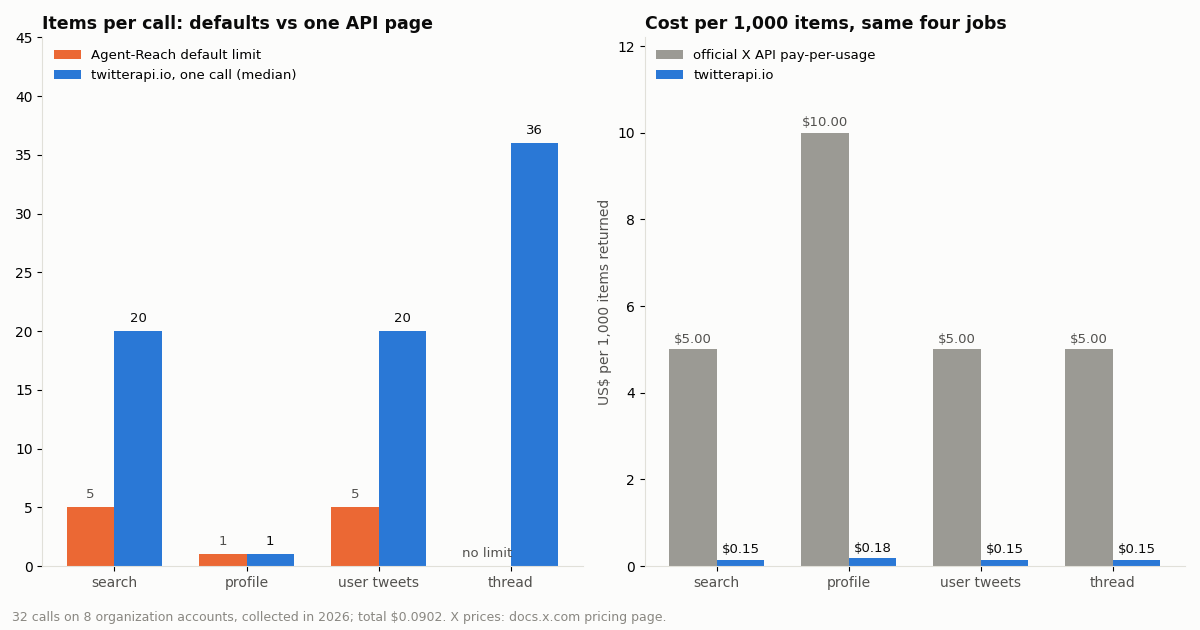
4. Small default pages. search and tweets default to 5 items. You can raise --limit, but each call is a browser session doing real page work, so larger pulls are slower and more visible to X than an API page.
5. Machine requirements. The channel needs Node and Chrome (or CloakBrowser). The project handles installing them, but it still means a desktop-class environment, not a slim container or a serverless function.
What people say about Agent-Reach on X: 500 posts measured
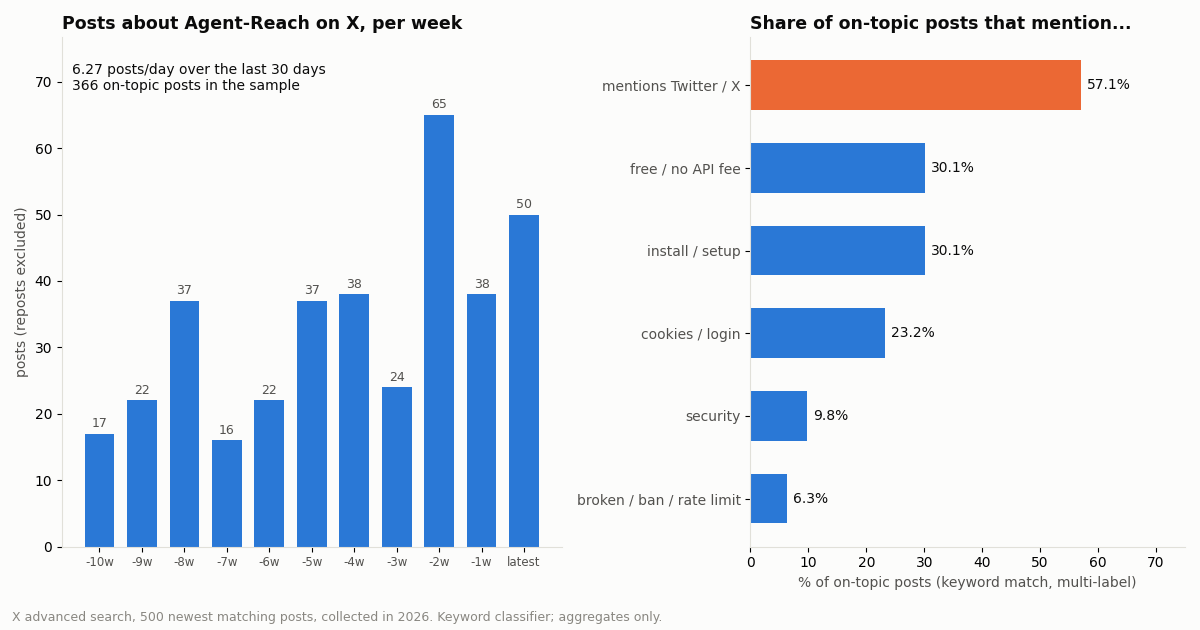
We searched X for ("agent reach" OR Panniantong) -filter:retweets, newest first, and pulled 25 pages (500 posts). A keyword classifier kept 366 posts that are about the project (they link the repo, name Agent-Reach or Panniantong, or use the capitalized name "Agent Reach"); the other 134 were ordinary phrases such as "have your agent reach out." The sample reaches back 74.7 days because the 500-post cap stopped there.
Volume is rising. Over the last 30 days of the sample, 188 on-topic posts appeared, or 6.27 a day, up from 4.9 a day across the whole window; the busiest week had 65 posts and the latest week 50.
X is the headline feature. 57.1% of on-topic posts mention Twitter or X, more than any other topic we tagged. 30.1% pitch it as free or as avoiding API fees, 30.1% talk about installing it, and 23.2% mention cookies, logins or sessions. Only 6.3% mention something broken, a ban or a rate limit, and 9.8% raise security; repo round-ups and how-to threads dominate.
It is bilingual. 50.0% of on-topic posts are in English and 32.0% in Chinese, then Japanese (6.6%) and Spanish (4.4%). 62.6% link the GitHub repo directly.
Reach is lumpy. The median on-topic post got 9 likes and 1,307 views; the top tenth got 262 likes or more, and the single most-viewed post passed 1.8 million views. A few list-style posts carry most of the attention.
The gap in that conversation is the point of this page: lots of people are told the X part is free; few posts say what the X part needs (a logged-in account in a browser) or what happens when it stops working.
The same four jobs through an API: what one call returns
To see what the API side of the trade looks like, we ran Agent-Reach's four twitter jobs through twitterapi.io on 8 organization accounts (OpenAI, AnthropicAI, GitHub, Vercel, Cursor, Google DeepMind, Nous Research, Hugging Face): one search (from:<account>), one profile, one timeline page and one thread per account, 32 calls in all. No X account was logged in anywhere.
Search and user tweets return full pages of 20 posts, against Agent-Reach's default of 5. Each post carries the text, createdAt, lang, all engagement counts including viewCount and bookmarkCount, conversationId and reply pointers, entities and extendedEntities (links, mentions, media), quoted_tweet and retweeted_tweet, and an embedded author object with follower counts.
Profile returns 25 fields, including followers, following, statusesCount, createdAt, isBlueVerified, isAutomated, canDm and pinnedTweetIds. An unknown handle comes back as HTTP 200 with status: "error" and msg: "user not found", so check the body, not only the status code.
Thread (/twitter/tweet/thread_context) returned between 22 and 37 posts on the first page for each account's most-replied recent post, with has_next_page true on 6 of 8, so a long thread pages on with next_cursor. Agent-Reach's own release run recorded 50 items for its thread action, so both lanes return real threads; the difference is what you depend on to get them.
What it cost. All 32 calls together cost $0.0902: 160 search posts, 160 timeline posts, 8 profiles and 272 thread posts.
Cost per 1,000: free-with-your-account vs API vs official X API
Agent-Reach's X channel has no API bill, and that is a real advantage for a personal research agent. What it costs instead is an X account's standing, a machine running a browser, and your time when it needs a fresh login or an update. An API turns those into a per-item price.
On posts that is $5.00 against $0.15, about 33x, using the rate card on docs.x.com/x-api/getting-started/pricing, which also caps pay-per-usage at 3 million post reads a month. On twitterapi.io a call is billed at 15 credits per post returned with a minimum of 15 credits a request, so a full 20-post page costs $0.003 and a search that finds nothing costs the $0.00015 minimum; profiles are 18 credits each. New accounts that pass the automatic bot check get up to $1 of free credits (at most 100,000 credits, no card, one per person or network, expiring after 31 days), which covers about 6,600 posts; purchased credits never expire. Rate limits start at 0.2 requests a second before the first payment and 20 once paid.
A reasonable split many builders land on: keep Agent-Reach for the platforms where it shines (YouTube transcripts, GitHub, the web reader) and route X through an API when the agent runs unattended or the X data matters.
Give the same agent X reads without an X account (MCP or a skill)
Option A: MCP, nothing to write. twitterapi.io publishes an open-source MCP server (@twitterapi_io/mcp-server on npm, version 0.2.0, MIT) with 12 read tools, and a hosted Streamable HTTP endpoint at https://mcp.twitterapi.io/mcp that takes your key as a Bearer token (Authorization: Bearer <key>), as the server's own instructions say. The tools that cover Agent-Reach's four actions are search_tweets, get_user_info, get_user_last_tweets and get_tweet_replies; the server also has get_user_mentions, get_tweet_quotes, get_user_followers and get_trends. In Claude Code that is one command (below); our OpenClaw and Hermes Agent pages show the same server in those agents' config files.
Option B: a skill with a small script. Agent-Reach's strength is that the agent learns one JSON envelope. You can keep that habit: the xreads.py script at the end of this page runs the same four jobs (search, profile, tweets, thread) and prints {"ok": true, "result": ...} or {"ok": false, "error": {...}}, with each post trimmed to the fields a summary needs. Put a three-line SKILL.md next to it that says when to call it, and the agent will reach for it the same way it reaches for agent-reach twitter.
Option C: both. Nothing stops you from keeping Agent-Reach installed and telling the agent, in its skill or system prompt, to use your X tool for anything on x.com. The two do not conflict; they read the same public posts by different routes.
If you later need the agent to post, reply or follow, that is a separate, authenticated product on twitterapi.io: one /twitter/user_login_v2 login ($0.10, with a proxy you supply) returns login_cookies, and each action such as /twitter/create_tweet_v2 or /twitter/follow_user_v2 is $0.002 per call. Those calls act as that account, so X can rate-limit, lock or suspend it; keep a human pace, expect the session to need a re-login now and then, and note that each HTTP 200 call is billed. Agent-Reach itself is read-only by its own README, so this is new ground, not a replacement.
# Option A: the hosted MCP server in Claude Code (key from the twitterapi.io dashboard)
claude mcp add --transport http twitterapi https://mcp.twitterapi.io/mcp \
  --header "Authorization: Bearer $TWITTERAPI_IO_API_KEY"

# ...or the same 12 tools over stdio from npm (Node 18+), pinned
# npx -y @twitterapi_io/mcp-server@0.2.0   (env: TWITTERAPI_IO_API_KEY)

# Option B: a skill folder next to Agent-Reach's
# ~/.agents/skills/x-reads/SKILL.md
#   ---
#   name: x-reads
#   description: Read X (Twitter): search posts, a profile, a user's recent posts, a thread. Use for any x.com link or X question.
#   ---
#   Run: python3 ~/.agents/skills/x-reads/xreads.py <search|profile|tweets|thread> <arg> [limit]
# It prints one JSON object; read ok, result, error.How we collected this
Questions. (A) How much do people post about Agent-Reach on X, in which languages, and what do they say about its X channel? (B) What do the four jobs of its twitter channel return, and cost, through a read API instead of a logged-in browser?
Accounts and query. Part A: X advanced search for ("agent reach" OR Panniantong) -filter:retweets, newest first, 25 pages, 500 posts, of which 366 were classified as about the project. Part B: 8 organization accounts (OpenAI, AnthropicAI, github, vercel, cursor_ai, GoogleDeepMind, NousResearch, huggingface), 4 calls each. We first tried @xai; that handle returned a protected profile with 0 followers and the bio "Now at @SpaceXAI", and an empty timeline, so we replaced it.
Window and size. Collected in 2026. Part A covers the newest 74.7 days of matching posts up to the 500-post cap; Part B covers each account's most recent posts at collection time. 61 API requests in total.
Method. Topic shares come from keyword rules in English, Chinese, Japanese and Spanish (multi-label, so shares do not sum to 100%). The classifier is approximate: it can miss posts that describe the project without naming it and can keep a few that use the capitalized phrase for something else. Item and field counts are read directly from the JSON responses; costs use the published per-item prices.
What the sample cannot show. It cannot say how often Agent-Reach's X channel fails for a typical user (we did not log an X account into it), how long X sessions last, or whether a given account gets restricted. We did not time calls, because our collection client spaces requests across several jobs and wall time would mostly measure that queue.
Privacy. Aggregates only. Search results come from private individuals, so their raw pages were not kept; the committed sample has no ids, links, text or handles. Only organization accounts are named.
"""xreads.py - the four Agent-Reach twitter jobs over the twitterapi.io REST API.

Usage (prints one JSON object, like agent-reach does):
  python3 xreads.py search "agent reach lang:en -filter:replies" 40
  python3 xreads.py profile OpenAI
  python3 xreads.py tweets OpenAI 40
  python3 xreads.py thread 1846987139428634858
Needs: pip install requests, and TWITTERAPI_IO_API_KEY in the environment.
"""
import json
import os
import sys

import requests

BASE = "https://api.twitterapi.io"
HEADERS = {"X-API-Key": os.environ["TWITTERAPI_IO_API_KEY"]}
KEEP = ("id", "url", "text", "createdAt", "lang", "likeCount", "retweetCount",
        "replyCount", "quoteCount", "viewCount", "conversationId", "inReplyToId")


def slim(t):
    """Trim a tweet to the fields an agent needs; keeps prompts small."""
    out = {k: t.get(k) for k in KEEP}
    a = t.get("author") or {}
    out["author"] = {"userName": a.get("userName"), "name": a.get("name"), "followers": a.get("followers")}
    return out


def paged(url, params, key, limit):
    """Follow next_cursor until `limit` tweets are collected or pages run out."""
    items, cursor = [], ""
    while len(items) < limit:
        r = requests.get(url, headers=HEADERS, params={**params, "cursor": cursor}, timeout=30)
        r.raise_for_status()
        body = r.json()
        page = (body.get("data") or {}).get("tweets", []) if key == "data.tweets" else body.get("tweets", [])
        items += page
        if not body.get("has_next_page") or not body.get("next_cursor") or not page:
            break
        cursor = body["next_cursor"]
    return items[:limit]


def search(query, limit=20):
    return paged(f"{BASE}/twitter/tweet/advanced_search", {"query": query, "queryType": "Latest"}, "tweets", limit)


def tweets(username, limit=20):
    return paged(f"{BASE}/twitter/user/last_tweets", {"userName": username.lstrip("@")}, "data.tweets", limit)


def thread(target, limit=100):
    tweet_id = str(target).rstrip("/").split("/")[-1].split("?")[0]
    return paged(f"{BASE}/twitter/tweet/thread_context", {"tweetId": tweet_id}, "tweets", limit)


def profile(username):
    r = requests.get(f"{BASE}/twitter/user/info", headers=HEADERS,
                     params={"userName": username.lstrip("@")}, timeout=30)
    r.raise_for_status()
    body = r.json()
    if body.get("status") == "error" or not body.get("data"):
        raise LookupError(body.get("msg") or "user not found")  # unknown users come back as HTTP 200
    return body["data"]


def main(argv):
    action, arg = argv[1], argv[2]
    limit = int(argv[3]) if len(argv) > 3 else 20
    try:
        if action == "profile":
            result = profile(arg)
        else:
            fn = {"search": search, "tweets": tweets, "thread": thread}[action]
            result = [slim(t) for t in fn(arg, limit)]
        print(json.dumps({"ok": True, "result": result}, ensure_ascii=False))
    except LookupError as e:
        print(json.dumps({"ok": False, "error": {"code": "NOT_FOUND", "message": str(e)}}))
    except requests.HTTPError as e:
        print(json.dumps({"ok": False, "error": {"code": "HTTP_" + str(e.response.status_code),
                                                  "message": e.response.text[:300]}}))


if __name__ == "__main__":
    main(sys.argv)
Questions readers ask
What is Agent Reach?
Agent Reach (the GitHub repo Panniantong/Agent-Reach) is an open-source, MIT-licensed Python CLI and agent skill that lets coding agents such as Claude Code, Codex, Cursor, OpenClaw and Hermes Agent read platforms they cannot reach on their own, through one command, agent-reach <channel> <action>. Its README lists 14 channels in default, optional and experimental tiers; Twitter (X) is experimental.
Is Agent Reach on PyPI? How do I install it?
No. The README and install guide both warn that "The PyPI package named agent-reach is NOT this project." Version 1.6 installs with uv tool install from the GitHub release zip followed by agent-reach setup; the intended path is to send your agent the link to docs/install.md and let it run the steps.
Does Agent Reach need my X (Twitter) account?
Yes, for the twitter channel. In 1.6.0 it runs OpenCLI in Agent Reach's own browser and needs you to be logged in to x.com there; the agent is told never to log in for you. The README recommends using a secondary account because platforms may restrict accounts used for automation.
Why does Agent Reach's Twitter channel stop working?
The usual causes are an expired X login (NEED_LOGIN), X throttling the session (RATE_LIMITED), and changes on X or in OpenCLI (UPSTREAM_BROKEN). The repo has open issues about a twitter search error and a renamed OpenCLI command. The troubleshooting guide says to run agent-reach update and then agent-reach check twitter, and not to switch accounts to keep requesting.
Can Agent Reach post tweets?
No. Its README says it is read-only: it searches and reads, and never posts, comments, likes or sends messages. If your agent needs to post, that requires an authenticated route such as the official X API or a login-based write endpoint, each with its own account-risk rules.
What is a good Agent Reach alternative for Twitter data?
For X specifically, a read API over MCP or REST does the same four jobs (search, profile, user tweets, thread) without an X account or a browser. On twitterapi.io those are /twitter/tweet/advanced_search, /twitter/user/info, /twitter/user/last_tweets and /twitter/tweet/thread_context, at $0.15 per 1,000 posts and $0.18 per 1,000 profiles. Many builders keep Agent-Reach for its other channels and route X through the API.
How much does it cost to give an agent X data through an API?
On twitterapi.io, posts are $0.15 per 1,000 returned (15 credits each, minimum 15 credits a request) and profiles $0.18 per 1,000. Our 32 test calls across 8 organization accounts cost $0.0902 in total. The official X API pay-per-usage rate card lists $0.005 per post read and $0.010 per user read, or $5.00 and $10.00 per 1,000.
Is Agent Reach safe to install?
It is open source, so you can read what it runs; its README says it is read-only, never asks for your password, keeps its browser reachable from your computer only, and tells you never to paste keys into a chat. The real exposure is the X (and other site) logins it reuses, which is why it recommends a secondary account.
Continue
- Agent-Reach on GitHub: repository, stars, license, last push
- Agent-Reach English README: channel table, tiers, Security section
- Agent-Reach install guide (uv install, PyPI warning)
- Agent-Reach twitter channel source (actions, OpenCLI backend, prerequisites)
- X API pricing: pay-per-usage rate card and 3 million post-read cap
- twitterapi.io API documentation
- X (Twitter) API hub: endpoints, pricing and guides
- OpenClaw Twitter (X) skill and MCP setup
- Hermes Agent and Twitter (X): the xurl skill and an API skill
- Birdclaw, the X archive tool for agents
- Claude and the Twitter (X) API: MCP setup guide
- Building a personal AI agent that reads X
- The twitterapi.io MCP server and its 12 tools
- twitterapi.io pricing per 1,000 posts and profiles
- 01Grok for Startups: what the xAI credits cover, who qualifies, and where Twitter (X) data fits
- 02X Chat API: Building on Encrypted Twitter (X) DMs with the Chat XDK
- 03Grok Bot API: Every Way to Drive a Grok Bot From Code, and How to Feed Your Own Agent Twitter (X) Data
- 04Grok Bot Alternatives: Open-Source and Hosted Agents for Twitter (X)
- 05Muse Connectors: What Exists, Custom Connectors, MCP, and Live Twitter (X) Data
- 06Personal AI Agents Compared: Grok Bot, OpenAI Dots, Meta Muse and Claude Duet, and Which One Can Read Twitter (X)
- 07Grok Voice Agent API: How to Call It and Feed It Live Twitter (X) Data
- 08Hermes Agent and Twitter (X): the Bundled xurl Skill, and a One-Key Skill That Reads X Data Through TwitterAPI.io
Stop reading. Start building.
Starter credits cover real testing on real data. Google sign-in, no card, no application queue.
Get an API keyAlready building with TwitterAPI.io? Publish an honest tutorial or build log about it and earn up to $200 a month in API credits.