OpenAI Agent Builder (AgentKit): add Twitter (X) data with MCP, then move to the Agents SDK
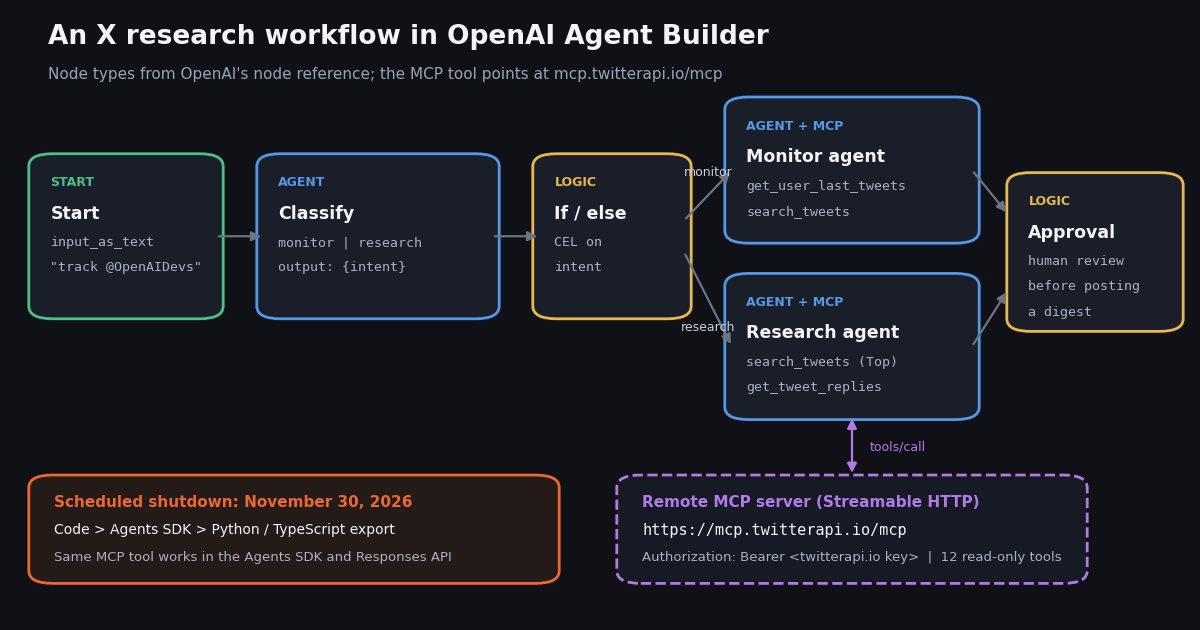
This guide is about OpenAI's visual Agent Builder (the canvas in AgentKit), not the code-first Agents SDK: if you already write Python agents, our guide to the OpenAI Agents SDK with the Twitter (X) API covers that route in depth. It is also not about Custom GPTs and their Actions, which OpenAI retires separately on December 11, 2026 (see our Custom GPT retirement guide). Here you get three things: what Agent Builder is and how its node graph works, how to wire an X (Twitter) monitoring and research workflow into it through an MCP server, and the Agents SDK code that carries the same workflow past the shutdown.
The shutdown matters more than any feature. OpenAI's own documentation, read for this page, carries a banner on the Agent Builder guide and the node reference: the product is deprecated, existing users can keep using it during a transition window, and it is scheduled to shut down on November 30, 2026. Anything you build on the canvas today has weeks, not years, so every step below ends with the code equivalent.
Every OpenAI fact below comes from developers.openai.com pages fetched this session. The MCP server details come from live calls to mcp.twitterapi.io, and the tool list was printed with the Agents SDK's own MCP client. The X data comes from a study of Agent Builder and AgentKit posts (659 returned by search), collected in 2026. We did not run a workflow inside the Agent Builder canvas for this page, and we say so where it matters.
Is OpenAI Agent Builder still available? The shutdown timeline
Yes, for now. OpenAI's deprecations page has an entry dated June 3, 2026: "we notified developers using Agent Builder that the product is being deprecated. ChatKit remains available." The same notice appears at the top of the Agent Builder guide and the node reference, adding that "existing users can continue using it during the transition window." The Evals platform and reusable prompts were deprecated on the same day, which matters if your workflow used Evaluate or a saved prompt.
What "AgentKit" means now. The @OpenAIDevs launch post listed four parts: ChatKit ("embeddable, customizable chat UI"), Agent Builder ("WYSIWYG workflow creator"), Guardrails ("safety screening for inputs/outputs") and Evals. With Agent Builder going, the parts that remain are ChatKit (the embeddable chat UI), the Agents SDK in Python and TypeScript, guardrails, and the Responses API's hosted MCP tool, which is the piece that actually connects to outside data.
Existing ChatKit embeds. The ChatKit guide says a ChatKit app backed by an Agent Builder workflow can keep using that hosted workflow during the transition window, and tells new apps, or anyone migrating before the shutdown, to use the advanced integration with their own server-side agent. OpenAI's pages do not say whether a published workflow ID keeps answering after November 30, so plan as if it does not.
Should you start a new workflow on the canvas? Only as a sketch. The canvas is still a fast way to lay out a multi-agent flow and test it in Preview with live data, and the export gives you working SDK code. Treat the canvas as a design tool with a deadline and the exported code as the product.
How the Agent Builder node graph works
OpenAI describes a workflow as "a combination of agents, tools, and control-flow logic." You insert nodes, connect them, and each connection "becomes a typed edge": click a node to see its inputs and outputs and check that the next node receives the properties it expects. Publishing creates a versioned snapshot with a workflow ID; deploying means passing that ID to ChatKit or clicking Code to download Agents SDK code.
Typed outputs are the point. An Agent node can return structured output, and the If/else node reads it with Common Expression Language (CEL). That is how a classifier agent's intent field decides which agent runs next, without the model choosing the route on its own.
Preview and Evaluate. Preview runs the workflow interactively, with file attachments, and shows each node's execution. Evaluate runs trace graders over saved traces, but it sits on the Evals platform, which becomes read-only on October 31, 2026 and shuts down with Agent Builder.
Does Agent Builder accept a custom MCP server or HTTP tool?
Yes for MCP. The node reference says the MCP node can "connect with OpenAI connectors or third-party servers, or add your own server." There is no generic HTTP-request node in the reference: to reach an outside API from the canvas, that API has to be wrapped as an MCP server. This is also the difference from Custom GPTs, whose Actions took an OpenAPI schema and are being retired with GPTs on December 11, 2026; Agent Builder never used Actions.
Under the canvas, the MCP tool is the Responses API's mcp tool type, and the exported code uses the same fields. Knowing them makes the Agent Builder form and the SDK code read the same way:
Authentication. The server's own initialize response says: "Auth: paste your twitterapi.io API key as the Bearer token." A tool call without a token returns HTTP 401 with a WWW-Authenticate: Bearer header that points at mcp.twitterapi.io/.well-known/oauth-protected-resource, so OAuth-capable clients (ChatGPT developer mode, for instance) can sign in instead. For Agent Builder and the Responses API, the key in the authorization field is the simple path. OpenAI's MCP guide notes the Responses API "does not store the value you provide in the authorization field," which is why the exported code sends it on every request.
Approvals. OpenAI's safety guide for Agent Builder says to keep tool approvals on for MCP tools, "including reads and writes," and to use the Human approval node. All 12 TwitterAPI.io tools are read-only (each carries readOnlyHint: true), so the risk is the data the model sends out in a query, not an action on an account. A reasonable setup is no per-call approval on reads and a Human approval node before anything leaves the workflow, such as a digest sent to a team channel.
Run these checks before pasting the URL into any client. They show the handshake, the 401 that tells a client how to authenticate, and an authenticated call:
# 1. Handshake: no key needed; the instructions field tells clients how to authenticate
curl -s https://mcp.twitterapi.io/mcp \
  -H 'content-type: application/json' \
  -H 'accept: application/json, text/event-stream' \
  -d '{"jsonrpc":"2.0","id":1,"method":"initialize","params":{"protocolVersion":"2025-06-18","capabilities":{},"clientInfo":{"name":"check","version":"0"}}}'
# -> "serverInfo":{"name":"twitterapi-mcp","version":"0.1.0"},
#    "instructions":"... Read-only access to Twitter/X data via 12 tools ... Auth: paste your
#    twitterapi.io API key as the Bearer token. ..."

# 2. A tool call without a token is refused, with a pointer to the auth metadata
curl -s -o /dev/null -D - https://mcp.twitterapi.io/mcp \
  -H 'content-type: application/json' \
  -H 'accept: application/json, text/event-stream' \
  -d '{"jsonrpc":"2.0","id":3,"method":"tools/call","params":{"name":"get_user_info","arguments":{"userName":"OpenAI"}}}' \
  | grep -iE '^HTTP|www-authenticate'
# -> HTTP/2 401
# -> www-authenticate: Bearer realm="twitterapi.io", resource_metadata="https://mcp.twitterapi.io/.well-known/oauth-protected-resource", scope="twitter.read"

# 3. The same call with your key as the Bearer token, as the server instructs
#    (this is the header an MCP tool with an authorization value sends)
curl -s https://mcp.twitterapi.io/mcp \
  -H "Authorization: Bearer $TWITTERAPI_IO_API_KEY" \
  -H 'content-type: application/json' \
  -H 'accept: application/json, text/event-stream' \
  -d '{"jsonrpc":"2.0","id":4,"method":"tools/call","params":{"name":"get_user_info","arguments":{"userName":"OpenAI"}}}'
The 12 X tools your agent gets, and the schema it reads
We listed the server's tools with the Agents SDK's own MCP client (openai-agents 0.24.0 with mcp 2.3.0, the versions pip installed this session). The listing needs no key; calling a tool does. Each tool maps to a TwitterAPI.io REST endpoint and returns the same JSON.
Allow only what the workflow needs. Every tool definition in the list is sent to the model on each turn. A monitoring agent needs get_user_last_tweets and search_tweets; a research agent adds get_tweet_replies and maybe get_tweet_quotes. Set those in allowed_tools (or the tool picker on the canvas) and leave the rest out.
The script below is the listing we ran, with its output pasted as comments. The schema at the end is what the model reads for search_tweets, trimmed only where marked. The description fields do the prompting for you: the model learns the search operators and the Latest versus Top choice from them, which is why short agent instructions work.
# List the tools and print the schema the model reads, with the Agents SDK's MCP client.
# The same object goes into Agent(..., mcp_servers=[server]) for Option B below.
import asyncio
import json
import os

from agents.mcp import MCPServerStreamableHttp


async def main() -> None:
    async with MCPServerStreamableHttp(
        name="twitterapi-io",
        params={
            "url": "https://mcp.twitterapi.io/mcp",
            # Only tool calls need the key; the listing below also worked without it.
            "headers": {"Authorization": f"Bearer {os.environ['TWITTERAPI_IO_API_KEY']}"},
            "timeout": 20,
        },
        cache_tools_list=True,
    ) as server:
        for tool in await server.list_tools():
            print(f"{tool.name:24s} required={tool.input_schema.get('required', [])}")
        search = next(t for t in await server.list_tools() if t.name == "search_tweets")
        print(json.dumps(search.input_schema, indent=2))


asyncio.run(main())

# Output (mcp.twitterapi.io, openai-agents 0.24.0, mcp 2.3.0):
# search_tweets            required=['query', 'queryType']
# get_user_info            required=['userName']
# get_user_about           required=['userName']
# get_user_followers       required=['userName']
# get_user_followings      required=['userName']
# get_user_last_tweets     required=[]
# get_user_mentions        required=['userName']
# get_tweets_by_ids        required=['tweet_ids']
# get_tweet_replies        required=['tweetId']
# get_tweet_quotes         required=['tweetId']
# get_tweet_retweeters     required=['tweetId']
# get_trends               required=['woeid']
# ...followed by the search_tweets schema shown in the next comment block

# search_tweets tool definition (inputSchema as returned (descriptions trimmed at ...):
# {
#   "name": "search_tweets",
#   "annotations": { "title": "Search Tweets", "readOnlyHint": true, "openWorldHint": true },
#   "inputSchema": {
#     "type": "object",
#     "properties": {
#       "query": {
#         "type": "string",
#         "description": "Twitter advanced search query string. Supports operators: from:USER, to:USER, since:YYYY-MM-DD, until:YYYY-MM-DD, lang:en, filter:replies, -filter:retweets, has:images, etc. ..."
#       },
#       "queryType": {
#         "type": "string",
#         "enum": ["Latest", "Top"],
#         "description": "'Latest' returns most recent tweets first; 'Top' returns highest-engagement tweets first. ..."
#       },
#       "cursor": {
#         "type": "string",
#         "description": "Pagination cursor from a previous response's next_cursor field. Omit for first page. Each page returns ~20 tweets."
#       }
#     },
#     "required": ["query", "queryType"]
#   }
# }Build an X monitoring and research workflow, node by node
The workflow in the diagram above takes one request, such as "what did @OpenAIDevs post this week" or "what are developers saying about the Agents SDK," decides whether it is monitoring or research, runs the right agent with the X tools, and stops for approval before anything is shared. The settings below follow OpenAI's node reference; menu wording on the canvas may differ slightly.
1. Start. Keep the default chat input, which exposes input_as_text. Add a state variable such as accounts (a list of handles) if the workflow always watches the same accounts.
2. Guardrails (optional). Put a Guardrails node after Start with jailbreak and PII checks. Whatever the user types becomes part of an X search query, so this is the earliest point to stop junk.
3. Classify agent. Instructions: "Decide whether the user wants new posts from accounts or a topic (monitor) or an analysis of a discussion (research). Extract the accounts and the topic." Set structured output with fields intent (monitor or research), accounts and topic. No tools on this agent.
4. If / else. One condition in CEL on the classifier's intent field equal to "monitor"; the else branch goes to research. Pick the variable from the node's input picker rather than typing the path, since that is where the typed edge shows the exact name.
5. Monitor agent + MCP. Add the MCP tool with the URL and key from the previous section and allow get_user_last_tweets and search_tweets. Instructions: summarize what is new in at most eight points with each post's URL, and say so when a tool returns nothing. The URL instruction matters: it lets a reader check every claim.
6. Research agent + MCP. Same server, allow search_tweets and get_tweet_replies. Instructions: search with queryType Top, read replies under the two most-engaged posts, report the main arguments and the like and view counts seen. Ask it to name organizations only, never private individuals.
7. Transform (optional). If a later node only needs a list of URLs and counts, reshape the agent output here so the next agent does not reread the whole tool output.
8. Human approval, then End. Approval before anything leaves the workflow. Then test in Preview with two requests, one per branch, and watch which tool each agent calls and what it costs.
What one run costs. Each tool call returns at most about 20 posts per page. A monitoring run that reads two accounts and one search page returns up to about 60 posts, or $0.009 at $0.15 per 1,000; the same 60 post reads at $0.005 each on X's pay-per-usage card cost $0.30. OpenAI model usage is billed separately by OpenAI.
The same workflow in the Agents SDK (what to migrate to)
OpenAI's migration guide has two paths. Agents SDK: open the workflow, select Code, choose Agents SDK, pick TypeScript or Python and copy the export into your app. ChatGPT Workspace Agents: for Business, Enterprise or Edu workspaces, paste the export into a new workspace agent and let the builder convert it. The guide is blunt that "this process does not convert your workflow graph or guarantee that every behavior transfers unchanged," and that workflows with strong determinism may not migrate faithfully to a workspace agent.
The code below is the X workflow written directly for the Agents SDK. HostedMCPTool keeps the connection on OpenAI's side, exactly like the canvas did; the tool_config dict "mirrors the JSON you would send to the REST API," per the SDK docs. We did not run this agent with an OpenAI key for this page; the MCP side was checked separately (the tool listing below and the unauthenticated 401 probe above).
If you need the model to stay deterministic about routing, replace the triage agent with ordinary code: call the classifier, read its structured output, and run the monitor or research agent yourself. That is the closest match to the If/else node.
Option B: connect from your own process. HostedMCPTool only works with OpenAI models that support the Responses API's hosted MCP integration, and the calls happen on OpenAI's servers, so your code never sees them. If you want to log each tool call, filter tools with a callback, or run the same agent on another model, use MCPServerStreamableHttp instead. The SDK docs recommend sending credentials in an Authorization header rather than the URL, as the listing script in the tools section above does.
Which one to pick. Use the hosted tool when you are moving an Agent Builder workflow and want the same behavior. Use the local client when you need control or observability. Both reach the same 12 tools at the same prices. For more on trimming raw tool output in your own process, see our Agents SDK guide: in its study a raw 20-post page was about 33,709 tokens and a trimmed function-tool result about 3,010.
# pip install openai-agents   (Python 3.10+; 0.24.0 on PyPI when this was written)
# export OPENAI_API_KEY=...  TWITTERAPI_IO_API_KEY=...
import asyncio
import os

from agents import Agent, HostedMCPTool, Runner

X_TOOLS = ["search_tweets", "get_user_last_tweets", "get_user_mentions", "get_tweet_replies"]

# Option A: hosted MCP. OpenAI's Responses API connects to the server for you,
# the same way an MCP tool configured in Agent Builder does.
x_mcp = HostedMCPTool(
    tool_config={
        "type": "mcp",
        "server_label": "twitterapi_io",
        "server_url": "https://mcp.twitterapi.io/mcp",
        # Sent as the Bearer token. twitterapi.io's server says: paste your API key as the Bearer token.
        # OpenAI does not store this value, so it is sent on every request.
        "authorization": os.environ["TWITTERAPI_IO_API_KEY"],
        "allowed_tools": X_TOOLS,          # 4 of the 12 tools: smaller prompt, lower cost
        "require_approval": "never",       # every tool here is read-only; use "always" for anything else
    }
)

monitor = Agent(
    name="X monitor",
    instructions=(
        "You watch X (Twitter) for the user. Use get_user_last_tweets for an account's new posts "
        "and search_tweets with queryType Latest for a topic. Summarize what is new in at most "
        "8 bullet points, each with the post URL. Never invent posts; if a tool returns nothing, say so."
    ),
    tools=[x_mcp],
)

research = Agent(
    name="X researcher",
    instructions=(
        "You research a topic on X. Call search_tweets with queryType Top, then get_tweet_replies "
        "on the two most-engaged posts. Report the main arguments, who is making them "
        "(organizations by name only) and the like/view counts you saw."
    ),
    tools=[x_mcp],
)

# The Agent Builder 'Classify' agent + 'If / else' node become a triage agent with handoffs.
triage = Agent(
    name="Triage",
    instructions="If the user wants new posts from accounts or a topic, hand off to X monitor. "
                 "If they want analysis of a debate or topic, hand off to X researcher.",
    handoffs=[monitor, research],
)


async def main() -> None:
    result = await Runner.run(triage, "What did @OpenAIDevs post this week about the Agents SDK?")
    print(result.final_output)


asyncio.run(main())
What X shows about Agent Builder: attention peaked at launch
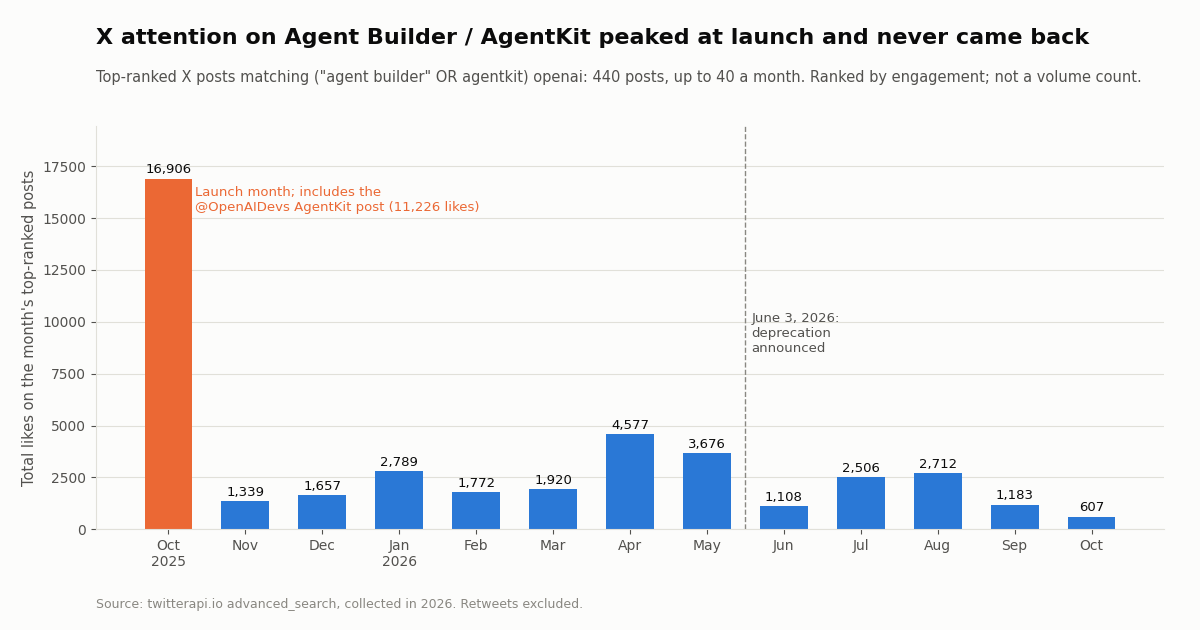
To see how builders treated Agent Builder from launch to deprecation, we pulled the top-ranked X posts for ("agent builder" OR agentkit) openai (reposts excluded) for every month from October 2025 to October 2026: 440 posts, up to 40 a month. Top-ranked means X's engagement ranking, so this is a sample of the most visible posts, not a count of all posts.
The launch was the peak. October 2025's top posts drew 16,906 likes in total, and 11,226 of those were the @OpenAIDevs post "Introducing AgentKit" (2,999,227 views). No later month came close; October 2026's top posts drew 607, 96.4% less than the launch month.
OpenAI's own accounts went quiet. Searching @OpenAIDevs and @OpenAI for "agent builder" or "agentkit" returned 6 and 1 posts. All are from October 2025 except one year-in-review post in January 2026; we found 0 posts from either account using those words after January 2026, including none around the June deprecation. Developers learned about the shutdown from the docs and email, not X, which helps explain why many still ask whether Agent Builder exists.
The recent stream is small and international. The latest 200 matching posts span 111.4 days, about 1.8 a day. 62% are in English, followed by Chinese and Japanese.
What builders talk about, and how we collected this
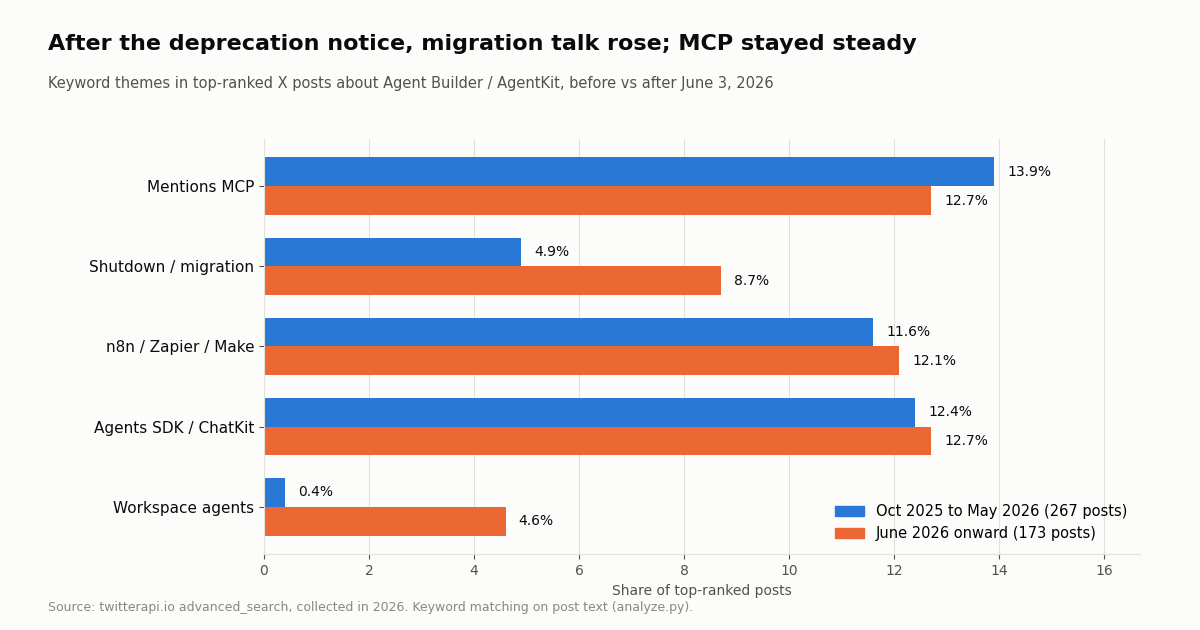
We tagged each post by keywords in its text (the patterns are in analyze.py) and compared the 267 top posts from launch through May 2026 with the 173 from June 2026 on.
MCP is a constant. About one top post in seven or eight mentions MCP in both periods (13.9% and 12.7%). Connecting outside tools was part of the Agent Builder conversation from the start, and it is the part that survives the shutdown, because the same MCP server works in the Agents SDK, ChatGPT and other clients.
Migration talk nearly doubled, from a low base. Posts about the shutdown or migrating rose from 4.9% to 8.7%, and "workspace agents" went from almost nothing (0.4%) to 4.6%. Comparisons with n8n, Zapier and Make held at about one post in eight in both periods (11.6% and 12.1%).
What this sample cannot show. Keyword tags miss posts that discuss a theme in other words or in other languages, and a top-ranked sample overweights popular accounts. Read the shares as direction, not as precise rates.
How we collected this. The paragraphs below describe the method, sample, cost and limits of the study behind both charts.
Question. How did X attention on Agent Builder / AgentKit change from launch to the scheduled shutdown, and what did builders discuss alongside it?
Queries. ("agent builder" OR agentkit) openai -filter:retweets through /twitter/tweet/advanced_search: two pages with queryType=Top per calendar month from October 2025 to October 2026, plus ten pages with queryType=Latest. Official accounts: from:OpenAIDevs (agentkit OR "agent builder") and the same for from:OpenAI.
Sample. 659 posts returned across 41 requests, collected in 2026: 440 unique top-ranked posts in monthly buckets, 200 latest posts, and 7 posts from the two OpenAI accounts. One December request came back empty and was repeated.
Cost. 659 tweets at $0.15 per 1,000 is about $0.10 for the whole study. The same reads at $0.005 per post read on X's pay-per-usage card would cost about $3.30.
What it cannot show. Total post volume (Top pages are ranked, not exhaustive), anything in private groups or other networks, or why engagement fell. Theme shares rely on English keywords.
Privacy. Aggregates only. Only organization accounts (@OpenAIDevs, @OpenAI) are named or quoted. Raw search pages were not kept; the published sample has no IDs, URLs, text or handles.
Cost: X data through MCP vs the official X API
The MCP tools bill exactly like the REST endpoints behind them. Tweet tools (search_tweets, get_user_last_tweets, get_user_mentions, replies, quotes, tweets by ID) cost 15 credits per tweet returned, $0.15 per 1,000 tweets, with a minimum of 15 credits per request, so a search that finds nothing costs $0.00015 and a full 20-post page costs $0.003. Profiles cost $0.18 per 1,000; follower and following lists cost 1 to 3 credits per user returned.
The X figures are from the rate card at docs.x.com/x-api/getting-started/pricing, read this session; X also gives $20 in credits on a first saved card and purchase, and matches a first auto-recharge up to $50. Per 1,000 posts that is $5 against $0.15, about 33x.
Scheduled monitoring. Agent Builder has no scheduler; a monitor runs when someone sends a message. If you move to code and poll, a check that finds nothing costs $0.00015, so checking one query every 60 seconds for a month (43,200 checks) costs $6.48 if nothing ever matches, and every 5 minutes about $1.30.
Getting a key. New accounts that pass the automatic bot check get up to $1 of free credits (at most 100,000 credits, no card, one per person or network, expiring after 31 days). Purchased credits never expire; $1 = 100,000 credits. Before the first payment the limit is 0.2 requests per second, enough for testing a workflow in Preview; after a payment it is 20. Subscriptions start at Starter $29 a month; see the pricing page. No X developer account is needed for reads.
"""The monitoring step without a model: what the 'Monitor agent' node fetches, as plain REST.
Run it on a schedule, then hand the new posts to any agent (Agents SDK, Workspace agent, or your own).
pip install requests ; export TWITTERAPI_IO_API_KEY=...
"""
import json
import os
from pathlib import Path

import requests

BASE = "https://api.twitterapi.io"
HEADERS = {"X-API-Key": os.environ["TWITTERAPI_IO_API_KEY"]}
STATE = Path("seen_ids.json")
ACCOUNTS = ["OpenAIDevs", "OpenAI"]
TOPIC = '("agents sdk" OR chatkit OR "workspace agents") -filter:retweets'


def last_tweets(user: str, max_pages: int = 2) -> list[dict]:
    out, cursor = [], ""
    for _ in range(max_pages):
        r = requests.get(f"{BASE}/twitter/user/last_tweets", headers=HEADERS,
                         params={"userName": user, "cursor": cursor}, timeout=30)
        r.raise_for_status()
        body = r.json()
        if body.get("status") == "error":
            raise RuntimeError(body.get("msg"))
        data = body.get("data") or {}
        out += data.get("tweets", [])
        if not body.get("has_next_page"):
            break
        cursor = body.get("next_cursor", "")
    return out


def search(query: str, max_pages: int = 3) -> list[dict]:
    out, cursor = [], ""
    for _ in range(max_pages):
        r = requests.get(f"{BASE}/twitter/tweet/advanced_search", headers=HEADERS,
                         params={"query": query, "queryType": "Latest", "cursor": cursor}, timeout=30)
        r.raise_for_status()
        body = r.json()
        out += body.get("tweets", [])
        if not body.get("has_next_page"):
            break
        cursor = body.get("next_cursor", "")
    return out


def main() -> None:
    seen = set(json.loads(STATE.read_text())) if STATE.exists() else set()
    fresh = []
    for acct in ACCOUNTS:
        fresh += [t for t in last_tweets(acct) if t["id"] not in seen]
    fresh += [t for t in search(TOPIC) if t["id"] not in seen]
    for t in sorted(fresh, key=lambda t: t.get("likeCount", 0), reverse=True)[:15]:
        print(f"{t['author']['userName']:>16} | {t.get('likeCount', 0):>6} likes | "
              f"{t.get('viewCount', 0):>8} views | {t['url']}")
    STATE.write_text(json.dumps(sorted(seen | {t["id"] for t in fresh})))
    print(f"{len(fresh)} new posts")


if __name__ == "__main__":
    main()
Questions readers ask
Is OpenAI Agent Builder being discontinued?
Yes. OpenAI announced the deprecation on June 3, 2026, and Agent Builder is scheduled to shut down on November 30, 2026, according to OpenAI's deprecations page. Existing users can keep using it during the transition window. ChatKit is not deprecated. OpenAI recommends moving to the Agents SDK or to ChatGPT Workspace Agents.
What is OpenAI AgentKit?
AgentKit was the set of tools OpenAI launched on October 6, 2025 for building agents: Agent Builder (a visual workflow canvas), ChatKit (an embeddable chat UI), Guardrails and Evals, with workflows deployable through ChatKit or exported to the Agents SDK. Agent Builder and the Evals platform are being shut down on November 30, 2026; ChatKit and the Agents SDK remain.
Can I add my own MCP server to Agent Builder?
Yes. OpenAI's node reference says the MCP node can connect OpenAI connectors, third-party servers or your own server. A remote server needs a public HTTPS URL using Streamable HTTP or HTTP/SSE, plus whatever token it expects. For TwitterAPI.io that is mcp.twitterapi.io/mcp with your API key as the Bearer token.
Does Agent Builder have an HTTP request node?
Not in OpenAI's node reference. The tool nodes are MCP, File search and Guardrails. To call an outside REST API from a workflow, wrap it as an MCP server, or export the workflow to the Agents SDK and write a function tool that makes the request.
How do I migrate an Agent Builder workflow?
Open the workflow, select Code, choose Agents SDK, pick Python or TypeScript and copy the export into your app, or paste it into a new ChatGPT workspace agent (Business, Enterprise or Edu). OpenAI warns the export does not convert the graph itself, so retest control flow, tools, authentication and approvals before relying on it.
Is Agent Builder the same as the OpenAI Agents SDK?
No. Agent Builder is a visual canvas; the Agents SDK is a Python and TypeScript library you code against. Agent Builder exports to Agents SDK code, and after the shutdown the SDK is the code-first way to keep the same workflow running.
Can an Agent Builder workflow post to X (Twitter)?
Not through TwitterAPI.io's MCP server: all 12 of its tools are read-only. Posting is a separate REST product that acts as a logged-in account, which X can rate-limit, lock or suspend, so it belongs in reviewed code with a human-paced schedule, not in an autonomous agent loop.
How much does X data cost in an Agent Builder workflow?
TwitterAPI.io bills tool calls like REST calls: $0.15 per 1,000 tweets returned and $0.18 per 1,000 profiles, with a 15-credit minimum per request. The official X API's pay-per-usage card lists $0.005 per post read, $5 per 1,000. OpenAI bills model usage separately.
Continue
- OpenAI API deprecations: Agent Builder (June 3, 2026 notice, November 30, 2026 shutdown)
- OpenAI: Agent Builder guide (workflows, publish, deploy)
- OpenAI: Agent Builder node reference
- OpenAI: Migrate from Agent Builder
- OpenAI Agents SDK (Python): MCP docs, HostedMCPTool and MCPServerStreamableHttp
- X API pricing (official pay-per-usage rate card)
- Twitter (X) API overview: endpoints and pricing
- OpenAI Agents SDK with the Twitter (X) API, in code
- Custom GPT retirement: migrating GPT Actions
- How to add an MCP server to ChatGPT
- OpenAI Codex with X data over MCP
- How to build an AI agent, framework by framework
- TwitterAPI.io X MCP server: the 12 tools and setup
- TwitterAPI.io pay-per-use pricing
- 01How to Build an MCP Server in Python for Twitter (X) Data
- 02OpenClaw vs Claude Code: which agent should run your Twitter (X) jobs?
- 03Hermes Agent vs OpenClaw: Which Agent Fits Twitter (X) Work?
- 04Claude Code Channels: Telegram, Discord and Twitter (X) Alerts in Your Session
- 05Codex MCP: How to Add Any MCP Server to OpenAI Codex (CLI, IDE and App)
- 06How to Build an AI Agent: A Python Tutorial That Monitors Twitter (X)
- 07Grok Voice Agent API: How to Call It and Feed It Live Twitter (X) Data
- 08Personal AI Agents Compared: Grok Bot, OpenAI Dots, Meta Muse and Claude Duet, and Which One Can Read Twitter (X)
Stop reading. Start building.
Starter credits cover real testing on real data. Google sign-in, no card, no application queue.
Get an API keyAlready building with TwitterAPI.io? Publish an honest tutorial or build log about it and earn up to $200 a month in API credits.