Claude Ultracode: How Claude Code's Workflow Setting Works, What It Costs, and an X (Twitter) Research Example
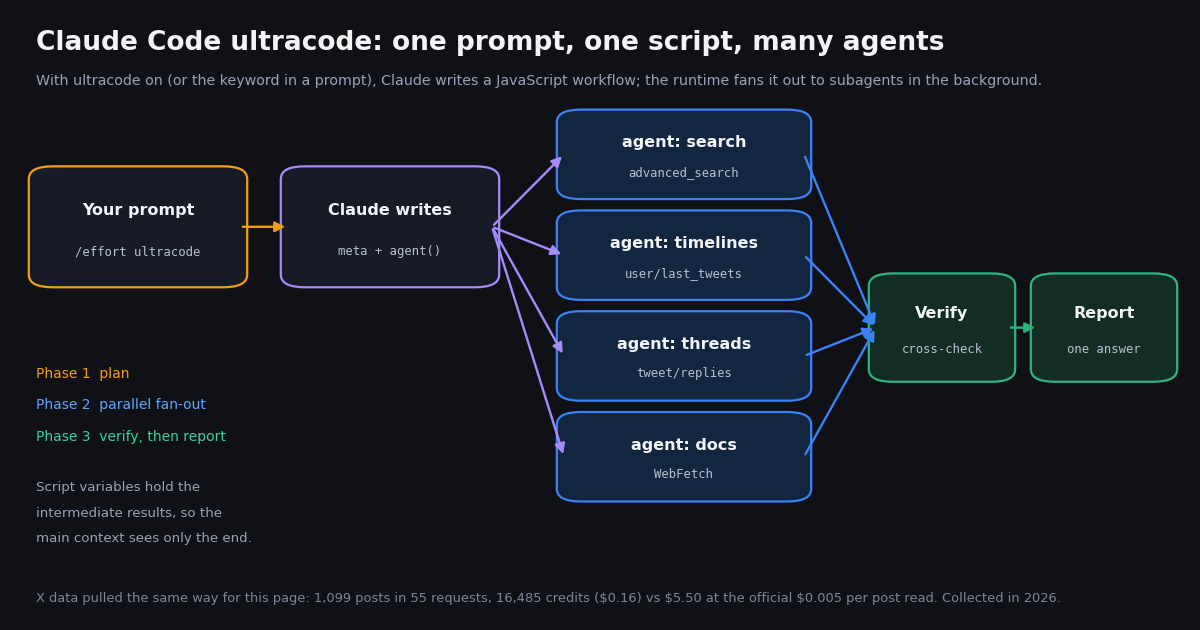
This page covers one Claude Code setting: what ultracode does, how to switch it on and off, and what it costs in usage. It is not a guide to scheduling Claude in the cloud. That is our Claude routines page, which covers tasks that run on a timer without you. Ultracode changes how Claude structures work inside a session you are typing into: it hands the plan to a script that runs many subagents at once.
Everything about ultracode below comes from Anthropic's Claude Code documentation as published today: the dynamic workflows page, the model configuration page and the settings reference. We did not run Claude Code for this page, and we do not report token counts or run times we did not measure. We did measure the X side. We pulled the public conversation about ultracode from X with the same endpoints a workflow agent would call, so the cost and volume figures here come from our own collection.
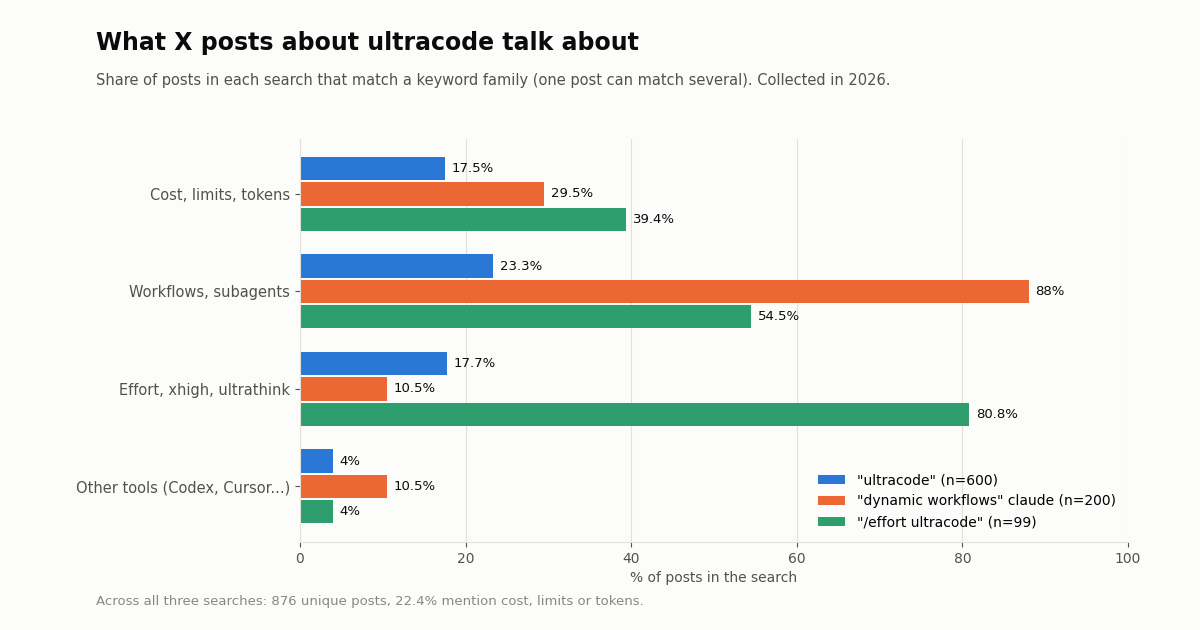
The short version: ultracode suits big, parallel tasks such as a repo-wide audit, a large migration or a research question that needs claims cross-checked. Leave it off for routine edits. The docs say it makes every request in the session heavier. On X, that trade-off is a common topic: 22.4% of the 876 unique posts we collected mention cost, limits or tokens.
What ultracode actually is (and what it is not)
Anthropic's model configuration page is explicit: ultracode is a Claude Code setting rather than a model effort level. With it on, Claude orchestrates dynamic workflows for substantive tasks, at whichever effort level the session runs at. It appears on the /effort slider as a toggle, but it is not a step above max. It is a separate switch that sits alongside the effort scale (low, medium, high, xhigh, max).
A dynamic workflow is a JavaScript script that orchestrates many subagents at once. Claude writes the script for the task you describe, and a runtime runs it in the background while your session stays responsive. The script calls agent() to spawn one subagent, pipeline() to run one per item in a list, parallel() to run several at once and wait for all of them, and phase() to group agents under a title in the progress view.
The difference from plain subagents is who holds the plan. The workflows page compares four mechanisms:
Because the loop, the branching and the intermediate results live in script variables, Claude's own context holds only the final answer. The docs also point to a quality benefit: a script can have independent agents review each other's findings before anything is reported, or draft a plan from several angles and weigh them against each other.
Not a new model. Ultracode does not change which model runs. Workflow agents pick their model the same way subagents do, and fall back to your session's model when nothing else assigns one. Not ultrathink. ultrathink is a separate keyword for one-off deeper reasoning in a single turn. Ultracode changes how the work is structured, not how hard one turn thinks.
How to turn ultracode on and off
There are two ways in, and the docs treat them differently.
1. The keyword, for one task. Include the word ultracode in a prompt you type, for example ultracode: audit every API endpoint under src/routes/ for missing auth checks. Claude Code highlights the keyword and Claude writes a workflow for that task only. The session's effort level does not change. Plain-language requests such as "use a workflow" work the same way. To cancel the highlight for one prompt, press Option+W on macOS or Alt+W on Windows and Linux, or press backspace right after the keyword. To stop the word triggering anything, turn off Ultracode keyword trigger in /config, which is the workflowKeywordTriggerEnabled setting.
2. The setting, for the whole session. Run /effort ultracode and Claude plans a workflow for every substantive task, deciding for itself when one is warranted. A single request can become several workflows in a row: one to understand the code, one to make the change, one to verify it. On the /effort slider, press Tab to flip the Ultracode toggle and Enter to apply. To start a session with it on, launch claude --effort ultracode, which also sets effort to xhigh. To make every session start with it, set "ultracode": true in a settings file. Turn it off with /effort ultracode off.
Version notes from the docs. /effort ultracode off, the slider toggle and keeping ultracode on at levels other than xhigh need Claude Code v2.1.284 or later. Before that, turning ultracode on set the session to xhigh, and /effort ultracode off failed with Invalid argument. Passing ultracode to --effort needs v2.1.203 or later. The persisted effortLevel setting and the CLAUDE_CODE_EFFORT_LEVEL variable do not accept ultracode. It has its own key.
Where the keyword does nothing. It only opts in when you type it yourself: at the interactive prompt, in an IDE extension panel, in a Remote Control client, or in an Agent SDK app that marks the input as human. A prompt passed with -p, a scheduled task prompt, a webhook payload or a pull request comment containing the word will not start a workflow. That is a deliberate guard, since text arriving from elsewhere should not be able to launch dozens of agents.
When ultracode is unavailable. The docs list two conditions that make ultracode unavailable. Workflows are turned off, or the model does not support xhigh effort. In either case --effort ultracode starts the session with ultracode off, at the highest effort the model and any cap allow, up to xhigh.
Dynamic workflows are available on all paid plans, with Anthropic API access, and on Amazon Bedrock, Google Cloud's Agent Platform and Microsoft Foundry. On Pro you turn them on from the Dynamic workflows row in /config. Anthropic introduced dynamic workflows as a research preview in its week 22 release notes (May 25 to 29, 2026, Claude Code v2.1.150 to v2.1.157).
You can turn workflows off for yourself with the /config toggle, "disableWorkflows": true in ~/.claude/settings.json, or CLAUDE_CODE_DISABLE_WORKFLOWS=1. An organization can set disableWorkflows in managed settings. When workflows are off, the keyword stops triggering and the Ultracode toggle disappears from /effort. The docs also note that no managed setting rules out ultracode alone. An organization effort cap lowers the level an ultracode session runs at but does not switch ultracode off.
What ultracode costs: usage, limits and guardrails
Anthropic publishes no separate price for ultracode. The cost is the tokens the extra agents spend. The workflows page says a single run "can use meaningfully more tokens than working through the same task in conversation", and that runs count toward your plan's usage and rate limits. With ultracode on, the same applies to every substantive request in the session. The docs put it plainly: each request uses more tokens and takes longer, and on a subscription a session with ultracode on reaches a session or weekly limit sooner than the same work with it off.
Turning ultracode on also switches off three checks, because the docs treat it as consent to large runs:
No Large workflow warning. Normally a run that schedules more than 25 agents, or whose projected total passes 1.5 million tokens, shows a Large workflow warning in the task panel. No concurrent subagent limit for subagents Claude spawns with the Agent tool. No first-launch approval in auto permission mode.
The runtime's own limits still apply, with or without ultracode:
Keep spend in check. The docs recommend running a workflow on a small slice first, such as one directory or a narrow question, and watching per-agent token use in /workflows, where you can stop a run without losing completed work. Set workflowSizeGuideline to small to aim for fewer agents, and ask Claude to use a smaller model for stages that do not need the strongest one. Agents in the same fan-out share a prompt cache prefix when model, effort, agent type, tools, schema and working directory match. Claude Code holds sibling agents for up to 5 seconds so they read that shared prefix.
When you hit a limit mid-run. On v2.1.271 and later, in an interactive session signed in with a claude.ai subscription and autoContinueAtUsageLimit on, a run pauses at the usage limit instead of failing. It resumes after the reset if that comes within 24 hours, and it waits at most twice. In claude -p, the Agent SDK or a background session, the affected agents fail instead. For plan-level prices, see our Claude Code pricing page.
What X says about ultracode: a measured sample
To show what an X research workflow would find, we ran the collection step ourselves with TwitterAPI.io: three Latest searches and two organization timelines. Every figure below is from that sample.
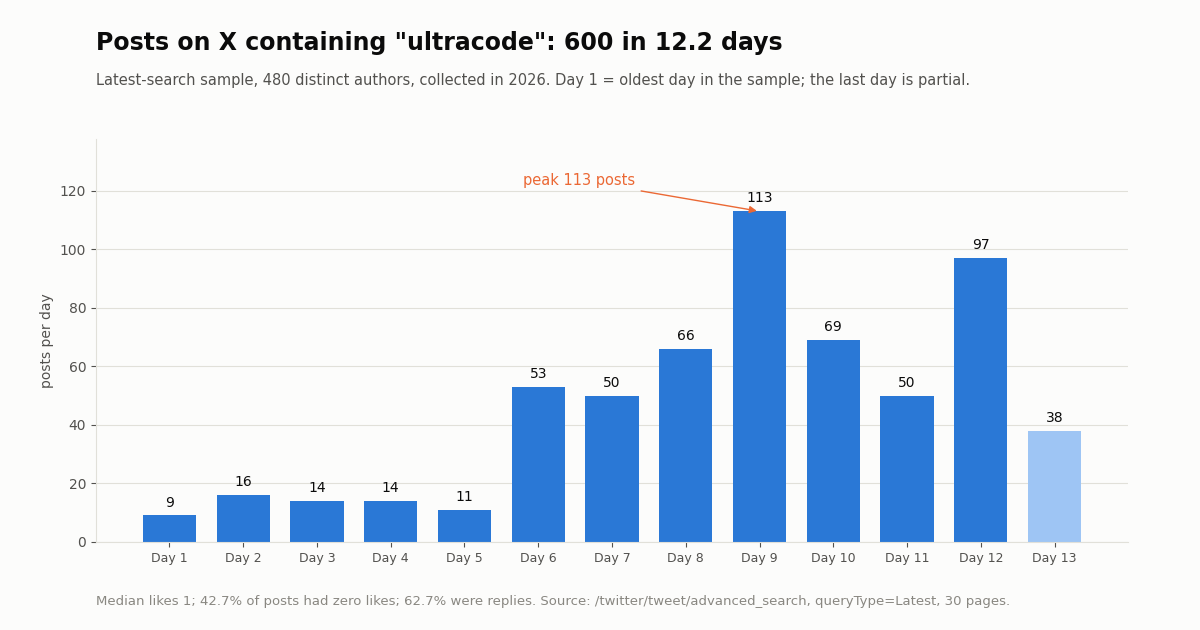
The plain keyword dominates. A Latest search for "ultracode" returned 600 posts from 480 distinct authors over 12.2 days, about 49 a day. The busiest day had 113 posts, 8.8x the average of the first five days in the window. More pages were available, so this is the newest slice of the conversation, not all of it.
It is a reply-heavy, long-tail conversation. 62.7% of the "ultracode" posts were replies and 42.7% had zero likes. The top 10% of posts collected 91.0% of all likes. Median views were 113, while the 90th percentile reached 1,737. A workflow that summarizes this conversation should weight by engagement or it will mostly read low-signal replies.
Few posts cite the docs. Only 2.3% of "ultracode" posts carried a link at all, and 0.3% linked an Anthropic or Claude domain. The narrower searches did better: 8.5% of "dynamic workflows" posts and 19.2% of "/effort ultracode" posts linked Anthropic's docs. That gap is why the workflow below ends with a verification phase against the docs.
It is international. 76.2% of "ultracode" posts were in English. Japanese (31 posts), Turkish (23), Chinese (17) and Spanish (15) followed.
The official accounts were quiet on the term. Neither @claudeai (100 recent posts over 184 days) nor @AnthropicAI (100 posts over 178.1 days) used the word "ultracode" in the posts we pulled. The conversation is user-driven, and the docs remain the authoritative description.
What people worry about: cost, effort and workflows
We tagged each post with keyword families (one post can match several). The pattern matches the trade-off in the docs.
Posts about the /effort ultracode command talk about cost most: 39.4% mention cost, limits or tokens. That fits the docs' warning that a session with ultracode on reaches usage limits sooner. 80.8% of those posts also discuss effort levels, which matches a confusion the docs address directly: on recent versions, ultracode is a toggle beside the effort scale, not a level on it.
Only 4.0% of "ultracode" posts name another coding tool such as Codex, Cursor or Gemini. People mostly discuss ultracode on its own terms. For broader tool comparisons, see our Codex vs Claude Code and Claude Code alternatives pages.
A worked example: an ultracode workflow that researches a topic on X
Research that needs sources cross-checked is one of the use cases Anthropic names for workflows, and the bundled /deep-research workflow does exactly that for the open web. It requires the WebSearch tool, and web search does not give you a structured, paginated feed of X posts. To bring X into a workflow, give the agents a tool that returns X data. The simplest is the hosted TwitterAPI.io MCP server, which Claude Code adds with one command. The server's own setup instructions say to paste your API key as the Bearer token.
The setup below is assembled from documented commands. It covers claude mcp add --transport http with a header, the mcp__<server>__* allow-rule syntax, the workflowSizeGuideline key and the ultracode keyword. The allow rule matters because workflow subagents use your permission rules, and the docs advise adding the tools agents need before a long run so it is not interrupted by prompts.
Next is the shape of script a run like this produces. It follows the documented script API (meta, phase(), parallel(), pipeline(), agent() with a JSON schema, the args global). This is an illustration of the structure Claude writes. We did not execute it for this page. Claude writes its own script per task, and you can read it with View raw script before approving. Note that the docs make Date.now() and Math.random() throw inside a workflow so relaunches repeat the same calls, so pass any timestamp in through args.
What that run would cost on the data side. The collection behind this page fetched 1,099 posts in 55 requests: 16,485 credits, or $0.16. The same reads at the official X API's pay-per-use rate of $0.005 per post read come to $5.50. That is $0.15 against $5 per 1,000 posts, roughly 33x. The Claude tokens the agents spend are billed separately by Anthropic, under your plan or API usage.
# add the hosted TwitterAPI.io MCP server (paste your API key as the Bearer token)
claude mcp add --transport http twitterapi https://mcp.twitterapi.io/mcp \
  --header "Authorization: Bearer YOUR_TWITTERAPI_IO_KEY"

# let workflow subagents call its tools without a prompt on every call
# .claude/settings.json
{
  "permissions": {
    "allow": ["mcp__twitterapi__*"]
  },
  "workflowSizeGuideline": "small"
}

# then, in an interactive session, either opt in once:
ultracode: research what developers on X say about Claude Code dynamic workflows, and verify each claim against the docs

# or turn it on for every substantive task in this session:
/effort ultracode
/effort ultracode off # back to routine work (v2.1.284+)The workflow script, and a scripted alternative for repeat runs
The script below is what a saved version of the X research workflow could look like in .claude/workflows/x-topic-research.js. Once saved from /workflows with s, it runs as /x-topic-research and accepts input through args, for example: Run /x-topic-research on topic "claude code ultracode".
When not to use a workflow at all. If you only need the numbers, such as post counts, languages, engagement and links, a plain script is faster and costs no Claude tokens. The Python example at the end of this page does that collection step on its own. A workflow earns its token cost when agents must read, judge and cross-check posts, which a fixed script cannot do.
Keeping an ongoing watch. Ultracode is for work inside a session. For a recurring check, such as a daily count of posts mentioning a feature, a scheduled job is the better fit. At the rate we observed for "ultracode" (49 posts a day, about 1,470 over 30 days), fetching every new post costs about $0.22 a month at $0.15 per 1,000 tweets, against $7.35 at the official X API's $0.005 per post read. Polling adds a floor: a check that finds nothing still costs the $0.00015 minimum, so checking every 5 minutes for a month costs $1.30 in empty checks. Our Claude routines and keyword alerts guides cover that setup.
export const meta = {
  name: 'x-topic-research',
  description: 'Research what X says about a topic and cross-check it against docs',
  phases: [{ title: 'Collect' }, { title: 'Read' }, { title: 'Verify' }],
}

const topic = args?.topic ?? 'claude code ultracode'

phase('Collect')
const [recent, top] = await parallel([
  () => agent(`Use mcp__twitterapi__search_tweets to fetch the newest posts about "${topic}", paging through about 100 results. Return counts, languages and the 20 most-liked post ids.`,
    { label: 'latest', schema: { type: 'object', required: ['ids'], properties: { ids: { type: 'array', items: { type: 'string' } } } } }),
  () => agent(`Use mcp__twitterapi__search_tweets to fetch the most popular posts about "${topic}". Return the 20 post ids with the most replies.`,
    { label: 'top', schema: { type: 'object', required: ['ids'], properties: { ids: { type: 'array', items: { type: 'string' } } } } }),
])

phase('Read')
const ids = [...new Set([...recent.ids, ...top.ids])].slice(0, 30)
const readings = await pipeline(ids, id =>
  agent(`Read post ${id} and its replies with mcp__twitterapi__get_tweet_replies. Summarize the claim it makes in one sentence. Quote no handles.`, { label: id }),
)

phase('Verify')
return await agent(`Check each claim against code.claude.com/docs/en/workflows.md and model-config.md. Mark each claim confirmed, wrong, or unverifiable, then write one report.\n\n${JSON.stringify(readings.filter(Boolean))}`)
How we collected this
Question. What does the public conversation about Claude Code's ultracode setting look like on X: volume, languages, engagement, topics and links to the docs? And what does collecting it cost compared with the official X API?
Queries and accounts. Three /twitter/tweet/advanced_search queries with queryType=Latest: "ultracode" (30 pages), "dynamic workflows" claude (10 pages) and "/effort ultracode" OR "effort ultracode" (5 pages). We also pulled /twitter/user/last_tweets for the organization accounts @claudeai and @AnthropicAI (5 pages each).
Window and sample. The newest posts matching each query at collection time, collected in 2026: 1,099 posts in 55 requests, 876 of them unique search results from 698 authors. Each search had more pages available, so every window is the most recent slice, not the full history. Topic shares come from keyword matching on post text (one post can match several families). They are approximate, and they cannot tell sarcasm, spam or bots apart from genuine posts.
What the sample cannot show. It says nothing about how many people use ultracode, how many tokens a run spends, or how long runs take. We did not run Claude Code for this page. Engagement counts are as returned at collection time.
Privacy. Aggregates only. Search results come from private individuals, so raw pages were kept out of the repository and no handles, post texts or author ids are published. Only the two Anthropic organization accounts are named.
Should you turn ultracode on? A decision guide
Turn it on for big, parallel or verification-heavy work. The docs' examples are a codebase-wide bug sweep, a 500-file migration, a research question that needs sources cross-checked, and a hard plan worth drafting from several angles. Use the keyword when one task fits that shape. Use /effort ultracode for a working session made of several such tasks.
Leave it off for routine edits. With ultracode on, every substantive request in the session gets the workflow treatment and the matching token bill. On a subscription, the docs warn, that means hitting session or weekly limits sooner. Switch it off with /effort ultracode off when you return to routine work.
Try a small slice first. Run the workflow on one directory or a narrow question, watch per-agent tokens in /workflows, and set workflowSizeGuideline to small until you know what a run costs you.
Plan for headless runs. In claude -p and the Agent SDK, the keyword does not trigger and no approval prompt appears. A workflow starts only if your permission rules allow the Workflow tool (or Workflow(<name>) for one saved workflow), or in auto mode, the mode that skips permission prompts, a PreToolUse hook or your host's approval. Usage-limit pauses do not apply there either: agents fail instead of waiting.
For X data, separate the two bills. Claude tokens are billed by Anthropic. X data through TwitterAPI.io is billed at 15 credits per tweet returned ($0.15 per 1,000), 18 credits per profile, with $1 = 100,000 credits. New accounts that pass the automatic bot check get up to $1 of free credits (at most 100,000 credits, no card, one per person or network, expiring after 31 days). Purchased credits never expire. Reads need no X account. Rate limits are 0.2 requests per second before the first payment and 20 once paid.
To wire X data into Claude Code today, get a key from the dashboard, add the MCP server with the command above, and check the endpoint reference at docs.twitterapi.io for parameters and response fields.
import os
import time
import requests

BASE = "https://api.twitterapi.io"
HEADERS = {"X-API-Key": os.environ["TWITTERAPI_IO_KEY"]}


def search_latest(query, max_pages=10):
    """Pull the newest posts for one query, following next_cursor."""
    tweets, cursor = [], ""
    for _ in range(max_pages):
        params = {"query": query, "queryType": "Latest"}
        if cursor:
            params["cursor"] = cursor
        r = requests.get(f"{BASE}/twitter/tweet/advanced_search",
                         headers=HEADERS, params=params, timeout=30)
        r.raise_for_status()
        page = r.json()
        tweets.extend(page.get("tweets", []))
        if not page.get("has_next_page"):
            break
        cursor = page.get("next_cursor", "")
        time.sleep(0.2)  # stay well under your plan's requests per second
    return tweets


def summarize(tweets):
    likes = sorted(t.get("likeCount", 0) for t in tweets)
    n = len(tweets)
    return {
        "posts": n,
        "authors": len({t["author"]["id"] for t in tweets}),
        "median_likes": likes[n // 2] if n else 0,
        "zero_like_share": round(sum(1 for x in likes if x == 0) / n, 3) if n else 0,
        "reply_share": round(sum(1 for t in tweets if t.get("isReply")) / n, 3) if n else 0,
        "langs": sorted({t.get("lang", "und") for t in tweets}),
    }


if __name__ == "__main__":
    queries = ["ultracode", '"dynamic workflows" claude', '"/effort ultracode"']
    total = 0
    for q in queries:
        rows = search_latest(q, max_pages=5)
        total += len(rows)
        print(q, summarize(rows))
    # 15 credits per tweet returned; $1 = 100,000 credits
    print(f"tweets returned: {total}  cost: ${total * 15 / 100000:.4f}")
Questions readers ask
What is Claude ultracode?
A Claude Code setting that makes Claude write a dynamic workflow, a JavaScript script that orchestrates many subagents, for each substantive task instead of working turn by turn. Anthropic's docs describe it as a setting rather than a model or an effort level. It runs at whichever effort level your session uses.
How do I turn on ultracode in Claude Code?
For one task, include the keyword ultracode in the prompt you type. For the whole session, run /effort ultracode, or press Tab on the /effort slider to flip the Ultracode toggle. To start a session with it on, launch claude --effort ultracode, which also sets effort to xhigh. To start every session with it, set "ultracode": true in a settings file.
How do I turn ultracode off?
Run /effort ultracode off (Claude Code v2.1.284 or later; earlier versions return Invalid argument). To stop the keyword from triggering workflows, turn off Ultracode keyword trigger in /config (workflowKeywordTriggerEnabled: false). Disabling dynamic workflows also removes ultracode.
Does ultracode cost extra?
There is no separate price. A workflow spawns many agents, so it uses more tokens than the same task done in conversation, and runs count toward your plan's usage and rate limits. Anthropic's docs say a session with ultracode on reaches session or weekly limits sooner on subscription plans. On the API you pay for the extra tokens.
Is ultracode the same as ultrathink or max effort?
No. ultrathink asks for deeper reasoning in a single turn, and max is the top effort level. Ultracode changes how work is structured by running a script that fans out to subagents. Since v2.1.284 it stays on at any effort level. Only claude --effort ultracode and the Agent SDK value also set the level to xhigh.
Why does the ultracode keyword not work in claude -p?
By design, the keyword only opts in when you type it yourself: at the interactive prompt, in an IDE panel, in Remote Control, or in an Agent SDK app that stamps the input as human. Prompts passed with -p, scheduled task prompts, webhook payloads and pull request comments do not start a workflow. In headless runs, allow the Workflow tool through permission rules instead.
Which plans support ultracode?
Dynamic workflows are available on all paid plans, with Anthropic API access, and on Amazon Bedrock, Google Cloud's Agent Platform and Microsoft Foundry. On Pro you enable them from the Dynamic workflows row in /config. Ultracode also needs a model that supports xhigh effort.
Can an ultracode workflow read X (Twitter) posts?
Yes, if its agents have a tool that returns X data. Add the hosted TwitterAPI.io MCP server with claude mcp add --transport http and an Authorization: Bearer header, then allow mcp__twitterapi__*. Reads cost $0.15 per 1,000 tweets returned, and no X account is needed.
Continue
- Claude Code docs: Orchestrate subagents at scale with dynamic workflows
- Claude Code docs: Model configuration (effort levels and ultracode)
- Claude Code docs: Settings reference (ultracode, workflowKeywordTriggerEnabled, workflowSizeGuideline)
- Claude Code docs: Connect Claude Code to tools via MCP
- Claude Code docs: Permissions (MCP allow rules)
- X API pricing (pay-per-usage rate card)
- X API guides hub
- Claude routines: scheduled Claude Code tasks
- Claude Code pricing and plan limits
- how to use Claude with the Twitter API
- writing a SKILL.md for Claude Code
- TwitterAPI.io hosted MCP server
- Codex vs Claude Code compared
- Claude Code alternatives
- keyword alerts on X for developers
- get a TwitterAPI.io API key
- 01Google AI Studio Free Tier Limits: What the Gemini API Allows in 2026
- 02Best Claude Model for Coding in 2026: Opus vs Sonnet vs Haiku vs Fable, Priced on Real Twitter (X) Data
- 03Zapier Alternatives in 2026: Prices, Self-Hosting and Which Ones Still Connect to Twitter (X)
- 04Antigravity vs Cursor: Plans, Models and a Twitter (X) MCP Setup in Both
- 05Claude Code Alternatives: Seven Coding Agents Checked for License, Free Use and MCP (Twitter/X Data Included)
- 06OpenCode vs Claude Code: config, plugins, models and one Twitter (X) MCP server in both
- 07Claude in Chrome: What It Is, How to Set It Up, and When an API Beats It for Twitter (X) Data
- 08Claude Code Pricing in 2026: Plans, Usage Limits and the Real Cost of an Always-On Agent
Stop reading. Start building.
Starter credits cover real testing on real data. Google sign-in, no card, no application queue.
Get an API keyAlready building with TwitterAPI.io? Publish an honest tutorial or build log about it and earn up to $200 a month in API credits.