SKILL.md explained: the Agent Skills format, X's own skill, and a Twitter (X) API skill you can install
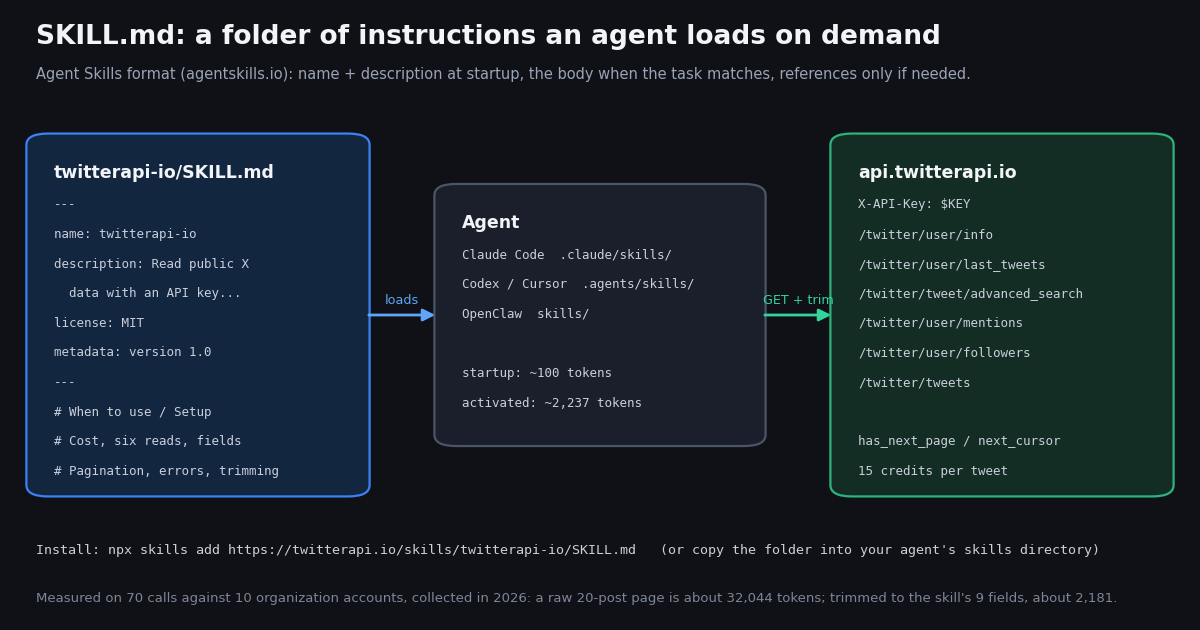
If you searched for "skill md" you probably met the file in one of three places: a SKILL.md inside a Claude Code or Codex repository, the skill.md page X added to its developer docs under Agent Resources next to llms.txt and the MCP server, or a security write-up about skills that run shell commands. All three are the same thing: a small Markdown file, with a YAML header, that tells an AI agent what it can do and when to do it. The format has a name, Agent Skills, and a public specification at agentskills.io that Anthropic released as an open standard and that Claude Code, Codex, Cursor, Gemini CLI, GitHub Copilot, VS Code, OpenClaw, Goose, Kiro and a few dozen other clients now read.
This page does three things. First it explains the format from the specification itself: the fields, the limits, the folder layout and the progressive-disclosure idea that makes skills cheap to keep installed. Second it opens X's own skill.md and lists what is actually in it, because the install command is one line but the file decides what your agent will do with your X developer account. Third it publishes a twitterapi.io SKILL.md, written to the spec, that gives an agent the six most common reads of public X data with an API key instead of OAuth, and shows how to install it in Claude Code, Codex, Cursor or OpenClaw.
Then we did what a skill page should do and measured the skill: we ran its six reads against 10 organization accounts (70 calls, collected in 2026) and recorded what an agent that follows the file actually pays, in context tokens before and after the trimming rule the file prescribes, in wall-clock per call, and in dollars at both the twitterapi.io and the official X API rate cards. Every number below comes from that run.
What a SKILL.md is: the Agent Skills format in one page
The specification is short, and worth reading in the original at agentskills.io/specification. A skill is a directory that contains, at minimum, a SKILL.md file. The file is YAML frontmatter followed by Markdown. The directory may also hold scripts/ (code the agent can run), references/ (documents the agent reads on demand) and assets/ (templates, images, data files), plus anything else you like.
The body has no required structure. The spec recommends step-by-step instructions, examples of inputs and outputs, and common edge cases, and warns that the agent loads the entire file once it decides to activate the skill, so long material belongs in references/ files linked by relative path, one level deep.
Progressive disclosure is why skills scale. The spec describes three stages. At startup the agent loads only name and description of every installed skill, about 100 tokens each. When a task matches a description, it loads the full body, which the spec recommends keeping under 5,000 tokens and under 500 lines. Files in scripts/, references/ and assets/ are read only when the body sends the agent there. A machine can therefore keep fifty skills installed for the price of a short paragraph of context, and pay for a skill only when it uses it.
Who reads the format. The agentskills.io home page lists the clients that support it; the list includes Claude Code, Claude, ChatGPT and Codex, Cursor, Gemini CLI, GitHub Copilot, VS Code, OpenCode, OpenHands, Goose, Amp, Letta, Roo Code, Kiro, Factory, JetBrains Junie, Hermes Agent and OpenClaw. The standard was developed by Anthropic, released openly, and takes contributions on GitHub under agentskills/agentskills, which also hosts skills-ref, a reference validator: skills-ref validate ./my-skill checks the frontmatter and the naming rules.
Not to be confused with. AGENTS.md and CLAUDE.md are always-on project instructions, loaded every session; a SKILL.md is loaded on demand. llms.txt is an index of documentation for crawlers and agents, not instructions. An MCP server exposes tools over a protocol; a skill is plain text that may tell the agent to call such tools, or to run curl. The skills.md and skillsmd.dev sites you will see in the search results are registries and explainers built around the same file format.
Where skills live and how to install one
Each agent reads skills from its own directory; the skills CLI published by vercel-labs on GitHub knows the paths and copies a skill into them. Its README documents these locations for the four agents most readers of this page use (it supports many more).
What npx skills add accepts. Per the README: GitHub shorthand (owner/repo), a full GitHub, GitLab or Azure Repos URL, a URL to a sub-folder of a repository (.../tree/main/skills/<name>), a git SSH URL, a local path, and a direct download URL that points at a single valid SKILL.md file or at a .zip, .tar, .tar.gz or .tgz archive. Inside a repository it looks for SKILL.md files in the root, in skills/ and in agent-specific folders. -g installs globally instead of into the current project, -y skips the prompts, -a <agent> targets one agent, -s <skill> picks one skill from a repository with several, and npx skills find <query> searches a public index.
Claude Code specifics. The Claude Code documentation (code.claude.com/docs/en/skills) adds that the directory name becomes a slash command (~/.claude/skills/deploy/ gives /deploy), that Claude also invokes a skill automatically when a request matches its description, and that disable-model-invocation: true turns the automatic part off. Claude Code extends the standard with fields such as context: fork, agent, paths, argument-hint and dynamic shell injection; the docs state that only name, description, license, compatibility, metadata and allowed-tools travel to other products, so a skill meant to be portable should stay inside those six.
Manual install is a copy. A skill is files, so mkdir plus curl -o into the right directory is a complete installation; nothing registers it. Deleting the directory uninstalls it. The commands below show both routes for the twitterapi.io skill published on this page.
# Route 1: the skills CLI (vercel-labs/skills). A direct URL to a single SKILL.md is a documented source.
npx skills add https://twitterapi.io/skills/twitterapi-io/SKILL.md            # into the current project
npx skills add https://twitterapi.io/skills/twitterapi-io/SKILL.md -g -y      # globally, no prompts
npx skills add https://twitterapi.io/skills/twitterapi-io/SKILL.md -a claude-code -a codex

# Route 2: copy the file yourself (name must equal the folder name: twitterapi-io)
mkdir -p ~/.claude/skills/twitterapi-io && curl -fsSL https://twitterapi.io/skills/twitterapi-io/SKILL.md -o ~/.claude/skills/twitterapi-io/SKILL.md
mkdir -p ~/.agents/skills/twitterapi-io && curl -fsSL https://twitterapi.io/skills/twitterapi-io/SKILL.md -o ~/.agents/skills/twitterapi-io/SKILL.md   # Codex, Cursor
mkdir -p ~/.openclaw/skills/twitterapi-io && curl -fsSL https://twitterapi.io/skills/twitterapi-io/SKILL.md -o ~/.openclaw/skills/twitterapi-io/SKILL.md

# The key the skill expects (dashboard: https://twitterapi.io/dashboard)
export TWITTERAPI_IO_API_KEY=...

# Check the file validates against the spec (optional)
npx skills-ref validate ~/.claude/skills/twitterapi-io   # or: skills-ref validate <dir> if installed from agentskills/agentskills

# X's own skill, for comparison
npx skills add https://docs.x.comX's own skill.md: what docs.x.com actually ships
X added a skill.md page to its developer documentation under Agent Resources, next to llms.txt and its MCP server. The page describes the file as "a structured capability summary that describes what AI agents can do with the X API", following the agentskills.io specification, and gives one install command: npx skills add https://docs.x.com. The CLI finds the file through X's discovery endpoint, docs.x.com/.well-known/agent-skills/index.json, which lists a single skill named x with the file at /.well-known/agent-skills/x/skill.md and a SHA-256 digest. The same text is served at docs.x.com/skill.md. We fetched it this session: 235 lines, 9,926 bytes, roughly 2,482 tokens once an agent loads it, comfortably inside the spec's 5,000-token recommendation.
Frontmatter. name: x; a description that starts "Use when building integrations with X (formerly Twitter), accessing posts, users, trends, and real-time data; managing authentication and API requests; handling pagination and rate limits; or troubleshooting API errors and response codes"; and metadata with mintlify-proj: x and version: "1.0". No license, compatibility or allowed-tools.
Body. Nine sections: Product Summary, When to Use, Quick Reference, Decision Guidance, Workflow, Common Gotchas, Verification Checklist and Resources. The Quick Reference is where the substance is: an authentication table (bearer token for app-only public reads, OAuth 1.0a user context, OAuth 2.0 authorization code with scopes, Basic auth for Enterprise), eleven endpoints (GET /2/users/by/username/{username}, GET /2/users/{id}, GET /2/tweets/search/recent, GET /2/tweets/{id}, GET /2/users/{id}/tweets, POST /2/tweets, DELETE /2/tweets/{id}, POST /2/users/{id}/likes, POST /2/users/{id}/following, GET /2/tweets/search/stream, POST /2/tweets/search/stream/rules), the tweet.fields and expansions parameters, max_results plus pagination_token with meta.next_token, and the three x-rate-limit-* headers.
What it tells the agent to do. Create an app at console.x.com, accept the developer agreement, store the bearer token or OAuth credentials in environment variables, always add fields and expansions (the file's first gotcha is that posts come back with only id and text by default), stop paginating when next_token is absent, parse the errors array rather than a single error, back off on 429 using x-rate-limit-reset, reconnect streams, and URL-encode spaces as %20.
What it does not contain. Prices. The Product Summary says only that "the API uses pay-per-usage pricing with no commitments"; the numbers live on docs.x.com/x-api/getting-started/pricing: $0.005 per post read, $0.010 per user read, $0.010 per follower or following read, $0.015 per post created ($0.200 with a URL), capped at 3 million post reads per monthly billing cycle with Enterprise above that. An agent following X's skill will not know that a 100-post search page costs $0.50 unless you tell it, which is one of the reasons the twitterapi.io skill below puts its prices in the body.
# How the CLI finds X's skill: the discovery document
curl -s https://docs.x.com/.well-known/agent-skills/index.json
# {"$schema": "https://schemas.agentskills.io/discovery/0.2.0/schema.json",
#  "skills": [{"name": "x", "type": "skill-md",
#              "description": "Use when building integrations with X (formerly Twitter), accessing",
#              "url": "/.well-known/agent-skills/x/skill.md", "digest": "sha256:6ea7a081..."}]}

# The file itself (235 lines when we fetched it)
curl -s https://docs.x.com/skill.md | head -20

# Install into the current project's agents
npx skills add https://docs.x.comThe twitterapi.io SKILL.md, in full
Below is the complete file we publish at twitterapi.io/skills/twitterapi-io/SKILL.md (177 lines, 8,948 bytes, about 2,237 tokens). It follows the specification literally: name equals the folder name twitterapi-io, the description says both what and when, and the only optional fields used are the four that travel to every client (license, compatibility, metadata). Everything an agent needs to make a correct, cheap call is in the body; there is no references/ folder yet, because the body stays under half the spec's line budget.
Design choices, and why. The description names the concrete tasks (profile, recent posts, search, mentions, followers, posts by ID) so that an agent's matcher fires on the words a user would use. The cost section comes before the endpoint table because an agent that loops over pages should know the price of a page before it starts; the spec's own description advice ("include specific keywords") applies to cost too. The six reads are a table of path, required parameters and where the items sit in the response, because that last column is where generic LLM knowledge fails: last_tweets nests under data.tweets, search and mentions return a top-level tweets, followers return followers with snake_case fields. The error section leads with the shape that bites: HTTP 200 with status: "error" and a msg. And the trimming section exists because of the numbers in the next part of this page.
On writes. The file mentions the write actions only in a final section that starts "only on explicit request", and carries the caveats verbatim: writes run through a logged-in session (/twitter/user_login_v2, $0.10, with a proxy you supply), each action is $0.002, every action acts as that X account, which X can rate-limit, lock or suspend, and calls are billed per HTTP 200 response. An agent that reads only the first screen of the skill will never see a write path, which is the right default.
---
name: twitterapi-io
description: Read public X (Twitter) data through the twitterapi.io REST API with a plain API key, no X developer account or OAuth. Use when a task needs a user's profile, an account's recent posts, a keyword or from:user search, mentions of an account, a followers list, or specific posts by ID, and when the agent must keep the response small and know what each call costs.
license: MIT
compatibility: Needs network access to https://api.twitterapi.io and the TWITTERAPI_IO_API_KEY environment variable. Examples use curl and Python 3 with requests.
metadata:
  author: twitterapi.io
  version: "1.0"
  homepage: https://twitterapi.io/skills/twitterapi-io/SKILL.md
  docs: https://docs.twitterapi.io
---

# twitterapi.io: X (Twitter) data for agents

## When to use

- The user asks what an X account posted, who someone is on X, who follows an account,
  what people are saying about a topic, or wants specific posts by ID.
- You need the data as JSON in one HTTP call, billed per item returned, with no OAuth flow.

Do not use this skill for the official X API v2 (`api.x.com/2/...`): the paths, auth and
response fields below are twitterapi.io's and are different. Do not use it to post, like,
follow or DM unless the user explicitly asks for a write and accepts the caveats at the end.

## Setup

1. Get an API key at https://twitterapi.io/dashboard (sign-up gives up to $1 of free credits to new
   accounts that pass the automatic bot check, one per person or network, expiring after 31 days).
2. Put it in the environment: `export TWITTERAPI_IO_API_KEY=...`. Never print or commit it.
3. Every request is a GET to the base URL `https://api.twitterapi.io` plus one of the paths below,
   with the header `X-API-Key: $TWITTERAPI_IO_API_KEY`.

Rate limits: 0.2 requests per second before the account's first payment, 20 per second once
paid (50 on the Scale plan, 500 on Business). Space calls accordingly; retry on HTTP 429 after
a short pause.

## Cost (check before looping)

- $1 = 100,000 credits. Pay only for the data returned.
- Tweet endpoints (search, timelines, mentions, tweets by ID): 15 credits per tweet returned,
  $0.15 per 1,000 tweets. Minimum 15 credits ($0.00015) per request, so an empty search costs
  $0.00015 and a full 20-tweet page costs $0.003.
- Profile (`/twitter/user/info`): 18 credits per user, $0.18 per 1,000 profiles.
- Followers / followings: 1 to 3 credits per user returned, in per-page tiers; a 200-row page
  is between 200 and 600 credits ($0.002 to $0.006).
- Tell the user the estimated cost before fetching more than 10 pages of anything.

## The six reads

All return JSON. Tweet objects look the same everywhere. Error text is always in `msg`.

| Need | Path and required params | Where the items are |
| --- | --- | --- |
| Profile | `/twitter/user/info?userName=<handle>` | `data` (one object) |
| Recent posts | `/twitter/user/last_tweets?userName=<handle>` (`includeReplies=true` to add replies) | `data.tweets[]`, 20 per page, newest first |
| Search | `/twitter/tweet/advanced_search?query=<q>&queryType=Latest` (`Top` for ranked) | `tweets[]`, up to 20 per page |
| Mentions | `/twitter/user/mentions?userName=<handle>` | `tweets[]` |
| Followers | `/twitter/user/followers?userName=<handle>` (`/followings` for who they follow) | `followers[]`, about 200 per page |
| Posts by ID | `/twitter/tweets?tweet_ids=<id1,id2,...>` | `tweets[]` |

Search `query` uses X search operators: `from:handle`, `to:handle`, `"exact phrase"`,
`lang:en`, `-filter:replies`, `min_faves:10`, `since_time:<unix>`, `until_time:<unix>`.
Combine with `OR` and parentheses.

### Tweet fields (camelCase)

`id`, `url`, `text`, `createdAt` (format `Thu Oct 16 12:34:56 +0000 2026`, not ISO 8601),
`lang`, `likeCount`, `retweetCount`, `replyCount`, `quoteCount`, `viewCount`, `bookmarkCount`,
`conversationId`, `isReply`, `inReplyToId`, `inReplyToUsername`, `entities` (hashtags, urls,
user_mentions), `extendedEntities.media[]` (type photo, video or animated_gif), `quoted_tweet`,
`retweeted_tweet`, and `author` with `id`, `userName`, `name`, `followers`, `following`,
`isBlueVerified`, `isVerified`, `createdAt`. There is no `public_metrics` object.

### Profile fields (`/twitter/user/info` -> `data`)

`id`, `name`, `userName`, `description`, `location`, `url`, `followers`, `following`,
`statusesCount`, `mediaCount`, `favouritesCount`, `createdAt`, `isBlueVerified`, `isVerified`,
`canDm`, `isAutomated`, `protected`.

### Follower rows (`/twitter/user/followers` -> `followers[]`, snake_case)

`id`, `screen_name`, `name`, `description`, `location`, `created_at`, `followers_count`,
`following_count`, `statuses_count`, `favourites_count`, `media_tweets_count`, `protected`,
`verified`, `can_dm`, `profile_image_url_https`, `url`.

## Pagination

Every list response carries `has_next_page` (boolean) and `next_cursor` (string). To get the
next page, repeat the same request with `cursor=<next_cursor>`. Stop when `has_next_page` is
false or the page is empty. Each page is billed separately.

## Errors

- HTTP 200 with `"status": "error"` and a `msg` string is the normal error shape. An unknown
  handle on `/twitter/user/info` returns 200, `status: "error"`, `msg: "user not found"`,
  `data: null` (never 404). Check `status` before reading `data`.
- HTTP 401: missing or wrong `X-API-Key`. HTTP 402 or an `msg` about credits: the account is
  out of credits. HTTP 429: over the rate limit; wait and retry.
- A protected account returns an empty `tweets` list rather than an error.

## Keep the context small

Raw responses are large because each tweet repeats its full `author` object, `entities` and
media. Before reasoning over results, keep only what the task needs. The default subset is
`id`, `createdAt`, `text`, `url`, `author.userName`, `likeCount`, `retweetCount`,
`replyCount`, `viewCount`; for profiles `id`, `userName`, `name`, `description`, `followers`,
`following`, `statusesCount`, `createdAt`, `isBlueVerified`; for follower rows `id`,
`screen_name`, `name`, `followers_count`, `created_at`. Fetch one page, trim, then decide
whether another page is needed. Never paste a raw page into the conversation.

## Examples

Shell (one search page, trimmed with jq):

```bash
curl -s -G "https://api.twitterapi.io/twitter/tweet/advanced_search" \
  -H "X-API-Key: $TWITTERAPI_IO_API_KEY" \
  --data-urlencode 'query=from:NASA -filter:replies' --data-urlencode 'queryType=Latest' \
  | jq -c '.tweets[] | {id, createdAt, text, url, user: .author.userName, likeCount, retweetCount, replyCount, viewCount}'
```

Python (profile, two timeline pages, pagination, error check, trimming):

```python
import os, requests

BASE = "https://api.twitterapi.io"
H = {"X-API-Key": os.environ["TWITTERAPI_IO_API_KEY"]}
KEEP = ("id", "createdAt", "text", "url", "likeCount", "retweetCount", "replyCount", "viewCount")

def trim(t):
    d = {k: t.get(k) for k in KEEP}
    d["user"] = (t.get("author") or {}).get("userName")
    return d

r = requests.get(f"{BASE}/twitter/user/info", headers=H, params={"userName": "NASA"}, timeout=30)
r.raise_for_status()
body = r.json()
if body.get("status") == "error":
    raise SystemExit(body.get("msg"))            # e.g. "user not found"
profile = body["data"]
print(profile["userName"], profile["followers"], profile["statusesCount"])

posts, cursor = [], None
for _ in range(2):                                # 2 pages = up to 40 posts = $0.006
    params = {"userName": "NASA"}
    if cursor:
        params["cursor"] = cursor
    r = requests.get(f"{BASE}/twitter/user/last_tweets", headers=H, params=params, timeout=30)
    r.raise_for_status()
    body = r.json()
    if body.get("status") == "error":
        raise SystemExit(body.get("msg"))
    page = (body.get("data") or {}).get("tweets") or []
    posts.extend(trim(t) for t in page)
    if not body.get("has_next_page") or not body.get("next_cursor") or not page:
        break
    cursor = body["next_cursor"]
print(len(posts), "posts;", "credits:", 15 * len(posts))
```

## Writes (only on explicit request)

twitterapi.io also offers write actions, which run through an authenticated session: one
`/twitter/user_login_v2` login ($0.10, with a proxy the customer supplies) returns
`login_cookies`; each post, delete, like, retweet, follow, unfollow or DM is then $0.002
(`/twitter/create_tweet_v2`, `/twitter/follow_user_v2`, and so on). Every write acts as that
X account, which X can rate-limit, lock or suspend; keep a human pace, expect the session to
need a re-login, and note that calls are billed per HTTP 200 response. Reads need no X account.

## Reference

- API reference and OpenAPI: https://docs.twitterapi.io (machine-readable index:
  https://docs.twitterapi.io/llms.txt)
- Prices and plans: https://twitterapi.io/pricing
- Dashboard, key and usage: https://twitterapi.io/dashboard
- MCP server with the same reads as tools: https://twitterapi.io/twitter-mcp-server
Side by side: X's skill versus the twitterapi.io skill
Both files are valid Agent Skills and both are small enough to load whole. They differ in what the agent must have before the first call, in how much the agent is told, and in what each read costs. Prices are from the X API pay-per-usage page on docs.x.com and from twitterapi.io/pricing.
Neither file replaces the other. If your agent must act as a specific X account with X's own guarantees, or needs the filtered stream, X's skill is the one to install and the OAuth table in it is accurate. If your agent needs to read public X data at scale, from any account, without an app review and at a price it can be told in advance, the twitterapi.io skill is the shorter path. Many setups will have both installed; the descriptions do not overlap enough to confuse a matcher, because X's starts with "building integrations with X" and ours with "read public X (Twitter) data through the twitterapi.io REST API with a plain API key".
What an agent following the skill pays in context
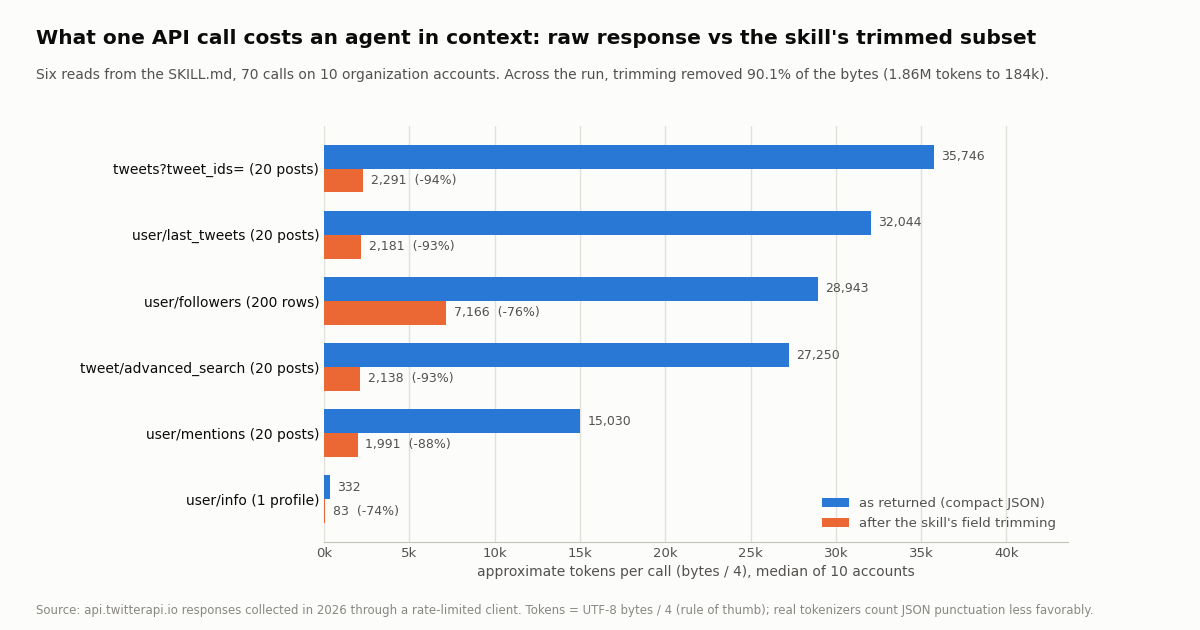
A skill is cheap to hold (2,237 tokens when active) but what it causes the agent to fetch is not. We ran each of the six reads against 10 organization accounts (@vercel, @github, @Docker, @CloudflareDev, @OpenAIDevs, @nvidia, @NASA, @stripe, @supabase, @AnthropicAI) through a rate-limited client: one profile, two timeline pages, one mentions page, one from:<account> search page, one followers page and one /twitter/tweets batch of the 20 IDs from the first timeline page, 70 calls in all, zero errors. For every response we recorded the compact-JSON size in bytes, divided by four as the usual token approximation, then applied the trimming rule from the skill (9 tweet fields, 9 profile fields, 5 follower fields) and measured again.
A page of posts is a chapter of a book. The median 20-post timeline page was 128,177 bytes, about 32,044 tokens, and the largest single response in the run (245,639 bytes, a /twitter/tweets batch) was about 61,410 tokens. Across the 1,000 tweets the run returned, the average tweet object was 6,261 bytes raw, about 1,565 tokens, because every tweet carries its full author profile, entities, media objects and any quoted or reposted tweet in full. Trimmed to the skill's nine fields the same tweet is 448 bytes, about 112 tokens.
Trimming removed 90.1% of the bytes. The whole run was 7,441,992 bytes raw (1,860,498 tokens) and 737,285 bytes trimmed (184,321 tokens). The reduction is largest where the author object repeats most, posts by ID (94.2%) and timelines (93.4%), and smallest for profiles (74.5%) and follower rows (75.5%), which are already flat. Mentions trimmed less than timelines (87.6%) because mentions from smaller accounts carry smaller author objects and fewer media attachments to begin with.
One account, the whole skill, once. An agent that runs all six reads for a single account (seven calls, with two timeline pages) ingests about 685,559 bytes raw, roughly 171,390 tokens, which is more than many models' entire context window, for what is a modest question. With the trimming rule it is about 18,030 tokens. That difference, not the API price, is the main reason the skill tells the agent to fetch one page, trim it, and only then decide whether to fetch another.
Latency. Median wall-clock across all 70 calls was 2,238 ms, measured from the moment the client's rate-limit lock released to the parsed body, so it excludes our own pacing. Profiles were fastest (1,108 ms), the 20-ID batch slowest (3,417 ms). For an agent this means a six-read session (seven calls) takes about 16 seconds of API time at the medians; an agent that paginates deep into followers will spend most of its time waiting, so the skill tells it to estimate before looping.
What the same calls cost in dollars, on both rate cards
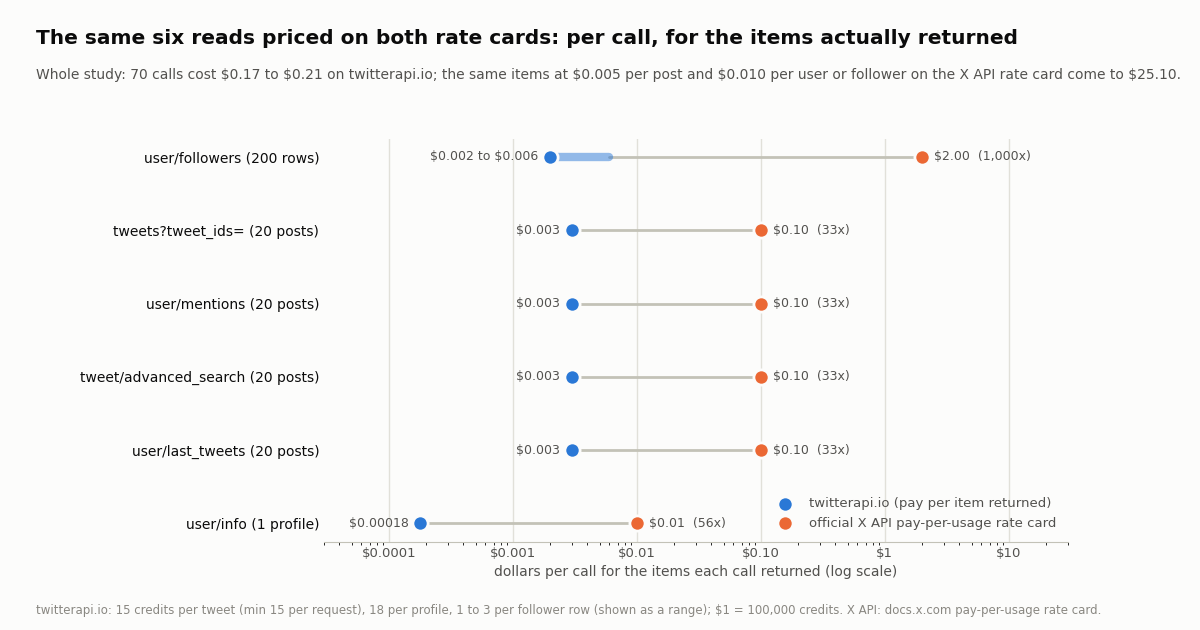
Credits are known exactly from the published prices: tweet endpoints bill 15 credits per tweet returned with a 15-credit minimum per request, profiles 18 credits, follower pages 1 to 3 credits per row depending on the page tier, and $1 buys 100,000 credits. For the official X API we priced the same items at the pay-per-usage rate card on docs.x.com: $0.005 per post read, $0.010 per user read, $0.010 per follower read. Both columns price the items each call actually returned; neither includes a subscription.
Followers decide the bill on the X side. Of the $25.10 the study would have cost at the X rate card, $20.00 is the 2,000 follower rows at $0.010 each; the 1,000 posts are $5.00 and the ten profiles $0.10. On twitterapi.io the order flips: a follower row is 1 to 3 credits and a tweet is 15, so an agent's cost profile inverts: here, a deep follower crawl is the smaller item and a deep timeline crawl is what to estimate first. For 1,000 posts the two rate cards are $5.00 and $0.15, about 33x apart.
The per-request minimum matters for agents. An agent that searches for something rare and gets zero results still pays 15 credits ($0.00015) on twitterapi.io, and a 1-post result costs the same 15 credits as the minimum. That floor is why the skill tells the agent to make searches specific (from:, lang:, -filter:replies) rather than issuing many near-empty probes; at 20 results a page the floor is irrelevant, at 0 or 1 it is the whole bill. Subscription plans with bonus credits are listed on the pricing page; the per-item prices above are what the skill quotes to the agent.
Writing a SKILL.md for your own API: what the spec and the measurements taught us
Make name equal the folder, and keep it boring. The validator rejects uppercase, leading or double hyphens and a name that differs from the directory. twitterapi-io installs the same way on every client; a clever name does not.
Write the description for the matcher, not for a human. Agents decide whether to load your skill from this one field, with about 100 tokens of budget. List the concrete tasks a user would phrase (profile, recent posts, search, followers) and the distinguishing condition (API key, no OAuth). The spec's own good example does exactly this for PDFs.
Put the response shape in the body, not a link to it. The field names and the nesting (data.tweets versus tweets versus followers) are what an agent cannot guess, and the body is loaded whole, so this is the surest place to prevent a wrong call. Save references/ for long material such as a full search-operator list.
Put prices and rate limits in the body too. X's skill omits them and defers to a docs page the agent may never fetch. Ours quotes 15 credits per tweet, the 15-credit minimum, 18 per profile and the request-rate tiers, and asks the agent to estimate before fetching more than 10 pages. Measured, the six reads for one account are $0.0172 to $0.0212; a skill that says so lets the agent tell the user before spending.
Prescribe a trimming rule. This is the lesson of the numbers: a 20-post page is about 32,044 tokens raw and about 2,181 trimmed. Without an instruction, an agent will paste the raw JSON into its context and run out of room after a few pages. Name the fields to keep and say "fetch one page, trim, then decide".
Lead with the error shape that is not an HTTP error. A 200 with status: "error" and msg: "user not found" is the case agents mishandle most; put it first, with the data: null consequence.
Keep writes behind an explicit request. If the API can act as a user account, say so late in the file, state the price and the account risk plainly, and make the default path read-only in the agent's behavior without claiming the API is. The spec has no field for this; the ordering of your sections is the mechanism.
Version in metadata, validate, then publish at a stable URL. metadata.version lets an agent or a human see which revision is installed; skills-ref validate catches frontmatter mistakes; a stable HTTPS URL to the single file is enough for npx skills add and for curl. If you want the file discoverable the way X's is, add a .well-known/agent-skills/index.json that lists it with a digest, per the discovery schema at schemas.agentskills.io.
How we collected this
Question: what does an agent that follows the twitterapi.io SKILL.md pay per call, in context (bytes and approximate tokens as returned and after the skill's trimming rule), in wall-clock, and in credits at the twitterapi.io rate card, and what would the same items cost at the official X API pay-per-usage rate card.
Accounts and calls: 10 public organization accounts, @vercel, @github, @Docker, @CloudflareDev, @OpenAIDevs, @nvidia, @NASA, @stripe, @supabase, @AnthropicAI. For each: /twitter/user/info, two pages of /twitter/user/last_tweets (default, replies excluded), one page of /twitter/user/mentions, one page of /twitter/tweet/advanced_search with query=from:<account> and queryType=Latest, one page of /twitter/user/followers, and one /twitter/tweets call with the 20 IDs from the first timeline page. 70 requests, 1,000 tweets, 2,000 follower rows, 10 profiles, collected in 2026 through a rate-limited client; 0 errors.
Measurement: size is the UTF-8 length of the response serialized as compact JSON; tokens are bytes divided by four, the common rule of thumb, which understates real tokenizer counts for JSON by a margin that varies by model, so treat the token figures as relative, not exact. Trimmed size applies the exact field lists in the skill (tweets: id, createdAt, text, url, author.userName, likeCount, retweetCount, replyCount, viewCount; profiles: nine fields; follower rows: five). Wall-clock runs from the release of the client's rate-limit lock to the parsed body. Credits follow the published prices; follower pages are shown as the 1-to-3-credit range because the tier is per page. X API prices are the pay-per-usage rate card on docs.x.com applied to the same item counts.
What the sample cannot show: medians over 10 large organization accounts; small accounts with short descriptions and no media would produce smaller raw pages and lower trim ratios. Latency was measured from one location on one day and will vary. We did not measure token counts with a real tokenizer, and we did not run the skill inside an agent harness to count the tokens the agent spent reasoning over the data; the figures are what the agent would ingest, not what it would do with it. The npx skills add direct-URL install was taken from the CLI's README and is not verified end to end until the file is live at the published URL.
Privacy: aggregates only. Profiles, timelines, from: searches and ID batches belong to the named organization accounts and are kept compressed with the study. Mentions and follower pages contain private individuals; those pages were kept only long enough to measure size and timing and were not stored with the study, and no text, handle or ID from them appears on this page.
"""skill_dry_run.py - run the six reads from the twitterapi.io SKILL.md for one account and report
what an agent would ingest (bytes, approximate tokens) raw and trimmed, plus the credits spent.

    pip install requests
    export TWITTERAPI_IO_API_KEY=...     # https://twitterapi.io/dashboard
    python skill_dry_run.py NASA
"""
import json
import os
import sys
import time

import requests

BASE = "https://api.twitterapi.io"
H = {"X-API-Key": os.environ["TWITTERAPI_IO_API_KEY"]}
TWEET_KEEP = ("id", "createdAt", "text", "url", "likeCount", "retweetCount", "replyCount", "viewCount")
PROFILE_KEEP = ("id", "userName", "name", "description", "followers", "following", "statusesCount", "createdAt", "isBlueVerified")
FOLLOWER_KEEP = ("id", "screen_name", "name", "followers_count", "created_at")


def get(url, **params):
    """One GET of a full URL. Errors come back as HTTP 200 with status=error and msg; raise on those too."""
    t0 = time.perf_counter()
    r = requests.get(url, headers=H, params=params, timeout=30)
    ms = (time.perf_counter() - t0) * 1000
    r.raise_for_status()
    body = r.json()
    if isinstance(body, dict) and body.get("status") == "error":
        raise RuntimeError(f"{url}: {body.get('msg')}")
    return body, ms


def size(obj):
    return len(json.dumps(obj, ensure_ascii=False, separators=(",", ":")).encode("utf-8"))


def trim_tweet(t):
    d = {k: t.get(k) for k in TWEET_KEEP}
    d["user"] = (t.get("author") or {}).get("userName")
    return d


def report(label, body, items, trimmed, credits, ms):
    raw = size(body)
    print(f"{label:<34} {items:>4} items  {raw:>8,} B ~{raw // 4:>6,} tok  ->  {size(trimmed):>7,} B ~{size(trimmed) // 4:>5,} tok  {credits:>4} credits  {ms:>6.0f} ms")
    return credits


def main(handle):
    spent = 0
    # 1. profile: 18 credits
    body, ms = get("/twitter/user/info", userName=handle)
    u = body["data"]
    spent += report("/twitter/user/info", body, 1, {k: u.get(k) for k in PROFILE_KEEP}, 18, ms)

    # 2. timeline, two pages: 15 credits per tweet returned (min 15 per request)
    cursor, ids = None, []
    for page in (1, 2):
        params = {"userName": handle}
        if cursor:
            params["cursor"] = cursor
        body, ms = get("/twitter/user/last_tweets", **params)
        tweets = (body.get("data") or {}).get("tweets") or []     # nested under data for this endpoint
        ids += [t["id"] for t in tweets]
        spent += report(f"/twitter/user/last_tweets p{page}", body, len(tweets), [trim_tweet(t) for t in tweets], max(15, 15 * len(tweets)), ms)
        if not body.get("has_next_page") or not body.get("next_cursor"):
            break
        cursor = body["next_cursor"]

    # 3. mentions and 4. search: top-level tweets[]
    body, ms = get("/twitter/user/mentions", userName=handle)
    tweets = body.get("tweets") or []
    spent += report("/twitter/user/mentions", body, len(tweets), [trim_tweet(t) for t in tweets], max(15, 15 * len(tweets)), ms)
    body, ms = get("/twitter/tweet/advanced_search", query=f"from:{handle}", queryType="Latest")
    tweets = body.get("tweets") or []
    spent += report("/twitter/tweet/advanced_search", body, len(tweets), [trim_tweet(t) for t in tweets], max(15, 15 * len(tweets)), ms)

    # 5. followers: top-level followers[], snake_case, 1 to 3 credits per row (we count the low tier)
    body, ms = get("/twitter/user/followers", userName=handle)
    rows = body.get("followers") or []
    spent += report("/twitter/user/followers", body, len(rows), [{k: r.get(k) for k in FOLLOWER_KEEP} for r in rows], len(rows), ms)

    # 6. posts by ID: the first 20 ids from the timeline
    if ids:
        body, ms = get("/twitter/tweets", tweet_ids=",".join(ids[:20]))
        tweets = body.get("tweets") or []
        spent += report("/twitter/tweets (20 ids)", body, len(tweets), [trim_tweet(t) for t in tweets], max(15, 15 * len(tweets)), ms)

    print(f"\ncredits spent (followers at the 1-credit tier): {spent:,} = ${spent / 100000:.4f}")


if __name__ == "__main__":
    main(sys.argv[1] if len(sys.argv) > 1 else "NASA")
Questions readers ask
What is a SKILL.md file?
The required file of an Agent Skill, the open format at agentskills.io for giving AI agents instructions they load on demand. It is YAML frontmatter (a required name of up to 64 lowercase characters that matches its folder, a required description of up to 1,024 characters, and optional license, compatibility, metadata and allowed-tools) followed by Markdown instructions. The folder can also hold scripts/, references/ and assets/. Claude Code, Codex, Cursor, Gemini CLI, GitHub Copilot, OpenClaw and many other agents read it.
Is SKILL.md the same as CLAUDE.md, AGENTS.md or llms.txt?
No. CLAUDE.md and AGENTS.md are always-on project instructions loaded every session. llms.txt is an index of documentation pages for crawlers and agents. A SKILL.md is loaded only when a task matches its description, which is why it can carry detailed, task-specific instructions without costing context the rest of the time. X publishes all three for its API: llms.txt, skill.md and an MCP server, grouped as Agent Resources in its docs.
How do I install a SKILL.md in Claude Code?
Put the folder under .claude/skills/ in a project or ~/.claude/skills/ for all projects, so the file sits at .claude/skills/<name>/SKILL.md with the folder named exactly as the name field. The skills CLI does it for you: npx skills add <source>, where source can be a GitHub repository, a sub-folder URL, a local path or a direct URL to one SKILL.md. The directory name becomes a slash command and Claude also activates the skill automatically when a request matches the description.
What sources does npx skills add accept?
Per the vercel-labs/skills README: GitHub shorthand such as owner/repo, full GitHub, GitLab and Azure Repos URLs, a URL to a specific skill folder inside a repository, git SSH URLs, local paths, and direct download URLs that point at a single valid SKILL.md file or a .zip, .tar, .tar.gz or .tgz archive. Flags: -g for a global install, -y to skip prompts, -a to target specific agents, -s to pick skills from a multi-skill repository.
What is in X's skill.md and does it include pricing?
The file at docs.x.com/skill.md (235 lines when fetched) has a frontmatter name of x, sections for product summary, when to use, quick reference, decision guidance, workflow, gotchas, a checklist and resources. It covers bearer-token and OAuth authentication, eleven /2/ endpoints, fields and expansions, pagination with meta.next_token and the x-rate-limit headers. It says the API is pay-per-usage but gives no prices; those are on the pricing page: $0.005 per post read, $0.010 per user or follower read, $0.015 per post created.
Do I need an X developer account to use the twitterapi.io skill?
No. Reads need only a twitterapi.io API key sent in the X-API-Key header, obtained from the dashboard; new accounts that pass the automatic bot check get up to $1 of free credits (one per person or network, expiring after 31 days) without a card. There is no X app, OAuth flow or developer agreement for reads. Write actions are different: they run through a logged-in X account session and act as that account.
How big should a SKILL.md be?
The specification says to keep the main file under 500 lines and the body under about 5,000 tokens, moving long reference material into references/ files the agent loads only when pointed to them. Both skills on this page are well inside that: X's is 235 lines (about 2,482 tokens) and the twitterapi.io file is 177 lines (about 2,237 tokens). The data the skill causes the agent to fetch is far larger: a single 20-post page is about 32,044 tokens raw, which is why the file prescribes a trimming rule.
Can a skill post to X, like or follow?
X's skill documents POST /2/tweets, likes and follows under OAuth user context, priced at $0.015 per post created ($0.200 with a URL) on the pay-per-usage card. The twitterapi.io skill mentions writes only in a final section marked for explicit requests: a session login via /twitter/user_login_v2 ($0.10, with a proxy you supply) and $0.002 per action, with the caveats that the call acts as that X account, which X can rate-limit, lock or suspend, that a human pace is needed, that the session may need re-login, and that calls are billed per HTTP 200 response.
Continue
- Agent Skills specification: SKILL.md frontmatter fields, limits, directory layout, progressive disclosure
- X developer docs: skill.md page (install command, discovery endpoints, what the file contains)
- skills CLI (npx skills add): accepted sources, agent install paths, flags
- Claude Code docs: skill locations, frontmatter, invocation, portability to the open standard
- X API pay-per-usage pricing ($0.005 per post read, $0.010 per user and follower read)
- twitterapi.io API reference: the six read endpoints and their response fields
- X API hub: endpoints, prices and guides
- How to use Claude with the Twitter (X) API (MCP setup)
- OpenClaw Twitter (X) skill and MCP setup
- OpenAI Codex with the Twitter (X) API
- Use Cursor with the Twitter (X) API
- xurl: X's own CLI for the X API, install, auth and cost
- Twitter (X) MCP server: the same reads as tools
- Get an API key in the dashboard
- Pay-per-call pricing
- 01How to Get a Grok API Key: Setup, Pricing and Live X Data for the xAI API
- 02The X Developer Portal (X Developer Console) for the Twitter (X) API: Sign-Up, Apps and Keys, Billing, Limits, and When You Do Not Need It
- 03Twitter (X) Auto Post: Schedule in X, RSS or Sheets to X, and Posting from Code
- 04How to Search and Track Mentions on Twitter (X), Including Someone Else's
- 05Twitter (X) Access Token: The 4 Credential Types, Which Endpoints Need Which, and How to Get and Validate Each
- 06How to Embed Tweets on Your Website — 3 Methods, Measured
- 07Who Has the Most Twitter (X) Followers — Build a Live API Leaderboard
- 08Jim Cramer on Twitter — A Tracking Guide for Retail Traders & Analysts
Stop reading. Start building.
Starter credits cover real testing on real data. Google sign-in, no card, no application queue.
Get an API key