Codex MCP: How to Add Any MCP Server to OpenAI Codex (CLI, IDE and App)
![Diagram: one ~/.codex/config.toml with an [mcp_servers.docs] stdio table (command, args, env_vars) and an [mcp_servers.twitterapi] HTTP table (url, bearer_token_env_var) feeds the Codex CLI, IDE extension and desktop app, which connect to either a stdio server (command, args, env, env_vars, cwd) or a Streamable HTTP server (url, bearer_token_env_var, http_headers, env_http_headers). Footer lists startup_timeout_sec default 10, tool_timeout_sec default 60, enabled, required, enabled_tools, disabled_tools, default_tools_approval_mode and the verify commands codex mcp list and /mcp.](/blog/codex-mcp/hero.png)
This guide is about connecting any MCP server to OpenAI Codex: the config.toml format, the codex mcp commands, authentication, timeouts, tool filters and the errors you will hit. If you want the X-specific workflow (what to ask Codex to do with tweets, a capped Python route, prompt-injection containment, and how to install the Codex CLI itself), read our separate guide to using OpenAI Codex with the Twitter (X) API; this page uses the X/Twitter MCP server only as the worked example.
Every configuration key below is quoted from OpenAI's Codex MCP page (developers.openai.com/codex/mcp) and the Codex configuration reference, read this session, and every CLI behavior was checked first-hand: we installed @openai/codex from npm (Codex CLI 0.165.0, the latest GitHub release when we checked), pointed CODEX_HOME at a scratch folder, and ran codex mcp add, list, get and remove against real servers, plus a set of deliberately broken configs to record the exact error messages.
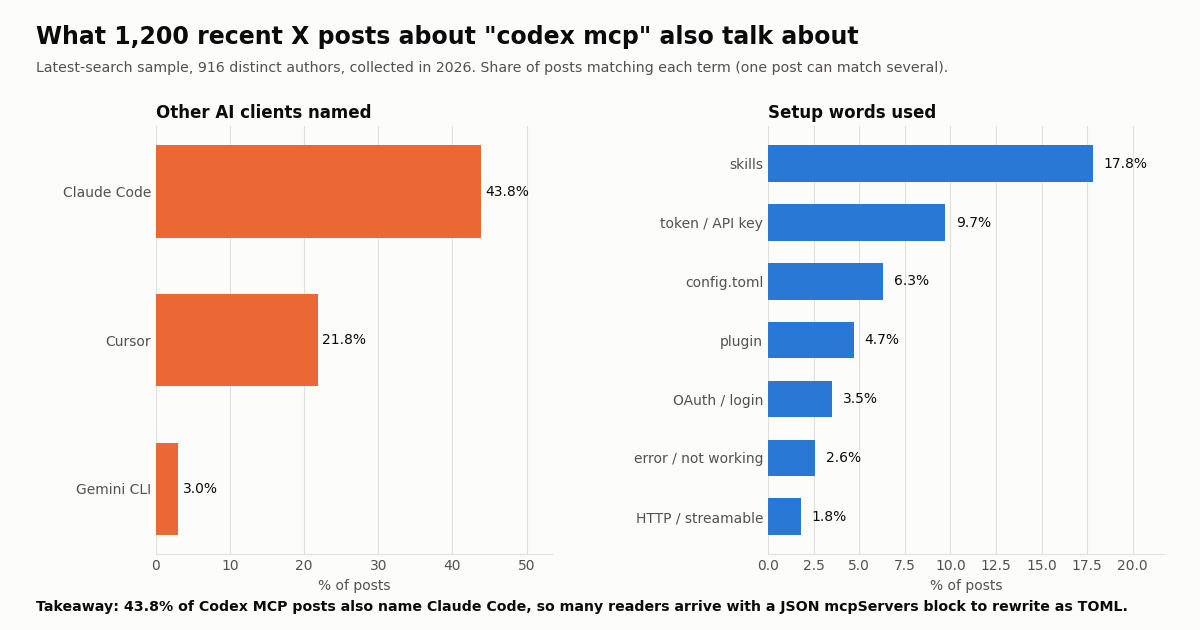
We also looked at how people talk about this on X: 1,200 recent posts matching "codex mcp" from 916 distinct authors, and the last 200 posts from the @OpenAIDevs organization account (collected in 2026). The headline: 43.8% of those posts also name Claude Code and 21.8% name Cursor, so a large share of people setting up Codex MCP are carrying a server over from another client. That is exactly where the TOML-versus-JSON mistakes come from.
Where Codex reads MCP servers from (and which clients share them)
Codex stores MCP configuration in config.toml alongside its other settings. OpenAI's docs give two locations: the user-level ~/.codex/config.toml, which applies everywhere, and a project-scoped .codex/config.toml, which Codex only loads for projects you have marked as trusted. If a server you put in a project file does not show up, check the trust setting before anything else.
The same docs state that the ChatGPT desktop app, the Codex CLI and the IDE extension share this configuration, so once a server is configured you can switch clients without redoing setup. Our scratch-folder test showed the other side of that: codex mcp add reported "Added global MCP server", meaning the CLI writes to the user-level file, not the project file. If you want a server only in one repository, edit that repository's .codex/config.toml by hand.
Moving the config folder. The CLI respects the CODEX_HOME environment variable for where it keeps config.toml. We used it to run every test on this page in a throwaway folder without touching a real setup; it is equally useful for a CI runner or a second profile.
What Codex supports. Per OpenAI's feature list: stdio servers (a local process started by a command) with environment variables; Streamable HTTP servers (an address) with bearer-token auth, OAuth (including Client ID Metadata Documents and Dynamic Client Registration), and ChatGPT session auth for trusted first-party servers. Codex also reads the instructions field a server returns during initialization and uses it as server-wide guidance alongside the tools. Those two transports are the two standard ones in the MCP specification (modelcontextprotocol.io/specification/2025-06-18/basic/transports).
Option 1: add a server with codex mcp add
The CLI is the quickest way to get a correct table, because it writes valid TOML for you. The usage line in the Codex source (codex-rs/cli/src/mcp_cmd.rs in github.com/openai/codex) is codex mcp add [OPTIONS] <NAME> (--url <URL> | -- <COMMAND>...): you pass either a URL or a command after --, never both.
Local (stdio) server. Everything after -- becomes the launch command and its arguments. OpenAI's example adds Context7, a documentation server: codex mcp add context7 -- npx -y @upstash/context7-mcp. Environment variables go in with repeated --env KEY=VALUE flags, which are only valid for stdio servers.
Remote (Streamable HTTP) server. Pass --url, and for token auth --bearer-token-env-var with the name of the variable that holds the token. Codex reads the variable when it connects and sends it as Authorization: Bearer <token>. For OAuth servers there are --oauth-client-id, --oauth-client-secret, --oauth-client-registration (auto, cimd or dcr) and --oauth-resource, then codex mcp login <name> to sign in.
Server names. Names may contain letters, numbers and -, _, :, @, /, .. A name with a space fails immediately with "invalid server name 'bad name' (use letters, numbers, '-', '_', ':', '@', '/', '.')" (our test).
The rest of the command family. codex mcp list (add --json for scripts), codex mcp get <name>, codex mcp remove <name>, codex mcp login <name> and codex mcp logout <name>. Every command accepts -c key=value to override a config value for one run.
Here is exactly what the two add commands wrote into a fresh config.toml in our test, and what codex mcp list printed afterwards:
$ codex mcp add twitterapi --url https://mcp.twitterapi.io/mcp --bearer-token-env-var TWITTERAPI_IO_API_KEY
Added global MCP server 'twitterapi'.
$ codex mcp add context7 -- npx -y @upstash/context7-mcp
Added global MCP server 'context7'.

$ cat ~/.codex/config.toml
[mcp_servers.twitterapi]
url = "https://mcp.twitterapi.io/mcp"
bearer_token_env_var = "TWITTERAPI_IO_API_KEY"

[mcp_servers.context7]
command = "npx"
args = ["-y", "@upstash/context7-mcp"]

$ codex mcp list
Name      Command  Args                      Env  Cwd  Status   Auth
context7  npx      -y @upstash/context7-mcp  -    -    enabled  Unsupported

Name        Url                            Bearer Token Env Var   Status   Auth
twitterapi https://mcp.twitterapi.io/mcp TWITTERAPI_IO_API_KEY enabled Bearer tokenOption 2: write the config.toml block by hand (every key)
Editing the file gives you the options the CLI does not expose: tool filters, timeouts, approval modes, env_vars, static headers and per-tool limits. Each server is one [mcp_servers.<server-name>] table. The keys split by transport, and mixing them is an error (see troubleshooting).
Shared by both transports: startup_timeout_sec (default 10), tool_timeout_sec (default 60), enabled (set false to switch a server off without deleting it), required (set true to make startup fail if the server cannot initialize), enabled_tools (allow list), disabled_tools (deny list, applied after the allow list), default_tools_approval_mode (auto, prompt, writes or approve), and per-tool tools.<tool>.approval_mode and tools.<tool>.output_token_limit. The configuration reference also lists startup_timeout_ms as a millisecond alias and a top-level mcp_optional_startup_grace_ms (default 1000) for how long Codex waits on optional servers when it builds the first tool catalog.
The block below combines both transports with the options most people end up needing. We loaded this exact HTTP table in our scratch Codex home and codex mcp list --json echoed back startup_timeout_sec: 20.0 and tool_timeout_sec: 90.0, so the keys parse as documented.
# ~/.codex/config.toml

# Local server: Codex starts the process and talks over stdin/stdout
[mcp_servers.context7]
command = "npx"
args = ["-y", "@upstash/context7-mcp"]
env_vars = ["CONTEXT7_API_KEY"]        # forward by name; the value stays in your shell
startup_timeout_sec = 20               # npx downloads on first run, 10 s can be too short

# Remote server: Codex calls a URL (Streamable HTTP)
[mcp_servers.twitterapi]
url = "https://mcp.twitterapi.io/mcp"
bearer_token_env_var = "TWITTERAPI_IO_API_KEY"
tool_timeout_sec = 90
enabled_tools = ["search_tweets", "get_user_last_tweets", "get_user_mentions", "get_user_info"]
default_tools_approval_mode = "writes"   # prompt only for tools not marked read-only

# Optional per-tool cap on how much output reaches the model
[mcp_servers.twitterapi.tools.search_tweets]
output_token_limit = 12000Auth: tokens, headers and OAuth without leaking secrets
There are four ways to authenticate, and they differ mainly in where the secret ends up. Our test found the one trap that matters: codex mcp add demo --env DEMO_KEY=plaintext-value -- npx ... wrote a [mcp_servers.demo.env] table containing DEMO_KEY = "plaintext-value". The value is now in a file that people back up, sync and sometimes commit.
One detail on env_http_headers. It sends the variable's value as-is. If you map Authorization to a variable, the variable must already contain Bearer <token>; that is why bearer_token_env_var, which adds the Bearer prefix for you, is the simpler choice for bearer servers.
OAuth servers. Add the URL, then run codex mcp login <name>. Per the docs, Codex picks Client ID Metadata Documents when the authorization server advertises support, falls back to Dynamic Client Registration, and lets you force either with --oauth-client-registration cimd or dcr. A pre-registered client secret passed with --oauth-client-secret is saved as mcp_servers.<name>.oauth.client_secret in config.toml, so OpenAI's own advice applies: keep that file private and out of version control. --scopes read,write overrides scopes for one login, and --no-browser prints the authorization URL for headless machines.
Headers that expire. http_headers_helper runs a local command that prints a JSON object of headers. Codex caches the result, and after a same-origin POST returns 401 or 403 it refreshes once and retries only if the helper returns different values. If no credential source resolves at all, Codex can still connect without authentication, which is why a missing variable often looks like a working server with failing tools.
Worked example: the X/Twitter MCP server in Codex, and checking its tool list
The twitterapi.io MCP server comes in two forms, and both drop into the tables above. The hosted one is a Streamable HTTP endpoint at https://mcp.twitterapi.io/mcp. We sent it an MCP initialize request this session: it answers as twitterapi-mcp and its instructions field reads "Read-only access to Twitter/X data via 12 tools ... Auth: paste your twitterapi.io API key as the Bearer token." A tool call with no credentials returned HTTP 401 with "Missing Authorization: Bearer <api_key> (or X-API-Key: <api_key> header)", so both bearer_token_env_var and an env_http_headers entry for X-API-Key work.
The local one is the npm package @twitterapi_io/mcp-server (version 0.2.0 on npm when we checked), which runs over stdio and reads TWITTERAPI_IO_API_KEY. Its setup for Claude Desktop, Cursor and other clients is on our Twitter MCP server page; in Codex it becomes a three-line table.
Why enabled_tools is worth it here. We measured the tools/list response: the 12 tool definitions total 11,677 characters (roughly 2,919 tokens at about four characters per token), and search_tweets alone is 1,938. Allow-listing the four tools most Codex tasks need cuts that to 5,119 characters (about 1,280 tokens), which is context the model gets back on every turn and fewer near-duplicate tools to choose between.
Approvals. Every one of the 12 tools carries the MCP readOnlyHint annotation. With default_tools_approval_mode = "writes", which the docs describe as prompting only for tools that are not marked read-only, Codex can call them without stopping to ask, while a server you add later that does write things still prompts.
Test it. Export the key in the shell you start Codex from, run codex mcp list and check the Auth column says "Bearer token", start codex, type /mcp, then ask: "Use the twitterapi tools to get the five most recent posts from @OpenAIDevs and give me their URLs." For the X-specific workflow beyond this (bigger pulls through a script, AGENTS.md limits, prompt injection in tweets), continue with the Codex + X API guide.
Check the tool list. codex mcp list only proves the entry parsed; it does not contact the server. Two checks tell you more. Inside the TUI, /mcp shows the active servers and their tools after Codex has connected. Outside Codex, you can ask a Streamable HTTP server for its tools directly with two JSON-RPC calls, which is how we measured the X server above.
A trap we found. The hosted X server answers tools/list without any credentials, so all 12 tools appear in /mcp even when your key variable is empty or wrong. The failure only shows up on the first tool call: with a bad key we got HTTP 401 and the JSON-RPC error "Upstream auth failed: twitterapi.io 401 ... API key is invalid". Many servers behave this way, so treat a visible tool list as proof of connectivity, not of auth.
For scripts and CI. codex mcp list --json returns each server with transport.type (stdio or streamable_http), the timeouts you set, and an auth_status of bearer_token, unsupported (stdio) or not_logged_in. That is the easiest way to assert a team config in a pipeline.
# 1. Put the key in your environment (shell profile), never in config.toml
export TWITTERAPI_IO_API_KEY="your_key_here"

# 2a. Hosted server (Streamable HTTP)
codex mcp add twitterapi --url https://mcp.twitterapi.io/mcp \
  --bearer-token-env-var TWITTERAPI_IO_API_KEY

# 2b. Or the local npm server (stdio). Then add  env_vars = ["TWITTERAPI_IO_API_KEY"]
#     to its table by hand instead of passing --env, which would store the key in the file.
# codex mcp add twitterapi -- npx -y @twitterapi_io/mcp-server

# 3. Check the entry and its auth status
codex mcp get twitterapi
codex mcp list

# 4. Inside the TUI: list live servers and tools
codex
/mcp

# 5. Outside Codex: ask a Streamable HTTP server for its tools directly
curl -s https://mcp.twitterapi.io/mcp \
  -H 'Content-Type: application/json' \
  -H 'Accept: application/json, text/event-stream' \
  -d '{"jsonrpc":"2.0","id":2,"method":"tools/list","params":{}}' \
| python3 -c "import json,sys; [print(t['name']) for t in json.load(sys.stdin)['result']['tools']]"Troubleshooting: the exact errors and what they mean
We broke a scratch config.toml on purpose in five common ways and recorded what Codex CLI 0.165.0 printed. Two of the five fail silently, which is why they cause most of the "Codex doesn't see my MCP server" threads.
Translating from Claude Code, Cursor or Claude Desktop. Those clients use a JSON mcpServers object. The fields map almost one to one: "command" and "args" stay the same, the JSON "env": {...} object becomes either env_vars = ["NAME"] (preferred) or an [mcp_servers.<name>.env] sub-table, and a JSON "url" plus "headers" becomes url plus bearer_token_env_var or env_http_headers. The table name must be mcp_servers with an underscore.
Server times out on startup. The default startup_timeout_sec is 10 seconds. An npx -y server downloads its package the first time it runs, which can take longer; raise it to 20 or 30, or install the package globally and point command at it. If a slow optional server is missing from the first tool catalog, that is mcp_optional_startup_grace_ms (1000 by default) at work; setting it to 0 makes Codex wait for each server's own timeout.
Tool calls time out. The default tool_timeout_sec is 60. Raise it per server for long-running tools such as large searches or builds rather than globally.
Server shows up but tools fail with 401. The variable named in bearer_token_env_var or env_vars is not set in the environment Codex started from. A shell profile change does not reach an already-running IDE or desktop app; restart it, or launch it from a terminal that has the variable.
Want a broken server to stop the session. Set required = true. Per the reference, startup or resume then fails if that enabled server cannot initialize, instead of Codex quietly continuing without its tools.
Project server missing. .codex/config.toml is only read in trusted projects, and codex mcp add writes to the global file, not the project one.
What 1,200 X posts say about Codex MCP setups
To see what people actually do with Codex MCP, we pulled the 1,200 most recent X posts matching "codex mcp" (excluding reposts) and scanned their text for client names, server names and setup words. The sample covers 3.35 days, about 358 posts a day, from 916 distinct authors; 53.7% are in English, 20.1% in Chinese and 11.5% in Japanese.
Codex MCP is a multi-client topic. The large overlap with Claude Code and Cursor is the single clearest signal: people are moving or mirroring servers between clients, which is why the JSON-to-TOML table in the troubleshooting section matters more than any list of servers. Skills come up in more posts than config.toml does, which matches how OpenAI now positions MCP next to skills and plugins in its own docs.
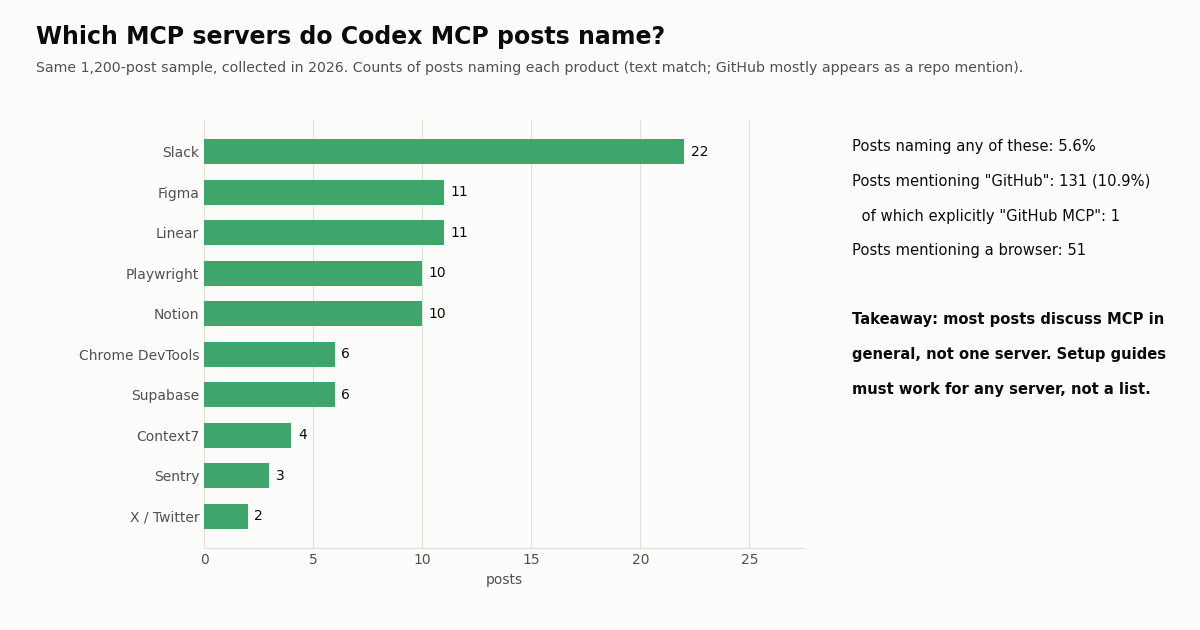
Few posts name a specific server. Only 5.6% of posts named any of ten well-known servers (Slack, Figma, Linear, Playwright, Notion, Chrome DevTools, Supabase, Context7, Sentry, X/Twitter). "GitHub" appears in 131 posts, but only 1 explicitly said "GitHub MCP"; most are repository mentions. The conversation is about how to wire MCP into Codex in general, not about one server.
Engagement is thin in the live stream and concentrated at the top. The median post in the Latest sample had 2 likes and 172 views, and 28.0% had none. The 96 posts X ranks as Top for the same query had a median of 68 likes and 5,894 views, and 54.2% of them also named Claude Code.
OpenAI's own account rarely says "MCP". Of the last 200 posts from @OpenAIDevs (about 44 days), 30.5% mention Codex but only 2 mention MCP. The setup details live in the docs rather than in announcements, so the docs pages quoted above are the source to check when something changes.
What the worked example costs, and how it compares with the official X API
Codex and the MCP server itself add no fee; the X data underneath is what you pay for. Through twitterapi.io, tweet reads cost 15 credits per tweet returned, which is $0.15 per 1,000 tweets, with a 15-credit minimum per request (so a search that finds nothing costs $0.00015, and a full 20-tweet page costs $0.003). Profiles cost $0.18 per 1,000. Reads need no X account and no X developer account. New accounts that pass the automatic bot check get up to $1 of free credits (at most 100,000 credits, no card, one per person or network, expiring after 31 days); purchased credits never expire. Subscriptions and rate limits are on the pricing page.
The official figures are from X's pricing page (docs.x.com/x-api/getting-started/pricing), fetched this session, which also lists $20 of credits on a first eligible card purchase plus a match of the first auto-recharge up to $50. Per 1,000 posts, $5 against $0.15 is about 33x.
This page's study, priced. The three samples behind the charts returned 1,496 posts in 75 requests, which at 15 credits per tweet is about $0.22. An agent that asks for one 20-post page per question spends $0.003 per question.
Writes are separate from this MCP server. Its 12 tools only read. The REST API also posts, likes, follows and sends DMs through an authenticated session: one /twitter/user_login_v2 login ($0.10, with a proxy you supply) returns login_cookies, and each action such as /twitter/create_tweet_v2 or /twitter/follow_user_v2 is then 60 credits ($0.0006). Each call acts as that account, so X can rate-limit, lock or suspend it; keep a human pace, expect the session to need a re-login now and then, and note that every HTTP 200 call is billed.
How we collected this
Question. When people post about MCP in OpenAI Codex on X, which other clients, servers and setup words do they mention, and how often does OpenAI's developer account talk about MCP?
Query and accounts. /twitter/tweet/advanced_search with the query codex mcp -filter:retweets: 1,200 posts from the Latest tab (a 3.35-day window ending at collection time, 916 distinct authors) and 96 from the Top tab. Plus /twitter/user/last_tweets for the @OpenAIDevs organization account (200 posts, about 44 days). Collected in 2026; 75 requests returning 1,496 posts, about $0.22 at $0.15 per 1,000.
Method. Each post's text was matched against fixed regular expressions for client names (Claude Code, Cursor, Gemini CLI), ten well-known MCP servers and setup words (config.toml, codex mcp add, stdio, HTTP, OAuth, token or API key, timeout, error). A post can match several terms. The tool-schema sizes come from one unauthenticated tools/list call to the hosted X MCP server; the CLI behavior comes from running Codex CLI 0.165.0 in a scratch CODEX_HOME.
What the sample cannot show. It is a few days of a keyword stream, not a census: the words "codex" and "mcp" can co-occur in posts about something else, text matching cannot tell a GitHub MCP server from a GitHub link, and a post that names a server is not proof anyone configured it. Posts in Chinese and Japanese were matched only on the English product names they contain.
Privacy. Aggregates only. Search-sample authors are private individuals, so their raw posts were kept out of the published dataset; the committed sample holds de-identified rows (language, weekday, engagement counts, matched terms) with no ids, text, links or handles. The only named account is @OpenAIDevs, an organization account.
"""Preflight for a Codex MCP setup: confirm the key you exported for Codex works,
and preview what the X/Twitter MCP tools will return, before wiring it into config.toml.

    export TWITTERAPI_IO_API_KEY="your_key_here"
    pip install requests && python3 preflight.py
"""
import os
import sys

import requests

BASE = "https://api.twitterapi.io"
KEY = os.environ.get("TWITTERAPI_IO_API_KEY")
if not KEY:
    sys.exit("TWITTERAPI_IO_API_KEY is not set in this shell; Codex will not see it either.")
HEADERS = {"X-API-Key": KEY}


def user_info(user_name):
    r = requests.get(f"{BASE}/twitter/user/info", headers=HEADERS,
                     params={"userName": user_name}, timeout=30)
    r.raise_for_status()
    body = r.json()
    if body.get("status") == "error":          # unknown user: HTTP 200 + status "error"
        raise RuntimeError(body.get("msg"))
    return body["data"]


def search(query, max_pages=2):
    """Same data the search_tweets MCP tool returns; follows next_cursor."""
    tweets, cursor = [], ""
    for _ in range(max_pages):
        r = requests.get(f"{BASE}/twitter/tweet/advanced_search", headers=HEADERS,
                         params={"query": query, "queryType": "Latest", "cursor": cursor},
                         timeout=30)
        if r.status_code == 401:
            sys.exit("401: the key is invalid. Fix it before adding the MCP server to Codex.")
        r.raise_for_status()
        body = r.json()
        tweets.extend(body.get("tweets", []))
        if not body.get("has_next_page"):
            break
        cursor = body.get("next_cursor", "")
    return tweets


if __name__ == "__main__":
    me = user_info("OpenAIDevs")
    print(f"@{me['userName']}: {me['followers']:,} followers, {me['statusesCount']:,} posts")

    posts = search("codex mcp -filter:retweets")
    print(f"{len(posts)} recent posts; cost about ${len(posts) * 15 / 100000:.4f}")
    for t in posts[:5]:
        print(f"- {t['createdAt']}  likes={t['likeCount']}  {t['url']}")

    print("\nKey works. Now run:")
    print("  codex mcp add twitterapi --url https://mcp.twitterapi.io/mcp "
          "--bearer-token-env-var TWITTERAPI_IO_API_KEY")
Questions readers ask
Where is the Codex MCP config file?
In ~/.codex/config.toml by default, or in .codex/config.toml inside a project you have marked as trusted. The Codex CLI, IDE extension and desktop app all read the same file. If you set CODEX_HOME, the CLI uses that folder instead.
Does OpenAI Codex support remote (HTTP) MCP servers?
Yes. Codex supports Streamable HTTP servers with bearer-token auth, OAuth (CIMD and Dynamic Client Registration) and ChatGPT session auth for trusted first-party servers. Use codex mcp add <name> --url <url>, or a table with url and bearer_token_env_var.
Why doesn't Codex see my MCP server?
The usual cause is the table name. Codex reads [mcp_servers.<name>] with an underscore; in our test [mcpServers.x] and [mcp.servers.x] were silently ignored and codex mcp list said no servers were configured. Also check that a project-level file is in a trusted project, and that enabled is not false.
Can I paste my Claude Code or Cursor mcpServers JSON into Codex?
No. config.toml is TOML, and a pasted JSON block stops Codex from loading its configuration ("TOML parse error at line 1, column 1"). Rewrite each server as a [mcp_servers.<name>] table: command and args carry over, env becomes env_vars or an env sub-table, and url plus headers becomes url plus bearer_token_env_var or env_http_headers.
How do I pass an API key to a Codex MCP server safely?
Keep the value in your environment and store only its name: bearer_token_env_var or env_http_headers for HTTP servers, env_vars for stdio servers. Avoid codex mcp add --env KEY=value for secrets, because it writes the value into config.toml in plain text.
How do I fix an MCP server that times out in Codex?
Raise startup_timeout_sec (default 10 seconds) for servers that are slow to start, such as npx -y packages on first run, and tool_timeout_sec (default 60 seconds) for slow tools. Both are set per server in its table.
How do I limit which MCP tools Codex can use?
Add enabled_tools (an allow list) and optionally disabled_tools (a deny list applied after it) to the server's table. For approvals, default_tools_approval_mode takes auto, prompt, writes or approve, and tools.<tool>.approval_mode overrides it for one tool.
Is there an MCP server for Twitter (X) data that works with Codex?
Yes. The twitterapi.io MCP server is available hosted at https://mcp.twitterapi.io/mcp (Streamable HTTP, API key as the bearer token) or as the npm package @twitterapi_io/mcp-server (stdio). It exposes 12 read tools; reads cost $0.15 per 1,000 tweets.
Continue
- OpenAI Codex docs: Model Context Protocol (supported features, codex mcp commands, config.toml keys and defaults)
- OpenAI Codex docs: Configuration reference (every mcp_servers.<id> key, startup_timeout_ms, mcp_optional_startup_grace_ms)
- openai/codex on GitHub: codex mcp CLI source (add/list/get/remove/login/logout flags, server-name rules)
- Model Context Protocol specification: transports (stdio and Streamable HTTP)
- X API docs: pay-per-usage pricing ($0.005 per post read, $0.010 per user read, 3M post-read cap)
- npm: @twitterapi_io/mcp-server (local stdio X/Twitter MCP server)
- Twitter (X) API overview: endpoints, pricing and access
- Using OpenAI Codex with the Twitter (X) API, including Codex CLI install
- Twitter MCP server: 12 tools and setup for every client
- Connecting ChatGPT to MCP servers
- OpenAI Agents SDK with Twitter (X) data
- Cursor with the Twitter (X) API and MCP
- What an MCP server is and how it works
- Build your own MCP server in Python
- twitterapi.io pricing and rate limits
- 01How to Build an MCP Server in Python for Twitter (X) Data
- 02OpenClaw vs Claude Code: which agent should run your Twitter (X) jobs?
- 03Hermes Agent vs OpenClaw: Which Agent Fits Twitter (X) Work?
- 04Claude Code Channels: Telegram, Discord and Twitter (X) Alerts in Your Session
- 05MCP Server Workflow Automation: the 14 Best MCP Servers for Claude Code, Codex and Cursor, Twitter (X) Data Included
- 06How to Use OpenAI Codex with the Twitter (X) API
- 07What Is an MCP Server? How AI Clients Talk to It, With a Live Twitter (X) Example
- 08ChatGPT MCP: how to add an MCP server to ChatGPT
Stop reading. Start building.
Starter credits cover real testing on real data. Google sign-in, no card, no application queue.
Get an API keyAlready building with TwitterAPI.io? Publish an honest tutorial or build log about it and earn up to $200 a month in API credits.