How to Use Cursor with the Twitter (X) API
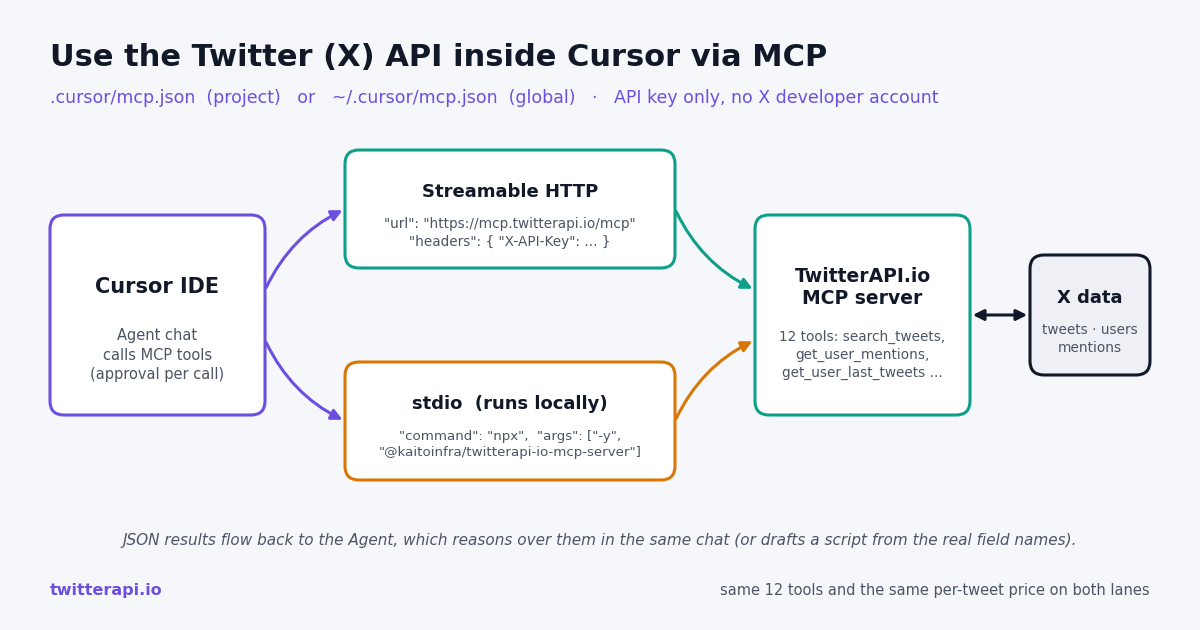
Cursor can read live Twitter (X) data the same way it reads your database or your docs: through a Model Context Protocol server. TwitterAPI.io runs one at https://mcp.twitterapi.io/mcp and ships the same code as an npm package, so the whole integration is one JSON block in Cursor's MCP config. After that, the Agent in Cursor's chat can search tweets, pull an account's recent posts, list mentions and look up profiles while you keep coding, and it can write the glue code for a standalone script with the real response shapes in front of it instead of guessing them.
This guide is written against Cursor's current MCP documentation (cursor.com/docs/mcp), which is where the file names, the transport list and the approval rules below come from. It covers the project-level and global config files, the hosted Streamable HTTP setup and the local npx setup, what the Agent needs in order to actually call the tools, three worked prompts you can paste as-is, and a runnable Python mentions poller that uses the plain HTTP API for the moments when a chat window is the wrong tool.
The alternative path, an X developer account plus a hand-written tool around the official X API, is also laid out so you can compare credentials, setup effort, read cost and rate limits side by side. The short version: the official route costs $0.005 per post read with a 3,000,000-read monthly cap on pay-per-usage, while TwitterAPI.io bills 15 credits per tweet returned, $0.15 per 1,000.
What is MCP, and why does Cursor need it for Twitter data?
The Model Context Protocol (MCP) is an open standard for connecting AI applications to external systems; the project's own introduction describes it as a USB-C port for AI apps, one connector that lets a client such as Cursor, Claude or ChatGPT plug into data sources, tools and workflows. An MCP server advertises tools with names, descriptions and JSON input schemas; the client lists those tools, lets the model decide when to call one, and feeds the result back into the conversation.
Cursor is an MCP client. Its docs describe MCP as a plugin system for the Agent: you register a server in a config file or on the Customize page, Cursor connects at startup, and the tools appear under Available Tools. Without MCP, getting tweets into Cursor means pasting JSON into the chat or writing a script first; with it, the Agent fetches what it needs on demand.
TwitterAPI.io's MCP server exposes twelve tools over the protocol: search_tweets, get_user_info, get_user_about, get_user_followers, get_user_followings, get_user_last_tweets, get_user_mentions, get_tweets_by_ids, get_tweet_replies, get_tweet_quotes, get_tweet_retweeters and get_trends. That list is what the hosted endpoint returns to a tools/list request today, and it matches the open-source package on GitHub (MIT licence). Each tool wraps a REST endpoint on api.twitterapi.io, so the data, the credits and the rate limits are identical to calling the API directly.
How does Cursor reach X data: hosted Streamable HTTP or local stdio?
Cursor's MCP client supports three transports: stdio, SSE and Streamable HTTP. For TwitterAPI.io you have two practical options, and both end up at the same server code.
Pick hosted when you want zero local dependencies or you work on a machine where you would rather not run Node processes for every editor window. Pick stdio when you prefer the process to run on your own machine, want the envFile option Cursor offers for stdio servers, or need to pin a specific package version in args.
One naming note from the source repository: the GitHub README publishes the package as @twitterapi_io/mcp-server while the hub page and this guide use @kaitoinfra/twitterapi-io-mcp-server; both names exist on the npm registry, were published at the same time and expose the same twitterapi-io-mcp-server binary. Either works in args.
Step-by-step: add the hosted Twitter MCP server to Cursor
Step 1: get an API key. Sign in to TwitterAPI.io with Google and copy the key from the dashboard. New accounts that pass the automatic bot check start with $1 in free credits (100,000 credits), no card, one per person and network, and those free credits expire after 31 days.
Step 2: choose the config scope. Cursor's docs give two file locations. .cursor/mcp.json in the project root makes the server available only in that project, which is right for a repo that several people share. ~/.cursor/mcp.json in your home directory makes it available in every project you open. The JSON is identical in both; only the path differs.
Step 3: write the server entry. Create the file if it does not exist and add the block below. The headers object is Cursor's documented way to pass credentials to a remote server; the header name TwitterAPI.io reads is X-API-Key.
Step 4: enable it and check the tool list. Open Customize in Cursor's sidebar (the docs say to install and manage MCP servers from the Customize page or in mcp.json). The twitterapi-io entry should show as connected with its tools listed under Available Tools. If it shows an error, re-check the URL (exactly https://mcp.twitterapi.io/mcp) and the header value.
Step 5: ask for something that needs live data. In the Agent chat, try: "Search Twitter for tweets about cursor mcp from the last 3 days and list the five with the most likes." Per Cursor's docs the Agent uses MCP tools listed under Available Tools automatically when they are relevant, including in Plan Mode, and asks for approval before each MCP tool call by default. Approve the search_tweets call once and the results land in the chat.
Optional: skip the approval prompt. MCP follows the same Run Modes as terminal commands in Cursor: in Auto-review mode, allowlisted MCP tools run immediately. Allowlist the read tools you trust (search_tweets, get_user_last_tweets, get_user_mentions) if you plan to run multi-step research prompts and do not want to click through every call.
{
  "mcpServers": {
    "twitterapi-io": {
      "url": "https://mcp.twitterapi.io/mcp",
      "headers": {
        "X-API-Key": "YOUR_TWITTERAPI_IO_KEY"
      }
    }
  }
}Alternative: run the server locally with npx (stdio)
If you would rather run the server as a local process, use the stdio form. Cursor's stdio config requires command and accepts args, env and envFile. The TwitterAPI.io package reads its key from the TWITTERAPI_IO_API_KEY environment variable, and Cursor's config supports ${env:NAME} interpolation, so you can keep the real key in your shell profile and commit a file that contains no secret.
Save the block below to .cursor/mcp.json or ~/.cursor/mcp.json, export TWITTERAPI_IO_API_KEY in the environment Cursor starts from, and reload the Customize page. On first start npx -y downloads the package (Node.js 18 or newer is the usual requirement for current MCP SDK packages; check the README if your Node is older), then the same twelve tools appear.
If you prefer a file over a shell variable: Cursor's envFile option, available for stdio servers only, loads variables from a dotenv-style file. Point it at a file that is in your .gitignore and keep ${env:TWITTERAPI_IO_API_KEY} in the env block.
One-click install is also possible: Cursor's docs point to the Cursor Marketplace and cursor.directory, where listed servers have an Add to Cursor button that writes the same JSON for you. Check what it wrote before trusting it with a key.
{
  "mcpServers": {
    "twitterapi-io": {
      "command": "npx",
      "args": ["-y", "@kaitoinfra/twitterapi-io-mcp-server"],
      "env": {
        "TWITTERAPI_IO_API_KEY": "${env:TWITTERAPI_IO_API_KEY}"
      }
    }
  }
}Three worked prompts for the Cursor Agent
These are the three tasks the brief for this page was built around, written so you can paste them. Each one names the data it needs so the Agent reaches for the right tool instead of answering from training data.
Prompt 1: sentiment around a GitHub repo. "Use the Twitter tools to search for tweets mentioning github.com/kaitoInfra/twitterapi-io-mcp-server or the phrase twitterapi-io-mcp-server from the last 14 days, Latest order, up to three pages. Group them into positive, neutral and negative, quote one tweet per group with the author handle, and tell me which complaints repeat." The Agent calls search_tweets with a query such as twitterapi-io-mcp-server since:<date>, paginates with the returned cursor if you asked for more than one page, then classifies. Each page costs 15 credits per tweet returned, so three full pages of 20 are 900 credits, $0.009.
Prompt 2: one account's last week. "Pull the last 7 days of posts from @cursor_ai with get_user_last_tweets (or search_tweets with from:cursor_ai since: if you need an exact date range), skip retweets, and give me a five-bullet summary with like counts from likeCount and view counts from viewCount." Naming the field names matters: TwitterAPI.io tweets carry likeCount, retweetCount, replyCount, viewCount and createdAt, not a public_metrics object, and a model that has read a lot of official X API code will otherwise invent the wrong keys.
Prompt 3: draft a mentions poller against the plain HTTP API. Sometimes the right output is a script, not a chat answer. The prompt below hands the Agent the endpoint, the header, the exact response shape and the error field so what it writes runs on the first try. The complete script it should produce is in the code section further down this page.
After the Agent drafts the script, ask it to run it once with INTERVAL set to 0 and MAX_PAGES set to 1 so you can see real createdAt and author.userName values before you leave it polling.
Write a Python script that polls Twitter/X mentions of @cursor_ai
with the plain TwitterAPI.io HTTP API (not the MCP tools) and prints new
mentions every 5 minutes. Facts you must follow, do not invent fields:

- GET https://api.twitterapi.io/twitter/user/mentions?userName=<handle>
- auth header: X-API-Key: <key>   (read it from TWITTERAPI_IO_API_KEY)
- 200 body: { "tweets": [...], "has_next_page": bool, "next_cursor": str }
- each tweet: "id", "text", "createdAt", "author": { "userName": ... }
  (there is no public_metrics object)
- pass "cursor" to get the next page; pages are newest-first, 20 per page
- non-200 or "status": "error" bodies carry the reason in "msg"
- cost: 15 credits per tweet returned, 15-credit minimum per request,
  so a check that finds nothing costs $0.00015

Stop paging as soon as you reach the last tweet id you already printed.What does it cost: MCP server in Cursor vs the official X API with a hand-written tool
There are two cost layers. Cursor itself bills you for the model usage exactly as before; adding an MCP server changes nothing there. The Twitter data layer is billed by TwitterAPI.io per tweet returned. The official alternative is to register an X developer account, build or host your own MCP server (or a tool wrapper) around the official X API, and pay X's pay-per-usage rates.
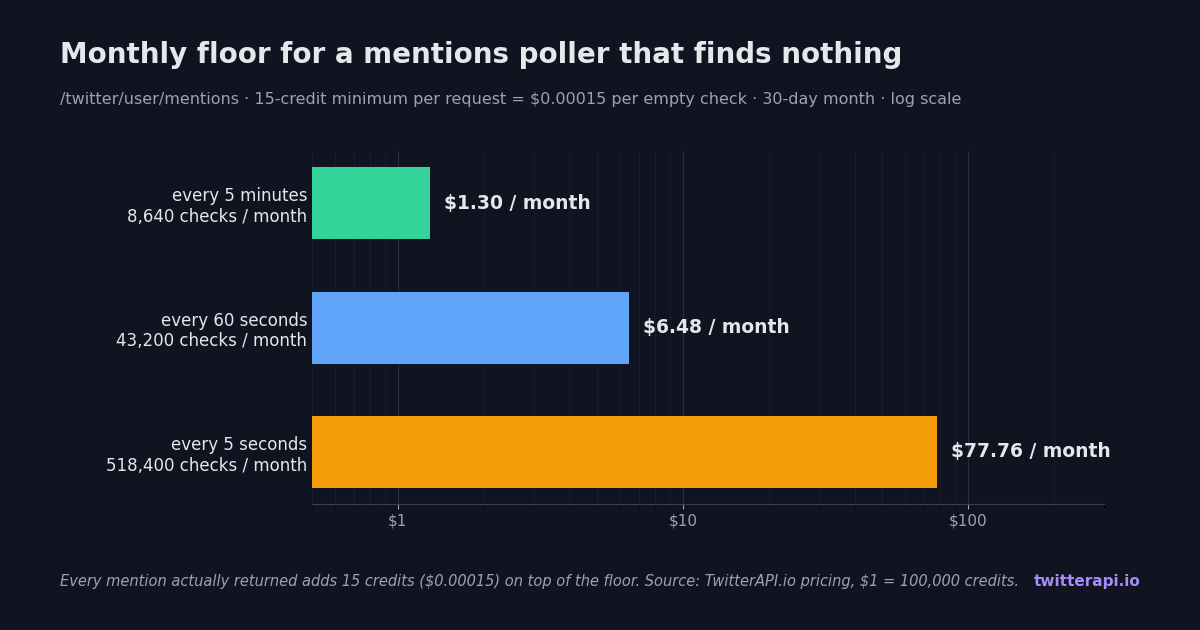
Polling is where the per-request minimum matters. The mentions poller above pays 15 credits per tweet it gets back, with a minimum of 15 credits per request, so a check that finds nothing costs $0.00015. Over a 30-day month that floor works out to $1.30 at a 5-minute interval (8,640 checks), $6.48 at 60 seconds (43,200 checks) and $77.76 at 5 seconds (518,400 checks); real spend is higher by 15 credits for every mention actually returned. The chart below plots those three floors.
For sub-minute latency, polling is the wrong shape: a filter rule on /oapi/tweet_filter/add_rule pushes matching tweets to a webhook instead. Subscriptions (Starter $29, Builder $99, Pro $199, Scale $499, Business $1,499 a month) bundle credits and raise the rate limit; the pricing page lists what each includes.
Limits and gotchas when using Twitter data in Cursor
Approval prompts interrupt long prompts. By default Cursor asks before every MCP tool call. A research prompt that paginates three times is three approvals. Allowlist the read tools in Auto-review mode when you are comfortable with the spend, and keep approval on for anything that costs more than a few cents per call.
Context window, not the API, caps result size. A single search_tweets page is about 20 tweets with full entities; ten pages is a lot of JSON in the chat. Ask for fewer pages or a tighter query (since:, lang:en, -filter:retweets), or have the Agent write results to a file and summarize from that.
Rate limit before the first payment is 0.2 requests per second. That is one call every five seconds, enough for interactive prompts and the 5-minute poller, but a prompt that fans out across twenty accounts will queue. After the first payment the limit rises to 20 requests per second.
Keys in project files travel with the repo. .cursor/mcp.json is a normal file; if you put a literal key in headers and commit it, it is public. Use the global file for personal keys, or ${env:TWITTERAPI_IO_API_KEY} plus envFile with the stdio form, and rotate the key from the dashboard if it leaks.
The MCP tools are reads. Posting, liking, retweeting and following are available through the REST API, not through these twelve tools: one /twitter/user_login_v2 login ($0.10, with a proxy you supply) returns login_cookies, and each /twitter/create_tweet_v2 or /twitter/like_tweet_v2 call is then $0.002, billed per HTTP 200 response. Those calls act as that X account, which X can rate-limit, lock or suspend, so keep a human pace and expect to re-login when the session expires. Reads need no X account at all.
Freshness is near real time, not instant. Tweets typically appear in search and timelines seconds to tens of seconds after posting. For alerting, use webhook rules rather than a 5-second poll.
Common errors and fixes
The server shows red or "no tools" on the Customize page. For the hosted form, confirm the url is exactly https://mcp.twitterapi.io/mcp and the file is valid JSON (a trailing comma is the usual culprit). For stdio, run npx -y @kaitoinfra/twitterapi-io-mcp-server in a terminal: if it prints a Node version error, upgrade Node; if it starts and waits, the package is fine and the problem is the config path.
Tool calls fail with an authorization message. The API answered with an error body whose msg explains it, usually a wrong or missing key. Re-copy the key from the dashboard; for the hosted form it belongs in headers under X-API-Key, for stdio in env under TWITTERAPI_IO_API_KEY. If you used ${env:...}, make sure the variable is set in the environment Cursor was launched from, not just in one terminal tab.
The Agent answers without calling a tool. Say "use the Twitter MCP tools" or name the tool (search_tweets) in the prompt, and check that the server is enabled on the Customize page. Cursor only offers tools listed under Available Tools.
msg says the user was not found. get_user_mentions, get_user_last_tweets and the userName parameter on /twitter/user/mentions take the handle without the @. A renamed or suspended account also returns this.
Timeouts on big searches. Add since: and until: to the query and ask for one page at a time. Each page is a separate request, so splitting the work also keeps each tool call within Cursor's approval and timeout window.
Spend climbs faster than expected. Every tweet returned costs 15 credits, so a prompt that asks for "all tweets" and paginates until has_next_page is false can pull hundreds of pages. Cap pages in the prompt ("at most three pages") and watch the credit balance on the dashboard.
"""Poll Twitter (X) mentions of one account with the plain TwitterAPI.io HTTP API.

pip install requests
export TWITTERAPI_IO_API_KEY=...   # from the twitterapi.io dashboard
"""
import os
import time

import requests

API_KEY = os.environ["TWITTERAPI_IO_API_KEY"]
BASE = "https://api.twitterapi.io"
WATCH = "cursor_ai"          # handle to watch, without the @
INTERVAL = 300               # seconds between checks (300 s = 5 min)
MAX_PAGES = 5                # safety cap per check; each page is 20 mentions


def fetch_page(cursor=None):
    params = {"userName": WATCH}
    if cursor:
        params["cursor"] = cursor
    r = requests.get(
        f"{BASE}/twitter/user/mentions",
        headers={"X-API-Key": API_KEY},
        params=params,
        timeout=30,
    )
    body = r.json()
    if r.status_code != 200 or body.get("status") == "error":
        # error bodies explain themselves in "msg" (bad key, bad handle, no credit ...)
        raise RuntimeError(f"HTTP {r.status_code}: {body.get('msg')}")
    return body


def new_mentions(last_seen_id):
    """Walk pages newest-first and stop at the first tweet we already printed."""
    found, cursor = [], None
    for _ in range(MAX_PAGES):
        page = fetch_page(cursor)
        for t in page.get("tweets", []):
            if t["id"] == last_seen_id:
                return found
            found.append(t)
        if last_seen_id is None or not page.get("has_next_page"):
            return found          # first run: one page seeds the watermark
        cursor = page.get("next_cursor")
    return found


last_seen = None
while True:
    try:
        tweets = new_mentions(last_seen)
        for t in reversed(tweets):   # print oldest first
            print(f"{t['createdAt']}  @{t['author']['userName']}: {t['text'][:140]}")
        if tweets:
            last_seen = tweets[0]["id"]
        else:
            print("no new mentions")  # this check cost the 15-credit minimum
    except Exception as exc:          # network error or an API "msg"
        print("poll failed:", exc)
    time.sleep(INTERVAL)
Questions readers ask
Does Cursor need a special agent mode to call the Twitter MCP tools?
Per Cursor's current MCP docs, no separate toggle: the Agent automatically uses MCP tools listed under Available Tools when they are relevant, including in Plan Mode. What you do need is the server enabled on the Customize page, and you will be asked to approve each MCP tool call by default unless you allowlist the tool in Auto-review mode.
Should I use .cursor/mcp.json or ~/.cursor/mcp.json?
Use the project file .cursor/mcp.json when the Twitter tools belong to one repo and teammates should get the same setup; use the global ~/.cursor/mcp.json when you want the tools in every project. The JSON is identical. Keep literal API keys out of the project file: use the global file, or ${env:TWITTERAPI_IO_API_KEY} with the stdio form.
Hosted Streamable HTTP or local npx: which should I pick?
Hosted (url: https://mcp.twitterapi.io/mcp with an X-API-Key header) needs nothing installed and updates itself. Local stdio (command: npx, args: ["-y", "@kaitoinfra/twitterapi-io-mcp-server"], key in env) runs the open-source package on your machine and supports Cursor's envFile option. Both expose the same twelve tools and bill the same per-tweet rate.
Do I need an X developer account or OAuth to use the Twitter API in Cursor?
No. The MCP server authenticates with a TwitterAPI.io API key, which you get after a Google sign-in with no card. The official X API route needs a developer account, an app, OAuth tokens and, for pay-per-usage, a saved card, and then charges $0.005 per post read.
How much does it cost to poll mentions from Cursor every minute?
Each check pays 15 credits per tweet returned with a 15-credit minimum, so a check that finds nothing costs $0.00015. At a 60-second interval that floor is 43,200 checks a month, $6.48; at 5 minutes it is $1.30; at 5 seconds it is $77.76. Mentions that do come back add 15 credits each. For true real-time alerts, use a webhook filter rule instead of polling.
Why does the Agent invent fields like public_metrics?
Because most Twitter code in its training data targets the official X API. TwitterAPI.io tweets use likeCount, retweetCount, replyCount, viewCount, createdAt and author.userName; list responses are top-level tweets with has_next_page and next_cursor, except /twitter/user/last_tweets, which nests them under data.tweets. Put those names in the prompt, as the worked prompt on this page does, and the Agent follows them.
Can Cursor post tweets through this MCP server?
The twelve MCP tools are reads. Writes go through the REST API with an authenticated session: /twitter/user_login_v2 ($0.10, with a proxy you supply) returns login_cookies, then each post, like, retweet or follow call such as /twitter/create_tweet_v2 is $0.002, billed per HTTP 200 response. Those calls act as that X account, which X can rate-limit, lock or suspend, so keep a human pace and expect to re-login when the session expires.
Is my API key safe in Cursor's MCP config?
It is stored in a local file and sent over HTTPS as an X-API-Key header (hosted) or passed as an environment variable to a local process (stdio). Treat it like any secret: keep it out of committed project files, prefer the global file or ${env:...} interpolation, and rotate it from the TwitterAPI.io dashboard if it is ever exposed.
Continue
- Cursor docs: Model Context Protocol (config file locations, transports, approval and Run Modes)
- Model Context Protocol: official introduction
- twitterapi-io-mcp-server source on GitHub (MIT, tool list)
- @kaitoinfra/twitterapi-io-mcp-server on npm
- X API pay-per-usage pricing (official, for comparison)
- Twitter MCP server: all 12 tools and install options
- The same MCP server in Claude Code and Claude.ai
- Connect ChatGPT to the Twitter (X) API
- How to add an MCP server to ChatGPT
- TwitterAPI.io REST endpoint reference
- Pay-per-call pricing and subscription tiers
- Get your API key from the dashboard
- 01What Is a Twitter (X) Chatbot, and How Do You Build One in 2026?
- 02How to Use Google Gemini with the Twitter (X) API
- 03OSINT on Twitter (X): What Public Data You Can Pull, and How
- 04n8n Twitter (X) API Workflow: Post New Tweets to Slack in 2026
- 05How Do You Turn On Twitter (X) Dark Mode, and What Are Its Exact Colors?
- 06Can You Use the X (Twitter) API for Free?
- 07How to Use Claude with the Twitter (X) API
- 08How to Search Tweets by Date via API — A Developer's Guide
Stop reading. Start building.
Starter credits cover real testing on real data. Google sign-in, no card, no application queue.
Get an API key