ChatGPT MCP: how to add an MCP server to ChatGPT
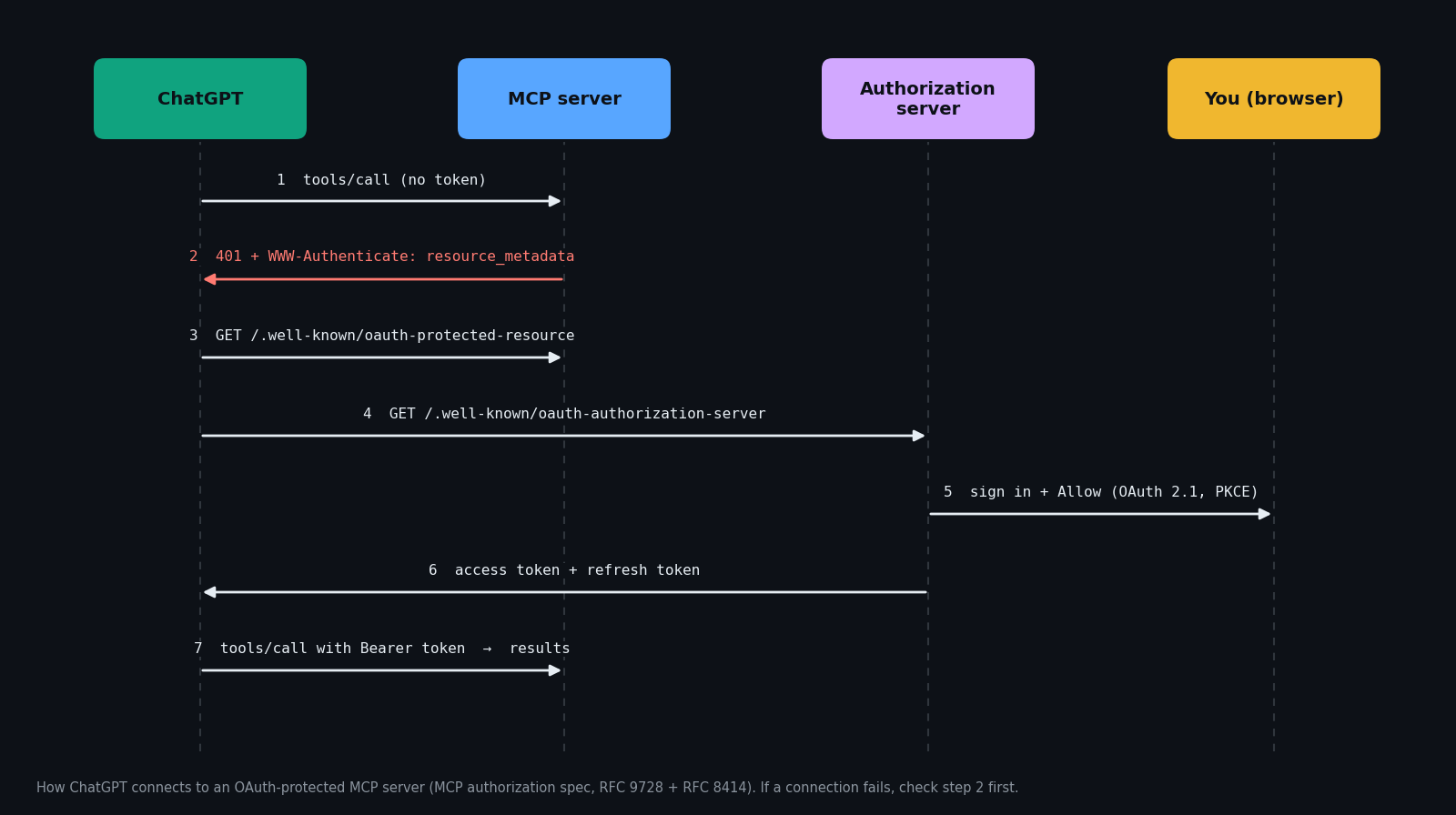
ChatGPT can now call tools on any remote Model Context Protocol (MCP) server you point it at. That is the same open protocol Claude and many coding agents use, so a server built once works across all of them. The catch is that the setup is hidden behind Developer mode, the menu names differ between account types, and the most common failure, ChatGPT never opening the sign-in window, gives you almost no error message.
This guide walks through the setup with a real, public server (TwitterAPI.io's Twitter/X data server), then shows how to check any server with four curl requests before you add it, and closes with a troubleshooting table built from the problems we actually hit and the ones that keep coming up in OpenAI's developer forum.
Which ChatGPT accounts can add an MCP server?
OpenAI's help center article on Developer mode describes custom MCP apps for ChatGPT Business and Enterprise/Edu, on ChatGPT web, with an admin in control of who may create them. Our own end-to-end test went further: on a free personal account we turned on Developer mode, added a custom MCP server with OAuth and called its tools successfully. Treat availability as something to check in your own Settings rather than something to assume from your plan name.
Developer mode is labelled high-risk for a reason: a connector can expose write actions, and anything a tool returns is read by the model, so a malicious server or a poisoned web page could try prompt injection. Add servers you trust, and prefer read-only scopes when a server offers them.
Step 1 — Turn on Developer mode
Personal accounts: open Settings and look in the account and security section for Developer mode (it carries a high-risk warning); the apps or plugins settings page also links to it.
Enterprise / Edu: Settings → Apps → Advanced Settings, once an admin has granted you access.
Business: an admin or owner enables it while creating the app, from Workspace settings → Apps → Create. Each admin turns it on for themselves; it can't be switched on for regular members.
Step 2 — Create the custom MCP connector
Open the apps page (shown as Plugins in some interfaces), choose Add or Create, then Create custom MCP server. The form asks for:
Tick the risk acknowledgement and click Create. In workspace admin settings the same step is Scan Tools followed by Create, and the app lands in Drafts until an admin publishes it.
Step 3 — Authorize, refresh the tools, use it in a chat
After you click Create, the server's sign-in page opens in a new tab. Check who is asking (it should name chatgpt.com) and what access is requested, then approve. Back in ChatGPT the connector shows as connected.
If the connector page then says no tools are available, click Refresh: in our test the tool list stayed empty until we did. Then start a new chat, open the + menu beside the message box and select the connector before asking your question. If you skip that, ChatGPT answers that it has no tools to call. A successful call shows a small "received app response" marker in the conversation.
To disconnect later, revoke access on the server's side (for TwitterAPI.io: dashboard → Connected apps → Revoke access). ChatGPT then shows the connection as expired with a Reconnect button. Deleting the connector itself is in the connector's actions menu.
Worked example: give ChatGPT live Twitter (X) data
TwitterAPI.io runs a public MCP server at https://mcp.twitterapi.io/mcp. Add it with the steps above and sign in with Google on the consent page; the scope requested is read-only (twitter.read). ChatGPT then gets 12 tools: tweet search with date ranges and operators, a user's recent posts, profiles, followers and followings, mentions, posts by ID, replies, quote posts, retweeters and trends.
Access tokens last an hour and renew automatically through a refresh token, so the connection doesn't silently drop. Every tool call is billed in TwitterAPI.io credits, the same as a direct API call: $0.15 per 1,000 tweets returned, against $0.005 per post read on X's pay-per-use API, about 33× less for the same data (prices from twitterapi.io/pricing and docs.x.com, which notes X prices may change).
For the Twitter-specific walkthrough, including the routes that work without Developer mode, see the guide to connecting ChatGPT to the Twitter API.
Check a server before you add it: four curl requests
Most "ChatGPT won't connect" threads come down to the server, not ChatGPT. The MCP authorization spec requires a protected server to answer an unauthenticated call with HTTP 401 and a WWW-Authenticate header carrying a resource_metadata URL (RFC 9728); the client follows it to the authorization server's metadata (RFC 8414) and runs OAuth 2.1 with PKCE from there. You can walk the same chain yourself in a minute.
Run the commands below against your server (the example uses TwitterAPI.io's). What to look for: request 1 returns a result with serverInfo; request 2 lists your tools; request 3 prints 401 and a www-authenticate: Bearer … resource_metadata="…" line; request 4 shows authorization_servers, then an authorization server whose grant_types_supported includes refresh_token and whose code_challenge_methods_supported includes S256.
# 1. Handshake: a working MCP server answers initialize over plain HTTPS
curl -s https://mcp.twitterapi.io/mcp \
  -H 'content-type: application/json' \
  -H 'accept: application/json, text/event-stream' \
  -d '{"jsonrpc":"2.0","id":1,"method":"initialize","params":{"protocolVersion":"2025-06-18","capabilities":{},"clientInfo":{"name":"check","version":"0"}}}'

# 2. Tool list: this is what ChatGPT's "Scan Tools" / "Refresh" reads
curl -s https://mcp.twitterapi.io/mcp \
  -H 'content-type: application/json' \
  -H 'accept: application/json, text/event-stream' \
  -d '{"jsonrpc":"2.0","id":2,"method":"tools/list"}'

# 3. A protected call without a token must fail with 401 + WWW-Authenticate.
#    The resource_metadata URL in that header is how ChatGPT finds your OAuth server.
curl -s -o /dev/null -D - https://mcp.twitterapi.io/mcp \
  -H 'content-type: application/json' \
  -H 'accept: application/json, text/event-stream' \
  -d '{"jsonrpc":"2.0","id":3,"method":"tools/call","params":{"name":"get_user_info","arguments":{"userName":"OpenAI"}}}' \
  | grep -i -E '^HTTP|www-authenticate'

# 4. Follow the chain: protected-resource metadata -> authorization server metadata.
#    Look for authorization_servers, then grant_types_supported containing refresh_token.
curl -s https://mcp.twitterapi.io/.well-known/oauth-protected-resource
curl -s https://api.twitterapi.io/.well-known/oauth-authorization-server
Troubleshooting: why ChatGPT won't connect to your MCP server
MCP connector vs. Custom GPT Action vs. function calling
MCP isn't the only way to give ChatGPT a tool. The three routes compare like this:
If a service already runs an MCP server, the connector is the least work: no schema to maintain, and the same URL works in other MCP clients.
Questions readers ask
Does ChatGPT support MCP?
Yes. With Developer mode on, ChatGPT can connect to remote MCP servers as custom connectors and call their tools, including write actions with confirmation. OpenAI documents it for Business, Enterprise and Edu; in our test a free personal account could use it too.
Can ChatGPT connect to a local MCP server?
ChatGPT needs a URL it can reach. For a server on your own machine, the connector form offers a tunnel option, or you can expose the server through an HTTPS tunnel yourself.
Why does my ChatGPT MCP connection keep expiring?
Usually because the authorization server issues no refresh token, so access ends when the first token expires. Support the refresh_token grant (OpenID providers usually need offline_access), then recreate the connector so ChatGPT fetches the updated metadata.
Is ChatGPT Developer mode safe?
OpenAI marks it high-risk because connectors can take actions and tool output is read by the model, which opens the door to prompt injection. Connect servers you trust, prefer read-only scopes, and review confirmations for write actions.
Continue
- OpenAI Help Center — Developer mode and MCP apps in ChatGPT
- Model Context Protocol specification — Authorization (401, protected resource metadata, PKCE)
- RFC 9728 — OAuth 2.0 Protected Resource Metadata
- X API pricing (official, for the cost comparison)
- Twitter (X) MCP server: tools, setup and pricing
- Connect ChatGPT to the Twitter (X) API — all three routes
- Use Claude with the Twitter (X) API over MCP
- TwitterAPI.io pay-per-call pricing
Stop reading. Start building.
Starter credits cover real testing on real data. Google sign-in, no card, no application queue.
Get an API key