Zapier Pricing in 2026: Plans, Tasks per Month, Overage and a Worked Twitter (X) Zap Bill
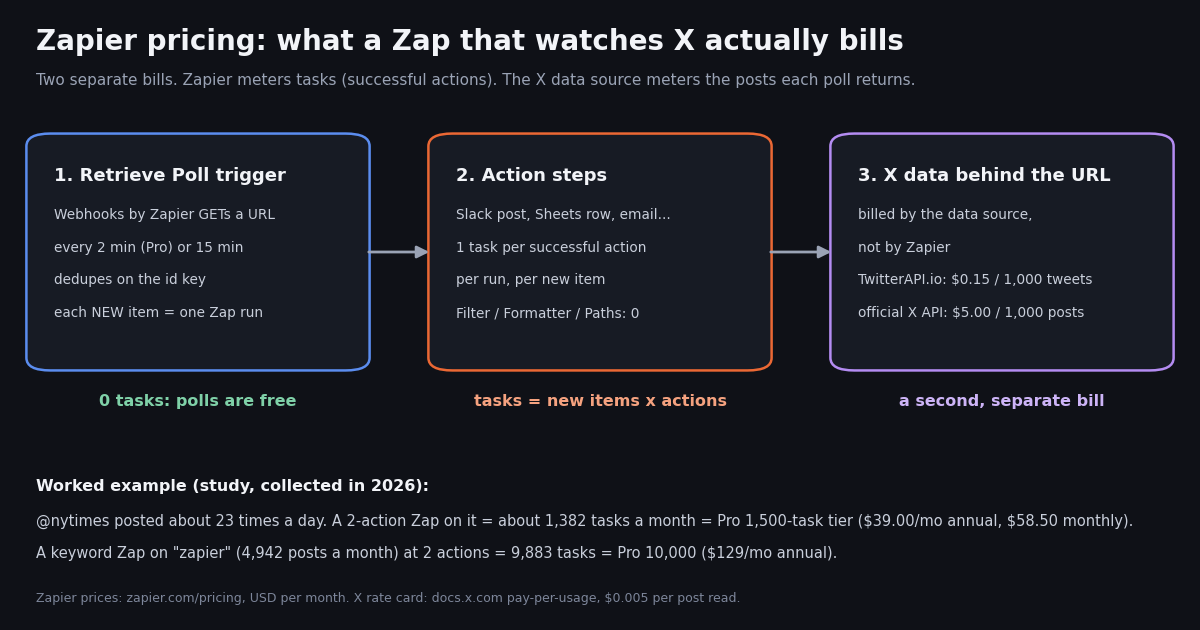
- Plans: Free (100 tasks/mo), Professional from $19.99/mo annual ($29.99 monthly, 750 tasks), Team from $69/mo annual ($103.50 monthly, 2,000 tasks, 25 users), Enterprise custom. Prices from
zapier.com/pricing, USD. - The unit: one task = one successful action step. Triggers, polling, Filter, Paths, Formatter, Delay, Tables and Forms use 0 tasks; a Zapier MCP tool call uses 2 tasks.
- Overage: pay-per-task bills 1.25x the base rate on annual plans and 2.5x on monthly plans, and usage stops at 3x your tier (750 tier: 2,250 tasks max). Turn it off and Zaps pause until the cycle resets.
- Discounts: annual billing is 33% off, non-profits get an extra 15% (not on pay-per-task charges), and new accounts get a 14-day Pro trial with no card.
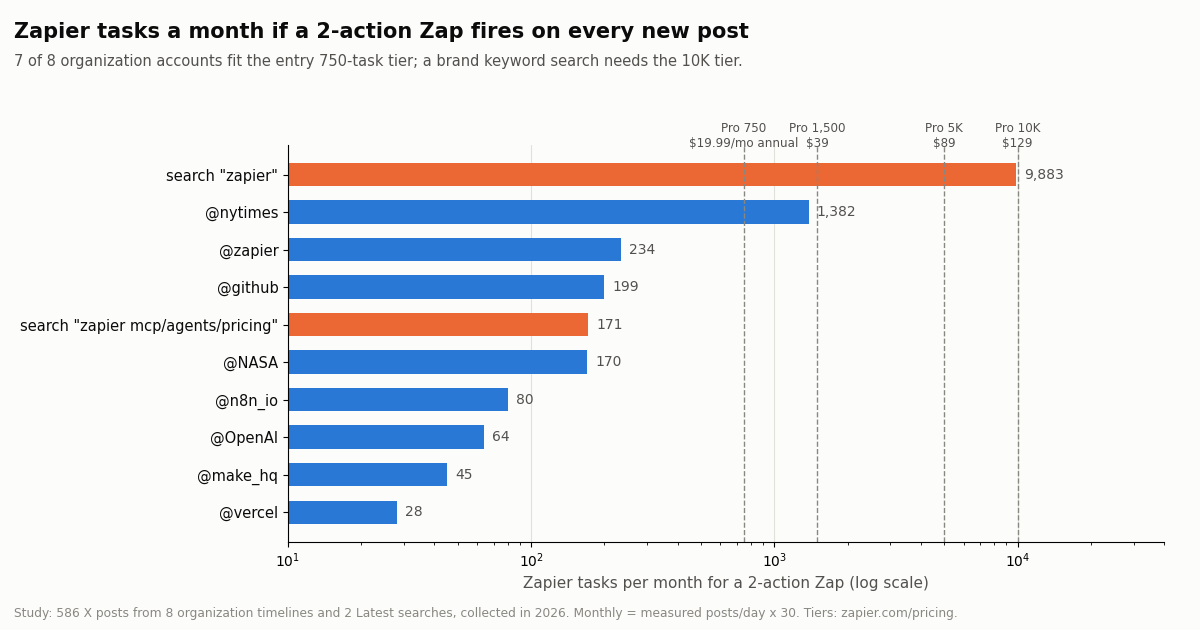
- X (Twitter) Zap study (collected in 2026): a 2-action Zap on @nytimes (about 23 posts a day) needs about 1,382 tasks (Pro 1,500, $39/mo annual); a keyword Zap on "zapier" needs 9,883 (Pro 10K, $129/mo annual).
- The second bill: the X data behind your Retrieve Poll URL. A static URL re-downloads a full page every poll ($64.80 a month at 2-minute polls on our rate card); a
within_time:20mquery on 15-minute polls cost $1.11 for the same keyword, vs $24.71 on the official X API pay-per-usage rate card.
Zapier sells automation by the task, and almost every surprise on a Zapier invoice comes from misunderstanding what a task is. This page is about Zapier's own bill: every plan and task tier with the current prices from Zapier's pricing page, what does and does not count as a task, how pay-per-task overage is priced, what the add-ons (MCP, Agents, Chatbots) cost, and worked monthly bills you can copy.
If you are choosing between platforms rather than pricing Zapier itself, the head-to-heads already live elsewhere: n8n vs Zapier vs Make compares the three tools side by side, Zapier alternatives covers what people switch to, n8n pricing explains n8n's execution meter, and the Make.com Twitter integration guide covers Make's credits. This page does not redo those comparisons; its angle is the Zapier bill and how to predict it.
Because Zapier's own Twitter integration stopped working on August 31, 2023 (Zapier's app page still says so), any Zap that watches X today calls an outside data source through Webhooks by Zapier. That makes a Twitter (X) Zap a clean worked example of both bills: Zapier tasks on one side, X data on the other. We measured it on real posts collected in 2026.
7 of 8 organization accounts fit the 750-task tier (at most 234 tasks); @nytimes needs about 1,382 and a keyword Zap on "zapier" about 9,883 (586 X posts, collected in 2026).
Zapier pricing at a glance: every plan in 2026
Zapier's pricing page (and its machine-readable version, which Zapier publishes for AI agents comparing plans) lists four plan levels. A self-serve subscription is always two choices made together: a plan level, which sets the features, and a task tier, which sets the monthly allowance. All prices below are in USD per month as Zapier shows them; annual plans are billed yearly at the monthly figure times 12.
Free is a trial room, not a production plan for API work. It caps every Zap at one trigger and one action and it has no Webhooks by Zapier, so it cannot call an arbitrary API at all. Anything that talks to a REST endpoint, including every X (Twitter) workflow on this page, starts at Professional.
Professional is one seat. The 750 and 1,500 task tiers exist only on Pro; Team begins at 2,000 tasks. Live chat support switches on from the Pro 2,000-task tier.
Team is about people, not volume. At the same task tier Team costs more than Pro (2,000 tasks: $69 vs $49 a month on annual billing); you pay for 25 seats, shared connections, SAML SSO and 1-minute polling instead of 2.
Enterprise changes the cycle. Self-serve allowances reset monthly even on annual billing; Enterprise uses an annual task limit spread across the contract year, which absorbs seasonal spikes. Zapier does not publish Enterprise prices.
Zapier Pro and Team pricing by task tier, plus annual and nonprofit discounts
The headline "from $19.99" is only the bottom rung. The real price is set by the task tier, and the per-task cost falls as the tier rises. These are the self-serve tiers from Zapier's pricing table (USD per month; annual figures are billed yearly). We left out the 300K, 400K, 750K, 1.25M, 1.5M and 1.75M rungs to keep the table readable; they follow the same curve.
What the curve means per task. At 750 tasks on annual billing you pay about 2.7 cents a task ($19.99 / 750). At 10,000 tasks it is about 1.3 cents ($129 / 10,000), and at 100,000 tasks about 0.5 cents ($489 / 100,000). The jump from 750 to 2,000 tasks costs $29 more a month on annual billing, so if you expect to cross 1,500 tasks regularly, price the next tier against overage before you pick.
Monthly vs annual. Monthly billing is about 1.5 times the annual figure on the lower tiers ($19.99 becomes $29.99, $129 becomes $193.50) and a little less on the largest ones. Zapier describes the annual price as 33% off the monthly rate. Above 2,000,000 tasks a month, volumes go through Zapier Sales.
Changing tiers. Zapier's FAQ says upgrades take effect immediately and are prorated for the rest of the cycle, while downgrades take effect at the end of the current billing cycle. You can cancel any time and keep the paid plan until the cycle ends.
Three ways to pay less without changing usage. Zapier lists annual billing, a non-profit discount and a free trial.
Annual billing: 33% off the monthly rate. On Pro 750 that is $19.99 a month ($239.88 a year) instead of $29.99 a month. Annual plans also get the smaller overage multiplier (1.25x instead of 2.5x).
Non-profit discount: an extra 15%. Zapier's pricing FAQ says non-profits get a 15% discount on any paid plan, excluding pay-per-task charges. Applied to the annual Pro 750 price that is about $16.99 a month; on Pro 2,000 annual about $41.65. Zapier verifies eligibility through its non-profit program page, so the discount is not automatic.
Free trial: 14 days of Professional, no credit card. Every new account is enrolled automatically. Team trials start from inside the product and Enterprise trials go through Sales. Use the trial week to measure your real task count on the Zap history page before you pick a tier.
Billing currency. Zapier bills in 19 currencies, converted from the USD base price at the exchange rate at the time of payment, so a non-USD recurring charge can move between invoices.
What counts as a task in Zapier (and what is free)
Zapier's help article on task usage puts it in one line: "A task is any successful action that runs in Zapier." Everything else follows from that sentence. A Zap with one trigger and three actions uses three tasks every time it runs to the end, and Zapier's own example (a Gmail trigger with a Dropbox action and a Slack action) uses two tasks per run, so ten runs use 20.
Polls are free; actions are not. This is the single most useful fact for estimating a bill. Zapier's pricing FAQ says it never charges a task to check for new data, only when a Zap completes an action. So the number of tasks depends on how many new items arrive and how many actions each one triggers, not on how often Zapier checks.
Put the Filter first. Because Filter by Zapier uses no tasks, a filter placed right after the trigger stops unwanted items before any billable action runs. A filter placed after an action still pays for that action.
One pool for everything. Zap steps, AI by Zapier, Code by Zapier and off-platform calls such as Zapier MCP all draw from the same account-level task pool. There are no separate budgets per product, so an MCP-heavy AI assistant and a busy Zap compete for the same 750 or 2,000 tasks.
A change to watch. Zapier's task usage article says that starting December 1, 2026, Next Gen Zaps also use tasks, at least 1 task per completed run. Classic Zaps keep the per-action rule above.
Zapier task limit and pay-per-task overage, with the math
When you hit your tier, what happens depends on one toggle. With pay-per-task on, Zaps and MCP calls keep running and every extra task is billed at an overage rate. With it off, everything pauses until the next usage period. Pay-per-task exists on Professional, Team and Enterprise, not on Free.
The overage rate is a multiple of your base per-task rate: 1.25x on annual self-serve plans and 2.5x on monthly plans (Zapier's pricing reference). There is also a ceiling: even with pay-per-task on, usage stops at 3x your task subscription. Zapier's metered-tasks article gives the example: a Professional 750 plan can run 750 included tasks plus 1,500 pay-per-task tasks, 2,250 in total, before Zaps stop.
Zapier does not print the base rate as a number; it says the exact rate is in your billing settings. If you treat the base rate as the tier price divided by its tasks, the estimate looks like this for the Pro 750 tier:
Why 632? It is the overage a 2-action Zap on the @nytimes timeline would run up on a 750 tier in our study (1,382 tasks a month, worked below). On monthly billing the 750 tier plus overage comes to about $93.17, while simply buying the 1,500 tier costs $58.50; on annual billing it is about $41.05 vs $39. Zapier's own reference says pay-per-task costs about 3x more on a monthly plan than on an annual one. Overage is a safety net for a spike, not a plan.
Self-serve allowances reset monthly, even on an annual subscription, so unused tasks do not roll over. Enterprise is the exception with its annual task limit.
Flood protection (Pro and up) holds a Zap that suddenly receives a burst of items, so a misconfigured trigger does not drain the month's tasks in an hour. Leave it on for anything that reads a public feed.
Zapier MCP, Agents and Chatbots pricing
Zapier's AI products are priced three different ways, which is where most confusion about "zapier mcp pricing" and "zapier agents pricing" comes from.
Zapier MCP lets an AI client (Claude, ChatGPT, Cursor and others) call Zapier actions as tools. Each successful tool call is 2 tasks from the same pool your Zaps use. An assistant that makes 300 tool calls a month uses 600 tasks, most of a Pro 750 tier, so budget it as if it were another Zap.
Zapier Agents do not touch your tasks at all. An activity is any billable thing an agent does: using a trigger, answering from a knowledge source, running an action, browsing, a web search or a message from the Chrome extension. Zapier caps a single run at 10 activities on Free and 40 on paid tiers, and asks before continuing.
Zapier Chatbots are feature-gated rather than metered: you pay for how many bots you can build and what they can do (knowledge sources, lead collection, embedding, removing the Zapier label), not per message.
If what your AI assistant needs is X data, an MCP tool call through Zapier would cost 2 tasks plus whatever data source sits behind it. TwitterAPI.io also runs a hosted MCP server at https://mcp.twitterapi.io/mcp (header Authorization: Bearer <your key>) that an AI client can call directly, so X reads do not consume Zapier tasks at all; see the MCP server guide linked below.
Study: how many Zapier tasks does a Zap that watches X burn?
To turn "tasks scale with new items" into numbers, we collected the latest posts from eight organization accounts and two keyword searches on X in 2026 (586 posts in total), measured how many posts each source produces per day, and converted that into the Zapier tasks a Zap would use if it fired on every new post. The Zap shape is the common one: Webhooks by Zapier Retrieve Poll trigger on an X data URL, then two actions (for example a Slack message and a Google Sheets row).
Seven of the eight organization accounts fit the entry 750-task tier with room to spare at two actions per post: the busiest of them, @zapier itself at about 3.9 posts a day, needs about 234 tasks. Even at three actions per post they all stay under 750. For a typical "post this brand's tweets to Slack" Zap, the Pro 750 tier ($19.99 a month on annual billing) is the realistic bill.
News accounts and keyword searches are a different class. @nytimes posted about 23 times a day in our sample: 1,382 tasks a month at two actions (Pro 1,500, $39 annual) and 2,074 at three (over 2,000, so Pro 5,000 at $89). A Latest search for the word "zapier" matched about 4,942 posts a month: 4,942 tasks with one action (Pro 5K, $89) and 9,883 with two (Pro 10K, $129 annual, $193.50 monthly).
Polling frequency barely matters to the task count. On Pro, Zapier checks every 2 minutes. For the organization accounts only 0.1% to 2.9% of those checks found a new post; for the "zapier" keyword, 18.5% did. Every empty check is free on Zapier's side, which is exactly why a Retrieve Poll Zap is cheap in tasks. The cost of frequent polling shows up on the other bill, the X data, covered in the next section.
The simplest task saver is a filter. If you only want posts with a link, a keyword, or above some like count, put Filter by Zapier straight after the trigger. The filter uses no tasks, so the two paid actions only run on posts that pass. On a keyword search where most matches are noise, that can cut the task count by more than the tier jump you were about to pay for.
Worked X (Twitter) example: the Zap, the URL and the second bill
Zapier's X integration is gone, so the trigger is Webhooks by Zapier, Retrieve Poll: Zapier GETs a URL on every poll, reads an array from the response, remembers each item's id, and fires one Zap run per item it has not seen before. Zapier's developer docs add two details that shape the design: results must come back newest first, and Zapier does not fetch further pages, so every new item has to appear on the first page.
The X data comes from whoever serves that URL, and it is billed by them, not by Zapier. With TwitterAPI.io the URL is the /twitter/tweet/advanced_search endpoint: tweets come back newest first in a top-level tweets array (set Zapier's Key field to tweets, Deduplication Key to id), up to 20 per page, with your key in an X-API-Key header. Reads need no X account and no X developer app. The configuration is in the code block below.
The trap: a static URL re-downloads the same page on every poll. A Retrieve Poll URL cannot carry a moving cursor such as the time of the last check. Point it at query=zapier and every poll returns the newest 20 posts again, most of which Zapier has already seen and discards. TwitterAPI.io bills 15 credits per tweet returned ($0.15 per 1,000 tweets), so a full 20-tweet page costs $0.003 per poll: about $64.80 a month at Pro's 2-minute polling (21,600 polls) and $8.64 at 15 minutes (2,880 polls), whatever the source posts.
The fix: put the time window in the query. X search supports within_time:, and we checked it on live calls this session: from:zapier within_time:7d returned only @zapier posts from the last 7 days, and zapier within_time:15m returned only posts from the last 15 minutes. Set the poll interval to 15 minutes (Pro lets you customize it) and the query window to 20 minutes, so polls overlap by 5 minutes and nothing falls between them; Zapier's id deduplication drops the overlap. Each poll now returns only the few fresh posts. In our sample the busiest 20-minute window for "zapier" held 7 posts, well inside one 20-post page, and none of the account windows held more than 4.
Where the official X API stands. The X pay-per-usage rate card (docs.x.com/x-api/getting-started/pricing) charges $0.005 per post read, which is $5.00 per 1,000 posts against TwitterAPI.io's $0.15 per 1,000 tweets, about 33x apart. For the "zapier" keyword that is about $24.71 a month even if every post is read exactly once, vs $1.11 for the 20-minute window design here. X also requires a developer account and app with pay-per-usage credits, and caps pay-per-usage at 3 million post reads a month.
A quiet account is a different story, stated plainly. For a single account that posts once or twice a day, the window design costs about $0.43 a month on TwitterAPI.io, almost all of it the 15-credit minimum on empty polls ($0.00015 each). X's rate card bills per post read, so an empty check costs nothing there, and reading @vercel's 14 posts a month once each would cost about $0.07 there, if you set up an X developer app. Both are rounding errors next to the $19.99 Zapier tier; the data price only matters once a Zap reads keywords, mentions or many accounts.
Putting the two bills together for the keyword Zap: Pro 10K at $129 a month (annual) for about 9,883 tasks, plus about $1.11 of X data on the 20-minute window design. Add a Filter step that keeps only posts with a link and the task count drops to whatever share passes, while the data bill stays the same, because the data is fetched before the filter runs.
Zapier: Webhooks by Zapier > Retrieve Poll (Professional plan or higher)

URL:                https://api.twitterapi.io/twitter/tweet/advanced_search?query=zapier%20within_time%3A20m&queryType=Latest
Key:                tweets
Deduplication Key:  id
Headers:            X-API-Key = <your TwitterAPI.io key>
Polling time:       15 minutes (Zap settings > customized polling time)

Each new item -> one Zap run; later steps can map the tweet fields (text, url, createdAt, likeCount, author).

Single account instead of a keyword:
  query=from:nytimes%20within_time%3A20m
Several accounts in one Zap:
  query=(from:github%20OR%20from:vercel)%20within_time%3A20m

Then: Filter by Zapier (0 tasks) > Slack: Send Channel Message (1 task) > Google Sheets: Create Row (1 task)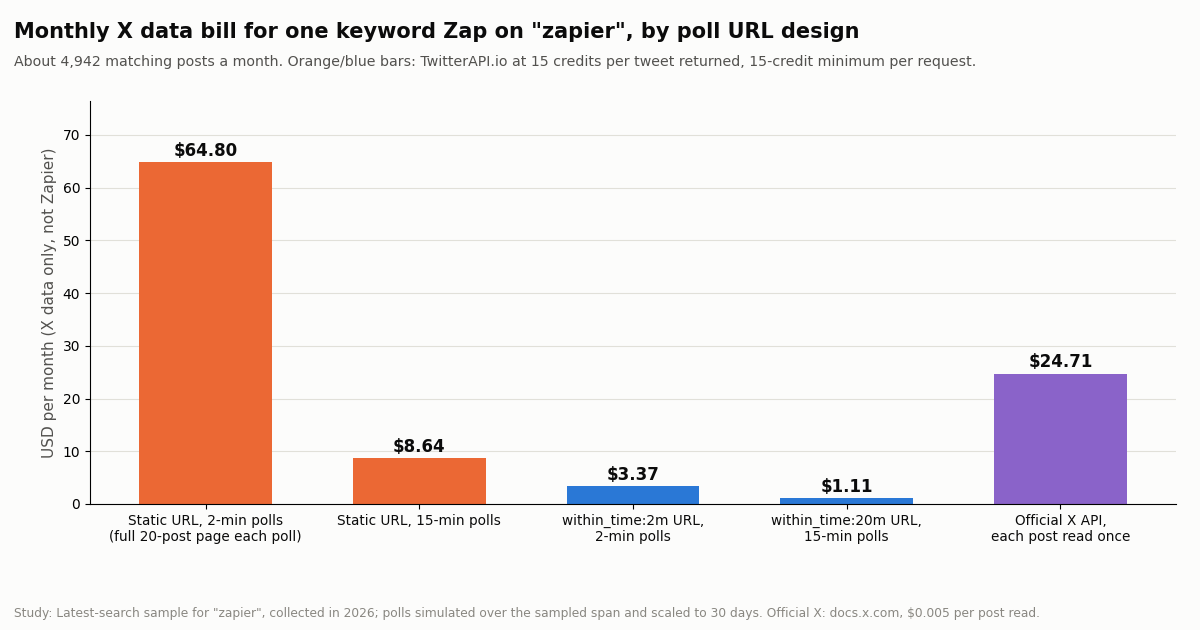
Four worked monthly Zapier bills
These combine the published tiers with the volumes measured in our study. Zapier prices are per month on annual billing unless noted; X data prices are TwitterAPI.io at 15 credits per tweet returned with the 15-credit minimum per request.
Scenario 1 is the typical one-brand feed. Polls are free, two actions per post, and the bill is the entry tier. If the Zap had only one action it would still be the entry tier: Free cannot run it because Webhooks by Zapier is not on Free.
Scenario 2 shows the tier cliff. Two actions on @nytimes (1,382 tasks) fit Pro 1,500 at $39; adding a third action pushes it to about 2,074 tasks, just over the 2,000 tier, so the next rung is 5,000 at $89. Dropping one action, or a Filter that skips a tenth of the posts, saves $40 a month. On a 2,000 tier with pay-per-task on, the 74 extra tasks would be cheaper than the jump, which is the one case where overage is the right answer.
Scenario 3 is where the data side would matter if the URL were wrong: a static URL polled every 2 minutes would add $64.80 a month on our rate card; the window URL adds $1.11. On the official X API the same posts cost about $24.71 even read once each.
Scenario 4 is the same workload on Team: $40 a month more on annual billing for shared Zaps and connections, SAML SSO, 25 seats and 1-minute polling.
AI add-on on top. If the same account also runs a Zapier MCP assistant making 200 tool calls a month, that is 400 more tasks from the same pool. In Scenario 1 that still fits Pro 750; in Scenario 2 it does not change the tier; in Scenario 3 it pushes 9,883 to about 10,283, over the 10K tier, into overage or the 20K rung ($189).
How we collected this
Question. How many new posts a month would a Zapier Retrieve Poll Zap see for typical X sources, how many tasks does that become at 1, 2 and 3 actions, which Zapier tier holds it, and what does the X data bill come to for different poll URL designs.
Sources. Timelines of eight organization accounts (@zapier, @n8n_io, @make_hq, @github, @vercel, @OpenAI, @NASA, @nytimes), about 60 posts each, plus two Latest keyword searches: "zapier" (100 posts) and "zapier mcp" OR "zapier agents" OR "zapier pricing" (60 posts). Two more one-page calls checked that within_time: returns only posts inside the window. 586 posts in total, 34 read requests, collected in 2026.
Method. For each source, posts per day = posts in the sample divided by the span from oldest to newest post, times 30 for a month. Polls were simulated over the same span at 2-minute and 15-minute intervals with matching or 20-minute windows; a poll is a hit when at least one sampled post falls in its window, and each poll is priced at 15 credits per tweet returned with the 15-credit minimum. Zapier tiers come from Zapier's pricing page, fetched this session; the official X price is the docs.x.com pay-per-usage rate card.
What the sample cannot show. Posting rates swing with news cycles and launches, so a month extrapolated from a few days (the keyword search covered about 15 hours, @nytimes under 3 days) can be off in either direction; the account samples span about 2.6 to 127 days. Timelines here exclude most replies, which a mentions or replies Zap would add. Zapier's exact base per-task rate is only shown in each account's billing settings, so the overage figures are estimates. Real polls drift a little in time, which is why we recommend the 5-minute overlap.
Privacy. Only aggregates appear here. Organization accounts are named; keyword-search results were reduced to counts and timings with no post text, IDs, links or authors kept.
"""zapier_x_bill.py - estimate the Zapier task tier and the X data bill for a Zap that
watches an X (Twitter) search, from a live sample of the source.

    pip install requests
    export TWITTERAPI_IO_KEY=your_key
    python zapier_x_bill.py "from:nytimes" --actions 2
"""
import argparse
import os
from datetime import datetime

import requests

BASE = "https://api.twitterapi.io"
HEADERS = {"X-API-Key": os.environ["TWITTERAPI_IO_KEY"]}

# Zapier Professional tiers (tasks, annual $/mo, monthly $/mo) from zapier.com/pricing
PRO_TIERS = [(750, 19.99, 29.99), (1500, 39.00, 58.50), (2000, 49.00, 73.50), (5000, 89.00, 133.50),
             (10000, 129.00, 193.50), (20000, 189.00, 283.50), (50000, 289.00, 433.50), (100000, 489.00, 733.50)]


def sample(query, pages=3):
    """Newest-first sample of the source via advanced_search (Latest)."""
    tweets, cursor = [], ""
    for _ in range(pages):
        params = {"query": query, "queryType": "Latest"}
        if cursor:
            params["cursor"] = cursor
        r = requests.get(f"{BASE}/twitter/tweet/advanced_search", headers=HEADERS, params=params, timeout=30)
        r.raise_for_status()
        data = r.json()
        tweets += data.get("tweets", [])
        if not data.get("has_next_page"):
            break
        cursor = data.get("next_cursor", "")
    return tweets


def created(t):
    return datetime.strptime(t["createdAt"], "%a %b %d %H:%M:%S %z %Y")


def main():
    ap = argparse.ArgumentParser()
    ap.add_argument("query")
    ap.add_argument("--actions", type=int, default=2, help="billable action steps per new post")
    ap.add_argument("--poll-min", type=int, default=15, help="Zapier polling interval in minutes")
    a = ap.parse_args()

    tw = sample(a.query)
    if len(tw) < 2:
        print("Too few posts to estimate a rate.")
        return
    times = sorted(created(t) for t in tw)
    span_days = max((times[-1] - times[0]).total_seconds() / 86400, 1 / 1440)
    per_month = len(tw) / span_days * 30
    tasks = per_month * a.actions
    tier = next((t for t in PRO_TIERS if tasks <= t[0]), None)

    polls = 30 * 24 * 60 // a.poll_min
    # window URL: each poll returns only fresh posts; empty polls bill the 15-credit minimum
    window_floor = polls * 15 / 100_000
    window_data = max(window_floor, per_month * 15 / 100_000)
    static_data = polls * 20 * 15 / 100_000   # a static URL returns a full 20-tweet page every poll
    official = per_month * 0.005               # docs.x.com pay-per-usage, each post read once

    print(f"Sampled {len(tw)} posts over {span_days:.2f} days -> about {per_month:,.0f} new posts a month")
    print(f"Zapier tasks at {a.actions} actions: about {tasks:,.0f}")
    if tier:
        print(f"Smallest Pro tier: {tier[0]:,} tasks, ${tier[1]:.2f}/mo annual, ${tier[2]:.2f}/mo monthly")
    else:
        print("Above the Pro tiers listed here: check zapier.com/pricing")
    print(f"X data, window URL ({a.query} within_time:{a.poll_min + 5}m): at least ${window_data:,.2f}/mo")
    print(f"X data, static URL (full page each poll): ${static_data:,.2f}/mo")
    print(f"Official X API, each post read once: ${official:,.2f}/mo")


if __name__ == "__main__":
    main()
Researching this?Free starter credits cover end-to-end testing — Google sign-in, no card. Get a key.
Questions readers ask
How much does Zapier cost per month?
Free is $0 for 100 tasks a month. Professional starts at $19.99 a month billed annually ($29.99 billed monthly) for 750 tasks, and Team starts at $69 a month billed annually ($103.50 monthly) for 2,000 tasks and 25 users. Enterprise is a custom price through Zapier Sales. The price rises with the task tier, up to 2,000,000 tasks a month on self-serve plans.
What counts as a task in Zapier?
One successful action step. Triggers and polling for new data use no tasks, and neither do Filter, Paths, Formatter, Delay, Looping, Digest, Storage, Tables or Forms steps, failed actions, or editor tests. A Zapier MCP tool call uses 2 tasks, and AI by Zapier steps vary by model tier.
What happens when I run out of Zapier tasks?
If pay-per-task billing is on, Zaps keep running and extra tasks are billed at 1.25x your base rate on annual plans or 2.5x on monthly plans, until usage reaches 3x your tier. If it is off, Zaps pause until your next usage period. Self-serve allowances reset monthly, even on annual billing.
Does Zapier offer a nonprofit discount?
Yes. Zapier's pricing FAQ says non-profits get a 15% discount on any paid plan, excluding pay-per-task charges, on top of the 33% annual-billing discount. Eligibility is checked through Zapier's non-profit program.
How much does Zapier MCP cost?
Zapier MCP is included on every plan, including Free, but each successful tool call uses 2 tasks from your plan's shared task pool. 300 tool calls a month is 600 tasks.
How is Zapier Agents priced?
Agents are billed in activities, separate from tasks. Free includes 400 activities a month; Agents Pro is $33.33 a month billed annually ($400 a year) for 1,500 activities; Enterprise is custom. A single run is capped at 10 activities on Free and 40 on paid tiers.
Can Zapier still connect to Twitter (X)?
Not through its own app: Zapier's Twitter integration stopped working on August 31, 2023. Zaps that read X today use Webhooks by Zapier (Professional plan or higher) to call an X data API, such as TwitterAPI.io's advanced_search endpoint, which bills $0.15 per 1,000 tweets returned.
Is Zapier cheaper monthly or annually?
Annually. Annual billing is 33% off the monthly rate (Pro 750 is $19.99 a month annual vs $29.99 monthly), and the overage multiplier is 1.25x instead of 2.5x, which Zapier says makes pay-per-task about 3x more expensive on a monthly plan.
Continue
- Zapier pricing page: plans, task tiers, pay-per-task, annual and non-profit discounts, Agents and Chatbots tabs
- Zapier help: how task usage is measured (what counts as a task, MCP 2 tasks, polling free)
- Zapier help: metered tasks (pay-per-task billing and the 3x ceiling)
- Zapier help: trigger Zaps from polling webhooks (Retrieve Poll, Key and Deduplication Key)
- X API pricing (pay-per-usage rate card: $0.005 per post read, 3M monthly cap)
- TwitterAPI.io docs: advanced_search endpoint
- X (Twitter) API guide and endpoint overview
- n8n vs Zapier vs Make: the same Twitter flow in all three
- Zapier alternatives that still connect to Twitter (X)
- n8n pricing: plans, executions and the X data cost
- Make.com Twitter (X) integration and Make credits
- TwitterAPI.io MCP server for AI clients
- TwitterAPI.io pricing: pay only for the data returned
- 01LlamaIndex vs LangChain: Which to Use, With the Same Twitter (X) RAG Pipeline Built in Both
- 02Agentic Payments: How AI Agents Pay, and Which Protocol Does What
- 03Kiro Pricing in 2026: Plans, Credits, Model Multipliers and Worked Monthly Bills
- 04Cline vs Cursor in 2026: Cost, Models, Plan/Act and MCP Compared
- 05Zed vs Cursor in 2026: Speed, Agents, Models, Pricing and MCP Compared
- 06Google Antigravity Pricing: Free Tier, Pro and Ultra Quotas, and What X Users Report
- 07n8n vs Zapier vs Make in 2026: Pricing, Self-Hosting, AI Agents and the Same Twitter (X) Flow Built in All Three
- 08n8n Pricing in 2026: Plans, Executions and the Twitter (X) Data Cost
Writing about something you built with TwitterAPI.io? Our community rewards program pays API credits for honest tutorials, build logs and videos.
Stop reading. Start building.
Starter credits cover real testing on real data. Google sign-in, no card, no application queue.
Get an API keyAlready building with TwitterAPI.io? Publish an honest tutorial or build log about it and earn up to $200 a month in API credits.