Hermes Agent and Twitter (X): the Bundled xurl Skill, and a One-Key Skill That Reads X Data Through TwitterAPI.io
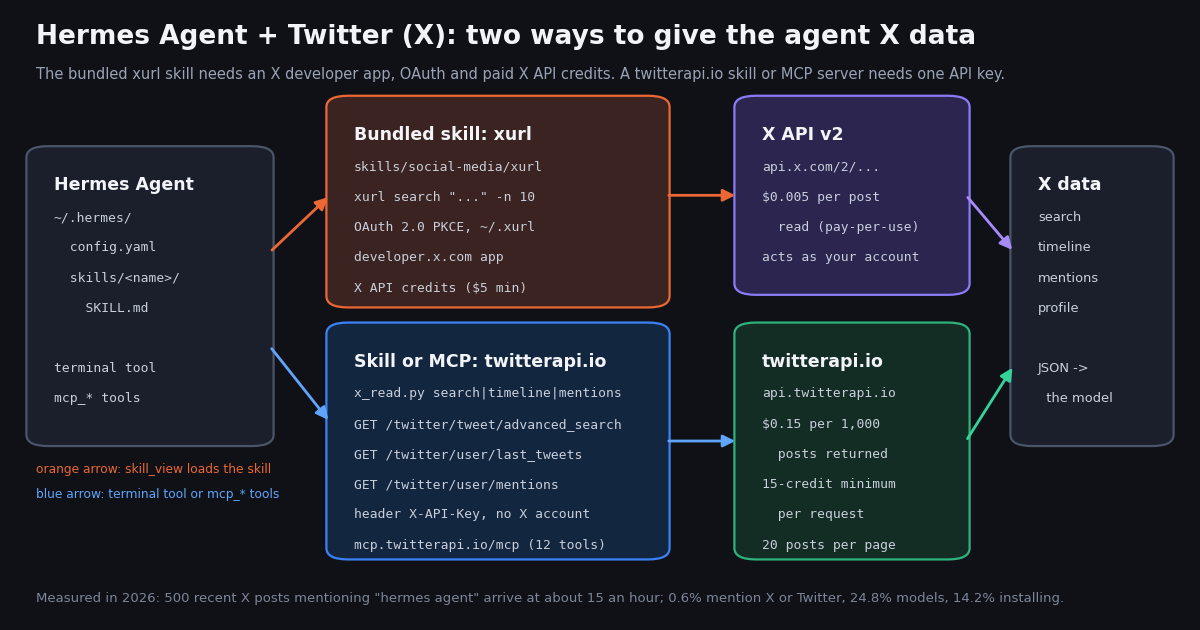
Hermes Agent is the open-source agent from Nous Research that its README describes as "the self-improving AI agent" with "a built-in learning loop": it creates skills from experience and keeps them in ~/.hermes/skills/. It ships with a social-media skill category whose only member is xurl, a wrapper around X's official command-line tool. People who search for "hermes agent twitter" usually want one of two things: to know what that bundled skill needs before it will search or post on X, or a way to give the agent X data without an X developer account. This page does both, and then measures what the people building with Hermes Agent actually talk about on X.
This is a Hermes Agent page, not a generic agent page. Our OpenAI Agents SDK guide wires the same reads as @function_tool functions in OpenAI's Python framework, and our OpenClaw guide edits OpenClaw's JSON5 gateway config; here everything lives in Hermes' own layout, ~/.hermes/config.yaml, ~/.hermes/.env and a SKILL.md with Hermes' metadata.hermes frontmatter, loaded through its skills_list() and skill_view() tools. If you want the xurl CLI itself explained end to end, read xurl: the X API CLI; if you want the skill file format, read SKILL.md explained.
Every Hermes Agent fact below was checked against the docs site and the GitHub repository at review time (install command, skill directories, frontmatter keys, the MCP config keys, the xurl skill text, the current release); every price against the published rate cards. The study at the end used 33 API requests and 640 posts, collected in 2026, and cost $0.096.
What Hermes Agent is, and the three ways it can touch X
Hermes Agent runs in a terminal (hermes, or hermes --tui), as a desktop app, or behind a messaging gateway (Telegram, Discord, Slack and others via hermes gateway setup). It is MIT-licensed, installs with one line (curl -fsSL https://hermes-agent.nousresearch.com/install.sh | bash on Linux, macOS and WSL2; iex (irm https://hermes-agent.nousresearch.com/install.ps1) on Windows), and the current release at review time was v0.22.2. You pick a model provider with hermes model (Nous Portal, OpenAI, Anthropic, OpenRouter and others), and the docs call that "the single most important setup step". The repository showed about 255,000 GitHub stars at review time.
Its tool system is organized in toolsets (web, terminal, file, browser, skills, memory, cronjob, code_execution and more, toggled with hermes tools or hermes chat --toolsets "web,terminal"), and three of them can reach X:
The bundled xurl skill (skills/social-media/xurl, version 1.1.3, author line "xdevplatform + openclaw + Hermes Agent"). A skill is a SKILL.md the model reads on demand; this one teaches the agent to run X's official CLI, xurl, for "raw post search, posting, DM, media". It needs an X developer app and paid X API access, which the next section walks through.
The x_search tool. The tools page lists an X Search toolset for "searching X (Twitter) posts", "gated on xAI credentials" and "off by default, opt in via hermes tools". It is xAI's server-side X Search, which xAI bills at $5 per 1,000 posts fetched and $10 per 1,000 user profiles fetched, on top of model tokens; our Grok agent guide, linked at the end of this page, covers that tool in depth.
A twitterapi.io skill or MCP server. Hermes loads any folder under ~/.hermes/skills/ and any server listed under mcp_servers in ~/.hermes/config.yaml. Both routes below give the agent search, timelines, mentions and profiles from api.twitterapi.io with one API key and no X account, billed per post returned.
Writes are the one thing the xurl route does that the one-key read route does not need an X login for: if your agent must post, reply or DM as you, the bundled skill is the direct route, and X's rate card prices a created post at $0.015 ($0.200 with a URL). If the agent must read, which is what most research, monitoring and digest tasks are, the one-key route costs about 33x less per 1,000 posts ($5 on the official rate card against $0.15 on twitterapi.io).
The bundled xurl skill: what it needs before the first search
The skill file says what it is in one line: "X/Twitter via xurl CLI: raw post search, posting, DM, media." xurl is published by X's developer platform team; its README says plainly "You must have a developer account and app to use this tool." So the skill cannot run until you have done five things outside the agent, and the skill text insists they stay outside: "Never ask the user to paste credentials/tokens into chat."
1. Install xurl. The skill lists four methods and says "Pick ONE method. On Linux, the shell script or go install are the easiest." They are brew install --cask xdevplatform/tap/xurl, npm install -g @xdevplatform/xurl, the install script from the xurl repository, or go install github.com/xdevplatform/xurl@latest.
2. Create an X developer app. In the developer portal dashboard on developer.x.com, create an app, set the redirect URI to http://localhost:8080/callback, and copy the Client ID and Client Secret.
3. Register the app and log in. xurl auth apps add my-app --client-id YOUR_CLIENT_ID --client-secret YOUR_CLIENT_SECRET, then xurl auth oauth2 --app my-app (a browser window completes the OAuth 2.0 PKCE flow; --headless exists for servers), then xurl auth default my-app and xurl auth status. The tokens land in ~/.xurl, which the skill tells the model to "never read, print, parse, summarize, upload, or send" to the LLM context, and it forbids the flags that would pass secrets on the command line (--bearer-token, --client-secret and the rest). A common pitfall it names: tokens saved to the unnamed default app instead of a named one, which makes later calls fail.
4. Pay for API access. The skill says "X API access is typically paid for meaningful usage", mentions a $5 minimum credit purchase and a CreditsDepleted error when the balance reaches zero. The public rate card on docs.x.com is pay-per-usage: $0.005 per post read, $0.010 per user read, $0.010 per follower or following read, $0.015 per post created ($0.200 with a URL), capped at 3 million post reads a month before Enterprise; a first card gets $20 of credits and a match of up to $50.
5. Accept that it acts as you. Every xurl call runs as the logged-in account. The skill notes that "X enforces per-endpoint rate limits. A 429 means wait and retry. Write endpoints (post, reply, like, repost) have tighter limits than reads." An agent that posts in a loop is posting from your account, with everything that implies for it.
After that, the skill gives the model shortcuts such as xurl search "golang" -n 10, xurl post "Hello world!", xurl reply POST_ID "comment", xurl dm @handle "message", xurl media upload photo.jpg, and raw access to any v2 endpoint (xurl /2/users/me). It is a complete X client. The cost of that completeness is the five steps above, a paid developer account, and a per-post price for reads that is the subject of the cost section.
# The bundled skill (skills/social-media/xurl) can only run after these steps, done by you, outside the agent.
# 1. Install xurl - pick ONE (the skill's own words)
brew install --cask xdevplatform/tap/xurl          # macOS
# npm install -g @xdevplatform/xurl                # or npm
# go install github.com/xdevplatform/xurl@latest   # or Go

# 2. Create an app in the X developer portal (developer.x.com), redirect URI http://localhost:8080/callback,
#    copy its Client ID and Client Secret. Reads are billed on X's pay-per-use rate card ($0.005 per post).

# 3. Register the app, log in with OAuth 2.0 PKCE, make it the default, check
xurl auth apps add my-app --client-id YOUR_CLIENT_ID --client-secret YOUR_CLIENT_SECRET
xurl auth oauth2 --app my-app          # opens a browser; add --headless on a server
xurl auth default my-app
xurl auth status

# 4. What the skill then runs for the model (every call acts as your account)
xurl search "hermes agent" -n 10
xurl /2/users/me

# 5. Ask Hermes; the skill loads itself when the task fits
hermes chat -q "/xurl search X for the 10 newest posts about hermes agent and summarize them"Route A: the twitterapi.io MCP server in ~/.hermes/config.yaml (5 minutes)
Get the key and park it in ~/.hermes/.env. Sign in to the twitterapi.io dashboard with Google and copy the key from the first screen. Hermes' configuration docs draw a clean line: "Secrets (API keys, bot tokens, passwords) go in .env. Everything else (model, terminal backend, compression settings, memory limits, toolsets) goes in config.yaml." They also say you can reference environment variables in config.yaml with ${VAR_NAME} syntax, and that an unset variable is left verbatim with a warning in the log. So the key goes in ~/.hermes/.env as TWITTERAPI_IO_API_KEY=..., and the config references it; the key never sits in a file you might share. New accounts that pass the automatic bot check get up to $1 of free credits (at most 100,000 credits, no card, one per person or network, expiring after 31 days), which is about 6,600 posts at $0.15 per 1,000.
Add the server. Hermes reads MCP servers from the mcp_servers key in ~/.hermes/config.yaml. A remote server needs url and optional headers; a local one needs command, args and optional env. The other documented keys are timeout, enabled, and tools.include or tools.exclude to whitelist or blacklist tools. twitterapi.io runs a hosted Streamable HTTP server at https://mcp.twitterapi.io/mcp; we initialized it during this review and its error text accepts either Authorization: Bearer <api_key> or an X-API-Key: <api_key> header. The same 12 tools are on npm as @twitterapi_io/mcp-server (0.2.0 at review time) for the stdio variant.
What the model sees. Hermes registers MCP tools as mcp_<server_name>_<tool_name>, so with the config below the agent gets mcp_twitterapi_search_tweets, mcp_twitterapi_get_user_last_tweets, mcp_twitterapi_get_user_mentions and mcp_twitterapi_get_user_info. The full list the server advertised when we called tools/list: search_tweets, get_user_info, get_user_about, get_user_followers, get_user_followings, get_user_last_tweets, get_user_mentions, get_tweets_by_ids, get_tweet_replies, get_tweet_quotes, get_tweet_retweeters and get_trends. tools.include keeps the prompt small and the agent focused; a research agent rarely needs followers lists.
Restart Hermes or type /reload-mcp in a running session, then ask something that needs fresh data. The model picks mcp_twitterapi_search_tweets, writes an X search query (query plus queryType, Latest or Top) and reasons over the JSON. One trade-off, measured on our OpenClaw page: MCP tools return the full post objects, which is where most of the model's tokens go. If you run large digests, Route B trims each post to the fields a summary needs.
# ~/.hermes/.env   (secrets live here; Hermes loads it as a fallback for environment variables)
# TWITTERAPI_IO_API_KEY=your_twitterapi_io_key

# ~/.hermes/config.yaml   (non-secret settings; ${VAR} is resolved from the environment / .env)
mcp_servers:
  twitterapi:
    url: "https://mcp.twitterapi.io/mcp"
    headers:
      X-API-Key: "${TWITTERAPI_IO_API_KEY}"
    timeout: 30
    tools:
      include: [search_tweets, get_user_last_tweets, get_user_mentions, get_user_info]

  # ...or the same 12 tools over stdio from npm (needs Node 18+); pin the version so a release never changes your tools unnoticed
  # twitterapi_local:
  #   command: "npx"
  #   args: ["-y", "@twitterapi_io/mcp-server@0.2.0"]
  #   env:
  #     TWITTERAPI_IO_API_KEY: "${TWITTERAPI_IO_API_KEY}"

# then, in a running session:  /reload-mcp
# and ask: hermes chat -q "What are people on X saying about hermes agent skills today? English, no replies, with links."Route B: a Hermes skill with a small Python tool for search, timelines and mentions
A Hermes skill is a folder with a SKILL.md: YAML frontmatter and markdown instructions, following the open Agent Skills format. The skills docs list the frontmatter keys Hermes reads: name, description, version, an optional platforms list such as [macos, linux], and metadata.hermes with tags, category, requires_toolsets and fallback_for_toolsets. User skills live in ~/.hermes/skills/ (more directories can be added through skills.external_dirs), and the docs are explicit that skills "are auto-discovered and work as /slash-commands without manual registration".
How the model finds it. Hermes loads skills progressively: skills_list() returns every skill's name and description in roughly 3,000 tokens, skill_view(name) fetches one skill's full text, and skill_view(name, path) fetches a reference file inside it. That is why the description below says both what the skill does and when to use it: the description is all the model sees until it decides the skill fits. The agent can also edit skills itself with skill_manage (create, patch, delete, write_file, remove_file), which is the "learning loop" the README advertises; expect it to patch your skill with what it learns.
What the script does. x_read.py (the full file is at the end of this page) has four subcommands: search (/twitter/tweet/advanced_search, query and queryType, X's operators such as from:, lang:en, -filter:replies, since: and until:), timeline (/twitter/user/last_tweets, replies excluded unless --replies), mentions (/twitter/user/mentions, with an optional --since Unix timestamp that maps to sinceTime) and profile (/twitter/user/info). Every call sends the key in the X-API-Key header, follows has_next_page and next_cursor up to a page cap of 10, backs off on HTTP 429, and prints one compact JSON object per post with nine fields (url, author, followers, createdAt, likes, reposts, replies, views, text) instead of the full object, then a summary line with posts returned, requests made and the cost in credits. The model reads a few hundred tokens per post instead of a few thousand.
Why the rules in the skill matter. The skill tells the model three things that keep the bill predictable: one page is up to 20 posts and costs 15 credits per post returned (an empty search still costs the 15-credit minimum, $0.00015); start with one page and quote the estimated cost before reading more than five; and before the account's first payment the limit is 0.2 requests a second (20 once paid), so the script sleeps on 429 rather than hammering. It also says the skill is for reads and that any write must be asked for explicitly, which is how you stop a helpful agent from deciding to reply on your behalf.
Install it with the shell block below (it writes SKILL.md; save the Python file from the end of this page as scripts/x_read.py), then run the slash command. Hermes executes the script through its terminal tool, which is why requires_toolsets: [terminal] is in the frontmatter.
mkdir -p ~/.hermes/skills/twitterapi-io/scripts
# 1. Save x_read.py (end of this page) as ~/.hermes/skills/twitterapi-io/scripts/x_read.py
#    and put the key in ~/.hermes/.env:  TWITTERAPI_IO_API_KEY=your_twitterapi_io_key
python3 -m pip install requests

# 2. The skill file. Hermes reads name/description/version/platforms/metadata.hermes from the frontmatter.
cat > ~/.hermes/skills/twitterapi-io/SKILL.md <<'SKILL'
---
name: twitterapi-io
description: Read public X (Twitter) data through twitterapi.io with one API key - keyword or from:user search, an account's recent posts, mentions of an account, a profile. Use when the user asks what is being said on X, what an account posted, or who mentioned it. No X developer app or OAuth.
version: "1.0"
platforms: [linux, macos]
metadata:
  hermes:
    tags: [x, twitter, social-media, research]
    category: social-media
    requires_toolsets: [terminal]
---

# twitterapi.io: X (Twitter) reads

Needs the TWITTERAPI_IO_API_KEY environment variable (set in ~/.hermes/.env or the shell
that starts Hermes). Never read, print or paste the key into the conversation.

## Commands (run with the terminal tool; pass the query as ONE single-quoted argument)

    python3 ~/.hermes/skills/twitterapi-io/scripts/x_read.py search 'hermes agent lang:en -filter:replies' --pages 2
    python3 ~/.hermes/skills/twitterapi-io/scripts/x_read.py search 'from:NousResearch' --type Latest
    python3 ~/.hermes/skills/twitterapi-io/scripts/x_read.py timeline NousResearch
    python3 ~/.hermes/skills/twitterapi-io/scripts/x_read.py mentions NousResearch --pages 2
    python3 ~/.hermes/skills/twitterapi-io/scripts/x_read.py profile NousResearch

Output: one JSON line per post (url, author, followers, createdAt, likes, reposts, replies,
views, text), then a summary line with posts returned, requests and cost in credits.

## Rules
- Search operators: from:user, lang:en, -filter:replies, min_faves:20, since:YYYY-MM-DD, until:YYYY-MM-DD.
- --type Latest = newest first; Top = X's ranking. One page = up to 20 posts.
- Each post returned costs 15 credits ($0.15 per 1,000); an empty search still costs 15 credits.
  Start with one page; tell the user the estimated cost before reading more than 5 pages.
- Before the account's first payment the limit is 0.2 requests per second; the script backs off on 429.
- Reads only. Do not post, like, reply or DM from this skill; ask the user before any write.
SKILL

# 3. It is live without registration; check, then use it as a slash command
hermes skills list
hermes chat -q "/twitterapi-io what are people saying on X about hermes agent skills today?"What each route costs per task, on each rate card
Three published price lists apply. twitterapi.io: tweet endpoints (search, timelines, mentions, posts by ID) are 15 credits per post returned, $0.15 per 1,000, with a 15-credit minimum per request, so an empty search costs $0.00015 and a full 20-post page $0.003; profiles are 18 credits each ($0.18 per 1,000); $1 is 100,000 credits and purchased credits never expire. X API pay-per-usage (docs.x.com): $0.005 per post read, $0.010 per user read, $0.015 per post created, 3 million post reads a month before Enterprise. xAI X Search (docs.x.ai): $5 per 1,000 posts fetched and $10 per 1,000 profiles, billed per item, including parent and quoted posts, on top of the model's tokens.
A cron skill is where the minimum matters: Hermes has a cronjob tool, and a mentions check that runs every 5 minutes is 8,640 requests a month. On twitterapi.io the cost of asking is the $0.00015 minimum, $1.30 a month for the floor, and each mention found adds $0.00015. Every 60 seconds is 43,200 checks, $6.48. Plans with bonus credits and the per-plan rate limits (20 requests a second once paid, 50 on Scale, 500 on Business) are on the pricing page, linked at the end of this page.
What people building with Hermes Agent talk about on X: 500 posts measured
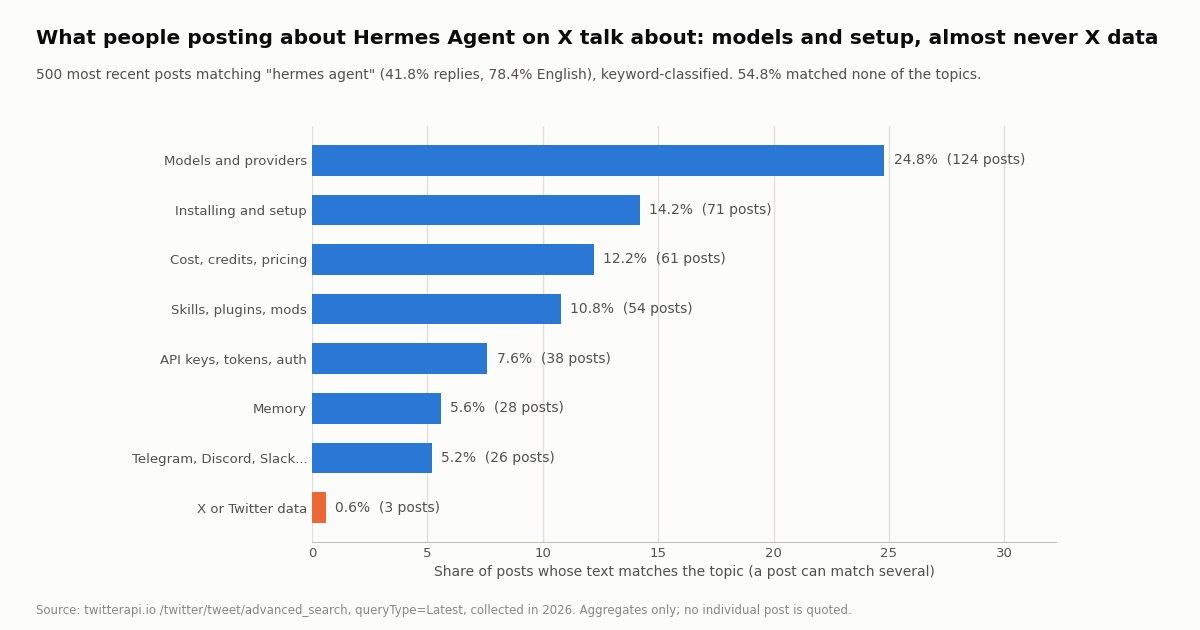
To see what a Hermes Agent user would actually ask an X-reading skill for, we pulled the 500 most recent posts matching the phrase "hermes agent" (25 pages of /twitter/tweet/advanced_search, queryType=Latest) and classified each post's text by keyword into topics. A post can match several topics; 54.8% matched none (reactions, jokes, screenshots with no text).
The volume is high. 500 posts spanned 30.3 hours. Across the 29 full clock hours in the window the count ran between 7 and 28 posts an hour, median 15, which extrapolates to roughly 400 posts a day for the exact phrase alone (the window straddled a Saturday and a Sunday, so a weekday figure may be higher). 41.8% were replies, 13.0% quoted another post, 23.8% carried a link and 28.8% an image or video. 78.4% were in English, 7.2% Japanese, 4.2% Chinese. Authors split 40.8% under 1,000 followers, 23.2% between 1,000 and 10,000, and 36.0% above 10,000.
The topics are models, setup, money, skills. Models and providers lead at 24.8% of posts (which model to run, which provider, free models on Nous Portal). Installing and setup is 14.2%, cost, credits and pricing 12.2%, skills, plugins and mods 10.8%, API keys, tokens and auth 7.6%, memory 5.6%, messaging gateways (Telegram, Discord, Slack) 5.2%. Among original posts only (291 of the 500) the same ranking holds with higher shares: models 32.0%, install 17.5%, cost 15.1%, skills 14.1%, API keys 10.3%.
X data is almost absent. Just 3 of 500 posts (0.6%) mentioned Twitter, X data, xurl, tweets or an X API at all. That is the gap this page fills: the bundled skill exists, but the people talking about Hermes Agent on X are not talking about using it on X, most likely because the xurl route starts with a developer app and a paid tier. It also tells you what a Hermes Agent X skill will be asked to do in practice: pull the conversation about a tool, a model or a release, not run an X account.
Engagement in this stream is thin, which matters for a digest skill: the median original post had 200 views and 1 like, the median reply 50 views and 0 likes, and 35.4% of original posts had no likes at all. A skill that adds min_faves:5 or -filter:replies to the query, as the script's rules suggest, cuts the noise before the model reads it.
How Nous Research itself posts about Hermes Agent, and what those posts get
The second half of the study is the organization account. We pulled the 140 most recent posts from @NousResearch (8 pages of /twitter/user/last_tweets, replies excluded, about 284,000 followers at collection time), which spanned 60 days: 2.3 posts a day. 52.9% of what the account publishes is a repost of someone else (team members, partners, users showing a setup), and 17.1% a quote post.
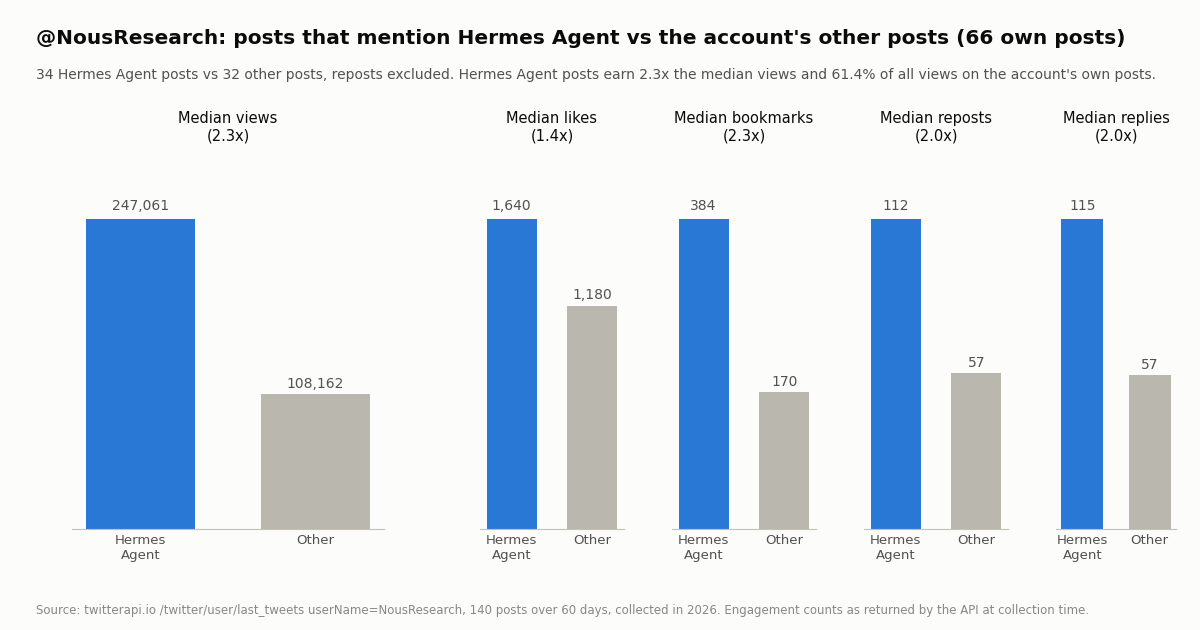
Hermes Agent is half the feed. 67 of the 140 posts (47.9%) mention Hermes Agent by name, 1.1 a day, and 77.9% mention Hermes in some form (the agent, the Hermes models, the Hermes Index benchmark). Week by week the Hermes Agent count ran from 2 to 12 posts, with the busiest weeks around releases and partnerships. Among the account's own 66 posts (reposts excluded), 34 are about Hermes Agent and 32 are not, which gives a fair comparison.
The agent posts outperform everything else the account says. On the account's own posts, the median Hermes Agent post reached 247,061 views against 108,162 for the other posts (2.3x), 1,640 likes against 1,180 (1.4x), 384 bookmarks against 170 (2.3x), 112 reposts against 57 and 115 replies against 57 (2.0x each). The 34 Hermes Agent posts collected 61.4% of all views on the account's own posts. The most-viewed Hermes Agent post, a link to a blog post about a large code clean-up the agent ran with hundreds of subagents, reached about 1.53 million views and 4,532 likes; the account's single most-viewed post in the window (about 1.61 million views) announced a model available free on Nous Portal and did not name the agent.
For a Hermes skill this is the practical lesson: timeline NousResearch is one $0.003 page that catches the release notes (the account posts about once a day about the agent), while search 'hermes agent' --pages 2 is the community side, 40 posts for $0.006, where the questions about models, install and cost live. The two reads together are under a cent.
Troubleshooting Hermes Agent on X data
The xurl skill asks for credentials in chat. It should not; the skill text forbids it. Run the xurl auth steps yourself in a terminal, confirm with xurl auth status, and start a fresh session. If tokens went to the unnamed default app, run xurl auth default my-app.
CreditsDepleted or enrollment errors from xurl. The X developer account's balance is empty or the app is not enrolled in the pay-per-use program; both are fixed in the developer portal, not in Hermes.
The twitterapi.io skill never appears. Check the folder is ~/.hermes/skills/twitterapi-io/SKILL.md (the name must match the folder), that the frontmatter is valid YAML (the description has a colon-free first line or is quoted), and run hermes skills list. Skills are discovered at session start, so restart the session.
The script says TWITTERAPI_IO_API_KEY is not set. The variable is not in the environment Hermes runs the terminal tool in. Put it in ~/.hermes/.env (Hermes loads that file as a fallback) or export it in the shell that starts hermes; in Docker, mount it into the container's environment.
HTTP 401 from api.twitterapi.io. The key is wrong or was rotated; the error body says API key is invalid. HTTP 400 with a detail field means a required parameter is missing (query and queryType for search, userName for mentions).
HTTP 429 from api.twitterapi.io. Accounts that have never paid are limited to 0.2 requests a second. The script sleeps and retries four times; if the agent runs several reads in parallel, ask it to run them one after another, or make the first payment (20 requests a second).
user not found on profile or timeline. /twitter/user/info answers HTTP 200 with status: "error" and data: null for an unknown handle; the script exits with the message. Handles change; search from: the old handle to find the new one.
MCP tools are missing after editing config.yaml. Type /reload-mcp in the session or restart; if the server returned 401 at startup, the ${TWITTERAPI_IO_API_KEY} reference was not resolved (the log warns about unset variables) and the header went out verbatim.
The model reads too much. MCP tools return full post objects. Switch the task to the Route B skill, whose nine-field output is a fraction of the tokens, or add tools.include and ask for -filter:replies so a page holds fewer, denser posts.
How we collected this
Question: how often does Nous Research, the organization behind Hermes Agent, post about Hermes Agent on X and how does engagement on those posts compare with its other posts; and among recent public posts that say "hermes agent", what share talk about installing it, skills, API keys, X or Twitter data, cost, models, memory and messaging, and how many such posts land per hour.
Accounts and query: the public organization account @NousResearch, and the phrase search "hermes agent" with queryType=Latest.
Method: /twitter/user/last_tweets with the default includeReplies (replies excluded), 8 pages, 140 posts, newest first, spanning 60 days; and /twitter/tweet/advanced_search, 25 pages, 500 posts, spanning 30.3 hours. 33 requests, 640 posts, $0.096 at 15 credits per post, collected in 2026 through a rate-limited client. Timeline posts were classified as Hermes Agent posts when the text (or the quoted post's text) contains "hermes agent" or the hashtag; engagement medians use the account's own posts only, because counts on a repost belong to the original author. Search posts were classified by regular expressions on the text into the eight topics in the table; a post can match several. Posts per hour use the 29 full clock hours in the window.
What the sample cannot show: 140 posts from one account is a two-month snapshot and the engagement counts are whatever the API returned at collection time, so the newest posts had less time to accumulate views. 500 search posts cover 30 hours over a weekend; weekday volume and topic shares may differ, and a keyword classifier misses posts that discuss a topic without using its words (the 54.8% unmatched share includes those). Nothing here measures how many Hermes Agent users run the xurl skill; the 0.6% figure is how often X or Twitter comes up in public posts about the agent. We did not run the xurl skill live, because it requires a paid X developer account; its requirements are quoted from the skill file and the xurl README.
Aggregates only. @NousResearch is an organization account, so its gzip-compressed raw timeline pages are kept with the study. Search-result authors are private individuals: their raw pages were not kept, no post is quoted, and the de-identified sample holds only derived flags and counts.
"""x_read.py - X (Twitter) reads for Hermes Agent through twitterapi.io: search, timeline, mentions, profile.

Save as ~/.hermes/skills/twitterapi-io/scripts/x_read.py (the SKILL.md on this page points here).
    python3 -m pip install requests
    export TWITTERAPI_IO_API_KEY=...     # or put it in ~/.hermes/.env; never paste it into the chat
    python3 x_read.py search 'hermes agent lang:en -filter:replies' --pages 2
    python3 x_read.py search 'from:NousResearch' --type Latest
    python3 x_read.py timeline NousResearch --replies
    python3 x_read.py mentions NousResearch --since 1760000000
    python3 x_read.py profile NousResearch

Prints one compact JSON object per post (nine fields) so the model reads a few hundred tokens per post
instead of a few thousand, then a summary line with posts returned, requests made and the cost.
Cost: 15 credits per post returned ($0.15 per 1,000), minimum 15 credits per request; a profile is 18 credits.
"""
import argparse
import json
import os
import sys
import time

import requests

BASE = "https://api.twitterapi.io"
KEY = os.environ.get("TWITTERAPI_IO_API_KEY")
if not KEY:
    sys.exit("TWITTERAPI_IO_API_KEY is not set (put it in ~/.hermes/.env)")
H = {"X-API-Key": KEY}
MAX_PAGES = 10          # 10 pages = up to 200 posts = $0.03; raise it deliberately, not by accident


def get(url, params):
    for attempt in range(4):
        r = requests.get(url, headers=H, params=params, timeout=30)
        if r.status_code == 429:            # 0.2 requests/s before the first payment, 20/s once paid
            time.sleep(2 * (attempt + 1))
            continue
        if r.status_code == 400:            # a missing/invalid parameter: the text is in `detail`
            sys.exit(f"bad request: {r.json().get('detail')}")
        r.raise_for_status()
        body = r.json()
        if body.get("status") == "error":   # e.g. unknown user: HTTP 200, status error, msg "user not found"
            sys.exit(f"api error: {body.get('msg')}")
        return body
    sys.exit("rate limited four times in a row; slow down")


def slim(t):
    """Nine fields the model needs for a digest; the full object is 5-10x larger."""
    a = t.get("author") or {}
    return {
        "url": t.get("url") or t.get("twitterUrl"),
        "author": a.get("userName"),
        "followers": a.get("followers"),
        "createdAt": t.get("createdAt"),            # "Thu Oct 16 12:34:56 +0000 2026"
        "likes": t.get("likeCount"),
        "reposts": t.get("retweetCount"),
        "replies": t.get("replyCount"),
        "views": t.get("viewCount"),
        "text": t.get("text"),
    }


def paged(url, params, pages, key_path):
    """Follow has_next_page / next_cursor; key_path is where the posts live in the body."""
    cursor, n, reqs = None, 0, 0
    for _ in range(min(pages, MAX_PAGES)):
        p = dict(params)
        if cursor:
            p["cursor"] = cursor
        body = get(url, p)
        reqs += 1
        items = body
        for k in key_path:
            items = (items or {}).get(k) or []
        for t in items:
            print(json.dumps(slim(t), ensure_ascii=False))
            n += 1
        if not items or not body.get("has_next_page") or not body.get("next_cursor"):
            break
        cursor = body["next_cursor"]
    return n, reqs


def main():
    ap = argparse.ArgumentParser(description="X reads through twitterapi.io")
    sub = ap.add_subparsers(dest="cmd", required=True)
    s = sub.add_parser("search", help="keyword or from:user search")
    s.add_argument("query")
    s.add_argument("--type", default="Latest", choices=["Latest", "Top"])
    s.add_argument("--pages", type=int, default=1)
    t = sub.add_parser("timeline", help="an account's recent posts")
    t.add_argument("user")
    t.add_argument("--replies", action="store_true")
    t.add_argument("--pages", type=int, default=1)
    m = sub.add_parser("mentions", help="posts that mention an account")
    m.add_argument("user")
    m.add_argument("--since", type=int, help="Unix seconds; only mentions after this")
    m.add_argument("--pages", type=int, default=1)
    p = sub.add_parser("profile", help="one account's profile")
    p.add_argument("user")
    a = ap.parse_args()

    if a.cmd == "search":
        n, reqs = paged(f"{BASE}/twitter/tweet/advanced_search",
                        {"query": a.query, "queryType": a.type}, a.pages, ["tweets"])
    elif a.cmd == "timeline":
        params = {"userName": a.user}
        if a.replies:
            params["includeReplies"] = "true"
        n, reqs = paged(f"{BASE}/twitter/user/last_tweets", params, a.pages, ["data", "tweets"])
    elif a.cmd == "mentions":
        params = {"userName": a.user}
        if a.since:
            params["sinceTime"] = a.since
        n, reqs = paged(f"{BASE}/twitter/user/mentions", params, a.pages, ["tweets"])
    else:
        d = get(f"{BASE}/twitter/user/info", {"userName": a.user}).get("data") or {}
        keep = ("userName", "name", "followers", "following", "statusesCount", "createdAt",
                "isBlueVerified", "description")
        print(json.dumps({k: d.get(k) for k in keep}, ensure_ascii=False))
        print(json.dumps({"summary": "1 profile, 1 request, 18 credits ($0.00018)"}))
        return
    credits = max(n * 15, reqs * 15)          # 15 per post returned, at least 15 per request
    print(json.dumps({"summary": f"{n} posts, {reqs} request(s), about {credits} credits (${credits / 100000:.5f})"}))


if __name__ == "__main__":
    main()
Questions readers ask
Does Hermes Agent have a Twitter (X) skill built in?
Yes. The repository ships a social-media skill category whose only skill is xurl (skills/social-media/xurl, version 1.1.3), described as "X/Twitter via xurl CLI: raw post search, posting, DM, media." It drives X's official command-line tool, so it needs an app on developer.x.com, an OAuth 2.0 PKCE login stored in ~/.xurl and paid X API credits before the first call. There is also an x_search tool, off by default, that needs xAI credentials.
Do I need an X developer account to give Hermes Agent X data?
Only for the bundled xurl skill and for writes. For reads (search, an account's posts, mentions, profiles) a twitterapi.io API key is enough: the skill or MCP server on this page sends it in the X-API-Key header, no X account, no OAuth, no developer app. New accounts that pass the automatic bot check get up to $1 of free credits (at most 100,000 credits, no card, one per person or network, expiring after 31 days).
Where do Hermes Agent skills live and how do I add one?
User skills live in ~/.hermes/skills/<name>/SKILL.md, with YAML frontmatter (name, description, version, optional platforms, metadata.hermes with tags, category and requires_toolsets) followed by instructions. The docs say skills are auto-discovered and work as /slash-commands without registration; hermes skills list shows them, and hermes skills install pulls published ones from hubs. The agent can also create and patch skills itself through its skill_manage tool.
Skill or MCP server: which should I use for X data in Hermes Agent?
The MCP entry is faster to set up (one block in ~/.hermes/config.yaml) and gives the model 12 tools that return full post objects. The skill gives you control: which endpoint, which operators, a page cap, a cost line, and a nine-field output that is a fraction of the tokens. Use MCP for ad-hoc questions and the skill for digests and scheduled checks.
What does reading X cost from Hermes Agent?
On twitterapi.io, tweet endpoints are 15 credits per post returned, $0.15 per 1,000, with a 15-credit minimum per request ($0.00015 for an empty search, $0.003 for a full 20-post page); profiles are 18 credits each. The official X API pay-per-use rate card is $0.005 per post read, about 33x more per 1,000 posts ($5 vs $0.15), and xAI's X Search tool is $5 per 1,000 posts fetched plus model tokens. See /pricing for plans and bonus credits.
Can Hermes Agent post to X through twitterapi.io?
Yes, through a separate authenticated session rather than the read key alone: one /twitter/user_login_v2 login ($0.10, with a proxy you supply) returns login_cookies, and each post, reply, like, retweet or follow through endpoints such as /twitter/create_tweet_v2 is then $0.002, billed per HTTP 200 call. Every such call acts as that X account, which X can rate-limit, lock or suspend, so keep a human pace, expect to re-login sometimes, and never let an agent write without an explicit instruction. The bundled xurl skill is the alternative for writes, on X's own rate card ($0.015 per post created).
Why does the xurl skill refuse to read ~/.xurl?
Because that file holds the OAuth tokens for your X account. The skill text says to never read, print, parse, summarize, upload or send it to the LLM context, forbids the command-line flags that would pass secrets, and tells the agent never to ask the user to paste credentials into chat. The twitterapi.io skill on this page follows the same rule for TWITTERAPI_IO_API_KEY: the script reads it from the environment, the model never sees it.
Continue
- NousResearch/hermes-agent on GitHub: README (description, install commands, ~/.hermes/skills, MIT license) and releases
- Hermes Agent docs: the bundled social-media/xurl skill (requirements, setup steps, credential rules, credits)
- Hermes Agent docs: Skills System (~/.hermes/skills, frontmatter keys, progressive loading, skill_manage, hub commands)
- Hermes Agent docs: MCP servers in ~/.hermes/config.yaml (mcp_servers keys, mcp_<server>_<tool> naming, /reload-mcp)
- xdevplatform/xurl on GitHub: X's official CLI, developer account requirement, auth commands
- X API pay-per-usage pricing ($0.005 per post read, $0.015 per post created), the official and pricier route
- Twitter (X) API hub: endpoints, pricing and guides
- OpenClaw Twitter (X) skill and MCP setup
- xurl: the X API CLI, install, auth and what each read costs
- SKILL.md explained: the Agent Skills format and a Twitter (X) API skill
- OpenAI Agents SDK with the Twitter (X) API
- Grok agent on live X data: x_search vs your own tools
- Pay-per-call pricing and plans
- twitterapi.io API reference
- 01Twitter (X) Statistics 2026: Attributed Figures and First-Hand Data on the Biggest Accounts
- 02Twitter (X) to SMS: Get a Text Message When an Account Posts
- 03Tweet Hunter (TweetHunter) Review: What It Automates, What It Costs, and the API Route for the Data Half
- 04How to Search Twitter (X) for Images: Operators, What They Return, and the API Route
- 05SOCMINT on Twitter (X): What Social Media Intelligence Is, and a Worked Method
- 06Grok Agent: How to Build an Agent with Grok on Live Twitter (X) Data
- 07Grok Voice Agent API: How to Call It and Feed It Live Twitter (X) Data
- 08Mass Delete Tweets — Bulk API Workflow + Free Tool Options
Stop reading. Start building.
Starter credits cover real testing on real data. Google sign-in, no card, no application queue.
Get an API key