How to Block Words on Twitter (X): Muted Words, Step by Step
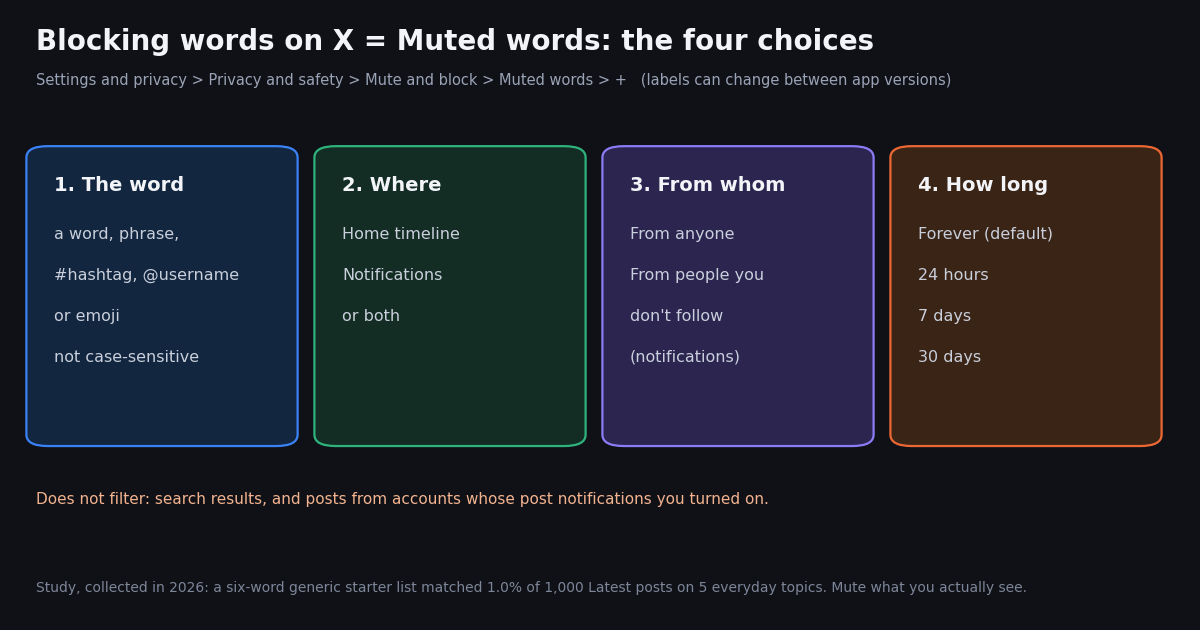
- The path: Settings and privacy > Privacy and safety > Mute and block > Muted words > +. Same on web, iPhone and Android; menus can be renamed between app versions.
- Four choices per word: the term, where (Home timeline / Notifications), from whom (anyone / people you don't follow, for notifications), and how long (Forever, 24 hours, 7 days, 30 days).
- What it matches: words, phrases,
#hashtags,@usernamesand emoji; not case-sensitive; mutingcryptoalso hides#crypto. - What it does not filter: search results, and posts from accounts you turned on post notifications for. Use block or mute account for people.
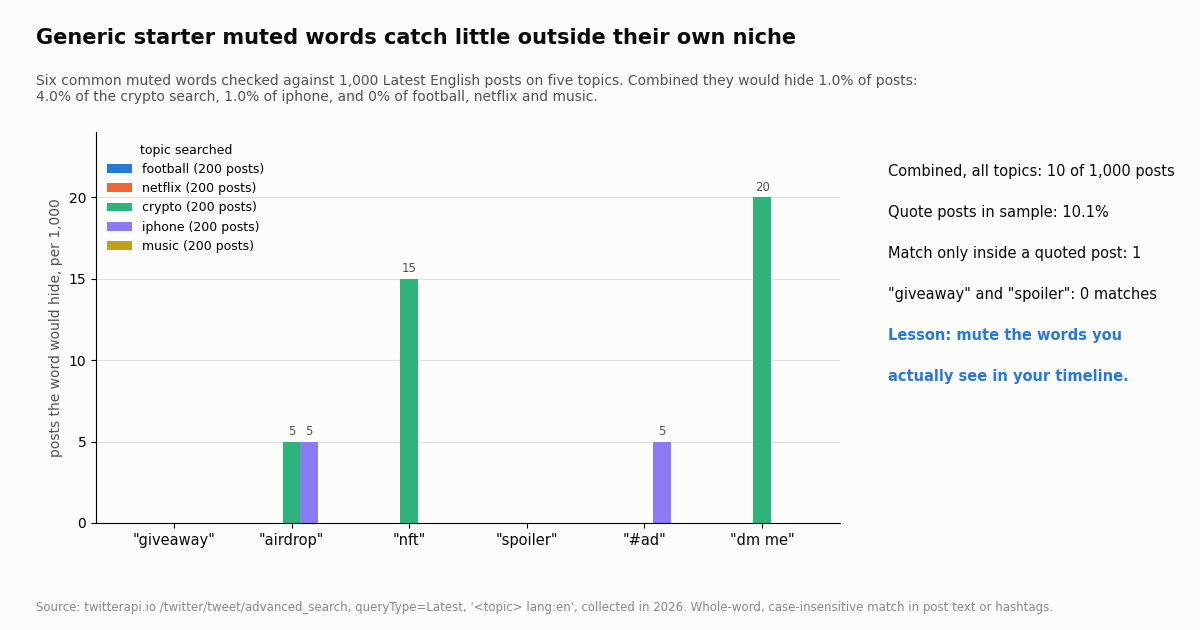
- Our data: six common starter words (giveaway, airdrop, nft, spoiler, #ad, dm me) would hide 1.0% of 1,000 Latest posts on five everyday topics, and 4.0% of a crypto search.
- Inverse use case: if you want to be alerted when a word appears instead of hiding it, search operators and keyword alerts do that; see the guides linked below.
People search for "how to block words on Twitter" because a topic, a spoiler, a slur or a wave of spam replies keeps showing up in their feed. X does not call it blocking: the feature is Muted words, and it hides posts that contain a word, phrase, hashtag, username or emoji from your Home timeline, your notifications, or both. Blocking is something you do to an account, not to a word.
This guide covers the exact settings path on x.com, iPhone and Android, what each option does (with a matrix you can scan), ready-made starter lists by use case, why muted words sometimes still leak through, and how muting compares with blocking and the quality filter. It ends with a short real-data test: we checked six popular starter muted words against 1,000 recent posts to see how much they would actually hide.
1.0% of 1,000 Latest posts on five everyday topics (4.0% of the crypto search, 0% of football, netflix and music), collected in 2026.
How to block words on Twitter (X): the steps on web, iPhone and Android
On x.com (desktop browser). Click More in the left sidebar, then Settings and privacy, then Privacy and safety, then Mute and block, then Muted words. Click the + icon, type the word or phrase, choose the options, and click Save. X's @Support account has given this exact path in replies to users ("More > Settings and privacy > Privacy and safety > Mute and block > Muted words. Then click the + icon to add words to mute").
On iPhone and Android. Tap your profile picture to open the menu, open Settings and Support (or Settings and privacy directly, depending on the version), then Privacy and safety > Mute and block > Muted words, and tap the + button. The options screen is the same as on the web.
From a post. On mobile you can also start from a post that contains the word: open the post's menu and look for a mute option, which opens the same Add muted word screen. Labels in this menu have moved over the years, so if you do not see it, use the settings path.
To unmute or edit. Go back to Muted words, tap or click the word, and either change the options and save, or choose Delete word. A word muted for 24 hours, 7 days or 30 days unmutes itself when the time runs out.
If your menus look different. X renames and regroups settings from time to time; older replies from @Support used "Privacy and safety > Safety > Muted words". The name Muted words has stayed constant, so searching for "muted" in the settings search box is a reliable fallback.
The mute-options matrix: what each choice actually does
Every muted word carries four settings. The table below lists each option, where it acts, and what you will notice. It is the core of the feature, and it is what the generic how-to articles tend to skip.
Pick From anyone when it is a topic you never want to see. @Support has told users that switching to "From anyone" mutes the word from everyone on the Home timeline and in notifications, which fixes the common complaint that a muted word still arrives from a friend.
Pick a short duration for spoilers and live events. 24 hours covers a game or an episode night, 7 days a release week, 30 days a season or an election cycle. The mute lifts on its own, so your list does not grow forever.
How to block certain words, hashtags, phrases and emoji
Single words. Type the word without quotes. Matching is not case-sensitive, so stars also hides Stars and STARS.
Hashtags. You can mute #hashtag directly. Muting the plain word also mutes the hashtag version (muting crypto hides #crypto), so the plain word is usually the broader choice.
Phrases. Enter the whole phrase, for example link in bio. This targets the exact phrase rather than each word, which keeps you from hiding every post that uses the word link.
Usernames. Muting @name as a word hides posts that mention that account, which is different from muting the account itself (that hides posts the account writes).
Emoji. Paste the emoji into the field. This is useful for spam replies that reuse the same emoji string.
Punctuation and spelling variants. Each spelling is a separate entry. If a spoiler circulates as both finale and #TheFinale, add both. Second sources report that punctuation can be part of a muted term; we did not find X stating a limit on how many words you can mute, so this guide does not quote one.
Starter muted-word lists by use case
These are generic starting points. Our study below shows why you should trim and extend them based on what you actually see; a list copied wholesale catches little.
Mental health and sensitive topics. Mute the specific terms that upset you with From anyone selected for notifications, and combine them with the sensitive-media setting under Content you see.
Work focus. A 24-hour mute of a trending topic is a quick way to keep a news cycle out of your feed for a day without unfollowing anyone.
Why muted words still show up
Search. X's help page on advanced muting options states that mute settings apply to everything except search results. If you search for the word, or a trend that contains it, you will see it. An @Safety post also points to separate search settings that hide sensitive content and remove muted accounts from search; those act on accounts and media, not your muted words.
Accounts with post notifications turned on. If you turned on notifications for an account's posts, muted words do not suppress those notifications.
Notifications from people you follow. If you chose From people you don't follow, accounts you follow still reach your notifications. Switch to From anyone.
Spelling variants, images and links. Muting reads text. A word written with numbers or spaces in it (g1veaway), shown only in an image, or hidden behind a link preview is a different string.
Quoted posts and profile names. X's help text does not say whether a muted word inside a quoted post, or in someone's display name or bio, hides the post that contains it. Treat these as possible gaps: in our sample one post in 1,000 had a starter word only inside the post it quoted. If something keeps leaking through this way, mute or block the account instead.
Ads. X does not document that muted words filter promoted posts. The ad controls in the post menu (for example, reporting or hiding an ad) are the tool for those.
What our data shows: do starter muted words actually catch spam?
We took six terms that appear on many starter muted-word lists and checked them against 1,000 of the latest English posts for five everyday topics (football, netflix, crypto, iphone and music, 200 posts each), collected in 2026. A post counts as hidden when the term appears as a whole word in its text or hashtags.
The headline. All six words together would hide 10 of 1,000 posts, or 1.0%. In the crypto search the list would hide 4.0%; in football, netflix and music, 0%.
What it means for you. Generic lists feel productive but catch almost nothing outside their niche. The words that work are the ones already annoying you: copy the exact term from the posts you want gone, and give event words a short duration.
Quotes are a small but real gap. 10.1% of sampled posts quoted another post. One post in the sample carried dm me only inside the quoted post, which a filter that reads the outer post's text would not see.
Mute words vs block vs mute account vs quality filter
Muted words is right for topics and spam patterns. Mute account is right for one person whose posts you no longer want, without the visibility of a block. Block is for people who should not interact with you; our guide on mass blocking explains what a block does now and the tools people use for many accounts at once, and our guide to who blocked you covers the reverse check. The quality filter in notification settings is X's automatic filter for low-quality notifications; it works alongside your muted words, not instead of them.
Can other people see my muted words? No. Muting is private to your account, and the muted account or author is not notified.
The inverse: get alerted when a word appears (for developers)
Some readers want the opposite of muting: see every post that mentions their brand or a keyword. That is a search problem. On X itself, the search box accepts operators such as -giveaway to exclude a word and from: or lang: to narrow results, and our search-operators guide lists them.
For automation, TwitterAPI.io exposes the same search as /twitter/tweet/advanced_search (no X account needed). Reads cost 15 credits per tweet returned, $0.15 per 1,000 tweets; the official X API's pay-per-usage rate card lists $0.005 per post read, or $5 per 1,000, about 33 times more per 1,000 tweets.
The script below is a practical use of that for muting: before you add a list in the app, it counts how many recent posts on a topic each word would hide, and how many only quote a post containing it. Our keyword-alerts guide covers the alerting direction end to end.
python3 muted_words_check.py "crypto lang:en" airdrop giveaway nft "dm me"
# 100 posts for 'crypto lang:en'
# 'airdrop': hides ... posts; ... more only quote a post with itHow we collected this
Question. How often would six common starter muted words (giveaway, airdrop, nft, spoiler, #ad, dm me) match recent posts on everyday topics, and where does the term sit: in the post text, as a hashtag, only in a quoted post, or only in the author's name or bio?
Data. /twitter/tweet/advanced_search with queryType Latest and the query <topic> lang:en for football, netflix, crypto, iphone and music, 10 pages each: 1,000 unique posts, collected in 2026. A sixth topic (gaming) failed with server errors at collection time and was dropped.
Method. Whole-word, case-insensitive matching (plural forms counted; #ad only as a hashtag), checked separately in the post text, its hashtags, the quoted post's text, and the author's display name and bio.
What the sample cannot show. It is one snapshot of five searches, not your timeline; your Home feed is ranked and personalized, and spam patterns move week to week. Matching is our approximation of X's filter, not X's code. Small counts (1 to 4 posts) are directional.
Privacy. Aggregates only. Authors are private individuals: raw pages were not stored in the repository, and the per-post sample keeps only de-identified match flags.
"""muted_words_check.py - test a muted-words list against real X (Twitter) posts
before you add it in the app. Counts how many Latest posts on a topic each
word would hide (post text or hashtags, whole word, case-insensitive).

    pip install requests
    export TWITTERAPI_IO_API_KEY=...   # from the twitterapi.io dashboard
    python3 muted_words_check.py "football lang:en" spoiler giveaway "dm me"
"""
import os
import re
import sys

import requests

BASE = "https://api.twitterapi.io"
HEADERS = {"X-API-Key": os.environ["TWITTERAPI_IO_API_KEY"]}


def latest_posts(query, max_pages=5):
    """Yield posts from advanced_search, following next_cursor page by page."""
    cursor = ""
    for _ in range(max_pages):
        r = requests.get(
            f"{BASE}/twitter/tweet/advanced_search",
            headers=HEADERS,
            params={"query": query, "queryType": "Latest", "cursor": cursor},
            timeout=30,
        )
        r.raise_for_status()
        body = r.json()
        for tweet in body.get("tweets", []):
            yield tweet
        if not body.get("has_next_page"):
            break
        cursor = body.get("next_cursor", "")


def matches(word, tweet):
    text = tweet.get("text", "")
    tags = [h.get("text", "").lower() for h in (tweet.get("entities") or {}).get("hashtags") or []]
    word = word.lower().lstrip("#")
    pattern = r"(?<![\w])#?" + re.escape(word).replace(r"\ ", r"\s+") + r"(?![\w])"
    return word.replace(" ", "") in tags or re.search(pattern, text, re.I) is not None


def main():
    query, words = sys.argv[1], sys.argv[2:]
    posts = list(latest_posts(query))
    print(f"{len(posts)} posts for {query!r}")
    for word in words:
        own = sum(1 for t in posts if matches(word, t))
        quoted = sum(
            1 for t in posts
            if not matches(word, t) and t.get("quoted_tweet") and matches(word, t["quoted_tweet"])
        )
        print(f"{word!r}: hides {own} posts; {quoted} more only quote a post with it")
    # cost: 15 credits per tweet returned = $0.15 per 1,000 tweets (100 posts = $0.015)


if __name__ == "__main__":
    main()
Researching this?Free starter credits cover end-to-end testing — Google sign-in, no card. Get a key.
Questions readers ask
Can you block words on Twitter (X)?
Not with a block button; the feature is Muted words. Go to Settings and privacy > Privacy and safety > Mute and block > Muted words, add the word with the + icon, choose Home timeline and/or Notifications and a duration, and save.
How do I block certain words on Twitter on my iPhone?
Tap your profile picture, open Settings and privacy, then Privacy and safety > Mute and block > Muted words, and tap +. The options are the same as on the web. Menus can be renamed between app versions; the Muted words name has stayed constant.
How do I block a hashtag on Twitter?
Add it as a muted word, with or without the #. Muting the plain word also mutes the hashtag, so muting crypto hides #crypto too.
Why do I still see muted words?
Muted words do not filter search results or notifications from accounts whose post notifications you turned on. Notifications from accounts you follow also get through if you chose From people you don't follow. Spelling variants and words inside images are separate strings.
Does muting a word work on the For you and Following feeds?
Yes, when the Home timeline option is on, which covers your Home feeds. It does not apply to search.
How long does a muted word last?
Forever by default, or 24 hours, 7 days or 30 days if you pick a duration. Timed mutes lift on their own.
Can people see that I muted a word?
No. Muting is private, and authors are not notified.
Is there a limit on how many words I can mute?
X does not state one on the sources we could check, so we do not quote a number. Short, specific entries work better than long generic lists: in our sample a six-word starter list hid 1.0% of posts.
Continue
- X Help Center: How to use advanced muting options (cited; the page blocks automated fetches)
- @Support: the Muted words settings path (More > Settings and privacy > Privacy and safety > Mute and block > Muted words)
- @Support: From anyone mutes words from everyone on Home timeline and in notifications
- @Safety: settings to mute accounts and words and to hide sensitive content
- TwitterAPI.io docs: advanced search endpoint
- X developer docs: X API pricing
- Twitter (X) API overview and hub
- How mass blocking on X works in 2026
- How to check who blocked you on Twitter (X)
- Twitter search operators guide, including -word exclusions
- Keyword alerts on X: a developer guide
- Free Twitter shadowban checker
- TwitterAPI.io pricing per 1,000 tweets
- 01Twitter (X) Drafts: How to Find, Access and Keep Them
- 02Twitter (X) API in AutoGen: a Search Tool and a Two-Agent Team on Real X Data
- 03Twitter (X) API in PHP: a Guzzle client with safe decoding and cursor paging
- 04Twitter (X) Account Suspended: Why It Happened and How to Get It Back
- 05How to DM on Twitter (X): send a message on web, iPhone and Android
- 06How to Mass Block on Twitter (X): Tools, Block Lists and Safer Options
- 07How to Connect ChatGPT to the Twitter (X) API
- 08How to Get a Grok API Key: Setup, Pricing and Live X Data for the xAI API
Writing about something you built with TwitterAPI.io? Our community rewards program pays API credits for honest tutorials, build logs and videos.
Stop reading. Start building.
Starter credits cover real testing on real data. Google sign-in, no card, no application queue.
Get an API keyAlready building with TwitterAPI.io? Publish an honest tutorial or build log about it and earn up to $200 a month in API credits.