Twitter (X) API in AutoGen: a Search Tool and a Two-Agent Team on Real X Data
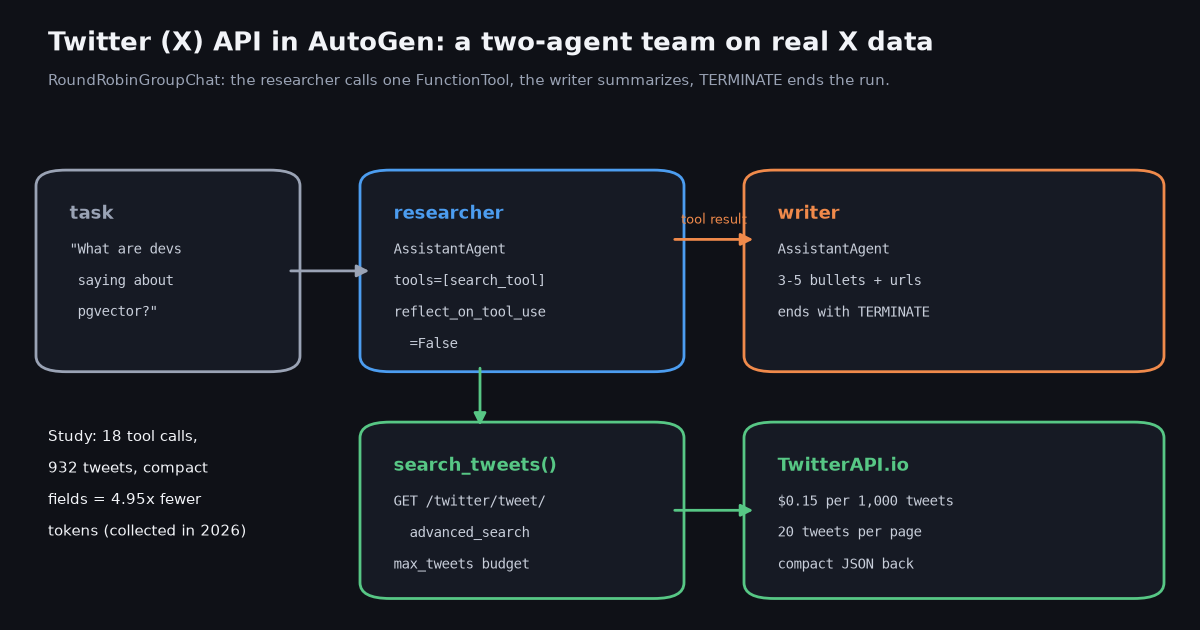
- The tool is a function.
search_tweets(query, max_tweets)calls/twitter/tweet/advanced_search, pages withnext_cursor, and returns compact JSON;FunctionToolturns its type hints and docstring into the schema the model sees. - Compact the result or overflow the context. Full tweet objects averaged 1,999 tokens per tweet in our sample; ten chosen fields averaged 404. That is 4.95x fewer tokens per call.
- Two agents, one round robin. A researcher with the tool and
reflect_on_tool_use=Falsehands the raw result to a writer, which summarizes and saysTERMINATE;MaxMessageTermination(6)is the safety net. - Test without an LLM key.
ReplayChatCompletionClientinautogen_ext.models.replayscripts the model turns, so the tool call and the API response are real while the run costs no model tokens. - Cost is per tweet returned. $0.15 per 1,000 tweets; our 18 questions returned 951 billed tweets for $0.14 in total. The official X API lists $0.005 per post read.
- AutoGen is archived. The
microsoft/autogenREADME points new users to Microsoft Agent Framework; the code on this page runs on the last AgentChat release, 0.7.5. AG2 is a separate community fork.
AutoGen is Microsoft's open-source framework for multi-agent applications: agents that call tools and talk to each other in a team until a termination condition fires. Giving those agents Twitter (X) data takes one tool and two decisions, and this page covers all three: the tool itself (a Python function over the TwitterAPI.io search endpoint), the decision about how much of each tweet the model should see, and the decision about how many tweets a run may fetch.
This is a bridge guide for builders, not a framework comparison. If you are still choosing between AutoGen, CrewAI and LangGraph, the CrewAI vs LangGraph guide covers that choice, including what happened to AutoGen; the LangGraph and Pydantic AI versions of this same search tool are linked at the end. Here we stay inside AutoGen AgentChat, on the API as it exists in the last release, and we ran every piece of code against the real API before writing about it.
One fact first, plainly: the microsoft/autogen GitHub repository is archived. Its README says the project is no longer actively maintained by Microsoft, that Microsoft is not providing bug fixes, security fixes, new features or support, and that new users should start with Microsoft Agent Framework. The packages still install and the code below still runs, so this page is useful if you maintain an AutoGen app or want a quick prototype; for a new production system, read the section on what the archive means before you commit.
4.95x
What you need: AutoGen packages, Python version and the API key
AutoGen today is three packages that share one version number. autogen-core holds the runtime, the model client interfaces and FunctionTool. autogen-agentchat holds the high-level pieces this page uses: AssistantAgent, the teams (RoundRobinGroupChat, SelectorGroupChat, Swarm) and the termination conditions. autogen-ext holds the integrations: model clients such as OpenAIChatCompletionClient, the ReplayChatCompletionClient for tests, and the MCP workbench.
Python 3.10 or newer. PyPI lists Requires-Python >=3.10 for autogen-agentchat 0.7.5, which was released in September 2025 and is still the latest version on PyPI. A system Python 3.9 will not resolve it; we built a 3.12 virtual environment for every run on this page.
Pin the versions. Because the repository is archived, there is no upgrade path inside AutoGen to wait for. Pin ==0.7.5 for all three packages so a stray install of an older 0.4.x does not change class names under you ( and PyPI marks several older releases as yanked, including the 0.4.x line).
A TwitterAPI.io key. Sign in at twitterapi.io, copy the key from the dashboard and export it as TWITTERAPI_IO_KEY. Reads need no X account and no X developer app. New accounts that pass the automatic bot check get up to $1 of free credits (up to 100,000 credits, no card, one per person or network, expiring after 31 days), which covers about a hundred of the 60-tweet searches measured below. Before the first payment the key is limited to 0.2 requests per second, which matters for teams that call the tool in a loop; it rises to 20 once you have paid.
A model. The full example uses OpenAIChatCompletionClient because it is the client in AutoGen's own quickstart, but any autogen-ext model client works with tools as long as the model supports function calling. For tests you need no model at all, as the replay section shows.
python3.12 -m venv .venv && . .venv/bin/activate
pip install "autogen-agentchat==0.7.5" "autogen-ext[openai]==0.7.5" requests
export TWITTERAPI_IO_KEY=...   # twitterapi.io/dashboard
export OPENAI_API_KEY=... # only for the live-model runStep 1: the search tool as a plain Python function
An AutoGen tool is an ordinary function. AssistantAgent(tools=[...]) accepts a FunctionTool, any other BaseTool, or a bare callable that it wraps for you. FunctionTool reads the type annotations and the docstring to build the JSON schema the model sees, so the annotations are part of your prompt: Annotated[str, "X search query, e.g. ..."] tells the model what a good query looks like without a line of system prompt.
It calls one endpoint. GET /twitter/tweet/advanced_search takes query (X search operators work: lang:en, -filter:retweets, from:, since:, min_faves:) and queryType (Latest or Top). The response carries tweets[] at the top level, plus has_next_page and next_cursor. Each page returns up to 20 tweets, newest first for Latest.
It owns the budget. max_tweets is an argument the model can set, clamped to 100 per call, and RUN_BUDGET is a cap across every call in one run. The model cannot talk its way past either, because the loop stops when the count is reached, the page comes back empty, or has_next_page is false.
It returns a string, never raises. AutoGen sends the tool's return value back to the model as text. A Python exception in a tool turns into an error result the model has to interpret, so the function catches failures and returns {"error": ...} with whatever tweets it already has. During our collection the search endpoint answered some pages with HTTP 503 under load; one page out of 52 still failed after retries, and the agent got the 27 tweets fetched before it instead of a crash.
It returns compact dicts. The compact() helper keeps ten fields: id, created_at, author (the userName), followers, text, likes, retweets, replies, views and url. The next section measures why this matters more than any other line in the file.
Trimming does not refund. You pay for every tweet the API returns, not for the tweets you keep. Keep max_tweets a multiple of 20 so the last page is not fetched and then thrown away; with max_tweets=60 one of our queries still needed four pages (79 tweets billed) because some pages came back short.
"""AutoGen agent team with a Twitter (X) search tool on TwitterAPI.io.

    pip install "autogen-agentchat==0.7.5" "autogen-ext[openai]==0.7.5" requests
    export TWITTERAPI_IO_KEY=...      # from twitterapi.io/dashboard
    export OPENAI_API_KEY=...         # or swap in another autogen-ext model client
    python autogen_x.py "What are developers saying about pgvector?"
"""
import asyncio
import json
import os
import sys
import time
from typing import Annotated

import requests
from autogen_agentchat.agents import AssistantAgent
from autogen_agentchat.conditions import MaxMessageTermination, TextMentionTermination
from autogen_agentchat.teams import RoundRobinGroupChat
from autogen_agentchat.ui import Console
from autogen_core.tools import FunctionTool

BASE = "https://api.twitterapi.io"
SESSION = requests.Session()
SESSION.headers["X-API-Key"] = os.environ.get("TWITTERAPI_IO_KEY", "")
RUN_BUDGET = {"tweets_left": 200}   # hard cap across every tool call in one run


def fetch_page(params: dict) -> dict:
    """One advanced_search page (up to 20 tweets), retrying transient errors."""
    for attempt in range(4):
        r = SESSION.get(f"{BASE}/twitter/tweet/advanced_search", params=params, timeout=30)
        if r.status_code in (429, 500, 502, 503, 504):
            time.sleep(2 ** attempt)
            continue
        r.raise_for_status()
        return r.json()
    raise RuntimeError(f"advanced_search kept failing (HTTP {r.status_code})")


def compact(t: dict) -> dict:
    """The ten fields the model needs; the full object is about 5x larger."""
    a = t.get("author") or {}
    return {
        "id": t.get("id"),
        "created_at": t.get("createdAt"),
        "author": a.get("userName"),
        "followers": a.get("followers"),
        "text": t.get("text"),
        "likes": t.get("likeCount"),
        "retweets": t.get("retweetCount"),
        "replies": t.get("replyCount"),
        "views": t.get("viewCount"),
        "url": t.get("url"),
    }


def search_tweets(
    query: Annotated[str, "X search query, e.g. 'pgvector lang:en -filter:retweets'"],
    max_tweets: Annotated[int, "tweets to fetch, a multiple of 20, 100 max"] = 40,
) -> str:
    """Search recent public X (Twitter) posts. Returns compact JSON, newest first."""
    max_tweets = max(1, min(max_tweets, 100, RUN_BUDGET["tweets_left"]))
    if RUN_BUDGET["tweets_left"] <= 0:
        return json.dumps({"error": "tweet budget for this run is used up"})
    tweets, cursor = [], ""
    while len(tweets) < max_tweets:
        params = {"query": query, "queryType": "Latest"}
        if cursor:
            params["cursor"] = cursor
        try:
            body = fetch_page(params)
        except Exception as e:  # give the model an error it can read, not a crash
            return json.dumps({"error": str(e), "count": len(tweets), "tweets": tweets})
        page = body.get("tweets") or []
        tweets.extend(compact(t) for t in page)
        RUN_BUDGET["tweets_left"] -= len(page)
        cursor = body.get("next_cursor") or ""
        if not page or not body.get("has_next_page") or not cursor:
            break
    tweets = tweets[:max_tweets]
return json.dumps({"query": query, "count": len(tweets), "tweets": tweets}, ensure_ascii=False)Step 2: how much of a tweet the agent should see (measured)
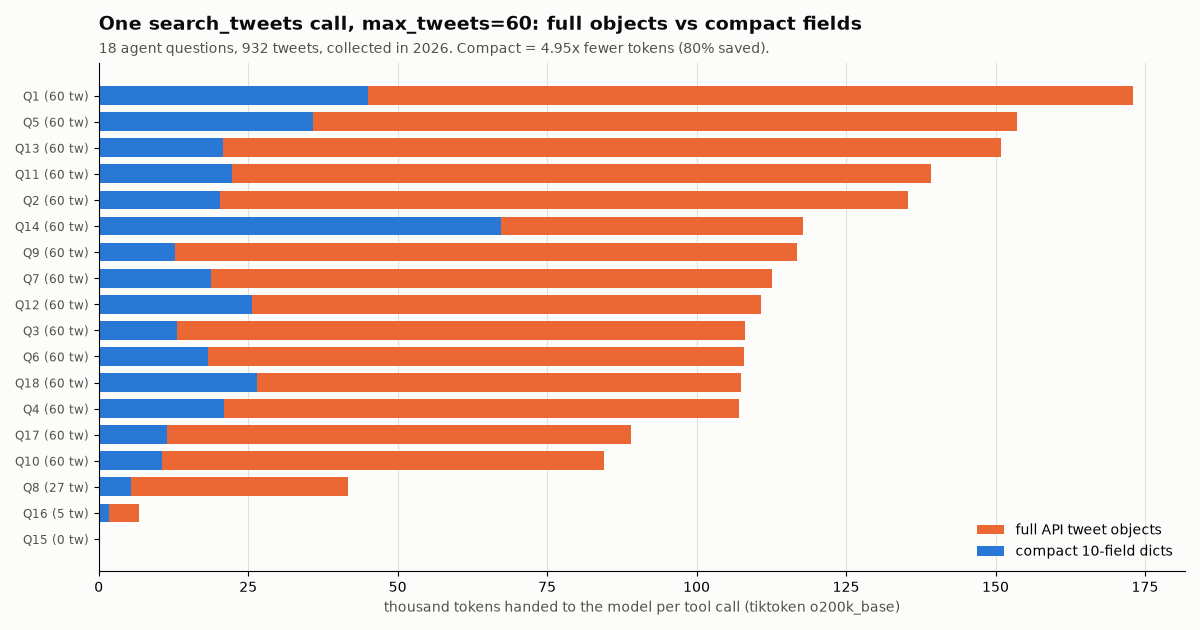
The lazy version of this tool returns response.json()["tweets"] and lets the model sort it out. We measured what that costs. For 18 realistic agent questions about public developer topics, we ran the tool with max_tweets=60 and counted the tokens (tiktoken o200k_base, as an estimate; other vendors' tokenizers differ) of two versions of the same result: the full tweet objects as the API returns them, and the ten-field compact dicts above.
The full objects are about 2,000.0 tokens per tweet. The median call returned 109,447 tokens of JSON. 5 of the 18 calls were larger than a 128k-token context window on their own, before the system prompt, the task or the other agent's turn.
The compact dicts are about 404 tokens per tweet. The median call dropped to 19,532 tokens, a 4.95x reduction (80% fewer tokens) across all 932 tweets, with nothing removed that a summary would cite.
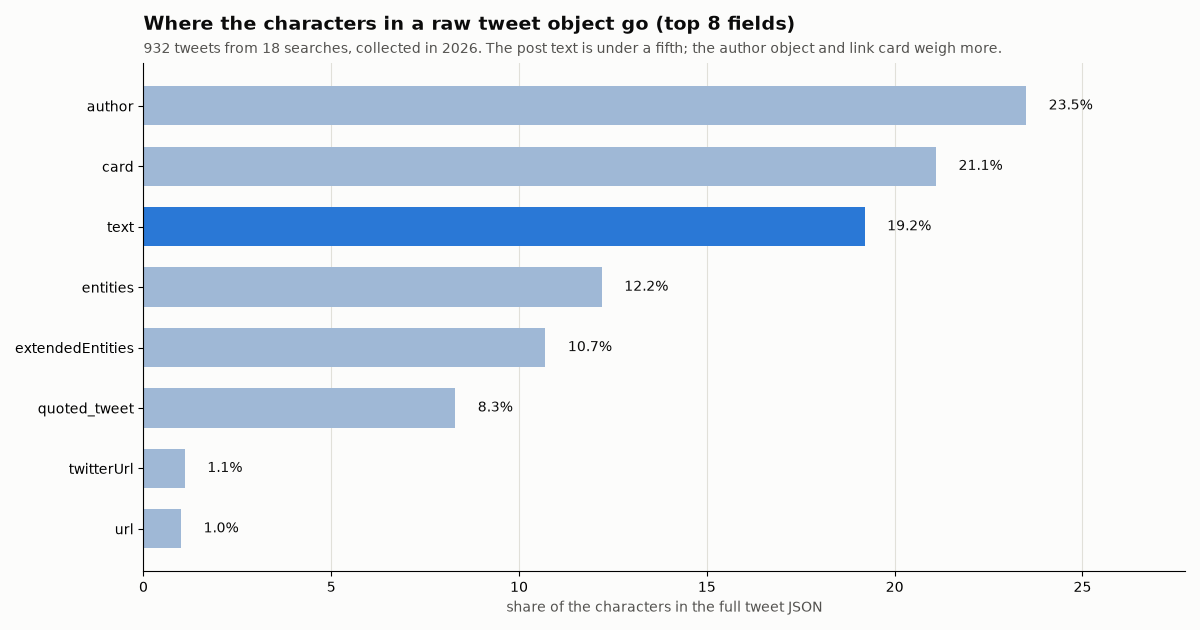
Where the weight is. In the full objects, the nested author profile took 23.5% of the characters and the link-preview card 21.1%, while the post text was 19.2%. entities (12.2%), extendedEntities media (10.7%) and embedded quoted_tweet objects (8.3%) made up much of the rest. In our sample 43% of tweets carried media, 46% a link and 10% a quoted post, and every one of those adds nested JSON the model rarely needs.
Long posts are the next problem. 42% of the posts in the sample had more than 500 characters of text (the median was 293), because long posts are common among developer accounts. Capping text at 500 characters cut the median call again, from 19,532 to 11,406 tokens, and the largest call from 67,213 to 15,857. Add a truncated flag so the writer knows to say so, and keep the url so a reader can open the full post.
Table: seven of the 18 calls, chosen to show the range (the full list is in the study files). Tokens are for the whole tool result of one call.
The pattern holds across topics: whatever the subject, the model receives four to six times more JSON than it needs when the tool passes the raw objects through. On a pay-per-token model that is a direct cost, and on a team the cost repeats, because every later agent turn carries the earlier messages in its context.
TEXT_CAP = 500   # characters; 0 = keep full text

def compact(t: dict) -> dict:
    a = t.get("author") or {}
    text = t.get("text") or ""
    return {
        "id": t.get("id"),
        "created_at": t.get("createdAt"),
        "author": a.get("userName"),
        "followers": a.get("followers"),
        "text": text[:TEXT_CAP] if TEXT_CAP else text,
        "truncated": bool(TEXT_CAP) and len(text) > TEXT_CAP,
        "likes": t.get("likeCount"),
        "retweets": t.get("retweetCount"),
        "replies": t.get("replyCount"),
        "views": t.get("viewCount"),
        "url": t.get("url"),
    }
Step 3: a two-agent team, researcher and writer
With the tool in place, the team is short. The researcher is an AssistantAgent with tools=[search_tool]. The writer is an AssistantAgent with no tools and a system message that asks for a cited summary ending in TERMINATE. RoundRobinGroupChat([researcher, writer]) gives each agent a turn in order and broadcasts every message to the whole team.
reflect_on_tool_use=False on the researcher. With reflection off, the researcher's turn ends with a ToolCallSummaryMessage whose content is the tool result itself, formatted by tool_call_summary_format (default {result}). The writer then receives the compact JSON directly. Turning reflection on adds a second model call in which the researcher rewrites the result in prose first, which costs tokens and can drop the urls the writer needs to cite.
max_tool_iterations stays at 1. In 0.7.5 AssistantAgent accepts max_tool_iterations (default 1). Raising it lets the researcher call the tool again in the same turn, for a follow-up query; if you do, RUN_BUDGET is what keeps a curious model from fetching 500 tweets.
Two termination conditions joined with |. TextMentionTermination("TERMINATE") ends the run when the writer finishes; MaxMessageTermination(6) ends it if the writer never says the word. Always pair a text condition with a hard cap: a team without one can loop until the model budget runs out.
One model client or two. The example passes the same client to both agents. Split them when it pays: a cheaper model for the researcher, whose only job is to write a search query, and a stronger one for the writer.
Run it with python autogen_x.py "What are developers saying about pgvector?" and Console streams each message as it arrives. The complete file is in the code block at the end of the page.
def build_team(researcher_client, writer_client) -> RoundRobinGroupChat:
    researcher = AssistantAgent(
        "researcher",
        model_client=researcher_client,
        tools=[search_tool],
        reflect_on_tool_use=False,   # hand the raw tool result straight to the writer
        system_message=(
            "You research X (Twitter). Call search_tweets once with a precise query "
            "(add lang:en and -filter:retweets). Never invent posts."
        ),
    )
    writer = AssistantAgent(
        "writer",
        model_client=writer_client,
        system_message=(
            "Summarize the researcher's tweets in 3 to 5 bullet points, cite tweet urls, "
            "say so plainly if count is 0, then end with the word TERMINATE."
        ),
    )
    stop = TextMentionTermination("TERMINATE") | MaxMessageTermination(6)
return RoundRobinGroupChat([researcher, writer], termination_condition=stop)Step 4: run it with no LLM key, using the replay client
autogen_ext.models.replay.ReplayChatCompletionClient returns a scripted list of model responses in order. Each entry is either a string or a CreateResult, and a CreateResult whose content is a list of FunctionCall objects is a tool call. Give it a ModelInfo with function_calling=True, or AssistantAgent refuses to attach tools to it.
That makes a precise integration test: the model's choices are fixed, but everything after them is real. The tool runs, the HTTP request goes to the API, the result flows through RoundRobinGroupChat to the writer, and the termination condition fires. You can assert on the exact message types, which is how we checked the claims in Step 3.
We ran this test for the question "What are developers saying about pgvector?" with max_tweets=40. The tool fetched 2 pages and 40 tweets (40 x $0.00015 = $0.006), and the run produced the five messages below and stopped on TERMINATE. The compact tool result was 48,506 characters. The replay client also records every prompt it receives, so you can check that the writer saw the user task, the tool call and the tool result: its prompt held 3 messages.
Run transcript (message types and sizes, from our run). The writer text is the scripted placeholder; with a live model it would be the summary.
import asyncio, json
from autogen_core import FunctionCall
from autogen_core.models import CreateResult, ModelInfo, RequestUsage
from autogen_ext.models.replay import ReplayChatCompletionClient

from autogen_x import build_team   # the module above

INFO = ModelInfo(vision=False, function_calling=True, json_output=False,
                 family="unknown", structured_output=False)
args = {"query": "pgvector lang:en -filter:retweets", "max_tweets": 40}

# Turn 1 of the researcher: a scripted tool call. The tool itself runs for real.
researcher_client = ReplayChatCompletionClient([CreateResult(
    finish_reason="function_calls",
    content=[FunctionCall(id="call_1", name="search_tweets", arguments=json.dumps(args))],
    usage=RequestUsage(prompt_tokens=0, completion_tokens=0), cached=False,
)], model_info=INFO)
writer_client = ReplayChatCompletionClient(["(scripted summary) TERMINATE"], model_info=INFO)

async def main():
    team = build_team(researcher_client, writer_client)
    result = await team.run(task="What are developers saying about pgvector?")
    for m in result.messages:
        text = m.content if isinstance(m.content, str) else repr(m.content)
        print(m.source, type(m).__name__, len(text))
    print(result.stop_reason)

asyncio.run(main())

# Output from our run:
# user        TextMessage              42 chars
# researcher  ToolCallRequestEvent     127 chars   search_tweets(query="pgvector lang:en -filter:retweets", max_tweets=40)
# researcher  ToolCallExecutionEvent   49,533 chars
# researcher  ToolCallSummaryMessage   48,506 chars  {"query": ..., "count": 40, "tweets": [...]}
# writer      TextMessage              28 chars   (scripted summary) TERMINATE
# stop_reason: Text 'TERMINATE' mentionedWhat a question costs: tweets, tokens and the official X API
An AutoGen run on X data has two bills. The model tokens go to your model vendor, at their prices, and the tweets go to the data provider. Keep them apart when you budget, because they scale with different settings: tokens with how much of each tweet you pass and how many turns the team takes, tweets with max_tweets.
Tweets on TwitterAPI.io. Search is billed at 15 credits per tweet returned, $0.15 per 1,000 tweets, with a minimum of 15 credits per request, so a search that finds nothing costs $0.00015 and a full 20-tweet page costs $0.003. In our study the median question cost $0.009 (60 tweets), the dearest $0.01185 (79 tweets billed over four short pages), the empty search $0.00015, and all 18 questions together $0.14.
The same reads on the official X API. X's pay-per-usage rate card (docs.x.com/x-api/getting-started/pricing) lists $0.005 per post read, so 1,000 tweets cost $5 there against $0.15 here, about 33x; a 60-tweet question would be $0.30. X also caps pay-per-usage at 3 million post reads a month, with Enterprise above that, and offers $20 in credits on a first card plus a match of up to $50.
Tokens are the larger lever. At the median, the uncompacted result was 109,447 tokens and the compact one 19,532. On any per-token model, that difference is worth far more per question than the $0.009 of tweets, so compaction is the first optimization, then max_tweets, then the choice of a cheaper model for the researcher.
Plans and rate limits. Credits are pay as you go ($1 = 100,000 credits, purchased credits never expire), and monthly plans run from Starter at $29 to Business at $1,499; the pricing page lists them. Rate limits are 0.2 requests per second before the first payment and 20 once paid, so a team that fans out several searches at once should be on a paid key.
AutoGen is archived: what that means for this code
We read the microsoft/autogen README and the GitHub API this session. The repository is archived. The README calls the project archived and no longer maintained, says Microsoft is not providing bug fixes, security fixes, new features or support, warns that vulnerabilities in the project and its dependencies may remain unaddressed, advises against production use, and directs new users to Microsoft Agent Framework, which it calls the enterprise-ready successor to AutoGen, with a migration guide on Microsoft Learn.
For an existing AutoGen app. The code keeps working as long as its dependencies do. Pin all three packages to 0.7.5, pin your model client's SDK, and keep the X data access in a plain function like search_tweets, with no AutoGen imports inside it. That function is the part you will carry to the next framework unchanged.
For a new project. Follow the README and look at Microsoft Agent Framework first; the tool function on this page is framework-neutral Python, so it ports with a new wrapper rather than a rewrite. If you want a Python framework with typed tools today, the Pydantic AI version of this guide uses the same endpoint, and the LangGraph version shows the graph approach.
AG2 is a different project. AG2 (formerly AutoGen) is a separate community fork with its own maintainers, releases and docs. This page covers Microsoft's AgentChat 0.7.5 only, so check AG2's own documentation before reusing this code there.
Why it is still worth getting right. Plenty of AutoGen code is already deployed, and the lessons in this page are not AutoGen-specific: compact the tool result, cap tweets per run, return errors as text, and test with a scripted model before you spend tokens.
Beyond your own tool: the MCP server route, and write tools
AutoGen can also take tools from an MCP server instead of from your own function. autogen_ext.tools.mcp (installed with the mcp extra) provides McpWorkbench and StreamableHttpServerParams(url, headers), and AssistantAgent accepts workbench= in place of tools=. Pointed at TwitterAPI.io's hosted MCP server, the agent gets the server's read tools, such as search_tweets and get_user_info, with no tool code of yours.
We confirmed these classes and parameters in the installed autogen-ext 0.7.5 package; we did not run the MCP route in this study, so the snippet below is unexecuted. The MCP server guide explains how the protocol works and what the server returns.
The trade-off. You write no tool code, but the server decides the shape and size of each tool result, so the compaction and the per-run tweet budget from Steps 1 and 2 are no longer yours to set. Use the MCP route when breadth of tools matters more than control over tokens; use your own function when the result size and the budget matter, which in a multi-agent team they usually do.
Reading needs no X account. Writing does: write actions run through an authenticated session of a real X account. One /twitter/user_login_v2 login ($0.10, with a proxy you supply) returns login_cookies, and each post, delete, like, retweet or follow after that (/twitter/create_tweet_v2, /twitter/follow_user_v2 and the rest) is 60 credits, $0.0006, billed per HTTP 200 call.
The call acts as that account. X can rate-limit, lock or suspend it, so keep a human pace, expect the session to need a fresh login now and then, and never let an agent post in a loop.
Keep a human in the loop. In AutoGen, put the write tool on a separate agent and add a UserProxyAgent (or your own approval step) before it in the team, so a person approves each post. The research team on this page has no write tool at all, which is the safe default for a summarizer.
# pip install "autogen-agentchat==0.7.5" "autogen-ext[openai,mcp]==0.7.5"
import os
from autogen_agentchat.agents import AssistantAgent
from autogen_ext.tools.mcp import McpWorkbench, StreamableHttpServerParams

params = StreamableHttpServerParams(
    url="https://mcp.twitterapi.io/mcp",
    headers={"X-API-Key": os.environ["TWITTERAPI_IO_KEY"]},
)

async def make_agent(model_client):
    async with McpWorkbench(server_params=params) as workbench:
        agent = AssistantAgent("researcher", model_client=model_client, workbench=workbench)
return await agent.run(task="What did @Docker post this week?")How we collected this
Question. What does an AutoGen agent actually see when it calls a Twitter (X) search tool: tweets per call, empty calls, the size of the tool result with full versus compact fields, and the cost per question?
Query. 18 keyword searches an agent might run for questions about public developer topics (agent frameworks, MCP servers, Python, Rust, TypeScript, Next.js, Bun, Docker, pgvector and two AutoGen class names), sent to /twitter/tweet/advanced_search with queryType=Latest, lang:en and -filter:retweets on the topic queries. No from: or to: operators and no person names.
Window and sample. The latest matching posts at collection time, collected in 2026: 18 tool calls with max_tweets=60, 51 successful requests, 951 tweets billed and 932 kept. 15 calls hit the 60-tweet budget, 1 returned nothing, and one page failed with HTTP 503 after retries. Separately, one replayed two-agent team run fetched 40 tweets.
Method. The same search_tweets and compact() code shown above, run in autogen-agentchat 0.7.5 on Python 3.12. Tokens were counted with tiktoken o200k_base on json.dumps of the tool result, as an estimate. Costs use 15 credits per tweet returned and the 15-credit minimum per request.
What the sample cannot show. Token counts vary by tokenizer and by topic: posts with long text, media or link cards weigh more. Eighteen questions is a small, developer-topic sample; consumer topics may have shorter posts. We did not measure model latency, model cost or summary quality, because the model turns were scripted.
Privacy. Search authors are private individuals, so raw API pages stayed on the collection machine and were never published. The published study files hold aggregates and de-identified rows only (no ids, urls, text or handles), and no account is profiled.
"""AutoGen agent team with a Twitter (X) search tool on TwitterAPI.io.

    pip install "autogen-agentchat==0.7.5" "autogen-ext[openai]==0.7.5" requests
    export TWITTERAPI_IO_KEY=...      # from twitterapi.io/dashboard
    export OPENAI_API_KEY=...         # or swap in another autogen-ext model client
    python autogen_x.py "What are developers saying about pgvector?"
"""
import asyncio
import json
import os
import sys
import time
from typing import Annotated

import requests
from autogen_agentchat.agents import AssistantAgent
from autogen_agentchat.conditions import MaxMessageTermination, TextMentionTermination
from autogen_agentchat.teams import RoundRobinGroupChat
from autogen_agentchat.ui import Console
from autogen_core.tools import FunctionTool

BASE = "https://api.twitterapi.io"
SESSION = requests.Session()
SESSION.headers["X-API-Key"] = os.environ.get("TWITTERAPI_IO_KEY", "")
RUN_BUDGET = {"tweets_left": 200}   # hard cap across every tool call in one run


def fetch_page(params: dict) -> dict:
    """One advanced_search page (up to 20 tweets), retrying transient errors."""
    for attempt in range(4):
        r = SESSION.get(f"{BASE}/twitter/tweet/advanced_search", params=params, timeout=30)
        if r.status_code in (429, 500, 502, 503, 504):
            time.sleep(2 ** attempt)
            continue
        r.raise_for_status()
        return r.json()
    raise RuntimeError(f"advanced_search kept failing (HTTP {r.status_code})")


def compact(t: dict) -> dict:
    """The ten fields the model needs; the full object is about 5x larger."""
    a = t.get("author") or {}
    return {
        "id": t.get("id"),
        "created_at": t.get("createdAt"),
        "author": a.get("userName"),
        "followers": a.get("followers"),
        "text": t.get("text"),
        "likes": t.get("likeCount"),
        "retweets": t.get("retweetCount"),
        "replies": t.get("replyCount"),
        "views": t.get("viewCount"),
        "url": t.get("url"),
    }


def search_tweets(
    query: Annotated[str, "X search query, e.g. 'pgvector lang:en -filter:retweets'"],
    max_tweets: Annotated[int, "tweets to fetch, a multiple of 20, 100 max"] = 40,
) -> str:
    """Search recent public X (Twitter) posts. Returns compact JSON, newest first."""
    max_tweets = max(1, min(max_tweets, 100, RUN_BUDGET["tweets_left"]))
    if RUN_BUDGET["tweets_left"] <= 0:
        return json.dumps({"error": "tweet budget for this run is used up"})
    tweets, cursor = [], ""
    while len(tweets) < max_tweets:
        params = {"query": query, "queryType": "Latest"}
        if cursor:
            params["cursor"] = cursor
        try:
            body = fetch_page(params)
        except Exception as e:  # give the model an error it can read, not a crash
            return json.dumps({"error": str(e), "count": len(tweets), "tweets": tweets})
        page = body.get("tweets") or []
        tweets.extend(compact(t) for t in page)
        RUN_BUDGET["tweets_left"] -= len(page)
        cursor = body.get("next_cursor") or ""
        if not page or not body.get("has_next_page") or not cursor:
            break
    tweets = tweets[:max_tweets]
    return json.dumps({"query": query, "count": len(tweets), "tweets": tweets}, ensure_ascii=False)


search_tool = FunctionTool(
    search_tweets,
    description="Search recent public X (Twitter) posts by keyword and X search operators.",
)


def build_team(researcher_client, writer_client) -> RoundRobinGroupChat:
    researcher = AssistantAgent(
        "researcher",
        model_client=researcher_client,
        tools=[search_tool],
        reflect_on_tool_use=False,   # hand the raw tool result straight to the writer
        system_message=(
            "You research X (Twitter). Call search_tweets once with a precise query "
            "(add lang:en and -filter:retweets). Never invent posts."
        ),
    )
    writer = AssistantAgent(
        "writer",
        model_client=writer_client,
        system_message=(
            "Summarize the researcher's tweets in 3 to 5 bullet points, cite tweet urls, "
            "say so plainly if count is 0, then end with the word TERMINATE."
        ),
    )
    stop = TextMentionTermination("TERMINATE") | MaxMessageTermination(6)
    return RoundRobinGroupChat([researcher, writer], termination_condition=stop)


async def main(task: str) -> None:
    from autogen_ext.models.openai import OpenAIChatCompletionClient

    client = OpenAIChatCompletionClient(model=os.environ.get("OPENAI_MODEL", "gpt-4.1-mini"))
    team = build_team(client, client)
    await Console(team.run_stream(task=task))
    await client.close()


if __name__ == "__main__":
    asyncio.run(main(" ".join(sys.argv[1:]) or "What are developers saying about pgvector?"))
Researching this?Free starter credits cover end-to-end testing — Google sign-in, no card. Get a key.
Questions readers ask
Does AutoGen have a built-in Twitter (X) tool?
No. autogen-agentchat and autogen-ext 0.7.5 ship model clients, code executors, an MCP workbench and adapters for HTTP, LangChain and other tools, but no X tool. You write a function such as search_tweets over a data API and pass it in AssistantAgent(tools=[...]), or connect an MCP server that exposes X tools through McpWorkbench.
Is AutoGen still maintained?
The microsoft/autogen repository is archived. Its README says Microsoft no longer maintains it or provides bug fixes, security fixes, features or support, advises against production use, and points new users to Microsoft Agent Framework with a migration guide. The last AgentChat release on PyPI is 0.7.5. AG2 is a separate community fork.
How do I add a tool to an AutoGen AssistantAgent?
Write a Python function with type annotations and a docstring, then pass it in tools=[...]. AssistantAgent wraps plain callables in FunctionTool for you; wrap it yourself with FunctionTool(func, description=...) when you want to set the description or reuse the tool across agents. Use Annotated[type, "hint"] on arguments, because those hints become part of the schema the model reads.
Why is my AutoGen agent running out of context after a Twitter search?
The raw tweet objects are large. In our measurement a full object averaged about 2,000.0 tokens, and 5 of 18 60-tweet searches exceeded 128k tokens on their own. Return a compact dict of the fields you need (we kept ten, 4.95x fewer tokens) and cap long post text at about 500 characters.
Can I test an AutoGen team without paying for an LLM?
Yes. ReplayChatCompletionClient from autogen_ext.models.replay returns scripted responses in order, including tool calls as CreateResult objects with FunctionCall content. Give it a ModelInfo with function_calling=True. The tool and the API call still run for real, so you test the data path end to end; the tweets returned are still billed.
How much does an AutoGen Twitter research run cost?
Two bills: model tokens at your model vendor's prices, and tweets at $0.15 per 1,000 returned on TwitterAPI.io. A 60-tweet search costs $0.009 in tweets; our 18 questions cost $0.14 together. The same 60 post reads on X's pay-per-usage rate card would be $0.30 at $0.005 per post read.
Do I need an X developer account to give an AutoGen agent X data?
Not for reading. A TwitterAPI.io API key is enough for search, timelines, profiles and followers. Posting is different: write actions run through a logged-in X account session, act as that account, and should stay behind a human approval step.
Should I use RoundRobinGroupChat or SelectorGroupChat for this?
For a fixed researcher-then-writer flow, RoundRobinGroupChat is enough and has no extra model call to pick the next speaker. SelectorGroupChat uses a model to choose who speaks next, which helps when a team has several specialists and the order depends on the question, at the cost of one more model call per turn.
Continue
- GitHub: microsoft/autogen README (archived; points new users to Microsoft Agent Framework)
- PyPI: autogen-agentchat 0.7.5 (Requires-Python >=3.10)
- AutoGen AgentChat docs: agents and tools (AssistantAgent, ToolCallSummaryMessage)
- Microsoft Learn: AutoGen to Microsoft Agent Framework migration guide
- TwitterAPI.io docs: advanced_search parameters and response
- X developer docs: pay-per-usage pricing ($0.005 per post read)
- X API guide hub: endpoints, pricing and access
- CrewAI vs LangGraph, and what happened to AutoGen
- The same Twitter (X) search tool as a LangGraph agent
- A typed Twitter (X) search tool in Pydantic AI
- How an AI agent loop works, built from scratch in Python
- What an MCP server is and how agent clients use it
- TwitterAPI.io pricing per 1,000 tweets and plans
- 01How to Block Words on Twitter (X): Muted Words, Step by Step
- 02Twitter (X) Drafts: How to Find, Access and Keep Them
- 03Twitter (X) API in PHP: a Guzzle client with safe decoding and cursor paging
- 04Twitter (X) Account Suspended: Why It Happened and How to Get It Back
- 05How to DM on Twitter (X): send a message on web, iPhone and Android
- 06How to Unroll a Twitter Thread (Bot, App, or Your Own Script)
- 07PhantomBuster Alternatives for Twitter (X) Data in 2026
- 08Twitter (X) Alerts for Keywords — A Developer's Guide
Writing about something you built with TwitterAPI.io? Our community rewards program pays API credits for honest tutorials, build logs and videos.
Stop reading. Start building.
Starter credits cover real testing on real data. Google sign-in, no card, no application queue.
Get an API keyAlready building with TwitterAPI.io? Publish an honest tutorial or build log about it and earn up to $200 a month in API credits.