Twitter (X) Drafts: How to Find, Access and Keep Them
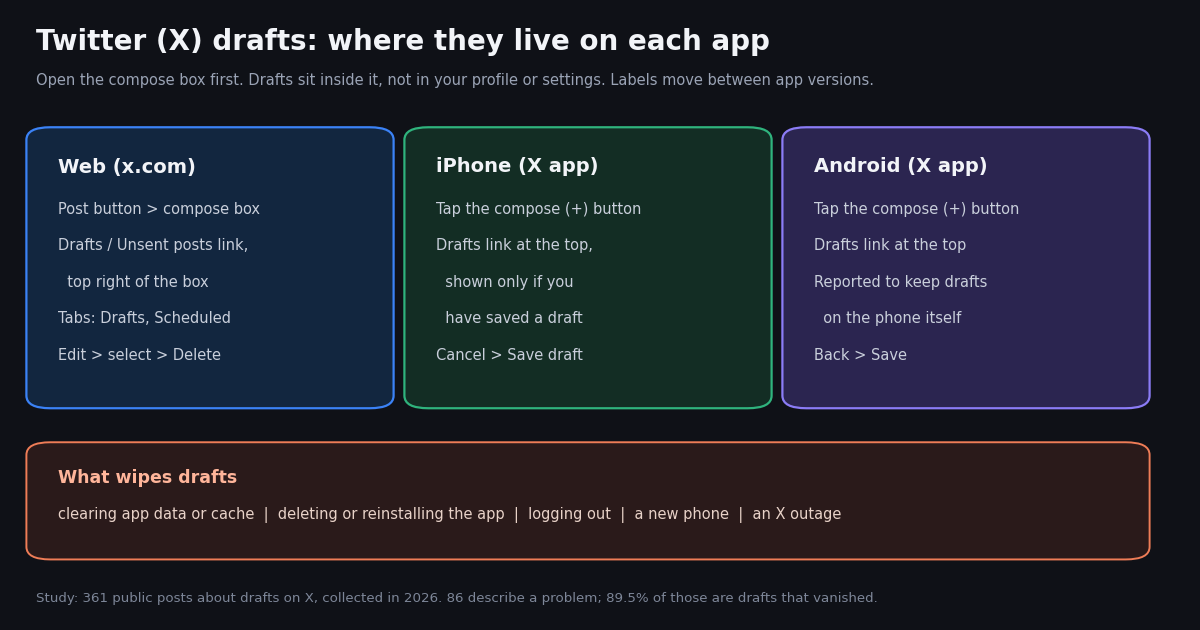
- Where drafts are: inside the compose box. Web: Post button, then Drafts / Unsent posts in the top right of the box. iPhone and Android: compose (+), then Drafts at the top.
- No draft yet, no link: the mobile Drafts link only shows once at least one draft is saved, which is a common reason for "twitter drafts not showing".
- Sync is unreliable: sources disagree on whether drafts sync between web and the apps; one 2026 bug report describes the Android app keeping drafts on the device. Do not count on seeing a phone draft on your laptop.
- What wipes drafts: clearing app data or cache, deleting or reinstalling the app, logging out, a new phone, and X-side bugs (one on March 26, 2026 hid web drafts and scheduled posts).
- Drafts vs scheduled posts: a draft waits for you; a scheduled post publishes at a set time. Both are listed under Unsent posts on the web.
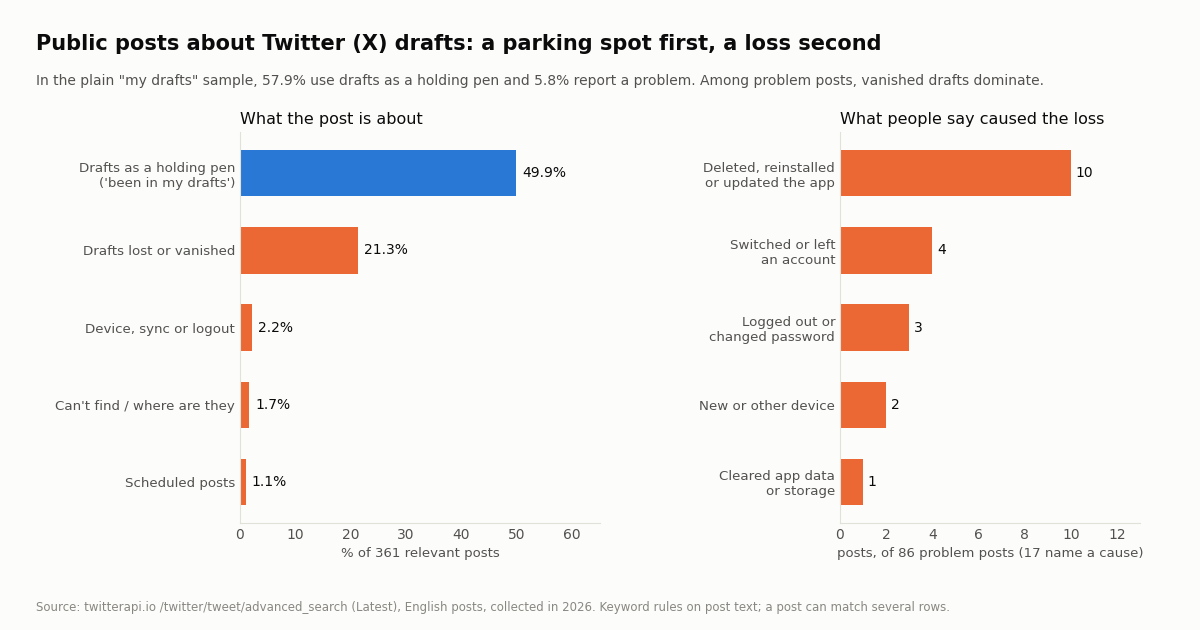
- Our study: of 361 public posts about drafts on X (collected in 2026), 23.8% describe a problem, and 89.5% of those are drafts that vanished.
"Where are my drafts on Twitter?" is one of those questions that sounds trivial until you are looking at an empty compose box with a half-written thread somewhere in it. X does not put drafts in your profile, in settings or in a sidebar. They sit inside the composer, behind a small link that is labeled differently on the web and in the apps, and that does not appear at all on mobile until you have saved something.
This guide gives the current route on x.com, iPhone and Android, explains why drafts go missing and what you can and cannot recover, separates drafts from scheduled posts, and closes with what 361 public posts about drafts tell us about how people actually use them. Menus on X change between app versions, so where we could not confirm a label first-hand we say so and describe the route in general terms.
One note before the steps: X's help center (help.x.com) refuses automated fetches, so where we rely on it we cite the page and quote only what other sources reproduce from it. Everything else on the page comes from sources we read this session or from our own data.
89.5% of 86 problem posts (361 relevant public posts about drafts on X, collected in 2026); in the plain "my drafts" sample, 57.9% just use drafts as a holding pen.
How to find drafts on Twitter (X) on the web
On a desktop or laptop browser, drafts are reached through the compose box. X's help page on posting (help.x.com/en/using-x/how-to-post) is quoted by several guides as saying you open the compose box on x.com, select Unsent posts in the top right corner of the box, and then select Drafts. Recent walkthroughs show the link labeled Drafts in the composer with an Unsent posts view behind it; the label has moved between the two over time.
Step 1. Go to x.com and sign in to the account that wrote the draft.
Step 2. Click the Post button in the left navigation to open the compose box (the box at the top of your Home timeline does not always show the link; the pop-up composer does).
Step 3. In the top right of the compose box, click Drafts (or Unsent posts, depending on the version you see).
Step 4. Pick a draft to load it back into the composer, edit it, and post it, or leave it where it is.
If the link is not there, refresh the page once; a social media guide by Lilach Bullock reports that the link sometimes only appears after a reload. If you still see nothing, the drafts you are looking for were probably saved in the mobile app, which is covered below.
How to access drafts on iPhone and Android
In the X app the route is the same on iPhone and Android: open the composer, then look at the top of it.
Step 1. Tap the compose (+) button at the bottom right of the Home timeline. On some versions it expands into a small menu; choose the option to write a post.
Step 2. At the top of the composer, tap Drafts. It sits near the Post button.
Step 3. Tap a draft to open it, or use the edit option in the draft list to select drafts and delete them.
The link only appears when there is something in it. An older Technipages guide notes that the Drafts option only exists if you actually have saved drafts, and newer guides describe the same behavior. If you see no Drafts link, that is usually because no draft was saved on that device, not because the feature is gone.
How to save a draft on mobile. Write the post, then tap the back arrow or Cancel in the top left of the composer. The app asks whether to save or delete; choose save. Swiping a draft or tapping its delete option removes it, and on the app there is no recycle bin.
Some guides describe a long-press on the compose button as a shortcut to drafts on iPhone. We could not confirm that this works on the current app, so treat it as something to try rather than a documented route.
How to access draft tweets, edit them and delete them
"How to access draft tweets" is the phrasing that has been rising in search, so here is the whole answer in one table. Labels are the ones current guides and X's help text use; X renames things, so if a label differs on your screen, look in the same place.
The last row trips people up. Drafts are tied to the account that saved them, so if you manage two accounts in the app, switch to the right one before you go looking.
Edit. Open the draft from the Drafts list; it loads back into the composer with its text and, usually, attached media. Change it and post, or close the composer and save again. Editing a draft is different from editing a published post, which is a separate feature limited to paid subscribers (see our edit guide).
Delete one. In the app, swipe the draft or use its delete option. On the web, open the Drafts or Unsent posts list, click Edit, tick the draft and click Delete.
Delete many. On the web, the same Edit view has Select all at the bottom left.
How many drafts can you keep? X does not publish a limit for drafts that we could find, and we did not see a reliable second source for one either. Long lists do get slow to scroll and, as above, piles of failed unsent posts have been linked to posting trouble, so pruning old drafts is a reasonable habit.
Do Twitter drafts sync between devices?
Not reliably, and the sources disagree on the details. Several how-to guides say drafts are saved on the device you wrote them on, so a draft from your iPhone will not appear on your laptop. Lilach Bullock's guide is more careful: drafts do not sync perfectly across every device in every situation, and she reports seeing drafts on the phone but not on the web, and the reverse.
The clearest technical detail comes from a March 2026 report by the Japanese tech site Roboin, written during an X bug. It observed that the Android X app kept saving and showing drafts normally while the web client failed, and concluded that the Android app does not sync drafts with the server; the same report describes the web client, iOS and the X Lite app as using server-side drafts, with X Lite keeping a local cache and showing the message "This draft has not been saved to the server." when saving failed.
The practical reading. A draft you save in one app should be considered local to that app until you have seen it somewhere else. If a draft matters (a long thread, an announcement, an apology you are still wording), copy the text into a notes app or a document as well. That is the only storage you control.
In our study, sync and device complaints were rare in public posts (2.2% of relevant posts), far behind drafts that simply vanished. That does not mean sync works; it means people notice a missing draft and rarely know why.
Why Twitter drafts disappear (and whether you can get them back)
Drafts are a convenience feature, not an archive. These are the causes that guides, bug reports and the posts in our study point to:
Clearing app data or cache. On Android, clearing storage for the X app (or a phone cleaner app doing it for you) removes anything kept locally, drafts included.
Deleting, reinstalling or updating the app. A reinstall starts the app with empty local storage. In our sample this was the cause people named in 10 of the 17 problem posts that named any cause.
Logging out, changing your password, or switching accounts. Signing out can clear the session's local data, and drafts belong to the account that saved them.
A new phone. Phone-to-phone transfers do not reliably carry app drafts with them.
Bugs on X's side. On March 26, 2026, Roboin documented drafts and scheduled posts failing to load on the web with "Something went wrong. Try reloading." and noted a similar bug in November 2025. In outages like these, drafts usually come back when the bug is fixed; there is nothing to do but wait.
Can you recover a deleted draft? Not through X. We found no trash folder for drafts in any current guide, and no API exposes them. If the draft was local and the app data is gone, it is gone. The only recovery is a copy you made yourself.
Stuck drafts can block posting. A May 2026 Roboin guide describes failed posts piling up as duplicate entries under Unsent posts and recommends clearing them on the web: open Drafts in the composer, go to Unsent posts, click Edit, use Select all, then Delete, repeating if a message says some unsent posts cannot be deleted.
Drafts vs scheduled posts on X
A draft waits for you. A scheduled post publishes itself at a time you set. Saving a draft never sets a publishing time, and a draft will sit in the list until you post or delete it.
Scheduling happens in the web composer: X documents it at help.x.com/en/using-x/how-to-schedule-a-post, and the calendar icon in the composer toolbar opens the date and time picker. X's help text, as quoted in third-party guides, lists drafts and scheduled posts together under Unsent posts, which is also where you edit or cancel a scheduled post before it goes out. A 2026 guide from the scheduling company Sked Social notes that X's help center does not document a schedule option in the iPhone or Android app, so plan to schedule from a browser.
If you want a regular posting rhythm rather than one-off saves, our guides to auto posting and to schedulers compare X's built-in scheduler with tools and code.
What 361 public posts say about Twitter drafts
We wanted to know what people actually run into with drafts, so we sampled public English posts about drafts on X and classified them with simple keyword rules (method below). Two searches fed the sample: a plain "my drafts" search, which shows everyday use, and a problem-focused search for drafts that disappeared, were deleted, did not show or did not sync.
Drafts are mainly a parking spot. In the plain "my drafts" search, 57.9% of relevant posts use drafts as a holding pen ("this has been in my drafts for months") and only 5.8% report a problem.
When there is a problem, it is a vanished draft. Across both searches, 86 of 361 relevant posts (23.8%) describe a problem. Of those, 89.5% are drafts that disappeared, 9.3% mention a device, sync or logout, 7.0% are people who cannot find their drafts, and 4.7% involve scheduled posts. The problem search was built around loss words, so this split overstates loss relative to finding; read it as the loudest complaint, not a census.
Only 17 of the 86 problem posts name a cause at all, so these counts are small; what they show is that the causes people blame are things they did to the app or account, which matches the list in the section above.
Few posts name a platform. 98.7% of relevant posts do not mention iPhone, Android or the web, which is why we cannot say from this sample which app loses drafts more often.
Loss posts get a little more sympathy. Problem posts have a median of 4 likes and 1 reply, against 1 like and 0 replies for all relevant posts.
For developers: drafts are not in any API
Drafts are private to the app and account that saved them, and no TwitterAPI.io endpoint reads or writes them; there is no drafts path in our endpoint list. X's public API does not expose the app's draft list either. If you want a draft workflow in your own tool, keep drafts in your own store (a database row, a file, a spreadsheet) and publish when ready.
Publishing from code through TwitterAPI.io runs through an authenticated session: one /twitter/user_login_v2 call ($0.10, with a proxy you supply) returns login_cookies, and each /twitter/create_tweet_v2 call is then 60 credits ($0.0006). The call acts as that account, so X can rate-limit, lock or suspend it; keep a human pace, expect to log in again when the session expires, and note that billing is per HTTP 200 call. Reads need no X account and cost $0.15 per 1,000 tweets returned, against $0.005 per post read on X's own pay-per-usage rate card (about 33x more per 1,000 tweets: $5 vs $0.15).
The example below is the read half: it pulls an account's recent posts with /twitter/user/last_tweets, so you can check that a post you published from a draft actually went out and see how it did.
import os, requests

BASE = "https://api.twitterapi.io"
H = {"X-API-Key": os.environ["TWITTERAPI_IO_API_KEY"]}

r = requests.get(f"{BASE}/twitter/user/last_tweets", headers=H,
                 params={"userName": "XDevelopers"}, timeout=30)
r.raise_for_status()
body = r.json()
for t in body["data"]["tweets"][:5]:
    print(t["createdAt"], t["likeCount"], t["text"][:80])
How we collected this
Question. When people post publicly on X about their drafts, what are they describing: everyday use, lost drafts, drafts they cannot find, sync between devices, or scheduled posts?
Query. Two English-language Latest searches on /twitter/tweet/advanced_search: "my drafts" lang:en -filter:retweets, and a problem search combining drafts with words such as disappeared, vanished, deleted, lost, not showing and sync. Posts were deduplicated by id; posts about sports drafts, email, essays and other apps were removed by rule (33 posts).
Window and sample. The latest matching posts at collection time, collected in 2026: 400 posts returned over 20 successful requests, 394 unique, 361 relevant. The plain search covers about the last day and a half of posts; the problem search reaches further back because such posts are rarer. Collection ran during a period of heavy HTTP 503 errors, so the sample is smaller than planned.
What the sample cannot show. Keyword rules on text miss posts about drafts that never use the word, and count jokes literally. Few posts name a platform, so platform comparisons are not possible. Public complaints are a biased slice of all users; people who never lose a draft do not post about it.
Privacy. Aggregates only. Search authors are private individuals, so the raw pages were kept in temporary storage and never committed; the published sample carries de-identified flags and counts with no ids, text, handles or URLs. No individual is quoted or profiled.
"""Keep your own drafts and check what went out.

X drafts are not exposed by any API, so this script keeps drafts in a local JSON
file and uses TwitterAPI.io reads to confirm which ones you have already posted.

    pip install requests
    export TWITTERAPI_IO_API_KEY=...
"""
import json, os, pathlib, requests

BASE = "https://api.twitterapi.io"
H = {"X-API-Key": os.environ["TWITTERAPI_IO_API_KEY"]}
STORE = pathlib.Path("drafts.json")
ACCOUNT = "XDevelopers"  # the account you post from


def load():
    return json.loads(STORE.read_text()) if STORE.exists() else []


def recent_texts(user, pages=3):
    texts, cursor = [], ""
    for _ in range(pages):
        params = {"userName": user}
        if cursor:
            params["cursor"] = cursor
        r = requests.get(f"{BASE}/twitter/user/last_tweets", headers=H, params=params, timeout=30)
        r.raise_for_status()
        body = r.json()
        if body.get("status") == "error":
            raise SystemExit(body.get("msg"))
        data = body.get("data") or {}
        texts += [t["text"] for t in data.get("tweets", [])]
        if not body.get("has_next_page") or not body.get("next_cursor"):
            break
        cursor = body["next_cursor"]
    return texts


if __name__ == "__main__":
    drafts = load()
    posted = recent_texts(ACCOUNT)
    for d in drafts:
        status = "posted" if any(d["text"][:60] in p for p in posted) else "still a draft"
        print(f"{status:14} {d['text'][:70]}")
Researching this?Free starter credits cover end-to-end testing — Google sign-in, no card. Get a key.
Questions readers ask
Where are my drafts on Twitter?
Inside the compose box. On x.com, click Post and then Drafts or Unsent posts in the top right of the box. In the iPhone or Android app, tap the compose (+) button and then Drafts at the top of the composer.
How do I access draft tweets on desktop?
Open x.com in a browser, click the Post button in the left menu to open the compose box, and select Drafts or Unsent posts in its top right corner. Drafts saved in the mobile app may not appear there, because draft sync between the apps and the web is not reliable.
Why are my Twitter drafts not showing?
Usually one of four reasons: you saved the draft on another device or app, you are signed in to a different account, no draft has been saved on this device (the mobile Drafts link only appears when one exists), or the app data was cleared or the app reinstalled. X-side bugs have also hidden drafts temporarily, for example on March 26, 2026.
Do Twitter drafts sync between iPhone, Android and the web?
Not reliably. Guides disagree, and a 2026 bug report describes the Android app keeping drafts on the phone while the web and iOS use server-side drafts. Treat a draft as local to the app you saved it in, and keep a copy elsewhere if it matters.
Can I recover deleted Twitter drafts?
Not through X. We found no trash folder for drafts, and no API reads them. If the draft was removed or the app data was cleared, the only recovery is a copy you saved yourself.
Do drafts post automatically?
No. A draft waits until you post it. To publish at a set time, schedule the post from the web composer instead; scheduled posts are listed under Unsent posts until they go out.
Is there a limit on how many drafts I can save on X?
X does not publish a draft limit that we could find. Long lists of failed unsent posts have been linked to posting problems, so deleting old drafts from time to time is sensible.
Can an API read my Twitter drafts?
No. Drafts are private to the app and account, and neither X's public API nor TwitterAPI.io exposes them. Keep drafts in your own store and publish when ready.
Continue
- X Help Center: How to post (drafts and Unsent posts; cited, not fetched)
- X Help Center: How to schedule a post (cited, not fetched)
- Roboin: X bug causes saved drafts and scheduled posts to disappear (March 2026)
- Roboin: How to delete accumulated unsent drafts on X (May 2026)
- X API pricing (pay-per-usage rate card)
- TwitterAPI.io documentation
- X (Twitter) API guide: data access without the official tiers
- Twitter auto post: X's scheduler, automation tools and code
- Twitter scheduler options compared
- How to edit a published post on X
- X (Twitter) post templates worth drafting
- How to DM on Twitter (X) in Chat
- TwitterAPI.io pricing for tweet reads and posting
- 01How to Block Words on Twitter (X): Muted Words, Step by Step
- 02Twitter (X) API in AutoGen: a Search Tool and a Two-Agent Team on Real X Data
- 03Twitter (X) API in PHP: a Guzzle client with safe decoding and cursor paging
- 04Twitter (X) Account Suspended: Why It Happened and How to Get It Back
- 05How to DM on Twitter (X): send a message on web, iPhone and Android
- 06Twitter Monitoring — A Practical Guide
- 07Can You Hide Who You Follow on Twitter (X)?
- 08Tweet Hunter (TweetHunter) Review: What It Automates, What It Costs, and the API Route for the Data Half
Writing about something you built with TwitterAPI.io? Our community rewards program pays API credits for honest tutorials, build logs and videos.
Stop reading. Start building.
Starter credits cover real testing on real data. Google sign-in, no card, no application queue.
Get an API keyAlready building with TwitterAPI.io? Publish an honest tutorial or build log about it and earn up to $200 a month in API credits.