X API Media Upload v2: How Twitter (X) Media Upload Works, Its Limits, and a One-Call Alternative
This page is about one narrow step: getting an image, GIF or video file onto X through an API and receiving the media_id you attach to a post. If you want the wider question of scheduling posts, publishing from RSS or a sheet, or choosing a posting tool, read our Twitter auto post guide instead; here we stay inside the upload itself, the endpoint paths, the limits, and the errors that come out of it.
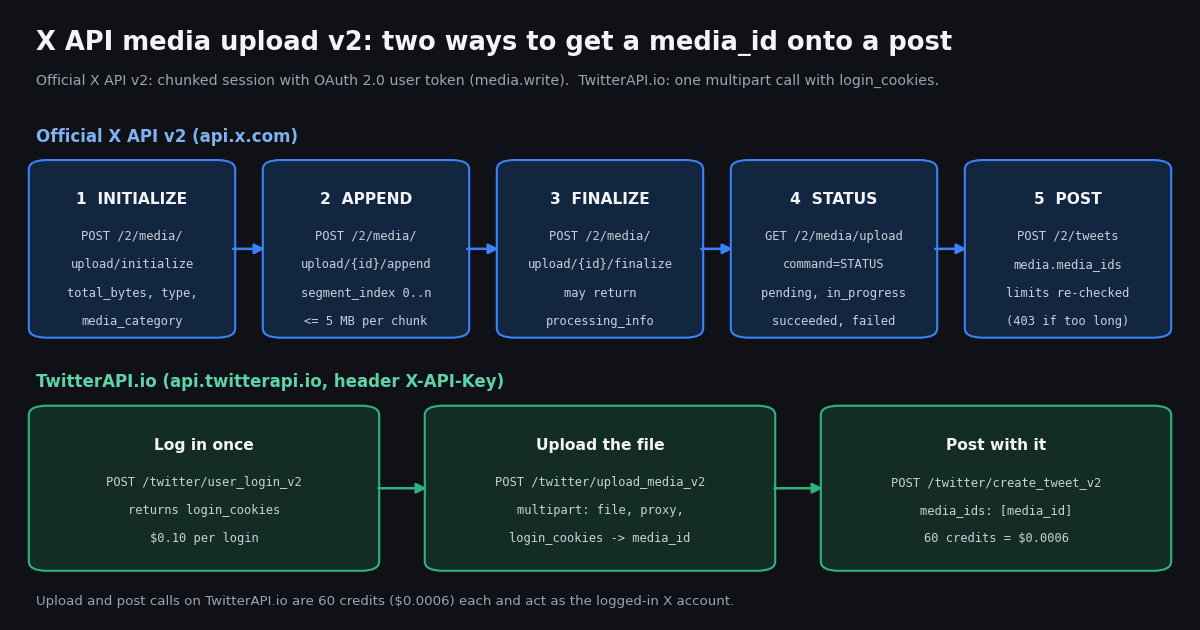
X rewrote its media upload for the v2 API. The old pattern of sending command=INIT, command=APPEND and command=FINALIZE to one upload URL is now described in X's docs as the previous protocol; the v2 flow uses separate paths for initialize, append and finalize, a JSON body at initialize, and an OAuth user token with the media.write scope. Every limit and path below was read from docs.x.com while writing this guide, and we quote the docs rather than forum folklore.
To ground the limits in what real accounts post, we pulled the latest 1280 posts from eight organization timelines (@NASA, @NBA, @NatGeo, @SpaceX, @XDevelopers, @nytimes, @BBCWorld, @verge) and measured the media attached to each: type, items per post, video duration, and the variants X serves back. The numbers appear in the tables and charts below.
How X API media upload v2 works: the five calls
X's chunked upload quickstart (docs.x.com/x-api/media/quickstart/media-upload-chunked) lists the flow as four upload calls and one post call. You authenticate as a user throughout: the endpoint reference for POST /2/media/upload lists an OAuth 2.0 user token with the media.write scope, or an OAuth 1.0a user token, as its security schemes. An app-only Bearer token is not among the accepted schemes, so upload always runs on behalf of a specific X user.
Initialize takes JSON, not form fields. The quickstart says so explicitly, and the request schema is strict (additionalProperties: false). The accepted media_type values in the reference include video/mp4, video/quicktime, video/webm, image/jpeg, image/png, image/gif, image/webp and subtitle types text/srt and text/vtt. total_bytes is capped at 17,179,869,184 bytes (16 GB) in the schema.
Append in chunks of 5 MB or less. X's guide says to keep each segment at or below 5 MB, with a server maximum of 8 MB, and to index segments from 0. The upside the docs list for chunking: uploads survive slow networks, can be paused and resumed, and a failed chunk can be retried on its own.
Finalize, then wait if told to. If the finalize response carries processing_info, the file is still being processed; poll the status call and sleep for check_after_secs between polls. States go pending, in_progress, then succeeded or failed. If finalize returns no processing_info, the media is ready. The example responses show expires_after_secs of 86,400, so an uploaded but unused media_id is not meant to be kept for long.
The simple upload still exists, for small files. POST /2/media/upload accepts a whole file in one request (base64 in a JSON body or raw bytes in multipart). X's media introduction says that simple path is for images and small files only, and that every video should go through the chunked flow.
# Official X API v2 chunked upload (api.x.com), OAuth 2.0 user token with media.write.
import math, os, time, requests

X = "https://api.x.com/2"
H = {"Authorization": f"Bearer {os.environ['X_USER_ACCESS_TOKEN']}"}  # user context, not app-only
path = "clip.mp4"
size = os.path.getsize(path)

# 1. INITIALIZE - JSON body, not form fields
init = requests.post(f"{X}/media/upload/initialize", headers=H, json={
    "media_type": "video/mp4", "total_bytes": size, "media_category": "tweet_video"}).json()
media_id = init["data"]["id"]

# 2. APPEND - chunks of at most 5 MB, segment_index from 0
CHUNK = 4 * 1024 * 1024
with open(path, "rb") as fh:
    for i in range(math.ceil(size / CHUNK)):
        requests.post(f"{X}/media/upload/{media_id}/append", headers=H,
                      data={"segment_index": i}, files={"media": fh.read(CHUNK)}).raise_for_status()

# 3. FINALIZE - may return processing_info
fin = requests.post(f"{X}/media/upload/{media_id}/finalize", headers=H).json()["data"]

# 4. STATUS - poll while processing_info says pending / in_progress
info = fin.get("processing_info")
while info and info["state"] in ("pending", "in_progress"):
    time.sleep(info.get("check_after_secs", 1))
    info = requests.get(f"{X}/media/upload", headers=H, params={
        "command": "STATUS", "media_id": media_id}).json()["data"].get("processing_info")
if info and info["state"] == "failed":
    raise SystemExit(f"processing failed: {info}")

# 5. POST - limits are checked again here (403 if the video is too long for this user)
r = requests.post(f"{X}/tweets", headers=H, json={
    "text": "Clip", "media": {"media_ids": [media_id]}})
print(r.status_code, r.json())
X media upload limits by media type
These are the caps from X's media introduction and best-practices pages (docs.x.com/x-api/media/introduction, docs.x.com/x-api/media/quickstart/best-practices). Two rules sit above the table: the limits follow the authenticated X account's Premium / verified status, not your developer API plan, and they are enforced twice, once by the upload endpoints and again when the media_id is attached to a post or DM.
Per post: up to 4 photos, or 1 animated GIF, or 1 video. You cannot mix a video with photos in one post.
GIFs have extra ceilings. The best-practices page recommends at most 1280x1080 resolution, at most 350 frames and at most 300 million pixels in total (width x height x frames) for an animated GIF, and warns that a GIF can fail at post creation even inside the 15 MB limit. Larger GIFs should go through the chunked flow with media_category=tweet_gif, which makes processing asynchronous.
Video recommendations. H.264 High Profile, 30 or 60 FPS, AAC-LC audio (High-Efficiency AAC is not supported), mono or stereo, YUV 4:2:0, progressive scan, no open GOP, aspect ratio between 1:3 and 3:1, and dimensions between 32x32 and 1280x1024 in the advanced list. X's recommended upload sizes are 1280x720 landscape, 720x1280 portrait and 720x720 square; subscribed users can upload 1080p and get 1080p playback.
If you omit media_category, X treats the upload as post media and picks tweet_image, tweet_video or tweet_gif from the content type. That default is fine for posts and wrong for DMs.
Twitter API upload image: the 5 MB rule and how to stay under it
The single most common image failure is size. X's image rule is 5 MB or less for tweet_image and dm_image, in JPG, PNG, GIF or WEBP. A phone photo or an exported PNG screenshot often weighs more than that, and a bot that forwards images from elsewhere will hit the cap sooner or later.
How big are the images organizations actually upload? X keeps the uploaded dimensions in each photo's original_info. Across the 249 photos in our sample, the median long edge was 3,000 pixels and 61.4% of photos were wider or taller than 2,048 pixels. So large originals are normal, and they pass when they are compressed well; the cap is on bytes, not pixels.
Check bytes before you call. Read the file size locally and refuse anything over 5 MB for an image or 15 MB for a GIF. That costs nothing and saves a failed write call.
Re-encode, do not just rename. Converting a large PNG photo to JPEG at quality 85 to 90, or resizing the long edge to about 2,048 to 4,096 pixels, usually brings a photo well under 5 MB. Keep screenshots with text as PNG if they are already small.
Strip what you do not need. Embedded thumbnails and large ICC profiles add bytes. Most image libraries drop them when you save a new copy.
Use the right category. An image meant for a DM should be uploaded as dm_image; X's best-practices page names a wrong category (for example a DM category on a post) as a common reason an upload succeeds and the post then fails.
We did not test which HTTP status X returns for an oversized image, and we are not going to guess one here. Treat any non-success response from the upload as final for that file, shrink it, and upload again.
# Shrink an image under X's 5 MB tweet_image cap before uploading (pip install pillow).
import io, os
from PIL import Image

CAP = 5 * 1024 * 1024

def fit_under_cap(path, out="upload.jpg", long_edge=4096):
    if os.path.getsize(path) <= CAP:
        return path
    img = Image.open(path).convert("RGB")
    img.thumbnail((long_edge, long_edge))
    for q in (90, 85, 80, 75, 70):
        buf = io.BytesIO()
        img.save(buf, "JPEG", quality=q, optimize=True)
        if buf.tell() <= CAP:
            open(out, "wb").write(buf.getvalue())
            return out
    raise ValueError("still over 5 MB; lower long_edge")
X media upload failed: the errors and what they mean
Most "media upload failed" reports trace back to a handful of causes that X's own docs describe. The table lists them with the documented signal; where X documents an exact message we quote it, and where it does not we say so.
The one exact message X documents. When POST /2/tweets rejects a video for length, the response is 403 Forbidden with the detail "This user is not allowed to post a video longer than N minutes.", where N is 20 by default and 125 for Premium / verified post video. X tells you to handle it even after a successful finalize.
Do not mix protocols. The chunked quickstart warns against sending command=INIT, command=APPEND or command=FINALIZE to POST /2/media/upload; those were the previous protocol. Only the status check still uses command=STATUS, on the GET. Older code samples and libraries that still send the command form are a frequent source of confusing failures.
Stuck in processing. If the state stays pending or in_progress, keep honoring check_after_secs rather than polling in a tight loop, and remember the session expiry in the initialize response. A video that never leaves processing is almost always a format problem; re-encode and start a new session.
Large IDs in JavaScript. X's best-practices page notes that media ids are long integers; use the string form of the id in languages that cannot hold a 64-bit integer exactly.
What organizations actually upload: media on 987 posts
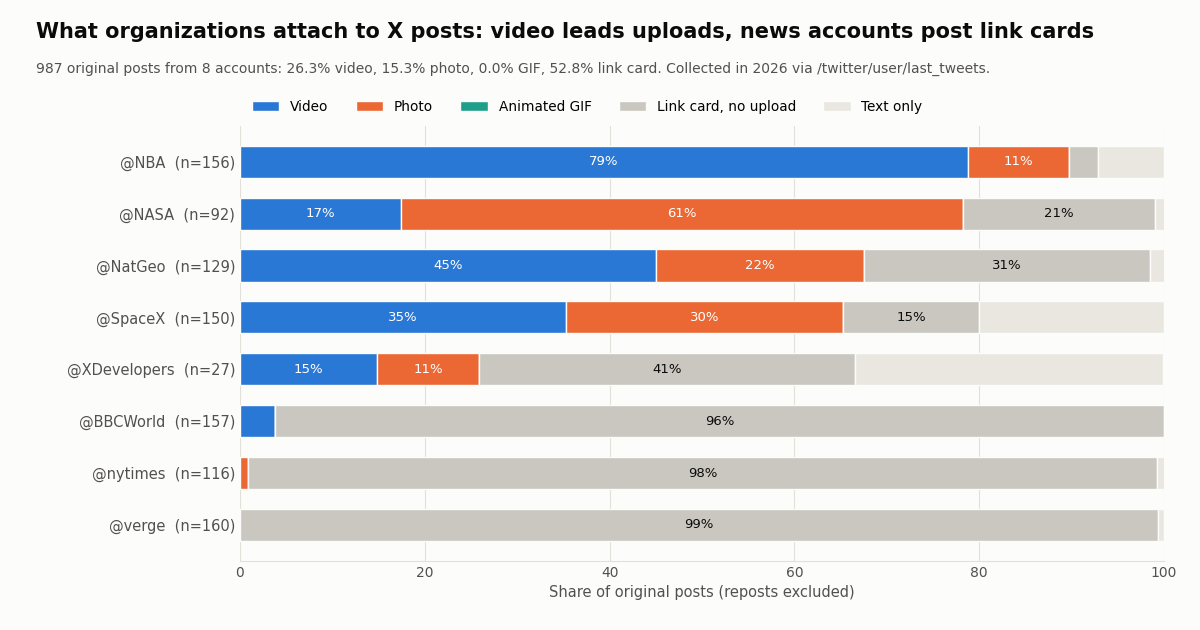
Limits tell you what is allowed; a sample tells you what is normal. We read the latest 1280 posts from eight organization accounts through /twitter/user/last_tweets (8 pages each), dropped the 293 reposts because their media was uploaded by someone else, and classified each of the 987 original posts by what it carried in extendedEntities.media.
Video is the most common upload. Across all original posts, 26.3% carried a video and 15.3% carried photos. Not one post in the sample carried an animated GIF (0.0%), which says something about how little GIFs matter for brand publishing next to video.
Half of the posts upload nothing. 52.8% of original posts were link cards: the image you see is pulled from the linked page's preview tags, not uploaded through the media endpoints. News publishers live there (@verge 99.4%, @nytimes 98.3%, @BBCWorld 96.2%). If your goal is a picture next to a link, a card may be all you need, and no upload call is involved.
Four-photo posts are rare. Of the 411 posts with media, 363 carried a single item, 15 carried two, 8 three and 25 the maximum of four (6.1%).
Video length, variants and resolution in the sample
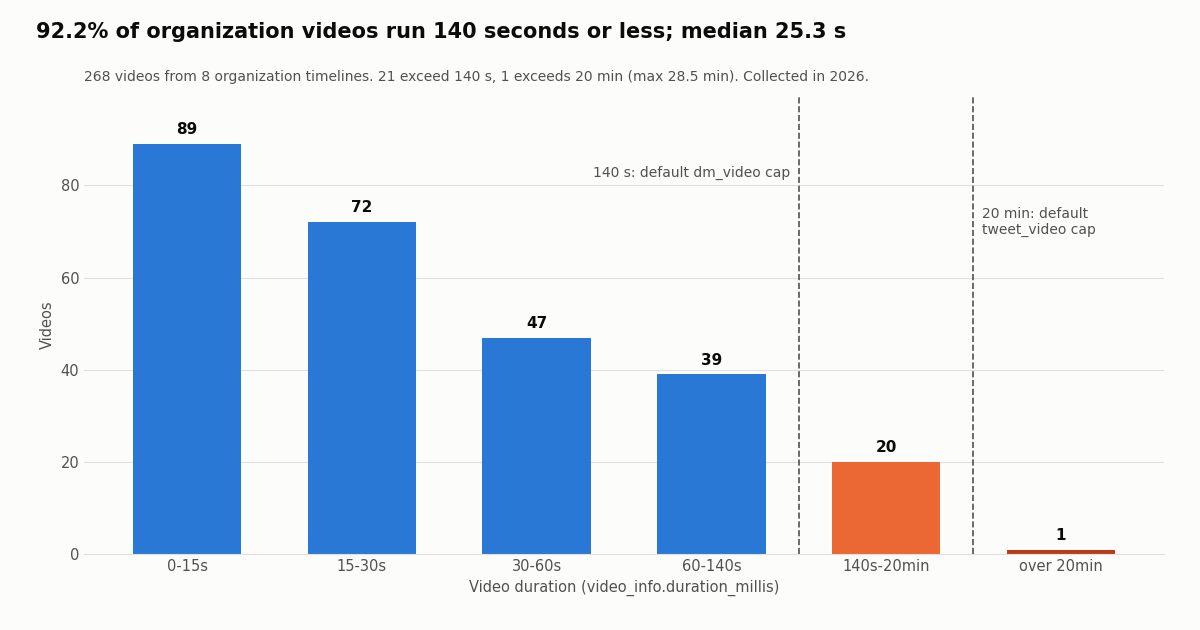
The 268 videos in the sample tell you which video limit you are likely to meet. The median duration was 25.3 seconds and the 90th percentile 119.2 seconds; 92.2% ran 140 seconds or less, which is the default DM video cap, and 99.6% fit the 20-minute default post cap. Only 1 video ran longer than 20 minutes (28.5 minutes), which needs a Premium / verified account on X's rules.
What X serves back. Every video in the sample came back with an HLS playlist (100.0%) plus a median of 4 MP4 renditions in video_info.variants. The highest MP4 bitrate had a median of 10.4 Mbps and a maximum of 25.1 Mbps; the most common top resolution was 3840x2160 (53 videos). X transcodes whatever you upload into this ladder, so a clean H.264 master at the recommended settings is worth more than a huge file.
A hint about the upload category. 79.1% of the video thumbnails sat under an amplify_video_thumb path in media_url_https, the rest under media or ext_tw_video_thumb. The path name matches X's amplify_video category, which suggests most of these brand videos were uploaded through ads or media-studio tooling rather than plain post upload. It is a reading of URL paths, not something X documents, so treat it as a hint only.
Upload media v2 on TwitterAPI.io: one call, then post
TwitterAPI.io exposes the upload as a single endpoint, POST /twitter/upload_media_v2 (reference: docs.twitterapi.io/api-reference/endpoint/upload_media_v2). It takes a multipart/form-data body and returns JSON with media_id, status and message. You authenticate the API call with your X-API-Key header; the X account that owns the upload comes from login_cookies.
Step 1, log in once. POST /twitter/user_login_v2 with user_name, email, password, proxy and, strongly recommended by the docs, totp_secret (the base32 2FA seed). It returns login_cookies and costs 10,000 credits ($0.10). The docs note these cookies only work with the v2-suffixed endpoints and that accounts without 2FA can yield cookies that cannot post. Store them and reuse them; log in again only when a call says the session is no longer valid.
Step 2, upload. Send the file with login_cookies and proxy to /twitter/upload_media_v2. Each call is 60 credits = $0.0006. There is no initialize, append, finalize or status loop on your side.
Step 3, post. POST /twitter/create_tweet_v2 with login_cookies, tweet_text, proxy and media_ids (a list of strings from step 2). Also 60 credits = $0.0006. Optional fields include reply_to_tweet_id, attachment_url for a quote, community_id, and is_note_tweet for long posts on Premium accounts.
X's limits still apply. The file still ends up on X under that account, so the 5 MB image, 15 MB GIF and per-account video caps in the table above are the ones to check before you upload. The is_long_video flag mirrors X's own rule that long video belongs to Premium accounts.
What you are signing up for. Every write call acts as that X account. X can rate-limit, lock or suspend an account that posts at an inhuman rate, so keep a human pace and space posts out. The session can need a fresh login. Billing is per HTTP 200 call, so read status and message on every response and stop retrying a file that keeps failing.
Cost: official X API vs TwitterAPI.io for upload and posting
X's pay-per-usage rate card (docs.x.com/x-api/getting-started/pricing) bills writes per request and reads per resource. It lists Post: Create at $0.015 per request and $0.200 per request when the post contains a URL; there is no separate media upload line on the card, and Media Metadata is $0.005 per request. New paying accounts get $20 in X API credits after saving a card and buying credits, plus a match of the first auto-recharge up to $50.
Reads are where the gap is widest. Confirming what you posted, or auditing a timeline's media like we did here, is a read. At $5 per 1,000 posts on X's card against $0.15 per 1,000 tweets on TwitterAPI.io, that is about 33x. X also caps pay-per-usage at 3 million post reads a month before Enterprise.
Credits and plans. $1 = 100,000 credits, and purchased credits never expire. New accounts that pass the automatic bot check get up to $1 of free credits (at most 100,000 credits, no card, one per person or network, expiring after 31 days). Subscriptions run from Starter at $29 a month to Business at $1,499 a month; see the pricing page for what each includes. Rate limits start at 0.2 requests per second before the first payment and rise to 20 once you have paid.
Which one to use. If you already run an X developer app with OAuth user tokens and need ads media (amplify_video), subtitles or the full DM category set, the official chunked flow is the tool built for it. If you post from a few accounts you control and want one call per file at a fixed price, the upload endpoint above is simpler.
How we collected this
Question. What media do large organization accounts attach to their X posts, and how close do they come to the v2 upload limits?
Accounts and endpoint. @XDevelopers, @NASA, @nytimes, @NatGeo, @SpaceX, @NBA, @verge and @BBCWorld, read with /twitter/user/last_tweets (replies excluded, newest first), 8 pages of 20 posts each, collected in 2026. 64 requests, 1280 posts, about $0.19 at 15 credits per tweet returned. For your own runs, /twitter/user/tweet_timeline (by numeric userId, from /twitter/user/info) is the steadier choice, because last_tweets can come back empty for accounts X keeps out of search.
Method. Reposts (293) were dropped because their media belongs to another account. For the 987 original posts we read extendedEntities.media[] (type, video_info.duration_millis, video_info.variants, original_info) and the card field. Each account's window runs from its oldest to newest post in the sample, so busy accounts cover days and quiet ones weeks.
What the sample cannot show. File sizes in bytes (X does not return them on read), the media_category actually used at upload, failed uploads, and anything about small or personal accounts. Eight brand accounts are not a census; the mix shifts with each organization's content strategy.
Privacy. Aggregates only, organization accounts only. Reposted and quoted authors were not analyzed, and raw pages were kept out of the repository; the published sample holds de-identified per-media rows with no ids, URLs or text.
# Measure what an account attaches to its posts (reads: 15 credits per tweet returned).
import collections, os, requests

BASE = "https://api.twitterapi.io"
H = {"X-API-Key": os.environ["TWITTERAPI_IO_API_KEY"]}

def media_mix(user, pages=8):
    mix, cursor = collections.Counter(), ""
    for _ in range(pages):
        r = requests.get(f"{BASE}/twitter/user/last_tweets", headers=H,
                         params={"userName": user, "cursor": cursor}, timeout=30).json()
        data = r.get("data") or {}
        for t in data.get("tweets", []):
            if t.get("retweeted_tweet"):
                continue  # a repost carries someone else's upload
            types = {m["type"] for m in (t.get("extendedEntities") or {}).get("media", [])}
            mix["video" if "video" in types else "animated_gif" if "animated_gif" in types
                else "photo" if "photo" in types else "card" if t.get("card") else "text"] += 1
        if not r.get("has_next_page"):
            break
        cursor = r.get("next_cursor", "")
    return mix

print(media_mix("NASA"))
"""x_media_post.py - upload an image or video to X (Twitter) and post it, through TwitterAPI.io.

    pip install requests
    export TWITTERAPI_IO_API_KEY=...        # dashboard at twitterapi.io
    export X_LOGIN_COOKIES=...              # from /twitter/user_login_v2 (log in once, reuse it)
    export X_PROXY=http://user:pass@host:port   # the proxy you supply for write actions
    python x_media_post.py photo.jpg "Launch day"

Cost: upload 60 credits ($0.0006) + post 60 credits ($0.0006) per HTTP 200 call.
Each call acts as the logged-in X account: keep a human pace.
"""
import os
import sys
import time

import requests

BASE = "https://api.twitterapi.io"
HEADERS = {"X-API-Key": os.environ["TWITTERAPI_IO_API_KEY"]}
COOKIES = os.environ["X_LOGIN_COOKIES"]
PROXY = os.environ["X_PROXY"]

# X's own limits (docs.x.com/x-api/media/introduction). The file still lands on X,
# so check it locally before spending a call.
LIMITS_MB = {".jpg": 5, ".jpeg": 5, ".png": 5, ".webp": 5, ".gif": 15}


def precheck(path):
    ext = os.path.splitext(path)[1].lower()
    size_mb = os.path.getsize(path) / (1024 * 1024)
    cap = LIMITS_MB.get(ext)
    if cap and size_mb > cap:
        sys.exit(f"{path} is {size_mb:.1f} MB; X caps {ext} uploads at {cap} MB. Resize or compress first.")
    return size_mb


def upload(path, long_video=False):
    with open(path, "rb") as fh:
        r = requests.post(
            f"{BASE}/twitter/upload_media_v2",
            headers=HEADERS,
            files={"file": (os.path.basename(path), fh)},
            data={"login_cookies": COOKIES, "proxy": PROXY,
                  "is_long_video": "true" if long_video else "false"},
            timeout=300,
        )
    body = r.json()
    if r.status_code != 200 or body.get("status") != "success":
        sys.exit(f"upload failed: HTTP {r.status_code} {body.get('message') or body}")
    return body["media_id"]


def post(text, media_ids):
    r = requests.post(
        f"{BASE}/twitter/create_tweet_v2",
        headers=HEADERS,
        json={"login_cookies": COOKIES, "proxy": PROXY,
              "tweet_text": text, "media_ids": media_ids},
        timeout=60,
    )
    body = r.json()
    if r.status_code != 200 or body.get("status") != "success":
        sys.exit(f"post failed: HTTP {r.status_code} {body.get('message') or body}")
    return body["tweet_id"]


def confirm(tweet_id):
    # Read the post back (15 credits per tweet returned) and list what X attached.
    r = requests.get(f"{BASE}/twitter/tweets", headers=HEADERS,
                     params={"tweet_ids": tweet_id}, timeout=30)
    for t in r.json().get("tweets", []):
        for m in (t.get("extendedEntities") or {}).get("media", []):
            info = m.get("video_info") or {}
            print(m["type"], m.get("media_url_https"),
                  f"{info.get('duration_millis', 0) / 1000:.1f}s" if info else "")


if __name__ == "__main__":
    files, text = sys.argv[1:-1], sys.argv[-1]
    if not 1 <= len(files) <= 4:
        sys.exit("X allows up to 4 photos, or 1 GIF, or 1 video per post.")
    ids = []
    for f in files:
        precheck(f)
        ids.append(upload(f))
        time.sleep(2)  # human pace between write calls
    tweet_id = post(text, ids)
    print("posted", tweet_id)
    time.sleep(5)
    confirm(tweet_id)
Questions readers ask
What is the X API media upload v2 endpoint?
On the official X API it is a set of endpoints under /2/media/upload: POST /2/media/upload/initialize, POST /2/media/upload/{id}/append, POST /2/media/upload/{id}/finalize and GET /2/media/upload?command=STATUS, plus a simple one-shot POST /2/media/upload for small images. On TwitterAPI.io the equivalent is POST /twitter/upload_media_v2, one multipart call that returns a media_id.
What is the image size limit for the X API?
5 MB for tweet_image and dm_image, in JPG, PNG, GIF or WEBP, per X's media docs. Animated GIFs uploaded as tweet_gif or dm_gif can be up to 15 MB. The cap is the same for Premium and default accounts.
How long can a video uploaded through the X API be?
For a post: 0.5 seconds to 20 minutes and up to 8 GB on a default account, 125 minutes and 16 GB on an X Premium / verified account. For a DM: 140 seconds and 512 MB by default, 10 minutes and 1 GB for Premium. The limit follows the uploading and posting user, not your developer plan.
Why does my media upload succeed but the post fails?
X checks the media twice: at upload and again when you attach the media_id to POST /2/tweets. A video longer than the posting user's cap fails at post time with 403 and "This user is not allowed to post a video longer than N minutes." A media category that does not match the target (a DM category on a post) and GIFs over the frame or pixel limits are the other documented causes.
Can I still send command=INIT to the upload endpoint?
X's chunked upload guide says not to send command=INIT, command=APPEND or command=FINALIZE to POST /2/media/upload; those belong to the previous protocol. The v2 flow uses dedicated initialize, append and finalize paths. command=STATUS is still used on the status GET.
What chunk size should I use for chunked upload?
X says to keep each appended segment at or below 5 MB, with a server maximum of 8 MB, and to number segments from 0. Its own samples use 4 MB chunks.
How many images can one post have?
Up to 4 photos, or 1 animated GIF, or 1 video, per X's best-practices page. In our sample of organization posts with media, only 6.1% used all four photo slots.
How much does it cost to upload media with TwitterAPI.io?
60 credits ($0.0006) per /twitter/upload_media_v2 call and 60 credits ($0.0006) per /twitter/create_tweet_v2 call, after a one-time /twitter/user_login_v2 login at $0.10. Billing is per HTTP 200 call. Each call acts as the logged-in X account, so keep a human pace; X can rate-limit, lock or suspend accounts that post too fast.
Continue
- X API docs: Chunked media upload (initialize, append, finalize, status; media categories)
- X API docs: Media best practices (size and duration limits, GIF and video specs, 403 posting error)
- X API docs: Media upload endpoints on the X API v2 (limits, simple vs chunked)
- X API reference: Initialize media upload (request schema, media types, total_bytes cap)
- X API docs: Pay-per-usage pricing and credits
- TwitterAPI.io docs: Upload media v2 (file, proxy, login_cookies, is_long_video)
- X API overview and pricing comparison
- Twitter auto post: scheduling, RSS and posting from code
- log in and post through the API
- bulk posting from templates
- download Twitter media in bulk
- full list of TwitterAPI.io endpoints
- free Twitter video downloader
- TwitterAPI.io pricing and plans
- 01How do you earn TwitterAPI.io credits by writing about the API?
- 02Twitter (X) Lists: What They Are, How to Make One, and How to Use Them
- 03Tweepcred: How Twitter (X) Scores Account Reputation, Read From the Code
- 04Tweet Failed to Send on Twitter (X)? What Each Error Means and How to Fix It
- 05How to Embed a Video on Twitter (X): In a Post or on Your Website
- 06Twitter (X) Media Viewer: How to Browse an Account's Photos and Videos
- 07Social Media API Explained: Four Kinds, and What the Twitter (X) Data Costs
- 08Upload-Post Alternative for Twitter (X): Post, Read and Search From One API
Stop reading. Start building.
Starter credits cover real testing on real data. Google sign-in, no card, no application queue.
Get an API keyAlready building with TwitterAPI.io? Publish an honest tutorial or build log about it and earn up to $200 a month in API credits.