Twitter (X) Video Not Playing? Here Is How to Fix It
A video that spins forever, a black box where the player should be, or the flat message "This media could not be played": these are the three ways a Twitter (X) video fails, and they point to different causes. Most troubleshooting lists treat them as one problem and hand you fifteen random steps. This page does the opposite. It starts with a diagnosis that takes half a minute, then gives you only the fixes that match what you saw.
The guide covers the X app on iPhone and Android, X in a desktop browser, and embedded X videos on other sites. It ends with a section for developers: if your job is to get the actual video file out of a post, you can skip the player entirely and read the MP4 variant URLs from the post's media object.
One scope note. This page is about videos that will not play. If the problem is a video you uploaded that fails to process, that is an upload issue with different causes (format, length, and size limits) and is not covered here.
First, a 30-second diagnosis: one video or every video?
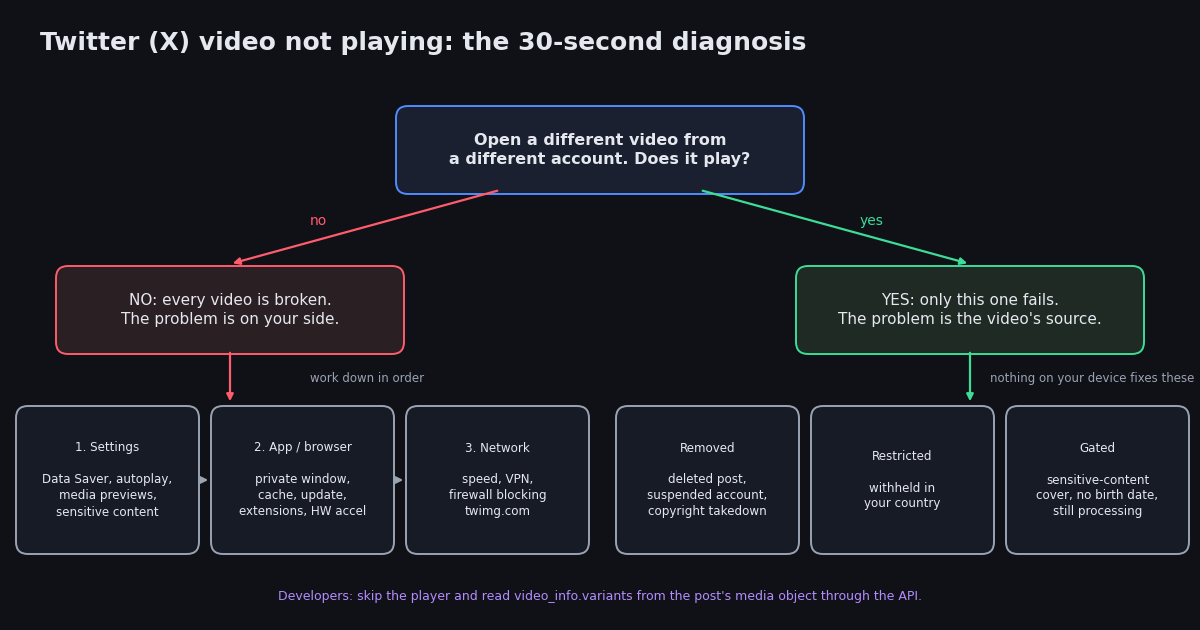
Before you clear a single cache, open a different video from a different account, ideally one posted today by a large account so you know it is live. Then compare what you see. The symptom tells you which layer is broken, and that decides which fixes are worth your time.
If every video is broken, work down the next three sections in order: settings first (they take seconds), then app or browser state, then network. If a single video is broken, read the section on the video itself and stop there; nothing on your device will revive a post that X has removed.
The video itself: removed, restricted, or gated
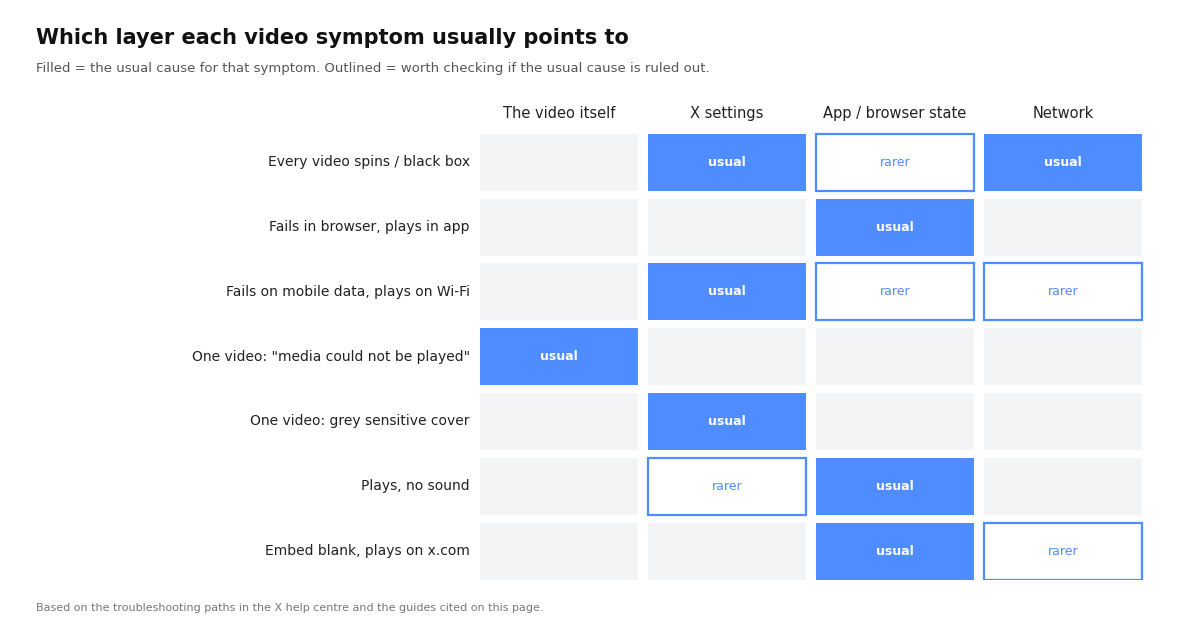
If exactly one video fails and the player shows "This media could not be played", the file is no longer being served to you. The common reasons, in rough order of how often people hit them:
The post or account is gone. The author deleted the post, the account was suspended, or the account went private and you do not follow it. The text of a deleted post can linger in your timeline cache for a while, which is why the video looks like it should be there.
A copyright or policy takedown. X removes media on valid DMCA notices and on policy grounds; the post survives with its text, the media does not. The post usually shows a short notice when this has happened.
Region restriction. Some media is withheld in specific countries at the request of a rights holder or a government. If a friend abroad can play it and you cannot, this is the reason, and a VPN set to that country will usually play it.
Age or sensitivity gating. A video marked as potentially sensitive shows a grey cover instead of a player until you either tap through or change the display setting described in the next section. If you are logged out, or your account has no birth date on file, X may refuse to show the video at all.
An upload that never finished processing. Very new posts sometimes show a player that cannot load because X is still transcoding the file. Wait a minute and reload before assuming anything else.
Four X settings that silently block video
These are the switches that make every video fail while everything else on X looks normal. All four live under Settings and privacy, then Accessibility, display, and languages, and the paths below match what the X app showed in guides we checked in 2026; menu labels move between releases, so search the settings screen if a label differs.
Data Saver. Under Data usage. When it is on, X stops loading video on mobile data and may show only a still frame. Turn it off, or leave it on and accept that video only loads on Wi-Fi.
Video autoplay. Under Data usage. Options are Never, On Wi-Fi only, or On mobile data and Wi-Fi. "Never" does not stop a video from playing when you tap it, but it makes every video look dead in the feed, and some people take that for a bug.
Media previews. Under Display and sound. If previews are off, posts show a link to the media instead of an inline player.
Display media that may contain sensitive content. Under Privacy and safety, then Content you see. Off means every video flagged as sensitive shows a grey cover; on means it plays inline. This setting is only available if your account has a birth date showing you are an adult.
On iPhone there is one more switch outside the app: Settings, then X, then Cellular Data. If it is off, the app loads on Wi-Fi only. Android has the equivalent under Settings, Apps, X, Mobile data and Wi-Fi.
App and browser fixes, in the order that finds the cause fastest
Do these in order and stop as soon as video plays. Each step rules out one thing, so the order matters more than the number of steps.
In a desktop browser:
1. Open x.com in a private or incognito window. Extensions are disabled there by default. If video plays, an extension is the cause, almost always an ad or tracker blocker that stops the player script or the video.twimg.com host. Add x.com to that extension's allow list rather than uninstalling it.
2. Clear site data for x.com only. In Chrome: the lock icon, Site settings, Clear data. You stay logged in elsewhere and lose nothing but the stale cache.
3. Update the browser. X's player uses current media APIs; a browser more than a few versions old can lose video while everything else still works.
4. Toggle hardware acceleration. A black box with audio playing is the classic sign. In Chrome it is under Settings, System; in Firefox under Settings, General, Performance. Flip it, restart the browser, test again.
5. Try a second browser. If Safari plays the video and Chrome does not, the problem is a Chrome profile setting, not X.
In the X app:
1. Fully close the app and reopen it. Swipe it away in the app switcher; minimising it does nothing.
2. Update the app from the App Store or Google Play. Old builds lose compatibility with X's video delivery first.
3. Clear the media cache. Android: Settings, Apps, X, Storage, Clear cache (not Clear data, which signs you out). Inside the app on both platforms: Settings and privacy, Accessibility, display, and languages, Data usage, Media storage, Clear media storage. iPhone has no system-level cache button; offloading the app under Settings, General, iPhone Storage keeps your login and drops the cache.
4. Restart the phone. Dull, but it clears a stuck media decoder more often than people expect.
5. Turn off Low Power Mode or Battery Saver while you test. Both can throttle video decoding.
Embedded videos on other websites use X's embed player, which needs third-party cookies and the same video.twimg.com host. If the embed is blank but the same post plays on x.com, allow third-party cookies for that site or open the post directly.
Network: speed, VPNs, and blocked hosts
Video is the first thing to fail on a weak connection because X picks a bitrate from the connection quality and gives up when even the lowest rendition cannot keep up. Troubleshooting guides we checked in 2026 put the practical floor at about 3 Mbps for standard quality and 5 Mbps for HD; run any speed test and compare.
Switch networks. Wi-Fi to mobile data, or the other way round. If video plays on one and not the other, the network is the cause and the rest of this page does not apply.
Turn the VPN off, then on again with a different location. Some VPN exit nodes are rate-limited or blocked by X's CDN, and some countries withhold specific media. A VPN can therefore both cause and cure a video failure.
Corporate or school networks often block video.twimg.com and *.twimg.com while leaving x.com itself reachable, which produces endless buffering with no error. Test on your phone's data to confirm.
DNS and ad-blocking at the network level (Pi-hole, NextDNS, some router firmware) do the same thing as a browser ad blocker, but for every device in the house. Check the block log for twimg.com.
Still broken? Check whether X itself is down
If you have worked through everything above and every video is still failing, check whether other people are seeing the same thing before you change anything else. Search X for "videos not loading" sorted by Latest, or check a third-party outage tracker. Video delivery has had platform-wide incidents in the past, and when it is X's problem the only fix is patience.
A platform-wide failure usually looks the same on every device and every network at once, and it starts suddenly. A problem that is only yours usually started after you installed something, changed a setting, or moved to a new network.
Developer route: read the MP4 URL from the post instead of fighting the player
If you are building something, you do not need the player at all. Every video post carries a media object with a list of renditions, and you can read it with one API call. On twitterapi.io, GET /twitter/tweets takes one or more post IDs and returns each post's media under extendedEntities.media; a video entry has type set to video (or animated_gif) and a video_info.variants array. Each variant has a content_type, a url, and, for MP4 renditions, a bitrate. Pick the highest bitrate video/mp4 entry for the best quality, or the application/x-mpegURL entry if you want the adaptive HLS playlist.
The script below prints every rendition for a post and the URL of the best MP4. Set TWITTERAPI_IO_KEY to a key from your dashboard. The returned URLs point at X's CDN, so the usual copyright rules apply to whatever you do with the file; the point here is diagnosis and integration, not redistribution.
Cost, since people ask: reading a post costs about $0.00015 on twitterapi.io ($0.15 per 1,000 tweets, pricing page checked in 2026) against $0.005 per post read on the official X API's pay-per-use pricing (docs.x.com, checked in 2026). That is roughly 33 times cheaper for the same media object, and there is no developer-app approval step: an API key from the dashboard is enough.
import os
import requests

HEADERS = {"X-API-Key": os.environ["TWITTERAPI_IO_KEY"]}  # from twitterapi.io/dashboard


def video_variants(tweet_id):
    """Return the list of video renditions for a post, or [] if it has no video."""
    r = requests.get(
        "https://api.twitterapi.io/twitter/tweets",
        params={"tweet_ids": tweet_id},
        headers=HEADERS,
        timeout=30,
    )
    r.raise_for_status()
    tweets = r.json().get("tweets") or []
    if not tweets:
        return []
    tweet = tweets[0]
    # Media lives under extendedEntities.media; fall back to a top-level media list if present
    media = (tweet.get("extendedEntities") or {}).get("media") or tweet.get("media") or []
    out = []
    for m in media:
        if m.get("type") in ("video", "animated_gif"):
            out.extend((m.get("video_info") or {}).get("variants", []))
    return out


if __name__ == "__main__":
    variants = video_variants("1234567890123456789")  # replace with the post ID from the URL
    if not variants:
        print("No video on this post (or the post is gone / restricted).")
    for v in variants:
        print(f"{v.get('content_type'):24} {str(v.get('bitrate', '')):>8}  {v.get('url')}")
    mp4s = [v for v in variants if v.get("content_type") == "video/mp4"]
    if mp4s:
        best = max(mp4s, key=lambda v: v.get("bitrate", 0))
        print("\nbest MP4:", best["url"])
Why X videos break more than images: how delivery works
Images on X are single files. Videos are not: X transcodes each upload into several renditions at different resolutions and bitrates, plus an adaptive HLS playlist, and the player picks a rendition from your connection quality and switches as it changes. That design is why the same post can play on your phone and fail on your laptop, and why a slightly slow connection produces buffering rather than a lower-quality picture.
It is also why ad blockers are the most common browser-side cause. The player script and the renditions are served from twimg.com hosts rather than from x.com, and a blocklist that treats those hosts as trackers kills the video while the rest of the page loads normally. Allow-listing x.com in the blocker usually fixes it in one step.
Finally, autoplay rules differ by platform. Mobile browsers and some desktop browsers only autoplay muted video, so a feed full of silent players is expected behaviour, not a bug; tapping the speaker icon in the player turns the sound on for that video.
"""Check whether a post's video is actually reachable, from the command line.

Useful when a video will not play and you want to know whether the file exists
before you spend time on device fixes. Needs TWITTERAPI_IO_KEY in the environment.
"""
import os
import sys
import requests

HEADERS = {"X-API-Key": os.environ["TWITTERAPI_IO_KEY"]}


def check(tweet_id):
    r = requests.get(
        "https://api.twitterapi.io/twitter/tweets",
        params={"tweet_ids": tweet_id},
        headers=HEADERS,
        timeout=30,
    )
    r.raise_for_status()
    tweets = r.json().get("tweets") or []
    if not tweets:
        return "post not found: deleted, private, or the account is suspended"
    tweet = tweets[0]
    media = (tweet.get("extendedEntities") or {}).get("media") or tweet.get("media") or []
    videos = [m for m in media if m.get("type") in ("video", "animated_gif")]
    if not videos:
        return "post exists but has no video attached (media removed, or it never had one)"
    variants = (videos[0].get("video_info") or {}).get("variants", [])
    mp4s = [v for v in variants if v.get("content_type") == "video/mp4"]
    if not mp4s:
        return "video entry present but no MP4 rendition listed; try the HLS playlist"
    best = max(mp4s, key=lambda v: v.get("bitrate", 0))
    # HEAD request to the CDN: a 200 here means the file is being served
    head = requests.head(best["url"], timeout=30, allow_redirects=True)
    return f"CDN responded {head.status_code} for the {best.get('bitrate')} bps rendition: {best['url']}"


if __name__ == "__main__":
    tweet_id = sys.argv[1] if len(sys.argv) > 1 else "1234567890123456789"
    print(check(tweet_id))
Questions readers ask
Why do Twitter videos not play on my phone but work on my computer?
Almost always a mobile-only setting or permission: Data Saver, video autoplay set to Wi-Fi only, the app's cellular data permission, or Low Power Mode. Check those four, then update the app and clear its media storage. If it only fails on mobile data and not on Wi-Fi, it is Data Saver or the cellular permission.
What does "This media could not be played" mean on X?
The player asked for the video and X refused or could not find it. The post was deleted, the account is suspended or private, the media was removed after a copyright or policy complaint, the video is withheld in your country, or it is still being processed. It is the video's problem, not your device's, so device fixes will not help.
Why are Twitter videos not playing in Chrome?
Open x.com in an incognito window first. If video plays there, an extension is blocking the player, usually an ad or tracker blocker that stops the twimg.com hosts; allow-list x.com. If it still fails, clear site data for x.com, update Chrome, and toggle hardware acceleration under Settings, System.
Why is the video grey and asking me to confirm I want to see it?
The post is flagged as potentially sensitive. Tap through to play it once, or change the setting under Settings and privacy, Privacy and safety, Content you see, Display media that may contain sensitive content. That toggle only appears if your account's birth date shows you are an adult.
Why do Twitter videos play but with no sound?
Feed videos autoplay muted on most platforms; tap the speaker icon in the player. If there is still no sound, check the phone's ring/silent switch (iPhone mutes autoplay video in silent mode), the in-app sound setting under Display and sound, and whether the post's author uploaded a silent clip.
Can a VPN stop Twitter videos from playing?
Yes, in both directions. Some VPN exit locations are throttled or blocked by X's CDN, so turning the VPN off fixes playback. On the other hand, a video withheld in your country will only play through a VPN set to a country where it is allowed.
How do I get the actual video file from a post?
Read the post's media object through an API. On twitterapi.io, GET /twitter/tweets with the post ID returns extendedEntities.media with a video_info.variants list; each MP4 variant has a URL and bitrate, and the highest bitrate is the best quality. The script on this page prints them. Respect the author's copyright in what you do with the file.
Continue
- X Help Center: about videos on X (playback, autoplay, and media settings)
- X Help Center: sensitive media policy and the sensitive-content display setting
- X Help Center: copyright policy and media takedowns
- X API pay-per-usage pricing (docs.x.com), the official and more expensive route to the media object
- twitterapi.io docs: Get Tweets by IDs endpoint (media object and video variants)
- WindowsReport: X video playback troubleshooting, source for the per-platform settings paths
- Twitter (X) API overview: the hub for reading X data
- Search X videos through the API
- Bulk media extraction from X posts via API
- Extract images from X posts with the API
- Tweet metadata fields reference (media, variants, counts)
- Fix "rate limit exceeded" on X
- twitterapi.io pay-per-call pricing
Stop reading. Start building.
Starter credits cover real testing on real data. Google sign-in, no card, no application queue.
Get an API key