Sensitive Content Warning on Twitter (X): How to See, Turn Off, or Keep It
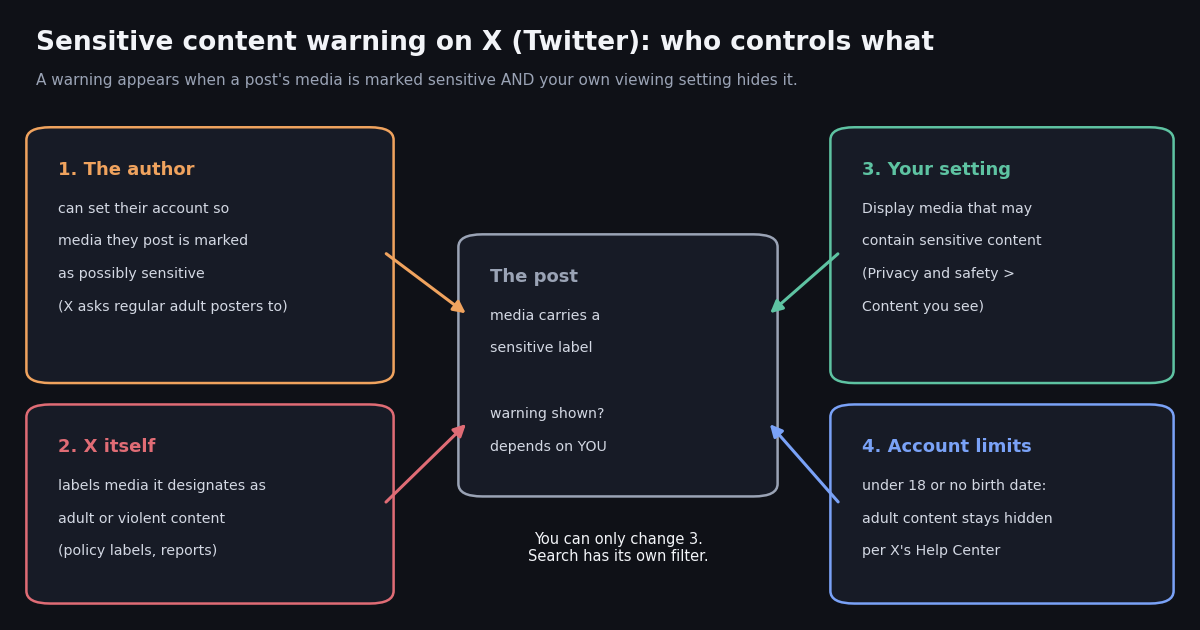
- The fix: Settings and privacy, then Privacy and safety, then Content you see, then check Display media that may contain sensitive content (path from X's @Safety account).
- Turn the warning back on: uncheck the same box. It is one account-level setting, not one per device.
- iPhone: if the switch is missing in the app, change it on x.com in a browser; the account setting carries over to the app after a refresh or re-login.
- Age: per X's Help Center, accounts under 18 or with no birth date on the profile cannot view adult content, whatever the switch says.
- Search is separate: Hide sensitive content under Search settings filters search results; the media switch does not change it.
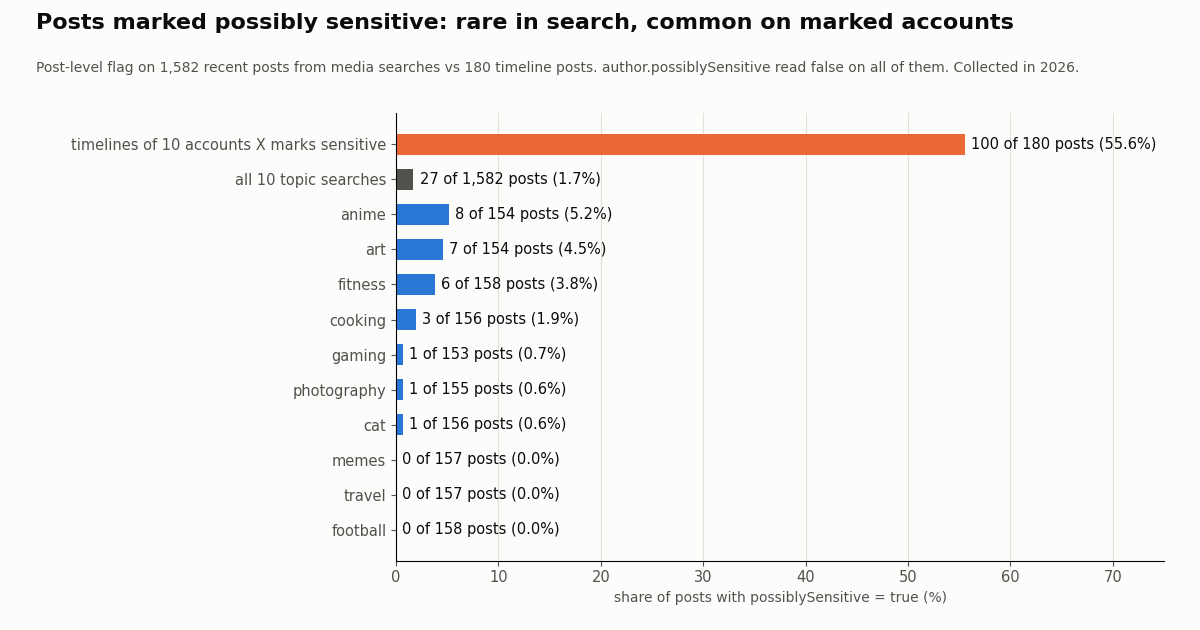
- Our data: in 1,582 recent posts from 10 everyday media searches, 27 (1.7%) carried
possiblySensitive: true; on the timelines of 10 accounts X marks sensitive, 100 of 180 posts (55.6%) did. Search on X filters most marked posts out, which is why the share there is small.
You tap a post and instead of the photo you get a gray box saying the media may contain sensitive content (X's Help Center notes that posts designated as adult content can show a newer warning that names the category). Sometimes it is on a meme from a friend, sometimes on a news video, sometimes on every image from one account. This page explains where that cover comes from, how to remove it or keep it, and why it can survive the setting change.
We checked the setting path against X's own @Safety posts rather than third-party screenshots, cite X's Help Center for the age rule (help.x.com blocks automated fetches, so we cite the URLs), and read 1,582 recent media posts and 180 timeline posts through the API to see which sensitivity signals a post actually carries once it leaves the app. The short version: the switch is real and simple, the label is decided before you ever see the post, and the post-level label does travel with the data, as a single boolean.
27 of 1,582 posts from 10 everyday topic searches (1.7%), against 100 of 180 posts (55.6%) on the timelines of 10 accounts X marks sensitive. Collected in 2026.
What is the sensitive content warning on X (Twitter)?
The warning is an interstitial: a cover over the media in a post, with a button to show it. The text of the post stays visible; only the photo, video or GIF is hidden. It is not a removal, not a strike against the author, and not a sign that the post broke the rules. It means the media has a sensitive label and your account is set to hide media with that label.
Who puts the label on. There are two sources. The first is the author: X's Adult Content policy asks people who regularly post adult content to adjust their media settings, which, in the policy's words, places all their images and videos behind a content warning that has to be acknowledged before the media can be viewed. The second is X itself, which applies labels to media it designates as adult or violent content, including after reports.
The policy names changed. On June 3, 2024, X's @Safety account announced Adult Content and Violent Content policies that replace the former Sensitive Media and Violent Speech policies, adding that what X enforces against had not changed. That is why older guides talk about a "sensitive media policy" and newer warnings can name the category instead of saying "sensitive".
Labels can be wrong. On January 21, 2024, @Safety posted that a bug had caused X to incorrectly label numerous posts as Sensitive Media and that it was removing labels from the affected posts. If ordinary posts suddenly show the cover, a labeling problem on X's side is one possibility worth keeping in mind before you change anything.
Display media that may contain sensitive content: how to turn the warning off
The setting that controls the cover is called Display media that may contain sensitive content. On September 12, 2025, X's @Safety account posted the web path for it: Settings, then Privacy and safety, then Content you see. On x.com that looks like this.
Step 1. Open x.com in a browser and sign in. Click More in the left column, then Settings and privacy.
Step 2. Click Privacy and safety, then Content you see.
Step 3. Check Display media that may contain sensitive content.
Step 4. Reload your home timeline. Media from authors who mark their own posts as sensitive should now show without the cover.
In October 2023 @Safety described the same controls from the other direction: you can disable the option to display media that may contain sensitive content, prevent posts with potentially sensitive content from appearing in your search results, and mute accounts and words. The post linked the settings page twitter.com/settings/safety.
Menus on X change without notice, so if a label reads slightly differently in your account, look for the words "sensitive content" inside Privacy and safety; that is where every version we found keeps it.
How to turn off sensitive content on Twitter on iPhone and Android
Android. A guide that tested the steps on mobile describes the route as: tap your profile picture, open Settings and Support, then Settings and privacy, then Privacy and safety, then Content you see, where the sensitive media options sit. The same guide reports finding the identical path on iOS.
iPhone and iPad. Other guides report that the switch is missing in the iPhone app for some accounts, and recommend changing it on the web. Both reports can be true at once, because X rolls interface changes out unevenly. What makes the web route work is that the setting belongs to your account, not to the app: @Safety itself describes it as a change "on your account" and gives the web path.
If the switch is missing in your app: open Safari (or any browser) on the same phone, go to x.com, sign in with the same account, change the setting under Privacy and safety, Content you see, then fully close and reopen the X app. If the app still shows the cover, sign out of the app and back in so it fetches your settings again.
Turning it back on. To restore the warning, uncheck the same box. Parents setting up a teen's phone should also know that the age rule below hides adult content on accounts under 18 no matter how this box is set.
Age and birth date: the limits the setting cannot change
X's Help Center says it restricts viewers who are under 18, or who do not include a birth date on their profile, from viewing adult content. For those accounts, the cover over adult content cannot be clicked through, so checking the display box does nothing for that category of media.
If you are an adult and still blocked: open your profile, choose Edit profile, and look for the birth date field. If it is empty or wrong, add your real date of birth.
Placement rules apply to authors, not viewers. The Adult Content policy also says adult content cannot appear in highly visible places such as live video, profile pictures, headers, List banners or Community cover photos. Those areas are not covered by any viewer setting, because the content is not allowed there at all.
Regional limits. Some content is withheld in specific countries in response to local law, which is a separate mechanism from the sensitive label, and the display setting does not reveal withheld content. In our sample, no author was withheld anywhere (withheldInCountries was empty for all 1,452 authors).
Why the warning still shows after you change the setting
These are the causes we see described most often, in the order worth checking. Each one takes under a minute.
The search filter is a different switch. Hide sensitive content lives under Search settings (also reached from Content you see). It decides whether posts with potentially sensitive content appear in search results at all, not whether a cover is drawn over media in your timeline. If your goal is to see more search results rather than uncover media, that is the switch to change; we cover the rest of X's search filters on a separate page.
Muted words can look like a warning. @Safety describes muting accounts and words as a way to keep them off your timeline and out of your search results, so muted posts go missing rather than covered. If posts are missing rather than covered, check Muted words under Privacy and safety before blaming the sensitive media setting.
How often posts carry a sensitive flag: what 1,582 media posts showed
We wanted a number for a simple question: if you read ordinary media posts through an API, how often is a post marked possibly sensitive? We searched 10 everyday topics (cat, football, cooking, gaming, anime, photography, fitness, travel, memes, art) for recent posts with media, collected in 2026, and read the sensitivity fields on every post. Then we read the latest timeline page of 10 accounts whose profile X marks as sensitive, found through embedded media in an earlier pass.
Search shows few marked posts. Only 1.7% of recent media posts in everyday topic searches carried the post-level flag. The highest topics were anime (8 of 154, 5.2%), art (7 of 154, 4.5%) and fitness (6 of 158, 3.8%); football, travel and memes had none. Search on X filters out most posts marked sensitive, so a small share in search results says more about the search filter than about how much of X is labeled.
Marked accounts post mostly marked media. On the 10 timelines, 100 of 180 posts carried possiblySensitive: true, so the label follows the posts of an account that uses the setting, which is exactly what produces a wall of covered media when you open such a profile.
The author flag is not the signal to use. author.possiblySensitive read false for every author, including those 10 accounts, because X usually does not include the account-level value in search and timeline data. False there means not provided, not checked and safe. Filter on the post-level field.
This is one moment, 10 everyday topics and 10 accounts; it does not cover adult or violent topics on purpose, so it cannot estimate how much of X is labeled overall.
What a warning would cover: photos, videos and GIFs by topic
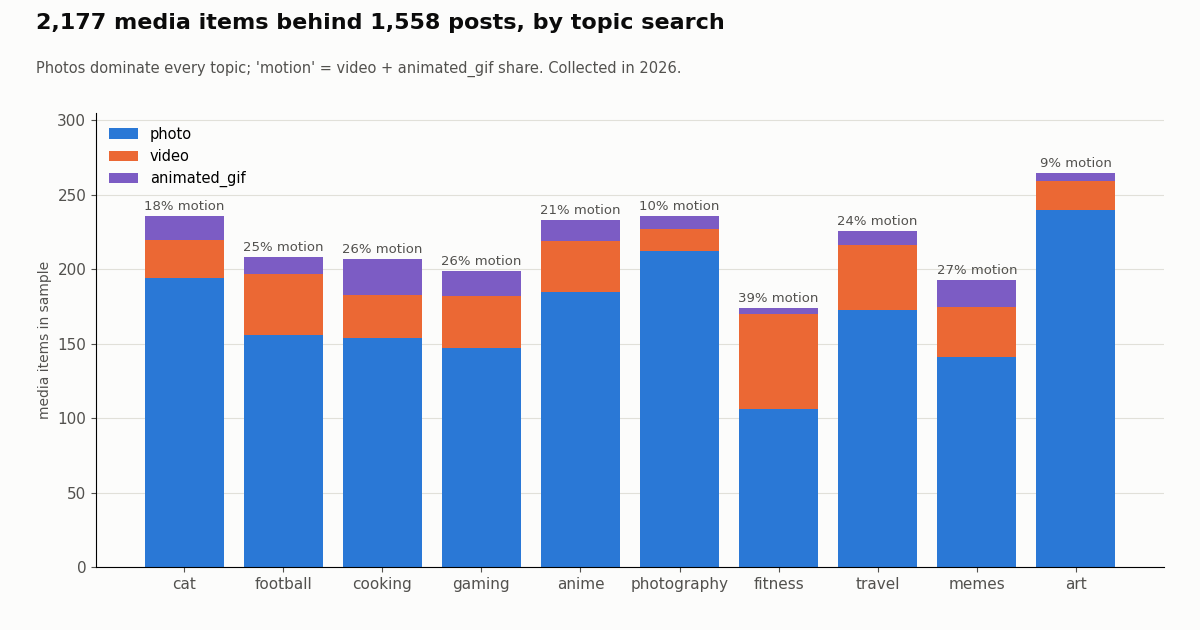
The cover applies to media, so it helps to know what kind of media people actually post. Across the 2,177 media items behind 1,558 posts with media, photos made up 1,708 (78.5%), videos 340 (15.6%) and animated GIFs 129 (5.9%).
Motion share varies a lot by topic. Video plus GIF made up 39.1% of items in fitness and 26.9% in memes, but only 10.2% in photography and 9.4% in art, where multi-image posts push the photo count up. Posts with a video were also flagged more often than posts with photos (10 of 333, 3.0%, against 16 of 1,110, 1.4%).
Media almost always loads. Only 5 of the 2,177 items reported a status other than Available, so when you see a cover rather than an error, the media is there; the label is what stops it.
For developers: reading sensitivity fields with the API
If you are building a feed, a moderation queue or a research dataset, you can carry the same label the app uses. These are the fields our responses carry, written exactly as returned.
possiblySensitive (boolean) on every tweet object: search, tweet lookup, timelines and the other tweet endpoints, including retweeted and quoted tweets. true means X marked the post as possibly sensitive. false means not marked, or X did not provide the flag; it does not mean the post was checked and found safe.
author.possiblySensitive (boolean) on the author object: read from X's data when X provides it. In most search and tweet responses X does not include the account-level value, so it reads false there; in our sample it was false for every author, including accounts whose posts were mostly marked.
extendedEntities.media[].additional_media_info.source_user.user_results.result.possibly_sensitive (boolean, snake_case): present only when a post embeds media originally uploaded by another account, and describes that account.
author.withheldInCountries (list) and extendedEntities.media[].ext_media_availability.status (for example Available or Unavailable): useful for regional and availability checks, not for sensitivity.
Reads need no X account: you call api.twitterapi.io with an X-API-Key header. A trimmed real response looks like this: {"tweets": [{"id": "2122446991162831247", "possiblySensitive": false, "author": {"userName": "NASA", "possiblySensitive": false}}]}.
Cost. Tweet endpoints cost 15 credits per tweet returned, which is $0.15 per 1,000 tweets; you pay only for the data returned, with a minimum of 15 credits ($0.00015) for a request that comes back empty. This whole study read about 1,762 posts in 90 requests for roughly $0.26. On X's official pay-per-usage rate card a post read is $0.005, or $5 per 1,000 posts, about 33 times the per-tweet price above; the same 1,762 reads would be about $8.81 there. New accounts that pass the automatic bot check get up to $1 of free credits (at most 100,000 credits, no card, one per person or network, expiring after 31 days); purchased credits never expire. Plans and rate limits are on the pricing page.
import requests

API_KEY = "YOUR_API_KEY"          # from https://twitterapi.io/dashboard
BASE = "https://api.twitterapi.io"
HEADERS = {"X-API-Key": API_KEY}


def search_media(topic, max_pages=3):
    """Yield recent media posts for a topic, following next_cursor."""
    cursor = ""
    for _ in range(max_pages):
        params = {"query": f"{topic} filter:media -filter:retweets", "queryType": "Latest"}
        if cursor:
            params["cursor"] = cursor
        r = requests.get(f"{BASE}/twitter/tweet/advanced_search", headers=HEADERS, params=params, timeout=30)
        r.raise_for_status()
        body = r.json()
        for tweet in body.get("tweets", []):
            yield tweet
        if not body.get("has_next_page"):
            break
        cursor = body.get("next_cursor", "")


def is_marked_sensitive(tweet):
    """True only when X marked the post. False means not marked OR not provided."""
    return tweet.get("possiblySensitive") is True


if __name__ == "__main__":
    for tweet in search_media("anime"):
        if is_marked_sensitive(tweet):
            media = (tweet.get("extendedEntities") or {}).get("media") or []
            print(tweet["url"], [m.get("type") for m in media])
How we collected this
Question. How often are recent media posts read through an API marked possibly sensitive, and which fields carry the label?
Query. /twitter/tweet/advanced_search with queryType Latest and <topic> filter:media -filter:retweets for 10 everyday, brand-safe topics: cat, football, cooking, gaming, anime, photography, fitness, travel, memes, art. Eight pages per topic, de-duplicated by post id.
Window and size. The most recent matching posts at collection time, collected in 2026: 1,582 unique posts, 1,558 of them with media, from 1,421 distinct authors, holding 2,177 media items. A cross-check read one timeline page (180 posts) for each of 10 accounts whose profile X marks sensitive, found through the nested media object in an earlier pass. 90 requests in total.
What the sample cannot show. It reflects one moment and 10 topics in what is mostly English-language search; it does not cover adult or violent topics on purpose, so it cannot estimate how much of X is labeled. Search on X filters out most marked posts, so the search share is a floor, not a rate. It cannot see the in-app cover itself, only the fields an API returns.
Privacy. Topic searches return private individuals, so raw pages were never stored in our repository; we keep aggregates and de-identified rows (topic, media types, flag values, a like-count bucket) with no post id, URL, text, author id or handle. No account is named.
import requests

API_KEY = "YOUR_API_KEY"          # from https://twitterapi.io/dashboard
BASE = "https://api.twitterapi.io"
HEADERS = {"X-API-Key": API_KEY}


def search_media(topic, max_pages=3):
    """Yield recent media posts for a topic, following next_cursor."""
    cursor = ""
    for _ in range(max_pages):
        params = {"query": f"{topic} filter:media -filter:retweets", "queryType": "Latest"}
        if cursor:
            params["cursor"] = cursor
        r = requests.get(f"{BASE}/twitter/tweet/advanced_search", headers=HEADERS, params=params, timeout=30)
        r.raise_for_status()
        body = r.json()
        for tweet in body.get("tweets", []):
            yield tweet
        if not body.get("has_next_page"):
            break
        cursor = body.get("next_cursor", "")


def is_marked_sensitive(tweet):
    """True only when X marked the post. False means not marked OR not provided."""
    return tweet.get("possiblySensitive") is True


if __name__ == "__main__":
    for tweet in search_media("anime"):
        if is_marked_sensitive(tweet):
            media = (tweet.get("extendedEntities") or {}).get("media") or []
            print(tweet["url"], [m.get("type") for m in media])
Researching this?Free starter credits cover end-to-end testing — Google sign-in, no card. Get a key.
Questions readers ask
How do I turn off the sensitive content warning on Twitter (X)?
Go to Settings and privacy, then Privacy and safety, then Content you see, and check Display media that may contain sensitive content. X's @Safety account gives this web path. The setting is saved to your account immediately.
Why can't I find the sensitive content setting in the iPhone app?
Several guides report the switch is missing in the iPhone app for some accounts, while others found the same path as on Android. Because the setting belongs to your account, change it on x.com in a browser, then close and reopen the app (or sign out and in) so it picks up the change.
I turned the setting on but still see the warning. Why?
The most common reasons are an empty or under-18 birth date (X's Help Center says those accounts cannot view adult content), cached settings in the app, or the separate Hide sensitive content filter in Search settings. Check the birth date first, then refresh the app.
How do I put the warning back on?
Uncheck Display media that may contain sensitive content in the same place: Settings and privacy, Privacy and safety, Content you see. Media marked as sensitive will be covered again on every device signed in to that account.
Who decides that a post is sensitive?
Either the author, whose media setting can put all their images and videos behind a warning (X asks regular adult posters to use it), or X, which labels media it designates as adult or violent content. Viewers cannot remove the label from someone else's post; they can only choose whether labeled media is covered for them.
Is the sensitive content warning the same as safe search?
No. The warning is a cover drawn over labeled media in your timeline and in posts you open. Hide sensitive content under Search settings is a separate filter that decides whether such posts appear in search results at all.
Can I see sensitive content on X without an account?
The display setting and the age rule both belong to a signed-in account: the switch lives in your account settings, and X's Help Center ties adult content to a birth date on the profile. A signed-out visitor has neither, so sign in with an account that has an adult birth date.
Does the API tell me if a tweet is marked sensitive?
Yes, per post. Every tweet object carries possiblySensitive: true means X marked it, false means not marked or not provided. In our sample 27 of 1,582 recent search posts were true, against 100 of 180 posts on 10 marked accounts' timelines. The author-level flag usually reads false because X rarely provides it, so filter on the post field.
Continue
- X Safety: how to disable Sensitive Media (web path)
- X Safety: controls for potentially sensitive content
- X Safety: Adult Content and Violent Content policies
- X Help Center: Adult Content policy
- X API data dictionary: possibly_sensitive
- TwitterAPI.io API documentation
- Twitter (X) API guides hub
- why Twitter search shows no results
- viewing an account's Twitter media
- blocking many Twitter accounts at once
- free Twitter shadowban checker
- TwitterAPI.io pricing and rate limits
- 01PhantomBuster Pricing: Plans, Execution Hours and What X (Twitter) Data Really Costs
- 02Sprinklr Pricing: What It Costs Now That Self-Serve Has Ended
- 03Goose MCP: How to Add MCP Servers (Extensions) to goose, Desktop and CLI
- 04ChatGPT Apps SDK Tutorial: Build a ChatGPT App That Answers With Live Twitter (X) Data
- 05LM Studio MCP: Connect MCP Servers (and Live Twitter (X) Data) to a Local Model
- 06Twitter (X) "Content Is Not Available": Every Cause, and How to Tell Which One
- 07n8n vs Zapier vs Make in 2026: Pricing, Self-Hosting, AI Agents and the Same Twitter (X) Flow Built in All Three
- 08Twitter (X) Hashtag Popularity Tracker — API Guide
Writing about something you built with TwitterAPI.io? Our community rewards program pays API credits for honest tutorials, build logs and videos.
Stop reading. Start building.
Starter credits cover real testing on real data. Google sign-in, no card, no application queue.
Get an API keyAlready building with TwitterAPI.io? Publish an honest tutorial or build log about it and earn up to $200 a month in API credits.