How to Save a GIF from Twitter (X): Desktop, iPhone, Android and Bulk
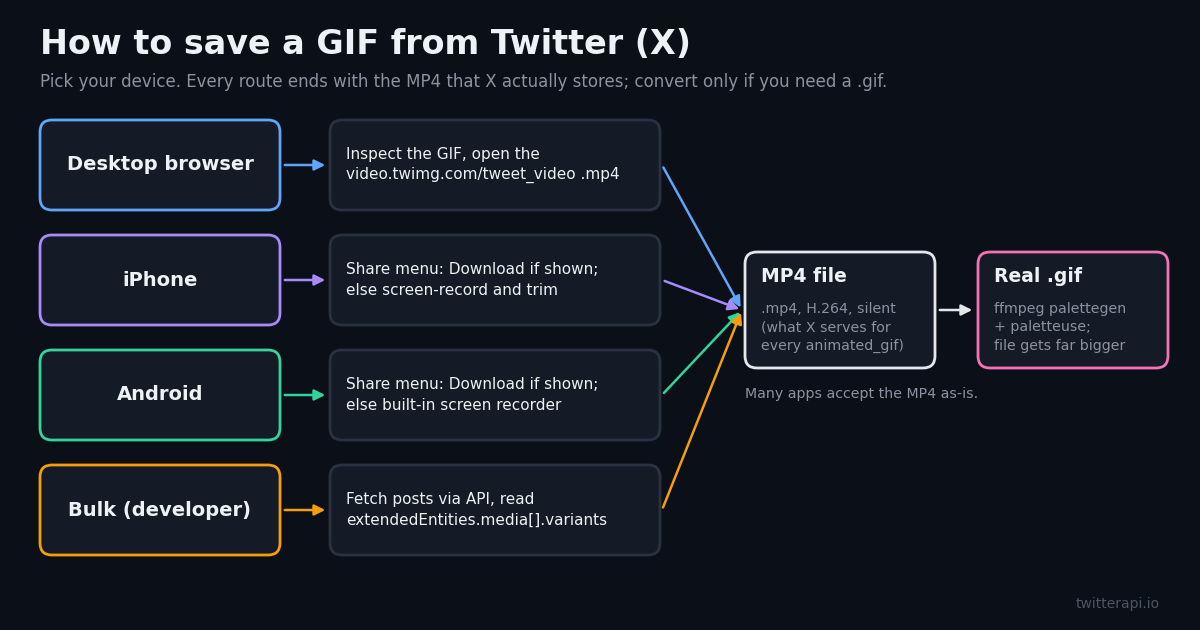
Searching for how to save a GIF from Twitter usually starts with a small surprise: there is no Save GIF button, and when you do manage to download one, your phone or computer calls it a video. That is not a bug in your method. X has served GIFs as MP4 video for years, so the file you can get hold of is an MP4, and getting a true .gif means converting it yourself.
This guide walks through each route in the order most people need them: desktop browser, iPhone, Android, then converting the MP4 into a real .gif with a correct ffmpeg command. The last part is for developers who need to save dozens or thousands of GIFs, with runnable Python against the twitterapi.io API. Along the way you will find file-size numbers we measured ourselves, so you can decide whether you even want the .gif version.
One ground rule before you start: a GIF someone posted still belongs to them. X's Terms of Service say users retain the rights to the content they post. Saving a reaction GIF for your own chats is everyday use; republishing someone's original animation as your own is not.
Why a Twitter GIF downloads as an MP4
When someone attaches a GIF to a post, X re-encodes it into an H.264 MP4 and plays that video on a loop with no controls, so it looks like a GIF. X's own data dictionary shows the shape: a media object with "type": "animated_gif", a preview image at pbs.twimg.com/tweet_video_thumb/<id>.jpg, and a video_info.variants list containing one entry with content_type video/mp4, bitrate 0 and a URL at video.twimg.com/tweet_video/<id>.mp4.
We downloaded the MP4 from that documented example and inspected it with ffmpeg: H.264 video, 350x262 pixels, 11 frames at roughly 10 fps, about 1 second long, 57,246 bytes, and no audio stream at all. That last detail answers a common question. Twitter GIFs never have sound; if a looping clip on X has audio, it was posted as a video, not a GIF.
The thumbnail trick: the preview image and the MP4 share the same ID. If you can see pbs.twimg.com/tweet_video_thumb/DBMDLy_U0AAqUWP.jpg, the clip lives at video.twimg.com/tweet_video/DBMDLy_U0AAqUWP.mp4. Swapping the host, folder and extension is often the fastest way to the file.
Why convert GIFs at all? The GIF format stores each frame as an indexed image with a palette of at most 256 colours, as MDN's image format guide describes, and compresses frames with LZW. Modern video codecs compress motion far better, which is why X keeps the MP4 and why a converted .gif is always bigger than the file X served you.
How to save a GIF from Twitter on desktop (Chrome, Edge, Firefox, Safari)
Step 1: open the post on its own page (click its timestamp) so only one GIF is on screen and it is playing.
Step 2: right-click the GIF. If your browser menu appears, choose Inspect. If X's own menu appears instead, press Ctrl+Shift+C (Cmd+Shift+C on a Mac; in Safari, enable the Develop menu first) and click the GIF to select it.
Step 3: in the Elements panel, look for a <video> tag near the highlighted node. Its src attribute, or a <source> child, holds a URL that starts with video.twimg.com/tweet_video/ and ends in .mp4. The poster attribute next to it shows the matching tweet_video_thumb image.
Step 4: copy that URL, paste it into a new tab, then save with Ctrl+S (Cmd+S) or right-click and choose Save video as. You now have the MP4 exactly as X stores it, with no re-encoding.
If you see blob: instead of a twimg URL: that post is a regular video streamed in segments, not a GIF. The tweet_video path only applies to animated_gif posts. For true videos, see our separate guide on downloading Twitter media in bulk.
Without DevTools: online downloader sites will take a post link and return the MP4. They work, but many are ad-heavy and you are pasting links into a third party. Since the file is already a plain public URL, the Inspect route is usually just as fast and keeps you off those sites.
How to save GIFs on Twitter from iPhone and Android
Mobile is where most people get stuck, because the apps hide the media URL. Work through these options in order and stop at the first one that works for you.
1. The share menu: tap the share icon on the post. X has offered a Download option for video posts to some accounts, tied to its paid Premium plan, and posters can switch downloads off for their own videos. Whether it appears on a GIF post depends on your account and app version, so look there first. If it is there, the clip lands in Photos or your Gallery as an MP4.
2. Bookmark, if you only want to find it again: the bookmark icon saves the post inside X, not the file. It is the right choice when you just want the reaction GIF handy later and it costs nothing to undo.
3. Screen recording: on iPhone, add Screen Recording to Control Center, start it, let the GIF loop once or twice, stop, then trim in Photos. Android phones have a built-in Screen record tile in Quick Settings on recent versions. You lose some sharpness and get the status bar unless you crop, but it always works.
4. Send it to a computer: tap Copy link, send the link to yourself, and use the desktop method. This gives you X's original MP4 rather than a screen capture, which matters if you plan to edit or convert it.
Turning the MP4 into a GIF on the phone: on iPhone, the Shortcuts app has a Make GIF action that accepts a video, so a two-action shortcut (select video, Make GIF) covers it. On Android, most gallery editors and GIF-maker apps can export a clip as GIF. Either way, keep the clip short; the size section below shows why.
Every method compared
Here is how the routes stack up for one GIF versus many. Cost figures for the API rows are per 1,000 posts read and come from each provider's published pricing; downloading the MP4 file itself is an ordinary HTTPS fetch from X's media servers, not an API call.
The two API rows read the same media object. The difference is the per-post price: X lists Posts: Read at $0.005 per resource, twitterapi.io lists $0.15 per 1,000 tweets ($0.00015 each), so $0.005 / $0.00015 = 33.3 times cheaper per post read.
Convert the MP4 to a real .gif with ffmpeg
Some places still want a .gif file: older forums, certain chat apps, slide decks, README files. ffmpeg does this well if you give it a custom palette. A plain ffmpeg -i in.mp4 out.gif uses a generic palette and tends to band gradients; the two-pass palette filters in the ffmpeg filter documentation fix that in a single command.
Best-looking default: ffmpeg -i in.mp4 -vf "fps=15,scale=480:-1:flags=lanczos,split[s0][s1];[s0]palettegen[p];[s1][p]paletteuse" -loop 0 out.gif
What each part does: fps=15 caps the frame rate, scale=480:-1:flags=lanczos sets the width and keeps the aspect ratio, split sends the frames down two paths, palettegen builds one 256-colour palette for the whole clip, paletteuse maps every frame onto it, and -loop 0 makes the GIF repeat forever, which is how it played on X.
Smaller file: ffmpeg -i in.mp4 -vf "fps=15,scale=480:-1:flags=lanczos,split[s0][s1];[s0]palettegen=stats_mode=diff[p];[s1][p]paletteuse=dither=bayer:bayer_scale=5:diff_mode=rectangle" -loop 0 out.gif. stats_mode=diff weights the palette toward the moving parts, and the ordered bayer dither compresses better than the default error-diffusion dither. In our test it trimmed 12% to 18% off the default command's output.
Keep the original frame rate when it is already low. X's documented sample GIF runs at about 10 fps; forcing fps=15 would only duplicate frames. Drop the fps= filter in that case, and drop scale= too if the clip is already small.
How big does a Twitter GIF get after conversion? Our measurements
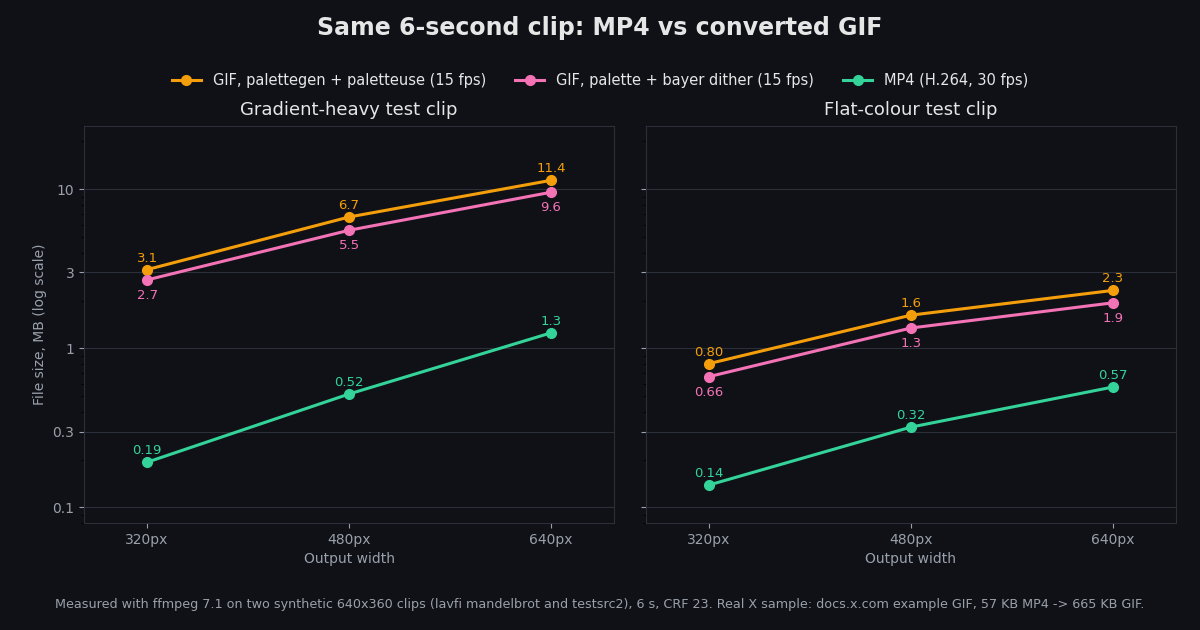
We wanted real numbers rather than the usual GIFs are bigger hand-wave, so we measured it. Method: ffmpeg 7.1 generated two synthetic 6-second, 30 fps, 640x360 test clips, one gradient-heavy (the mandelbrot source) and one with flat colours and sharp edges (the testsrc2 source), each encoded as H.264 at CRF 23 without audio, similar in kind to the MP4s X serves. Each clip was then scaled to 320, 480 and 640 px wide and written three ways: as MP4 (30 fps), as GIF with the default palette command (15 fps), and as GIF with the smaller-file command (15 fps). Sizes are in MB of 1,000,000 bytes.
Even with half the frames (15 fps against the MP4's 30 fps), every GIF came out several times larger. The real X sample, converted at its native size and frame rate, grew from 57,246 to 664,882 bytes with the default command, 11.6 times larger. The practical takeaway: keep the MP4 unless the destination insists on .gif, and if it does, shrink the width before you touch anything else. These are two synthetic clips and one short sample, so treat the ratios as a guide and measure your own clip if size matters.
Save GIFs from Twitter in bulk with an API (for developers)
Doing the Inspect routine fifty times gets old fast. If you are archiving your own account's GIFs, building a reaction-GIF library for a team, or collecting animated media for research, read the posts through an API and pull the MP4 URLs from the response.
twitterapi.io's tweet lookup endpoint GET /twitter/tweets takes a comma-separated tweet_ids list and returns full post objects. Posts that carry media include an extendedEntities.media array mirroring X's own extended_entities: each entry has a type (photo, video or animated_gif) and, for GIFs and videos, video_info.variants. For a GIF you take the video/mp4 variant; there is normally only one.
The snippet below turns post links into IDs, looks them up, and prints each GIF's MP4 URL. The complete script further down adds downloading, retries, an account-timeline mode via GET /twitter/user/last_tweets, and optional ffmpeg conversion.
Cost check: reading 1,000 posts costs $0.15 on twitterapi.io's published pay-per-use rate ($0.15 per 1K tweets). The same 1,000 reads on X's pay-per-use API cost 1,000 x $0.005 = $5.00. The MP4 downloads themselves are fetched straight from video.twimg.com and are not billed as API reads by either provider.
import os
import re
import requests

API_KEY = os.environ["TWITTERAPI_IO_KEY"]
HEADERS = {"X-API-Key": API_KEY}


def tweet_id_from_url(url_or_id: str) -> str:
    """Accept a post URL (x.com or twitter.com) or a bare numeric ID."""
    m = re.search(r"/status/(\d+)", url_or_id)
    if m:
        return m.group(1)
    if url_or_id.strip().isdigit():
        return url_or_id.strip()
    raise ValueError(f"no post ID in {url_or_id!r}")


def gif_mp4_urls(tweet: dict) -> list[str]:
    """Return the MP4 URL of every animated_gif attached to one post."""
    urls = []
    media = (tweet.get("extendedEntities") or {}).get("media") or []
    for item in media:
        if item.get("type") != "animated_gif":
            continue
        variants = (item.get("video_info") or {}).get("variants") or []
        mp4s = [v for v in variants if v.get("content_type") == "video/mp4"]
        if mp4s:
            best = max(mp4s, key=lambda v: v.get("bitrate") or 0)
            urls.append(best["url"])
    return urls


def lookup(ids: list[str]) -> list[dict]:
    r = requests.get(
        "https://api.twitterapi.io/twitter/tweets",
        headers=HEADERS,
        params={"tweet_ids": ",".join(ids)},
        timeout=20,
    )
    r.raise_for_status()
    return r.json().get("tweets", [])


links = [
    "https://x.com/someone/status/1846987139428634858",
    "1866332309399781537",
]
ids = [tweet_id_from_url(u) for u in links]
for tweet in lookup(ids):
    for url in gif_mp4_urls(tweet):
        print(tweet["id"], url)
Copyright and good manners when you save Twitter GIFs
X's Terms of Service are blunt about ownership: users retain their rights to the content they post, including photos and videos. Saving a GIF changes nothing about who owns it.
Fine for most people: keeping a reaction GIF for your own chats, saving your own posts' GIFs as a backup, or quoting the original post so the creator gets the view.
Ask first: reposting an artist's original animation, using a GIF in marketing or a paid product, or uploading a collection of other people's GIFs somewhere else. When in doubt, link to or quote the original post instead of re-uploading the file.
Bulk jobs: stick to public posts, store only what your project needs, and delete media you no longer use. Posts from protected accounts are meant for their approved followers; don't try to work around that.
"""Save every GIF from a list of X (Twitter) posts, or from one account's
recent posts, as MP4 (and optionally as .gif via ffmpeg).

pip install requests      # ffmpeg must be on PATH only if CONVERT = True
export TWITTERAPI_IO_KEY=your_key
"""
import os
import re
import subprocess
import time
from pathlib import Path

import requests

HEADERS = {"X-API-Key": os.environ["TWITTERAPI_IO_KEY"]}
OUT = Path("twitter_gifs")
OUT.mkdir(exist_ok=True)
CONVERT = False          # True = also write a .gif next to each .mp4
GIF_WIDTH = 480          # output width for the .gif; height keeps aspect ratio


def gif_variants(tweet: dict):
    media = (tweet.get("extendedEntities") or {}).get("media") or []
    for idx, item in enumerate(media):
        if item.get("type") != "animated_gif":
            continue
        variants = (item.get("video_info") or {}).get("variants") or []
        mp4s = [v for v in variants if v.get("content_type") == "video/mp4"]
        if mp4s:
            yield idx, max(mp4s, key=lambda v: v.get("bitrate") or 0)["url"]


def tweets_by_ids(ids: list[str]) -> list[dict]:
    found = []
    for i in range(0, len(ids), 20):          # 20 IDs per request: a conservative batch
        r = requests.get(
            "https://api.twitterapi.io/twitter/tweets",
            headers=HEADERS,
            params={"tweet_ids": ",".join(ids[i:i + 20])},
            timeout=20,
        )
        r.raise_for_status()
        found.extend(r.json().get("tweets", []))
    return found


def recent_tweets(user_name: str, pages: int = 3) -> list[dict]:
    found, cursor = [], None
    for _ in range(pages):
        params = {"userName": user_name}
        if cursor:
            params["cursor"] = cursor
        r = requests.get(
            "https://api.twitterapi.io/twitter/user/last_tweets",
            headers=HEADERS,
            params=params,
            timeout=20,
        )
        r.raise_for_status()
        body = r.json()
        data = body.get("data") or body          # tolerate a nested "data" wrapper
        found.extend(data.get("tweets", []))
        cursor = body.get("next_cursor")
        if not body.get("has_next_page") or not cursor:
            break
    return found


def download(url: str, dest: Path) -> bool:
    if dest.exists():
        return True
    for attempt in range(3):
        try:
            with requests.get(url, stream=True, timeout=60) as r:
                if r.status_code == 404:          # media removed: skip for good
                    return False
                r.raise_for_status()
                tmp = dest.with_suffix(".part")
                with open(tmp, "wb") as fh:
                    for chunk in r.iter_content(1 << 16):
                        fh.write(chunk)
                tmp.rename(dest)
                return True
        except requests.RequestException:
            time.sleep(2 ** attempt)
    return False


def to_gif(mp4: Path) -> Path:
    gif = mp4.with_suffix(".gif")
    vf = (f"scale={GIF_WIDTH}:-1:flags=lanczos,split[s0][s1];"
          "[s0]palettegen[p];[s1][p]paletteuse")
    subprocess.run(["ffmpeg", "-y", "-loglevel", "error", "-i", str(mp4),
                    "-vf", vf, "-loop", "0", str(gif)], check=True)
    return gif


def save_all(tweets: list[dict]) -> None:
    saved = 0
    for t in tweets:
        author = (t.get("author") or {}).get("userName", "unknown")
        for idx, url in gif_variants(t):
            dest = OUT / f"{author}_{t['id']}_{idx}.mp4"
            if download(url, dest):
                saved += 1
                print("saved", dest, dest.stat().st_size, "bytes")
                if CONVERT:
                    gif = to_gif(dest)
                    print("  ->", gif, gif.stat().st_size, "bytes")
    print(f"{saved} GIF(s) saved from {len(tweets)} posts")


if __name__ == "__main__":
    links = ["https://x.com/someone/status/1846987139428634858"]
    ids = [re.search(r"(\d{6,})", u).group(1) for u in links]
    save_all(tweets_by_ids(ids))
    # Or scan an account's recent posts instead:
    # save_all(recent_tweets("some_account", pages=2))
Questions readers ask
Why does a GIF I saved from Twitter play as a video?
Because it is one. X converts uploaded GIFs into silent H.264 MP4 files and serves them from video.twimg.com/tweet_video/. The data marks them as animated_gif, but the file is an MP4. Most phones, browsers and chat apps play it and loop it fine; convert it with ffmpeg only if a site insists on .gif.
How do you save GIFs on Twitter from an iPhone?
Check the post's share menu for a Download option first. If it isn't offered, add Screen Recording to Control Center, record the GIF looping, then trim it in Photos. For X's original file instead of a screen capture, copy the post link, open it on a computer and use the Inspect method. The Shortcuts app's Make GIF action can turn the saved video into a .gif.
How do I save a GIF from Twitter on Android?
Same order as iPhone: try Download in the share menu, otherwise use the Screen record tile in Quick Settings and trim the result in your gallery app. Copying the link and finishing on a desktop browser gets you the original MP4 at full quality.
Can I save a Twitter GIF as a real .gif file?
Yes. Save the MP4 first, then run ffmpeg -i in.mp4 -vf "fps=15,scale=480:-1:flags=lanczos,split[s0][s1];[s0]palettegen[p];[s1][p]paletteuse" -loop 0 out.gif. Expect a bigger file: in our tests the .gif was 3x to 16x the size of the MP4 at the same width.
Why doesn't my saved Twitter GIF have sound?
GIFs on X are silent by design. The MP4 behind X's documented sample GIF contains only a video stream, no audio track. A looping clip with sound on X was uploaded as a video, so save it with a video method instead.
Does bookmarking a GIF on Twitter save it?
It saves the post inside your X account so you can find it again, not the file. If the post is deleted or the account goes private, the bookmark stops showing the GIF. Download the MP4 if you need a copy that lasts.
How can I download all the GIFs from an account?
Use an API rather than clicking through the timeline. With twitterapi.io, page through GET /twitter/user/last_tweets for the account, keep media entries whose type is animated_gif, and download each video/mp4 variant URL. Reading 1,000 posts costs $0.15 at the published rate. The full Python script on this page does exactly this.
Is it legal to save GIFs from Twitter?
Saving a public GIF for personal use is common, but the person who posted it keeps the rights to it under X's Terms of Service. Reposting, selling or using someone else's GIF commercially needs their permission or another legal basis where you live. Quoting the original post is the simple, safe way to share it.
Continue
- X developer docs: data dictionary with the animated_gif extended_entities example
- X developer docs: media object fields (type, variants)
- FFmpeg filters documentation: palettegen and paletteuse
- MDN: image file type and format guide (GIF palette limits)
- X Terms of Service: your rights in the content you post
- X API pricing: Posts: Read per-resource cost
- Twitter (X) API overview and endpoints
- Download Twitter media in bulk: photos and videos
- Extract image URLs from tweets with an API
- Search Twitter for video posts via API
- Download tweets with an API
- twitterapi.io pay-per-use pricing
- Get a twitterapi.io API key
Stop reading. Start building.
Starter credits cover real testing on real data. Google sign-in, no card, no application queue.
Get an API key