"You Can No Longer Send Messages to This Person" on Twitter (X): What It Means and What You Can Do
- It is a closed door, not an error. The other account no longer accepts messages from you; X does not say why.
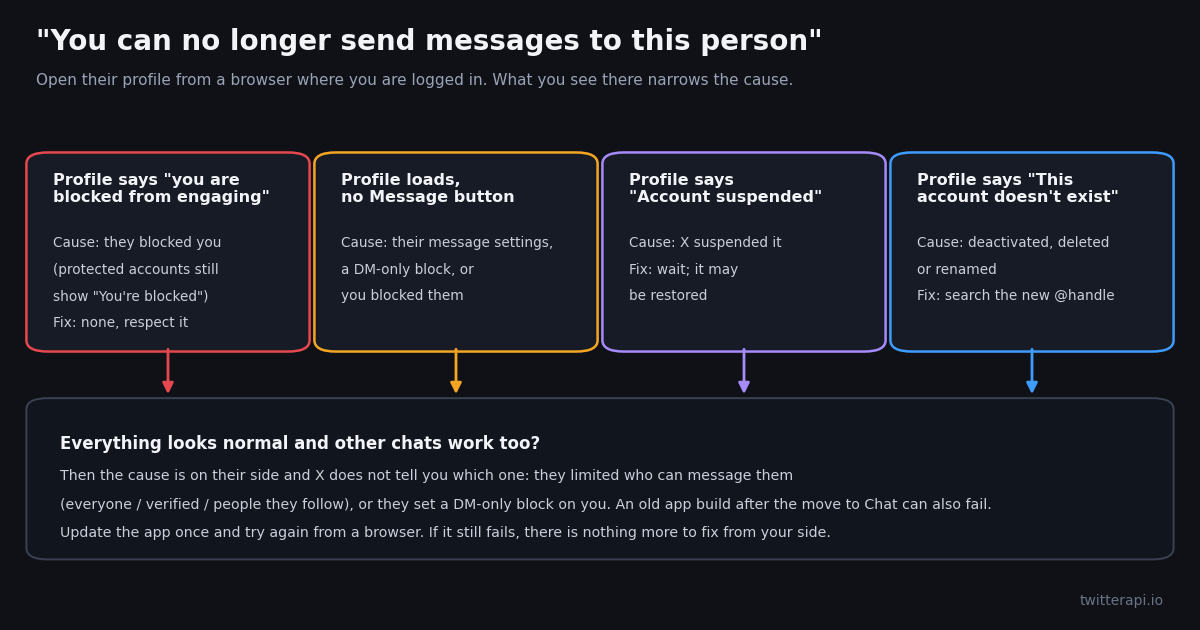
- Five causes produce the same line: a block, a DM-only block, their message settings, a suspended or deleted account, or your own block.
- Check their profile: "blocked from engaging" = block; "Account suspended" or "This account doesn't exist" = gone; normal profile, no message button = settings or DM block.
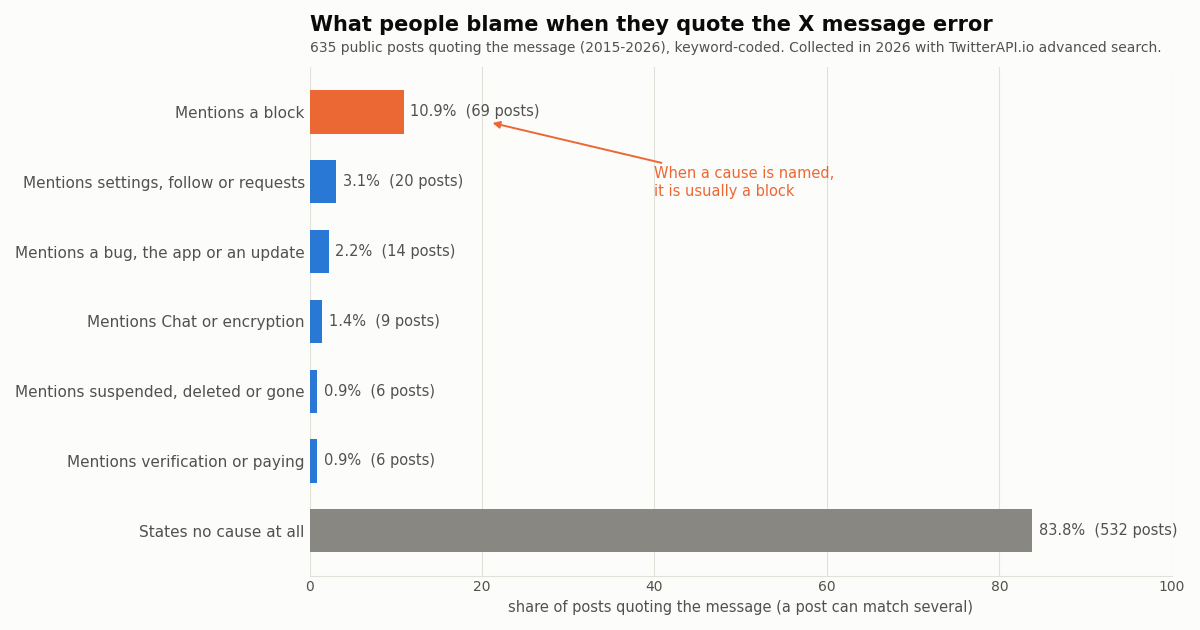
- What people blame: in 635 public posts quoting the message, 67.0% of those naming a cause said block; 83.8% named no cause at all.
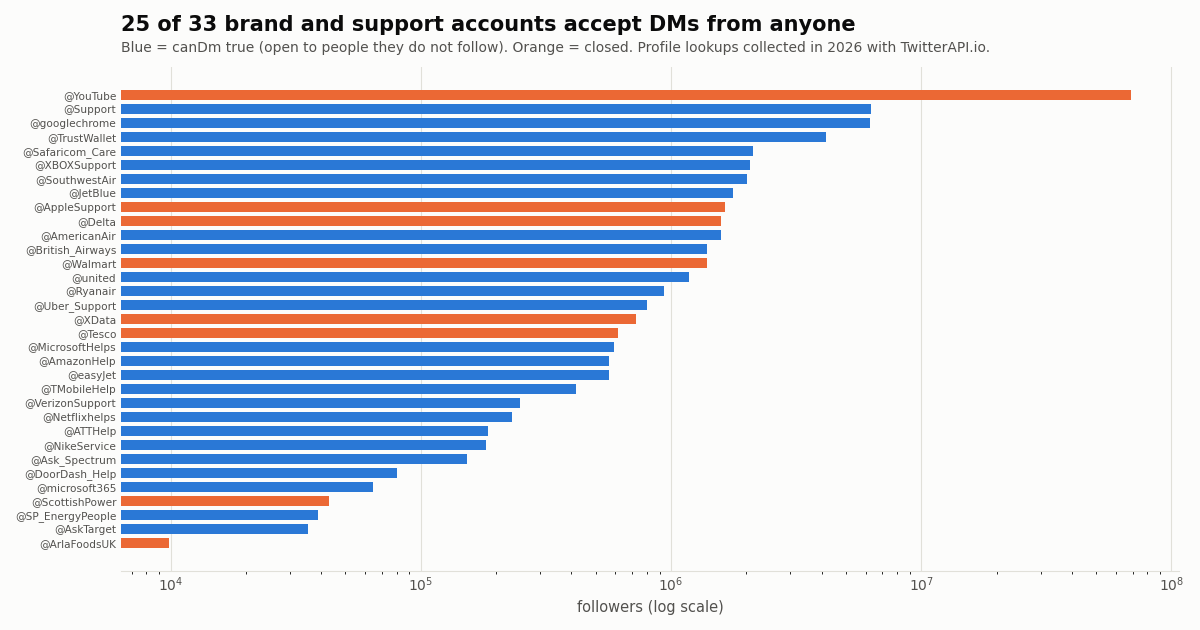
- Brands close DMs too: 8 of 33 large brand and support accounts we checked do not accept messages from people they do not follow.
- Nothing to fix on your side except unblocking them if you blocked them, or updating an old app build. Do not try from a second account.
You open a conversation on X, and where the message box used to be there is one grey line: "You can no longer send messages to this person." Sometimes a "Learn more" link follows it. The chat history may still be there, but you cannot add to it.
This page explains exactly what the line means, the five causes that produce it, what you can see from your side to tell them apart, and which causes no one outside X can distinguish. It is written for people using the X app or website. If your message shows "Message failed to send" or a red exclamation mark instead, that is a different problem (daily limits and delivery failures), covered in our guide to the Twitter direct message limit.
We also did something the other guides did not: we read 635 public posts in which people quote this exact message, to see what they believed caused it, and we checked whether 33 large brand and customer-support accounts accept messages at all.
67.0% of the 103 posts that name a cause, out of 635 public posts quoting the message (collected in 2026). 83.8% name no cause at all.
What "You can no longer send messages to this person" means
The message is X's way of saying the conversation is closed from the other side, or from yours. X shows it in place of the message box, at the bottom of an existing conversation or when you try to start a new one. It replaces the text field, so there is nothing to retry: the app is not failing to send, it is refusing to let you type.
It is not a rate limit. When you hit X's daily message cap or send too fast, you get a different notice ("Message failed to send", a red exclamation mark, or a notice naming the limit), and the conversation opens again later. "You can no longer send messages to this person" does not time out on its own; it stays until whatever caused it changes.
It is not about your account in general. If you can still message other people, your account is fine. The line is specific to one conversation partner.
X does not tell you the reason. Every cause below produces the same sentence. X keeps blocks private to the person who blocks, and it does not reveal anyone's message settings. That is deliberate, and it is why so many people post the message asking what it means.
The wording is X's. In our sample, 461 of 635 posts quote it as "to this person". Other apps use similar lines with "this user", "this contact" or "this number" (WhatsApp, marketplaces, phone messaging); if that is the wording you saw, you are probably not looking at X.
The five causes, what you can see, and what you can do
This is the core of the page. Start from the column you can check (what the other person's profile and your conversation list show) and read across.
Two more situations are not causes of this exact line but are often confused with it. An out-of-date app after X's move to Chat can fail to send or show a stale conversation; update the app and try from a browser. A group chat you were removed from shows its own line, "You can no longer send messages in this conversation", which is about the group, not about one person.
Muting does not cause it. Muting someone hides their posts from you; it does not close messages in either direction. If the person may only have muted you, your messages still go through.
How to check what happened in about two minutes
Step 1: open their profile while logged in. Use the X website in a browser if the app is behaving oddly, and go to their @handle directly rather than through the conversation, which can be cached.
Step 2: read the profile banner. If it says you can view their public posts but are blocked from engaging with them, or simply "You're blocked", that is a block. X changed blocking in November 2024 so that blocked accounts can still see public posts but cannot follow, reply or message; the notice X shows says so explicitly. Protected accounts were excluded from that change, so a block from a protected account still shows the older "You're blocked" screen.
Step 3: if the profile says "Account suspended" or "This account doesn't exist". The account is gone for now. Suspended accounts can be restored after an appeal. A deactivated account can come back if the owner logs in again within X's deactivation window. "This account doesn't exist" also appears when someone changes their @handle, so search their display name before you conclude they left.
Step 4: if the profile looks completely normal. Check your own blocked accounts list under your privacy settings first; a forgotten block from your side is the one cause you can fix. If they are not there, the cause is their message settings or a DM-only block. Both are private. Nobody outside X can tell which of the two it is, including us and including any third-party tool that claims otherwise.
Step 5: rule out the app once. Message another person. If that fails too, the problem is your app or account (update the app, log out and in, or try the website), not this conversation. If other conversations work, stop troubleshooting: the door is closed on their side.
Blocked or just closed DMs? What X's settings actually allow
Most people assume a block, and the posts we read show it (see the study below). But X gives every account several quieter ways to stop messages without blocking anyone, and they produce the same line.
Who can message you. X's own developer documentation for Chat settings lists three values for who may message an account: everyone (all), verified accounts only (verified), and only accounts the person follows (following). There is also a separate switch that always allows messages from the person's subscribers. If someone moves from everyone to following, every person they do not follow loses the ability to start a new conversation with them.
Message requests and the quality filter. When you message someone who does not follow you and who accepts messages from everyone, your message lands in their message requests, not their main inbox. X's settings also include a low-quality message filter that sends some requests to a separate folder; X's help page describes Grok sorting requests into priority and hidden inboxes. A message stuck there was still delivered; it just was not seen. That is a different experience from this error: you can type and send, you just get no reply.
The DM-only block. X added a way to block someone's messages without blocking the account. X's help page on DM blocking describes it as controlling who can send you direct messages without affecting your other interactions, and notes that it does not affect group messages. That is why some people see this line while still being able to reply to the person's posts in public: the person did not block the account, only its messages.
Requests are capped by plan. X's Chat help page, as indexed by search engines (help.x.com blocks automated reading, so we could not open it ourselves), lists per-day caps on new message requests by plan, with free accounts allowed the fewest. Hitting that cap produces a limit notice, not this line, but it explains why some new conversations never start.
What people blame: 635 posts that quote the message
To see how people actually experience this message, we collected every public post our search could reach that quotes it or a close variant, 635 unique posts written between 2015 and 2026, and coded each one by the cause it mentions.
Most posts name no cause. 83.8% only quote the line. Reading them, many are jokes: the message has become a punchline for a conversation that went badly ("I was babe last night, today I'm 'you can no longer send messages to this person'"). The rest are people who saw it and did not know why, which is the question this page answers.
When people do name a cause, it is a block. 103 posts name at least one cause, and 67.0% of those mention a block. Settings and following come a distant second. Very few mention suspension or a deleted account, although one post captures that case well: someone assumed they had been blocked, opened the profile, and found the account was simply gone.
Brand support conversations show up too. 9 posts are about customer-service chats: people told to send a DM to a company's support account, only to find the company had closed messages, and moving to email instead. The next section measures how common that is.
It is a long-lived message. Posts quoting it go back to 2015, and it keeps appearing every year (222 of the posts are from 2023 or later), through X's renaming and the move to Chat. Of all posts, 35.7% are replies and 13.2% carry a screenshot or other media.
Keyword coding is blunt: a post that says "blocked" may be joking, and a post can match several causes. Read the shares as what people talk about, not as how often each cause really happens. X does not publish that.
Brand and support accounts: 8 of 33 do not accept messages
If the "person" is a company, the cause is almost always its message settings, not a block. Many brands answer in public and accept messages only from accounts they follow, or open messages only after they reply to you.
We looked up 33 large brand, airline, telecom and customer-support accounts and read X's canDm flag on each profile, which says whether the account accepts messages from people it does not follow. 25 accept them (75.8%). These 8 do not:
What to do with a brand. Reply to one of their posts or mention them publicly and ask them to message you; most support teams follow you or open a conversation from their side, after which you can write back. If they have closed messages entirely, use the contact form or email on their website. Two of the posts in our sample did exactly that after hitting this line with a utility and a food brand.
Large accounts generally. In a separate lookup of over a thousand public profiles with 10,000+ followers, reported on our Twitter direct message limit page, only a minority accepted messages from accounts they do not follow. This brand sample is far more open (75.8%), because support accounts exist to take messages. A private person who closes messages is common, not a sign that something is wrong with you.
One caveat on canDm. X does not document the flag, and it may be calculated relative to the account that looks the profile up. Treat it as "open to strangers", not as a promise that your message will go through: if the account allows only verified senders and you are not verified, you still cannot write.
What not to do
Do not message from a second account. If someone blocked you or closed their messages, writing from another account is exactly what X's rules on abusive behavior and ban evasion are written against, and it can get both of your accounts limited or suspended.
Do not pay for a "who blocked me" or "read their DMs" app. No tool can see someone else's message settings or a DM-only block; that data is private to the account. The honest ways to check a block are covered in our who-blocked-me guide.
Do not keep reinstalling the app. One update and one try from a browser is enough to rule out the app. If other conversations work, more troubleshooting will not change the outcome.
Do not assume the worst. A closed conversation is often a settings change made for spam reasons, a deactivated account, or a suspension that has nothing to do with you. Some posts in our sample came from people who assumed a block and then found their contact had simply left the platform.
For developers: check whether an account accepts messages before you write
If you build support tools or a product that contacts people who asked to be contacted, you can see one part of this picture in data. The profile object returned by /twitter/user/info (and /twitter/user/batch_info_by_ids for many accounts at once) includes canDm, plus protected; an unknown, deleted or renamed handle returns HTTP 200 with status: "error" and msg: "user not found", which is how a gone account looks in code. The script below is what we used for the brand table, in simplified form. Reads need no X account.
What the data cannot show. A block, a DM-only block and a mute are private to the account that set them. No API, ours or X's, tells a third party that A blocked B. canDm false tells you only that strangers cannot start a conversation.
Cost. Profile lookups on TwitterAPI.io cost 18 credits per user, which is $0.18 per 1,000 profiles. On X's official pay-per-usage rate card a user read is $0.010, which is $10 per 1,000: about 55 times more for the same lookup. New accounts that pass the automatic bot check get up to $1 of free credits (at most 100,000 credits, no card, one per person or network, expiring after 31 days), enough for a few thousand lookups.
Sending is a separate product. TwitterAPI.io also has /twitter/send_dm_to_user for an account you control: one /twitter/user_login_v2 login ($0.10, with a proxy you supply) returns login_cookies, then each message is 60 credits ($0.0006), billed per HTTP 200 call. The call acts as that account, so X can rate-limit, lock or suspend it; keep a normal human pace, expect the session to need a re-login sometimes, and only message people who expect to hear from you. It does not open a conversation X has closed: if the recipient blocked the account or closed their messages, the send fails exactly as it does in the app. It is not for bulk or unsolicited messages.
import requests

API_KEY = "YOUR_TWITTERAPI_IO_KEY"   # from your twitterapi.io dashboard
BASE = "https://api.twitterapi.io"
HEADERS = {"X-API-Key": API_KEY}


def dm_status(handle: str) -> dict:
    """Look up one public profile and report whether it accepts DMs from anyone.

    canDm is X's own "open to message requests" flag as returned on the profile.
    It cannot tell you whether *you* are blocked or DM-blocked: that is private.
    """
    r = requests.get(f"{BASE}/twitter/user/info", headers=HEADERS,
                     params={"userName": handle.lstrip("@")}, timeout=30)
    r.raise_for_status()
    body = r.json()
    # An unknown, deleted or renamed handle comes back as HTTP 200 with status "error".
    if body.get("status") != "success" or not body.get("data"):
        return {"handle": handle, "result": "not found (deactivated, deleted, renamed or suspended)",
                "msg": body.get("msg")}
    u = body["data"]
    return {
        "handle": "@" + u["userName"],
        "followers": u.get("followers"),
        "protected": u.get("protected"),
        "accepts_dms_from_anyone": u.get("canDm"),
        "result": "open to message requests" if u.get("canDm")
                  else "only people they follow (or verified accounts) can start a chat",
    }


if __name__ == "__main__":
    for h in ["AmazonHelp", "AppleSupport", "Delta", "SouthwestAir"]:
        print(dm_status(h))
How we collected this
Question: when people post on X about seeing "You can no longer send messages to this person", what do they think caused it; and how many large brand and support accounts accept messages from people they do not follow?
Posts: four exact-phrase searches on /twitter/tweet/advanced_search (Latest): "no longer send messages to this person", "you can no longer send messages", "can no longer send messages to", and "cannot send messages to this person" OR "can't send messages to this person". We followed every page each search returned and de-duplicated by post id: 635 unique posts, 2015 to 2026, 92.4% in English. Each post was coded by keyword for the cause it mentions (block, settings or following, bug or app, Chat or encryption, suspended or deleted, verification or paying); a post can match several.
Accounts: 33 public brand, airline, telecom and support accounts looked up with /twitter/user/info, reading canDm and follower counts. Three handles we tried were skipped because they returned no account or a renamed, near-empty account.
Size and cost: 57 search pages plus 36 profile lookups, collected in 2026 through a rate-limited, read-only client, for about $0.16 in total.
What the sample cannot show: how often each cause really happens. Search reaches only public posts, people who joke about the message are over-represented, and keyword coding misses causes described in other words. The brand sample is a hand-picked list, not a random sample of X. canDm is undocumented and may be computed relative to the account doing the lookup.
Privacy: we report aggregates only. The posts' authors are mostly private individuals, so no handles, post ids, links or full texts are stored or shown; short quotes are generic phrases used by many people. Only organization accounts are named.
import requests

API_KEY = "YOUR_TWITTERAPI_IO_KEY"   # from your twitterapi.io dashboard
BASE = "https://api.twitterapi.io"
HEADERS = {"X-API-Key": API_KEY}


def dm_status(handle: str) -> dict:
    """Look up one public profile and report whether it accepts DMs from anyone.

    canDm is X's own "open to message requests" flag as returned on the profile.
    It cannot tell you whether *you* are blocked or DM-blocked: that is private.
    """
    r = requests.get(f"{BASE}/twitter/user/info", headers=HEADERS,
                     params={"userName": handle.lstrip("@")}, timeout=30)
    r.raise_for_status()
    body = r.json()
    # An unknown, deleted or renamed handle comes back as HTTP 200 with status "error".
    if body.get("status") != "success" or not body.get("data"):
        return {"handle": handle, "result": "not found (deactivated, deleted, renamed or suspended)",
                "msg": body.get("msg")}
    u = body["data"]
    return {
        "handle": "@" + u["userName"],
        "followers": u.get("followers"),
        "protected": u.get("protected"),
        "accepts_dms_from_anyone": u.get("canDm"),
        "result": "open to message requests" if u.get("canDm")
                  else "only people they follow (or verified accounts) can start a chat",
    }


if __name__ == "__main__":
    for h in ["AmazonHelp", "AppleSupport", "Delta", "SouthwestAir"]:
        print(dm_status(h))
Researching this?Free starter credits cover end-to-end testing — Google sign-in, no card. Get a key.
Questions readers ask
Does "You can no longer send messages to this person" mean I am blocked?
Not necessarily. A block is the most common cause people name, but the same line appears when the person put a DM-only block on you, changed who can message them, was suspended, deactivated or deleted their account, or when you blocked them. Open their profile: if it says you are blocked from engaging (or "You're blocked" on a protected account), it is a block.
Can someone block my DMs without blocking my account?
Yes. X has a DM-only block that stops someone's messages without blocking the account. X's help page says it does not affect group messages. You can still see and reply to their posts, but you cannot message them, and from your side it looks the same as them closing messages to people they do not follow.
If I can still see their posts, did they block me?
Possibly. Since X's November 2024 block change, a blocked account can still view a public account's posts, but X shows a notice that you are blocked from engaging with them and cannot follow or message them. If there is no such notice and the posts look normal, it is more likely their message settings or a DM-only block.
Will the message go away on its own?
Only if the cause changes: they unblock you, change their settings, follow you, or their account comes back. It is not a timed limit like the daily message cap, so waiting a day does not help by itself.
Can they still see the messages we already exchanged?
The conversation history usually stays in both inboxes unless one of you deletes it; the line only stops new messages. If the account was deleted, the conversation may show it as unavailable.
Does muting someone stop them from messaging me?
No. Muting hides someone's posts from your timeline but does not close messages. To stop messages, change who can message you, use the DM-only block, or block the account.
Why does it say this for a company's support account?
Many brands accept messages only from accounts they follow. In our check, 8 of 33 large brand and support accounts did not accept messages from strangers. Reply to one of their posts and ask them to message you, or use the contact form on their website.
Can an app or website tell me why I can't message someone?
No. Blocks, DM-only blocks and message settings are private to the account that set them. Public profile data shows only whether an account accepts messages from people it does not follow, which is the canDm flag; nothing shows whether you specifically are blocked.
Continue
- X API docs: Update Chat settings (who can message: all, verified, following; subscriber switch; quality filter)
- X Help Center: How to DM block accounts (does not affect group messages)
- X Help Center: About Direct Messages (message requests and settings)
- X Help Center: About Chat (message requests from people you do not follow)
- Engadget: X now lets blocked users see your posts (the blocked-from-engaging notice, November 2024)
- TwitterAPI.io API reference: user info (canDm, protected)
- Twitter (X) API overview
- Twitter direct message limit and why DMs fail to send
- How to see who blocked you on Twitter (X)
- What a suspended Twitter account means and what you can still see
- What happens when a Twitter account is deactivated
- Why X says content is not available
- TwitterAPI.io pricing for profile lookups
- 01Twitter (X) Verification in 2026: What the Blue, Gold and Grey Checkmarks Mean and How to Get One
- 02Twitter (X) API with LangGraph: Build a Search Agent Graph
- 03C# Twitter (X) API: a .NET client with HttpClient and System.Text.Json
- 04Twitter (X) API Mentions: Get Every Post That Mentions an Account
- 05How to Log Out of Twitter (X) on Web, iPhone and Android
- 06Tweet Failed to Send on Twitter (X)? What Each Error Means and How to Fix It
- 07How to Use Twitter (X) Without an Account — A Developer's API Guide
- 08Twillot Twitter (X) Viewer: What It Is, Whether It Works, and Is It Safe?
Writing about something you built with TwitterAPI.io? Our community rewards program pays API credits for honest tutorials, build logs and videos.
Stop reading. Start building.
Starter credits cover real testing on real data. Google sign-in, no card, no application queue.
Get an API keyAlready building with TwitterAPI.io? Publish an honest tutorial or build log about it and earn up to $200 a month in API credits.