Twitter (X) API with LangGraph: Build a Search Agent Graph
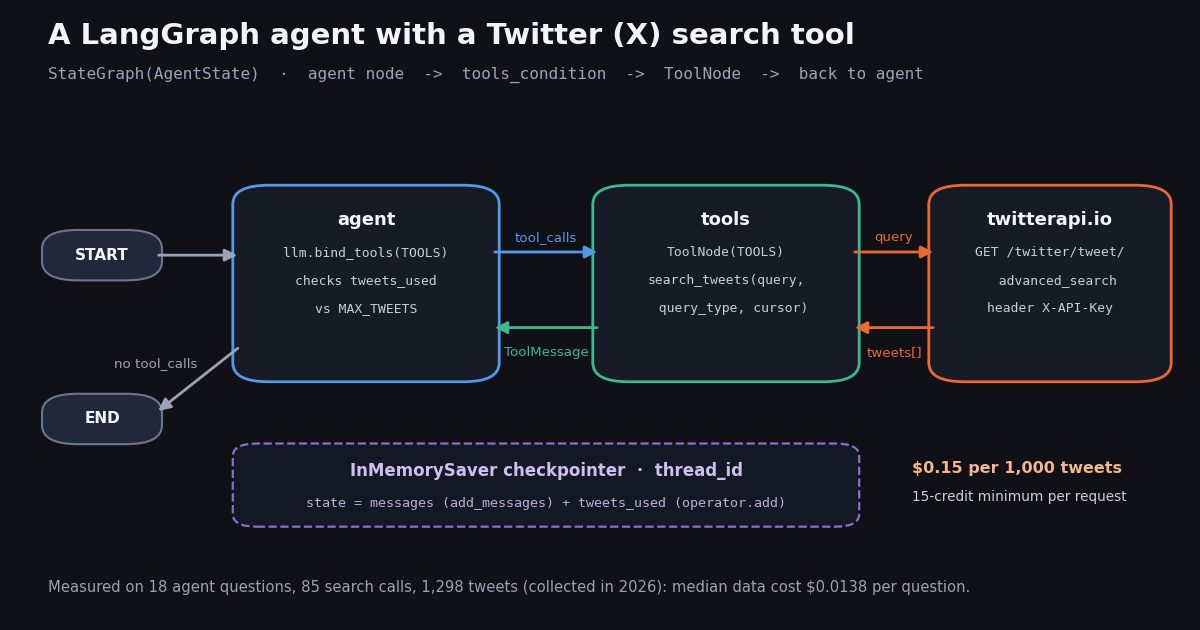
- The graph:
StateGraph(AgentState)with anagentnode, atoolsnode wrappingToolNode([search_tweets]),tools_conditionas the conditional edge, andtools -> agentto close the loop. - The tool: one
@toolthat calls/twitter/tweet/advanced_searchwithX-API-Key; it returns slimmed tweets,has_next_pageandnext_cursorso the model pages by itself. - Versions verified this session:
langgraph1.2.23,langgraph-prebuilt1.1.3,langchain-core1.8.4,langchain1.5.2 on Python 3.12.create_react_agentis deprecated in LangGraph v1 in favor oflangchain.agents.create_agent. - Measured: 18 agent questions, 85 calls, 1,298 tweets returned. Median 20 tweets per call, 10.6% of calls came back empty, zero tweet ids repeated across pages.
- Cost per question: median $0.0138, at most $0.0150 for 5 pages ($0.15 per 1,000 tweets returned). The same 100 posts at X's $0.005 per post read would be $0.50.
- Guardrails that matter: a
tweets_usedreducer in state with a hardMAX_TWEETS, a checkpointer keyed bythread_id, and a stop rule for short Latest pages that saved every empty follow-up call in our sample.
This page is for builders who already chose LangGraph and want a working graph that reads Twitter (X): a typed state schema, an agent node that decides when to search, a ToolNode that calls the API, a conditional edge that loops until the model is done, and a checkpointer that remembers the thread. The graph below was run in a Python 3.12 virtual environment with LangGraph 1.2.23 against the live search endpoint, and the run transcript is shown as it printed.
It is deliberately narrower than our LangChain guide, which covers document loaders, RAG over a timeline and the one-line create_agent route. Here the graph is the point: you own the nodes and edges, so you can put a tweet budget in state, stop paging when a result set runs out, and resume a conversation by thread_id. If you are still choosing a framework, the LangChain vs LangGraph comparison linked at the end is the better first read.
We also measured what such a search tool actually hands back to an agent. For 18 realistic questions about public developer products ("what are people saying about Supabase this week"), the tool made 85 calls and returned 1,298 tweets. The numbers decide two design choices on this page: when the agent should stop paging, and how many tweets a single question should be allowed to pull.
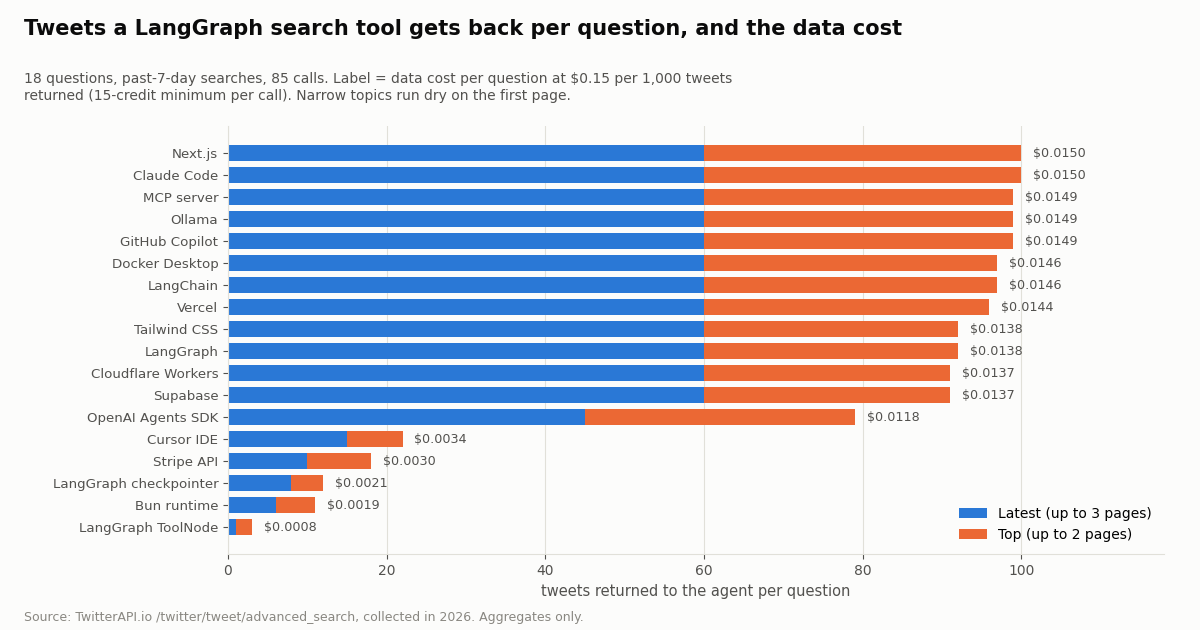
$0.0138 for up to 5 search calls (18 questions, 85 calls, 1,298 tweets, collected in 2026). 10.6% of calls came back empty, all of them follow-up pages.
What you are building: the graph, the versions, the pieces
A LangGraph agent is a state machine. The state holds the conversation, nodes are functions that read the state and return updates, and edges decide which node runs next. For an agent that searches X, you need four pieces and one loop.
Versions we verified this session. PyPI lists langgraph 1.2.23 (requires Python 3.10+), langgraph-prebuilt 1.1.3, langchain-core 1.8.4 (requires Python 3.11+) and langchain 1.5.2, so use Python 3.11 or newer. We installed them into a clean virtual environment and imported StateGraph, MessagesState, START, END from langgraph.graph, ToolNode and tools_condition from langgraph.prebuilt, and InMemorySaver from langgraph.checkpoint.memory. All of them import without warnings.
One API moved. In LangGraph 1.x, langgraph.prebuilt.create_react_agent still exists but is marked deprecated with the message that it has moved to langchain.agents as create_agent. If you want the prebuilt loop, use create_agent; if you want control over the loop (budgets, stop rules, extra nodes), build it yourself as below. The hand-built version is about 30 lines.
Install the pieces with pip install "langgraph>=1.2" "langchain>=1.5" requests, plus the integration package for your model provider (for example langchain-anthropic or langchain-openai). The API key for the data side comes from your dashboard and goes in an environment variable; no X developer account or OAuth app is needed for reads.
Step 1: a search tool that calls /twitter/tweet/advanced_search
The tool is an ordinary Python function with the @tool decorator. LangChain turns its signature and docstring into the JSON schema the model sees, so the docstring is part of your prompt: tell the model which operators it may use and how paging works.
Slim the payload. A raw tweet object from the API carries dozens of fields (entities, media, card, quoted and retweeted objects, a full author profile). The model needs a handful. In our study, the text alone of a full 20-tweet page was a median of 9,252 characters, and the 90th-percentile tweet ran to 1,436 characters because long-form posts are common. slim() keeps the id, time, author handle and follower count, the first 400 characters of text, and two engagement counts, which keeps a page of results to a predictable size in the context window.
Return an artifact for bookkeeping. With response_format="content_and_artifact" the tool returns a tuple: the string the model reads, and a value the model never sees. Here the artifact is the number of tweets returned, which the graph adds to tweets_used. That is how you count billable tweets without parsing the model-facing JSON.
A stop rule that saves empty calls. The API documents up to 20 results per page and notes that a page can hold fewer because non-tweet items are filtered out, so a short page does not by itself prove the end. In our sample, though, every short Latest page that still said has_next_page: true was followed by an empty page (5 of 5), while short Top pages were usually followed by more results (8 of 12). So the tool reports has_next_page as false after a short Latest page and trusts the API flag for Top. Each avoided empty call saves the 15-credit minimum and one model round trip.
The query string is plain X search syntax. Operators the agent will reach for most are lang:en, -filter:retweets, from:handle, since:YYYY-MM-DD and quoted phrases; our search operators guide lists the rest. The documented query limit is 512 characters, and longer queries return HTTP 400.
import json
import os

import requests
from langchain_core.tools import tool

BASE = "https://api.twitterapi.io"
HEADERS = {"X-API-Key": os.environ["TWITTERAPI_IO_KEY"]}


def slim(t: dict) -> dict:
    """Keep only what the model needs: a full tweet object is mostly noise to an LLM."""
    a = t.get("author") or {}
    return {
        "id": t.get("id"),
        "createdAt": t.get("createdAt"),
        "author": a.get("userName"),
        "followers": a.get("followers"),
        "text": (t.get("text") or "")[:400],
        "likes": t.get("likeCount"),
        "replies": t.get("replyCount"),
    }


@tool(response_format="content_and_artifact")
def search_tweets(query: str, query_type: str = "Latest", cursor: str = "") -> tuple[str, int]:
    """Search recent X (Twitter) posts. `query` accepts X search operators such as
    lang:en, -filter:retweets, from:handle, since:YYYY-MM-DD. query_type is Latest or Top.
    Pass the returned next_cursor to get the next page; stop when has_next_page is false."""
    r = requests.get(
        f"{BASE}/twitter/tweet/advanced_search",
        headers=HEADERS,
        params={"query": query, "queryType": query_type, "cursor": cursor},
        timeout=30,
    )
    r.raise_for_status()
    body = r.json()
    tweets = body.get("tweets") or []
    result = {
        "count": len(tweets),
        "tweets": [slim(t) for t in tweets],
        # Latest: a short page was the last page in our study, so skip the empty follow-up.
        "has_next_page": bool(body.get("has_next_page")) and (len(tweets) == 20 or query_type == "Top"),
        "next_cursor": body.get("next_cursor") or "",
    }
return json.dumps(result), len(tweets) # (content for the model, artifact for the budget)Step 2: state, nodes and the tools_condition loop
The state schema is a TypedDict with two keys. messages uses the add_messages reducer, so each node returns only its new messages and LangGraph appends them. tweets_used uses operator.add, so each tools step returns the tweets it pulled and LangGraph keeps the running total. You could start from the prebuilt MessagesState and subclass it; spelling it out makes the budget field explicit.
The agent node binds the tools to the model and invokes it. Before it does, it checks the budget: once tweets_used reaches MAX_TWEETS, the model is called without tools and with a system note to answer from what it has. Because the model physically has no tools bound at that point, it cannot request another search, which is more reliable than asking it nicely in the prompt. One page can still land after the check, so a run can overshoot the cap by at most one page (20 tweets).
The tools node wraps ToolNode. ToolNode reads the tool calls from the last AI message, runs them, and returns one ToolMessage per call. If the model asks for several searches in one turn, ToolNode runs them concurrently (it maps the calls over an executor, or gathers them in async mode). That matters for rate limits: before your first payment the API allows 0.2 requests per second, so three parallel searches on a fresh account will see HTTP 429. After the first payment the limit is 20 requests per second.
tools_condition is the router: it returns "tools" when the last message has tool calls and END otherwise. The edge from tools back to agent closes the loop, so the model sees each result and decides whether to search again, page on, or answer. Compiling with a checkpointer turns every step into a saved snapshot.
import operator
from typing import Annotated

from langchain_core.messages import AnyMessage, SystemMessage
from langgraph.checkpoint.memory import InMemorySaver
from langgraph.graph import START, StateGraph
from langgraph.graph.message import add_messages
from langgraph.prebuilt import ToolNode, tools_condition
from typing_extensions import TypedDict

MAX_TWEETS = 60  # hard cap per agent run: 60 tweets x $0.15 / 1,000 = $0.009
TOOLS = [search_tweets]


class AgentState(TypedDict):
    messages: Annotated[list[AnyMessage], add_messages]   # appended, never overwritten
    tweets_used: Annotated[int, operator.add]             # summed across tool steps


def build_graph(llm):
    llm_with_tools = llm.bind_tools(TOOLS)
    tool_node = ToolNode(TOOLS)

    def agent(state: AgentState):
        if state.get("tweets_used", 0) >= MAX_TWEETS:
            note = SystemMessage(f"Tweet budget of {MAX_TWEETS} reached. Answer now without tools.")
            return {"messages": [llm.invoke(state["messages"] + [note])]}
        return {"messages": [llm_with_tools.invoke(state["messages"])]}

    def tools(state: AgentState):
        out = tool_node.invoke(state)
        used = sum(m.artifact or 0 for m in out["messages"])
        return {"messages": out["messages"], "tweets_used": used}

    g = StateGraph(AgentState)
    g.add_node("agent", agent)
    g.add_node("tools", tools)
    g.add_edge(START, "agent")
    g.add_conditional_edges("agent", tools_condition)  # routes to "tools" or END
    g.add_edge("tools", "agent")
return g.compile(checkpointer=InMemorySaver())Step 3: the checkpointer, threads, and a real run
Pass a thread_id in the config and the checkpointer stores the state after every node. A second invoke on the same thread starts from the saved messages, so a follow-up such as "which of those got the most replies?" can be answered from tool results already in the thread, without another search. Because tweets_used is part of the saved state, the budget also carries across turns: a thread that has used its 60 tweets answers follow-ups without new searches.
InMemorySaver is for development and tests: it lives in the process and is gone on restart. For a deployed agent, install a durable saver. PyPI currently lists langgraph-checkpoint-postgres 3.2.1 and langgraph-checkpoint-sqlite 3.1.3. Snapshots include the slimmed tweets in the tool messages, so treat the checkpoint store like any store of third-party post text: set a retention period and do not keep more than the agent needs.
Human approval before anything that acts. Reading needs no X account. If you later add tools that act as an account (post, reply, like, follow), those run through an authenticated session: one /twitter/user_login_v2 login ($0.10, with a proxy you supply) returns login_cookies, and each action such as /twitter/create_tweet_v2 or /twitter/follow_user_v2 is 60 credits ($0.0006), billed per HTTP 200 call. Every such call acts as that account, so X can rate-limit, lock or suspend it; keep a normal human pace, expect the session to need a fresh login now and then, and this is not a way around any X limit. In a graph, put an approval step in front of these tools with LangGraph's interrupt() from langgraph.types, so a person confirms each action before it runs.
We ran the graph above with a scripted chat model (a LangChain fake chat model that emits fixed tool calls) so the run is reproducible without a model API key; the tool calls themselves went to the live search endpoint. The model asked for the first Latest page, then requested the next page with the returned cursor, then answered. The commented lines at the end of the code block are the streamed output of graph.stream(..., stream_mode="updates"), with the date in the query and the cursor shortened.
What to notice. Each tool step added 20 to tweets_used through the reducer, so the state ended at 40 after two pages, which is $0.006 of data at $0.15 per 1,000 tweets. Six messages were saved (question, two AI tool calls, two tool results, the answer) and the checkpointer wrote 7 snapshots for the thread. The final answer in this run is scripted, so it says nothing about the content; with a real model the answer is generated from the two pages of slimmed tweets.
To run it with a real model, use init_chat_model from langchain.chat_models with any tool-calling chat model, for example init_chat_model("anthropic:<model-name>") or an OpenAI model id, and keep everything else unchanged. The end-to-end script is in the code block at the end of this page.
config = {"configurable": {"thread_id": "langgraph-week-1"}}
graph.invoke({"messages": [HumanMessage("What are developers saying about LangGraph this week?")],
              "tweets_used": 0}, config)

# Same thread: the follow-up sees the earlier tool results and the running tweet count.
graph.invoke({"messages": [HumanMessage("Which of those posts got the most replies?")]}, config)

snap = graph.get_state(config)
print(snap.values["tweets_used"], len(snap.values["messages"]))

# Production: swap InMemorySaver for a durable saver, e.g.
#   pip install langgraph-checkpoint-postgres
#   from langgraph.checkpoint.postgres import PostgresSaver

# --- streamed output of our run (scripted model, live search endpoint) ---
# [agent] ai: tool_calls=[search_tweets(query="LangGraph lang:en -filter:retweets since:YYYY-MM-DD", query_type="Latest")]
# [tools] ToolMessage count=20 has_next_page=True artifact=20
#     tweets_used += 20
# [agent] ai: tool_calls=[search_tweets(..., query_type="Latest", cursor="DAADDAABCgAB...")]
# [tools] ToolMessage count=20 has_next_page=True artifact=20
#     tweets_used += 20
# [agent] ai: (scripted final answer, no tool_calls) -> tools_condition routes to END
# final tweets_used: 40 messages: 6 HTTP calls: 2 checkpoints saved: 7What the search tool returns: 18 agent questions measured
Agent demos tend to assume a search tool returns a full page every time. We checked. For 18 questions about public developer products and topics, we sent the query an agent would send (<topic> lang:en -filter:retweets limited to the past 7 days) and paged exactly as the tool does: up to 3 pages of Latest and up to 2 pages of Top per question. That is 85 calls and 1,298 tweets returned (1,143 distinct).
Broad topics never ran dry, narrow ones did on page 1. Twelve of the questions filled all 3 Latest pages (60 tweets). The narrow ones, such as "LangGraph ToolNode" (1 tweet in the week) or "Bun runtime" (6), returned a short first page and then an empty one. An agent that keeps paging on a narrow topic is paying for empty pages; the short-page rule in Step 1 stops that.
Cursors did not repeat results. Across all 85 calls no tweet id appeared twice within the pages of one query, so a dedup step is cheap insurance rather than a necessity. What does differ is Latest versus Top: a median of 25.4% of Top results were also in the first 60 Latest results. For "what are people saying" questions an agent that only reads Latest misses most of the posts that got traction, so a good tool docstring tells the model to use Top for "most discussed" and Latest for "what is new".
What the agent reads. 29.7% of returned tweets were replies, 38.6% carried a link, and 71.7% came from accounts with a blue check (paid subscription). Replies and link posts are why slimming the text matters: a reply often only makes sense with its parent, which you can fetch by id with /twitter/tweets if the agent asks for it.
What one agent run costs, and how to cap it
Model tokens are billed by your model provider; this section is about the data side, which is billed per tweet returned. The formula is short: data cost per run = tweets returned x $0.15 / 1,000, where every request costs at least 15 credits ($0.00015), so a search that finds nothing still costs the minimum. A full 20-tweet page is $0.003.
The right-hand column uses the official X API pay-per-usage rate card on docs.x.com/x-api/getting-started/pricing: $0.005 per post read and $0.010 per user read, with pay-per-usage capped at 3 million post reads a month (Enterprise above that). Per 1,000 posts that is $5 against $0.15 here, about 33x. The official route also needs a developer account, an app and OAuth credentials before the first call.
Why a budget in state, not in the prompt. Models decide how many times to search, and a curious model on a broad topic will keep paging. With tweets_used in state and the tools unbound at MAX_TWEETS, the worst case per question is fixed by code: 60 tweets plus at most one more page. If your agent serves many users, set MAX_TWEETS per tier and log tweets_used with each thread so you can see cost per conversation.
New accounts that pass the automatic bot check start with up to $1 of free credits (at most 100,000 credits, no card, one per person or network, expiring after 31 days), which covers several hundred questions at the study median. Purchased credits never expire, and the pricing page lists the monthly plans if you prefer a subscription.
Adding more X tools: user info and timelines
Search answers "what are people saying". Two more read tools cover most other agent questions: who an account is (/twitter/user/info) and what it posted recently (/twitter/user/last_tweets). Add them to TOOLS and the same ToolNode and tools_condition loop handles them; nothing else in the graph changes.
Read the shapes exactly. /twitter/user/info returns the profile under data (userName, followers, description, createdAt, isBlueVerified and more). An unknown handle does not return HTTP 404: it returns HTTP 200 with status: "error", msg: "user not found" and data: null, so the tool must check status and hand the model a clear error instead of crashing on None. /twitter/user/last_tweets nests its tweets under data.tweets, 20 per page, newest first, while has_next_page and next_cursor sit at the top level.
Profiles are billed at $0.18 per 1,000 (18 credits each) and timeline tweets at the same $0.15 per 1,000 as search. If you count profiles toward a budget, return a separate artifact or a second counter in state; mixing them in tweets_used hides which tool drives cost.
If you would rather not write tools at all, the hosted MCP server exposes the same read endpoints as tools, and LangChain's MCP adapters can load them into a LangGraph ToolNode. Writing your own @tool functions keeps the docstrings, slimming and budget logic in your code, which is why this guide does it by hand.
@tool
def user_info(user_name: str) -> dict:
    """Profile of one X account: followers, bio, created date, blue check."""
    r = requests.get(f"{BASE}/twitter/user/info", headers=HEADERS,
                     params={"userName": user_name}, timeout=30)
    body = r.json()
    if body.get("status") == "error":          # unknown user: HTTP 200, msg "user not found"
        return {"error": body.get("msg")}
    d = body["data"]
    return {k: d.get(k) for k in ("userName", "name", "description", "followers",
                                  "following", "statusesCount", "createdAt", "isBlueVerified")}


@tool
def recent_posts(user_name: str, cursor: str = "") -> dict:
    """Newest posts of one account, 20 per page."""
    r = requests.get(f"{BASE}/twitter/user/last_tweets", headers=HEADERS,
                     params={"userName": user_name, "cursor": cursor}, timeout=30)
    data = r.json().get("data") or {}
    tweets = data.get("tweets") or []
    return {"tweets": [slim(t) for t in tweets],
            "has_next_page": r.json().get("has_next_page"), "next_cursor": r.json().get("next_cursor")}


TOOLS = [search_tweets, user_info, recent_posts]Troubleshooting a LangGraph X agent
HTTP 429 on the first run. Before your first payment the limit is 0.2 requests per second, and ToolNode runs parallel tool calls at the same time. Either pay once to move to 20 requests per second, or add a short retry with backoff inside the tool. ToolNode(..., handle_tool_errors=True) turns an exception into a ToolMessage the model can read, which beats a crashed graph.
HTTP 400 with a detail message. A missing or invalid parameter (for example a queryType other than Latest or Top, or a query over 512 characters) returns 400 with the explanation in detail. Return that text to the model as the tool result so it can fix its own query.
The model loops on searches. Usually the docstring does not say when to stop. State it: stop when has_next_page is false, prefer Top for "most discussed", answer once you have enough. The MAX_TWEETS cap is the backstop.
Empty results for a topic you know is active. Check the operators the model wrote. Models sometimes add min_faves: or a tight since: range on their own. Log the exact query argument from each AI message's tool_calls and test it directly.
create_react_agent deprecation warning. In LangGraph 1.x, import create_agent from langchain.agents instead, or keep the hand-built graph from this page, which only uses StateGraph, ToolNode and tools_condition.
Context grows with every page. Each tool result stays in messages. For long threads, summarize older tool messages in a node before the agent runs, or keep only the ids and let the agent re-fetch posts by id with /twitter/tweets when it needs them.
How we collected this
Question. When a LangGraph agent answers realistic "what are people saying about this product" questions with a search tool, how many tweets does each call return, how often is a call empty, how far can it page before results run out or repeat, and what does a question cost in data?
Queries. 18 topics about public developer products and tools: LangGraph, LangChain, Claude Code, Cursor IDE, GitHub Copilot, Ollama, Supabase, Vercel, Next.js, Docker Desktop, Cloudflare Workers, Stripe API, OpenAI Agents SDK, MCP server, Tailwind CSS, Bun runtime, and two narrow LangGraph phrases. Each became <topic> lang:en -filter:retweets limited to the 7 days before collection.
Method and size. /twitter/tweet/advanced_search, up to 3 Latest pages and 2 Top pages per question, following next_cursor while has_next_page was true: 85 requests, 1,298 tweets returned, collected in 2026. Costs are computed from the published rates (15 credits per tweet returned, 15-credit minimum per request). The graph run in the transcript made 2 further requests and is not part of these numbers.
What the sample cannot show. One week of searches about developer topics in English. Result counts for news, sports or non-English topics will differ, and so will a week with a major release. The short-page rule is an observation from this sample, not a documented API guarantee; the API documents that pages can hold fewer than 20 results because non-tweet items are filtered.
Privacy. Search results are mostly posts by private individuals, so no raw pages, tweet ids, texts or handles are published. The study folder holds aggregates and de-identified per-call rows (topic, query type, page number, tweets returned).
import json
import operator
import os
from typing import Annotated

import requests
from langchain_core.messages import AnyMessage, HumanMessage, SystemMessage
from langchain_core.tools import tool
from langgraph.checkpoint.memory import InMemorySaver
from langgraph.graph import END, START, StateGraph
from langgraph.graph.message import add_messages
from langgraph.prebuilt import ToolNode, tools_condition
from typing_extensions import TypedDict

BASE = "https://api.twitterapi.io"
HEADERS = {"X-API-Key": os.environ.get("TWITTERAPI_IO_KEY", "")}
MAX_TWEETS = 60  # hard cap per agent run: 60 tweets x $0.15 / 1,000 = $0.009


class AgentState(TypedDict):
    messages: Annotated[list[AnyMessage], add_messages]
    tweets_used: Annotated[int, operator.add]


def fetch_search(query: str, query_type: str, cursor: str) -> dict:
    r = requests.get(
        f"{BASE}/twitter/tweet/advanced_search",
        headers=HEADERS,
        params={"query": query, "queryType": query_type, "cursor": cursor},
        timeout=30,
    )
    r.raise_for_status()
    return r.json()


def slim(t: dict) -> dict:
    a = t.get("author") or {}
    return {
        "id": t.get("id"),
        "createdAt": t.get("createdAt"),
        "author": a.get("userName"),
        "followers": a.get("followers"),
        "text": (t.get("text") or "")[:400],
        "likes": t.get("likeCount"),
        "replies": t.get("replyCount"),
    }


@tool(response_format="content_and_artifact")
def search_tweets(query: str, query_type: str = "Latest", cursor: str = "") -> tuple[str, int]:
    """Search recent X (Twitter) posts. `query` accepts X search operators such as
    lang:en, -filter:retweets, from:handle, since:YYYY-MM-DD. query_type is Latest or Top.
    Pass the returned next_cursor to get the next page; stop when has_next_page is false."""
    body = fetch_search(query, query_type, cursor)
    tweets = body.get("tweets") or []
    result = {
        "count": len(tweets),
        "tweets": [slim(t) for t in tweets],
        # Latest: a short page was the last page in our study, so skip the empty follow-up.
        "has_next_page": bool(body.get("has_next_page")) and (len(tweets) == 20 or query_type == "Top"),
        "next_cursor": body.get("next_cursor") or "",
    }
    return json.dumps(result), len(tweets)  # (content for the model, artifact for the budget)


TOOLS = [search_tweets]


def build_graph(llm):
    llm_with_tools = llm.bind_tools(TOOLS)
    tool_node = ToolNode(TOOLS)

    def agent(state: AgentState):
        if state.get("tweets_used", 0) >= MAX_TWEETS:
            note = SystemMessage(f"Tweet budget of {MAX_TWEETS} reached. Answer now without tools.")
            return {"messages": [llm.invoke(state["messages"] + [note])]}
        return {"messages": [llm_with_tools.invoke(state["messages"])]}

    def tools(state: AgentState):
        out = tool_node.invoke(state)
        used = sum(m.artifact or 0 for m in out["messages"])
        return {"messages": out["messages"], "tweets_used": used}

    g = StateGraph(AgentState)
    g.add_node("agent", agent)
    g.add_node("tools", tools)
    g.add_edge(START, "agent")
    g.add_conditional_edges("agent", tools_condition)  # -> "tools" or END
    g.add_edge("tools", "agent")
    return g.compile(checkpointer=InMemorySaver())


if __name__ == "__main__":
    from langchain.chat_models import init_chat_model

    # Any tool-calling chat model works, e.g. MODEL="anthropic:<model-name>" or "openai:<model-name>"
    llm = init_chat_model(os.environ["MODEL"])
    graph = build_graph(llm)
    config = {"configurable": {"thread_id": "langgraph-week-1"}}
    question = "What are developers saying about LangGraph this week? Cite tweet ids."
    result = graph.invoke({"messages": [HumanMessage(question)], "tweets_used": 0}, config)
    print(result["messages"][-1].content)
    print("tweets used:", result["tweets_used"], "data cost: $%.4f" % (result["tweets_used"] * 0.15 / 1000))
Researching this?Free starter credits cover end-to-end testing — Google sign-in, no card. Get a key.
Questions readers ask
Does LangGraph have a built-in Twitter (X) tool?
No. LangGraph provides the graph runtime (StateGraph, ToolNode, tools_condition, checkpointers); tools are ordinary LangChain tools that you write or load. A Twitter tool is a @tool function that calls an X data API, such as /twitter/tweet/advanced_search with an X-API-Key header, as shown on this page.
Should I use create_react_agent or build the graph myself?
In LangGraph 1.x create_react_agent is deprecated and points to create_agent in langchain.agents. Use create_agent for a quick standard loop. Build the graph yourself when you need control: a tweet budget in state, a stop rule for paging, an approval step, or extra nodes such as summarization.
Do I need an X developer account or OAuth for a LangGraph agent that reads tweets?
Not with TwitterAPI.io: reads need only an API key in the X-API-Key header, no X account. The official X API requires a developer account, an app and OAuth credentials, and bills $0.005 per post read on its pay-per-usage rate card.
How much does a LangGraph Twitter agent cost to run?
Two bills: model tokens from your model provider, and data. Data is $0.15 per 1,000 tweets returned with a 15-credit ($0.00015) minimum per request. In our study the median question used 5 search calls and cost $0.0138; a MAX_TWEETS cap of 60 limits a question to about $0.009 plus at most one extra page.
Why does my LangGraph agent get HTTP 429 from the API?
ToolNode runs parallel tool calls concurrently. Before the first payment the API allows 0.2 requests per second, so several simultaneous searches hit the limit. After the first payment it is 20 per second, 50 on Scale and 500 on Business. Add a retry with backoff in the tool, or use handle_tool_errors=True so the model sees the error.
How do I keep conversation memory between questions?
Compile the graph with a checkpointer and pass the same thread_id in the config for each turn. InMemorySaver works for development; for production use a durable saver such as langgraph-checkpoint-postgres or langgraph-checkpoint-sqlite. The saved state includes tool results and the tweets_used counter.
Can a LangGraph agent post tweets?
Yes, through an authenticated session: one /twitter/user_login_v2 login ($0.10, with a proxy you supply) returns login_cookies, and each post or other action is 60 credits ($0.0006), billed per HTTP 200 call. The call acts as that account, so X can rate-limit, lock or suspend it; keep a human pace and put an interrupt() approval step before any action tool.
Continue
- PyPI: langgraph (1.2.23, Python 3.10+), verified this session
- LangGraph docs: quickstart (StateGraph, tool node, conditional edges, compile)
- LangGraph on GitHub: prebuilt ToolNode, tools_condition and the create_react_agent deprecation notice
- PyPI: langgraph-checkpoint-postgres, the durable checkpointer for production
- TwitterAPI.io API reference: advanced_search (query, queryType Latest or Top, cursor, up to 20 per page)
- X API pay-per-usage pricing ($0.005 per post read), the official and pricier route
- Twitter (X) API overview for developers
- LangChain + Twitter (X) API: loaders, RAG and create_agent
- LangChain vs LangGraph: which one to use
- How to build an AI agent, step by step
- OpenAI Agents SDK with the Twitter (X) API
- Twitter search operators for the API
- Twitter (X) MCP server: read tools for AI agents
- Pay-per-use pricing for tweets and profiles
- 01Twitter (X) Verification in 2026: What the Blue, Gold and Grey Checkmarks Mean and How to Get One
- 02"You Can No Longer Send Messages to This Person" on Twitter (X): What It Means and What You Can Do
- 03C# Twitter (X) API: a .NET client with HttpClient and System.Text.Json
- 04Twitter (X) API Mentions: Get Every Post That Mentions an Account
- 05How to Log Out of Twitter (X) on Web, iPhone and Android
- 06Pydantic AI vs LangGraph: Typed Agents or State Graphs, and When Each Wins
- 07CrewAI vs LangGraph: Which Multi-Agent Framework to Pick, and Where AutoGen Went
- 08LangChain vs LangGraph: Which to Use, With the Same X-Monitoring Agent Built in Both
Writing about something you built with TwitterAPI.io? Our community rewards program pays API credits for honest tutorials, build logs and videos.
Stop reading. Start building.
Starter credits cover real testing on real data. Google sign-in, no card, no application queue.
Get an API keyAlready building with TwitterAPI.io? Publish an honest tutorial or build log about it and earn up to $200 a month in API credits.