C# Twitter (X) API: a .NET client with HttpClient and System.Text.Json
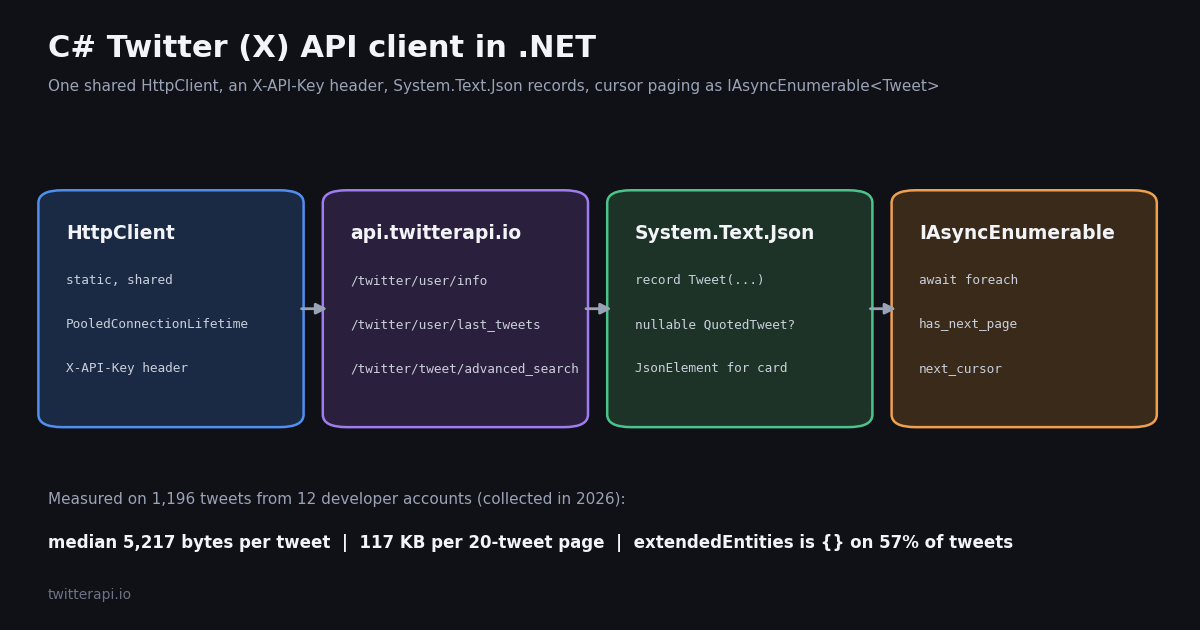
- No SDK needed: one static
HttpClientplus anX-API-Keyheader reaches every read endpoint; the full client on this page is about 120 lines and compiles on the .NET 8 SDK. - Model nullability is measured, not guessed: across 1,196 tweets,
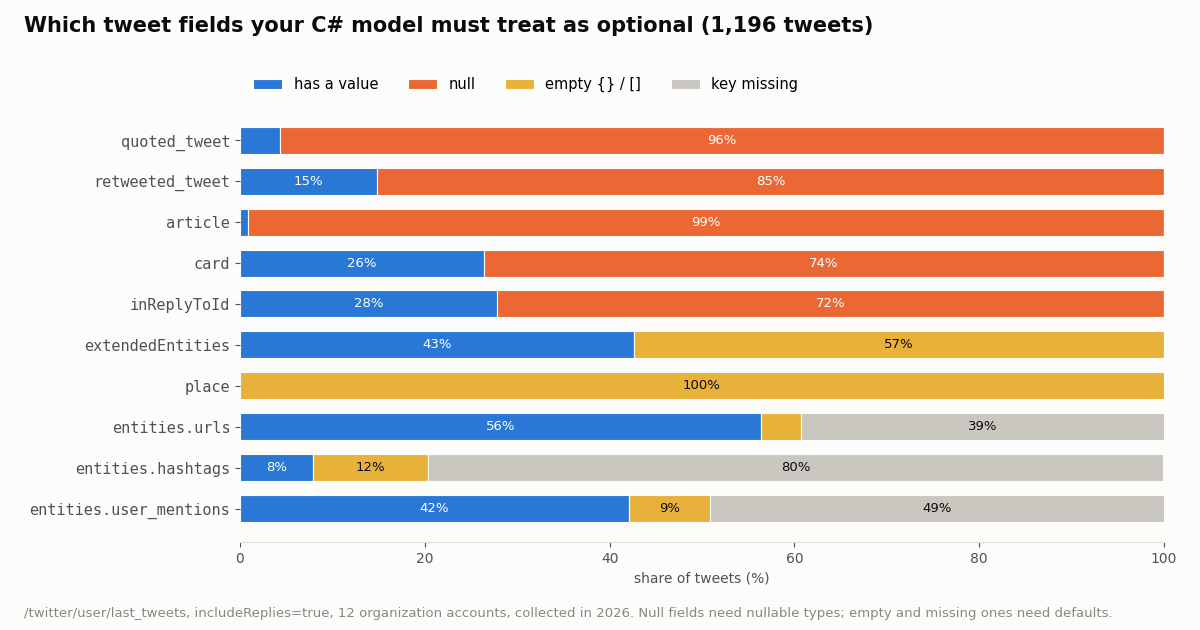
quoted_tweetis null 96% of the time,card74%,inReplyToId72% (with replies included). - Empty is not null:
extendedEntitiesis{}on 57% of tweets andplacewas{}on all of them; insideentities, thehashtagskey was missing on 80%. - Size your buffers: a tweet is a median 5,217 bytes of compact JSON (90th percentile 9,824), and a 20-tweet page a median 117 KB.
- Paging is a cursor loop:
has_next_pageandnext_cursorbecome anIAsyncEnumerable<Tweet>; cap pages, because you pay $0.15 per 1,000 tweets returned. - Libraries: Tweetinvi (last NuGet release 2021) and LinqToTwitter (last release 2022) target X's official API with OAuth and X pricing ($0.005 per post read); this page targets TwitterAPI.io.
Search for a C# Twitter API example and you mostly find two things: old Tweetinvi or LinqToTwitter snippets written for X's OAuth-protected API, and generic HttpClient tutorials that never show what a real tweet object looks like. This guide closes that gap with a complete, typed .NET client for TwitterAPI.io's read endpoints, written against the response shapes the API actually returns.
Every modeling decision below is backed by a measurement. We pulled 1,196 recent tweets from 12 organization and developer accounts (including @dotnet, @VisualStudio and @github) and recorded, field by field, how often each optional property is null, an empty object, or missing, plus how many bytes each tweet and page weighs. The C# on this page was compiled with the .NET 8 SDK and its records were run over every one of those 1,196 saved tweets without a deserialization error.
The page is for developers writing C# or .NET code. If you are on Python, the Python guide covers the same endpoints; if you are moving from Tweetinvi or LinqToTwitter, the comparison table in the first section shows what changes.
57.4%
Which Twitter (X) API a C# app calls, and what that means for your code
A C# program can read X data through two very different doors. The first is X's own API at api.x.com, which needs a developer account, an app, OAuth credentials and pay-per-usage billing from X. That is what the two well-known .NET libraries wrap. The second is TwitterAPI.io, a REST API that returns X data with a single API key and no X account: you send X-API-Key and read JSON.
The libraries are worth a status check before you depend on one. We looked at both on GitHub and NuGet this year:
Neither repository is archived, and both are MIT licensed, so they still work for apps that already have X developer credentials. They are not the right tool for TwitterAPI.io, because they build OAuth-signed requests for X's paths. For TwitterAPI.io you do not need a library at all: HttpClient and System.Text.Json ship with .NET, and the whole client below is about 120 lines.
What changes for a C# developer. No OAuth signing, no token refresh, no app approval. One header. JSON with camelCase tweet fields (likeCount, createdAt, extendedEntities), snake_case envelope keys (has_next_page, next_cursor) and snake_case nested-tweet keys (quoted_tweet, retweeted_tweet). The records in this guide map both styles explicitly so nothing silently comes back as zero.
Set up one shared HttpClient and reuse it
Create a console project with dotnet new console on .NET 8 or later. No package references are needed. Put your key in an environment variable (the sample reads TWITTERAPI_IO_KEY) rather than in source or appsettings.json that ends up in git.
Microsoft's HttpClient guidelines are explicit: reuse instances instead of creating a fresh one each time, because each instance owns a connection pool and creating and disposing them can exhaust ports. On .NET Core and .NET 5+, the recommended pattern is a static or singleton HttpClient with PooledConnectionLifetime set so DNS changes are picked up; in ASP.NET Core apps, a typed client registered with IHttpClientFactory is the other supported option. The client below takes the static route and sets a five-minute pooled lifetime.
The key travels on each HttpRequestMessage as a header rather than in DefaultRequestHeaders, which keeps the shared client free of per-tenant state if you later serve several keys. Retries live in the same method: an HTTP 429 waits 1, 2, 4, then 8 seconds before giving up. You are most likely to see 429 before your first payment, when the limit is 0.2 requests per second; it rises to 20 per second once paid (50 on Scale, 500 on Business, up to 1,000 on request).
using System.Net;
using System.Text.Json;

public sealed class TwitterApiClient
{
    static readonly HttpClient Http = new(new SocketsHttpHandler { PooledConnectionLifetime = TimeSpan.FromMinutes(5) })
    {
        BaseAddress = new Uri("https://api.twitterapi.io"),
        Timeout = TimeSpan.FromSeconds(40),
    };
    static readonly JsonSerializerOptions Json = new(JsonSerializerDefaults.Web);
    readonly string _apiKey;

    public TwitterApiClient(string apiKey) => _apiKey = apiKey;

    async Task<T> GetAsync<T>(string pathAndQuery, CancellationToken ct)
    {
        for (var attempt = 0; ; attempt++)
        {
            using var req = new HttpRequestMessage(HttpMethod.Get, pathAndQuery);
            req.Headers.Add("X-API-Key", _apiKey);
            using var res = await Http.SendAsync(req, ct);
            if (res.StatusCode == HttpStatusCode.TooManyRequests && attempt < 4)
            {
                await Task.Delay(TimeSpan.FromSeconds(Math.Pow(2, attempt)), ct); // 1, 2, 4, 8 s
                continue;
            }
            var body = await res.Content.ReadAsStringAsync(ct);
            if (!res.IsSuccessStatusCode) // 400 carries the reason in "detail", others in "msg"
                throw new TwitterApiException($"HTTP {(int)res.StatusCode}: {body}", res.StatusCode);
            return JsonSerializer.Deserialize<T>(body, Json)
                ?? throw new TwitterApiException("Empty response body", res.StatusCode);
        }
    }

    // GetUserAsync, GetTimelineAsync and SearchAsync follow below
}

public sealed class TwitterApiException(string message, HttpStatusCode? status = null) : Exception(message)
{
    public HttpStatusCode? Status { get; } = status;
}
Model a tweet with System.Text.Json records: what must be nullable
With JsonSerializerDefaults.Web, System.Text.Json matches camelCase JSON to PascalCase properties case-insensitively, which handles likeCount, createdAt, inReplyToId and the rest. The snake_case keys need a [property: JsonPropertyName(...)] attribute on the positional record parameter. Records with positional parameters deserialize through their constructor; a key that is missing from the JSON leaves the parameter at its default.
The real question is which properties can be absent or null. Here is what 1,196 timeline tweets (replies included) actually contained:
Three practical rules come out of that table. First, reference-type properties that can be null in the JSON (QuotedTweet, RetweetedTweet, InReplyToId) must be declared nullable, or nullable reference type analysis will lie to you and your code will throw NullReferenceException on the 96% of tweets that are not quotes. Second, extendedEntities is an empty object on tweets without media, not null, so tweet.ExtendedEntities is usually non-null while tweet.ExtendedEntities.Media is null: always write t.ExtendedEntities?.Media?.Count ?? 0. Third, objects whose inner shape you do not need (card, place, article) are simplest as JsonElement?, which keeps the raw JSON and never fails on a shape change.
The entities object is sparse in a different way: its keys appear only when the tweet has something to report, and sometimes appear as an empty list.
.NET 8 also ships JsonNamingPolicy.SnakeCaseLower, but because tweet fields are camelCase and only a few keys are snake_case, per-property attributes are simpler than a global policy. The policy is the better fit for /twitter/user/followers and /twitter/user/followings, whose user objects are entirely snake_case (screen_name, followers_count, created_at): give those calls their own JsonSerializerOptions with PropertyNamingPolicy = JsonNamingPolicy.SnakeCaseLower.
So Urls, Hashtags and UserMentions must all be nullable lists. The numeric counters were the opposite: likeCount, retweetCount, replyCount, quoteCount, bookmarkCount and viewCount were JSON integers on every tweet. The largest value we saw was a viewCount of 19,991,428, which fits an int, but int stops at about 2.1 billion and long removes the question for any account. viewCount was present on all 1,196 tweets; it is declared long? anyway because nothing guarantees it on every tweet. Tweet id was a JSON string on every tweet; keep it a string, since tweet IDs exceed the range JavaScript clients can hold as numbers and parsing them buys nothing.
using System.Text.Json;
using System.Text.Json.Serialization;

public sealed record TimelinePage(string? Status, string? Msg, TimelineData? Data,
    [property: JsonPropertyName("has_next_page")] bool HasNextPage,
    [property: JsonPropertyName("next_cursor")] string? NextCursor);

public sealed record TimelineData([property: JsonPropertyName("pin_tweet")] Tweet? PinTweet, List<Tweet>? Tweets);

public sealed record SearchPage(List<Tweet>? Tweets,
    [property: JsonPropertyName("has_next_page")] bool HasNextPage,
    [property: JsonPropertyName("next_cursor")] string? NextCursor);

public sealed record Tweet(
    string Id, string Url, string Text, string CreatedAt, string? Lang,
    long LikeCount, long RetweetCount, long ReplyCount, long QuoteCount, long? ViewCount, long BookmarkCount,
    bool IsReply, string? InReplyToId, string? InReplyToUsername, string? ConversationId,
    Author Author,
    Entities? Entities,
    ExtendedEntities? ExtendedEntities,  // {} when there is no media, not null
    JsonElement? Card,                   // null on most tweets; nested binding_values when present
    JsonElement? Place,                  // {} on every tweet in our sample
    [property: JsonPropertyName("quoted_tweet")] Tweet? QuotedTweet,
    [property: JsonPropertyName("retweeted_tweet")] Tweet? RetweetedTweet);

public sealed record Author(string Id, string UserName, string Name, long Followers, long Following,
    bool IsBlueVerified, string? VerifiedType, string? CreatedAt);

public sealed record Entities(List<UrlEntity>? Urls, List<JsonElement>? Hashtags,
    [property: JsonPropertyName("user_mentions")] List<JsonElement>? UserMentions);

public sealed record UrlEntity([property: JsonPropertyName("expanded_url")] string? ExpandedUrl);

public sealed record ExtendedEntities(List<Media>? Media);

public sealed record Media(string Type, [property: JsonPropertyName("media_url_https")] string? MediaUrlHttps);

public sealed record UserInfoResponse(string? Status, string? Msg, UserInfo? Data);

public sealed record UserInfo(string Id, string UserName, string Name, string? Location, string? Description,
    long Followers, long Following, long StatusesCount, bool IsBlueVerified, string? VerifiedType,
    bool CanDm, bool Protected, string? CreatedAt);
Page through timelines and search with IAsyncEnumerable
Every list endpoint on TwitterAPI.io pages the same way: send cursor (empty for the first page), read has_next_page and next_cursor from the response, and repeat. In C# 8 and later, an async method that returns IAsyncEnumerable<Tweet> turns that loop into a stream the caller consumes with await foreach, and the [EnumeratorCancellation] attribute lets a CancellationToken passed to WithCancellation reach the HTTP calls.
Two envelope details matter. For /twitter/user/last_tweets the tweets are nested in data.tweets (with data.pin_tweet beside them), while /twitter/tweet/advanced_search returns tweets at the top level. That is why the client uses two page records, TimelinePage and SearchPage, instead of one generic envelope. And the user lookup reports an unknown handle as HTTP 200 with status set to error, msg set to user not found and data null, never as a 404, so the method checks Status before trusting Data.
Always cap the page count. On all 60 timeline pages in our study, has_next_page was true, so a loop that only stops when the API says so will keep walking an account's history (and billing $0.003 per full 20-tweet page). The maxPages parameter is the budget guard; for monitoring jobs, stop as soon as you reach a tweet Id you already stored.
Search queries use X's operator syntax: from:dotnet, "C#", since_time: and until_time: with Unix seconds, lang:en, -filter:replies. Pass queryType=Latest for chronological results or Top for X's ranking. Escape the query with Uri.EscapeDataString; quotes, colons and the # in C# all need encoding.
using System.Runtime.CompilerServices;

// inside TwitterApiClient
public async Task<UserInfo?> GetUserAsync(string userName, CancellationToken ct = default)
{
    var r = await GetAsync<UserInfoResponse>(
        $"/twitter/user/info?userName={Uri.EscapeDataString(userName)}", ct);
    return r.Status == "error" ? null : r.Data; // unknown user: HTTP 200, status "error", data null
}

public async IAsyncEnumerable<Tweet> GetTimelineAsync(string userName, bool includeReplies = false,
    int maxPages = 5, [EnumeratorCancellation] CancellationToken ct = default)
{
    var cursor = "";
    for (var page = 0; page < maxPages; page++)
    {
        var r = await GetAsync<TimelinePage>(
            $"/twitter/user/last_tweets?userName={Uri.EscapeDataString(userName)}" +
            $"&includeReplies={(includeReplies ? "true" : "false")}&cursor={Uri.EscapeDataString(cursor)}", ct);
        if (r.Status == "error") throw new TwitterApiException(r.Msg ?? "API error");
        foreach (var t in r.Data?.Tweets ?? new List<Tweet>()) yield return t;
        if (!r.HasNextPage || string.IsNullOrEmpty(r.NextCursor)) yield break;
        cursor = r.NextCursor;
    }
}

public async IAsyncEnumerable<Tweet> SearchAsync(string query, string queryType = "Latest",
    int maxPages = 5, [EnumeratorCancellation] CancellationToken ct = default)
{
    var cursor = "";
    for (var page = 0; page < maxPages; page++)
    {
        var r = await GetAsync<SearchPage>(
            $"/twitter/tweet/advanced_search?query={Uri.EscapeDataString(query)}" +
            $"&queryType={queryType}&cursor={Uri.EscapeDataString(cursor)}", ct);
        foreach (var t in r.Tweets ?? new List<Tweet>()) yield return t;
        if (!r.HasNextPage || string.IsNullOrEmpty(r.NextCursor)) yield break;
        cursor = r.NextCursor;
    }
}
Use the client: profile, timeline and search in one program
Top-level statements keep the entry point short. The program below looks up @dotnet, prints the last two pages of its timeline with like counts and media counts, and runs one search. ParseCreatedAt converts the createdAt string, which looks like Wed Nov 18 02:08:01 +0000 2026, into a DateTimeOffset. Every one of the tweets in our sample used the +0000 offset, which is why the format string can treat it as a literal; DateTimeOffset.ParseExact with CultureInfo.InvariantCulture avoids surprises on machines with a non-English locale, where Wed and Nov would not parse.
Errors surface as a TwitterApiException that carries the HTTP status. The response body is included in the message: a missing or invalid parameter returns HTTP 400 with the reason in detail, and other errors carry their text in msg. Log the message; do not log the request headers, which hold your key.
using System.Globalization;

var apiKey = Environment.GetEnvironmentVariable("TWITTERAPI_IO_KEY")
    ?? throw new InvalidOperationException("Set the TWITTERAPI_IO_KEY environment variable.");
var client = new TwitterApiClient(apiKey);

var user = await client.GetUserAsync("dotnet");
Console.WriteLine(user is null ? "user not found" : $"{user.Name} (@{user.UserName}): {user.Followers:N0} followers");

await foreach (var t in client.GetTimelineAsync("dotnet", maxPages: 2))
{
    var when = Twitter.ParseCreatedAt(t.CreatedAt);
    var media = t.ExtendedEntities?.Media?.Count ?? 0;
    Console.WriteLine($"{when:yyyy-MM-dd HH:mm} {t.LikeCount,6} likes  media={media}  {t.Url}");
}

await foreach (var t in client.SearchAsync("from:dotnet \"C#\"", maxPages: 1))
    Console.WriteLine($"search hit {t.Id}: {t.Text.ReplaceLineEndings(" ")}");

public static class Twitter
{
    // createdAt looks like "Wed Nov 18 02:08:01 +0000 2026"
    public static DateTimeOffset ParseCreatedAt(string s) =>
        DateTimeOffset.ParseExact(s, "ddd MMM dd HH:mm:ss '+0000' yyyy", CultureInfo.InvariantCulture,
            DateTimeStyles.AssumeUniversal);
}
How big the JSON is, and what that means for buffering
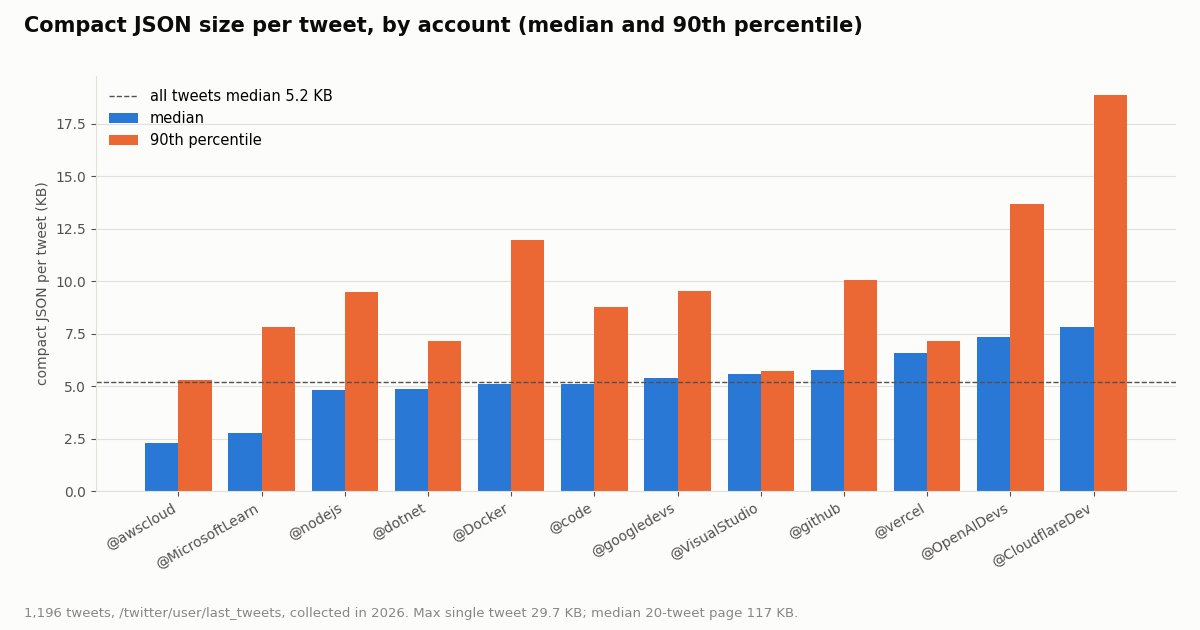
A tweet object is heavier than most examples suggest, because it carries the full author profile and, for quotes and reposts, a complete nested tweet with its own author. Across 1,196 tweets the median compact JSON size was 5,217 bytes, the 90th percentile 9,824 bytes and the largest 29,736 bytes. The embedded author object alone was a median 1,321 bytes, about 25% of a typical tweet. Nested retweeted_tweet objects were a median 5,332 bytes and quoted_tweet objects 5,370 bytes, about the size of a whole tweet on their own.
Per account the spread is wide. The accounts that reply most (@awscloud replies made up 74% of its sample) have small median tweets, likely because short replies seldom carry media or link cards; accounts that post launch announcements with videos, cards and quotes sit at the top. A 20-tweet page was a median 117 KB and at most 232 KB.
For a C# client this has two consequences. ReadAsStringAsync on a 117 KB body is fine for interactive use and simplifies logging the body on errors, which is why the client above uses it. For bulk jobs that walk thousands of pages, switch to ReadAsStreamAsync plus JsonSerializer.DeserializeAsync<T>, which avoids materializing each body as a string and keeps allocations off the large object heap (objects of 85,000 bytes or more land there, and a 117 KB string is well past that). Second, if you store tweets, store the fields you need rather than the raw JSON: at about 5.2 KB per tweet, a million raw tweets is several gigabytes.
What a C# client costs to run, next to X's own rate card
TwitterAPI.io bills per result: 15 credits per tweet returned, which is $0.15 per 1,000 tweets, and 18 credits per profile, which is $0.18 per 1,000 profiles. Each request has a 15-credit minimum, so a poll that finds nothing costs $0.00015 and a full 20-tweet page costs $0.003. Credits are $1 per 100,000, purchased credits never expire, and new accounts that pass the automatic bot check get up to $1 of free credits (at most 100,000 credits, no card, one per person or network, expiring after 31 days).
X's official pay-per-usage rate card (docs.x.com, Pricing) lists $0.005 per post read, $0.010 per user read and $0.010 per follower or following read, with pay-per-usage capped at 3 million post reads per monthly billing cycle and Enterprise above that. The same reads side by side:
Per 1,000 tweets that is $0.15 against $5.00, about 33 times less on TwitterAPI.io for the same read volume. The difference grows with the patterns C# services tend to run, such as background workers that poll a set of accounts: a check every 60 seconds for a month is 43,200 requests, which costs $6.48 at the $0.00015 floor when nothing new appears, or $1.30 a month at a five-minute interval. Subscriptions (Starter $29, Builder $99, Pro $199, Scale $499, Business $1,499 a month) mainly raise rate limits and add credits; the pricing page has the details.
For scale: the whole study behind this page, 1,196 tweets and 12 profiles over 72 requests, cost $0.18.
Posting from C#: what write calls involve
Everything above is a read and needs no X account. Writes are a separate product: you log in once with /twitter/user_login_v2 ($0.10, with a proxy you supply), which returns login_cookies, and then each post, delete, like, retweet, follow or unfollow call (for example /twitter/create_tweet_v2 or /twitter/follow_user_v2) costs 60 credits, $0.0006, billed per HTTP 200 call. On the official rate card a post created is $0.015, or $0.20 when it contains a URL.
From C#, those are POST requests through the same HttpClient, with a JSON body built from a record. The important part is not the code: each call acts as that account, so X can rate-limit, lock or suspend it. Use only your own account, keep a normal human pace, expect the session to need a fresh login now and then, and treat X's automation rules as binding; none of this is a way around any limit.
How we collected this
Question. Which tweet and profile fields does a C# model need to mark nullable, and how large is the JSON a .NET client deserializes?
Accounts and endpoints. 12 public organization and developer accounts: @github, @vercel, @Docker, @nodejs, @dotnet, @VisualStudio, @code, @awscloud, @googledevs, @CloudflareDev, @OpenAIDevs and @MicrosoftLearn. For each, up to five pages of /twitter/user/last_tweets with includeReplies=true (newest first) and one /twitter/user/info call: 60 timeline pages and 12 profiles, 72 requests in total, 1,196 tweets.
Window and method. The most recent posts of each account at collection time, collected in 2026; the span differs per account. Sizes are compact JSON (no whitespace) in UTF-8 bytes. A field is counted as null when the key holds JSON null, empty when it holds {}, [] or an empty string, and missing when the key is absent.
What the sample cannot show. Organization timelines are not all of X: tweets from private individuals, polls, Spaces, long-form posts (article was set on under 1% of our tweets) and very old tweets may populate fields differently. Search and mention endpoints return the same tweet object, but we did not measure them here. Re-run the Python checker below on your own accounts before you tighten a type.
Code verification. The C# client was compiled with the .NET 8 SDK (0 warnings, 0 errors), and its records deserialized all 1,196 saved tweets and 12 profiles, plus a synthetic user-not-found body, without errors. The live HTTP calls were not executed during this build.
Privacy. Aggregates only. All accounts are organizations; we did not analyze reposted, quoted or replied-to authors.
"""check_tweet_model.py - pull one timeline page from TwitterAPI.io and report, per optional
field, how often it is null, empty or missing. Run it before you change your C# records.

    pip install requests
    export TWITTERAPI_IO_KEY=...      # from the twitterapi.io dashboard
    python check_tweet_model.py dotnet
"""
import os
import sys
from collections import Counter

import requests

BASE = "https://api.twitterapi.io"
HEADERS = {"X-API-Key": os.environ["TWITTERAPI_IO_KEY"]}
FIELDS = ["quoted_tweet", "retweeted_tweet", "card", "place", "inReplyToId", "extendedEntities", "article"]


def state(obj, key):
    if key not in obj:
        return "missing"
    value = obj[key]
    if value is None:
        return "null"
    if value in ({}, [], ""):
        return "empty"
    return "value"


def timeline(user_name, max_pages=3):
    cursor = ""
    for _ in range(max_pages):
        r = requests.get(
            f"{BASE}/twitter/user/last_tweets",
            headers=HEADERS,
            params={"userName": user_name, "includeReplies": "true", "cursor": cursor},
            timeout=40,
        )
        r.raise_for_status()
        body = r.json()
        if body.get("status") == "error":
            raise SystemExit(body.get("msg"))
        for tweet in (body.get("data") or {}).get("tweets", []):
            yield tweet
        if not body.get("has_next_page") or not body.get("next_cursor"):
            return
        cursor = body["next_cursor"]


def main():
    user_name = sys.argv[1] if len(sys.argv) > 1 else "dotnet"
    info = requests.get(f"{BASE}/twitter/user/info", headers=HEADERS,
                        params={"userName": user_name}, timeout=40).json()
    if info.get("status") == "error":  # unknown user: HTTP 200 with msg "user not found"
        raise SystemExit(info.get("msg"))
    print(f"@{info['data']['userName']}: {info['data']['followers']:,} followers")

    tweets = list(timeline(user_name))
    print(f"{len(tweets)} tweets")
    for field in FIELDS:
        counts = Counter(state(t, field) for t in tweets)
        print(f"{field:18} " + "  ".join(f"{k}={v}" for k, v in sorted(counts.items())))


if __name__ == "__main__":
    main()
Researching this?Free starter credits cover end-to-end testing — Google sign-in, no card. Get a key.
Questions readers ask
Is there an official C# SDK for the Twitter (X) API?
X does not publish an official .NET SDK. The common community libraries are Tweetinvi and LinqToTwitter, both MIT licensed and not archived; Tweetinvi's latest NuGet release is 5.0.4 (2021) and LinqToTwitter's is v6.15.0 (June 2022). Both call X's official API with OAuth credentials. For TwitterAPI.io no SDK is needed: HttpClient and System.Text.Json from the base library are enough.
Can I still use Tweetinvi or LinqToTwitter?
Yes, if you have an X developer account and accept X's pricing ($0.005 per post read on the pay-per-usage rate card). Check that the endpoints you need are supported by the library version you install, since neither has shipped a release in several years. They do not work with TwitterAPI.io, which uses an X-API-Key header instead of OAuth signing.
Should I use IHttpClientFactory or a static HttpClient?
Either is correct per Microsoft's guidance. In a console app or worker, a static HttpClient with PooledConnectionLifetime set is simplest. In ASP.NET Core, a typed client registered with AddHttpClient<TwitterApiClient>() fits dependency injection. What you must avoid is creating and disposing a new HttpClient every time you send something.
Why do my tweet counts deserialize as 0?
Usually a naming mismatch. With JsonSerializerDefaults.Web, camelCase keys like likeCount map automatically, but snake_case keys such as has_next_page, next_cursor, quoted_tweet and retweeted_tweet need JsonPropertyName attributes. A key that does not match any constructor parameter is ignored and the value stays at its default.
Which tweet properties should be nullable in C#?
In our 1,196-tweet sample: quoted_tweet (96% null), retweeted_tweet (85%), card (74%), inReplyToId (72% with replies included) and article (99%). extendedEntities and place are usually empty objects rather than null, and the lists inside entities are often missing, so make those nullable too.
Do I need an X developer account to read tweets from C#?
Not with TwitterAPI.io: reads need only its API key, and no X account. You pay $0.15 per 1,000 tweets returned. X's official API does need a developer account and app credentials.
How do I handle rate limits in C#?
Retry HTTP 429 with exponential backoff, as the client on this page does (1, 2, 4, 8 seconds), and keep one shared client so connections are reused. The limit is 0.2 requests per second before the first payment, 20 per second after it, 50 on Scale and 500 on Business. If you run many workers, add a SemaphoreSlim or System.Threading.RateLimiting limiter in front of the client.
Can I use this client from .NET Framework?
The code uses C# 12 primary constructors, records and IAsyncEnumerable, which target .NET 8 or later. On .NET Framework you would replace records with classes, use IHttpClientFactory (Microsoft's recommendation there), and add the System.Text.Json and Microsoft.Bcl.AsyncInterfaces packages.
Continue
- Microsoft Learn: HttpClient guidelines for .NET (static client with PooledConnectionLifetime, or IHttpClientFactory)
- Microsoft Learn: JsonNamingPolicy.SnakeCaseLower (System.Text.Json naming policies)
- TwitterAPI.io docs: Get user last tweets (userName, cursor, includeReplies, has_next_page, next_cursor)
- X developer docs: Pricing (pay-per-usage rate card, 3M post-read cap)
- Tweetinvi on GitHub (MIT; latest NuGet release 5.0.4)
- LinqToTwitter on GitHub (MIT; latest release v6.15.0)
- X (Twitter) API hub: endpoints, pricing and guides
- Twitter (X) API in Python: the complete guide
- Migrating from Tweepy to TwitterAPI.io in Python
- The twitter-api-v2 npm package for Node.js
- Twitter API v2 explained: endpoints, auth and limits
- TwitterAPI.io API reference: every endpoint, parameter and response field
- TwitterAPI.io pricing: pay only for the data returned
- 01Twitter (X) Verification in 2026: What the Blue, Gold and Grey Checkmarks Mean and How to Get One
- 02"You Can No Longer Send Messages to This Person" on Twitter (X): What It Means and What You Can Do
- 03Twitter (X) API with LangGraph: Build a Search Agent Graph
- 04Twitter (X) API Mentions: Get Every Post That Mentions an Account
- 05How to Log Out of Twitter (X) on Web, iPhone and Android
- 06OpenClaw Mission Control: Built-in Control UI vs Third-Party Dashboards (and X Data)
- 07Twitter (X) OpenAPI: Which Spec to Use and How to Generate a Typed Client
- 08How to change your Twitter (X) font: text size, Chirp, and Unicode "fancy fonts"
Writing about something you built with TwitterAPI.io? Our community rewards program pays API credits for honest tutorials, build logs and videos.
Stop reading. Start building.
Starter credits cover real testing on real data. Google sign-in, no card, no application queue.
Get an API keyAlready building with TwitterAPI.io? Publish an honest tutorial or build log about it and earn up to $200 a month in API credits.