Tweeload: What the Twitter (X) Video Downloader Does, and Whether It Is Safe
If you searched for tweeload, you most likely want to save one video or GIF from an X (Twitter) post and want to know whether tweeload.com still works and is safe to use. This page answers that for regular users. If you are a developer who needs to pull media from many posts by code, the companion bulk media download API guide is the better fit; we only touch on the developer route at the end.
We did not rewrite the site's own feature list. In 2026 we loaded tweeload.com, submitted six different inputs to its download form (a vertical video, a landscape video, an animated GIF, a photo-only post, a post ID that does not exist, and plain text), followed the download links to see where the file actually comes from, and read its privacy policy, terms and app store listings. We also measured what the videos behind those Download buttons look like: 1,600 recent posts from ten brand and entertainment accounts, and the real size of more than 100 MP4 files on X's servers.
A word on rights before you start. Downloading a video does not give you any rights to it. Save your own clips, or ones the creator has allowed you to use, and share other people's work by reposting or linking the original post.
What is tweeload, and how do you use it?
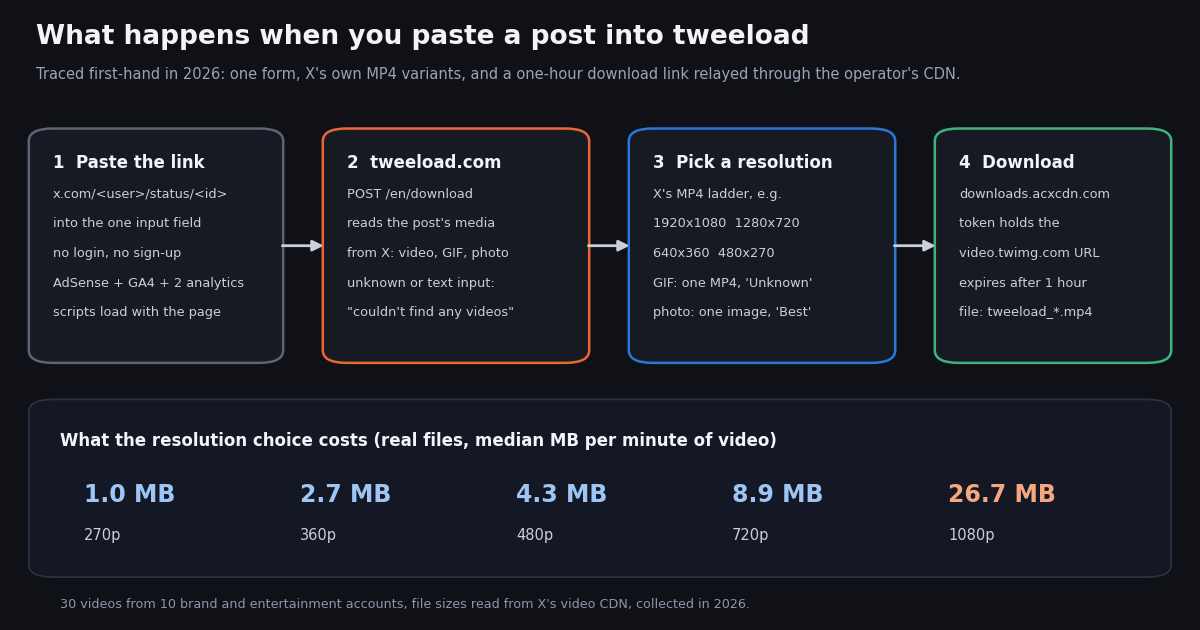
Tweeload is a browser-based downloader for X (Twitter) media. The site at tweeload.com has one input field: paste a post link such as x.com/<user>/status/<id>, press Download, and it shows a table of the video sizes available for that post with a Download button next to each. Its own FAQ says it is free, needs no sign-up, has "no usage restrictions", and cannot download videos from private (protected) accounts because that would require logging in to your X account.
Who runs it. The site footer and About page name Aculix Technologies LLP, which also runs downloaders for Reddit, Pinterest, Threads, Bluesky, Facebook and Twitch under other domains. The domain was registered in 2022, according to the public registry (RDAP) record we looked up. The site states it is not affiliated with or endorsed by Twitter (X).
More than a website. The same brand ships a Chrome extension, "Twitter Video Downloader - Tweeload", which the Chrome Web Store listed with about 4,000 users and a 4.3 rating from 59 reviews when we checked; an Android app; and an iOS app called "Tweeload - Twitter Video Saver". The site also offers a bookmarklet and a tweet screenshot maker, and is translated into 27 languages.
What it supports. Per its About page: videos from posts (including quoted posts and replies), GIFs, which X stores as MP4 so that is the file you get, and multiple quality options "up to the highest resolution Twitter provides". In our test it also handled a photo-only post, which the homepage does not advertise.
How to use it, step by step. The flow is the same on a phone, tablet or computer. These are the steps the site describes, checked against what we actually saw.
Step 1: copy the post link. In the X app or on x.com, tap the share icon under the post and choose Copy link. A link that starts with twitter.com works as well as x.com.
Step 2: paste and press Download. Paste it into the field on tweeload.com. The form posts to /en/download and the result page loaded in about 3 seconds in our test, with the account's name and avatar above a Resolution / Download table.
Step 3: pick a resolution. For a landscape sports clip we got 1920x1080, 1280x720, 640x360 and 480x270; for a vertical clip, 1080x1920, 720x1280, 480x852 and 320x568. Those are exactly the MP4 versions X itself stores for each video, so tweeload does not upscale or re-encode anything. A "Download with app" button sits under the table.
Step 4: save the file. The browser saves an MP4 named like tweeload_<random>.mp4. On iPhone the site says files land in the Files app, from where you can move them to Photos.
One small annoyance: a mistyped link, a deleted post and a post without media all produce the same message, so the error alone will not tell you which one happened.
Is tweeload down or not working?
When we checked in 2026, no. The homepage answered 5 of 5 requests with HTTP 200 in a median 1.30 seconds, the bare domain and www.tweeload.com both led to the same site, and every valid video, GIF and photo post we submitted returned download links. A full 5 minute 22 second 1080p clip started downloading immediately and turned out to be a 281.8 MB file.
If it fails for you, the cause is usually one of these, roughly in order of likelihood:
The post is from a protected account, was deleted, or has no video. Tweeload only sees what a logged-out visitor can see. Its own FAQ names private accounts and deleted posts as the main reasons a download fails, and the error message is the same in all these cases.
The link is not a post link. Profile links, search links and shortened links that point somewhere else return the same "couldn't find any videos" message. Copy the link from the post's share menu.
The download link expired. Each Download button carries a token that is valid for one hour (3,600 seconds between its issue and expiry times). If you leave the result tab open and come back later, run the link through the form again.
The video is in a quoted post. The About page says quoted posts are supported, but if a result looks wrong, open the quoted post on its own and paste that link instead.
An ad blocker or privacy extension. The site shows a notice asking you to turn off ad blockers. In our scripted test the download worked without ads loading at all, so a blocker should not break the download itself, but heavy script blocking can break the form page.
X changed something. Every downloader of this kind depends on reading posts from X, and X changes its site regularly. If tweeload and our tool both fail on the same public post, wait an hour and try again.
Is tweeload safe?
Based on what we could check, tweeload looks like a legitimate ad-funded tool rather than a malware trap, with the privacy trade-offs you would expect from one. Here is the evidence, good and bad.
The relay detail is worth knowing. The About page says downloads come "directly from Twitter's CDN to your device". What we observed is slightly different: each button links to downloads.acxcdn.com, and the token in that link contains the original video.twimg.com address, which the relay fetches and passes on to you as an attachment. That is a common way to force a download instead of playback in the browser, and the file itself was unaltered X video. It does mean the operator's server sees which videos you download and your IP address, on top of what the ad and analytics scripts see.
The apps are a different product from the website. The iOS listing, under the seller name Calymex Ventures LLP rather than Aculix, describes saving links to videos and GIFs, and offers "Tweeload Weekly" at $1.99, "Tweeload Annual" at $14.99 and "Remove Ads" at $49.99 as in-app purchases. The website is free. If you only need the occasional clip, the website or a no-ads alternative avoids a subscription prompt entirely. We could not load the Google Play listing, so we cannot report on the Android app's data practices.
Practical safety rules for any downloader. Only click the Download button inside the result table, never ads that look like buttons; never type your X password into a downloader (tweeload does not ask for it, and none should); and treat any site that wants you to install an extension or app before showing a download as a warning sign.
What you are actually downloading: our 2026 study of 1,600 posts
Tweeload can only give you what X stores. To see what that is, we pulled the 1,600 most recent posts from ten media-heavy brand and entertainment accounts (9GAG, Netflix, Wendy's, Duolingo, Marvel, Spotify, FIFA World Cup, IGN, MLB and Pokemon) and read every media item. After setting aside 244 reposts of other accounts, 1,356 posts were the accounts' own.
Video is common, GIFs are rare. 33.3% of those posts carried a native video, 49.9% only photos, and 16.4% no media at all. Animated GIFs, one of tweeload's headline features, appeared in just 6 posts (0.4%). Each GIF was a single MP4 file with no duration or bitrate listed, which fits tweeload labeling a GIF's resolution "Unknown".
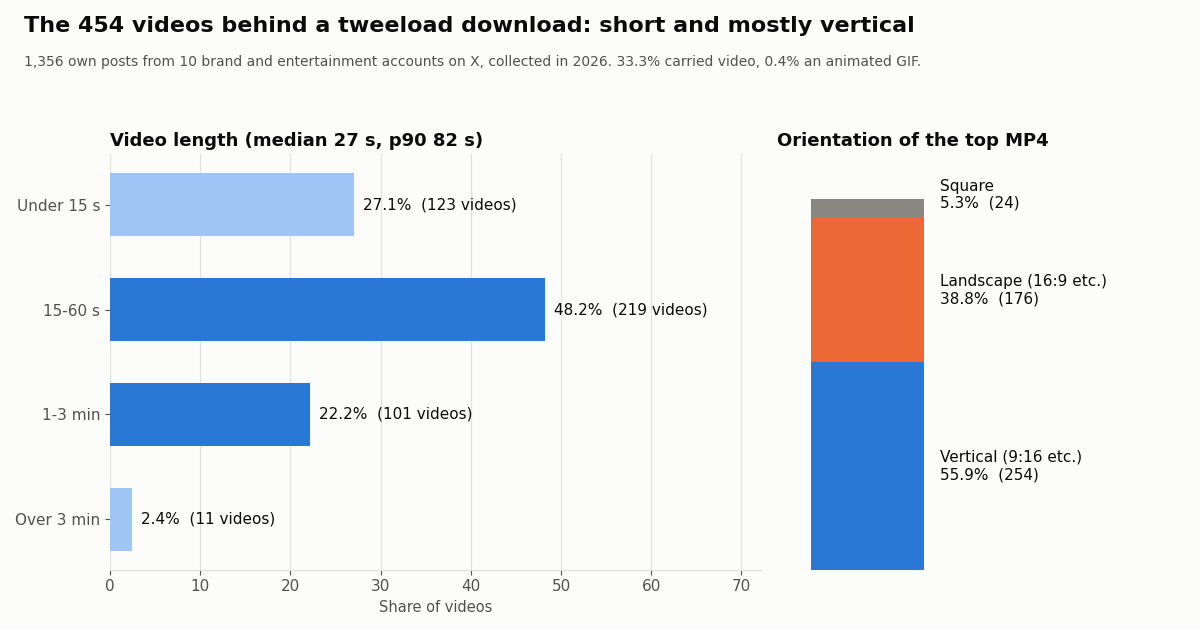
Videos are short and mostly vertical. The 454 videos had a median length of 27 seconds; 75.3% ran under a minute and only 2.4% over three minutes (the longest was 5.5 minutes). 55.9% were vertical, 38.8% landscape and 5.3% square, so the "1080x1920" kind of choice you see in tweeload is the normal case, not an odd one.
You will almost always get HD. X offered a median of 4 MP4 sizes per video. The largest one was at least 720 pixels on its short side for 98.5% of videos and at least 1080 for 78.2%. Every video also had an HLS streaming playlist, which tweeload does not offer and most people do not need.
Which resolution should you pick? Real file sizes
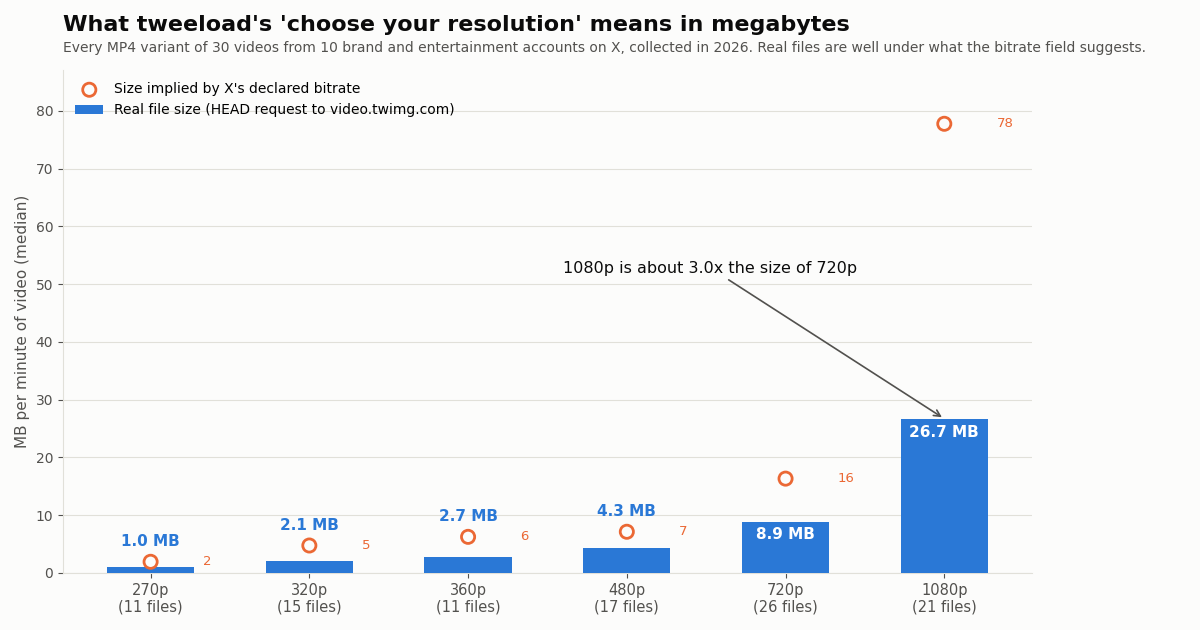
Tweeload's step 3 says "choose your resolution" without telling you how big each file is. We measured it. For 30 videos from the sample we asked X's video servers for the size of every MP4 version, the same files tweeload relays, and divided by the video length.
1080p costs about 3.0x the storage of 720p. On a phone screen the two look close; on a laptop or TV 1080p is visibly sharper. A reasonable rule: 720p for phones and messaging, 1080p when you will edit the clip or watch it on a big screen, and 360p or lower only when data is tight.
Don't trust the bitrate number. X lists a bitrate for each version, and multiplying it by the length is how many tools estimate size. For the top version that estimate was about three times too high: real files came to a median 34% of it (1080p is listed at about 78 MB per minute but really runs about 27 MB). The chart shows the gap at each resolution.
The highest and lowest choice differ a lot. For the same video, the largest file was a median 13x the size of the smallest. Long clips make this concrete: the 5 minute 22 second MLB highlight in our tweeload test was 281.8 MB at 1080p.
Tweeload alternatives compared
Tweeload is one of many sites that do the same thing. Here is how the realistic options compare for saving a single clip. Facts about third-party sites come from our own checks; anything we did not test is marked as such.
Our free downloader at /tools/twitter-video-downloader takes the same kind of post link and lists every MP4 size X has for videos and GIFs, plus original-size images. The download buttons point straight at X's own servers (video.twimg.com, pbs.twimg.com); we do not store, re-host or relay the media. There are no display ads. Lookups have a daily allowance, which is higher when you sign in.
ssstwitter is the best-known rival brand. We tested it separately on its own page, linked at the end, so we do not repeat that here.
Screen recording works for anything you can play, but it re-encodes the video, loses quality and captures the interface too. Use it only when nothing else does, and the same rights rules apply.
Is it legal to download videos with tweeload?
Tweeload's own FAQ answers this sensibly: downloading for personal use is generally fine, but do not re-upload or redistribute someone else's content without permission, and prefer reposting or quoting the original. We would put it more firmly: a download tool gives you a file, not a license. Copyright stays with whoever made the video.
In the US, re-using someone else's video without permission depends on fair use, which the US Copyright Office describes as a case-by-case, fact-specific test weighing four factors: the purpose and character of the use, the nature of the work, how much of it is used, and the effect on the market for the original. X's own copyright policy (help.x.com/en/rules-and-policies/copyright-policy) explains how rights holders file takedown notices against posts that re-upload their work.
Safe uses: your own videos (a backup of clips you posted), content your company or client owns, videos the creator has licensed or explicitly allowed, and short excerpts for commentary or news where fair use clearly applies. Not safe: re-uploading other people's clips to your own accounts, using them in ads, or collecting creators' videos to repost at scale.
For developers: back up your own account's videos with the API
Tweeload is built for one post at a time. If you run a brand or creator account and want an inventory or backup of its own videos, a script is faster than pasting links. GET /twitter/user/last_tweets returns an account's posts 20 per page with extendedEntities.media intact, including every MP4 variant URL on video.twimg.com; GET /twitter/tweets fetches up to 50 specific posts by ID in one call. Neither needs an X account, only an API key.
The script below lists every video in an account's latest 200 posts with its length, best resolution and direct file URL. It follows has_next_page and next_cursor and skips reposts, so only the account's own media are listed. A single-post downloader in the same style is at the end of this page.
What it costs. twitterapi.io charges $0.15 per 1,000 tweets returned (15 credits each), so a 20-post page is $0.003 and the 200-post inventory above is $0.03. The same 200 posts on the official X API's pay-per-use rate card ($0.005 per post read, per docs.x.com) would be $1.00, roughly 33x more. Media files themselves download from X's CDN and are not billed by either. The full bulk workflow, with retries and file naming, is in our bulk media download API guide.
import os
import re
import requests

HEADERS = {"X-API-Key": os.environ["TWITTERAPI_IO_KEY"]}
ACCOUNT = "your_brand_handle"   # an account you run: back up its own videos


def short_side(url):
    m = re.search(r"/(\d+)x(\d+)/", url)
    return min(int(m.group(1)), int(m.group(2))) if m else 0


cursor, pages, rows = "", 0, []
while pages < 10:                                   # 10 pages = up to 200 posts = $0.03
    r = requests.get(
        "https://api.twitterapi.io/twitter/user/last_tweets",
        params={"userName": ACCOUNT, "cursor": cursor},
        headers=HEADERS,
        timeout=30,
    )
    r.raise_for_status()
    body = r.json()
    data = body.get("data") or {}                    # this endpoint nests tweets under "data"
    for t in data.get("tweets", []):
        if t.get("retweeted_tweet"):                 # skip reposts of other people's posts
            continue
        for m in (t.get("extendedEntities") or {}).get("media") or []:
            if m.get("type") != "video":
                continue
            mp4s = [v for v in m["video_info"]["variants"] if v.get("content_type") == "video/mp4"]
            best = max(mp4s, key=lambda v: v.get("bitrate") or 0)
            rows.append((t["id"], m["video_info"].get("duration_millis", 0) / 1000, short_side(best["url"]), best["url"]))
    pages += 1
    if not body.get("has_next_page"):
        break
    cursor = body.get("next_cursor") or ""

print(f"{len(rows)} videos in {pages} pages")
for tid, secs, side, url in rows:
    print(f"{tid}  {secs:6.1f} s  {side}p  {url}")
How we collected this
Question. What does a tweeload user actually get from a post: how often posts carry video or GIFs, how long and in what orientation the videos are, which resolutions X offers, and how large each resolution really is?
Accounts and sample. The latest posts of ten public organization accounts: 9GAG, Netflix, Wendy's, Duolingo, Marvel, Spotify, FIFA World Cup, IGN, MLB and Pokemon, up to 160 each, 1,600 posts in total (1,356 own posts, 454 videos). GIPHY was on the planned list but returned no posts and was replaced by Pokemon before analysis. Collected in 2026 through /twitter/user/last_tweets, 81 requests, about $0.24.
File sizes. For 30 videos picked at a fixed stride through the sample, we sent HEAD requests for every MP4 version to X's video CDN and read the file size: 101 of 115 files answered (the rest timed out on our network). Size per minute is the file size divided by the listed duration.
Tweeload test. Five homepage loads and six form submissions to tweeload.com (a vertical video, a landscape video, a GIF post, a photo-only post, a non-existent post ID and plain text), plus one download followed to the file, all from our network in 2026. We read the About page, privacy policy, terms, the Chrome Web Store and App Store listings, the domain's registry record and Google's Safe Browsing status.
What it cannot show. We inspected tweeload with a plain HTTP client, not a full browser, so the ads a live visitor sees may differ. Ten brand accounts are not all of X: news, sports or personal accounts post different mixes and lengths. One network's tests do not prove the site works everywhere, and a site can change after we look. We did not test the Android app or Chrome extension.
Privacy. Aggregates only, organization accounts only; reposted and quoted authors were not analyzed. The study files are in data/studies/tweeload/ in our site repository.
"""Save the video, GIF or photos from one of YOUR OWN public X (Twitter) posts.

Usage:  python save_my_post_media.py https://x.com/<you>/status/<id> [max_height]
Needs:  pip install requests ; export TWITTERAPI_IO_KEY=...  (twitterapi.io/dashboard)
Only download media you own or have permission to use.
"""
import os
import re
import sys

import requests

HEADERS = {"X-API-Key": os.environ["TWITTERAPI_IO_KEY"]}


def post_id(url_or_id):
    m = re.search(r"status/(\d+)", url_or_id)
    return m.group(1) if m else url_or_id.strip()


def fetch_post(tid):
    # GET /twitter/tweets takes up to 50 comma-separated IDs; deleted or private posts are omitted
    r = requests.get(
        "https://api.twitterapi.io/twitter/tweets",
        params={"tweet_ids": tid},
        headers=HEADERS,
        timeout=30,
    )
    r.raise_for_status()
    tweets = r.json().get("tweets") or []
    return next((t for t in tweets if t.get("id") == tid), None)


def height(variant):
    m = re.search(r"/(\d+)x(\d+)/", variant.get("url", ""))
    return min(int(m.group(1)), int(m.group(2))) if m else 0


def pick_variant(media, max_height):
    mp4s = [v for v in media["video_info"]["variants"] if v.get("content_type") == "video/mp4"]
    fitting = [v for v in mp4s if height(v) <= max_height] or mp4s
    return max(fitting, key=lambda v: v.get("bitrate") or 0)


def save(url, path):
    with requests.get(url, stream=True, timeout=60) as r:  # straight from X's CDN
        r.raise_for_status()
        with open(path, "wb") as f:
            for chunk in r.iter_content(1 << 16):
                f.write(chunk)
    print(f"saved {path}  {os.path.getsize(path) / 1e6:.1f} MB")


def main():
    tid = post_id(sys.argv[1])
    max_height = int(sys.argv[2]) if len(sys.argv) > 2 else 1080
    tweet = fetch_post(tid)
    if not tweet:
        sys.exit("Post not found: deleted, private, or a wrong ID.")
    media = (tweet.get("extendedEntities") or {}).get("media") or []
    if not media:
        sys.exit("This post has no photo, video or GIF.")
    for i, m in enumerate(media, 1):
        if m["type"] in ("video", "animated_gif"):
            v = pick_variant(m, max_height)
            secs = (m["video_info"].get("duration_millis") or 0) / 1000
            print(f"{m['type']} {i}: {height(v) or '?'}p, {secs:.0f} s, declared {v.get('bitrate', 0) // 1000} kbps")
            save(v["url"], f"{tid}_{i}.mp4")
        elif m["type"] == "photo":
            save(m["media_url_https"], f"{tid}_{i}.jpg")


if __name__ == "__main__":
    main()
Questions readers ask
Is tweeload safe to use?
From our 2026 checks, the website appears safe for occasional use: Google Safe Browsing reports no unsafe content, the page code shows one Download button per resolution and no pop-up scripts, it never asked for a login, and the file we downloaded was a genuine MP4. The trade-offs are Google ads and analytics on every page, and downloads relayed through the operator's own server, which can see what you download. Never enter your X password on any downloader.
Is tweeload down right now?
It was up when we tested it in 2026: 5 of 5 homepage requests returned 200 and every valid video, GIF and photo post returned download links. If it fails, check that the post is public, still exists and contains media, and re-submit the link if the result page is more than an hour old, because download links expire after one hour.
Why does tweeload say "We couldn't find any videos inside this tweet"?
Tweeload shows that same message for a deleted post, a post from a protected account, a post with no media, a mistyped link and text that is not a link at all. Copy the link again from the post's share menu and make sure the post is public.
Is tweeload free?
The website is free and says it has no usage restrictions; it is funded by ads. The iOS app is free to install but offers in-app purchases (a weekly plan at $1.99, an annual plan at $14.99 and a $49.99 remove-ads option on its App Store listing when we checked).
Can tweeload download GIFs and photos?
Yes. X stores GIFs as MP4 video, so tweeload gives you an MP4 with its resolution shown as "Unknown". In our test a photo-only post returned one image marked "Best". GIFs are rare on X: only 0.4% of 1,356 brand-account posts in our sample had one.
Can tweeload download videos from private accounts?
No. Its FAQ says private (protected) videos would require logging in to your X account, which it does not do. No legitimate downloader needs your X password.
What is the best tweeload alternative?
For one-off downloads without ads, our free Twitter video downloader returns every MP4 size X stores, with links straight to X's servers. If you need your own account's videos in bulk, the twitterapi.io API lists them by script; new accounts that pass the automatic bot check get up to $1 of free credits (at most 100,000 credits, no card, one per person or network, expiring after 31 days).
Which resolution should I choose on tweeload?
720p for phones and messaging, 1080p for editing or big screens. In our measurements a minute of video was about 9 MB at 720p and 27 MB at 1080p, so 1080p takes roughly three times the space.
Continue
- X API data dictionary (docs.x.com): media object, variants, bit_rate and duration_ms
- X API pay-per-usage pricing (docs.x.com): $0.005 per post read
- twitterapi.io docs: Get User Last Tweets
- twitterapi.io docs: Get Tweets by IDs
- US Copyright Office: the four fair use factors
- Google Transparency Report: Safe Browsing site status
- Twitter (X) API overview: the hub for reading X data
- Free Twitter (X) video downloader with direct X CDN links
- ssstwitter tested: does it work and is it safe
- How to save a GIF from Twitter (X)
- Download pictures from Twitter (X) in original size
- Twitter (X) video not playing: causes and fixes
- Bulk media download API guide for developers
- twitterapi.io pricing: pay only for the data returned
- 01X Radar Explained: Twitter (X) Keyword Monitoring, Tiers, Limits and an API Alternative
- 02Twitter (X) Stalker Tools: What They Can See, What They Can't, and Where the Line Is
- 03Snaplytics Twitter (X) Viewer: What It Is, Whether It Works, and Safer Options
- 04Twillot Twitter (X) Viewer: What It Is, Whether It Works, and Is It Safe?
- 05Twitter (X) Web Viewer: How to View Tweets Without an Account
- 06Tweet Tunnel Alternative: How to See Old Tweets Now That TweetTunnel Is Gone
- 07Social Blade Twitter Stats: What Happened and How to Rebuild Them
- 08Twitter (X) Search Operators — Complete API Reference
Stop reading. Start building.
Starter credits cover real testing on real data. Google sign-in, no card, no application queue.
Get an API key