Twitter (X) Verification in 2026: What the Blue, Gold and Grey Checkmarks Mean and How to Get One
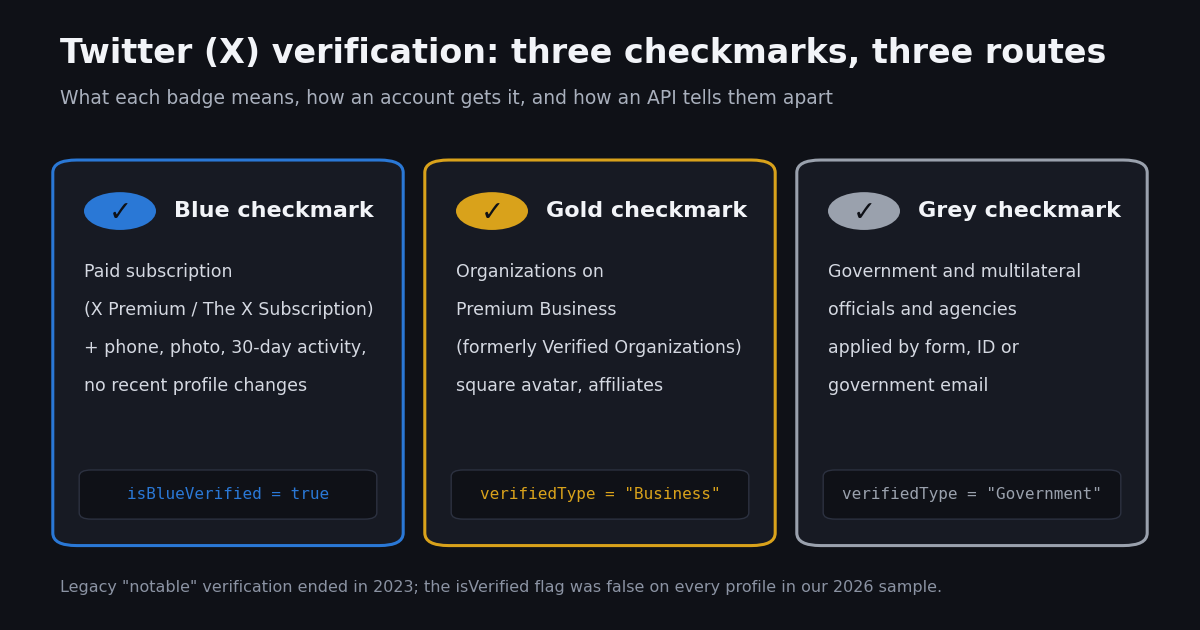
- Blue = an active paid subscription (X Premium / The X Subscription) plus X's eligibility review. It is not identity verification.
- Gold = an organization on Premium Business (formerly Verified Organizations); affiliates get a small badge with the organization's photo.
- Grey = government and multilateral officials and agencies, applied by form with ID documents or a government email; lost when the person leaves office.
- Legacy verification (active, notable, authentic) started winding down on April 1, 2023; legacy checks stayed only for accounts that subscribed.
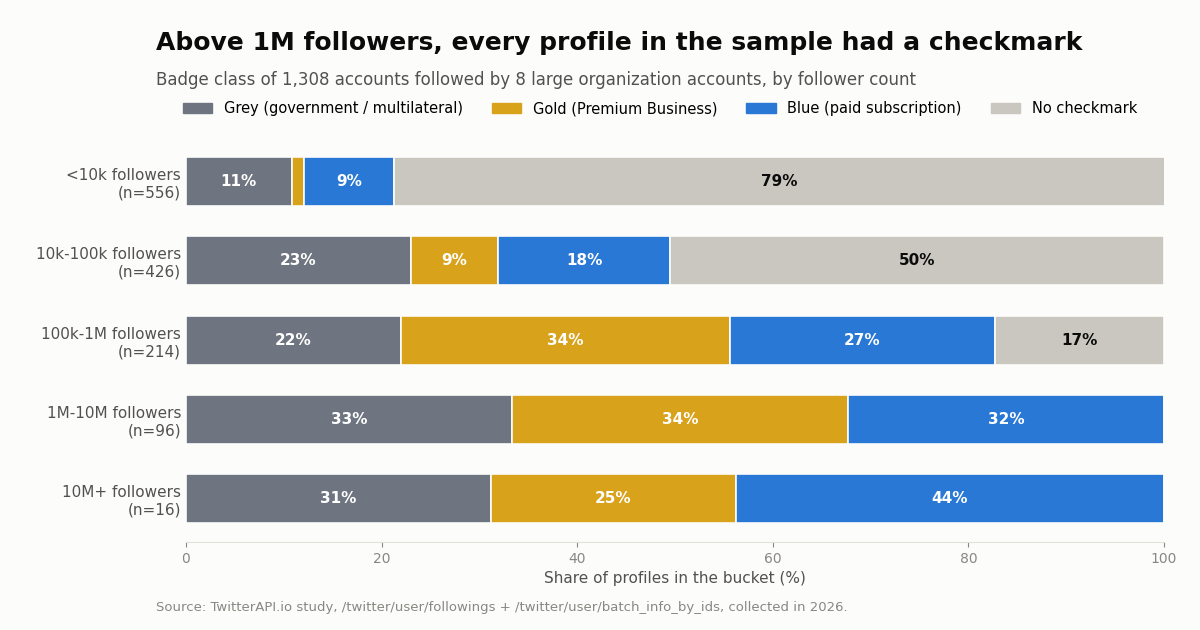
- Our 2026 study of 1,308 profiles: 53% no checkmark, 17% blue, 12% gold, 18% grey; the legacy
isVerifiedflag was false on all of them. - Developers: read
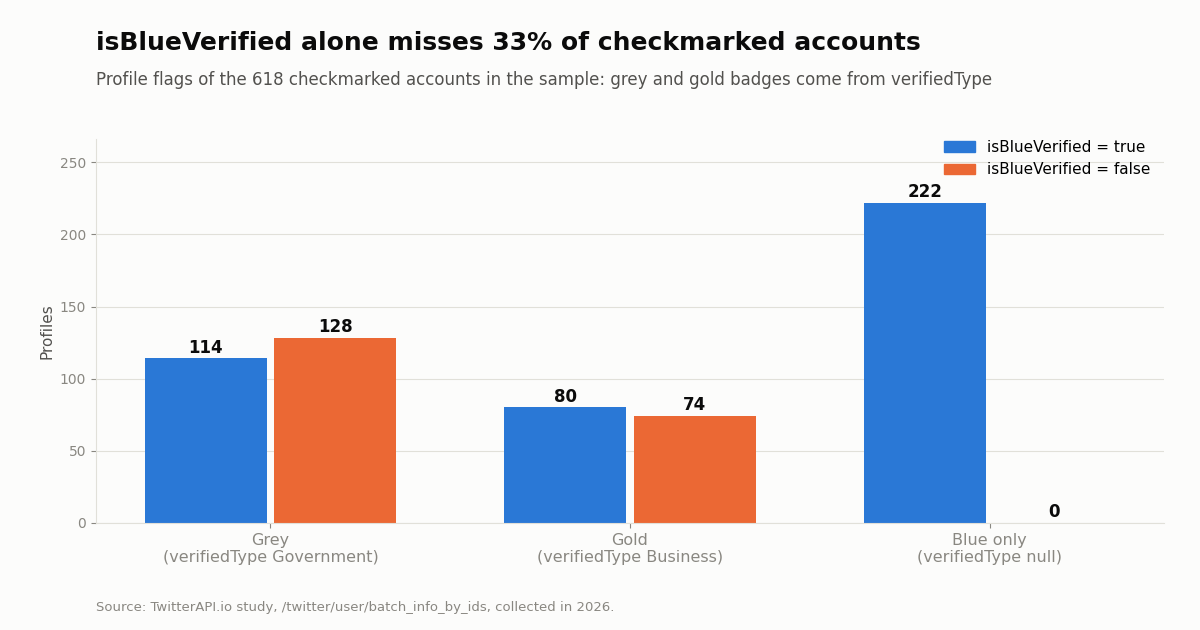
verifiedTypebeforeisBlueVerified. 33% of checkmarked profiles in our sample hadisBlueVerifiedfalse.
"Twitter verification" used to mean one thing: a free blue badge Twitter gave to accounts it judged active, notable and authentic. That program is gone. Since X began winding it down on April 1, 2023, the word covers three different checkmarks with three different routes, plus an optional ID label, and the help pages that explain them have been renamed more than once. This guide puts the current rules side by side, quoted from X's own help center, so you can tell what a badge you see actually proves and which one (if any) you can get.
This page is about the badge. If you are stuck on a "we sent you a code" screen while logging in, that is account security, not verification, and it is not covered here. For subscription prices, tiers and how to cancel, see our X Premium guide (linked at the end); this page gives one line on cost and links there. We also ran a small study of 1,308 real profiles to see how common each checkmark is among accounts that organizations follow, and we close with a short section for developers who need to read verification status from API data.
32.7% of the 618 checkmarked profiles in our 2026 sample of 1,308 accounts (grey and gold badges with isBlueVerified false). Above 1M followers, every profile had a checkmark.
The three X checkmarks at a glance
X's help page "About profile labels and checkmarks" (help.x.com/en/rules-and-policies/profile-labels) defines the badges. The table condenses it, with the route to each badge and the profile field that identifies it in API data.
One account, one checkmark. A profile shows at most one checkmark color. An affiliation badge (a small copy of the organization's profile photo) can sit next to any of the three, which is why a journalist can show a blue checkmark plus their newspaper's logo.
What a checkmark is not. X states on the same page that blue-checked accounts "will not undergo review to confirm that they meet the active, notable and authentic criteria" of the old program, and its blue-checkmark page says X "does not endorse or validate the views expressed on accounts featuring blue checkmarks." A checkmark is a status signal, not a fact-check.
How to get the blue checkmark: the requirements X lists
The blue checkmark is the only badge an individual can obtain, and it is tied to a paid plan. X's page "About X Blue Checkmark" (help.x.com/en/managing-your-account/about-x-bluecheck) says the badge "means that the account has an active subscription to X Premium and meets our eligibility requirements. It does not mean that the account has been ID verified." In 2026 X Premium became part of The X Subscription; the profile-labels page now says the badge can come from "X Premium or a Plus, Premium, Super, or Ultra plan on The X Subscription." On X Premium, the entry Basic tier does not include the checkmark; Premium and Premium+ do.
Complete. The account must have a display name and a profile photo.
Active use. The account must have been active in the past 30 days to subscribe.
Security. The account must have a confirmed phone number.
Non-deceptive. No recent changes to the profile photo, display name or @handle; no signs of being misleading or deceptive; no signs of platform manipulation and spam.
Review, then badge. Every other subscription feature turns on immediately; the checkmark appears only after X's team reviews the account. There is no separate application form for the blue badge anymore.
Cost in one line. The blue checkmark comes with a paid X plan; tier names and current prices are in our X Premium guide, and X changes them by region and platform, so check the subscribe screen in your own app before paying.
Optional ID verification. X's "ID Verification Policy & Privacy" page (help.x.com/en/rules-and-policies/verification-policy) describes a separate, voluntary step for Premium subscribers: you verify with a government-issued ID through X's processors (the page names Persona and Stripe), and an "ID verified" label appears in the pop-up when someone clicks your checkmark. The page says the option is "only available to individual users and not businesses or organizations," and that X also requires ID for creators paid through Ad Revenue Sharing and Creator Subscriptions. ID verification adds a label; it does not change the checkmark's color.
The gold checkmark: Premium Business (formerly Verified Organizations)
The gold checkmark and square avatar belong to organizations. The program was launched as Verified Organizations; X's help page now titles it "Premium Business" (help.x.com/en/using-x/verified-organizations), and the profile-labels page says the gold checkmark "indicates that the account is an official organization account through Premium Business."
Who qualifies. "Only organization accounts (such as businesses, non-profits and political parties) are allowed"; personal accounts are not, with case-by-case exceptions for businesses built around a personal brand.
What you must provide. A matching active X account, a current organization email address and a current website domain at sign-up, plus a complete profile with an accurate photo, bio and display name. X reviews the account after purchase and emails when it is ready.
Two tiers. Full Access includes affiliations: the organization can invite leadership, employees, sub-brands or support handles, and each affiliate who accepts gets a checkmark plus the affiliation badge. The Basic tier has the gold checkmark without affiliations. X's page lists Full Access at $1,000 a month or $10,000 a year (US, plus tax, $50 a month per extra affiliate) and Basic at $2,000 a year; prices "may vary by region and are subject to change."
No refund for the wrong account type. The page states that accounts that sign up but are not an organization account will not be refunded, so a solo creator should not buy Premium Business to get gold.
The grey checkmark: governments and multilateral organizations
X's "Grey checkmark" page (help.x.com/en/using-x/grey-checkmark) says the badge "verifies government and multilateral organization accounts" and lists four groups.
Government individuals. At national level: heads of state and their deputies and spouses, cabinet members or ministers and their deputies, members of Congress or Parliament, head spokespersons of government entities, and ambassadors. At state level: governors and chief ministers, plus positions equivalent in status.
Government organizations. Agencies, ministries and their specialized departments, legislative bodies and committees, embassies and consulates, at national, state and local level.
Multilateral organizations and leaders. International and supranational government organizations and agencies, and their heads and deputy heads.
How to apply. Make the display name, photo, bio and website accurately represent the person or body; apply through X's form; confirm identity by uploading documents or linking a government email address. Approved accounts are verified immediately. Affiliate sub-accounts are not accepted for grey; X points those to its organization program instead.
When grey goes away. "Grey checkmarks are for current government officials and organizations only." X's own example: an outgoing US president loses the grey checkmark on inauguration day, and an agency loses it when it is disbanded or reorganized. Government bodies that do not meet the criteria can look at X's paid Premium Organizations package, which also carries a grey checkmark and square avatar.
Paid, legacy or affiliated: how to read a checkmark you see
Legacy checkmarks no longer exist as a separate badge. X's blue-checkmark page says that starting April 1, 2023 it "began winding down our legacy Verification program," and accounts verified under the old criteria "did not retain a blue checkmark unless they are subscribed." So treat any blue checkmark you see today as a subscription signal, not as the old notability badge.
Click the checkmark. Tapping or clicking a checkmark opens a short pop-up about it; X's ID verification page says that is where the "ID verified" label appears for subscribers who added it. The color alone cannot tell you whether an account added ID verification, so the pop-up is the check to make. Wording and menus in the apps change often, so rely on what the pop-up says rather than on a remembered layout.
Look for the affiliation badge. A small square image of an organization's profile photo next to the name means a Premium Business Full Access organization has claimed the account. Clicking it opens the organization. It is the strongest public sign that a person really works for the organization named in their bio.
In the EU the wording differs. X's blue-checkmark page notes that users in the EEA see blue-checkmark accounts described as "Premium" rather than "verified," after the European Commission's Decision of 5 December 2025 concluded the badge misled users under the Digital Services Act; X says it is appealing.
Checkmarks can disappear temporarily. Changing your profile photo, display name or @handle removes the blue checkmark until X reviews the account again, and no further changes are allowed during that review. X may also remove a checkmark at any time for rule violations.
What a checkmark does, and what nobody can promise
What X documents. On the blue side, the badge comes bundled with subscription features X lists on its help page: reply prioritization (larger on higher tiers), editing posts, longer posts and video uploads, reduced ads on Premium, and access to apply for creator revenue sharing and creator subscriptions. Reply prioritization is the feature most people mean when they say verified accounts "get more reach"; X lists it as a feature and does not promise any particular audience.
What X does not publish. X has not published how much extra distribution a checkmark brings, and any number you read about that is an outside estimate. Our X Premium guide includes a separate 1,575-post study of what the paid checkmark changes in engagement data, with the limits of what such a comparison can show.
Trust signals cut both ways. Because the blue checkmark is bought rather than granted, readers who remember the old program can mistake a subscriber for an authority. For organizations, the gold checkmark plus affiliation badges are the clearer signal; for officials, grey. For anyone else, click the checkmark and read the pop-up.
Bots and checkmarks. A paid checkmark requires a phone number and a review, but X does not claim it filters out automation. If you are judging whether an account is real, account age, posting pattern and follower quality say more than the badge; our guide on what share of X accounts are bots covers the published estimates, and the account age checker tool reads the creation date of any public account.
Study: how common each checkmark is among 1,308 accounts organizations follow
The guides that rank for this keyword explain the badges; we did not find one that measures how common each badge is. So we measured it. We took the newest followings of eight large organization accounts (Google, NASA, UN, nytimes, WHO, Microsoft, Reuters and WhiteHouse), which tilts the sample toward organizations, media, officials and public figures, deduplicated them, and looked up every profile's verification fields.
Overall, 52.8% of the 1,308 profiles had no checkmark, 17.0% had a blue checkmark only, 11.8% had gold and 18.5% had grey. The share with a checkmark rises steeply with audience size.
Above 1M followers, all 112 profiles had a checkmark. Below 10,000 followers, 78.8% had none. Gold reaches about a third of profiles from 100k followers up (33.6% at 100k-1M, 34.4% at 1M-10M); the 10M+ band is only 16 profiles, so read its split as indicative.
The mix also depends on who is doing the following. Who is doing the following shapes the mix as well.
Brands follow brands; agencies follow agencies. 51.0% of Google's sampled followings carried gold and 80.0% of NASA's carried grey. The two news organizations followed mostly accounts with no checkmark (83.5% for nytimes, 82.5% for Reuters), probably because newsrooms follow many individual reporters and sources. WhiteHouse followed only 5 accounts, all grey, so it is left out of the table.
Affiliation badges are common on gold and grey. 31.8% of gold and 35.1% of grey profiles carried an affiliation label, against 12.2% of blue-only profiles and 0% of profiles with no checkmark (affiliates always receive a checkmark).
The legacy flag is gone. The isVerified field, which tracked the old notable-account program, was false on all 1,308 profiles, including NASA and the UN.
For developers: reading verification status from the API
If you build moderation, lead scoring or research tools, you will want the checkmark as data. On TwitterAPI.io the profile object from /twitter/user/info (one handle) or /twitter/user/batch_info_by_ids (we sent up to 100 ids in each lookup) carries three fields: isBlueVerified (boolean), verifiedType ("Business", "Government" or null in our sample) and the legacy isVerified. Organization affiliation sits in affiliatesHighlightedLabel.label (description is the organization's name; every label in our sample had user_label_type BusinessLabel).
Pitfall 1: isBlueVerified is not "has a checkmark". Of the 618 checkmarked profiles in our sample, 128 grey and 74 gold accounts had isBlueVerified false, so a filter on that field alone would miss 32.7% of them. Decide the color from verifiedType first, then fall back to isBlueVerified.
Pitfall 2: the author object inside a tweet is not enough. In the 280 search results we pulled, the embedded author.verifiedType was null every time, including for posts by accounts whose profile lookup returned Government or Business, and author.isBlueVerified was false for those gold and grey accounts. Look the authors up with batch_info_by_ids when the color matters.
Search operators work, and cover all three colors. filter:blue_verified and filter:verified both work in /twitter/tweet/advanced_search: on a plain "openai" search, 57.5% of 40 posts came from blue-flagged authors; with either filter it was 100%, and with -filter:blue_verified it was 0%. We then searched from: one grey and one gold account whose profiles say isBlueVerified false: each returned 20 posts with filter:blue_verified and 0 with -filter:blue_verified. In our test, X's search treated gold and grey accounts as verified even where the profile flag said otherwise.
Cost compared with the official X API. On TwitterAPI.io you pay only for the data returned: $0.18 per 1,000 profiles and $0.15 per 1,000 tweets, no X account needed for these reads. X's pay-per-usage rate card (docs.x.com/x-api/getting-started/pricing) lists $0.010 per user read ($10 per 1,000) and $0.005 per post read ($5 per 1,000, about 33x more for tweets). X's own user object exposes verified_type with example values blue, business and government. New TwitterAPI.io accounts that pass the automatic bot check get up to $1 of free credits (at most 100,000 credits, no card, one per person or network, expiring after 31 days).
import os
import requests

BASE = "https://api.twitterapi.io"
HEADERS = {"X-API-Key": os.environ["TWITTERAPI_IO_API_KEY"]}

r = requests.get(f"{BASE}/twitter/user/info", headers=HEADERS,
                 params={"userName": "NASA"}, timeout=30)
body = r.json()
if body.get("status") != "success" or body.get("data") is None:
    print("lookup failed:", body.get("msg"))        # unknown handle -> "user not found"
else:
    d = body["data"]
    label = (d.get("affiliatesHighlightedLabel") or {}).get("label") or {}
    print(d["userName"], "| isBlueVerified:", d["isBlueVerified"],
          "| verifiedType:", d.get("verifiedType"),       # "Business", "Government" or None
          "| legacy isVerified:", d["isVerified"],
          "| affiliated with:", label.get("description"))
How we collected this
Question. How common is each X checkmark among accounts that large organizations follow, how does the mix change with follower count, and do the verified search operators work?
Accounts. The newest followings (one page of up to 200 each) of Google, NASA, UN, nytimes, WHO, Microsoft, Reuters and WhiteHouse: 1,320 rows, 1,308 unique profiles after deduplication, each looked up with /twitter/user/batch_info_by_ids. Badge class: grey if verifiedType is Government, gold if Business, otherwise blue if isBlueVerified is true, otherwise none.
Search test. Two pages (40 posts) each of the latest posts for "openai", "openai filter:blue_verified", "openai filter:verified" and "openai -filter:blue_verified", plus four from: queries each for one grey and one gold account with isBlueVerified false.
Window and size. Profiles as they stood at collection time, collected in 2026. 42 API requests in total, about $0.32 at list prices.
What the sample cannot show. It is not a random sample of X: organizations' followings over-represent officials, media and brands, so platform-wide checkmark shares are far lower. Newest followings are not all followings. A checkmark can change within days after a profile edit or a lapsed subscription. Our badge rule reflects the fields as returned; X's own pop-up remains the authority for any single account.
Privacy. Aggregates only. Followed accounts can include private individuals, so raw pages were not kept in the repository; the published sample holds de-identified rows (badge class, follower bucket, affiliation yes or no, account creation year) with no ids, handles, names or text. Only the eight seed organization accounts are named.
"""verified_posts.py - find posts from checkmarked accounts on a topic and label each author's
checkmark (blue, gold, grey) with twitterapi.io. No X account needed for these reads.

    pip install requests
    export TWITTERAPI_IO_API_KEY=...      # from the twitterapi.io dashboard
    python verified_posts.py "openai" 3
"""
import os
import sys
from collections import Counter

import requests

BASE = "https://api.twitterapi.io"
HEADERS = {"X-API-Key": os.environ["TWITTERAPI_IO_API_KEY"]}


def badge(user):
    """Map a profile object to the checkmark X shows. Read verifiedType first:
    grey and gold accounts can have isBlueVerified == False."""
    vt = user.get("verifiedType")
    if vt == "Government":
        return "grey"
    if vt == "Business":
        return "gold"
    if user.get("isBlueVerified"):
        return "blue"
    return "none"


def search_checkmarked(topic, max_pages):
    """filter:blue_verified keeps posts from any checkmarked author (blue, gold or grey)."""
    cursor = ""
    for _ in range(max_pages):
        r = requests.get(
            f"{BASE}/twitter/tweet/advanced_search",
            headers=HEADERS,
            params={"query": f"{topic} filter:blue_verified", "queryType": "Latest", "cursor": cursor},
            timeout=30,
        )
        r.raise_for_status()
        body = r.json()
        for tweet in body.get("tweets", []):
            yield tweet
        if not body.get("has_next_page"):
            break
        cursor = body.get("next_cursor", "")


def badges_by_id(user_ids):
    """The author object inside a tweet does not carry a reliable verifiedType,
    so look the profiles up in batches of up to 100 ids."""
    out = {}
    ids = sorted(set(user_ids))
    for i in range(0, len(ids), 100):
        r = requests.get(
            f"{BASE}/twitter/user/batch_info_by_ids",
            headers=HEADERS,
            params={"userIds": ",".join(ids[i:i + 100])},
            timeout=30,
        )
        r.raise_for_status()
        for user in r.json().get("users", []):
            out[str(user["id"])] = badge(user)
    return out


if __name__ == "__main__":
    topic = sys.argv[1] if len(sys.argv) > 1 else "openai"
    pages = int(sys.argv[2]) if len(sys.argv) > 2 else 3
    tweets = list(search_checkmarked(topic, pages))
    labels = badges_by_id([str(t["author"]["id"]) for t in tweets])
    for t in tweets[:10]:
        kind = labels.get(str(t["author"]["id"]), "unknown")
        print(f"[{kind:>5}] @{t['author']['userName']}: {t['text'][:80]!r}  {t['url']}")
    print("posts:", len(tweets), "| authors by checkmark:", dict(Counter(labels.values())))
    # Cost: tweets returned x $0.15 per 1,000 + profiles x $0.18 per 1,000.
    # 3 full pages = 60 tweets ($0.009) + up to 60 profiles ($0.0108).
Researching this?Free starter credits cover end-to-end testing — Google sign-in, no card. Get a key.
Questions readers ask
Is Twitter verification free?
Only for one group. The grey checkmark for qualifying government and multilateral officials and agencies is applied through an application form, and X's grey checkmark page lists no fee for it, although X also offers a paid Premium Organizations package for government bodies. The blue checkmark requires a paid X plan, and the gold checkmark requires a Premium Business subscription. The free notable-account program ended when X began winding it down on April 1, 2023.
What are the requirements for the blue checkmark on X?
An active subscription on a tier that includes the checkmark, plus X's review: a display name and profile photo, activity in the past 30 days, a confirmed phone number, no recent changes to the photo, display name or @handle, and no signs of being misleading, deceptive, or engaged in platform manipulation and spam.
Does the blue checkmark mean the account's identity was verified?
No. X's help page says the blue checkmark means an active subscription that meets eligibility rules and "does not mean that the account has been ID verified." Subscribers can add optional ID verification with a government ID; when they do, an ID verified label appears in the pop-up you see after clicking the checkmark.
How does a business get the gold checkmark?
By subscribing to Premium Business (formerly Verified Organizations) with a matching X account, a current organization email address and website domain, and a complete profile. X reviews the account after purchase. Only organizations qualify; X says personal accounts that sign up are not refunded.
Why did my checkmark disappear?
The common reasons X lists: you changed your profile photo, display name or @handle (the blue checkmark returns after X re-reviews the account), your subscription lapsed, the account broke X's rules, or for grey checkmarks the person left office or the agency was reorganized.
What does a grey checkmark mean on X?
The account represents a government or multilateral organization or official, such as a head of state, minister, member of parliament, ambassador, agency, embassy or international organization. It is only for current officials and bodies.
Can I still apply for the old free verification?
No. X says it no longer accepts applications under the previous active, notable and authentic criteria. Accounts verified that way kept a checkmark only if they subscribed.
How can I check whether an account is verified in bulk?
Look profiles up through an API and read the verification fields. On TwitterAPI.io, /twitter/user/batch_info_by_ids returns isBlueVerified and verifiedType (Business or Government); read verifiedType first, because in our sample a third of gold and grey accounts had isBlueVerified false. Profiles cost $0.18 per 1,000.
Continue
- X Help Center: About profile labels and checkmarks (blue, gold, grey, affiliation badges)
- X Help Center: About X Blue Checkmark (eligibility criteria, legacy wind-down, loss of the checkmark)
- X Help Center: Premium Business, formerly Verified Organizations (gold checkmark, affiliates, eligibility)
- X Help Center: Grey checkmark (eligible officials and bodies, how to apply, when it is lost)
- X Help Center: ID Verification Policy & Privacy (optional ID verified label)
- X API pay-per-usage pricing ($0.010 per user read, $0.005 per post read), the official and pricier route
- Twitter (X) API overview: the hub for reading X data
- X Premium in 2026: The X Subscription tiers, prices and how to cancel
- What percentage of Twitter (X) accounts are bots: every published estimate
- Twitter account age checker: see when any public account was created
- Twitter (X) search operators for the API, including filter operators
- TwitterAPI.io pricing: profiles and tweets billed per result
- 01"You Can No Longer Send Messages to This Person" on Twitter (X): What It Means and What You Can Do
- 02Twitter (X) API with LangGraph: Build a Search Agent Graph
- 03C# Twitter (X) API: a .NET client with HttpClient and System.Text.Json
- 04Twitter (X) API Mentions: Get Every Post That Mentions an Account
- 05How to Log Out of Twitter (X) on Web, iPhone and Android
- 06Kimi Code and Twitter (X): Accounts, and How to Add an X MCP Server
- 07Gemini CLI vs Claude Code in 2026: Access, Quotas, MCP and Pricing for Twitter (X) Data Agents
- 08What Is fxtwitter (FixupX) and How Do You Use It in Discord?
Writing about something you built with TwitterAPI.io? Our community rewards program pays API credits for honest tutorials, build logs and videos.
Stop reading. Start building.
Starter credits cover real testing on real data. Google sign-in, no card, no application queue.
Get an API keyAlready building with TwitterAPI.io? Publish an honest tutorial or build log about it and earn up to $200 a month in API credits.