How to Use Google Gemini with the Twitter (X) API
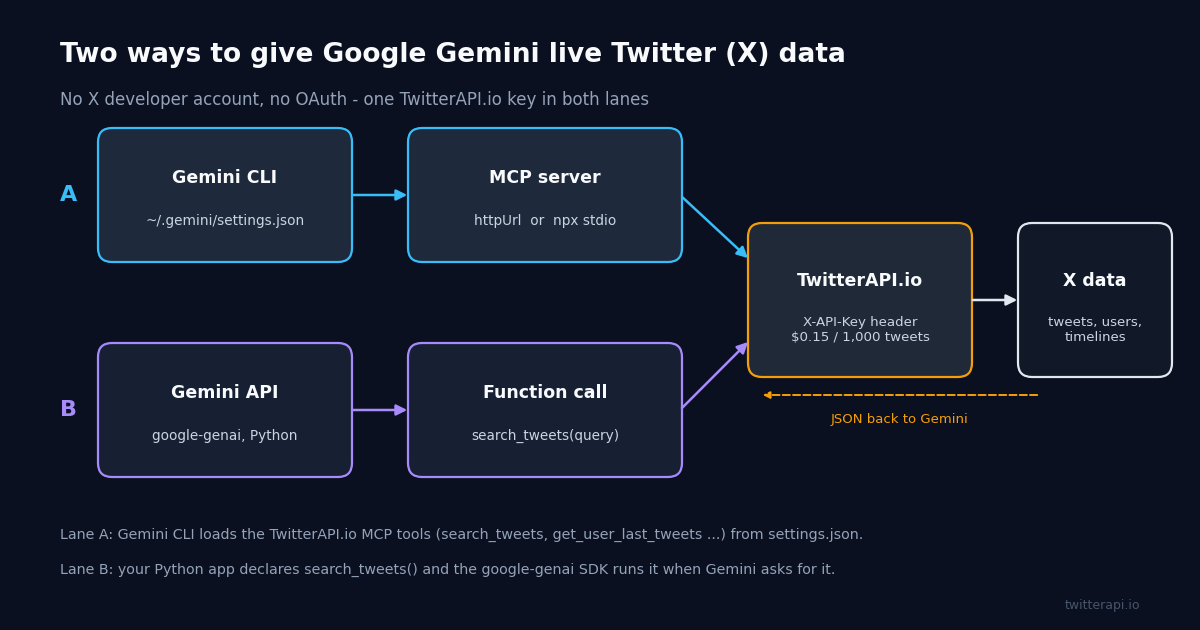
Google Gemini has no native Twitter/X access, so you give it live tweets through a tool: either point Gemini CLI at the TwitterAPI.io MCP server with an httpUrl entry in ~/.gemini/settings.json, or declare a search_tweets(query) function in Python with the google-genai SDK and let Gemini call it. Both paths use one TwitterAPI.io X-API-Key, and neither needs an X developer account, an OAuth app or a saved card. This guide walks both paths end to end: the exact config block, three prompts you can paste into Gemini CLI, a complete Python script, the JSON you get back, and what each read costs.
Most pages on this query are about the opposite direction: no-code connectors that let Gemini write a tweet and post it. That is useful, but it leaves out the half that makes Gemini worth wiring to X at all: reading. Sentiment on a launch, what an account said this week, which posts on a topic travelled furthest. Those need search and timeline data, and that is what the two paths below provide. (Writes are covered too, further down, with the caveats that come with them.)
If you have already connected Claude or ChatGPT to the same server, the TwitterAPI.io side is identical: the hosted MCP endpoint is https://mcp.twitterapi.io/mcp, the npm package is @kaitoinfra/twitterapi-io-mcp-server, and the REST base is https://api.twitterapi.io. Only the Gemini-side configuration changes, and that is what this page documents, verified against the Gemini CLI MCP docs and the google-genai SDK reference.
Why Gemini cannot read Twitter (X) on its own, and the two ways to fix it
Neither the Gemini models, Gemini CLI nor the Gemini API ship a Twitter/X connector. Gemini can only use data that is in its context window, so to answer "what are people saying about this launch?" it needs something that fetches the posts and hands them over as text. Two mechanisms do that, and Gemini supports both: the Model Context Protocol (MCP), which Gemini CLI loads from settings.json, and function calling, which the Gemini API exposes to your own code.
Path A: Gemini CLI + MCP. The Gemini CLI docs list three MCP transports: stdio, SSE and Streamable HTTP (geminicli.com/docs/tools/mcp-server). TwitterAPI.io hosts a Streamable HTTP server at https://mcp.twitterapi.io/mcp and publishes an npm package for stdio, so you can pick either. Once configured, Gemini CLI sees 12 tools (search_tweets, get_user_info, get_user_about, get_user_followers, get_user_followings, get_user_last_tweets, get_user_mentions, get_tweets_by_ids, get_tweet_replies, get_tweet_quotes, get_tweet_retweeters and a trends tool) and calls them from plain-language prompts. No code.
Path B: Gemini API + function calling. In your own Python, Node or Go app you declare a function, Gemini returns a structured request to call it, your code runs it against https://api.twitterapi.io, and Gemini writes the answer from the result. The google-genai Python SDK goes one step further with automatic function calling: pass the function object itself and the SDK handles the call-and-return loop (googleapis.github.io/python-genai). This is the path for apps, scheduled jobs and anything that is not a human typing in a terminal.
The official X API is the third option and the one the no-code connectors quietly rely on. It works, but it means an X developer account, an OAuth 2.0 app, a saved payment card and $0.005 per post read (docs.x.com/x-api/getting-started/pricing). We keep it in the comparison table below as the reference point; everything else on this page runs on a TwitterAPI.io key that you get by signing in with Google at twitterapi.io and copying it from the dashboard.
Path A: add the TwitterAPI.io MCP server to Gemini CLI (settings.json)
Install Gemini CLI if you have not (npm install -g @google/gemini-cli, or brew install gemini-cli; the README also allows a one-off npx @google/gemini-cli). Sign in with a Google account or set GEMINI_API_KEY. Then open the user-level settings file, ~/.gemini/settings.json, or the project-level .gemini/settings.json if you only want the tools in one repo, and add an mcpServers object. The property names below are the ones the Gemini CLI docs define: httpUrl selects the Streamable HTTP transport, headers carries custom HTTP headers, command / args / env define a stdio server, and timeout is the request timeout in milliseconds (default 600,000).
The block below shows both variants in one file so you can see them side by side; keep whichever you prefer and delete the other. twitterapi is the hosted server: nothing to install, authenticated by the X-API-Key header. twitterapi-local runs the open-source package through npx on your machine and reads the key from the TWITTERAPI_IO_API_KEY environment variable; the docs' own stdio example uses the same $VAR form inside env, which keeps the secret out of the JSON file.
If you prefer the command line to editing JSON, the docs document gemini mcp add --transport http --header "X-API-Key: YOUR_KEY" twitterapi https://mcp.twitterapi.io/mcp, which writes the same entry for you, and gemini mcp list to confirm it. Inside a session, /mcp lists every connected server and its tools; if twitterapi is there with 12 tools, you are done.
Two optional keys are worth knowing. trust: true skips the confirmation prompt Gemini CLI shows before each tool call, which you will want once you have seen the tools work; and includeTools / excludeTools let you expose a subset, for example only search_tweets and get_user_last_tweets on a shared machine.
{
  "mcpServers": {
    "twitterapi": {
      "httpUrl": "https://mcp.twitterapi.io/mcp",
      "headers": { "X-API-Key": "YOUR_TWITTERAPI_IO_KEY" },
      "timeout": 30000
    },
    "twitterapi-local": {
      "command": "npx",
      "args": ["-y", "@kaitoinfra/twitterapi-io-mcp-server"],
      "env": { "TWITTERAPI_IO_API_KEY": "$TWITTERAPI_IO_API_KEY" }
    }
  }
}Three prompts to run in Gemini CLI
Gemini CLI reads each tool's description and parameters from the MCP server, so you do not name the tool; you describe the outcome and mention the fields you care about. The three prompts below cover the three jobs people actually wire Gemini to X for, and each maps to one or two tool calls. Naming queryType, likeCount or next_cursor in the prompt is optional, but it nudges Gemini to pass the right argument and to paginate instead of stopping after one page.
Prompt 1, sentiment on a product launch, triggers search_tweets with queryType=Latest. Two pages is 40 tweets, which is enough for a quick read and costs about $0.006 of credits. Ask for the @handle on each quote so you can verify the examples yourself.
Prompt 2, one account's last week, triggers get_user_last_tweets, which wraps /twitter/user/last_tweets. The endpoint sorts by createdAt newest first, so asking Gemini to keep only the last 7 days is a filter on the returned list, not a parameter; if the account posts a lot, tell Gemini to follow the cursor for a second page.
Prompt 3, most-retweeted posts on a topic, is search_tweets with queryType=Top followed by Gemini sorting on retweetCount. Top ranks by relevance and engagement across time, while Latest is strictly newest first; for "which posts travelled furthest" you want Top. Three pages is 60 tweets, about $0.009.
When a prompt does not trigger a tool call at all, say "search X" or "use the twitterapi tools" explicitly, or check /mcp to confirm the server connected. When it triggers one call where you expected several, ask for the pagination in words ("follow next_cursor until you have three pages").
# Start a session in any folder, confirm the server loaded, then ask.
gemini
> /mcp
#   twitterapi (httpUrl) - 12 tools: search_tweets, get_user_info, get_user_last_tweets, ...

# 1. Sentiment on a product launch  (Gemini picks search_tweets)
> Search X for posts about "Gemini 3.8 Flash" with queryType Latest, two pages.
  Sort them into positive / neutral / negative, quote two posts per group with
  the @handle and likeCount, and finish with a one-line verdict.

# 2. One account's last week  (Gemini picks get_user_last_tweets)
> Fetch the recent tweets of @GoogleDeepMind, keep only the last 7 days by
  createdAt, and summarise the themes in five bullets with like and retweet counts.

# 3. Most-retweeted posts on a topic  (search_tweets, then Gemini sorts)
> Search X for "Gemini CLI" with queryType Top, follow next_cursor for three pages,
  and list the ten posts with the highest retweetCount as a table:
author.userName, retweetCount, likeCount, first 80 characters of text.Path B: Gemini API function calling in Python with google-genai
The current SDK is the google-genai package (pip install google-genai, then from google import genai and from google.genai import types). Its reference documents automatic function calling: "You can pass a Python function directly and it will be automatically called and responded by default." The SDK derives the function's JSON schema from the type hints and the docstring, so the quality of the Args: block in your docstring is what decides whether Gemini fills query and query_type sensibly. The model id used throughout the SDK examples is gemini-flash-latest; the complete script at the end of this page uses the same.
Google's function-calling guide (ai.google.dev/gemini-api/docs/function-calling) now documents the newer Interactions API as well: client.interactions.create(model="gemini-3.8-flash", input=..., tools=[...]), where you inspect function_call steps and send back a function_result yourself. It is the same idea with more control and more code. For a search-and-summarise job, the generate_content path with automatic calling is shorter and is what we show.
The function itself is ordinary requests code: GET https://api.twitterapi.io/twitter/tweet/advanced_search with the X-API-Key header and query plus queryType parameters, follow next_cursor while has_next_page is true, and return a compact list so Gemini's context is not filled with fields it does not need. The manual variant below disables automatic calling, which is the right mode when you want to log or rate-limit what Gemini asks for before any credits are spent: read response.function_calls[0], run it, and send the result back with types.Part.from_function_response, as the SDK reference shows.
Two practical notes. Keep max_pages small and let the prompt widen it; each page is up to 20 tweets and 15 credits per tweet, so a runaway loop is the only way this gets expensive. And trim the tweet objects before returning them: the raw response carries around thirty fields per tweet (entities, cards, quoted tweets), and the six you keep (id, text, likeCount, retweetCount, createdAt, author.userName) are what a summary needs.
from google import genai
from google.genai import types

client = genai.Client()  # reads GEMINI_API_KEY from the environment

# Same search_tweets() as in the full script below, but we stop the SDK from
# running it so we can log what Gemini asked for before any credits are spent.
config = types.GenerateContentConfig(
    tools=[search_tweets],
    automatic_function_calling=types.AutomaticFunctionCallingConfig(disable=True),
)
prompt = types.Content(
    role="user",
    parts=[types.Part.from_text(text="Find the most-retweeted posts about 'Gemini CLI' this week")],
)
first = client.models.generate_content(model="gemini-flash-latest", contents=[prompt], config=config)
call = first.function_calls[0]
print(call.name, dict(call.args))
# -> search_tweets {'query': 'Gemini CLI', 'query_type': 'Top', 'max_pages': 2}

result = search_tweets(**call.args)           # one HTTP call per page, 15 credits per tweet
reply = types.Part.from_function_response(name=call.name, response={"tweets": result})
final = client.models.generate_content(
    model="gemini-flash-latest",
    contents=[prompt, first.candidates[0].content, types.Content(role="tool", parts=[reply])],
    config=types.GenerateContentConfig(tools=[search_tweets]),
)
print(final.text)What comes back: the advanced_search response Gemini reads
Whether Gemini reaches the endpoint through the MCP tool or your function, the JSON is the same. /twitter/tweet/advanced_search returns a top-level tweets array plus has_next_page and next_cursor for pagination; each tweet carries camelCase counters (likeCount, retweetCount, replyCount, viewCount), an X-style createdAt string and an author object with userName. There is no nested metrics wrapper and no versioned path prefix; those belong to the official X API, and seeing them in a snippet is a sign it was written from memory. A failed call shows up as a non-200 HTTP status, so raise_for_status() is the error check; the search response itself has no error field.
The shape below is trimmed to the fields the examples use. get_user_last_tweets is the one wrinkle: it nests the list as data.tweets instead of top-level tweets, with has_next_page and next_cursor still at the top. If you write your own function for timelines, read page["data"]["tweets"].
Each page holds up to 20 tweets and is billed at 15 credits per tweet returned, so a full page is 300 credits, which is $0.003. A search that matches nothing still costs the 15-credit minimum ($0.00015). There is no per-request cap: a 20-tweet page is $0.003, 1,000 tweets are $0.15.
{
  "tweets": [
    {
      "id": "1975512345678901234",
      "text": "Wired Gemini CLI to live X search over MCP this morning - the httpUrl entry in settings.json was all it took.",
      "likeCount": 184,
      "retweetCount": 37,
      "replyCount": 12,
      "viewCount": 22930,
      "createdAt": "Tue Oct 06 14:02:11 +0000 2026",
      "author": { "userName": "example_dev", "name": "Example Dev" }
    }
  ],
  "has_next_page": true,
  "next_cursor": "DAACCgACGxQ...."
}Gemini CLI + MCP vs Gemini function calling vs the official X API
The three ways to get X data in front of Gemini differ less in what they return than in what they ask of you first. The table puts the dimensions side by side; prices are the published per-unit rates, and rate limits are quoted from each provider's docs.
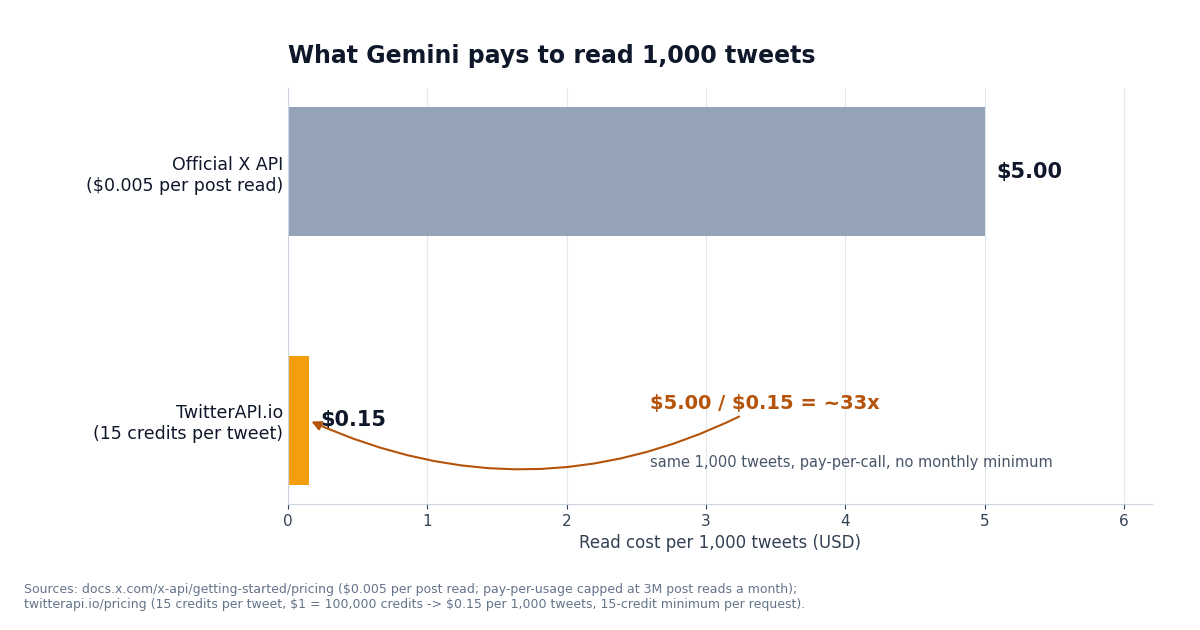
On price the gap is the same 33x in both TwitterAPI.io columns: $5.00 divided by $0.15. On setup the gap is the OAuth app and the developer account, which the two Gemini paths simply do not have. The official API's advantage is being official: if your product needs that status, it is the only choice, and its documentation (docs.x.com) is the reference for the operator syntax that search_tweets queries also accept.
What it costs to run Gemini on Twitter (X) data
There are two meters. The X data meter is TwitterAPI.io's: 15 credits per tweet returned on search, mentions, replies, quotes, timelines and tweets-by-ID, with $1 buying 100,000 credits. That is $0.15 per 1,000 tweets, $0.003 for a full 20-tweet page, and a 15-credit minimum ($0.00015) for a request that returns nothing. Profiles are 18 credits each ($0.18 per 1,000). The official X API charges $0.005 per post read, so the same 1,000 tweets are $5.00: $5.00 / $0.15 is about 33x, and the chart below is just those two numbers.
The Gemini meter is Google's token pricing, which is separate and unchanged by where the tweets come from. Google's pricing page lists Gemini 2.5 Flash at $0.30 per 1M input tokens and $2.50 per 1M output tokens, and Gemini 3.8 Flash at $0.75 input / $3.75 output per 1M for 2026 (ai.google.dev/gemini-api/docs/pricing); a free tier with limited model access also exists. Derived from those list prices: 10,000 input tokens on Gemini 2.5 Flash cost $0.003, the same as one 20-tweet page of X data, and $0.0075 on Gemini 3.8 Flash. Trimming tweets to six fields before they reach the model is what keeps this side small.
Worked example, prompt 1 above: two pages of 20 tweets is 600 credits, $0.006 of X data. Run it hourly for a month (720 runs) and the X side is $4.32. A monitoring loop that checks every 5 minutes and usually finds nothing pays the 15-credit floor each time: $1.30 a month; every 60 seconds is 43,200 checks, $6.48. New accounts that pass the automatic bot check start with $1 in free credits (no card; one per person and network; the free credits expire after 31 days), which covers everything on this page several times over. Subscriptions from Starter at $29 a month add bonus credits and the paid rate limit of 20 requests/s; the full ladder is on the pricing page.
Writes, if you need them, run through an authenticated session rather than a read key: one /twitter/user_login_v2 login ($0.10, with a proxy you supply) returns login_cookies, and each /twitter/create_tweet_v2, like, retweet, follow or unfollow is then $0.002, billed per HTTP 200 call. The call acts as that X account, so X can rate-limit, lock or suspend it; keep a human pace, and expect to re-login when the session expires. Reads need none of this.
Troubleshooting Gemini CLI MCP and function-calling errors
The server is missing from /mcp. The usual causes are a JSON syntax error in settings.json (a trailing comma is enough), the key written as url instead of httpUrl (in Gemini CLI url means an SSE endpoint, and the hosted server speaks Streamable HTTP), or the file saved in a different location than the one Gemini CLI is reading (user ~/.gemini/settings.json versus project .gemini/settings.json). Restart the session after editing.
Tool calls fail with 401 / unauthorized. The X-API-Key header is missing or wrong in the headers object, or, for the stdio package, TWITTERAPI_IO_API_KEY is not set in the shell that launched Gemini CLI. Copy the key again from the dashboard; keys can be rotated there at any time.
Gemini CLI asks for confirmation on every call. That is the default safety prompt for MCP tools. Set trust: true on the server entry once you are comfortable, or accept per session.
response.text is empty in Python. With automatic function calling disabled, the first response is the function call, not prose: read response.function_calls and continue the loop as in the manual example. With automatic calling on, an empty text usually means the function raised; print the HTTP status and body from requests: a search that failed returns a non-200 status rather than an error field.
429 or slow responses on a new account. Before the first payment the rate limit is 0.2 requests/s (one call every five seconds), which is fine for interactive prompts but will trip a loop that paginates aggressively. Once paid it is 20 requests/s. Lower max_pages, or add a short sleep between pages.
Timeouts on big searches. Tighten the query (lang:en, since:/until: bounds, min_faves:), ask for fewer pages, or raise timeout on the server entry (milliseconds; the docs' default is 600,000). Queries use X's advanced-search operator syntax, so anything that works in the X search box works here.
# pip install google-genai requests
# export GEMINI_API_KEY=...            (Google AI Studio key)
# export TWITTERAPI_IO_API_KEY=...     (twitterapi.io dashboard)
import os
import requests
from google import genai
from google.genai import types

TW_KEY = os.environ["TWITTERAPI_IO_API_KEY"]


def search_tweets(query: str, query_type: str = "Latest", max_pages: int = 2) -> list[dict]:
    """Search public Twitter/X posts and return a compact list of tweets.

    Args:
        query: An X advanced-search query, e.g. 'Gemini CLI lang:en -filter:retweets'.
        query_type: 'Latest' for newest first or 'Top' for the most relevant posts.
        max_pages: Pages of up to 20 tweets to fetch; each full page costs about $0.003.
    """
    tweets, cursor = [], None
    for _ in range(max_pages):
        params = {"query": query, "queryType": query_type}
        if cursor:
            params["cursor"] = cursor
        r = requests.get(
            "https://api.twitterapi.io/twitter/tweet/advanced_search",
            headers={"X-API-Key": TW_KEY},
            params=params,
            timeout=30,
        )
        r.raise_for_status()                   # non-200 is the error signal
        page = r.json()
        for t in page.get("tweets", []):
            tweets.append({
                "id": t["id"],
                "text": t["text"],
                "likes": t["likeCount"],
                "retweets": t["retweetCount"],
                "created_at": t["createdAt"],
                "author": t["author"]["userName"],
            })
        if not page.get("has_next_page"):
            break
        cursor = page.get("next_cursor")
    return tweets


client = genai.Client()  # reads GEMINI_API_KEY

# Automatic function calling: the SDK builds the schema from the type hints and
# docstring, Gemini decides to call search_tweets, the SDK runs it, sends the
# tweets back, and the final answer lands in response.text.
response = client.models.generate_content(
    model="gemini-flash-latest",
    contents=(
        "Search X for posts about 'Gemini 3.8 Flash' from the last few days, "
        "then summarise the three most common complaints and the three most "
        "praised features. Cite the @handle and like count for each point."
    ),
    config=types.GenerateContentConfig(tools=[search_tweets]),
)
print(response.text)Questions readers ask
Does Google Gemini have built-in access to Twitter (X)?
No. Neither the Gemini models, Gemini CLI nor the Gemini API include a Twitter/X connector. Gemini reads tweets only when a tool fetches them: in Gemini CLI that is an MCP server configured in settings.json, in your own app it is a function you declare through the Gemini API. TwitterAPI.io provides both the MCP server and the REST endpoints behind it.
Does Gemini CLI support the hosted Streamable HTTP MCP server?
Yes. The Gemini CLI docs list stdio, SSE and Streamable HTTP transports; httpUrl selects Streamable HTTP, url selects SSE, and command / args / env define a stdio server. Use httpUrl: "https://mcp.twitterapi.io/mcp" with an X-API-Key entry in headers, or the npx stdio package if you would rather run the server locally.
Which Gemini model should I use for function calling over tweets?
The google-genai SDK reference uses gemini-flash-latest in its function-calling examples, and Google's function-calling guide uses gemini-3.8-flash on the Interactions API. A Flash-class model is the sensible default for search-and-summarise jobs: the X data is a few thousand tokens per page and the reasoning is light. Pick a Pro-class model only when the summary itself needs it, and check the model's function-calling support on Google's model page before switching.
Do I need an X developer account or OAuth to connect Gemini to Twitter?
Not for reads. Both paths on this page use one TwitterAPI.io API key, obtained by signing in with Google at twitterapi.io; there is no X developer account, OAuth app or saved card involved. The official X API does require all three and charges $0.005 per post read, which is why it appears here only as the comparison column.
Can Gemini post tweets through this, or only read them?
Both, but writes are a separate product with separate rules. Reads need only the API key. Writes go through an authenticated session: /twitter/user_login_v2 ($0.10, with a proxy you supply) returns login_cookies, and each post, like, retweet, follow or unfollow via the _v2 write endpoints is then $0.002 per HTTP 200 call. The call acts as that X account, so X can rate-limit, lock or suspend it; keep a human pace and expect to re-login when the session expires.
How do I keep my TwitterAPI.io key out of settings.json?
Use the stdio variant: the Gemini CLI docs' own example puts $VAR references inside env, so "TWITTERAPI_IO_API_KEY": "$TWITTERAPI_IO_API_KEY" reads the key from your shell. For the hosted httpUrl entry the key sits in headers, so keep that file out of version control (prefer the user-level ~/.gemini/settings.json over a project-level file in a repo) and rotate the key from the dashboard if it leaks.
What does a Gemini sentiment check on 100 tweets cost?
On the X data side, 100 tweets are 1,500 credits, which is $0.015 (15 credits per tweet, $1 = 100,000 credits). On the Gemini side it is your normal token billing; Google lists Gemini 2.5 Flash at $0.30 per 1M input tokens, so even 10,000 input tokens add $0.003. The same 100 tweets on the official X API are $0.50 at $0.005 per post read.
Continue
- Gemini CLI docs: MCP servers (settings.json, httpUrl / command transports, gemini mcp add)
- google-gemini/gemini-cli on GitHub (install, authentication, MCP support)
- Google Gen AI Python SDK reference (automatic function calling, FunctionDeclaration, from_function_response)
- Gemini API docs: function calling (Interactions API, gemini-3.8-flash)
- Gemini API pricing (Flash token prices, free tier)
- X API pricing (official; $0.005 per post read, for the comparison)
- Twitter (X) MCP server: the 12 tools, setup and pricing
- Use Claude with the Twitter (X) API over MCP
- Connect ChatGPT to the Twitter (X) API: MCP, Actions and function calling
- Add an MCP server to ChatGPT (Developer mode)
- TwitterAPI.io pay-per-call pricing and subscription tiers
- Get your TwitterAPI.io API key ($1 free credits for new accounts)
- 01What Is a Twitter (X) Chatbot, and How Do You Build One in 2026?
- 02OSINT on Twitter (X): What Public Data You Can Pull, and How
- 03n8n Twitter (X) API Workflow: Post New Tweets to Slack in 2026
- 04How to Use Cursor with the Twitter (X) API
- 05How Do You Turn On Twitter (X) Dark Mode, and What Are Its Exact Colors?
- 06Can You Use the X (Twitter) API for Free?
- 07How to Use Claude with the Twitter (X) API
- 08How to Calculate Twitter (X) Engagement Rate via API
Stop reading. Start building.
Starter credits cover real testing on real data. Google sign-in, no card, no application queue.
Get an API key