OSINT on Twitter (X): What Public Data You Can Pull, and How
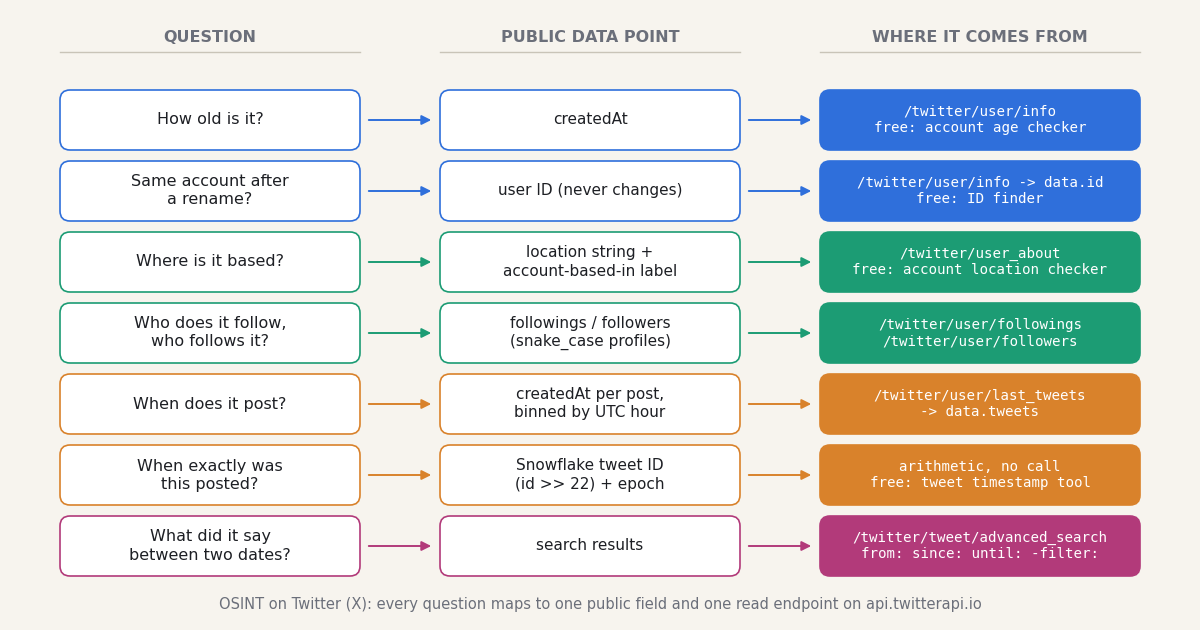
Most pages that rank for "osint twitter" are either a tree of tool links (the OSINT Framework, Bellingcat's toolkit) or a course outline about search operators. Both are useful, and both stop at the same point: they tell you a tool exists, not which field in X's data answers your question, what that field looks like, or what it costs to pull a thousand of them. This page is written from the other end. It starts with the questions investigators, analysts, trust-and-safety teams and journalists actually ask about an X account, and for each one names the data point, the free tool on this site that shows it for a single handle, and the API endpoint and response field that return it in bulk.
Everything here is public data: fields X displays on a profile or in search to anyone who looks. Nothing requires logging into an X account, nothing touches protected accounts or direct messages, and nothing on this page is about taking over, impersonating or interfering with anyone's account. The last section covers the lines that matter: X's terms, data minimisation, and the difference between a signal and a finding.
The code is Python, uses the X-API-Key header, checks the msg field on every error, and runs as written once TWITTERAPI_IO_KEY is set. Where the brief truth is "you cannot get this" (deleted posts, private data, a user's real-time position), the page says so rather than pointing at a tool that claims otherwise.
The question-to-endpoint map: what public X data answers which OSINT question
An X account exposes a fixed set of public facts. Each row below is one question an investigator asks, the data point that answers it, the free tool on this site that shows it for one handle, and the API route for doing it at scale. Endpoint paths are relative to https://api.twitterapi.io; every one of them is a GET with the X-API-Key header and returns JSON.
Two things the table does not contain, because X does not expose them publicly: a user's real-time position (X removed precise coordinates from its apps in 2019 and the location string is free text), and anything about a protected account beyond the fact that it is protected. The posts of protected accounts are not returned by any read endpoint here.
Account age, creation date and the user ID that outlives every handle change
The two most useful facts about an account are also the two least expensive to get: the creation timestamp and the numeric user ID. Both come from one call, GET /twitter/user/info?userName=<handle>, which puts the profile in data with camelCase fields: id, userName, name, createdAt, followers, following, statusesCount, location, description, isBlueVerified, protected, isAutomated (twitterapi.io docs, verified 2026). Profiles are billed at $0.18 per 1,000, so a watch-list of 500 handles costs $0.09 to refresh.
Creation date. data.createdAt is the moment the account was registered. On its own it answers "is this a fresh account?"; across a set of accounts it answers "were these created together?", which is the usual first step when a cluster of profiles pushes the same message. A posts-per-day lifetime average (statusesCount divided by age in days) is a second cheap signal from the same call. Treat both as leads: a brand-new account can be a real person who just joined, and an old one can be bought or renamed into a copy of someone else. For a single handle the free account age checker on this site shows the exact timestamp, the age in years and days and the username change count without an API key.
User ID. data.id is the string of digits X assigned at registration. X's own help page on changing a username states that a change does not affect followers, direct messages or replies, which is another way of saying the account underneath is the same object; the ID is that object's name. Store IDs, not handles, in any case file: x.com/i/user/<id> opens the profile whatever it is called today, and GET /twitter/user/batch_info_by_ids?userIds=<id1>,<id2> returns the current userName for a list of IDs in one call. The free ID finder converts in both directions for one handle at a time. The reverse lookup is what lets you prove that the handle a screenshot shows and the handle in front of you today are the same account, or that they are not.
Rename history. GET /twitter/user_about?userName=<handle> returns the panel X shows under About this account: about_profile.username_changes.count, the account_based_in region, a location_accurate flag and an affiliate_username for organisation-affiliated accounts. X rolled this panel out globally in November 2025 (announced by its head of product on X). The change count tells you an account has been renamed; it does not tell you the previous names, which X does not publish.
Reading the time out of a tweet ID: the Snowflake formula
Every post, user and direct message ID on X is a 64-bit Snowflake ID, and the high bits of a Snowflake ID are a timestamp. X's developer documentation describes the IDs as unsigned 64-bit integers composed of a timestamp, a worker number and a sequence number, which makes them roughly time-ordered: higher IDs are newer objects (docs.x.com, X IDs). The original generator, published by Twitter and archived at github.com/twitter-archive/snowflake, states the layout: 41 bits of milliseconds since a custom epoch, 10 bits of machine ID (5 datacenter + 5 worker in IdWorker.scala), and a 12-bit sequence. The custom epoch in that file is twepoch = 1288834974657, which is 2010-11-04 01:42:54.657 UTC.
The formula: unix_ms = (tweet_id >> 22) + 1288834974657. Shift the ID right by 22 bits (12 sequence + 5 worker + 5 datacenter) to drop the machine and sequence fields, add the epoch, and you have the publication time in milliseconds, with no API call and no rate limit. Worked example: ID 2109793921203093888 shifted right by 22 is 503014068890; add the epoch and you get 1791849043547 ms, which is 2026-10-12 23:50:43.547 UTC. The same arithmetic works on user IDs created after November 2010, which gives you a second, independent estimate of an account's creation time to check createdAt against.
Two caveats. IDs at or below 29700859247 predate Snowflake and are plain sequential numbers, so they carry no time; the script returns None for them. And the timestamp is when X assigned the ID, which for a scheduled post is the publish moment, not the moment the author wrote it. For bulk work paste a list of URLs or IDs into the free tweet timestamp tool on this site, which does the conversion, shows your local time next to UTC and exports CSV; for code, the function below is the whole thing.
"""Tweet ID -> UTC time, with no API call. The epoch and the 22-bit shift come from
twitter-archive/snowflake (IdWorker.scala): twepoch = 1288834974657, shift = 12 + 5 + 5."""
from datetime import datetime, timezone

TWEPOCH_MS = 1288834974657
LAST_PRE_SNOWFLAKE_ID = 29700859247   # older IDs are sequential and carry no time


def tweet_time(tweet_id):
    tid = int(tweet_id)
    if tid <= LAST_PRE_SNOWFLAKE_ID:
        return None                        # posted before Snowflake went live
    ms = (tid >> 22) + TWEPOCH_MS
    return datetime.fromtimestamp(ms / 1000, tz=timezone.utc)


for tid in ["20", "1288834974657000000", "2109793921203093888"]:
    t = tweet_time(tid)
    print(tid, "->", t.strftime("%Y-%m-%d %H:%M:%S.%f")[:-3] + " UTC" if t else "pre-Snowflake, no timestamp")
Behavioural signals: the follow graph and posting-time patterns
Two endpoints return the graph. GET /twitter/user/followers?userName=<handle> returns the account's followers newest-first, and GET /twitter/user/followings?userName=<handle> returns who it follows; both page with cursor and pageSize (up to 200), both return has_next_page and next_cursor at the top level, and both carry a full profile per user in snake_case: id, screen_name, name, followers_count, friends_count, statuses_count, created_at, location, description, protected, verified (twitterapi.io response shapes, verified 2026). Note the casing: these lists use screen_name and created_at, while /twitter/user/info uses userName and createdAt. Followers and followings are billed at 1 to 3 credits per user returned, so a full first page of 200 costs between $0.002 and $0.006.
The graph questions practitioners ask are set operations: which accounts do two suspects both follow, which of an account's newest followers were themselves created this month, and which accounts in a follower list share a creation week and an empty bio. All of them key on the permanent id, never on the handle. Keep the raw lists as CSV with the ID as the first column; graph tools such as Gephi or Maltego import a two-column edge list directly, and the ID column is what lets you merge a list pulled today with one pulled next month after half the handles have changed.
The newest-first ordering of /twitter/user/followers is itself a signal: the first page is the most recent follows, which is where a sudden purchase of followers or a coordinated follow wave shows up as a run of accounts with adjacent creation dates. A follower audit that scores that first page is the subject of the Twitter audit guide linked below.
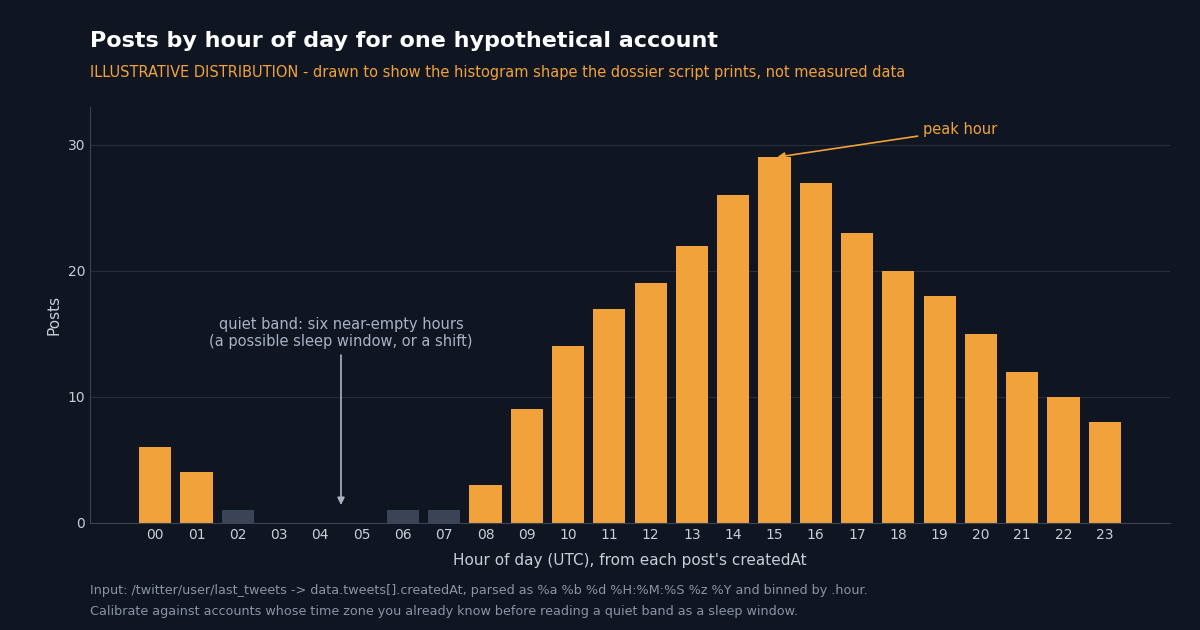
Posting-time patterns. GET /twitter/user/last_tweets?userName=<handle>&includeReplies=true returns the account's most recent posts, newest first, with the list nested at data.tweets and the pagination fields has_next_page and next_cursor at the top level. Each post carries createdAt in the classic format Tue Dec 10 07:00:30 +0000 2024, always with a +0000 offset, so parsing with %a %b %d %H:%M:%S %z %Y and reading .hour gives UTC hours directly. Bin a few hundred posts by hour and you get a histogram like the one below. Hour-of-day histograms are commonly used by practitioners to estimate the time zone an account operates in and to spot accounts that post around the clock with no sleep gap; the inference is weak for scheduled or multi-operator accounts, and a quiet band can be a work shift rather than a night, so calibrate it against accounts whose time zone you already know before you rely on it. Timeline pages are billed at $0.15 per 1,000 posts, so 400 posts (20 pages) cost $0.06.
"""Who do two accounts both follow? Shared followings are a common link signal in OSINT work.
Followings come back newest-first in snake_case: screen_name, followers_count, created_at.
Cost: 1 to 3 credits per account returned, so two 200-account pages cost well under $0.02."""
import os

import requests

HEADERS = {"X-API-Key": os.environ["TWITTERAPI_IO_KEY"]}


def followings(handle, pages=1):
    out, cursor = {}, ""
    for _ in range(pages):
        r = requests.get("https://api.twitterapi.io/twitter/user/followings",
                         params={"userName": handle, "cursor": cursor, "pageSize": 200},
                         headers=HEADERS, timeout=30)
        r.raise_for_status()
        body = r.json()
        if body.get("status") == "error":
            raise SystemExit(f"{handle}: {body.get('msg')}")
        for u in body.get("followings") or []:
            out[u["id"]] = u          # keyed by permanent user ID, not by handle
        if not body.get("has_next_page"):
            break
        cursor = body["next_cursor"]
    return out


a, b = followings("NASA"), followings("ESA")
shared = set(a) & set(b)
print(f"{len(shared)} accounts followed by both (first page each)")
for uid in sorted(shared, key=lambda k: -(a[k].get("followers_count") or 0))[:15]:
    u = a[uid]
    print(f"@{u['screen_name']:<18} followers={u.get('followers_count'):<10} joined={u.get('created_at')}")
Search operators for investigators: author, date, content class and location
GET /twitter/tweet/advanced_search takes a query string in the same grammar as the X search box, a queryType of Latest or Top, and a cursor (empty string for the first page). Each page returns up to 20 posts in a top-level tweets array with has_next_page and next_cursor; every post carries id, createdAt, text, likeCount, retweetCount, replyCount, viewCount, isReply, source and an author object with userName, id, location and createdAt. Billing is $0.15 per 1,000 posts returned with a 15-credit ($0.00015) minimum per request, so a full page costs $0.003 and an empty one $0.00015.
Keep queries under 512 characters: X's own operator reference gives 512 as the self-serve limit for recent search and 1,024 for the full archive (docs.x.com, verified 2026), and in practice that is about 20 from: clauses OR-ed together. The official reference documents from:, to:, url:, lang:, is:retweet, has:geo, place: and point_radius: for its own API; the search-box grammar accepted here is broader, including since: / until:, min_faves: and the filter: family, and the full list is on the search operators reference linked below.
Location. Four location signals exist and none is complete: a Place tag on the post (rare), the free-text profile location string on every author object, the account-based-in label from /twitter/user_about, and place names in the text. For an account you can read the first three from the responses above; for a search, bin results by author.location rather than trusting a near: operator. The search-by-location guide linked below walks through all four, with the control-query check that tells you when an operator was silently ignored.
Deleted and edited posts: what the API can and cannot return
This is the question every OSINT page gets asked and most answer badly, so here is the plain version: no read endpoint on twitterapi.io, and no endpoint on the official X API, returns a post that X no longer serves. When you call GET /twitter/tweets?tweet_ids=<id> for a deleted post the call succeeds and tweets is empty; when you call GET /twitter/user/info for a deleted or suspended account the call returns status: "error" and msg: "user not found" with data null, and never an HTTP 404. A suspended account that still exists comes back with unavailable set. Anything that claims to "recover" a deleted post is reading a copy someone saved earlier: a web archive, a quote-post that embedded the text, or a scheduled capture.
Edited posts are similar. X allows up to five edits inside a short window after posting (one hour per the X help center; the X API documentation describes each edit as creating a new post ID and lists the chain in edit_history_tweet_ids). The tweet objects returned here are the version X currently serves and do not include that chain, so a post you fetch after an edit is the edited one. If the original wording matters, you need the copy you took before the edit.
The only reliable record is therefore one you make yourself, on a schedule, before the post disappears. The simplest form is a search bound to the last run: from:handle since_time:<last_run_unix> on /twitter/tweet/advanced_search, stored as JSON with the post id, createdAt, text, the author.id and the snowflake time you computed. A check that finds nothing costs the 15-credit minimum, $0.00015, so polling one query every 5 minutes for a month is $1.30 and every 60 seconds is $6.48, plus $0.15 per 1,000 posts actually captured. Capturing the id matters more than it looks: a later GET /twitter/tweets on a stored ID that now returns nothing is itself evidence that the post was removed between the two timestamps. For what remains visible after an account is deleted, deactivated or suspended, see the guide on finding deleted Twitter accounts linked below.
Three ways to get the same data: X by hand, the official X API, TwitterAPI.io
Every data point on this page can be reached three ways. The differences are setup, cost at volume, which operators you can use and how far back you can go.
The ratios are arithmetic from the two published price lists, not a benchmark. What the official route buys you is official support and the documented operator set; what it costs you is the approval step and about 33 times the price per post. The by-hand route stays the right one for a single account you will look at once; the moment the question becomes "these 200 accounts, every week", it is an API job, and the dossier script below is the starting point.
Ethics and lawful use: public data, X's terms, and the line between a signal and a finding
Public data only. Every field on this page is one X displays to anyone viewing the profile or running a search. Nothing here reads direct messages, protected accounts' posts, email addresses or phone numbers, and the read endpoints cannot: a protected account's timeline is simply not returned. If a method needs a password, a session cookie from someone else's account, or a phishing page, it is not OSINT and it is not covered here.
No account takeover, no impersonation, no interference. Reading public data needs no X login. Do not log into the account you are investigating, do not create look-alike accounts to approach it, and do not use what you find to contact, harass or dox the person behind it. Keep automated reads at a sensible pace; the rate limits above are the ceiling, not a target.
Respect X's terms and the law where you operate. X's Terms of Service and developer rules govern access to the platform, and data protection law (the GDPR for EU residents' data, state laws in the US) applies to personal data regardless of how public it was. Collect the minimum the question needs, record why you collected it, delete what you do not need, and keep a chain of custody (timestamp, source URL, raw JSON) for anything that may be used as evidence.
A signal is not a finding. A creation date, a quiet band in a histogram, a shared set of followings, or a profile location that matches a city are each consistent with several explanations. Corroborate across independent signals and outside sources before attributing an account to a person, and never publish an attribution you cannot defend. The tools on this page make the data cheap; the judgement is still yours.
"""Profile dossier for one public X account, built from three read endpoints.

1. /twitter/user/info        -> creation date, user ID, followers, post count, location
2. /twitter/user/last_tweets -> posting-hour histogram (UTC) from each post's createdAt
3. /twitter/tweet/advanced_search -> a dated sample: from:<handle> since:<date>

Needs TWITTERAPI_IO_KEY in the environment (key from twitterapi.io/dashboard).
Cost at the defaults: one profile ($0.00018) + one timeline page (up to 20 posts,
$0.003) + one search page (up to 20 posts, $0.003), about $0.006 in total.
Reads only: no X login, nothing is posted, liked or followed.
"""
import os
import sys
from collections import Counter
from datetime import datetime, timezone

import requests

HANDLE = sys.argv[1] if len(sys.argv) > 1 else "NASA"
SINCE = sys.argv[2] if len(sys.argv) > 2 else "2026-01-01"   # YYYY-MM-DD, UTC
HEADERS = {"X-API-Key": os.environ["TWITTERAPI_IO_KEY"]}
TWEET_DATE = "%a %b %d %H:%M:%S %z %Y"   # createdAt on posts, e.g. Tue Dec 10 07:00:30 +0000 2024
TWEPOCH_MS = 1288834974657               # Snowflake custom epoch (twitter-archive/snowflake)


def get(path, params):
    """HTTP errors raise here. Endpoints that wrap the result (user/info, last_tweets)
    also report failures as status == "error" with the reason in msg; checked per call below."""
    r = requests.get("https://api.twitterapi.io" + path, params=params, headers=HEADERS, timeout=30)
    r.raise_for_status()
    return r.json()


def parse_profile_date(value):
    """Profile createdAt has been served as ISO and as the classic format; accept both."""
    try:
        return datetime.fromisoformat(value.replace("Z", "+00:00"))
    except ValueError:
        return datetime.strptime(value, TWEET_DATE)


def snowflake_time(tweet_id):
    return datetime.fromtimestamp(((int(tweet_id) >> 22) + TWEPOCH_MS) / 1000, tz=timezone.utc)


# 1. Profile: the facts that do not change with a rename
profile = get("/twitter/user/info", {"userName": HANDLE})
if profile.get("status") == "error" or not profile.get("data"):
    raise SystemExit(f"@{HANDLE}: {profile.get('msg')}")   # e.g. "user not found": suspended, renamed or deleted
user = profile["data"]
created = parse_profile_date(user["createdAt"])
age_days = (datetime.now(timezone.utc) - created).days
print(f"@{user['userName']}  user id {user['id']}  (x.com/i/user/{user['id']})")
print(f"created {created:%Y-%m-%d %H:%M} UTC  ({age_days} days ago)")
print(f"followers {user.get('followers'):,}  following {user.get('following'):,}  "
      f"posts {user.get('statusesCount'):,}  location {user.get('location')!r}")
print(f"lifetime average {user.get('statusesCount', 0) / max(age_days, 1):.1f} posts/day")

# 2. Timeline: when does this account post? (UTC hours, one page = up to 20 posts)
timeline = get("/twitter/user/last_tweets", {"userName": HANDLE, "includeReplies": "true"})
if timeline.get("status") == "error":
    raise SystemExit(f"last_tweets: {timeline.get('msg')}")
tweets = (timeline.get("data") or {}).get("tweets") or timeline.get("tweets") or []
hours = Counter(datetime.strptime(t["createdAt"], TWEET_DATE).hour for t in tweets if t.get("createdAt"))
print(f"\nposting hours (UTC) across {len(tweets)} recent posts:")
for h in range(24):
    print(f"{h:02d}:00 {'#' * hours.get(h, 0)}")
if tweets:
    newest = tweets[0]
    print(f"newest post id {newest['id']} -> snowflake time {snowflake_time(newest['id']):%Y-%m-%d %H:%M:%S} UTC")

# 3. Dated search sample: what did the account post on or after SINCE?
#    advanced_search has no status/msg wrapper: the page is tweets + has_next_page + next_cursor.
search = get("/twitter/tweet/advanced_search",
             {"query": f"from:{HANDLE} since:{SINCE} -filter:retweets", "queryType": "Latest", "cursor": ""})
sample = search.get("tweets") or []
print(f"\n{len(sample)} posts from:{HANDLE} since:{SINCE} on the first page "
      f"(has_next_page={search.get('has_next_page')})")
for t in sample[:5]:
    print(f"  {t['createdAt']}  likes={t.get('likeCount')}  {t.get('text', '')[:70]!r}")
Questions readers ask
What is OSINT on Twitter (X)?
Open-source intelligence on X is the practice of answering an investigative question from data X already shows the public: an account's creation date, numeric user ID, profile and region labels, follower and following lists, posting times, the timestamps encoded in post IDs, and anything search operators can retrieve. It does not include private data, protected accounts or any form of account access.
How do I find when a Twitter (X) account was created?
For one handle, use the free account age checker on this site; it shows the exact creation timestamp, the age in days and the username change count. Programmatically, call GET /twitter/user/info?userName=<handle> and read data.createdAt. Accounts created after November 2010 also carry the creation time inside their numeric user ID, via the Snowflake formula.
Does a Twitter (X) user ID change when the username changes?
No. X's help page on changing a username states that followers, direct messages and replies are unaffected; the account underneath keeps its numeric ID. Read it from data.id on /twitter/user/info, open x.com/i/user/<id> to see the current handle, or resolve a list of IDs with /twitter/user/batch_info_by_ids.
How do I get the exact time a tweet was posted from its ID?
Tweet IDs are Snowflake IDs: shift the ID right by 22 bits and add the epoch 1288834974657 to get Unix milliseconds, so (id >> 22) + 1288834974657. The layout (41 bits of time, 10 bits of machine ID, 12 bits of sequence) and the epoch come from the archived twitter-archive/snowflake repository. IDs at or below 29700859247 predate Snowflake and carry no time. The free tweet timestamp tool on this site does this for a batch of URLs.
Can an API recover deleted tweets?
No. Both twitterapi.io and the official X API return only what X currently serves: /twitter/tweets returns an empty list for a deleted ID and /twitter/user/info returns msg: "user not found" for a deleted account. The only record of a deleted post is a copy made before deletion: a web archive, a quote-post, or your own scheduled capture with from:handle since_time:<last_run> on /twitter/tweet/advanced_search.
Which search operators work for Twitter (X) OSINT?
Through /twitter/tweet/advanced_search: from:, to:, @handle, since: / until: dates and since_time: / until_time: Unix seconds, -filter:retweets, -filter:replies, filter:links, filter:media, url:, min_faves:, min_retweets:, lang:, exact phrases and OR / - boolean grammar. near: and geocode: are legacy and best effort. Keep the query under 512 characters.
What does Twitter (X) OSINT cost through an API?
On twitterapi.io, profiles are $0.18 per 1,000, posts from search or timelines are $0.15 per 1,000 with a $0.00015 minimum per request, and followers or followings are 1 to 3 credits per user returned; the three-call dossier in this guide is about $0.006 per account. The official X API pay-per-usage plan charges $0.010 per user read and $0.005 per post read (docs.x.com, verified 2026), about $0.21 for the same dossier, after app approval.
Is Twitter (X) OSINT legal?
Reading data X displays publicly is generally lawful, but it is still bounded by X's Terms of Service and developer rules and by data protection law such as the GDPR when the data identifies a person. Collect the minimum, keep records of source and time, do not access accounts or private data, and treat every signal on this page as a lead to corroborate rather than a conclusion.
Continue
- twitter-archive/snowflake (archived): the Snowflake ID layout, 41-bit time, 10-bit machine ID, 12-bit sequence; epoch 1288834974657 in IdWorker.scala
- X developer docs: X IDs are 64-bit Snowflake IDs, roughly time-ordered; always handle them as strings
- X API search operators reference (the official, pricier route): from:, to:, url:, lang:, has:geo, place:, point_radius:; 512 / 1,024-character query limits
- X API pay-per-usage pricing: $0.005 per post read, $0.010 per user read, 3M post reads a month cap
- X Help Center: changing your username does not affect followers, Direct Messages or replies
- X Help Center: Edit post, up to 5 edits in a limited window, with a visible edit history
- Twitter (X) API overview: every read endpoint on one map
- Twitter (X) search operators: the full API reference
- Twitter (X) search by location: the four signals and the control-query check
- How to find deleted Twitter (X) accounts and what survives
- Twitter (X) audit: scoring followers for fake-account signals
- Free Twitter (X) account age and join-date checker
- Free Twitter (X) ID finder: username to user ID and back
- Free tweet timestamp tool: tweet ID to exact date
- Free Twitter (X) account location checker (account based in)
- twitterapi.io pay-per-call pricing
- Get an API key from the dashboard
- 01What Is a Twitter (X) Chatbot, and How Do You Build One in 2026?
- 02How to Use Google Gemini with the Twitter (X) API
- 03n8n Twitter (X) API Workflow: Post New Tweets to Slack in 2026
- 04How to Use Cursor with the Twitter (X) API
- 05How Do You Turn On Twitter (X) Dark Mode, and What Are Its Exact Colors?
- 06What Is a Twitter Ratio?
- 07Twitter Tools — 47 Worth Knowing, Organized by Job-to-Be-Done
- 08Twitter (X) Lists API — Programmatic Guide
Stop reading. Start building.
Starter credits cover real testing on real data. Google sign-in, no card, no application queue.
Get an API key