"Please Use the Official X App" When Signing In to Twitter (X): Why It Happens and How to Get Back In
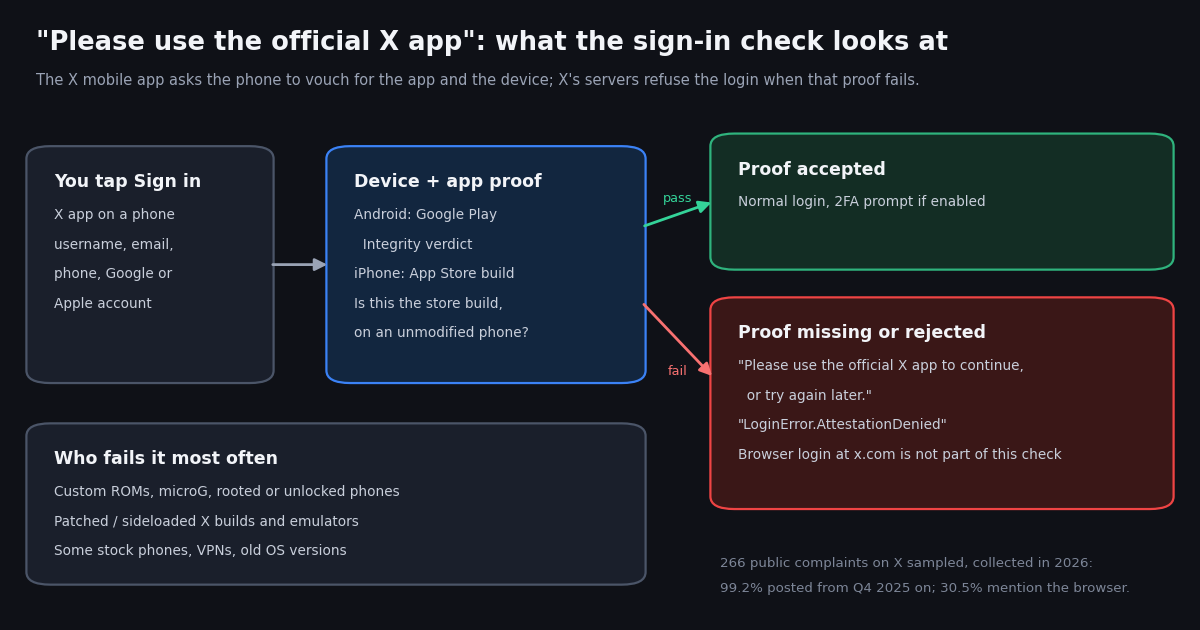
This page is about one sign-in refusal: the X mobile app telling you to use the official X app, or showing LoginError.AttestationDenied, even when you are already using an X app. It is not the generic "Something went wrong, try reloading" screen (that has its own checklist), not error 226 ("this request looks like it might be automated", which is about the request pattern of a session), and not "this content is not available" (which is about posts and profiles you can see). Those are covered in our other troubleshooting guides; this one is only about the app and device check at the sign-in step.
We read the bug trackers of the third-party X clients that broke when the check arrived, Google's own documentation of the Play Integrity verdicts, the GrapheneOS forum threads where users compared notes, and X's log-in help pages. We also pulled 266 public posts from X in which people describe the error and counted what they mention: the phone, the setup, and the route that got them back in. Every number below comes from that sample.
Short version: the browser is the reliable way in, the app needs a phone and an app build that pass the check, and there is no setting inside X that turns the check off.
What "Please use the official X app to sign in" actually means
Modern mobile apps can ask the operating system for a signed statement about themselves and the phone they run on. On Android that statement is a Google Play Integrity verdict. On iPhone, the same refusal hits every build not installed from the App Store, which points to an equivalent Apple-side check; X has not documented which one. The app sends that statement to its own servers with the login request, and the servers decide whether to continue. When X's servers do not get a statement they accept, the sign-in stops before your password is even judged, and the app shows the official-app message or LoginError.AttestationDenied followed by a long g; code.
Google's documentation spells out what the Android verdict says. MEETS_BASIC_INTEGRITY means the device passes basic system checks, even with an unlocked bootloader. MEETS_DEVICE_INTEGRITY means a genuine, certified Android device; on Android 13 and higher that requires hardware-backed proof that the bootloader is locked and the operating system is a certified manufacturer image. MEETS_STRONG_INTEGRITY adds a security update within the last year. A separate app verdict, PLAY_RECOGNIZED, says the app and its signing certificate match what Google Play distributes; a patched or re-signed APK comes back as UNRECOGNIZED_VERSION (developer.android.com/google/play/integrity/verdicts).
X has not published which of those labels it requires, and user reports disagree: on the microG tracker a commenter says you need the device or strong verdict, while on a Piko fork's tracker another user reports signing in with only the basic verdict. What every report agrees on is the shape of the failure: the same account signs in fine at x.com in a browser and on a stock phone with the store app, and fails on the setup that cannot produce the proof.
It is not an account penalty. Nothing in the message says your account is locked, suspended or limited, and reporters on the NeoFreeBird tracker confirmed the same credentials worked in the App Store build. If the browser log-in refuses you too, the problem is the account rather than the app check; see fix 5 below.
The exact messages, and where each one shows up
The wording varies by app version and platform. These are the strings people pasted into public bug reports, verbatim. If yours matches one of them, the rest of this page applies.
"Sorry, we could not log you in" and the plain "Something went wrong" are different: they appear for wrong passwords, network trouble and outages, and they are covered by the general log-in and outage guides. The search phrase "please use official x app to sign in" is how most people remember the official-app message; the screen itself says "to continue".
When it started: the October 2025 wave
The check arrived abruptly. On October 28, 2025, the NeoFreeBird issue titled Loginerror.AttestationDenied was opened and went on to collect 116 comments, and the Squawker tracker logged LoginError.AttestationDenied on October 29, 2025 with the server response {"code": 399} on an HTTP 400. A NeoFreeBird maintainer summarized the thread's findings: X had started enforcing a server-side attestation check to verify the app is not modified, it failed on every sideloaded build, and accounts signing in with two-factor or with Google or Apple appeared less affected at first. Commenters also reported the same error on the official app inside an emulator and on a rooted phone.
It did not stop there. Through 2026 the reports moved from modded clients to ordinary phones that fail the device verdict: microG users on Android 14 to 16, Huawei phones running HarmonyOS with microG (an issue reporting the official-app message on a Google Play install), Pixel phones on GrapheneOS, and a recent microG report with the exact "Please use the official X app to continue, or try again later" string. The Piko tracker has recent reports from users of patched X 12.19.1 builds on Android 9 and Android 16 being told to use the official app.
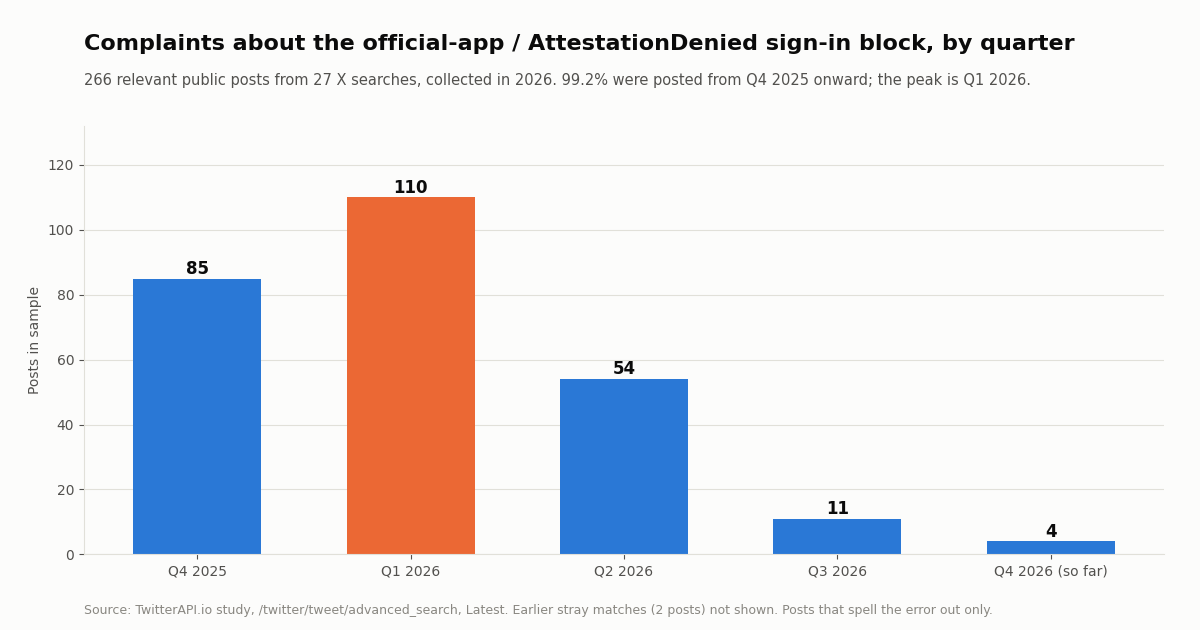
Our sample shows the same arc on X itself. Of the 266 relevant public posts, 85 are from Q4 2025, 110 from Q1 2026 (the peak), 54 from Q2 2026, 11 from Q3 2026 and 4 so far in Q4 2026. Only 2 posts in the whole index matched before Q4 2025, so 99.2% of the complaints date from the rollout on.
Who sees it: the setups that fail the check
Sorted roughly from most to least likely, based on the bug reports above and on what posters in our sample named.
Patched or sideloaded X apps. Piko and ReVanced builds on Android, NeoFreeBird and BHTwitter on iPhone, and the official IPA run inside LiveContainer all fail the app half of the check, because the build is not the one the store signed. On Android that is the UNRECOGNIZED_VERSION app verdict described in Google's docs.
Custom ROMs and microG. GrapheneOS, LineageOS, /e/OS, crDroid and similar systems, and any phone that uses microG instead of Google Play services, usually cannot return the device verdict X expects. Huawei phones on HarmonyOS with microG are a large share of these reports; one reporter listed their result as basic integrity pass, device and strong integrity fail.
Rooted phones, unlocked bootloaders and emulators. Same reason: the device verdict depends on a locked bootloader and a certified system image.
Third-party X clients. Squawker and QuaX are open-source Android clients that sign in with your own account. After the October 2025 change, Squawker 3.8.4 moved to signing in through X's own web log-in page in an embedded browser, the method QuaX already used, which fixed sign-in for most users.
Stock phones, occasionally. A minority of reports come from untouched phones with the store app. Commonly suggested causes are an outdated Android version or a VPN or proxy; some reporters never found a cause. These are the cases where updating and trying again later can actually help.
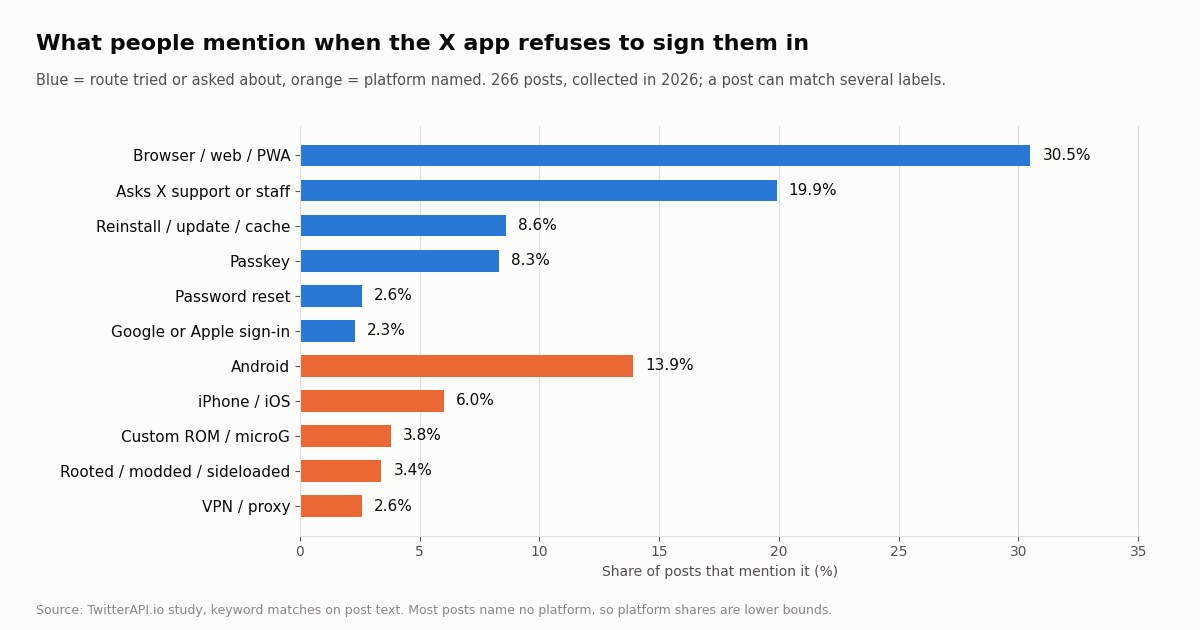
In our sample most posts name no phone at all, so these shares are lower bounds: Android is named in 13.9% of posts, iPhone or iOS in 6.0%, a custom ROM or microG in 3.8%, a rooted, modded or sideloaded app in 3.4%, and a VPN or proxy in 2.6%.
How to get back in: fixes in the order to try them
1. Sign in at x.com in a browser. The integrity check lives in the mobile app's log-in flow, and the bug threads we read consistently report the browser working for the same account: Chrome, Firefox, Safari or GrapheneOS's Vanadium. On a phone you can use the browser's Add to Home screen (or Install app) option to get an icon that opens x.com full-screen; GrapheneOS forum users describe exactly this as their daily setup. The website covers the core of X: timeline, posting, replies, DMs and settings.
2. Use the store build of the X app. Uninstall any patched, sideloaded or mirror-site APK and install X from Google Play or the App Store. On Android, also update Google Play services and the system itself; Google's docs note the strong verdict needs a security update within the last year.
3. Turn off VPNs and proxies, then try again later. The message itself offers "or try again later"; on a stock phone that may help if the failure was temporary. Do not hammer the button; a few attempts spaced out is enough.
4. Try a different sign-in method in the app. On the GrapheneOS forum, users reported that signing in with Google or with a passkey worked where username and password failed, and one user who changed their account email to a Google address signed in to the Play Store app through Google sign-in. The catch reported in the same threads: a passkey has to be created first, and creating it in the app fails for the same reason, so create it while signed in at x.com in a browser and save it in a password manager that the phone's apps can use. Results differ by setup; one user saw "Passkeys not supported for this app" from their password manager.
5. Check whether it is your account or your device. If x.com in a browser also refuses you, this is not the app check: use X's log-in help (help.x.com/en/managing-your-account/log-in-issues) for password resets, lost email access and locked accounts.
6. Report it to X, with the code. Include the full g; code from the error when you contact X support through its help pages. Posters in our sample often tagged X staff publicly instead (19.9% of posts mention support or tag X accounts), which rarely produces an answer.
This guide does not cover tools that fake an integrity verdict on rooted phones. The maintainers of the affected clients describe the check as server-side, so the reliable routes are the ones above.
What people did about it: the routes in 266 public complaints
We tagged each post in the sample by the routes it mentions. A post can mention several, and many mention none (they only report the error), so read these as "how often this comes up", not as success rates.
Two more numbers show who is posting. 35.0% of the posts come from accounts with a blue check, which matters because paying subscribers are locked out of the app the same way, and the median post got 4 likes (90th percentile 21), so most complaints get little attention. English makes up 72.9% of the sample, followed by Chinese at 9.0% and Japanese at 5.3%, consistent with the many Huawei and microG reports from Chinese-speaking users on the microG tracker.
Fix by setup: a quick table
Find your situation in the left column. If two rows apply (a custom ROM and a patched app), work from the top row down.
Switching between several accounts in the app is the same check: adding a second account runs the full sign-in again, so an app that is already signed in can still refuse a new account. Add the second account in the browser instead.
For developers: reading X data never goes through this check
The attestation check is part of signing in to an X account inside X's app. Reading public X data through an API does not involve your X account or a phone at all, so it is unaffected. If you built a dashboard, a monitor or a research script that used to log in with a personal account through a third-party client, an API key is the steadier route: with twitterapi.io you call endpoints such as /twitter/tweet/advanced_search, /twitter/user/last_tweets and /twitter/user/info with an X-API-Key header, and no X account is needed for reads.
Cost, on two named rate cards: twitterapi.io charges $0.15 per 1,000 tweets returned and $0.18 per 1,000 profiles, with a 15-credit ($0.00015) minimum per request, and new accounts that pass the automatic bot check get up to $1 of free credits (at most 100,000 credits, no card, one per person or network, expiring after 31 days). The official X API pay-per-usage card (docs.x.com/x-api/getting-started/pricing) charges $0.005 per post read and $0.010 per user read, capped at 3 million post reads a month, so 1,000 posts cost $5 there against $0.15 here, about 33 times more.
The script below answers the question this page keeps asking, "is it my account or my phone?", from public data: it checks that your profile still resolves, when you last posted, and how many public posts mention the error in the last 24 hours. The whole study behind this page (27 search requests, 342 tweets) cost about $0.05.
"""signin_check.py - is it my account, or is the X app refusing my phone?

Reads public X data through twitterapi.io (no X account, no login, no app check):
  1. does your profile still resolve publicly?
  2. when did your account last post?
  3. are other people posting about the AttestationDenied / official-app error right now?

    pip install requests
    export TWITTERAPI_IO_API_KEY=...   # from twitterapi.io/dashboard
    python signin_check.py your_handle
"""
import os
import sys
import time
from datetime import datetime, timezone

import requests

BASE = "https://api.twitterapi.io"
HEADERS = {"X-API-Key": os.environ["TWITTERAPI_IO_API_KEY"]}


def get(url, params):
    r = requests.get(url, headers=HEADERS, params=params, timeout=30)
    r.raise_for_status()
    return r.json()


def profile(handle):
    body = get(f"{BASE}/twitter/user/info", {"userName": handle})
    if body.get("status") == "error" or not body.get("data"):
        # unknown or unavailable account: HTTP 200 with status "error" and a msg
        return None, body.get("msg")
    return body["data"], None


def last_post_time(handle):
    body = get(f"{BASE}/twitter/user/last_tweets", {"userName": handle})
    tweets = (body.get("data") or {}).get("tweets", [])
    if not tweets:
        return None
    # createdAt looks like "Thu Oct 16 12:34:56 +0000 2026"
    return datetime.strptime(tweets[0]["createdAt"], "%a %b %d %H:%M:%S %z %Y")


def recent_error_reports(hours=24, max_pages=5):
    """Count public posts that mention the error in the last `hours` (aggregate only)."""
    since = int(time.time()) - hours * 3600
    query = f'(AttestationDenied OR "attestation denied" OR "official X app") since_time:{since}'
    count, cursor = 0, ""
    for _ in range(max_pages):
        params = {"query": query, "queryType": "Latest"}
        if cursor:
            params["cursor"] = cursor
        body = get(f"{BASE}/twitter/tweet/advanced_search", params)
        count += len(body.get("tweets", []))
        if not body.get("has_next_page"):
            break
        cursor = body.get("next_cursor", "")
    return count


if __name__ == "__main__":
    handle = sys.argv[1].lstrip("@")
    data, msg = profile(handle)
    if data is None:
        print(f"@{handle}: profile does not resolve publicly ({msg}). "
              "This is an account problem, not the app check - use X's log-in help pages.")
        sys.exit(1)
    print(f"@{handle}: resolves publicly, {data['followers']:,} followers, "
          f"{data['statusesCount']:,} posts, protected={data.get('protected')}")
    if not data.get("protected"):
        last = last_post_time(handle)
        if last:
            age = datetime.now(timezone.utc) - last
            print(f"last public post: {age.days} days ago")
    n = recent_error_reports()
    print(f"public posts mentioning the error in the last 24 h: {n}")
    print("Account looks fine -> the block is on the app/device side. Sign in at x.com in a browser.")
How we collected this
Question. When people hit the official-app or LoginError.AttestationDenied sign-in block, when do they post about it, what phone or setup do they name, and which way back in do they mention?
Queries. Seven searches through /twitter/tweet/advanced_search in Latest mode: AttestationDenied, "attestation denied", "official X app" with log-in words, "official X app" "try again later", "use the official X app", LoginError with X or log-in words, and "play integrity" with X and log-in words. 27 requests returned 342 tweets, 317 unique.
Filter and window. We kept posts that mention attestation, or that mention the official X app or Play Integrity together with a log-in word: 266 posts. The window is whatever the search index returned for each query, newest first; collected in 2026.
Method. Lower-cased keyword matching for platform and route labels (not exclusive), quarter counts from each post's timestamp, language from X's own lang field, engagement from likeCount and replyCount.
What it cannot show. How many accounts are affected (most people never post about it), whether a route worked (a mention is not a success), or which integrity label X requires. Posts that describe the problem without the error words are missed.
Privacy. Aggregates only. The authors are mostly private individuals: no post is quoted, no account is named, raw search pages were not kept with the study, and the committed sample holds only de-identified rows (quarter, language, labels, counts).
"""signin_check.py - is it my account, or is the X app refusing my phone?

Reads public X data through twitterapi.io (no X account, no login, no app check):
  1. does your profile still resolve publicly?
  2. when did your account last post?
  3. are other people posting about the AttestationDenied / official-app error right now?

    pip install requests
    export TWITTERAPI_IO_API_KEY=...   # from twitterapi.io/dashboard
    python signin_check.py your_handle
"""
import os
import sys
import time
from datetime import datetime, timezone

import requests

BASE = "https://api.twitterapi.io"
HEADERS = {"X-API-Key": os.environ["TWITTERAPI_IO_API_KEY"]}


def get(url, params):
    r = requests.get(url, headers=HEADERS, params=params, timeout=30)
    r.raise_for_status()
    return r.json()


def profile(handle):
    body = get(f"{BASE}/twitter/user/info", {"userName": handle})
    if body.get("status") == "error" or not body.get("data"):
        # unknown or unavailable account: HTTP 200 with status "error" and a msg
        return None, body.get("msg")
    return body["data"], None


def last_post_time(handle):
    body = get(f"{BASE}/twitter/user/last_tweets", {"userName": handle})
    tweets = (body.get("data") or {}).get("tweets", [])
    if not tweets:
        return None
    # createdAt looks like "Thu Oct 16 12:34:56 +0000 2026"
    return datetime.strptime(tweets[0]["createdAt"], "%a %b %d %H:%M:%S %z %Y")


def recent_error_reports(hours=24, max_pages=5):
    """Count public posts that mention the error in the last `hours` (aggregate only)."""
    since = int(time.time()) - hours * 3600
    query = f'(AttestationDenied OR "attestation denied" OR "official X app") since_time:{since}'
    count, cursor = 0, ""
    for _ in range(max_pages):
        params = {"query": query, "queryType": "Latest"}
        if cursor:
            params["cursor"] = cursor
        body = get(f"{BASE}/twitter/tweet/advanced_search", params)
        count += len(body.get("tweets", []))
        if not body.get("has_next_page"):
            break
        cursor = body.get("next_cursor", "")
    return count


if __name__ == "__main__":
    handle = sys.argv[1].lstrip("@")
    data, msg = profile(handle)
    if data is None:
        print(f"@{handle}: profile does not resolve publicly ({msg}). "
              "This is an account problem, not the app check - use X's log-in help pages.")
        sys.exit(1)
    print(f"@{handle}: resolves publicly, {data['followers']:,} followers, "
          f"{data['statusesCount']:,} posts, protected={data.get('protected')}")
    if not data.get("protected"):
        last = last_post_time(handle)
        if last:
            age = datetime.now(timezone.utc) - last
            print(f"last public post: {age.days} days ago")
    n = recent_error_reports()
    print(f"public posts mentioning the error in the last 24 h: {n}")
    print("Account looks fine -> the block is on the app/device side. Sign in at x.com in a browser.")
Questions readers ask
Why does X say "please use the official X app" when I am using the X app?
Because the check is about the build and the phone, not the logo. X's servers ask the app for an integrity statement (Google Play Integrity on Android, an App Store build check on iPhone). A patched or sideloaded build, a custom ROM, microG, a rooted phone or an emulator cannot produce one X accepts, so even the real X app is told to use the official app.
What does LoginError.AttestationDenied mean on X?
It is the raw form of the same refusal: the attestation (the signed proof about your app and device) was denied at the sign-in step. Third-party client logs show it as an HTTP 400 with error code 399. Your password was not the problem.
Is my X account banned or locked if I see this?
No, not by itself. In the bug reports we read, the same credentials sign in at x.com in a browser and in the store app on a stock phone. If the browser also refuses you, the problem is the account, so follow X's log-in help instead.
How do I fix attestation denied on X?
Sign in at x.com in a browser first; the check is not part of the web log-in. For the app: install the store version, update Android and Google Play services, turn off VPNs, and try Google, Apple or passkey sign-in, which users on GrapheneOS report working where password sign-in fails.
Does the X app work on GrapheneOS?
Signing in with username and password is reported to fail with AttestationDenied. GrapheneOS forum users report that Google sign-in or a passkey created in the browser works in the Play Store app, and many simply use x.com installed as a web app from the Vanadium browser.
Can I use a passkey to get around the official app message?
Sometimes. Users report that a passkey works in the app, but it must be created first while signed in at x.com in a browser and stored in a password manager the phone's apps can use; creating it inside the app fails with the same error.
Why can't I add a second account in the X app?
Adding an account runs the full sign-in, including the integrity check, so an app that is already signed in to one account can still refuse a new one. Add the second account at x.com in a browser.
Did third-party Twitter clients stop working because of this?
Their old sign-in flow did. Squawker and QuaX switched to loading X's own web log-in page inside the app, and Squawker 3.8.4 restored sign-in that way. Sideloaded iPhone builds such as NeoFreeBird and BHTwitter reported the error for the native log-in.
Continue
- Android Developers: Play Integrity verdicts (MEETS_BASIC / DEVICE / STRONG_INTEGRITY, PLAY_RECOGNIZED)
- NeoFreeBird issue #78: LoginError.AttestationDenied (opened October 28, 2025)
- Squawker issue #387: login AttestationDenied, HTTP 400 code 399, fixed in 3.8.4
- microG issue #3920: "Please use the official X app to continue, or try again later."
- X Help Center: Help with logging in
- X API pricing (pay-per-usage rate card)
- Twitter (X) API overview: the hub for reading X data
- Twitter (X) "Something went wrong, try reloading": fixes by cause
- Twitter error 226: "this request looks like it might be automated"
- What X's "content is not available" notices mean
- Adding and switching between X accounts
- Is X down? How to check an outage
- Third-party Twitter (X) clients that still work
- twitterapi.io pay-per-call pricing
- 01Twitter (X) Clients in 2026: Which Ones Still Work, by Platform
- 02How to Mass Block on Twitter (X): Tools, Block Lists and Safer Options
- 03Does Twitter (X) Delete Inactive Accounts? The Policy, the Purge, and What Actually Survives
- 04How to View a Suspended Twitter (X) Account, and What Still Survives
- 05Twitter (X) Temporary Label: What "May Impact Its Reach" Means and What to Do
- 06How to Use the Vercel AI SDK with the Twitter (X) API
- 07TwitterAPI.io vs the Official X (Twitter) API — A 2026 Comparison
- 08How to Scrape Twitter (X) Without the Official API
Stop reading. Start building.
Starter credits cover real testing on real data. Google sign-in, no card, no application queue.
Get an API keyAlready building with TwitterAPI.io? Publish an honest tutorial or build log about it and earn up to $200 a month in API credits.