Muse Connectors: What Exists, Custom Connectors, MCP, and Live Twitter (X) Data
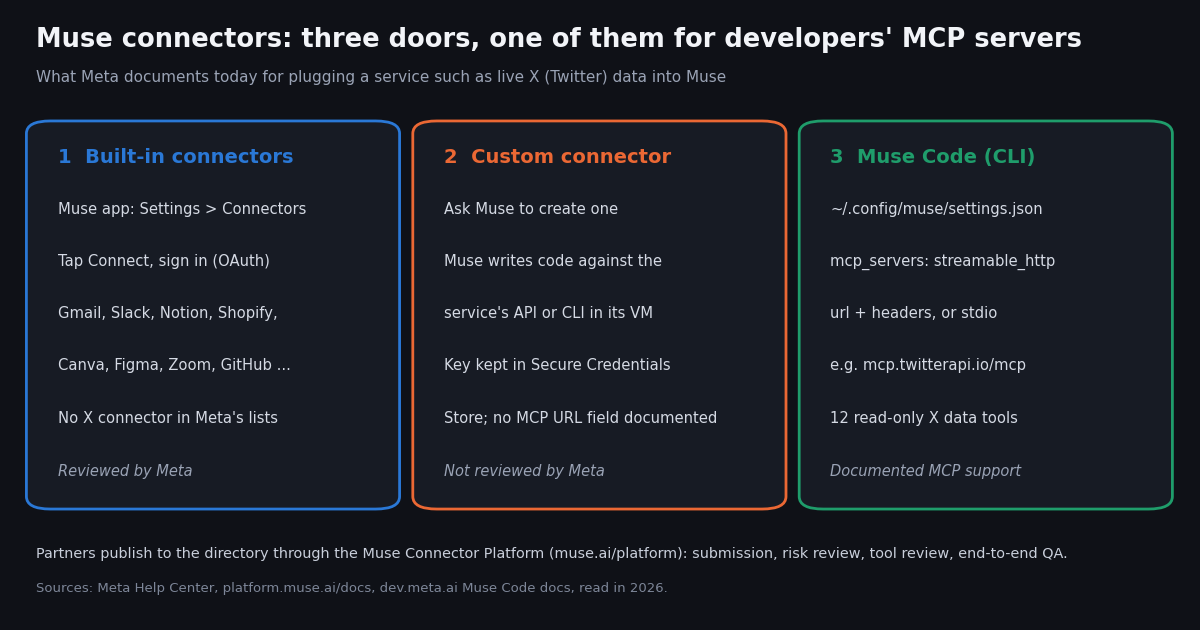
This page is about Muse connectors, the integrations inside Meta's Muse personal AI agent (the app at muse.ai, on iOS, Android, Mac and in WhatsApp). It is not about Grok's connectors in the Grok chat app, which have a documented field for adding a custom MCP server URL; that is our Grok connectors guide. Muse works differently: its custom connectors are code that the agent writes for you, and its documented MCP support lives in the separate Muse Code CLI.
Everything below comes from Meta's own pages, read this year: the Meta Help Center article on how Muse works with connectors, the Muse Connector Platform guidelines at platform.muse.ai/docs, the Meta Newsroom launch posts, the Muse security write-up, the Muse Code documentation at dev.meta.ai, and the official @Muse, @AIatMeta and @Meta accounts on X. Where Meta does not document something, such as the exact screens of the custom connector flow, we say so instead of guessing.
We also measured how people talk about Muse connectors on X: 236 posts naming Muse connectors or Muse MCP since the launch, 500 recent posts about Meta Muse, and the full post history of the official @Muse account, all collected in 2026 through our own API.
What Muse connectors are
Meta's Help Center defines them in one line: "You can choose to connect Muse to apps and services provided by Meta or third-parties. We call these Connectors." Muse itself is the personal AI agent Meta introduced in September 2026. It runs on Muse Secure VM, a dedicated Linux computer in the cloud with a full browser, and Meta's launch post says the data and credentials for any service a person connects are stored there.
A connector gives Muse a typed, permissioned way into a service instead of clicking through its website. The Muse security write-up (linked from security.muse.ai) explains the plumbing: for each built-in connector Meta "worked closely with the service provider to integrate their API" and wrote SKILL files, detailed instructions on how Muse should use it. Built-in connector logic runs outside the agent's runtime cell, and OAuth tokens sit in a credential store the main agent never sees.
Every action passes a gatekeeper. A separate agent called Sentinel is "the sole permission authority" for connector actions and network egress. Muse proposes; Sentinel decides whether to allow, deny or ask you. The connector platform docs spell out the defaults: reads and non-sensitive writes ask on first use, and you can choose Always allow; sensitive writes such as a purchase or sending an email ask every time and cannot be set to Always allow.
Connecting is per account and revocable. The help page says you tap Connect next to the connector you want, and that you can disconnect any time under Settings, Connectors. "Disconnecting stops Muse from exchanging data with the Connector", though Muse may keep what it already used in its memories and chat history.
Muse connectors list: what Meta has announced
Meta does not publish a public, complete directory on the web. Its small-business announcement says: "You can see the full list of available connectors in your Muse app settings, with more to come." What follows is every connector we could confirm from a Meta page or an official Meta account, so treat it as a floor, not the full list.
Two more items from the launch post are not connectors in the same sense but often get listed with them: checkout through Link by Stripe, and 1Password support and Shop Pay, both described at launch as coming soon. In our X sample of recent Meta Muse posts, 1Password was the service named most often (22 of 500 posts), ahead of Instagram (14) and Facebook (11).
Is there an X (Twitter) connector? Not in anything Meta has published. None of the lists above names X, and in the full post history of the @Muse account none of the 9 posts about connectors mentions X or Twitter. If you need live posts, search results, timelines or replies from X in Muse, you have to bring that data in yourself, which is what the rest of this page covers.
Can you add a custom connector or an MCP server to Muse?
Yes for custom connectors, with a caveat; and MCP only in Muse Code. Here is what each Meta source says, side by side.
Custom connectors in the Muse app. The Help Center: "If you want to connect to a service not yet available in the Connector list, you can ask Muse to create a Custom Connector." Muse guides you through it, which "can involve retrieving API information from the service", and the credentials go into its Secure Credentials Store. The security write-up adds the mechanism: "Muse can also write its own custom connectors for other services you care about if they have their own APIs or CLIs." The Help Center also warns: "Meta doesn't review custom connectors or how they use your information", so grant access with care.
What Meta does not document for the app. The Help Center article has no step-by-step menu path for custom connectors and no field for a remote MCP server URL, an MCP transport, or OAuth settings. Some third-party guides describe one; we could not find it on any Meta page, so we do not repeat it here. In practice the documented interface is a conversation: you tell Muse which service, give it the API documentation and a key when it asks, and it builds the integration in its VM.
MCP in Muse Code. Muse Code, Meta's coding agent CLI, is the one Muse product with documented MCP support. Its docs say: "Connect external tools through the Model Context Protocol (MCP). Declare servers in the mcp_servers block of your settings file." Each server uses stdio (with command, args, env) or streamable_http (with url and headers), configs support ${VAR} interpolation, remote servers can require an OAuth 2.1 sign-in through muse mcp login <server>, and /mcp lists connected servers and tools. Muse Code is a developer tool, not the consumer Muse app, so an MCP server added there does not show up under the app's Settings, Connectors.
Meta AI Connectors is a different program. dev.meta.ai/products/connectors describes Meta AI Connectors for the Meta AI assistant and AI glasses: a developer preview with MCP onboarding, selected in waves, where "publishing and discovery are coming in a later phase". It is separate from Muse connectors, which the same page links out to.
How the Muse Connector Platform review works
On September 18, 2026 the @Muse account posted "Attention developers! You can now build your own Muse connectors." On October 2, 2026 it announced a new developer portal with "Here's to the next 3,000 submissions!" The guidelines at platform.muse.ai/docs describe what a submission needs and how it is judged.
What you submit. A connector overview (intended users, supported tasks, how it beats the browser); business verification and acceptance of the Muse developer terms; a data processing questionnaire; the endpoint, authentication setup, scopes and credentials (for example OAuth client credentials or an API key) with "API or MCP documentation" covering inputs, outputs, read/write classes, side effects, errors and rate limits; and a dedicated test account for reviewers.
The three review stages. A risk assessment of security, privacy and integrity; a tool review that classifies every tool as read, write or sensitive write and approves only compliant tools; and end-to-end QA, including manual testing that sensitive writes always ask for approval. Approved connectors appear in Settings, Connectors and are discoverable by the agent; featuring is a separate editorial decision.
The bar for a data connector. The guidelines say Muse "can already browse websites", so a connector must add value beyond the browser. "A read-only connector can qualify when the information is the outcome, such as an account report or live inventory analysis. A wrapper around public pages or a list of links alone is not enough." For an X data connector that means returning structured results (posts, metrics, timelines, replies) rather than links to x.com.
Data rules. Connectors may use the data only to fulfill the user's request: no selling it, no unrelated advertising, no profiles, no model training, and deletion once access is revoked. Security incidents must be reported to Meta within 48 hours. Financial connectors may read data, but Meta is not currently approving money-movement or trading tools.
What people on X say about Muse connectors (our data)
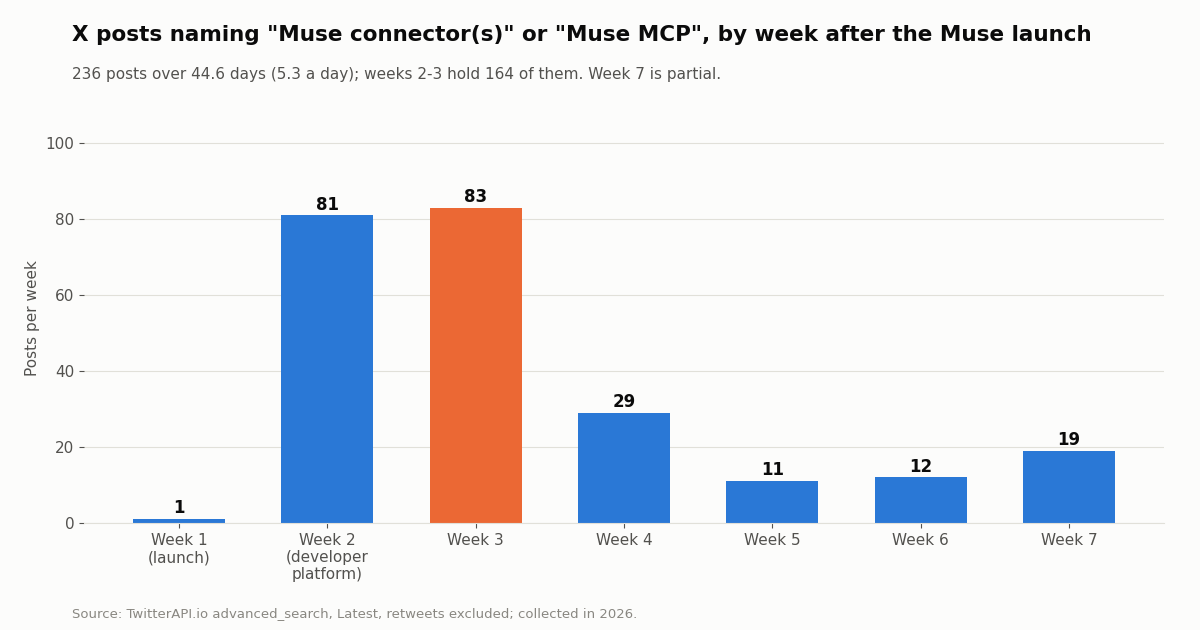
We searched X for posts naming "Muse connector(s)" or "Muse MCP" and kept the 236 posts published since the Muse launch, over 44.6 days, 5.3 a day on average. The curve is a launch spike: weeks 2 and 3, when Meta opened the developer platform and announced the small-business connectors, hold 164 of them (69.5%).
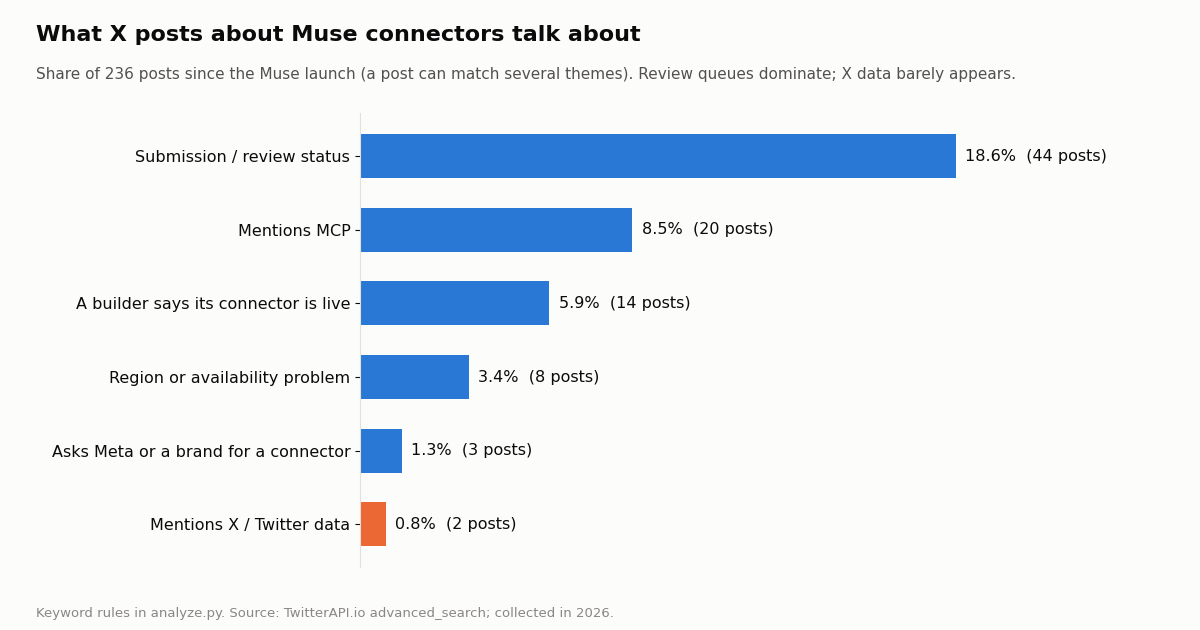
The review queue is the story. Nearly one connector post in five is about submitting, waiting or getting approved; builders post their status the way app developers once posted App Store review times. MCP comes up in about one post in twelve, mostly from developers comparing an MCP server with an API spec as the thing to submit.
X data is almost absent. Only 2 posts mention X or Twitter as a data source. In the wider Meta Muse conversation (500 recent posts, about 414 a day), just 1.2% mention connectors at all, and 0.4% mention MCP. Most Muse talk is about the product and the models, not integrations.
Official accounts. The @Muse account published 156 posts of its own since launch; 9 of them (5.8%) are about connectors, and those drew a median of 58,591 views against 33,773 for all its posts. Its biggest connector post, "dozens of new connectors just dropped. Slack, Notion, Figma, Canva, Shopify, Zoom + more", passed 1.6 million views. Neither @Muse, @AIatMeta nor @Meta mentioned MCP or custom connectors in the posts we collected.
Give Muse live X (Twitter) data with an MCP server in Muse Code
If you work in Muse Code, the TwitterAPI.io MCP server is a single settings block. It is a hosted Streamable HTTP server at https://mcp.twitterapi.io/mcp with 12 tools, all marked readOnlyHint: true: search_tweets, get_user_info, get_user_about, get_user_followers, get_user_followings, get_user_last_tweets, get_user_mentions, get_tweets_by_ids, get_tweet_replies, get_tweet_quotes, get_tweet_retweeters and get_trends. We confirmed the list with a live tools/list call.
Step 1: get a key. Sign up at TwitterAPI.io; new accounts that pass the automatic bot check get up to $1 of free credits (at most 100,000 credits, no card, one per person or network, expiring after 31 days). No X account is needed for reads.
Step 2: add the server. Put the mcp_servers block from the code below in ~/.config/muse/settings.json (it must contain "schema_version": 1, per Meta's configuration docs) and export TWITTERAPI_IO_API_KEY in your shell. The server's own instructions say to send the API key as the Bearer token, and Muse Code interpolates ${VAR} in server configs.
Step 3 (alternative): OAuth instead of a header. The server also implements MCP OAuth (PKCE with S256, refresh tokens, dynamic client registration at api.twitterapi.io). Leave out headers and run muse mcp login twitterapi; Muse Code keeps and refreshes the tokens.
Step 4: check it. Start muse, type /mcp and look for the twelve tools, then ask a normal question such as "Search Latest posts about Muse connectors from the last day, excluding retweets, and list the five most viewed with links." Because every tool declares itself read-only, Meta's docs say it runs without an approval prompt under on-request approvals.
Probe first. The three curl requests in the code below are what we ran against mcp.twitterapi.io while writing this page. The first two need no key; the third proves your key works. An unauthenticated tool call returns HTTP 401 with a www-authenticate: Bearer header naming the scope twitter.read, which is how an MCP client discovers the OAuth flow. Tool results are plain JSON that the model reads into its context, and tweet objects are large (our Grok connectors guide measured a 20-post search page at roughly 138 KB), so ask for narrow queries and small pages.
We built this config from Meta's documented schema and probed the server directly; we did not run it inside a Muse Code session, because Muse Code needs a Meta developer login. mode: optional keeps a session alive if the server is unreachable; the default, required, aborts the run. Meta also warns that MCP tools are not sandboxed, so add only servers you trust.
# 1. Add the server (this creates the file; if you already have
#    ~/.config/muse/settings.json, merge the mcp_servers block instead)
mkdir -p ~/.config/muse
cat > ~/.config/muse/settings.json <<'EOF'
{
  "schema_version": 1,
  "mcp_servers": {
    "twitterapi": {
      "transport": "streamable_http",
      "url": "https://mcp.twitterapi.io/mcp",
      "headers": {
        "Authorization": "Bearer ${TWITTERAPI_IO_API_KEY}"
      },
      "enabled": true,
      "mode": "optional"
    }
  }
}
EOF
export TWITTERAPI_IO_API_KEY=your_key_here

# 2. Probe the server before you trust it
URL=https://mcp.twitterapi.io/mcp
H1='Content-Type: application/json'
H2='Accept: application/json, text/event-stream'

# initialize: reachable? (no key needed)
curl -s -X POST "$URL" -H "$H1" -H "$H2" \
  -d '{"jsonrpc":"2.0","id":1,"method":"initialize","params":{"protocolVersion":"2025-06-18","capabilities":{},"clientInfo":{"name":"probe","version":"0"}}}'

# tools/list: 12 tools, all readOnlyHint true (no key needed)
curl -s -X POST "$URL" -H "$H1" -H "$H2" -d '{"jsonrpc":"2.0","id":2,"method":"tools/list"}'

# tools/call: needs the key as a Bearer token (HTTP 401 without it)
curl -s -X POST "$URL" -H "$H1" -H "$H2" -H "Authorization: Bearer $TWITTERAPI_IO_API_KEY" \
  -d '{"jsonrpc":"2.0","id":3,"method":"tools/call","params":{"name":"search_tweets","arguments":{"query":"muse connectors -filter:retweets"}}}'

# 3. Start Muse Code, then type /mcp to list connected servers and tools
museIn the Muse app: a custom connector, or the X step outside Muse
In the consumer app there is no documented MCP field, so you have two honest options.
Option 1: ask Muse to build a custom connector. Tell Muse you want a connector for TwitterAPI.io, point it at docs.twitterapi.io, and give it your API key when it asks; per Meta it stores credentials in the Secure Credentials Store. The endpoints it needs are ordinary HTTPS GETs with an X-API-Key header, for example /twitter/tweet/advanced_search for search and /twitter/user/last_tweets for a timeline, both paginated with has_next_page and next_cursor. Meta does not review custom connectors, so you are trusting the code Muse writes; check what it built in the activity log before you set any permission to Always allow.
Option 2: do the X step outside Muse. Run the Python script on this page (or our hosted MCP server from any MCP client), then give Muse the resulting digest. Muse can work with files and build artifacts such as dashboards, so a compact Markdown or JSON digest of the posts you care about is enough for summaries, competitor tracking or a weekly report. This keeps your key out of Muse entirely.
Option 3, for companies: submit a connector. If you run a product that should be in the directory, the route is the Muse Connector Platform. Remember the guideline that a wrapper around public pages is not enough; a submitted X data connector would need to return structured, useful results and pass the three review stages.
Whichever route you use, any write action on X (posting, replying, following) is a different matter from reading. Muse treats sending and publishing as sensitive writes that ask every time, and on TwitterAPI.io writes run through an authenticated session for that account (one /twitter/user_login_v2 login at $0.10 with a proxy you supply, then $0.002 per action, billed per HTTP 200 call). The call acts as that account, X can rate-limit, lock or suspend it, the session can need a re-login, and you should keep a human pace. For a read-only Muse workflow you need none of that.
What it costs: X data vs the official X API, and Muse models on the Meta Model API
Muse itself is free for most use, with subscription plans for more, according to Meta's launch post. The X data you pull in is billed by whoever serves it.
That is about 33x per 1,000 posts. One full 20-post page costs $0.003 on TwitterAPI.io; a check that finds nothing costs the $0.00015 minimum, so a Muse task polling a keyword every 5 minutes for a month has a floor of about $1.30. Profiles are $0.18 per 1,000. Before the first payment the rate limit is 0.2 requests per second, which is fine for an agent that reads a page at a time; paid accounts get 20. Subscriptions start at $29 a month (Starter) if you prefer a plan; see the pricing page for all tiers.
Our own study for this page made 61 requests and returned 1,186 posts plus one profile, about $0.18 in data.
Muse Spark on the Meta Model API. Searches for "meta muse api" usually mean the models, not the agent. Meta's developer site lists the Muse model family (Muse Spark, Muse Spark Open, Muse Wonder, Muse Glimmer and others) on the Meta Model API, and its Muse Code launch post says Muse Spark 1.2 is available across Muse Code, the Meta Model API and OpenRouter.
The contributor IDs are, in Meta's words, "used to improve our products". If you build your own agent on a Muse model instead of using the Muse app, you wire X data in the same way as with any other model: call the REST endpoints from your tool code, or point an MCP-capable harness at https://mcp.twitterapi.io/mcp.
How we collected this
Question. How is Meta Muse discussed on X, how much of that is about connectors, and what did Meta's official accounts say about connectors?
Queries and accounts. /twitter/tweet/advanced_search (Latest) for "meta muse" -filter:retweets (25 pages) and for ("muse connectors" OR "muse connector" OR "muse mcp") -filter:retweets (12 pages); /twitter/user/last_tweets for the organization accounts @Muse (10 pages), @AIatMeta and @Meta (5 pages each); one search for Muse posts from @AIatMeta and @Meta; one profile lookup for @Muse.
Window and size. The Meta Muse sample is the latest 500 posts, covering 29.0 hours. The connector sample is every post the search returned since the Muse launch, 236 posts over 44.6 days. The @Muse timeline covers its whole history since launch. In total 61 requests, collected in 2026.
Method. Themes are case-insensitive keyword rules on post text, listed in analyze.py; a post can match several. The analysis code, results and charts live in data/studies/muse-connectors.
What the sample cannot show. It cannot see the in-app connector directory, how many connectors Meta has approved, or how many people use custom connectors. Keyword rules miss posts that discuss connectors without the word, and the search index does not return every post. The 1Password count reflects news in the window, not long-run interest.
Privacy. Results are aggregates. Only organization accounts (@Muse, @AIatMeta, @Meta and brands they reposted) are named; no private individual is profiled, and raw search pages were not kept in the repository.
"""x_digest.py: the X (Twitter) step for Meta Muse, done outside Muse.

Pulls the latest posts for a search query from TwitterAPI.io, follows
next_cursor, and writes a compact digest (Markdown + JSON) you can hand to
Muse, attach in a chat, or let a Muse custom connector run on a schedule.
Usage:  TWITTERAPI_IO_API_KEY=... python3 x_digest.py '"muse connectors" -filter:retweets' 3
"""
import json
import os
import sys

import requests

BASE = "https://api.twitterapi.io"
HEADERS = {"X-API-Key": os.environ["TWITTERAPI_IO_API_KEY"]}


def search(query, max_pages=3):
    """Latest posts for an X advanced-search query, up to max_pages x 20."""
    tweets, cursor = [], ""
    for _ in range(max_pages):
        r = requests.get(
            f"{BASE}/twitter/tweet/advanced_search",
            headers=HEADERS,
            params={"query": query, "queryType": "Latest", "cursor": cursor},
            timeout=30,
        )
        r.raise_for_status()
        data = r.json()
        tweets.extend(data.get("tweets", []))
        if not data.get("has_next_page"):
            break
        cursor = data.get("next_cursor", "")
    return tweets


def compact(t):
    """Keep only what an agent needs; the full tweet object is much larger."""
    a = t.get("author") or {}
    return {
        "url": t.get("url"),
        "created_at": t.get("createdAt"),
        "author": a.get("userName"),
        "followers": a.get("followers"),
        "text": t.get("text"),
        "likes": t.get("likeCount"),
        "reposts": t.get("retweetCount"),
        "replies": t.get("replyCount"),
        "views": t.get("viewCount"),
        "lang": t.get("lang"),
    }


def main():
    query = sys.argv[1] if len(sys.argv) > 1 else '"meta muse" -filter:retweets'
    pages = int(sys.argv[2]) if len(sys.argv) > 2 else 3
    rows = [compact(t) for t in search(query, pages)]
    rows.sort(key=lambda r: r["views"] or 0, reverse=True)

    with open("x_digest.json", "w") as f:
        json.dump({"query": query, "count": len(rows), "posts": rows}, f, indent=1)

    lines = [f"# X digest: {query}", f"{len(rows)} posts, most viewed first", ""]
    for r in rows[:25]:
        text = (r["text"] or "").replace("\n", " ")[:200]
        lines.append(f"- @{r['author']} ({r['views']} views, {r['likes']} likes): {text} {r['url']}")
    with open("x_digest.md", "w") as f:
        f.write("\n".join(lines) + "\n")

    # Billing: 15 credits per tweet returned ($0.15 per 1,000), minimum 15 per request.
    print(f"wrote x_digest.md and x_digest.json ({len(rows)} posts, about ${len(rows) * 0.00015:.4f} in data)")


if __name__ == "__main__":
    main()
Questions readers ask
What are Muse connectors?
Connectors are how Meta's Muse agent links to other apps and services, from Meta's own (Facebook, Instagram, Threads) to third parties such as Gmail, Slack, Notion and Shopify. You connect them under Settings, Connectors, and Muse asks for approval before sensitive actions such as sending an email or buying something.
Where is the full list of Muse connectors?
Inside the app. Meta says the full list of available connectors is in your Muse app settings, with more to come. Publicly, Meta's posts and help pages name Gmail, Facebook, Instagram, Threads, Apple Health, Android SMS, Granola, Notion, GitHub, Asana, Box, Canva, Dropbox, Figma, HighLevel, QuickBooks, Klaviyo, Lovable, Shopify, Slack, Stripe and Zoom, with PayPal, Expedia and Instacart announced as coming soon.
Can I add a custom connector to Muse?
Yes. Meta's Help Center says you can ask Muse to create a custom connector for a service that is not in the list; Muse builds it against the service's API or CLI and stores your credentials in its Secure Credentials Store. Meta does not review custom connectors, so only connect services you trust.
Does Muse support MCP servers?
Muse Code does: you declare servers in the mcp_servers block of ~/.config/muse/settings.json, over stdio or streamable_http, with OAuth sign-in through muse mcp login. Meta's help article for the Muse app does not document adding a remote MCP server URL, so we cannot confirm an MCP field in the consumer app.
How do developers submit a Muse connector?
Through the Muse Connector Platform at muse.ai/platform. You describe the connector, verify your business, answer a data processing questionnaire, provide the endpoint, auth setup and API or MCP documentation, and give reviewers a test account. Meta then runs a risk assessment, a tool review and end-to-end QA; approval is not guaranteed.
Can Muse read Twitter (X) posts?
Not through any connector Meta has announced. You can bring X data in with a custom connector that calls a data API, with the TwitterAPI.io MCP server in Muse Code, or by fetching posts outside Muse and giving it the digest. On TwitterAPI.io that costs $0.15 per 1,000 posts returned.
Are Muse connectors the same as Meta AI Connectors?
No. Meta AI Connectors at dev.meta.ai is a developer preview for the Meta AI assistant and AI glasses, with MCP onboarding and publishing planned for a later phase. Muse connectors belong to the Muse agent and are submitted through muse.ai/platform.
Is Muse free?
Meta's launch post says Muse is free for most of what people need, with subscription plans for people who want to do more. Data you pull in from paid services, such as X data from an API, is billed by that provider.
Continue
- Meta Help Center: How Muse works with Connectors (custom connectors, not reviewed by Meta)
- Muse Connector Platform: connector guidelines (permissions, submission, review)
- Meta Newsroom: Muse for Small Business (connector list, custom connectors)
- Meta Newsroom: Introducing Muse (Secure VM, availability, pricing model)
- Muse Code docs: Extending and automating (MCP servers, muse mcp login)
- X API pricing: pay-per-usage rate card
- X (Twitter) API guide: endpoints, pricing and access
- Grok connectors: add X data through a custom MCP connector
- Use Claude with the Twitter (X) API through MCP
- ChatGPT MCP: connect a custom MCP server
- Personal AI agents compared, and how they get X data
- TwitterAPI.io MCP server: 12 read-only X data tools
- TwitterAPI.io API documentation
- Pay-per-call pricing for X data
- 01Grok for Startups: what the xAI credits cover, who qualifies, and where Twitter (X) data fits
- 02X Chat API: Building on Encrypted Twitter (X) DMs with the Chat XDK
- 03Grok Bot API: Every Way to Drive a Grok Bot From Code, and How to Feed Your Own Agent Twitter (X) Data
- 04Grok Bot Alternatives: Open-Source and Hosted Agents for Twitter (X)
- 05Grok Bot vs Claude: which agent can read and act on Twitter (X) data, and what it costs
- 06Grok Connectors: Add a Custom MCP Connector for Live Twitter (X) Data
- 07Mass Unfollow on Twitter (X) — A Developer's API Tutorial
- 08Twitter (X) Analytics Free — A Tier Comparison
Stop reading. Start building.
Starter credits cover real testing on real data. Google sign-in, no card, no application queue.
Get an API keyAlready building with TwitterAPI.io? Publish an honest tutorial or build log about it and earn up to $200 a month in API credits.